alcove
Health Uyari
- License — License: Apache-2.0
- Description — Repository has a description
- Active repo — Last push 0 days ago
- Low visibility — Only 6 GitHub stars
Code Gecti
- Code scan — Scanned 12 files during light audit, no dangerous patterns found
Permissions Gecti
- Permissions — No dangerous permissions requested
Bu listing icin henuz AI raporu yok.
MCP server that gives AI coding agents on-demand access to your private project docs — without dumping everything into the context window, without leaking docs into public repos, and without per-project config for every agent you use.

Your AI agent doesn't know your project. Alcove fixes that.
English · 한국어 · 日本語 · 简体中文 · Español · हिन्दी · Português · Deutsch · Français · Русский







Alcove is an MCP server that gives AI coding agents on-demand access to your private project docs — without dumping everything into the context window, without leaking docs into public repos, and without per-project config for every agent you use.
Demo
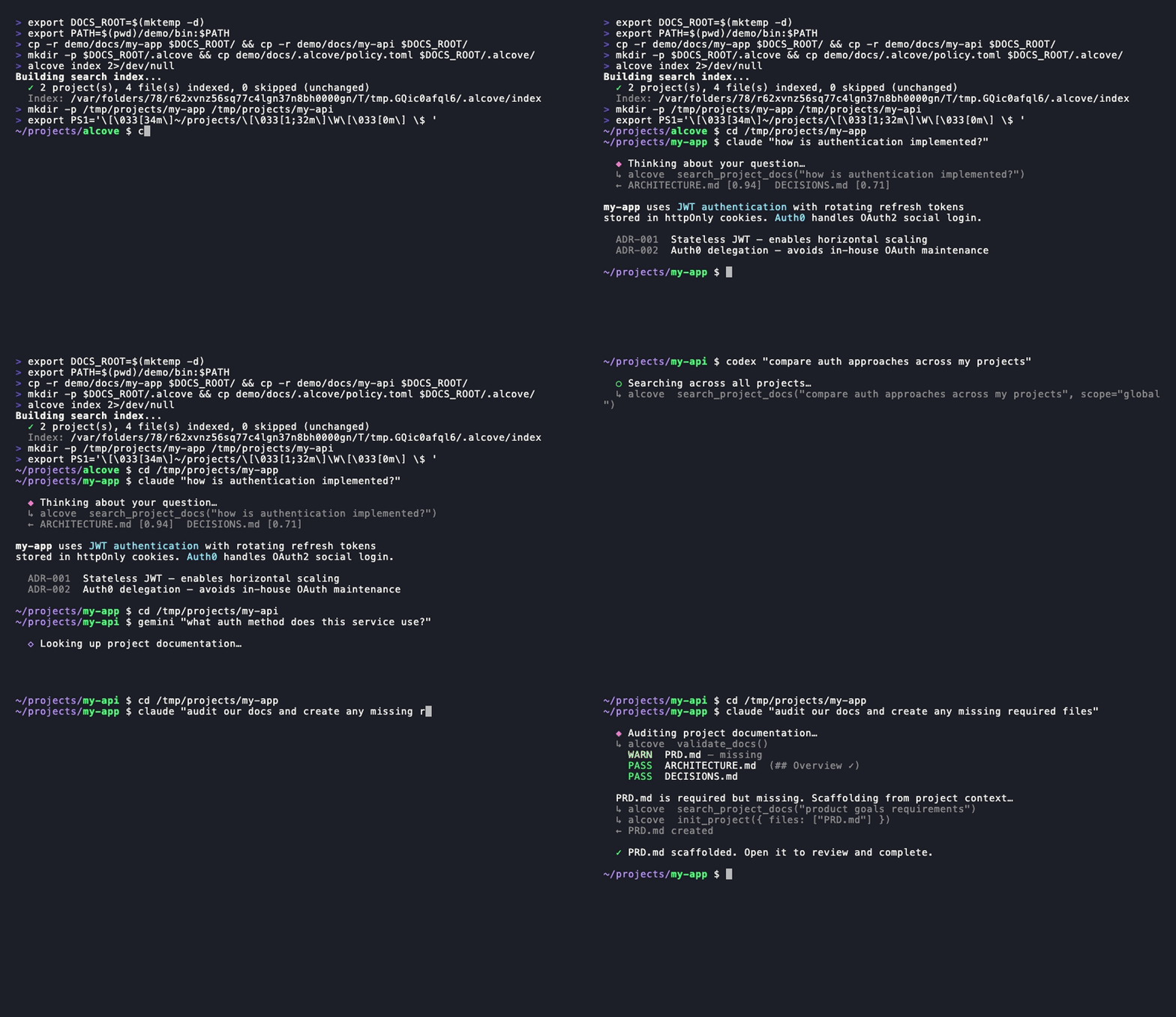
CLI demoClaude, Gemini, Codex — search · switch projects · global search · validate & generate. One setup.
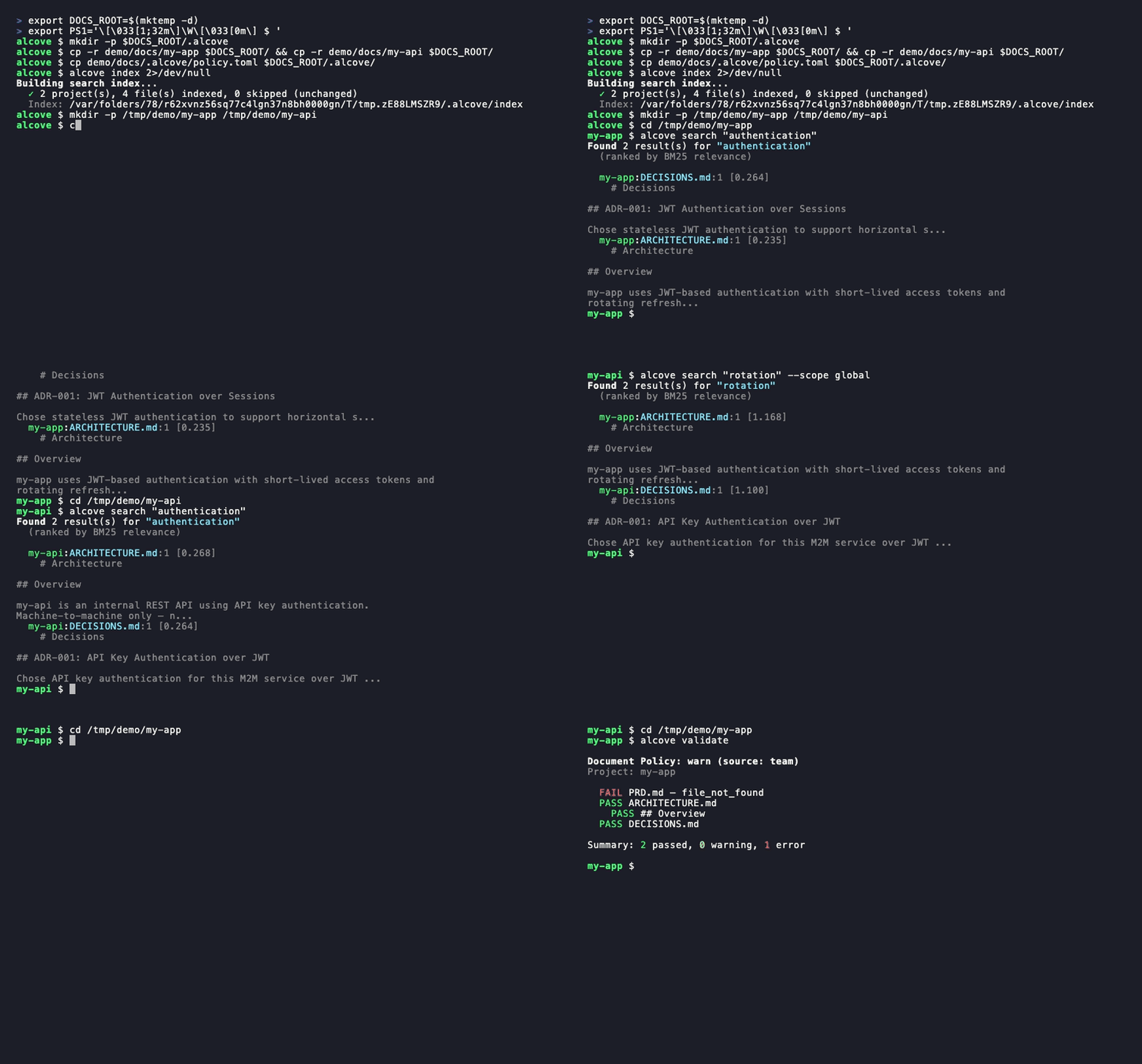
alcove search· project switch ·--scope global·alcove validate
The problem
Your AI agent starts every session from zero.
It doesn't know your architecture. It ignores constraints from decisions you already made. It asks you to explain the same things every session.
The context window is the bottleneck. Every token costs money and attention. Loading 10 architecture docs into context wastes 50K+ tokens on every run — and Anthropic's own docs warn that bloated config files make agents ignore your actual instructions.
So you have three bad options:
Stuff everything into agent config — every file loads into context on every run. 10 docs = context bloat = slower, more expensive, less accurate responses.
Copy-paste into every chat — works once, doesn't scale past one session.
Don't bother — your agent invents requirements you already documented, ignores constraints from decisions you already made, and you re-explain the same architecture every Monday morning.
Now multiply it across 5 projects and 3 agents. Every time you switch, you lose context.
How Alcove solves this
Alcove doesn't inject your docs. Agents search for what they need, when they need it.
~/projects/my-app $ claude "how is auth implemented?"

  → Alcove detects project: my-app
  → BM25 search: "auth" → ARCHITECTURE.md (score: 0.94), DECISIONS.md (score: 0.71)
  → Agent gets the 2 most relevant docs, not all 12
~/projects/my-api $ codex "review the API design"

  → Alcove detects project: my-api
  → Same doc structure, same access pattern
  → Different project, zero reconfiguration
Switch agents anytime. Switch projects anytime. The document layer stays standardized.
Why Alcove
Alcove gives your agents a memory that survives between sessions.
Agents don't load your docs into context. They search for what they need, when they need it. Architecture docs, design decisions, runbooks, constraints — all in one place, searchable, never in your public repo.
Agent config is for agent behavior. Alcove is for project knowledge.
Agent config files                ← agent rules, coding conventions, recurring corrections
~/.alcove/docs/my-app/
  ARCHITECTURE.md                ← tech stack, data model, system design
  DECISIONS.md                   ← why X was chosen over Y
  DEBT.md                        ← known issues, workarounds
  ...                            ← agent searches here when it needs context
| Without a doc layer | With Alcove |
|---|---|
| Docs in agent config bloat context on every run | BM25 search — agents pull only what they need |
| Internal docs scattered across Notion, Google Docs, local files | One doc-repo, structured by project |
| Each AI agent configured separately for doc access | One setup, all agents share the same access |
| Switching projects means re-explaining context | CWD auto-detection, instant project switch |
| Agent search returns random matching lines | Ranked results — best matches first, one result per file |
| "Search all my notes about OAuth" — impossible | Global search across every project in one query |
| Sensitive docs sitting in project repos | Private docs on your machine, never in public repos |
| Doc structure differs per project and team member | policy.toml enforces standards across all projects |
| No way to check if docs are complete | validate catches missing files, empty templates, missing sections |
| Stale docs with broken links or WIP markers go unnoticed | lint detects broken links, orphans, and stale markers automatically |
| Notes from Obsidian or other tools stay siloed | promote brings any note into your doc-repo with one command |
Quick start
Claude Code (recommended)
/plugin marketplace add epicsagas/plugins
/plugin install alcove@epicsagas
Auto-installs the binary and registers the MCP server on next session start.
Required: Run
alcove setuponce after installation to configure your docs root and enable full functionality. The plugin seeds the MCP connection automatically, but Alcove cannot search or index documents untilsetuphas been run.
alcove setup # run once after plugin install
Updates with claude plugin update epicsagas/alcove.
macOS (Apple Silicon only)
brew install epicsagas/tap/alcove
No Homebrew? Use the installer script:
curl --proto '=https' --tlsv1.2 -LsSf \
  https://github.com/epicsagas/alcove/releases/latest/download/install.sh | sh
Note: Pre-built binaries are available for macOS Apple Silicon only due to ONNX Runtime prebuilt constraints. Linux and Windows users must build from source.
Via Rust toolchain
cargo binstall alcove   # pre-built binary (fast)
cargo install alcove    # build from source
Then run setup:
alcove setup
alcove --version
alcove doctor
Optional dependencies
| Tool | Purpose | Install |
|---|---|---|
pdftotext (poppler) |
Full PDF text extraction — required for PDF search | macOS: brew install poppler · Debian/Ubuntu: apt install poppler-utils · Fedora: dnf install poppler-utils · Windows: poppler for Windows |
Without pdftotext, Alcove falls back to a built-in PDF parser which may fail on some files. Run alcove doctor to check your setup.
Note: Pre-built binaries are available for Linux (x86_64), macOS (Apple Silicon & Intel), and Windows.
setup walks you through everything interactively:
- Where your docs live
- Which document categories to track
- Preferred diagram format
- Embedding model for hybrid search
- HTTP server — host, port, auto-generated bearer token, and login item registration
- Which AI agents to configure (MCP + skill files)
Re-run alcove setup anytime to change settings. It remembers your previous choices.
Troubleshooting
Agent can't find Alcove tools
Run alcove setup again — it re-registers the MCP server for all configured agents. Then start a new agent session (registration takes effect on next session start).
Search returns no results
The index may not be built yet. Run alcove index to build it, then try again.
403 Unauthorized from background serverALCOVE_TOKEN is not set in your shell. Run alcove token to print it, then add export ALCOVE_TOKEN="..." to your shell profile and reload.
alcove doctor reports issues
Follow the suggestions printed by doctor — it checks binary location, MCP registration, index state, and optional dependencies like pdftotext.
Usage
CLI Search
Search through your documents directly from the terminal. By default, it searches across all projects (global scope).
# Basic search (global scope)
alcove search "authentication"

# Limit search to the current project (auto-detected via CWD)
alcove search "auth flow" --scope project

# Force grep mode (exact substring match)
alcove search "TODO" --mode grep

# Force ranked mode (BM25/Hybrid)
alcove search "data model" --mode ranked

# Adjust result limit
alcove search "deployment" --limit 5
Coding Agents (MCP)
AI coding agents use Alcove through MCP tools. You don't usually need to call these yourself; the agent will invoke them when you ask questions about your project.
| Goal | Agent Tool | Description |
|---|---|---|
| Explore | get_project_docs_overview |
List all files in the current project to understand the structure. |
| Search | search_project_docs |
Search for specific keywords or concepts. Supports scope: "global". |
| Read | get_doc_file |
Read the content of a specific file found during search. |
| Audit | audit_project |
Check for missing docs or inconsistencies between code and docs. |
Example agent interaction:
User: "How do I add a new API endpoint?"
Agent: (callssearch_project_docs(query="add api endpoint"))
Agent: (reads the most relevant doc viaget_doc_file)
Agent: "According toARCHITECTURE.md, you need to..."
How it works
flowchart LR
    subgraph Projects["Your projects"]
        A1["my-app/\n  src/ ..."]
        A2["my-api/\n  src/ ..."]
    end

    subgraph Docs["Your private docs (one repo)"]
        D1["my-app/\n  PRD.md\n  ARCH.md"]
        D2["my-api/\n  PRD.md\n  ..."]
        P1["policy.toml"]
    end

    subgraph Agents["Any MCP agent"]
        AG["Claude Code · Cursor\nGemini CLI · Codex · Copilot\n+4 more"]
    end

    subgraph MCP["Alcove MCP server"]
        T["search · get_file\noverview · audit\ninit · validate"]
    end

    A1 -- "CWD detected" --> D1
    A2 -- "CWD detected" --> D2
    Agents -- "stdio (proxy → HTTP)" --> MCP
    MCP -- "scoped access" --> Docs
Your docs are organized in a separate directory (DOCS_ROOT), one folder per project. Alcove manages docs there and serves them to any MCP-compatible AI agent over stdio. When the background HTTP server is running (via alcove enable), the stdio process acts as a thin proxy — forwarding requests to the warm server for instant response with zero cold-start. Without the background server, it loads the full engine on each session.
MCP Tools
| Tool | What it does |
|---|---|
get_project_docs_overview |
List all docs with classification and sizes |
search_project_docs |
Smart search — auto-selects BM25 ranked or grep, supports scope: "global" for cross-project search |
get_doc_file |
Read a specific doc by path (supports offset/limit for large files) |
list_projects |
Show all projects in your docs repo |
audit_project |
Cross-repo audit — scans doc-repo and local project repo, suggests actions |
init_project |
Scaffold docs for a new project (internal + external docs, GitHub community standards, selective file creation) |
validate_docs |
Validate docs against team policy (policy.toml) |
rebuild_index |
Rebuild the full-text search index (usually automatic) |
check_doc_changes |
Detect added, modified, or deleted docs since last index build |
lint_project |
Semantic lint — broken links, orphan files, stale markers, stale date claims |
promote_document |
Copy or move a file from an external vault into the alcove doc-repo |
search_vault |
Search knowledge base vaults — separate from project docs, for research and reference |
list_vaults |
List all knowledge base vaults with document counts |
configure_project |
Create or update per-project settings (core docs, team docs, public docs, diagram format) |
CLI
alcove              Start MCP server (agents call this)
alcove setup        Interactive setup — re-run anytime to reconfigure
alcove doctor       Check the health of your alcove installation
alcove validate     Validate docs against policy (--format json, --exit-code)
alcove lint         Semantic lint — broken links, orphans, stale markers (--format json)
alcove promote      Bring a file from an external vault into your doc-repo
alcove index        Update the search index (incremental — only changed files)
alcove rebuild      Rebuild the search index from scratch (use after schema changes)
alcove search       Search docs from the terminal
alcove token        Print the bearer token for team sharing
alcove uninstall    Remove skills, config, and legacy files

alcove mcp <CMD>      Manage background MCP server lifecycle (start, stop, status, enable, disable)
alcove api <CMD>      Manage background REST API server lifecycle (start, stop, status, enable, disable)

alcove vault create   Create a new knowledge base vault
alcove vault link     Link an external directory as a vault (e.g., Obsidian)
alcove vault list     List all vaults with document counts
alcove vault remove   Remove a vault (symlinks: remove link only)
alcove vault add      Add a document to a vault
alcove vault index    Build search index for vaults
alcove vault rebuild  Rebuild vault search index from scratch
Lint
# Lint the current project (auto-detected from CWD)
alcove lint

# Lint a specific project by name
alcove lint --project my-app

# Machine-readable output for CI
alcove lint --format json
Lint checks four things:
| Check | What it catches |
|---|---|
broken-link |
[[wikilinks]] and [text](path) pointing to missing files |
orphan |
Files that no other document links to |
stale-marker |
WIP / TODO / FIXME / DRAFT / DEPRECATED markers |
stale-date |
Year mentions that are 2+ years old (e.g. "as of 2022") |
Promote
# Copy a note from Obsidian into your doc-repo (auto-routes to matching project)
alcove promote ~/my-brain/Projects/auth-notes.md

# Route to a specific project
alcove promote ~/my-brain/Projects/auth-notes.md --project my-app

# Move instead of copy
alcove promote ~/my-brain/Projects/auth-notes.md --mv
Files with no matching project land in inbox/ for manual review.
Background Server
Running a persistent background server eliminates cold-start latency (2–5s ONNX model load) on every new agent session. alcove setup enables this by default (macOS login item).
# Enable and start (persists across reboots — macOS)
alcove mcp enable --now

# Lifecycle
alcove mcp stop / start / restart / status

# Disable and remove login item
alcove mcp disable
You can also run a separate REST API server:
# Start the API server in background
alcove api start
The server uses a bearer token for authentication — auto-generated during alcove setup and stored in config.toml. Your existing MCP config (command: alcove) stays unchanged; the stdio process auto-detects the running server and proxies to it.
# Check or share the token
alcove token

# Set in shell profile (setup does this automatically)
export ALCOVE_TOKEN="alcove-..."
Token priority: --token flag > ALCOVE_TOKEN env var > config.toml.
Logs are written to ~/.alcove/logs/. On startup, run alcove doctor to verify the server is reachable.
Agents always connect via stdio (MCP standard). When the background server is running, the stdio process is a thin proxy — it forwards requests over HTTP instead of loading the search engine itself.
Proxy mode (background server running):
  Agent ──stdio──→ alcove (thin proxy, <10 MB, instant)
                     └──HTTP──→ alcove serve (always warm)
                                 ├─ BM25 index (loaded)
                                 ├─ ONNX embedding model (loaded)
                                 ├─ HNSW vector index (loaded)
                                 └─ hybrid search ready (~5ms)

Direct mode (no background server):
  Agent ──stdio──→ alcove (full engine, one process per session)
                     ├─ load ONNX embedding model (2-5s cold start)
                     ├─ open BM25 index
                     └─ hybrid search ready (after warm-up)
On startup, the stdio process checks GET /health. If the server responds, it enters proxy mode automatically — no MCP config change needed.
Search
Alcove automatically picks the best search strategy. When the search index exists, it uses BM25 ranked search (powered by tantivy) for relevance-scored results. When it doesn't, it falls back to grep. You never have to think about it.
Hybrid Search (RAG)
Alcove supports Hybrid Search which combines BM25 with Vector Similarity Search (powered by fastembed).
During alcove setup, you can choose an embedding model and download it immediately. You can also manage models manually:
# Set and download an embedding model
alcove model set MultilingualE5Small
alcove model download

# Check model status
alcove model status
Choosing a model
| Model | Disk | Dim | Languages | Best for |
|---|---|---|---|---|
SnowflakeArcticEmbedXSQ |
15 MB | 384 | English | CI, resource-constrained environments |
SnowflakeArcticEmbedXS |
30 MB | 384 | English | Fast English-only indexing |
SnowflakeArcticEmbedSQ |
65 MB | 384 | English | Balanced quality + size (English) |
SnowflakeArcticEmbedS |
130 MB | 384 | English | Good English recall |
MultilingualE5Small |
235 MB | 384 | 100+ languages | Default — multilingual / mixed-language projects |
SnowflakeArcticEmbedMQ |
200 MB | 768 | English | High quality, quantized |
SnowflakeArcticEmbedM |
400 MB | 768 | English | Best English recall |
MultilingualE5Base |
555 MB | 768 | 100+ languages | Better multilingual quality |
MultilingualE5Large |
2.2 GB | 1024 | 100+ languages | Maximum multilingual quality |
BGEM3 |
2.3 GB | 1024 | 100+ languages | State-of-the-art multilingual |
Q (quantized) variants use int8 quantization — ~50% smaller on disk, slightly lower recall, no meaningful accuracy loss for typical document search. Use the XSQ/SQ/MQ variants when memory is a constraint.
Once a model is downloaded and ready, Alcove will automatically use Hybrid Search for both CLI search and agent-based MCP tools. This is particularly effective for multilingual projects and complex semantic queries.
# Search the current project (auto-detected from CWD)
alcove search "authentication flow"

# Force grep mode if you want exact substring matching
alcove search "FR-023" --mode grep
The index builds automatically in the background when the MCP server starts, and rebuilds when it detects file changes. No cron jobs, no manual steps.
How it works for agents: agents just call search_project_docs with a query. Alcove handles the rest — ranking, deduplication (one result per file), cross-project search, and fallback. The agent never needs to choose a search mode.
Index lifecycle
Understanding when to run alcove index vs alcove rebuild:
| Command | What it does | When to use |
|---|---|---|
alcove index |
Incremental update — only processes new/changed files | Default: run after adding or editing docs |
alcove rebuild |
Full rebuild — drops and recreates all index data | After changing embedding models, or after index corruption |
First-time setup:
# Step 1: BM25 search is ready immediately after setup
alcove index            # builds full-text index (no model needed)

# Step 2: Enable Hybrid Search (optional but recommended)
alcove model set MultilingualE5Small
alcove model download   # ~235 MB download

# Step 3: Build vector index for all existing docs
alcove rebuild          # one-time full rebuild with embeddings
                        # ⚠ peak RAM = model size + corpus vectors (see note below)

# After this: incremental updates just work
alcove index            # fast — only re-embeds changed files
Switching models:
alcove model set SnowflakeArcticEmbedS   # change model
alcove rebuild                            # required: vectors are model-specific
Memory during rebuild:
Peak RAM = model size + all document vectors held in RAM while building the HNSW graph. For MultilingualE5Small with ~3,500 docs, expect ~700 MB peak. This is structural — after rebuild completes, steady-state drops to ~50–200 MB depending on your [memory] config. You can reduce steady-state further with lower max_hnsw_cache and shorter model_unload_secs.
Global search
Every architecture decision, every runbook, every project note — searchable across all your projects at once.
# Search across ALL projects
alcove search "rate limiting patterns" --scope global
alcove search "OAuth token refresh" --scope global
Agents can do the same with scope: "global" in search_project_docs. One query, every project.
Project detection
By default, Alcove detects the current project from your terminal's working directory (CWD). You can override this with the MCP_PROJECT_NAME environment variable:
MCP_PROJECT_NAME=my-api alcove
This is useful when your CWD doesn't match a project name in your docs repo.
Document policy
Define team-wide documentation standards with policy.toml in your docs repo:
[policy]
enforce = "strict"    # strict | warn

[[policy.required]]
name = "PRD.md"
aliases = ["prd.md", "product-requirements.md"]

[[policy.required]]
name = "ARCHITECTURE.md"

  [[policy.required.sections]]
  heading = "## Overview"
  required = true

  [[policy.required.sections]]
  heading = "## Components"
  required = true
  min_items = 2
Policy files are resolved with priority: project (<project>/.alcove/policy.toml) > team (DOCS_ROOT/.alcove/policy.toml) > built-in default (from your config.toml core files). This ensures consistent doc quality across all your projects while allowing per-project overrides.
Document classification
Alcove classifies docs into tiers:
| Classification | Where it lives | Examples |
|---|---|---|
| doc-repo-required | Alcove (private) | PRD, Architecture, Decisions, Conventions |
| doc-repo-supplementary | Alcove (private) | Deployment, Onboarding, Testing, Runbook |
| reference | Alcove reports/ folder |
Audit reports, benchmarks, analysis |
| project-repo | Your GitHub repo (public) | README, CHANGELOG, CONTRIBUTING, SECURITY, CODE_OF_CONDUCT, LICENSE, QUICKSTART |
The audit tool scans both your doc-repo and local project directory, then suggests actions — like generating a public README from your private PRD, or pulling misplaced reports back into Alcove.
Configuration
Config lives at ~/.config/alcove/config.toml:
docs_root = "/Users/you/documents"

[core]
files = ["PRD.md", "ARCHITECTURE.md", "PROGRESS.md", "DECISIONS.md", "CONVENTIONS.md", "SECRETS_MAP.md", "DEBT.md"]

[team]
files = ["ENV_SETUP.md", "ONBOARDING.md", "DEPLOYMENT.md", "TESTING.md", ...]

[public]
files = ["README.md", "CHANGELOG.md", "CONTRIBUTING.md", "SECURITY.md", ...]

[diagram]
format = "mermaid"

[server]
host = "127.0.0.1"          # bind address (0.0.0.0 for all interfaces)
port = 57384                  # listen port
token = "alcove-a3f7b2..."   # auto-generated bearer token

[memory]
reader_ttl_secs   = 300   # evict idle IndexReader after N seconds (0 = never)
max_cached_readers = 1    # max concurrent IndexReader instances in RAM
model_unload_secs  = 600  # unload embedding model after N seconds of inactivity (0 = never)
max_hnsw_cache     = 3    # max HNSW graphs held in memory simultaneously
All of this is set interactively via alcove setup. You can also edit the file directly.
Memory usage note: During initial indexing or a full rebuild, Alcove loads the embedding model (~235–500 MB) and holds all document vectors in RAM while constructing the HNSW graph — peak usage scales with corpus size and is unavoidable for that operation. The [memory] settings above control steady-state RAM after indexing is complete.
File lists are fully customizable — add any filename to any category, or move files between categories to match your team's workflow:
[core]
files = ["PRD.md", "ARCHITECTURE.md", "DECISIONS.md", "MY_SPEC.md"]  # added custom doc

[public]
files = ["README.md", "CHANGELOG.md", "PRD.md"]  # PRD exposed as public for this project
Supported agents
| Agent | MCP | Skill |
|---|---|---|
| Claude Code | ~/.claude.json |
~/.claude/skills/alcove/ |
| Cursor | ~/.cursor/mcp.json |
~/.cursor/skills/alcove/ |
| Claude Desktop | platform config | — |
| Cline (VS Code) | VS Code globalStorage | ~/.cline/skills/alcove/ |
| OpenCode | ~/.config/opencode/opencode.json |
~/.opencode/skills/alcove/ |
| Codex CLI | ~/.codex/config.toml |
~/.codex/skills/alcove/ |
| Copilot CLI | ~/.copilot/mcp-config.json |
~/.copilot/skills/alcove/ |
| Antigravity | ~/.gemini/antigravity/mcp_config.json |
— |
| Gemini CLI | ~/.gemini/settings.json |
~/.gemini/skills/alcove/ |
Agents with skill support activate Alcove automatically when you ask about project architecture, conventions, decisions, or status. They can also be invoked explicitly:
/alcove                          Summarize current project docs and status
/alcove search auth flow         Search docs for a specific topic
/alcove what conventions apply?  Ask a doc question directly
Supported languages
The CLI automatically detects your system locale. You can also override it with the ALCOVE_LANG environment variable.
| Language | Code |
|---|---|
| English | en |
| 한국어 | ko |
| 简体中文 | zh-CN |
| 日本語 | ja |
| Español | es |
| हिन्दी | hi |
| Português (Brasil) | pt-BR |
| Deutsch | de |
| Français | fr |
| Русский | ru |
# Override language
ALCOVE_LANG=ko alcove setup
Updating
| Method | Command |
|---|---|
| Homebrew | brew upgrade alcove |
| curl installer | Re-run the install script above |
| cargo binstall | cargo binstall alcove@latest |
| cargo install | cargo install alcove@latest |
| Claude Code Plugin | claude plugin update epicsagas/alcove |
alcove --version
Uninstall
alcove uninstall          # remove skills & config
cargo uninstall alcove    # remove binary
Knowledge Base Vaults
Beyond project documentation, Alcove supports independent knowledge base vaults for research notes, reference materials, and curated knowledge that LLMs can search.
# Create a vault for AI research notes
alcove vault create ai-research

# Link an existing Obsidian vault (no copying — indexes in place)
alcove vault link my-obsidian ~/Obsidian/research

# Add a document
alcove vault add ai-research ~/Downloads/transformer-survey.md

# Build the vault search index
alcove vault index

# List all vaults
alcove vault list
#   areas (8 docs) → (linked)
#   resources (71 docs) → (linked)
#   zettelkasten (17 docs) → (linked)

# Search from CLI
alcove search "attention mechanism" --vault ai-research

# Agents search via MCP
search_vault(query="attention mechanism", vault="ai-research")

# Search ALL vaults at once
search_vault(query="transformer", vault="*")
Vaults are completely isolated from project docs — separate indexes, separate caches, separate search. Your coding agent's project doc search is never affected by vault activity.
| Feature | Project docs | Vaults |
|---|---|---|
| Purpose | Per-project documentation | General knowledge base |
| Storage | ~/.alcove/docs/ |
~/.alcove/vaults/ |
| Index | Shared project index | Independent per-vault index |
| Cache | PROJECT_READER_CACHE |
VAULT_READER_CACHE |
| Search | search_project_docs |
search_vault |
| Symlink | No | Yes (link external dirs) |
Vault Configuration
By default, vaults are stored in ~/.alcove/vaults/. You can change this in your config.toml:
[vaults]
root = "/path/to/your/vaults"
Refer to the Configuration section for more details on config.toml.
Ecosystem
obsidian-forge
Alcove pairs naturally with obsidian-forge, an Obsidian vault generator and automation daemon. For the best integration, your alcove docs_root should point to the obsidian-forge project archives.
1. Set Documents Root
Point your primary docs to the obsidian-forge project directory (directly or via symlink):
# During alcove setup, set docs_root to:
~/Obsidian/SecondBrain/99-Archives/projects
2. Link Knowledge Areas as Vaults
Link the other three obsidian-forge categories as independent alcove vaults. This creates symlinks in ~/.alcove/vaults/:
# Link obsidian-forge categories
alcove vault link areas ~/Obsidian/SecondBrain/02-Areas
alcove vault link resources ~/Obsidian/SecondBrain/03-Resources
alcove vault link zettelkasten ~/Obsidian/SecondBrain/10-Zettelkasten
Now your agents have structured access:
search_project_docs: Searches archived project knowledge (PRDs, etc.)search_vault: Searches your broader knowledge areas and research notes.
You can verify the physical storage mapping by checking the symlinks in ~/.alcove/vaults/.
Contributing
Bug reports, feature requests, and pull requests are welcome. Please open an issue on GitHub to start a discussion.
License
Apache-2.0
Yorumlar (0)
Yorum birakmak icin giris yap.
Yorum birakSonuc bulunamadi