epic-harness
Health Uyari
- License — License: Apache-2.0
- Description — Repository has a description
- Active repo — Last push 0 days ago
- Low visibility — Only 5 GitHub stars
Code Basarisiz
- rm -rf — Recursive force deletion command in .claude-plugin/hooks.json
- rm -rf — Recursive force deletion command in .codex-plugin/hooks.json
Permissions Gecti
- Permissions — No dangerous permissions requested
Bu listing icin henuz AI raporu yok.
Multi-tool AI agent harness — 22 skills, self-evolving engine, unified memory, autonomous spec-to-PR pipeline. Works with Claude Code, Codex, Cursor, OpenCode, and Cline.
Epic Harness
A multi-tool AI agent harness that learns from every session — 22 skills, autonomous pipelines, and a self-evolving engine.
One harness, six AI tools. Autonomous from spec to PR. Smarter every session.
English | 日本語 | 한국어 | Deutsch | Français | 简体中文 | 繁體中文 | Português | Español | हिन्दी







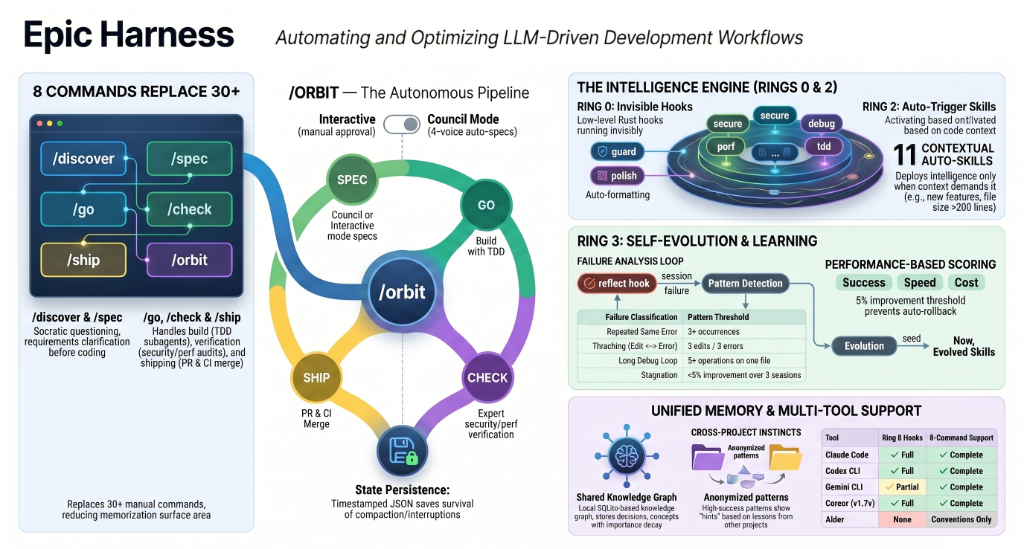
A multi-tool AI agent harness with 22 skills (8 pipeline + 14 quality gates), a self-evolving engine, unified memory, and a single-command autonomous pipeline (/orbit). Works with Claude Code, Codex, Cursor, OpenCode, and Cline — all sharing the same ~/.harness/ data directory. After each session, the evolve loop analyzes failures, generates targeted skills, and loads them next time.

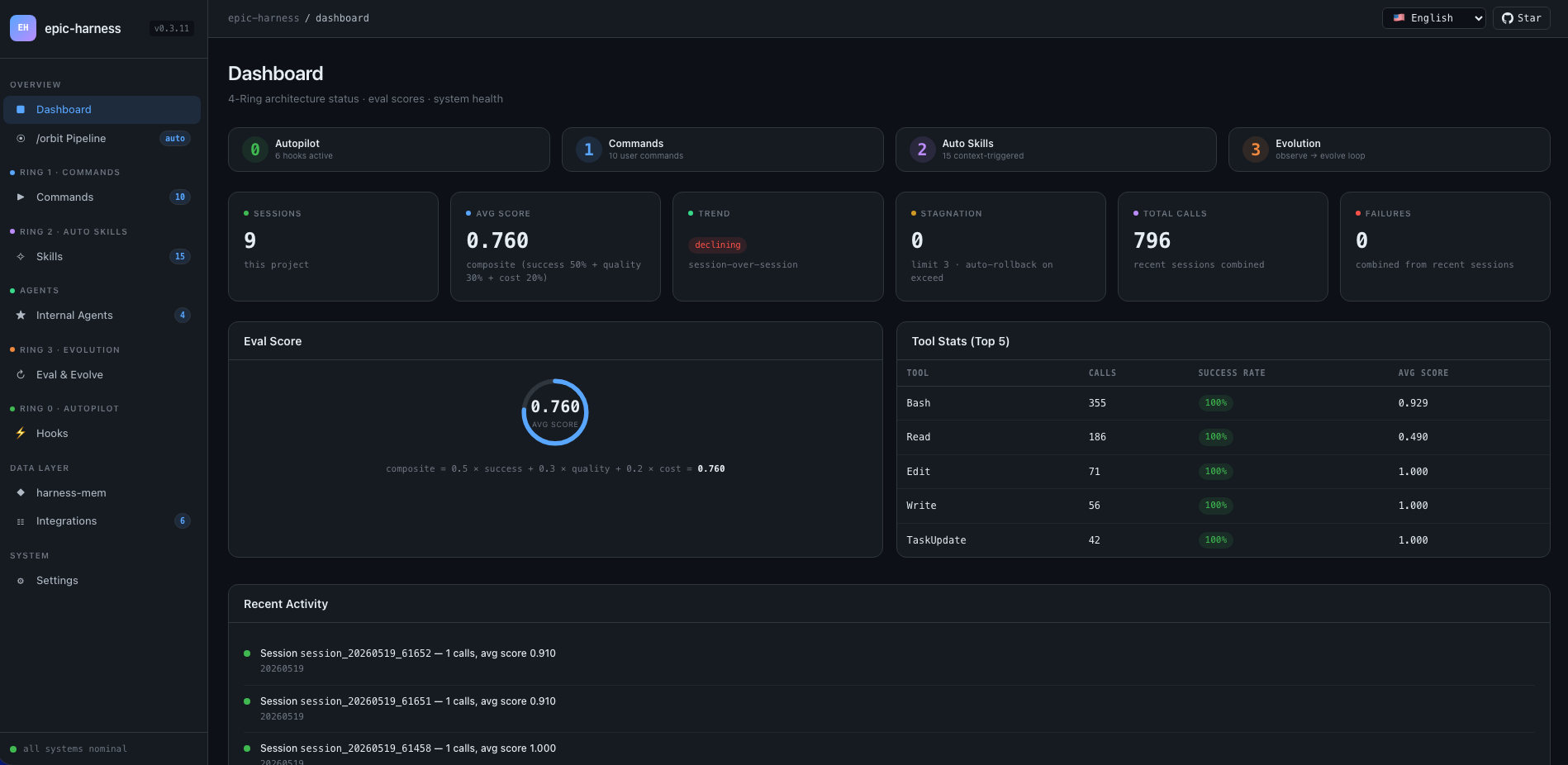
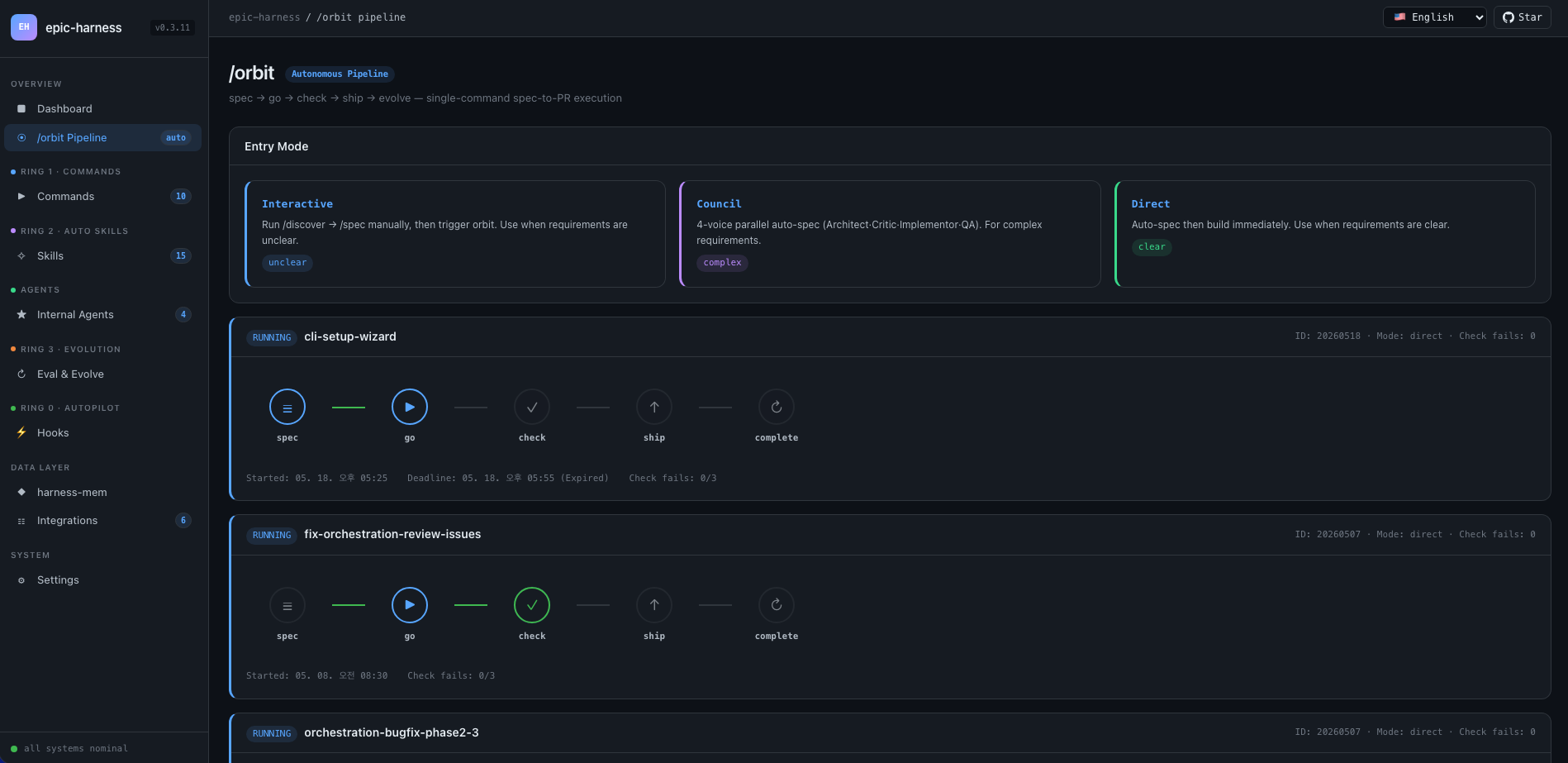
Web Dashboard — auto-launches on session start
10-screen real-time metrics for eval scores, tool stats, orbit pipelines, evolved skills, and hook health. Opens automatically with the first Claude Code session — no manual setup needed.
# Auto-launches on first session (default: http://localhost:7700)
# Configure port or disable in ~/.harness/config.toml:
[dashboard]
port = 7700       # set to 0 to disable auto-launch
auto_open = true  # open browser on first session
Screens: Dashboard · /orbit Pipeline · Skills (22) · Live Agents · Eval & Evolve · Hooks (6) · Integrations (6) · harness-mem · Settings
What It Does
One command ships a feature end-to-end. Skills fire without you asking. The agent gets smarter after every session.
$ /orbit "Add JWT auth to the login API"
→ spec approved → go (TDD subagents) → audit (PASS) → ship (PR + CI) → evolve
Or invoke pipeline skills directly:
/spec "Add JWT auth to the login API"   # clarifies requirements → SPEC-*.md
/go                                      # auto-plans → TDD subagents → 4 min
/audit                                   # parallel review + security + tests → PASS
/ship                                    # isolated test → PR → CI green
Skills trigger automatically in the background — no extra commands:
Writing a feature?    → tdd fires (Red→Green→Refactor enforced)
Test fails?           → debug fires (root-cause first, no random fixes)
Touching auth or DB?  → secure fires (OWASP checklist, no shortcuts)
File hits 200 lines?  → simplify fires (extract, rename, reduce)
After the session ends, the evolve loop analyzes what broke, generates targeted skills, and loads them next session. The agent that struggled with TypeScript build failures will have an evo-ts-care skill next time.
Installation
First time? Read the Quick Start Guide (5 min).
Claude Code
/plugin marketplace add epicsagas/plugins
/plugin install epic@epicsagas
Auto-installs the binary and registers all hooks in one step.
Codex CLI
codex plugin marketplace add epicsagas/plugins
Auto-installs all 22 skills and registers hooks. Available immediately — no further steps needed.
Updates with codex plugin update epic@epicsagas.
macOS / Linux
brew install epicsagas/tap/epic-harness
No Homebrew? Use the installer script:
curl --proto '=https' --tlsv1.2 -LsSf \
  https://github.com/epicsagas/epic-harness/releases/latest/download/install.sh | sh
Windows
irm https://github.com/epicsagas/epic-harness/releases/latest/download/install.ps1 | iex
Via Rust toolchain
cargo binstall epic-harness   # pre-built binary (fast)
cargo install epic-harness    # build from source
Then run the setup wizard:
epic install cursor # Cursor IDE
epic-harness --versionto verify. Update withbrew upgrade epic-harnessor re-run the installer script.
Prerequisites: Git. Source/binary installs also need the Rust toolchain.
epic install — setup wizard
After installing the binary, run epic install (or epic install claude) to:
- Create
~/.harness/directory structure - Sync commands and skills to the tool's config directory
- Register the MCP server (harness-mem) for Claude Code
- Create
~/.harness/config.tomlwith defaults if absent
On Claude Code, hooks/install.js auto-runs on session start and installs the binary if missing. No manual step needed after the initial clone.
Other tools
epic install cursor         # Cursor         → ~/.cursor/ (requires Cursor 1.7+)
epic install opencode     # OpenCode    → ~/.config/opencode/
epic install cline        # Cline       → ~/Documents/Cline/Rules/
epic install aider        # Aider       → ~/.aider.conf.yml + ~/.aider/
epic install              # Interactive menu
Integration files are synced from the binary: missing or outdated files are written. AGENTS.md is only created when absent.
Verify
epic --version              # Binary installed
ls ~/.harness/              # Data directory exists
Inside a Claude Code session: /evolve status
Pipeline Skills (Ring 1)
8 skills that orchestrate multi-step workflows. Invoke with /skill-name or let /orbit chain them.
| Skill | What it does |
|---|---|
/orbit |
Full autonomous pipeline: spec → go → audit → ship → evolve in one shot |
/discover |
Problem discovery — 5 Whys, JTBD, Socratic questioning |
/spec |
Define requirements — converts to numbered R + AC document |
/go |
Build phase — auto-plan → TDD sub-agents → parallel execution → AC verification |
/audit |
Audit phase — parallel code review + security audit + tests |
/ship |
Shipping phase — isolated test → PR with full audit report → CI watch |
/evolve |
Manual evolution trigger — analyze sessions, view dashboard, rollback |
/team |
Browse org libraries, hire existing teams, or design new ones |
/orbit — Autonomous Pipeline
/orbit wraps the entire pipeline into a single autonomous execution. Pick a mode — everything else is hands-off until the PR.
flowchart TD
    START(["/orbit"]) --> MODE{"requirement?"}:::human
    MODE -->|"unclear"| WAIT["Interactive\n/discover → /spec\nthen 'orbit go'"]:::human
    MODE -->|"clear + complex"| COUNCIL["Council\n4-voice auto-spec"]:::auto
    MODE -->|"clear + simple"| DIRECT["Direct\nauto-spec"]:::auto
    WAIT --> SPEC_LOAD["Load spec"]
    COUNCIL --> SPEC_LOAD
    DIRECT --> SPEC_LOAD
    SPEC_LOAD --> GO["Go\nplan → TDD → integrate"]:::auto
    GO --> AUDIT["Audit\nreview + security + test"]:::auto
    AUDIT -->|"PASS / WARN"| SHIP["Ship\nisolated test → PR → CI"]:::auto
    AUDIT -->|FAIL| RETRY{"retry < 3?"}
    RETRY -->|yes| GO
    RETRY -->|no| PAUSE["Pause\nuser decides"]:::human
    PAUSE -->|continue| GO
    PAUSE -->|abort| ABORT(["Abort"])
    SHIP --> EVOLVE["Evolve\nauto-analyze session"]:::auto
    EVOLVE --> DONE(["Orbit Complete\nconsolidated report"]):::auto

    classDef human fill:#4a4a6a,stroke:#9b9bcc,color:#fff
    classDef auto  fill:#1a5c3a,stroke:#4caf7d,color:#fff
Purple — human steps: mode selection (unclear → interactive), 3× audit failure pause.
Green — clear + complex → council auto-spec; clear + simple → direct build; both fully autonomous.
State persisted in $HARNESS_DIR/orbit/PIPELINE-{timestamp}.json — survives context compaction.
Caveats: The agent may bypass the pipeline when modifying orbit itself or editing docs only. See Known Issues (Agent Judgment).
Quality Gates (Ring 2)
14 skills that auto-trigger based on context. You don't invoke them.
| Skill | Triggers when |
|---|---|
| tdd | New feature implementation or bug fix |
| debug | Test failure or runtime error |
| secure | Auth / DB / API / secrets code touched |
| perf | Loops, queries, rendering, batch operations |
| simplify | File > 200 lines or high cyclomatic complexity |
| document | Public API added or signature changed |
| verify | Before completing /go or /ship |
| context | Context window > 70% |
| council | Ambiguous architectural or design decisions |
| orchestrate | Multi-agent orchestration status and live agent intervention |
| agent-introspection | 3+ consecutive failures or circular retry pattern |
| reflect | On-demand /reflect: evidence-based human self-assessment — "Am I using AI as a thought amplifier?" Scores 5 dimensions from hook-collected data |
| commit | Conventional Commits generation — auto-generates from git diff |
Token budget note: Claude Code loads skill descriptions into every session context. epic's 22 skills fit within the default
skillListingBudgetFraction: 0.01(1%). If you install additional skills (e.g. episteme, alcove, obscura), the combined total may exceed the budget and trigger a "descriptions dropped" warning. Add this to~/.claude/settings.jsonto fix it:"skillListingBudgetFraction": 0.02Use
0.03if you have 20+ skills installed.
Evolve (Ring 3)
The harness watches every tool call, scores it on 3 axes, detects failure patterns, and generates targeted skills — automatically, at session end.
Scoring
composite = 0.5 × tool_success + 0.3 × output_quality + 0.2 × execution_cost
Failure classification (9 types): type_error · syntax_error · test_fail · lint_fail · build_fail · permission_denied · timeout · not_found · runtime_error
Pattern Detection
| Pattern | Detects | Default threshold |
|---|---|---|
repeated_same_error |
Same error N+ times | 3 |
fix_then_break |
Edit success → build/test fails | 3 lookback, 2 cycles |
long_debug_loop |
Stuck on same file | 5 operations |
thrashing |
Edit↔Error alternating | 3 edits, 3 errors |
Evolution Flow
Observe (PostToolUse — 3-axis scoring)
    ↓ obs/session_{id}.jsonl
Analyze (SessionEnd)
    ↓ per-tool, per-ext scores + patterns
Propose (Solver — graduated by score: ≥0.90 skip, ≥0.70 moderate, <0.70 full)
    ↓ SkillProposal[] with confidence
Curate (Accept/Merge/Skip, feedback masked from solver)
    ↓ evolved/{skill}/SKILL.md + meta.json
Gate (format check, dedup, cap 10, gated promotion ≥ 3 sessions)
    ↓ evolved_backup/ (best checkpoint)
Instinct (high-success patterns → cross-project memory.db nodes)
    ↓
Reload (next session — resume loads evolved skills)
Skill seeding: weak tool (success <60%, min 5 obs), weak file type (success <50%, min 3 obs), high-frequency error (5+ occurrences).
Stagnation: 3 sessions without 5% improvement → auto-rollback to best checkpoint.
Skill Effectiveness
Every evolved skill tracked with A/B attribution:
/evolve history → Skill Effectiveness

| Skill              | With | Without | Delta |
|--------------------|------|---------|-------|
| evo-ts-care        | 0.87 | 0.72    | +15%  |
| evo-bash-discipline| 0.65 | 0.68    | -3%   |
Positive delta = effective. Negative = consider removing via /evolve rollback.
Cold-Start Presets
On first session, stack-appropriate preset skills auto-apply:
| Stack | Presets |
|---|---|
| Node.js/TypeScript | evo-ts-care, evo-fix-build-fail |
| Go | evo-go-care |
| Python | evo-py-care |
| Rust | evo-rs-care |
Instinct Learning
High-success patterns extracted and promoted across projects:
observe (100% confirmed) → extract_instincts() → instinct node (confidence ≥ 0.8)
    → promote to global when observed in ≥ 2 projects
/evolve              # Run now
/evolve status       # Dashboard: scores, trends, patterns, skills
/evolve history      # Full history + skill effectiveness
/evolve cross-project # Cross-project pattern analysis
/evolve rollback     # Restore previous best
/evolve reset        # Clear all evolution data
Hooks (Ring 0)
Run invisibly on every session. Single Rust binary (epic-harness) with subcommands.
| Hook | When | Does |
|---|---|---|
| resume | Session start | Restore context, load memory, detect stack |
| guard | Before Bash | Block force-push-to-main, rm -rf /, DROP prod |
| polish | After Edit | Auto-format (Biome/Prettier/ruff/gofmt) + typecheck |
| observe | Every tool use | Log to ~/.harness/projects/{slug}/obs/ for evolution |
| snapshot | Before compact | Save state to ~/.harness/projects/{slug}/sessions/ |
| reflect | Session end | Auto-evolution engine: analyze failures, seed evolved skills, update metrics, ingest to memory. Feeds /reflect skill with data |
Polish feeds back into observe: format failure → lint_fail, TypeScript error → build_fail. Edit→Error thrashing gets detected even when errors come from polish.
Each session writes its own session_{date}_{pid}_{random}.jsonl — multiple concurrent sessions won't corrupt each other's data.
Hook Profiles
Via ~/.harness/config.toml or EPIC_HOOK_PROFILE env var:
| Profile | Active hooks |
|---|---|
minimal |
guard, observe, resume |
standard (default) |
above + polish, reflect, snapshot |
strict |
all hooks + future strict-only checks |
Custom Guard Rules
Add project-specific rules via .harness/guard-rules.yaml in your project root:
blocked:
  - pattern: kubectl\s+delete\s+namespace | msg: Namespace deletion blocked
warned:
  - pattern: docker\s+system\s+prune | msg: Docker prune — verify first
Team (epic team)
Teams are org-level, not project-bound. Running /team in any project enriches a shared pool of agent definitions — never silently overwrites.
epic team                              # Interactive: scan → design → write → sync
epic team sync backend                 # Dispatch agents → .claude/agents/backend/
epic team link backend                 # Dispatch + register project in team config
epic team list                         # All teams in current org
epic team list --org netflix           # Teams in a named org
epic team show backend --playbook      # Config + full playbook
epic team delete backend               # Recall from current project only
epic team delete backend --global      # Permanently delete from org store
After syncing, agents are available in the next session: @domain-expert, @reviewer, @tester, etc.
| Type | Keyword | Default agents |
|---|---|---|
| Stream-aligned | stream |
domain-expert, reviewer, tester |
| Platform | platform |
api-designer, infra-specialist, dx-agent |
| Enabling | enabling |
specialist |
| Complicated Subsystem | subsystem |
domain-specialist, integration-tester |
Multi-org: epic team --org netflix — separate topology per org.
Merge strategy: changed agents prompt (default: keep existing, backup to .history/). Playbook always appends.
Multi-Tool Support
All tools share the same ~/.harness/projects/{slug}/ data directory.
| Tool | Ring 0 Hooks | Skills | Agents |
|---|---|---|---|
| Claude Code | ✓ Full | ✓ 22 (pipeline + quality) | Live |
| Codex CLI | ✓ Full¹ | ✓ 22 | — |
| Cursor | ✓ Full³ | ✓ via rules | Live |
| OpenCode | ✓ Partial⁴ | — | — |
| Cline | ✓ Full⁵ | — | — |
| Aider | —⁶ | — | — |
¹ Plugin marketplace · ³ Cursor 1.7+ · ⁴ JS plugin · ⁵ 5 hook scripts · ⁶ Conventions only
Architecture: 4-Ring Model
flowchart TB
    subgraph R0["Ring 0 — Autopilot (hooks, invisible)"]
        direction LR
        h1(resume) --- h2(guard) --- h3(polish) --- h4(observe) --- h5(snapshot) --- h6(reflect)
    end

    subgraph R1["Ring 1 — Pipeline Skills (8)"]
        direction TB
        subgraph orbit_wrap["  /orbit  "]
            direction LR
            c1("discover") --> c2("spec") --> c3("go") --> c4("audit") --> c5("ship") --> c6("evolve")
        end
        c7("/team")
        c8("/evolve (manual)")
    end

    subgraph R2["Ring 2 — Quality Gates (14, context-triggered)"]
        direction LR
        s1(tdd) --- s2(debug) --- s3(secure) --- s4(perf) --- s5(simplify) --- s6(verify) --- s7(council)
    end

    subgraph R3["Ring 3 — Evolve (self-improving)"]
        direction LR
        e1(observe) --> e2(analyze) --> e3(seed) --> e4(gate) --> e5(reload)
    end

    R0 -->|"observe every tool call"| R3
    R3 -.->|"evolved skills"| R2
    R1 -->|"auto-trigger skills"| R2
    R0 -->|"resume: restore context"| R1
Cross-Project Learning
Opt-in to share failure patterns across projects:
touch ~/.harness/projects/{slug}/.cross-project-enabled
Session end → exports anonymized patterns to ~/.harness/global_patterns.jsonl. Session start → shows hints from other projects' weak areas.
Unified Memory
All agents share a knowledge graph in ~/.harness/memory.db (SQLite with full-text search). No external runtime.
score = recency(25%) + importance(35%) + access_frequency(15%) + FTS_match(25%)
CLI
epic mem recall "auth refactor" --project my-project   # Smart recall
epic mem add --title "JWT rotation" --type decision    # Add node
epic mem search "JWT"                                  # FTS5 search
epic mem list --type decision --project my-project    # Filter
epic mem context --project my-project                  # Project context
epic mem serve                                         # Web UI → :7700 or custom port with --port 8800
epic mem mcp-install                                   # Register MCP server
epic mem export --out ./docs/memory                    # Export to Markdown
MCP Tools (6)
| Tool | Purpose |
|---|---|
mem_recall |
Smart contextual recall with hint + project + graph neighbors |
mem_add |
Add node with auto-importance by type (or explicit 0.0–1.0) |
mem_search |
Keyword search (full-text), ranked by importance |
mem_query |
Filter by tag/type/project — alias for mem_list |
mem_context |
Project-scoped smart recall (no hint) |
mem_related |
Graph traversal from a node ID (finds connected knowledge) |
Node Types
| Type | Created by | Importance |
|---|---|---|
decision |
Manual / MCP | 0.9 |
resolution |
Manual / MCP | 0.8 |
concept |
Manual / MCP | 0.7 |
project |
Manual / MCP | 0.7 |
instinct |
Auto (reflect) | 0.7 |
pattern |
Auto (reflect) | 0.5 |
error |
Auto (reflect) | 0.4 |
session |
Auto (reflect) | 0.2 |
Lifecycle: 30+ days without access → 10% importance decay (floor 0.05). 180+ days → tagged stale, excluded from recall. pinned tag prevents decay.
WIP: harness-mem is under active development. CLI, MCP server, Web UI, and auto-recording pipeline are not yet fully functional. Do not rely on this feature in production.
Project Data — directory layout
Project Data
All data lives in ~/.harness/ (home directory), not in your project root. Survives project deletion, doesn't pollute git history.
~/.harness/
├── memory.db                  # SQLite knowledge graph (nodes + edges + FTS5)
├── graph.json                 # Cached graph (for web UI)
├── config.toml                # User configuration
├── global_patterns.jsonl      # Cross-project patterns (opt-in)
├── orgs/                      # Team global store
│   └── {org}/teams/{team}/
│       ├── config.json, mission.md, playbook.md, agents/, .history/
└── projects/{slug}/
    ├── memory/                # Project patterns and rules
    ├── sessions/              # Session snapshots (for resume)
    ├── obs/                   # Tool usage observation logs (JSONL)
    ├── evolved/               # Auto-evolved skills
    │   ├── manifest.json
    │   └── {skill}/SKILL.md + meta.json
    ├── evolved_backup/        # Best checkpoint (for rollback)
    ├── dispatch/              # Skill dispatch logs
    ├── evolution.jsonl        # Full evolution history
    └── metrics.json           # Aggregate stats + skill attribution
Share safety rules with your team: .harness/guard-rules.yaml in the project root (committed to git).
Configuration — config.toml reference
Configuration
All tunable parameters in ~/.harness/config.toml. Absent = hardcoded defaults.
# Priority: env var (EPIC_HOOK_PROFILE) > this file > defaults

[hook]
profile = "standard"         # "minimal" | "standard" | "strict"
gateguard_hints = true

[scoring]
weights = [0.5, 0.3, 0.2]   # [success, quality, cost]

[evolution]
max_skills = 10
stagnation_limit = 3
improvement_threshold = 0.05
gated_promotion_min = 3

[pattern]
# repeated_error_min = 3
# debug_loop_min = 5
# graduated_scope_skip = 0.90
# graduated_scope_moderate = 0.70

[instinct]
# confidence_threshold = 0.8
# promotion_min_projects = 2
# max_instincts = 20
# min_observations = 10
# min_avg_score = 0.5
Known Issues (Agent Judgment)
These issues arise from the agent's interpretation of context rather than bugs in the code. Listed here so users know what to watch for.
Discovered Issues
| Issue | When | What happens | Workaround |
|---|---|---|---|
| Orbit self-modification bypass | /orbit is asked to improve orbit itself |
Agent may skip the orbit pipeline entirely and edit files ad-hoc on main, leaving changes uncommitted with no spec/PR/traceability | After orbit completes, check git status. If changes are on main without a pipeline state, commit manually or re-run /orbit from a separate branch |
| Doc-only task skips protocol | /orbit receives a markdown-only change (no code to test) |
Agent may judge TDD/test phases as meaningless and skip the full pipeline | Acceptable for pure doc changes. For mixed code+doc, ensure the agent doesn't skip code-related phases |
| Mode misclassification | Request is borderline between Direct and Council | Agent may choose Direct when Council (4-voice) would catch more edge cases, or Council when Direct suffices | If the agent picks a mode that feels wrong, say "use Council mode" or "use Direct mode" explicitly |
Intentional Design Choices
These were considered for enhancement but kept as-is after evaluation:
| Choice | Why not enhanced | Rationale |
|---|---|---|
| Worktree enters at Go phase, not orbit start | Could isolate from preflight | Preflight/mode/spec are read-only. Isolating earlier adds complexity with no benefit — the branch isn't created until Go phase anyway |
| Worktree preserved after Ship | Could auto-remove on PR merge | The branch is the PR head. Removing it before merge breaks the PR. Cleanup is left to the user after merge |
Branch named orbit-{slug} not feature/{slug} |
Could match conventional branch naming | EnterWorktree doesn't allow / in names. Renaming post-creation adds a step for cosmetic benefit only |
| No lightweight pipeline path for doc changes | Could detect doc-only and skip TDD/tests | Detection is fragile (what counts as "doc"?). Adding a separate path increases protocol complexity for marginal gain |
Troubleshooting
command not found: epic after installAdd the Cargo bin directory to your PATH:
export PATH="$HOME/.cargo/bin:$PATH"
Add this line to your ~/.zshrc or ~/.bashrc to make it permanent.
Re-run the install to sync hooks into Claude Code settings:
epic install claude
Then restart Claude Code. Hooks are written to ~/.claude/settings.json.
macOS may block unsigned binaries downloaded from the internet:
xattr -d com.apple.quarantine ~/.cargo/bin/epic-harness
xattr -d com.apple.quarantine ~/.cargo/bin/epic
The plugin looks for the binary in hooks/bin/epic-harness first. After updating via cargo install, copy it:
cp ~/.cargo/bin/epic-harness hooks/bin/epic-harness
Development
cargo install --path .                                        # Build + install
cp ~/.cargo/bin/epic-harness hooks/bin/epic-harness           # Update plugin binary
cargo test                                                    # Tests
Hooks look for the binary in two places: hooks/bin/epic-harness (plugin local) → ~/.cargo/bin/epic-harness (PATH).
Links
- Changelog — release history
- Contributing — how to contribute
- Security — reporting vulnerabilities
- Issues — bug reports and feature requests
Acknowledgments
- a-evolve — Automated evolution and benchmark patterns
- agent-skills — Claude Code agent skill system
- everything-claude-code — Comprehensive Claude Code patterns
- gstack — Plugin architecture reference
- harness — Hook and harness infrastructure patterns
- serena — Autonomous agent design
- SuperClaude Framework — Multi-command framework architecture
- superpowers — Claude Code extension patterns
License
Yorumlar (0)
Yorum birakmak icin giris yap.
Yorum birakSonuc bulunamadi