Velith
Health Uyari
- License — License: Apache-2.0
- Description — Repository has a description
- Active repo — Last push 0 days ago
- Low visibility — Only 5 GitHub stars
Code Gecti
- Code scan — Scanned 12 files during light audit, no dangerous patterns found
Permissions Gecti
- Permissions — No dangerous permissions requested
Bu listing icin henuz AI raporu yok.
AI-native publishing system — build books like software. 6-phase pipeline from blank page to EPUB/PDF, with 16 skills, 7 agents, and 8 genre templates. Claude Code plugin.
Velith







한국어 · 日本語 · 中文 · Español · Français · Deutsch · Português
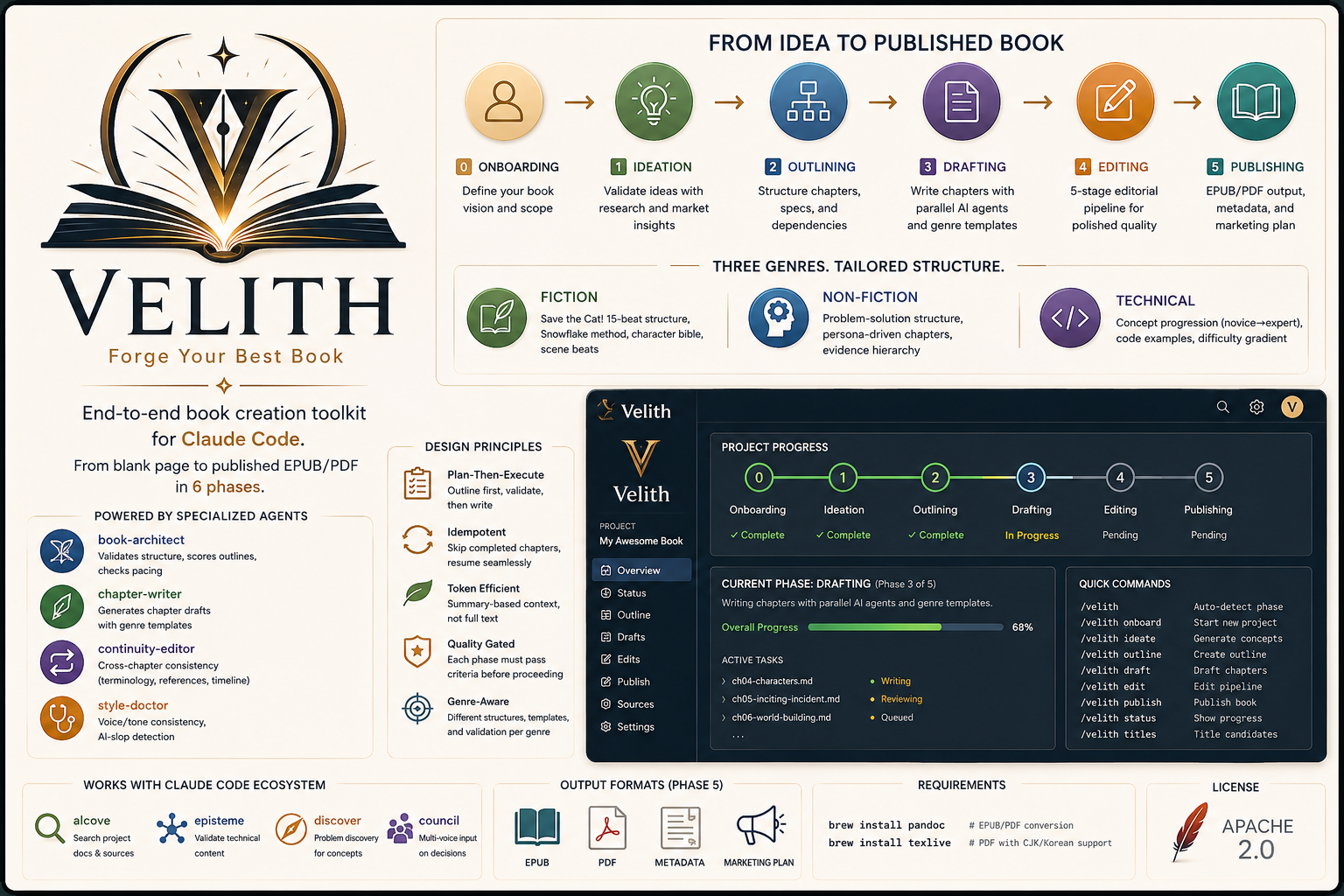
Build books like software. AI-native publishing system for structured long-form creation — from blank page to publishable EPUB/PDF.
Phase 0: Onboarding → Phase 1: Ideation → Phase 2: Outlining → Phase 3: Drafting → Phase 4: Editing → Phase 5: Publishing
Why Velith?
Writing a book with raw LLM prompts gives you disconnected chapters, inconsistent voice, and no structure. Velith treats books as structured artifacts — not isolated prompts. Each phase builds on persistent context to create coherent long-form work, with quality gates at every stage.
| Feature | Why it matters | |
|---|---|---|
| 📋 | 6-phase pipeline | Each phase validates before moving on — no rework |
| 📖 | 7 genre templates | Fiction, non-fiction, technical, screenplay, poetry, game, academic (+ custom via genre-creator) |
| 🤖 | 7 specialized agents | Architecture, drafting, scene generation, continuity, style, cover, marketing |
| ✏️ | 5-stage editing | Assessment → Developmental → Line → Copy → Proofread |
| 🔄 | Resume anywhere | Skip completed chapters, pick up from where you left off |
| 📦 | EPUB, PDF, MOBI, TXT, Markdown | Publish-ready files via Pandoc + Calibre |
Comparison
| Velith | Raw prompts | AI writing tools (Jasper, Sudowrite) | |
|---|---|---|---|
| Structure validation | Phase-gated pipeline | None | Basic templates |
| Cross-chapter continuity | Dedicated agent | Manual | Limited |
| AI-slop detection | Built-in (style-doctor) | None | None |
| Genre awareness | 7 genre systems + custom | Depends on prompt | Fiction-focused |
| Output format | EPUB, PDF, MOBI, TXT, Markdown | Copy-paste | DOCX, limited |
| Requires | Claude Code, Codex CLI, Agy, Cursor, Cline, or Aider | Any LLM | Subscription |
| Full control | Prompt-level | Full | Black box |
Installation
Claude Code
/plugin marketplace add epicsagas/plugins
/plugin install velith@epicsagas
All 16 skills and 7 agents are available immediately. No further steps needed.
Updates with /plugin update velith@epicsagas.
Prerequisites: Claude Code CLI installed and authenticated.
Codex CLI (OpenAI)
codex plugin marketplace add epicsagas/plugins
Velith provides 16 skills (via .agents/skills/) and 7 custom subagents (via .codex/agents/):
| Subagent | Role |
|---|---|
book-architect |
Structure validation, outline scoring |
chapter-writer |
Chapter draft generation |
scene-generator |
Scene-level GMC+RDD breakdown (fiction) |
continuity-editor |
Cross-chapter consistency checks |
style-doctor |
AI-slop detection, voice consistency |
cover-designer |
Cover concepts + image prompts |
marketing-expert |
Reader personas, launch strategy |
Codex auto-discovers skills from .agents/skills/ and subagents from .codex/agents/*.toml. No extra configuration needed.
Updates with codex plugin update velith@epicsagas.
Prerequisites: Codex CLI installed and configured with an OpenAI API key.
Agy (Antigravity)
agy plugin install https://github.com/epicsagas/Velith
Agy auto-discovers skills and agents from the repository root. No extra configuration needed.
Prerequisites: Agy installed and configured.
Cursor
Velith provides context rules in .cursor/rules/ that give Cursor's agent full awareness of the book publishing pipeline, genre patterns, and editing standards.
| Rule File | Loaded When |
|---|---|
velith-pipeline.mdc |
Always (phases, router, agents, quality gates) |
velith-genres.mdc |
Editing drafts, outlines, or PRD files |
velith-editing.mdc |
Working on edits or STYLE.md |
Rules are automatically loaded when you open a Velith book project in Cursor. No installation needed — just clone or copy the .cursor/rules/ directory into your project.
Prerequisites: Cursor installed.
Cline
Velith provides project-level instructions in .clinerules at the repository root. Cline reads this file automatically when working in the project directory — no extra configuration needed.
Prerequisites: Cline extension installed in VS Code or JetBrains.
Aider
Velith provides writing conventions in CONVENTIONS.md, auto-loaded via .aider.conf.yml.
aider # CONVENTIONS.md is auto-loaded
Prerequisites: Aider installed and configured with an API key.
Quick Start
# Start a new book project
> /book-init

# Auto-detect your current phase and continue
> /loom
The plugin guides you through:
- Onboarding — Genre, audience, language, source material, style guide
- Ideation — Market research, concept distillation, competing titles
- Outlining — Full chapter outline with specs, dependencies, cross-references
- Drafting — Chapter-by-chapter generation with parallel subagents
- Editing — 5-stage pipeline: Assessment → Developmental → Line → Copy → Proofread
- Publishing — EPUB/PDF/MOBI conversion, metadata, marketing plan
Skills
| Skill | Phase | Description |
|---|---|---|
/loom |
Router | Auto-detect phase and route to the next step |
/book-init |
0 | Start new book project — genre, audience, style guide |
/book-ideation |
1 | Generate and validate concepts, competitive analysis |
/book-outline |
2 | Create chapter outline with dependencies |
/book-draft |
3 | Draft chapters (all/specific/resume) with parallel agents |
/book-edit |
4 | 5-stage editing pipeline |
/book-publish |
5 | Format to EPUB/PDF/MOBI, cover, marketing |
/book-status |
— | Terminal dashboard + --ui for browser dashboard |
/book-fiction |
— | Fiction patterns (15-beat, Snowflake, character bible) |
/book-nonfiction |
— | Non-fiction patterns (problem-solution, evidence hierarchy) |
/book-technical |
— | Technical book patterns (concept gradient, code, labs) |
/book-screenplay |
— | Screenplay patterns (3-act + sequence, dialogue, A/B story) |
/book-poetry |
— | Poetry patterns (form types, imagery, collection arc) |
/book-game |
— | Game scenario patterns (quest trees, branching, lore bible) |
/book-academic |
— | Academic patterns (IMRAD, lit review, argument chains) |
/book-genre-creator |
— | Meta-skill for genre selection and custom genre creation |
Agents
| Agent | Role |
|---|---|
book-architect |
Validates structure, scores outlines, checks pacing |
chapter-writer |
Generates chapter drafts with genre templates |
continuity-editor |
Cross-chapter consistency (terminology, references, timeline) |
style-doctor |
Voice/tone consistency, AI-slop detection |
scene-generator |
Scene-level breakdown with GMC+RDD structure (fiction only) |
cover-designer |
Cover concepts + Midjourney/DALL-E image prompts |
marketing-expert |
Reader personas, channel strategy, 12-week launch calendar |
Visual Dashboard
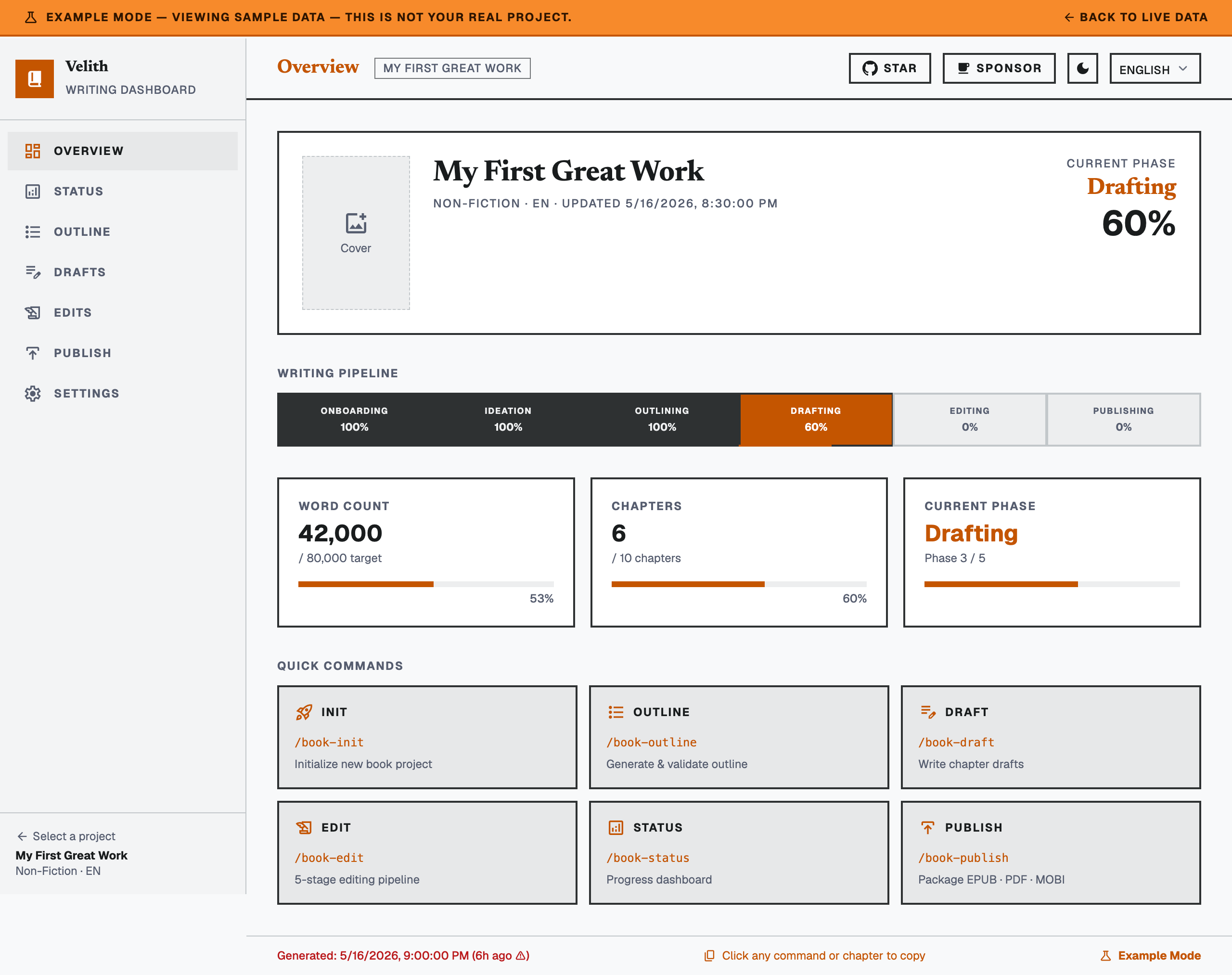
/book-status --ui opens a Svelte-based progress dashboard in your browser. The dashboard auto-refreshes every 5 seconds:
- 6-phase pipeline tracker (Onboarding → Ideation → Outlining → Drafting → Editing → Publishing)
- 7 agent status cards (book-architect, chapter-writer, continuity-editor, cover-designer, marketing-expert, scene-generator, style-doctor)
- Chapter outline, drafts table, and 5-stage editing kanban
- Output file status (EPUB/PDF/MOBI/TXT/MD) with publish checklist
- Project settings and command reference
The dashboard reads from per-project status.json files dynamically. The pre-built dist/ is included — no build step required for plugin users.
To run locally for development:
cd dashboard
npm install
npm run dev     # http://localhost:5173
npm run build   # rebuild dist/
Design Principles
- Plan-Then-Execute — Outline first, validate, then write
- Idempotent — Skip completed chapters, resume from where you left off
- Token Efficient — Summary-based context, not full text
- Genre-Aware — Different structures, templates, and validation per genre
- Quality Gated — Each phase must pass criteria before proceeding
External Dependencies
For EPUB/PDF output (Phase 5):
brew install pandoc        # EPUB/PDF conversion
brew install texlive       # PDF with CJK/Korean support
brew install --cask calibre  # MOBI (Kindle) conversion — optional
Troubleshooting
pandoc not foundInstall via Homebrew:
brew install pandoc
Install a CJK-capable LaTeX distribution:
brew install texlive
# Or for minimal install:
brew install basictex && sudo tlmgr install collection-langkorean
Restart Claude Code to reload plugins:
claude restart
Project Structure
When you create a book project, Velith sets up:
{project-dir}/
├── PRD.md          # Book requirements
├── STYLE.md        # Voice, tone, conventions
├── ideation.md     # Ideas, market research
├── outline.md      # Full chapter outline
├── drafts/         # Chapter drafts
│   ├── ch00-foreword.md
│   ├── ch01-xxx.md
│   └── ...
├── edits/          # Editing reports
│   └── editorial-report.md
├── publish/        # Final outputs
│   ├── book.epub
│   ├── book.pdf
│   ├── book.mobi
│   └── metadata.yaml
└── sources/        # Source material references
Integration
Built-in agent workflows
No extra setup — these run automatically during the pipeline:
- discover — During
/book-outline,book-architectprobes for blind spots and contradictions in the book concept before the structure is locked - council — During
/book-outlineand/book-edit, multiple editorial perspectives (developmental, structural, line-edit) are weighed for outline and revision decisions
alcove — Research vault as source material
alcove is a private document server that lets Velith agents read your existing notes, research, and project docs as source material during drafting.
When it helps:
- You have years of research notes, interview transcripts, or reference docs you want the agent to cite from
- You're writing non-fiction and need agents to pull facts from structured project documentation
- You maintain a knowledge base with terminology, timelines, or world-building details the agent should respect
How to use:
- Install and configure alcove as an MCP server in your Claude Code settings
- During
/book-init, point to your alcove project as a source - Agents will query alcove automatically when drafting chapters that reference your research
obsidian-forge — Write where you think
obsidian-forge bridges your Obsidian vault to Velith, so you can research in Obsidian and write with Velith without copying files manually.
When it helps:
- Your research, character profiles, and reference notes already live in an Obsidian vault
- You want to iterate on outlines in Obsidian's linked-note environment before committing to Velith
- You collaborate with co-authors who prefer Obsidian for brainstorming
How to use:
# Create a book project inside your Obsidian vault (01-Projects/)
of book init my-book --genre non-fiction --lang ko

# Work in Obsidian: research notes, character profiles, references
# Tag notes with book/my-book to link them as source material
of book sync my-book

# Export to a standalone directory when ready to write
of book export my-book --output ~/projects/my-book

# Now run velith on the exported project
> /loom
Both alcove and obsidian-forge are optional — Velith works standalone.
Contributing
See CONTRIBUTING.md. PRs welcome — check open issues labeled good first issue.
License
Yorumlar (0)
Yorum birakmak icin giris yap.
Yorum birakSonuc bulunamadi