ccmux
Health Gecti
- License — License: MIT
- Description — Repository has a description
- Active repo — Last push 0 days ago
- Community trust — 20 GitHub stars
Code Basarisiz
- rm -rf — Recursive force deletion command in .github/workflows/release.yml
Permissions Gecti
- Permissions — No dangerous permissions requested
Bu listing icin henuz AI raporu yok.
🔮 Track all your AI coding agents (Claude Code, Codex, Cursor, ...) in tmux and jump to the one that needs you
ccmux 🔮
Track all your AI coding agents (Claude Code, Codex, Cursor, ...) in tmux and jump to the one that needs you
❓ Why?
When running multiple AI coding agent sessions across tmux panes, it's hard to keep track of which session is idle, which is waiting for permission, and which pane to switch to. ccmux solves this with a background daemon that monitors session activity and an interactive TUI that shows live session states at a glance.
It works with your existing tmux workflow. You don't change how you launch or run your agents; ccmux discovers what's already running in your panes, so as long as you're in tmux with a supported agent, it just works.
Built-in support for: Claude Code, Codex, Cursor, OpenCode, Pi, Gemini CLI, plus custom agent definitions via config.
✨ Features
- 🎯 Live Session States: Every agent tracked as idle, working, or waiting (permission / plan approval / question), flagged the moment one needs you
- 🧩 Multi-Agent: Claude Code, Codex, Cursor, OpenCode, Pi, Gemini CLI, plus custom agents via config
- 🔄 Real-Time: Background daemon streams state changes instantly over SSE, no polling, no refresh
- 👁️ Live Preview: Split-pane view of the selected session's pane content
- ⚡ Act in Place: Tab into the preview to approve, answer, or type, keys go straight to that pane
- 📊 Sidebar Mode: Compact always-visible session rail docked beside your working panes
- 🔍 Fuzzy Search: Find sessions by project, branch, path, last prompt, or pane content
- 📂 Session Grouping: Collapsible project groups with reordering and pinning
- 🌿 Git & PR Aware: Branch and worktree detection, open PRs with live CI and review status
- 🤖 Background Agents & Subagents: Claude Code background agents get rows too; nested Task agent waiting states surface
- 🔁 Session Control: Spawn, kill, and restart sessions from the TUI;
ccmux invokefor scripted one-shot agent turns - ⌨️ Keyboard-First, Mouse-Friendly: Vim keys and number jumps, plus click-to-switch and right-click context actions
📦 Installation
Prerequisites
- tmux with active sessions running AI coding agents
Homebrew
brew install epilande/tap/ccmux
ccmux setup
From Source
Requires Bun.
git clone https://github.com/epilande/ccmux.git
cd ccmux
bun install
bun link
ccmux setup
ccmux setup installs agent hooks for authoritative session matching. ccmux works without it, but it's recommended; see Session Matching with Hooks. Bare ccmux setup only configures agents whose executable is found on PATH; use ccmux setup --agent <name> to install for a specific agent even if it isn't detected.
🚀 Quick Start
- Start your AI coding sessions in tmux panes as usual
- Launch the picker:
ccmux - Navigate with j/k, press Enter to switch to a session
[!TIP]
Bind a tmux key so you can pop ccmux open from anywhere (add to~/.tmux.conf):# Prefix + C-p: open ccmux in a centered popup bind-key C-p display-popup -E -w 80% -h 75% "ccmux" # Or skip the prefix entirely (Alt+p from any pane) bind-key -n M-p display-popup -E -w 80% -h 75% "ccmux"The picker exits after you select a session, so the popup closes itself and drops you straight into that pane. (
display-popuprequires tmux 3.2+.)
🎮 Usage
CLI Commands
| Command | Description |
|---|---|
ccmux |
Launch interactive TUI picker (default) |
ccmux picker |
Launch TUI with options (--preview, --icons <style>) |
ccmux picker --persistent |
Dashboard mode (stay open after switching sessions) |
ccmux spawn [agent] |
Spawn a new agent session in a tmux pane |
ccmux invoke [agent] "prompt" |
Run a single agent turn and write the response to stdout (docs) |
ccmux invoke list |
List active and recently-finished invocations (-j for JSON) |
ccmux invoke cancel <id> |
Cancel a running invocation by id (idempotent) |
ccmux invoke result <id> |
Print an invocation's full captured output (subprocess agents only) |
ccmux show |
List all active sessions |
ccmux show --json |
Output sessions as JSON |
ccmux status |
Show daemon and session overview |
ccmux switch <id> |
Switch tmux client to a session's pane |
ccmux kill <id> |
Kill a session's process |
ccmux restart <id> |
Kill and resume a session |
ccmux send <id> <text> |
Send text to a session's tmux pane |
ccmux screen [id] |
Capture pane content |
ccmux screen --grep <pattern> |
Search across all session panes |
ccmux dismiss <id> |
Remove a session from tracking |
ccmux daemon start|stop|restart|status |
Manage the background daemon |
ccmux config set <key> <value> |
Set a preference |
ccmux config get <key> |
Get a single preference value |
ccmux config list |
List all preferences |
ccmux config themes |
List built-in themes (marks the active one) |
ccmux setup |
Install hooks for every supported agent found on PATH (Claude + Codex + Cursor + OpenCode + Pi) |
ccmux setup --agent <name> |
Limit install/uninstall/status to specific agent(s); forces install even if not found on PATH |
ccmux setup --status |
Report install state without writing anything |
ccmux setup --uninstall |
Remove hooks (preserves user-owned hook entries) |
ccmux debug |
Diagnose session tracking discrepancies |
ccmux sidebar |
Launch narrow sidebar TUI (no preview/footer) |
ccmux sidebar --toggle |
Smart toggle: spawn/kill sidebars in every window across all tmux sessions |
The daemon starts automatically the first time you run a ccmux command (picker, show, invoke, etc.). It runs on 127.0.0.1:2269 and provides both a REST API and SSE event stream.
Preview Pane
Press P to split the picker and preview the highlighted session's live pane content side by side. Press Tab to focus the preview and act in place: your keystrokes go straight to that agent's pane, so you can approve a permission, answer a question, or type a follow-up without ever leaving ccmux.
https://github.com/user-attachments/assets/7e0d42b3-4e7b-43b8-8d06-72a2d69dd694
Sidebar Mode
A compact, always-visible session list that lives alongside your working panes. No preview panel, no footer, just status icons and project names.
ccmux sidebar --toggle                  # Toggle sidebars in all tmux windows
ccmux sidebar --toggle --width 40       # Custom width (default: 30)
ccmux sidebar --toggle --position right # Right side (default: left)
ccmux sidebar --resize --width 30       # Snap every existing sidebar pane to <width>
The smart toggle fills gaps when some windows are missing sidebars, and kills all sidebars when every window already has one. New windows automatically get a sidebar, and sidebars snap back to their configured width when a window is resized.
Configure defaults so --toggle uses your preferred layout:
ccmux config set sidebar.width 40
ccmux config set sidebar.position right
Suggested tmux keybinding (add to ~/.tmux.conf):
bind-key S run-shell "ccmux sidebar --toggle"
Spawning Sessions
Launch new agent sessions directly from the CLI:
ccmux spawn                          # Spawn claude (default) in a new tmux window
ccmux spawn codex                    # Spawn a specific agent
ccmux spawn --split                  # Split current pane instead of new window
ccmux spawn --detach                 # Don't switch to the new pane
ccmux spawn --cwd ~/proj             # Set working directory
ccmux spawn --resume <id>            # Resume an existing session
ccmux spawn --prompt "fix the tests" # Send an initial prompt
Programmatic Invocation
ccmux invoke runs a single agent turn and writes the response to stdout, so you can use real agents in shell pipelines and scripts. See docs/invoke.md for the full reference.
ccmux invoke claude "say hi in one word"
echo "what is 2 + 2" | ccmux invoke claude
git diff main | ccmux invoke claude "Review this diff"
Claude runs interactively in a dedicated tmux session and returns clean text parsed from the transcript JSONL. Codex, Cursor, OpenCode, Pi, and Gemini run as non-interactive subprocesses (codex exec -o, cursor-agent --print, opencode run --format json, pi -p, gemini -p) and return the agent's clean response text.
For orchestration, name an invocation with --id <id>, then use ccmux invoke list, ccmux invoke cancel <id>, and ccmux invoke result <id> to watch, cancel, or read its full captured output by that id. See docs/invoke.md for the fire-and-poll reference.
Dispatch Skill
This repo ships a dispatch Agent Skill that teaches your coding agent to orchestrate other agents through ccmux invoke (firing, fan-out, joining, cancelling, and reading worker output). For Claude Code it installs as a plugin (this repo doubles as a plugin marketplace):
/plugin marketplace add epilande/ccmux
/plugin install ccmux@ccmux
Other skills-capable agents (Codex, Cursor, OpenCode, and others) can use the same skill by copying it into their skills directory. The skill is additive glue for the ccmux CLI, which must be installed and on your PATH. See plugins/ccmux/README.md for details.
⌨️ Keyboard Controls
| Action | Key | Description |
|---|---|---|
| Navigate | j / k or ↑ / ↓ | Move through session list |
| Jump to first/last | gg / G | Go to top / bottom |
| Jump to session | 1–9 | Switch directly to session N |
| Switch to session | Enter | Switch tmux to the selected pane |
| Search | / | Enter fuzzy search mode |
| Toggle preview | P | Show/hide the preview panel |
| Scroll preview | Ctrl+D / Ctrl+U | Half-page scroll in preview |
| Resize preview | Alt+H / Alt+L | Increase/decrease preview width |
| Focus preview | Tab | Send keys directly to tmux pane |
| Restart session | r | Kill and resume the selected session |
| Reconnect | R | Reconnect to the daemon SSE stream |
| Kill session | x | Kill the selected session's process |
| Kill all | X | Kill all tracked sessions |
| Collapse/expand | h / l or Space | Toggle group collapsed state |
| Move group | J / K | Reorder group down / up (persisted) |
| Move group top/bottom | < / > | Pin group to top / bottom |
| Collapse/expand all | zM / zR or - / = | Collapse or expand all groups |
| Hide idle | f | Toggle hiding idle sessions |
| Cycle prompt | p | Prompt display: inline → own row → off |
| Cycle group-by | b | Cycle through group-by modes |
| Help | ? | Show keyboard shortcuts overlay |
| Quit | q / Esc | Exit the picker |
| Action | Key |
|---|---|
| Navigate results | Ctrl+N / Ctrl+P |
| Select | Enter |
| Cancel | Esc |
When preview is focused (Tab), keystrokes are forwarded to the tmux pane. These keys still work:
| Action | Key |
|---|---|
| Navigate sessions | Ctrl+N / Ctrl+P |
| Resize preview | Alt+H / Alt+L |
| Scroll preview | Ctrl+D / Ctrl+U |
| Exit focus | Tab / Esc |
⚙️ Configuration
Preferences are stored in ~/.config/ccmux/ccmux.json and can be managed with:
ccmux config set <key> <value>
ccmux config get <key>
ccmux config list
| Key | Values | Default | Description |
|---|---|---|---|
iconStyle |
dot, emoji, nerdfont, none |
dot |
Status icon style |
theme |
catppuccin-*, tokyo-night*, dracula, gruvbox-*, nord, rose-pine* |
catppuccin-mocha |
TUI color theme (resolved at launch; see Theme) |
showPreview |
true, false |
false |
Show preview panel on launch |
previewWidth |
20–80 |
40 |
Preview panel width (percentage) |
command |
any non-blank string | claude |
CLI command used for session restart |
groupBy |
project, cwd, session, window, none |
project |
How sessions are grouped in the TUI |
promptDisplay |
inline, row2, off |
inline |
Prompt display: inline on row 1, its own row, or hidden |
backgroundAgents |
true, false |
true |
Show Claude background agents as rows (daemon restart required) |
searchPaneContent |
true, false |
true |
Include captured pane content in TUI search |
persistent |
true, false |
false |
Keep picker open after switching sessions (dashboard mode) |
sidebar.width |
10–80 |
30 |
Sidebar pane width in columns |
sidebar.position |
left, right |
left |
Which side of the window to place the sidebar |
📊 Column Configuration
Each session item has up to two rows (row1, row2), and each row has a left and right side. Each side is a comma-separated list of field entries. An entry is either <field> (use the field's default mode) or <field>:<mode> (override the mode).
ccmux config set columns.row1.left  "index,status:icon,project"
ccmux config set columns.row1.right "agent:short,pane,time"
ccmux config set columns.row2.left  "prompt"
ccmux config set columns.row2.right "branch"
Pass an empty string to clear a side: ccmux config set columns.row2.left "".
| Field | Modes | Default mode | Description |
|---|---|---|---|
index |
— | — | Row number (1–9) |
status |
icon/short/full |
icon |
Status badge style |
project |
dirname/full |
dirname |
Project path (basename or full) |
agent |
short/full |
full |
Agent name (2-char code or full label) |
version |
— | — | Agent version |
pane |
— | — | Tmux pane target (session:window.pane) |
time |
— | — | Relative time since last input |
prompt |
— | — | Last user prompt (truncated) |
cwd |
— | — | Working directory |
branch |
— | — | Git branch |
pr |
short/full |
full |
Open PRs for the branch (#25/PR #25) |
Defaults: row1.left is index, status, project (status badge widens icon→short→full as the terminal grows). row1.right cascades by breakpoint: just pane below xs, then agent:short, pane at xs, agent:short, pane, time at sm, and agent:full, version, pane, time at md+. The prompt and pr cells are configured on row2, but promptDisplay (default inline, cycled live by p) controls how they render: inline flattens them onto row1 so each session stays a single line, row2 gives the prompt its own line with pr at the right edge, and off hides both. Sessions with no prompt stay single-line in inline mode; in row2 mode the second line still appears when another row-2 field (such as an open PR) has data.
Sidebar defaults differ to fit the narrow rail: row1 is status, project with pr:short, agent:short on the right (PR stays visible even with the prompt hidden), and row2 is prompt / time (a lone time never earns the row; it rides along when some other field has data). The 30-col rail has no room to inline, so the sidebar always uses the two-row layout (inline behaves like row2). Override these under the sidebar.columns key in ~/.config/ccmux/ccmux.json (e.g. "sidebar": { "columns": { "row2": { "left": ["pane"] } } } to bring the pane target back).
The CLI's comma-separated form sets one mode per entry. To vary the layout by terminal width (responsive cascade), edit ~/.config/ccmux/ccmux.json directly and use the default/xs/sm/md/lg keys on either a row side (whole array) or an entry's mode.
📐 Breakpoints
Named breakpoints control when responsive column layouts activate. A breakpoint value applies from that terminal width upward until a larger breakpoint overrides it.
| Name | Default width |
|---|---|
xs |
40 |
sm |
60 |
md |
80 |
lg |
100 |
ccmux config set breakpoints.sm 55
ccmux config set breakpoints.lg 120
🎨 Theme
The TUI ships 14 built-in palettes across six families, resolved once at launch (no in-TUI toggle).
ccmux config themes                       # list built-ins, mark the active one
ccmux config set theme tokyo-night        # switch theme
| Theme | Background |
|---|---|
catppuccin-mocha |
dark (default) |
catppuccin-macchiato |
dark |
catppuccin-frappe |
dark |
catppuccin-latte |
light |
tokyo-night |
dark |
tokyo-night-storm |
dark |
tokyo-night-day |
light |
dracula |
dark |
gruvbox-dark |
dark |
gruvbox-light |
light |
nord |
dark |
rose-pine |
dark |
rose-pine-moon |
dark |
rose-pine-dawn |
light |
For per-key tweaks, set theme to an object in ~/.config/ccmux/ccmux.json: a built-in base plus colors (the 14 semantic keys) and/or ansi (the 16 terminal colors used to render the preview), deep-merged over the base.
{
  "theme": {
    "base": "catppuccin-mocha",
    "colors": { "red": "#ff5555" },
    "ansi": { "brightBlack": "#585b70" }
  }
}
An unknown base name falls back to the default theme; an invalid hex value or unknown override key is dropped and the base value is kept. Each emits a warning. Run ccmux config themes to inspect any problems with the current config.
[!NOTE]
ccmux paints no background fill, so theme colors sit on your terminal's own background. The light palettes (catppuccin-latte,tokyo-night-day,gruvbox-light,rose-pine-dawn) assume a light terminal; pair them with a light background. Every other palette assumes a dark one.
🔗 Session Matching with Hooks
For reliable session-to-pane mapping (especially with multiple sessions of the same agent in the same project), install hooks:
ccmux setup                    # Install hooks for every supported agent found on PATH
ccmux setup --agent codex      # Limit to a single agent (installs even if not on PATH)
ccmux setup --status           # Report install state without writing
ccmux setup --uninstall        # Remove hooks
Hooks write PID marker files under ~/.config/ccmux/session-pids/ whenever a session starts, a turn completes, or the agent asks the user to approve a tool. The daemon picks up the markers in real time via a filesystem watcher. See docs/architecture.md#hook-lifecycle for the full flow (marker writes, chokidar dispatch, per-agent correlation).
Gemini CLI is tracked through process detection and terminal pattern matching, so it needs no setup.
Claude Code
Uses Claude's native hooks in ~/.claude/settings.json with three scripts under ~/.claude/hooks/:
ccmux-session-start.sh: writes the marker on session create/resumeccmux-session-end.sh: removes the markerccmux-state-notify.sh: updates state onidle_prompt/permission_prompt
Codex CLI
Uses Codex's native hooks (~/.codex/hooks.json plus the codex hooks feature flag in ~/.codex/config.toml, which is [features] codex_hooks = true pre-0.124 and [features] hooks = true on 0.124+; ccmux recognizes either) with three scripts under ~/.codex/hooks/:
ccmux-session-start.sh: writes the marker when a Codex session startsccmux-stop.sh: refreshes the marker at the end of every turnccmux-permission-request.sh: marks the session aswaiting_permissionwhen the user is asked to approve a tool
Tool-approval detection (PermissionRequest) needs Codex >= 0.122.
Cursor CLI
Uses Cursor's native hooks (~/.cursor/hooks.json) with four scripts under ~/.cursor/hooks/:
ccmux-session-start.sh: writes the marker on fresh chat launchccmux-session-end.sh: unlinks the marker when the chat endsccmux-before-submit-prompt.sh: flips state toworkingand records the last prompt (1 KB cap)ccmux-stop.sh: refreshes state back toidleat turn completion
Requires cursor-agent >= 2026.1.16 (when the hooks feature landed).
OpenCode
Uses OpenCode's plugin system rather than shell hooks. ccmux setup --agent opencode drops a single auto-discovered JS plugin at ~/.config/opencode/plugin/ccmux.js (honors $XDG_CONFIG_HOME). The plugin subscribes to OpenCode's in-process event bus and writes a marker for every session on the server:
session.created/session.updated: marker with directory + titlesession.status(busy/retry/idle): refreshes state toworkingoridlemessage.updated/message.part.updated: captures the user's last prompt (1 KB cap) into the marker (parity with Claude/Codex/Cursor)permission.asked/permission.replied: flips state towaiting_permissionwith the pending tool, clears back toworkingon replysession.deleted: unlinks the marker
Because one OpenCode server can host many sessions, the daemon folds all markers sharing a server PID into the single ccmux Session for the tmux pane that hosts the server. Status is worst-of (waiting > working > idle); cwd and nativeSessionId come from the newest-activity marker, while pendingTool and the attention indicator come from the newest-waiting marker.
Pi
Uses Pi's extension system rather than shell hooks. ccmux setup --agent pi drops a single auto-discovered JS extension at ~/.pi/agent/extensions/ccmux.js. The extension subscribes to Pi's lifecycle events and writes one marker per session:
session_start: marker with the session id, transcript path, and cwd (Pi fires this at launch, so the marker carries full identity immediately)before_agent_start: captures the user's last prompt (1 KB cap)agent_start/agent_end: flips state toworking/idle(these bracket one full user prompt, so the row never flickers mid-response the way per-turn events would)session_shutdown: unlinks the marker
Pi runs one session per process, so there's no server-style aggregation; the daemon correlates the marker's PID to its tmux pane via process ancestry and links nativeSessionId.
Matching priority (with hooks installed)
- Marker file (authoritative): Direct PID/TTY/session-id/transcript from the hook, re-verified on every scan so a wrong binding heals itself
- Process start time: For panes markers don't claim, ccmux correlates session timestamps with agent process start times, matching each same-directory group as a whole within a 10-minute tolerance. When two candidates are too close to call, the session is left unbound rather than guessed.
Without hooks, the daemon does not use historical session IDs to claim pane ownership. It creates pane-scoped sessions from live process + tmux discovery, then attaches agent log metadata only when it can safely tie a log to the running process.
🧩 Custom Agents
The built-in agents are the happy path: they ship with hook integration for authoritative session matching. If you run an agent ccmux doesn't support out of the box, you can teach it one in ~/.config/ccmux/ccmux.json. Custom agents fall back to process matching plus terminal pattern scanning (no hooks), so detection is less precise than a built-in, but it gets unsupported agents onto the board.
{
  "agents": {
    "myagent": {
      "processMatch": "myagent",
      "terminalRules": [
        {
          "matchAny": ["thinking...", "esc to interrupt"],
          "status": "working"
        },
        {
          "matchAll": ["approve?", "[y/n]"],
          "status": "waiting",
          "attentionType": "permission",
          "pendingTool": "Command"
        }
      ],
      "resumeCommand": "myagent resume {id}"
    }
  }
}
You can also override built-in agent settings by using the agent's name as the key (e.g., "claude", "codex").
| Field | Required | Description |
|---|---|---|
processMatch |
Yes* | Regex to match the process executable |
commandPatterns |
No | Additional regex patterns to match full commands |
terminalRules |
No | Ordered terminal matching rules |
versionCommand |
No | Command to get agent version |
versionPatterns |
No | Regex patterns to extract version from output |
resumeCommand |
No | Command template for restarting ({id} placeholder) |
sessionFilePattern |
No | Regex to extract session ID from log filenames |
executable |
No | Command used to launch the agent (defaults to key) |
hooks |
No | { type } (built-in override only; internal) |
* Required for new agents; optional when overriding built-in agents.
Invoke-related fields (invokeMode, errorRules, readyPattern) are documented in docs/invoke.md.
Each terminalRules entry must define exactly one matcher:
matchAny: matches when any string is present in the last 30 lines (case-insensitive)matchAll: matches only when every string is present in the last 30 lines (case-insensitive)
Rules are evaluated top-to-bottom, and the first match wins. This lets you express broad "working" prompts and more specific multi-line waiting prompts without detector-specific logic.
🏗️ Architecture
ccmux has three layers: agents running in tmux panes, a background daemon that observes them, and clients (TUI + CLI utilities) that consume daemon state over HTTP/SSE.
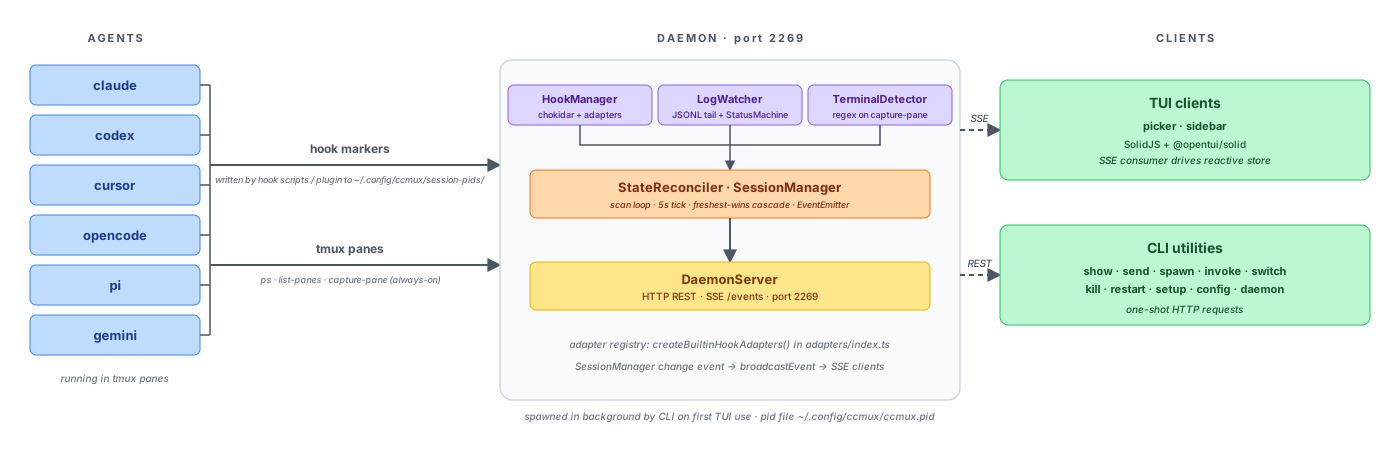
The daemon merges three signals into one session state: log parsing for agents that write JSONL transcripts, terminal pattern matching for agents that don't, and PID marker files written by hook adapters for authoritative session-to-pane mapping. It exposes a local HTTP API with SSE streaming on port 2269. The TUI connects as an SSE client and renders state reactively using Solid.js via the @opentui/solid framework.
For deeper internals (status detection cascade, session-to-pane binding, hook event lifecycle, PR enrichment, background agents, code map), see docs/architecture.md. Per-agent hook quirks and the agent-owned files ccmux reads are in docs/agent-adapters.md.
| State | Meaning |
|---|---|
| idle | Waiting for user input |
| working | Processing (thinking, running tools, subagents) |
| waiting | Needs attention: permission, plan approval, or question |
The status machine derives state from JSONL log entries, tracks pending tool IDs for parallel tool calls, and checks process liveness to detect crashed sessions.
🔧 Development
bun install              # Install dependencies
bun run dev              # Run with --watch
bun run typecheck        # Type check
bun test                 # Run tests
bun run build            # Bundle to dist/index.js (consumed by the launcher)
Performance Profiling
Set CCMUX_PERF=1 to enable performance instrumentation:
CCMUX_PERF=1 ccmux picker 2>/tmp/ccmux-perf.log
This outputs a startup waterfall and periodic runtime stats (FPS, memo recomputes, active timers) to stderr.
📄 License
MIT
Yorumlar (0)
Yorum birakmak icin giris yap.
Yorum birakSonuc bulunamadi