kortext
Health Uyari
- License — License: MIT
- Description — Repository has a description
- Active repo — Last push 0 days ago
- Low visibility — Only 5 GitHub stars
Code Gecti
- Code scan — Scanned 12 files during light audit, no dangerous patterns found
Permissions Gecti
- Permissions — No dangerous permissions requested
Bu listing icin henuz AI raporu yok.
The project brain for AI-driven development: a brief becomes approved analysis documents, then your own agent CLI (Claude, Codex etc.) writes the code. Local-first, no API key of its own.





Building products with AI, I keep running into two problems.
- I cannot see where the project stands.
- At some point the model drifts from the rules we shook hands on and starts improvising like a free-range chicken.
I know you have the same problem. You just have not named it yet.
I have. Its name is Kortext.
Kortext is a product constitution you agree on with the AI before development starts — under whatever form of democracy you prefer.
From the BRIEF.md you provide, 10 expert personas write 14 architecture documents. That constitution is what keeps the model inside the project's reality.
Simple to use, thorough in what it covers.
Enter the project and its scope in a refreshingly plain interface.
Every document a persona writes is put in front of you for approval.
Read them — for a smooth ride, or for an audit. A document may ask you questions; you may ask for an explanation or a change.
If the change you ask for touches another document, that document goes back through the pipeline.
Once the constitution is settled, carry on with whatever AI you use, however you like.
And I have not forgotten projects that are already under way: Kortext can start from an existing codebase too.
For the more curious
There is one human role, Prime. The other personas: product manager, architect, designer, growth expert, security engineer, DevOps engineer, DBA, compliance expert, copywriter and QA engineer.
BRIEF.md is the document you provide. From it, Kortext produces PRODUCT.md, STACK.md, STRUCTURE.md, ARCHITECTURE.md, DESIGN.md, GROWTH.md, SECURITY.md, ENVIRONMENT.md, DATABASE.md, API.md, LEGAL.md, CONTENT.md, ENGINEERING.md, TEST.md.
There is a sample BRIEF.md. If the brief you wrote is not enough, Kortext says so.
Add an existing project and it may come back with suggestions about where the project is and where it is heading. Smart-arse.
It runs your own AI agent.
It is not shy with tokens, but it spends them before the tokens and the hours that would otherwise be wasted later. On the whole, a much better deal.
Kortext collects nothing, keeps no telemetry. I am very curious how much it gets used, though.
How it works
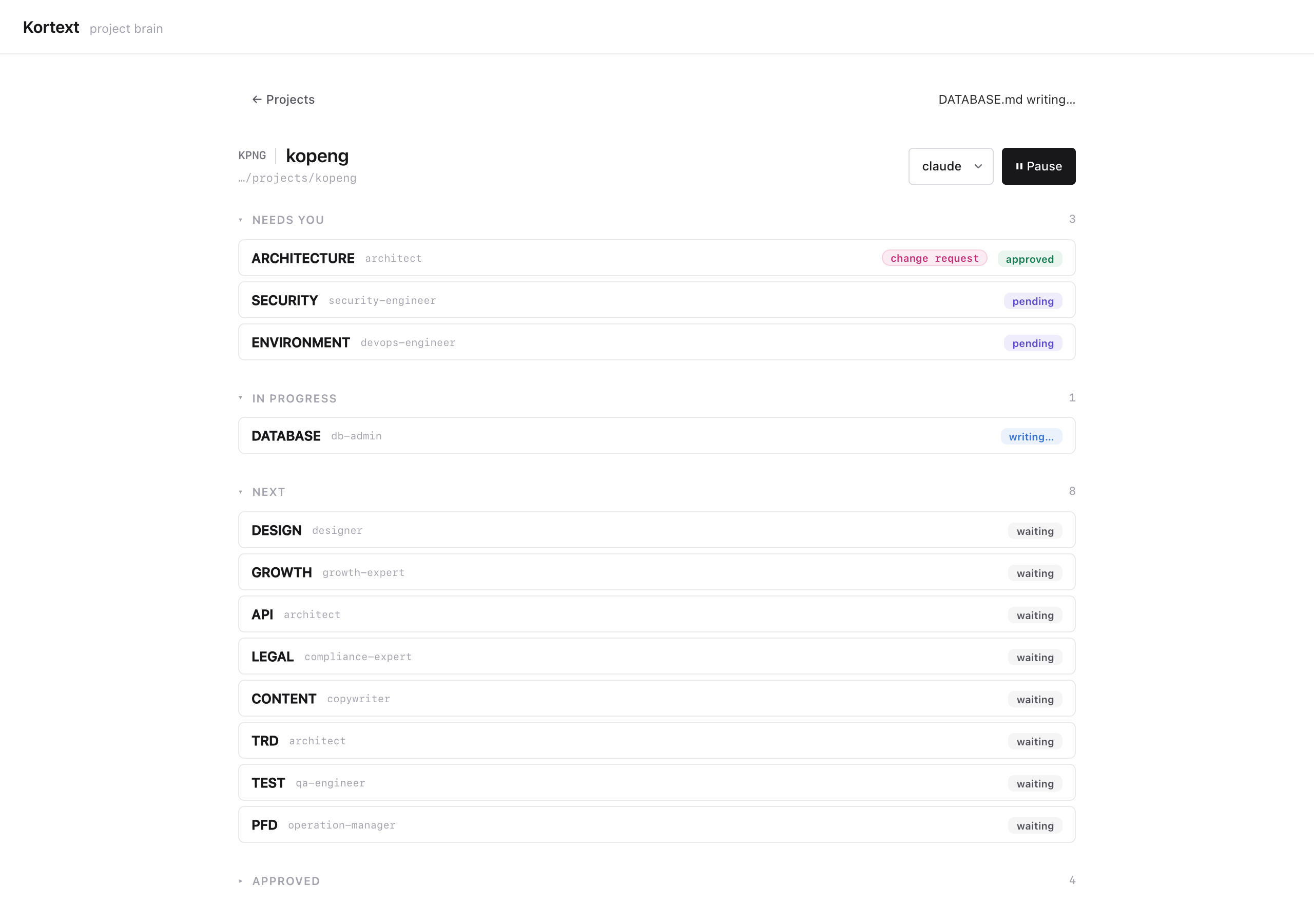
Pick the project folder and the agent CLI it runs on. The choice belongs to the project; two projects can happily sit on two different CLIs. A new project starts from a brief you write or upload in the form; an existing project starts straight from the code.
Kortext puts a
.kortext/folder at the root of the repo, with the document skeletons inside, and anAGENTS.mdbeside it. IfAGENTS.mdalready exists, it adds a marked block and leaves your own text alone.Kortext runs your agent CLI step by step, in the order the documents depend on each other. Each step writes one document — ARCHITECTURE, STACK, SECURITY, DATABASE, DESIGN, LEGAL… — as a persona: architect, security engineer, designer.
Every document arrives as adraft, and a document you have not approved is never written.Open any document. Approve it; select a line and ask "why did you write it this way?" (that conversation is ephemeral, nothing is saved); or leave notes and ask for a revision. Ask for a revision and the document is written again.
When every document is approved or declared unnecessary, the analysis is complete. The documents are now the project's constitution and
AGENTS.mdis the handover. Copy one of the starter commands into your client — CLI or app, whichever you use — and start building.
A document can also close as
not-applicable, with a reason: "this project does not need this one."
Install
Node 22 or newer and at least one agent CLI on your PATH is all you need
(claude, codex, antigravity or another).
After that it is one command in the terminal: npm install -g kortext
npm no longer runs a package's install scripts on its own. Kortext's SQLite binding ships prebuilt for the common platforms, so this command is usually enough.
Ifkortextstarts but cannot open its database, install once more with the script allowed:
npm install -g --allow-scripts=better-sqlite3 kortext
When the install finishes, type kortext. The server comes up, your browser opens, and the Kortext panel is in front of you. That is all.
RequirementsThe server uses port 3441; change it with
--portif you like.
Your data lives in one global SQLite database:~/.kortext/kortext.db. Change that with--db.
Node.js 22 and npm 10
Node 22 on macOS
brew install node@22
Windows support is experimental. Kortext is developed and tested on macOS and Linux. The Windows-specific parts — finding your agent CLI with
where, running the.cmdshim npm installs — were written from the documented behaviour but have not been run on a real Windows machine. If something does not work, please open an issue; the fault is my gap, not your setup.
Install Node 22 from nodejs.org (the LTS labelled v22.x). On the Tools for Native Modules screen, tick "Automatically install the necessary tools"; Kortext's SQLite binding needs them.
EACCES or a permission error on the global install? Point npm's global folder at one you own instead of opening an admin shell:
npm config set prefix "$env:APPDATA\npm"
and add %APPDATA%\npm to your PATH.
sudo apt install -y curl build-essential python3      # gcc/make for the SQLite binding
curl -o- https://raw.githubusercontent.com/nvm-sh/nvm/v0.40.3/install.sh | bash
nvm install 22 && nvm alias default 22
Do not sudo npm install -g. On EACCES:npm config set prefix ~/.npm-global, then put ~/.npm-global/bin on your PATH.
An agent CLI
npm install -g @anthropic-ai/claude-code    # claude
npm install -g @openai/codex                # codex
npm install -g @google/gemini-cli           # gemini
[!NOTE]
You give Kortext no key; it uses the subscription behind the CLI you already use. Cursor, Copilot, OpenCode, Amp, Droid, Goose, Qwen Code and Cline have their definitions ready too.
Starting and stopping
Once Kortext is running you can close the terminal window; it keeps running in the background.
To stop it, press the ⏻ button in the panel's status bar.
To start it again, type kortext once more.
kortext              # start in the background, open the panel
kortext --stop       # stop the background server
kortext --no-detach  # keep it in this terminal, Ctrl+C to stop
Neither the button nor --stop cuts a running step short; while one is in flight they ask you to wait. An analysis is never interrupted mid-write.
What the background server prints collects in ~/.kortext/kortext.db.log.
Update and uninstall
When a new version is out, the panel says so in a strip under the header. Update now runs the install for you; the new version takes over once you quit kortext and start it again. If a step is running, the button waits for it rather than swapping the files underneath. By hand, or if the button fails:
npm update -g kortext
npm uninstall -g kortext
Uninstalling removes only the program. Your project registry and logs stay in ~/.kortext/, and your documents stay in your repo. For a clean slate, delete both yourself.
Development
npm install && npm --prefix ui install
npm run dev        # server :3441 (tsx watch)
npm run dev:web    # vite panel :3442 (proxy /api → 3441)
npm test           # node:test suite
npm run typecheck  # server + panel
npm run format     # prettier writes; format:check verifies (CI runs the check)
npm run build      # tsc → dist/ + vite → ui/dist/
For issues and pull requests — see CONTRIBUTING,
SUPPORT and the security policy.
Kortext is free and MIT-licensed. If it earns a place in your work,
sponsoring it keeps it maintained.
Docs
GUIDE — the panel, explained · CHANGELOG
License
MIT © Eray Endes
Yorumlar (0)
Yorum birakmak icin giris yap.
Yorum birakSonuc bulunamadi