solidworks-GPT-plugin
Health Uyari
- License — License: MIT
- Description — Repository has a description
- Active repo — Last push 0 days ago
- Low visibility — Only 5 GitHub stars
Code Gecti
- Code scan — Scanned 12 files during light audit, no dangerous patterns found
Permissions Gecti
- Permissions — No dangerous permissions requested
Bu listing icin henuz AI raporu yok.
Knowledge-backed SolidWorks design and validation plugin for OpenAI Codex
solidworks-GPT-plugin




An installable Codex plugin that ports the knowledge workflow ofsolidworks-claude-plugin
to OpenAI Codex.
It adds five coordinated skills:
solidworks-designorchestrates requirements, planning, modeling, validation, and delivery.sw-pre-startloads conventions, active design rules, relevant references, and initial rule checks.sw-kb-apilooks up catalog parts, published build instructions, macros, known errors, and lessons.sw-learnerbuilds a complete, corrected feedback payload from the current SolidWorks session.sw-session-reporterasks for consent and submits feedback to the knowledge base.
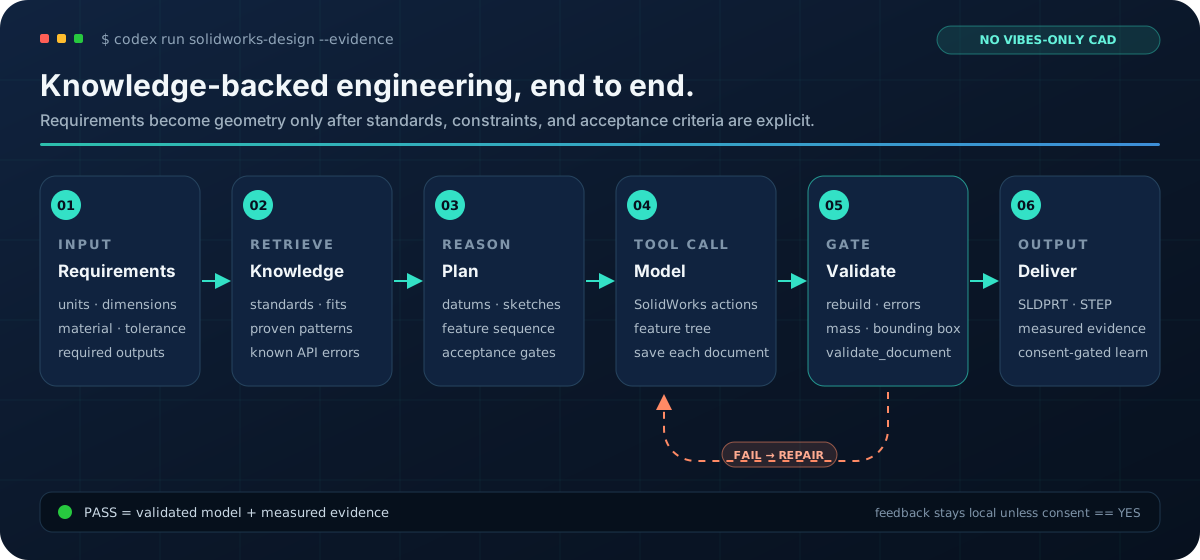
Conceptual workflow preview—not a recorded CAD result. Every reported model still has to pass the measured validation gates shown above.
What the workflow guarantees
This plugin is designed for engineering work where a plausible answer is not
enough. It makes requirements, knowledge lookup, modeling, and validation
explicit parts of one workflow:
flowchart LR
    A[Design request] --> B[Requirements and pre-start checks]
    B --> C[Standards and knowledge lookup]
    C --> D[Feature and datum plan]
    D --> E[SolidWorks modeling]
    E --> F{validate_document passes?}
    F -- No --> G[Inspect and repair]
    G --> E
    F -- Yes --> H[Save, export, and report evidence]
    H --> I[Build session lessons]
    I --> J{User consent?}
    J -- Yes --> K[Submit validated feedback]
    J -- No --> L[Keep the session local]
| Boundary | Behavior |
|---|---|
| Engineering inputs | Units, dimensions, material, tolerances, and outputs are confirmed before geometry changes. |
| Knowledge | Standards, proven build instructions, macros, errors, and lessons are retrieved before modeling. |
| CAD validation | Rebuild state, feature tree, mass, bounding box, and validate_document determine pass or fail. |
| Privacy | Feedback is local by default and is submitted only with explicit or previously saved consent. |
60-second tour
After installing the plugin, start a new Codex task with a concrete engineering
request. For example:
Design a metric stepped shaft in SolidWorks.
Units: mm
Material: AISI 1045
Overall length: 160
Bearing seats: 25 h6 x 30 long at both ends
Center section: 35 mm diameter
Output: saved part, STEP export, mass, bounding box, validation report
The workflow will stop for any geometry-changing requirement that is still
ambiguous, retrieve applicable standards and known patterns, plan the model,
build each document, and report measured validation evidence. A knowledge-base
outage is recorded but does not block local CAD work.
The default knowledge base is https://sw-plugin.ideep.org. Override it with
the SW_KB_HOST environment variable. Read-only runtime endpoints are public;
session feedback is sent only after the user chooses Yes, send now or has
previously chosen Always send.
Install from GitHub
codex plugin marketplace add Erfouni/solidworks-GPT-plugin
codex plugin add solidworks-gpt-plugin@solidworks-gpt
Restart the ChatGPT desktop app or start a new Codex task after installation so
the new plugin skills are loaded.
For a local checkout, replace the GitHub shorthand in the first command with
the absolute path to this repository.
Requirements
- Windows with SolidWorks installed for actual CAD work.
- A SolidWorks automation surface already available to Codex (for example a
SolidWorks MCP/COM integration). This plugin supplies the design and knowledge
workflow; it does not bundle an MCP server or install SolidWorks itself. curlfor knowledge-base calls.- Python 3.9+ for the optional deterministic session and feedback utilities.
Knowledge-base outages never block CAD work. The skills record the outage and
continue with the available SolidWorks tooling and engineering context.
Diagnose local readiness
Run the bundled doctor before the first CAD task:
python plugins/solidworks-gpt-plugin/scripts/doctor.py
It validates Python, the installed manifest/skills/schema, SW_KB_HOST syntax,curl, and the local SolidWorks COM registration. It makes zero network
requests and never launches SolidWorks. Missing optional dependencies are
reported as warnings; require the complete CAD and feedback environment with:
python plugins/solidworks-gpt-plugin/scripts/doctor.py --strict
For CI, support packets, or reproducible installation evidence, use --json.
Host output is credential-free, and endpoint reachability is deliberately not
claimed.
For release notes and project questions, see the
latest release,
the changelog, and
GitHub Discussions.
Privacy and local state
.sw-learner-state.jsonstores the current session ID and submission metadata
in the working directory.~/.sw-feedback-prefcontainsalwaysonly after the user explicitly chooses
Always send.- Feedback may include build instructions, generated macros, resolved errors,
lessons, and model images. The payload is never submitted without consent
unless the savedalwayspreference is present.
Validate the plugin
From this repository root:
python plugins/solidworks-gpt-plugin/scripts/run_checks.py
The repository also includes the original porting specification and the KB
admin OpenAPI reference under plugins/solidworks-gpt-plugin/docs/.
Contributing
Bug reports, documentation improvements, and focused pull requests are
welcome. Start with CONTRIBUTING.md, use the structured issue
templates, and run the repository checks before opening a pull request.
License
Yorumlar (0)
Yorum birakmak icin giris yap.
Yorum birakSonuc bulunamadi