Pacer
Health Uyari
- License — License: MIT
- Description — Repository has a description
- Active repo — Last push 0 days ago
- Low visibility — Only 5 GitHub stars
Code Basarisiz
- rm -rf — Recursive force deletion command in .github/workflows/release.yml
- rm -rf — Recursive force deletion command in bin/dev-install.sh
Permissions Gecti
- Permissions — No dangerous permissions requested
Bu listing icin henuz AI raporu yok.
Native macOS app for tracking Claude Code usage — tokens, cost, rate-limit pacing, per-project breakdowns. SwiftUI + SwiftData.
Pacer




Know what Claude Code is costing you — and how close you are to your limits — right from your Mac's menu bar.
Pacer is a free, open-source macOS app that keeps an eye on your Claude Code
usage: the tokens you're burning, what they cost, how close you are to your
5-hour and weekly rate limits, and where the spend is going — by project, by
model, by day. It sits quietly in your menu bar, keeps itself up to date, and
keeps all of your data on your own Mac.
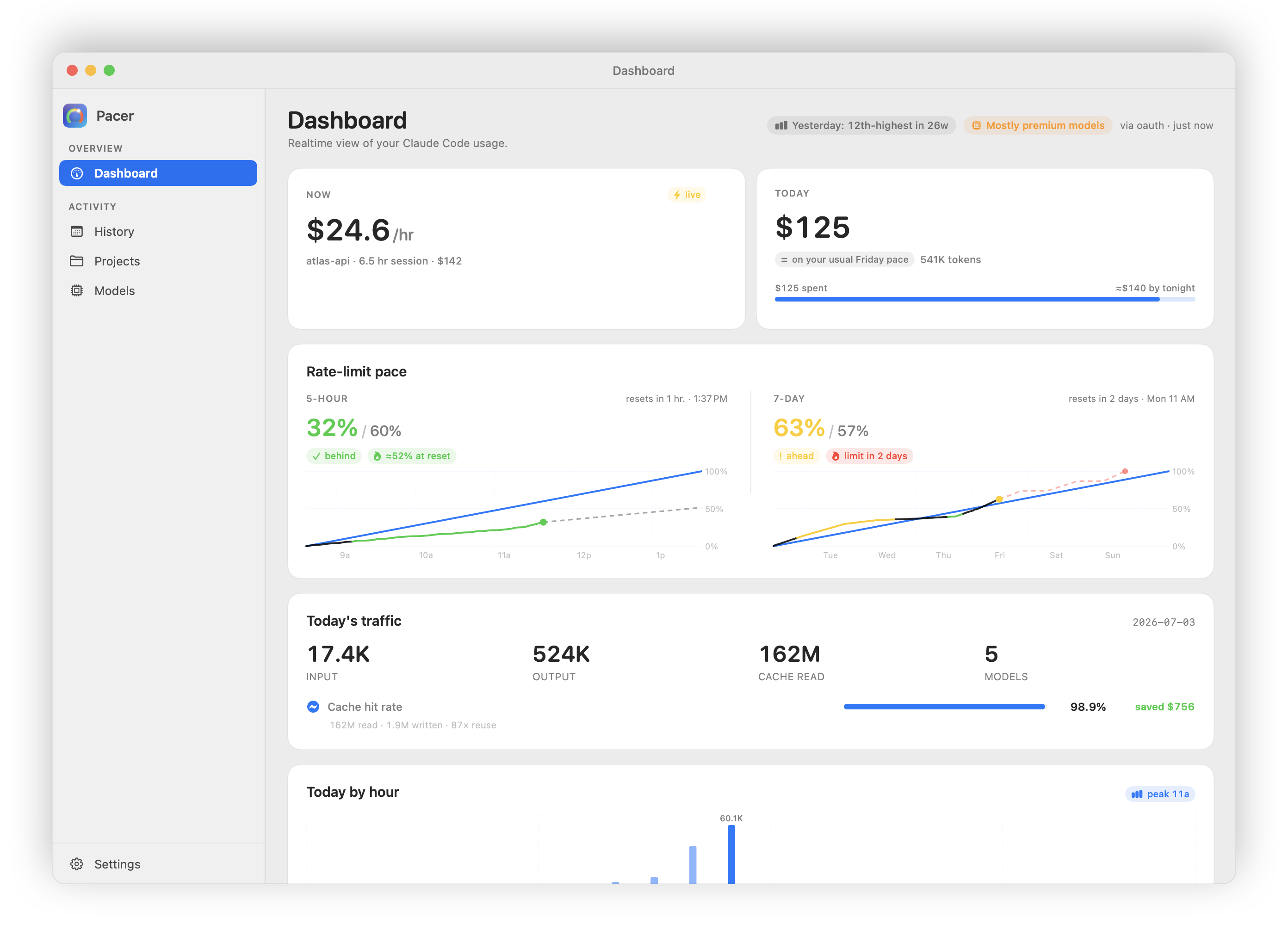
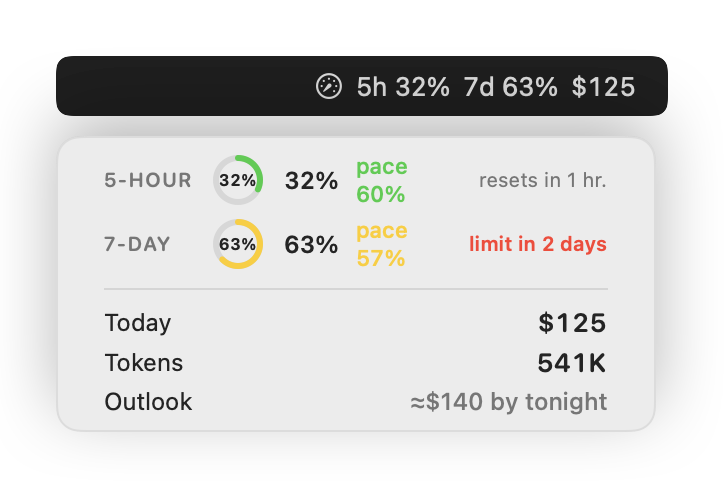
Menu bar & click-down popover |
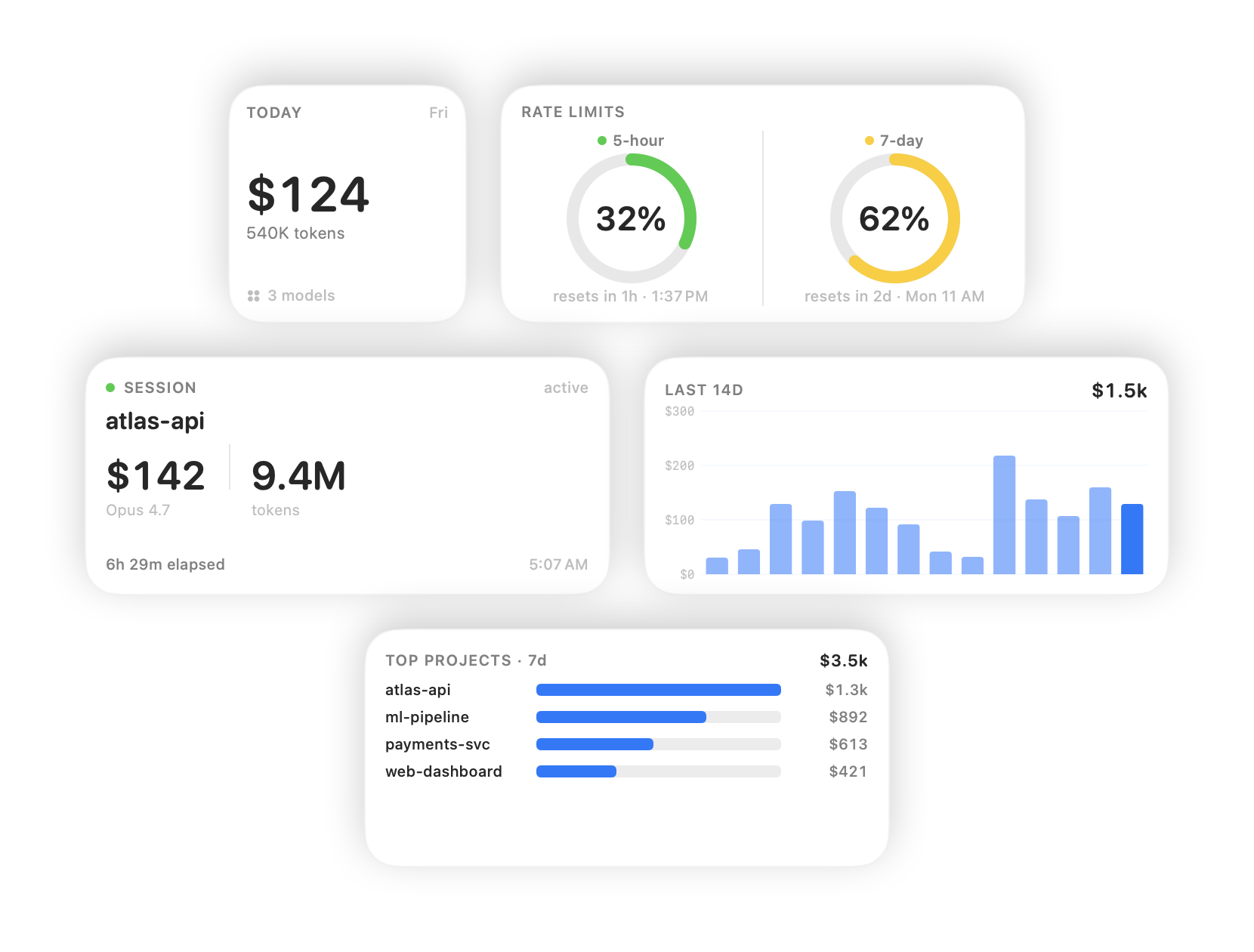
Home-screen & Notification Center widgets |
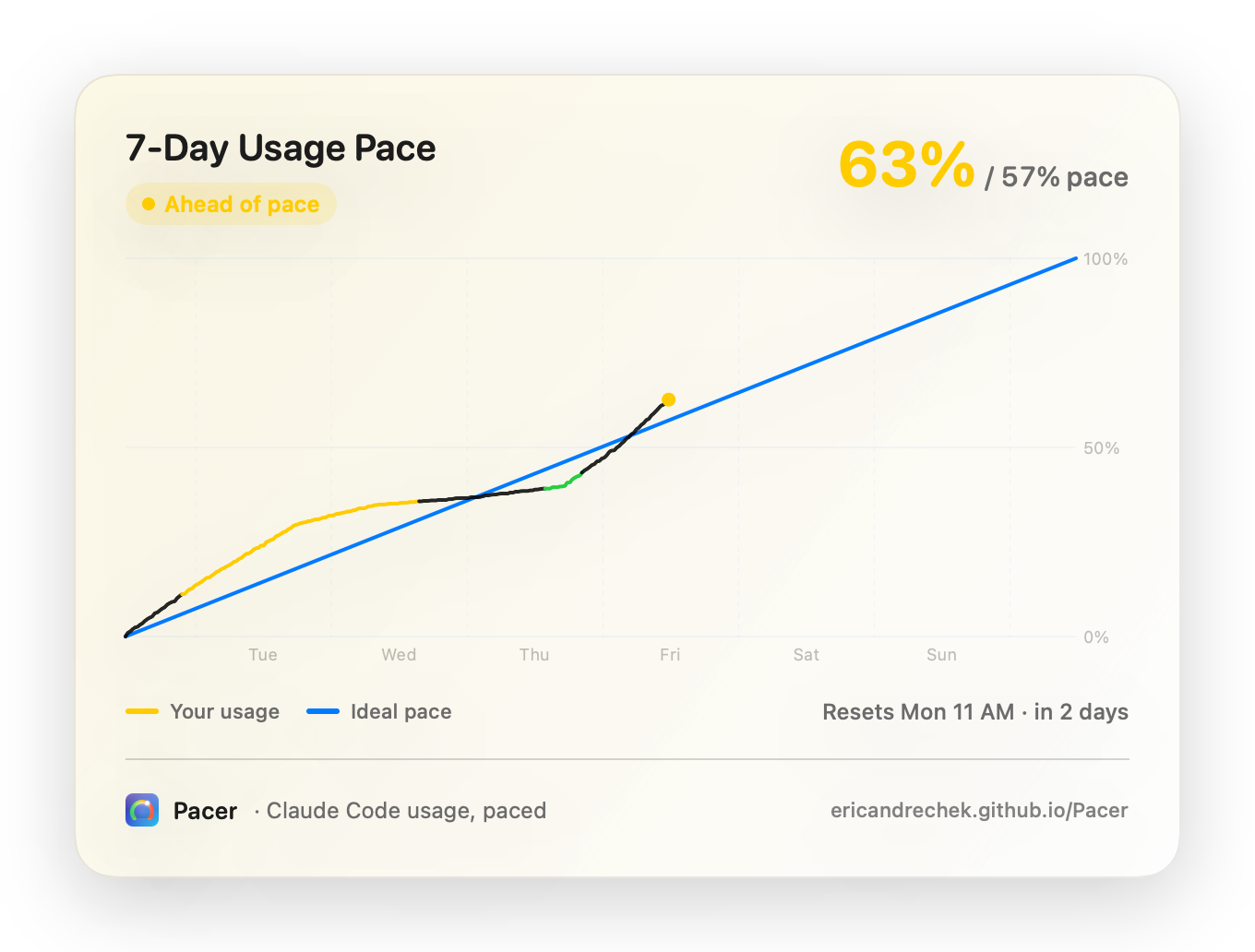
Share your 5-hour & 7-day burn charts as an image
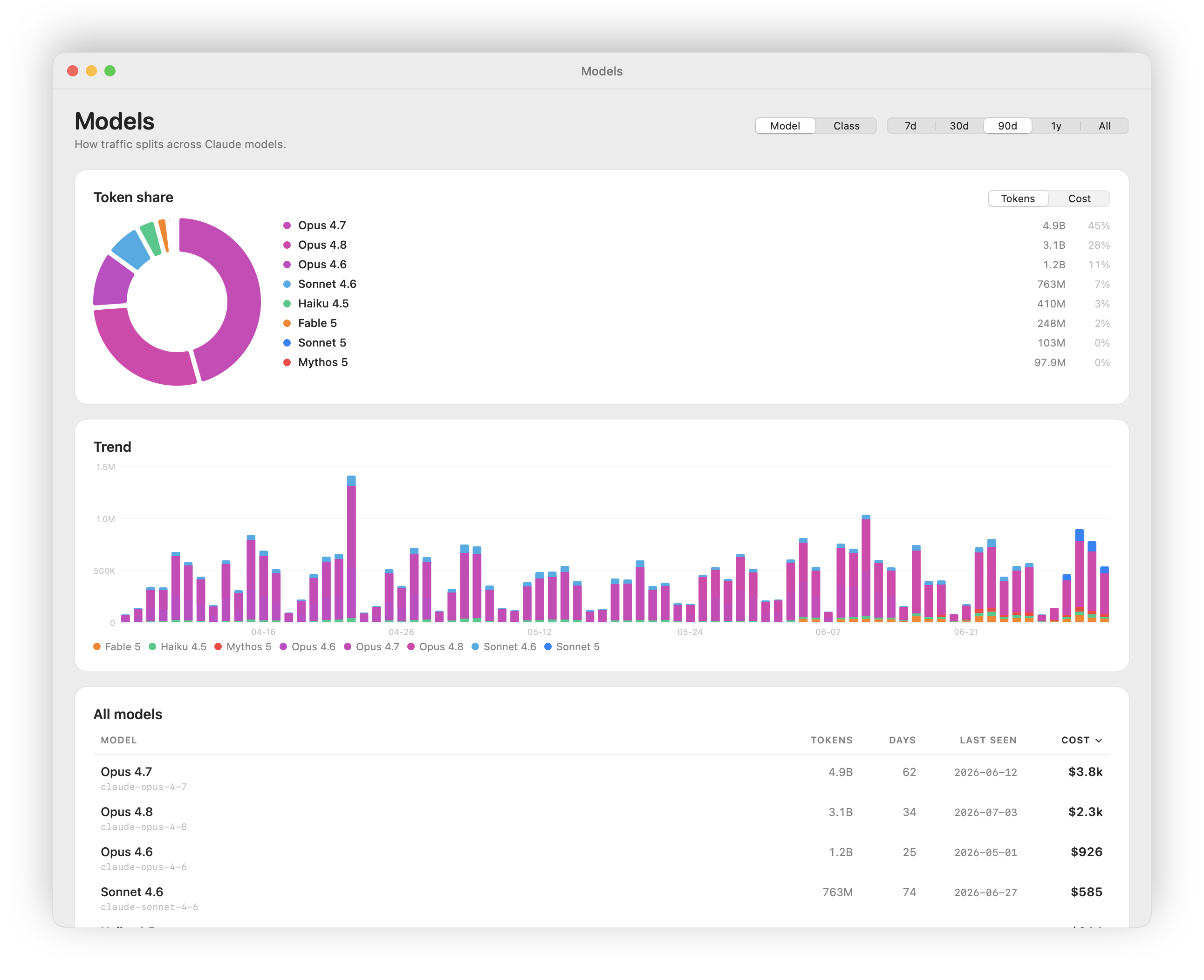
Models — share, trend, and per-model table; group by model or class
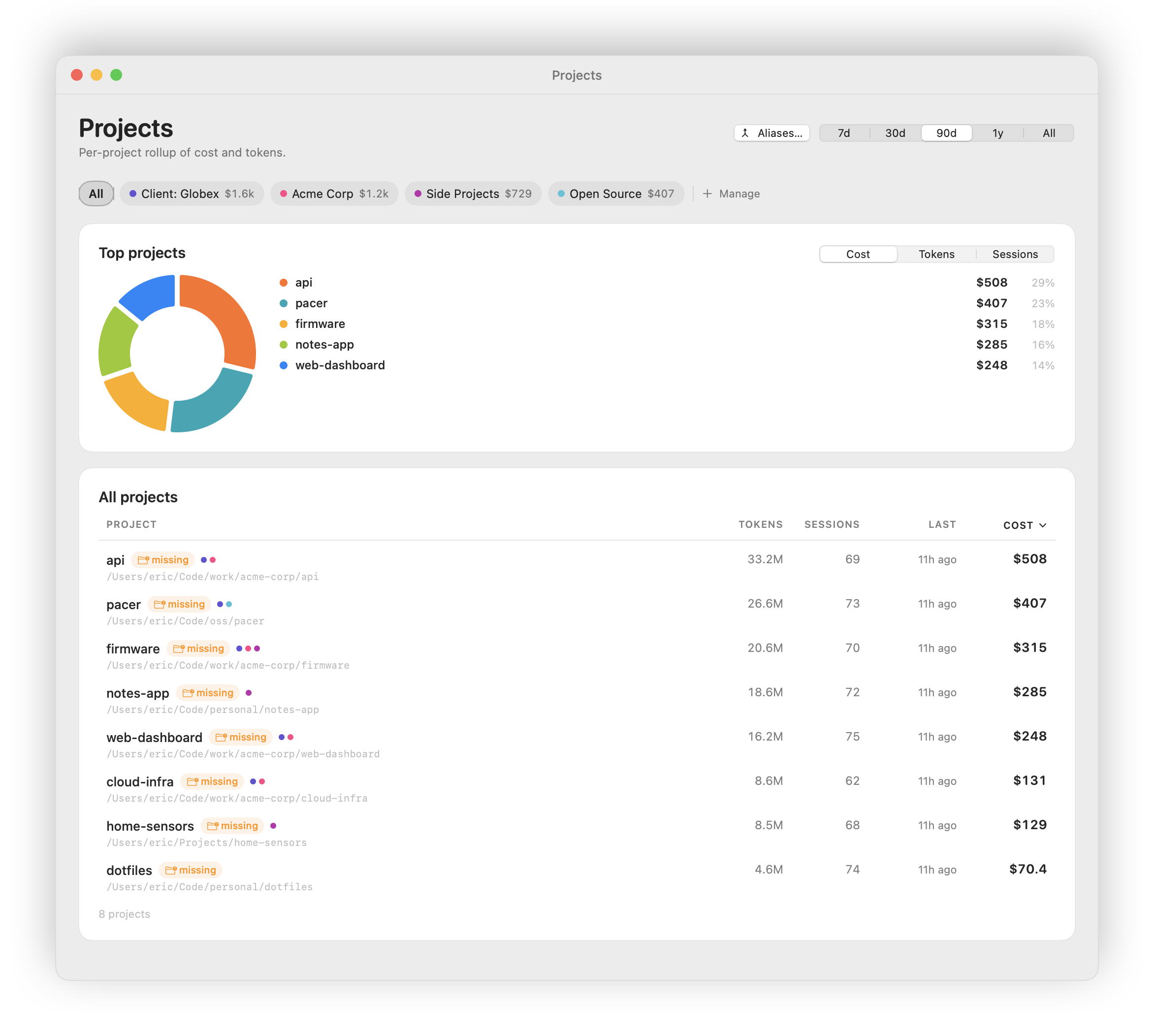
Projects & Collections — group projects, scope totals to a collection
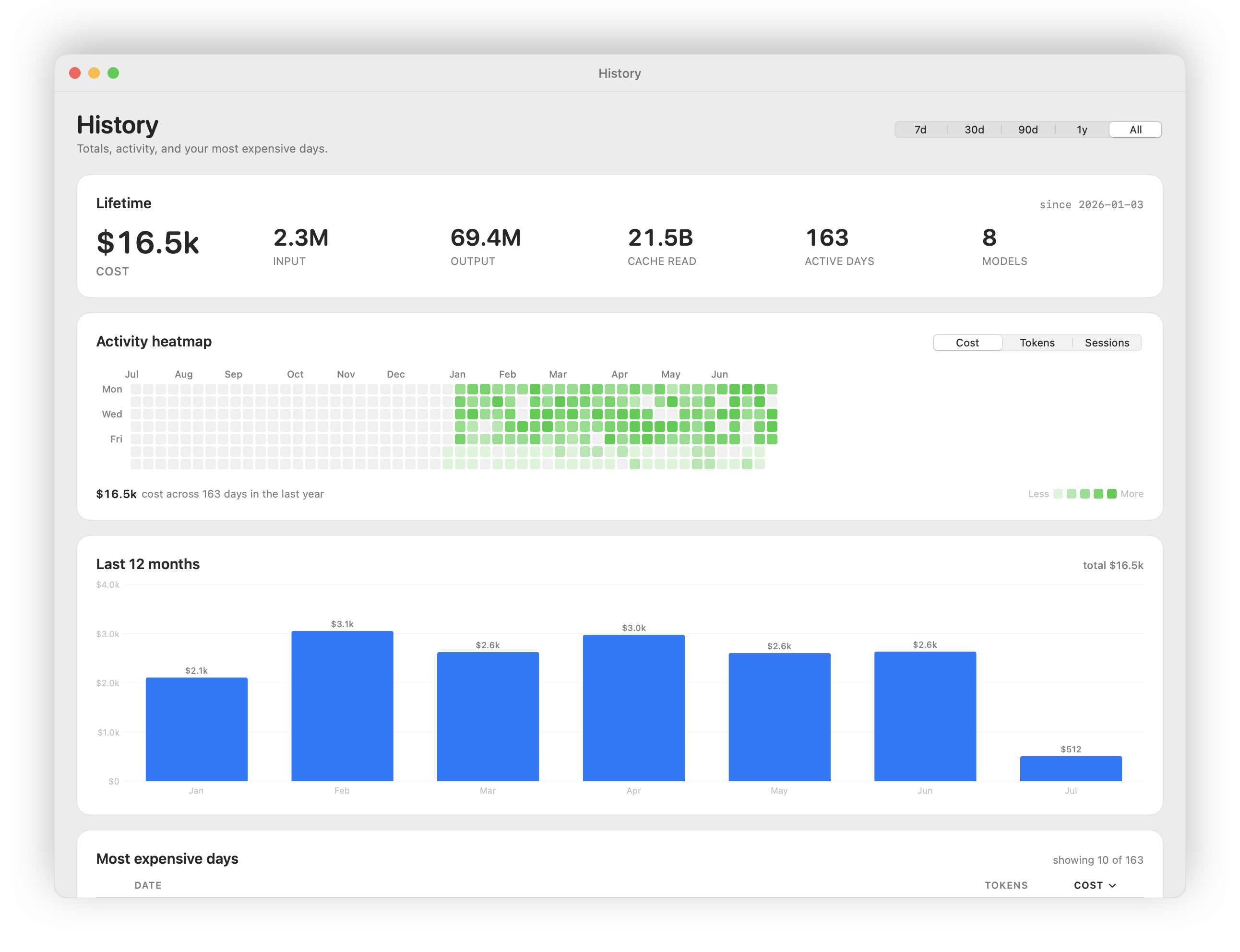
History — lifetime totals, six-month heatmap, monthly spend
Heads up — early days. Pacer is pre-1.0 and under active development. It
works and it's useful today, but expect the occasional rough edge, and your
saved history may need to be rebuilt between 0.x versions.
Download & install
- Download the latest version →
(grab thePacer-x.y.z.dmgfile under "Assets"). - Open the downloaded file and drag Pacer into your Applications folder.
- Launch Pacer. It lives in your menu bar — look for the little gauge icon
up top (there's no Dock icon). Click it to open the dashboard. - The first time, macOS asks permission for Pacer to read Claude Code's files.
Click Allow — that's how Pacer sees your usage. Nothing leaves your Mac.
That's all. Pacer keeps itself up to date automatically: when a new version
ships, it offers to install it for you — no re-downloading, no reinstalling.
You'll need macOS 15 (Sequoia) or newer, on either Apple Silicon or Intel.
What you get
- Rate-limit pacing. Your 5-hour and weekly windows as easy-to-read pace
charts — are you ahead, on track, or about to hit the wall? Color bands
(behind / on track / ahead / nearly maxed) tell you at a glance, refreshed
every few minutes from Anthropic's usage data. - Costs, your way. See spend the way Claude Code reports it, or have Pacer
price it from tokens itself — switchable in Settings. Daily, monthly, and
all-time totals included. - Where it's going. Break usage down by project — grouped into your own
non-destructive collections — and by model, with every Claude model in its
own color and groupable by class. Drill into any single day, and see a
GitHub-style activity heatmap of the last six months. - Live "today" view. Your current burn rate plus a running "at this pace,
today will end at about $X" projection. - At a glance, always. A configurable menu-bar readout (icon, percent, or
both) plus home-screen-style widgets for cost and pacing. - Optional nudges. Local notifications when you cross a rate-limit threshold
(50 / 75 / 90%) or blow past a daily spending limit you set. Off by default. - Export. Send daily totals, daily-by-model, or per-project numbers to a
CSV for your own spreadsheets.
How Pacer compares
You've got options for keeping an eye on Claude Code usage — Claude Code's own/usage, the popular ccusage CLI, and
several menu-bar apps — the closest being Token Pacer,
a paid, closed-source namesake, plus Claude God and
ccseva. They're good tools; here's
the honest lay of the land.
| Pacer | Token Pacer | Claude God | ccseva | ccusage | CC /usage |
|
|---|---|---|---|---|---|---|
| Form factor | Menu-bar app | Menu-bar app | Menu-bar app | Menu-bar app | CLI | In-terminal |
| Native macOS (not Electron) | ✓ | ✓ | ✓ | – (Electron) | – | – |
| Always-on, glanceable | ✓ | ✓ | ✓ | ✓ | – | – |
| Live limit % from Anthropic's API | ✓ | ✦ | ✓ | ✦ | ✦ | ✓ |
| Pace vs. ideal-burn line | ✓ | – | – | – | – | – |
| End-of-day spend projection | ✓ | ✓ | ✓ | ✓ | – | – |
| Activity heatmap (6 months) | ✓ | – | – | – | – | – |
| Per-project & per-model breakdown | ✓ | ✓ | ✓ | ✓ | ✓ | – |
| Beyond Claude Code (Codex, opencode, …) | – | ✓ | – | – | – | – |
| Home-screen / Notification Center widgets | ✓ | – | ✓ | – | – | – |
| Threshold / budget notifications | ✓ | ✓ | ✓ | ✓ | – | – |
| CSV export | ✓ | ✓ | ✓ | – | ✓ | – |
| ROI: cost vs. git commits | – | – | ✓ | – | – | – |
| Claude Code plugin marketplace | – | – | ✓ | – | – | – |
| Price | Free | $29 one-time | Free | Free | Free | Included |
| Free & open source | ✓ | – | ✓ | ✓ | ✓ | – |
✦ estimates the windows from your local JSONL logs rather than reading
Anthropic's usage API. Token Pacer is a paid, closed-source app, so its column is
read from its public site rather than its source — and some of its features (CSV
export, custom model pricing) are Pro-tier. Best-effort as of June 2026 — these
tools all move fast, so corrections are welcome via an issue or PR.
The gist:
- vs.
/usage— Claude Code's built-in view is a snapshot you ask for in
one terminal; Pacer is the always-on, zoomed-out companion that remembers every
session. The speedometer in one car vs. the dashboard that logs every trip. - vs.
ccusage— a great CLI for scriptable numbers (Pacer's tests even
cross-check their scanner against it); Pacer is the GUI you glance at instead of
a command you re-run, and it reads your actual limit % from Anthropic rather
than estimating from logs. - vs. Claude God / ccseva — the closest rivals, and genuinely nice. Pacer
leans into pacing (your windows against an ideal-burn line, "will I run out
before the reset?"), native + quiet-by-default, and signed/notarized
self-update; Claude God goes further on ROI/git correlation and a plugin
marketplace, and ccseva on its glassy UI. Pick the one that thinks about your
usage the way you do — they coexist happily. - vs. Token Pacer — the close namesake, and the nearest thing to a direct
rival: also a native, local-first macOS menu-bar tracker, and it reaches
wider — covering Codex and opencode alongside Claude Code, with "next action"
nudges. The trade-offs: it's $29 and closed-source, where Pacer is free and
open; Pacer reads your real limit % from Anthropic and adds the ideal-burn
pacing line, the 6-month heatmap, and widgets. Multi-agent and willing to pay?
Fair pick. Claude Code-first and value open source? Pacer.
Privacy
Pacer is local-first. It reads only the files Claude Code already writes to
your own Mac, and it sends nothing about your usage anywhere:
~/.claude/projects/*.jsonl— your session token usage, read on your machine.- The Claude Code login token in your macOS Keychain — used only to ask
Anthropic for your rate-limit status, the same way Claude Code itself does.
The only network connections Pacer makes are:
api.anthropic.com— to check your rate-limit windows (~12 small requests an
hour while it's running).github.com— to check for, download, and install app updates (at launch,
then every 6 hours; installs happen in the background when automatic updates
are on).
No analytics, no telemetry, no third parties. Your data stays on your Mac in~/Library/Group Containers/…/pacer.sqlite, and it persists across app updates.
For developers
Pacer is SwiftUI + SwiftData + Charts, signed with Developer ID and notarized,
auto-updating via Sparkle. Contributions welcome —
see CONTRIBUTING.md.
Components
| Component | Role |
|---|---|
Pacer.app |
Main UI + menu-bar item. Data collection (FSEvents JSONL scan + OAuth poll) runs in-process inside this binary — there is no separate daemon. |
PacerWidgets |
WidgetKit extension — reads the shared App Group store directly. |
PacerCore |
Shared Swift package — parsers, models, scan coordinator, recomputers. |
Building from source
For everyday use, the released DMG
is what you want — this section is only for hacking on Pacer.
Requirements: macOS 15 SDK (Xcode 16+) and xcodegen (brew install xcodegen).
The Xcode project is generated from project.yml — never edit the .xcodeproj
directly.
make verify       # unsigned compile-only check (no Apple account needed)
make test         # PacerCore unit + ground-truth tests
make install      # signed + notarized build → /Applications/Pacer.app
make screenshots  # regenerate the README screenshots (see docs/screenshots.md)
make help         # everything else
make verify and make test need no signing setup and are all that CI runs.
To build a runnable app you need your own Apple Developer account — point the
install at it with PACER_SIGN_IDENTITY="Developer ID Application: <Name> (<TEAMID>)" make install.
See CONTRIBUTING → "Building and running it yourself"
for the full story (and why an App Group ties signing to your Team ID).
AGENTS.md is the deep architectural guide (performance invariants,
the SwiftData schema, the recomputer pattern); docs/ covers the design,
perf-tuning, screenshot generation, and release process.
Releasing
Pushing a vX.Y.Z tag triggers.github/workflows/release.yml, which builds,
signs, notarizes, packages a DMG, signs the Sparkle update, publishes the GitHub
Release, and updates appcast.xml on the gh-pages branch. Seedocs/releasing.md for the secrets and the cut-a-release
checklist.
License
MIT. Pacer reads data from Anthropic's Claude Code product but is not
affiliated with or endorsed by Anthropic.
Yorumlar (0)
Yorum birakmak icin giris yap.
Yorum birakSonuc bulunamadi