leafdesk
Health Warn
- License — License: AGPL-3.0
- Description — Repository has a description
- Active repo — Last push 0 days ago
- Low visibility — Only 5 GitHub stars
Code Fail
- rimraf — Recursive directory removal in desktop/pnpm-lock.yaml
Permissions Pass
- Permissions — No dangerous permissions requested
No AI report is available for this listing yet.
Open-source workspace of pages and databases with realtime collaboration and a built-in MCP server for AI assistants. Run it on your own server, or on your computer with the desktop app for macOS, Windows and Linux.

An open-source, self-hostable workspace of pages and databases with realtime collaboration and a
built-in MCP server, so AI assistants such as Claude can search, read and edit your workspace
after you approve them over OAuth.
Website: esmworks.github.io/leafdesk
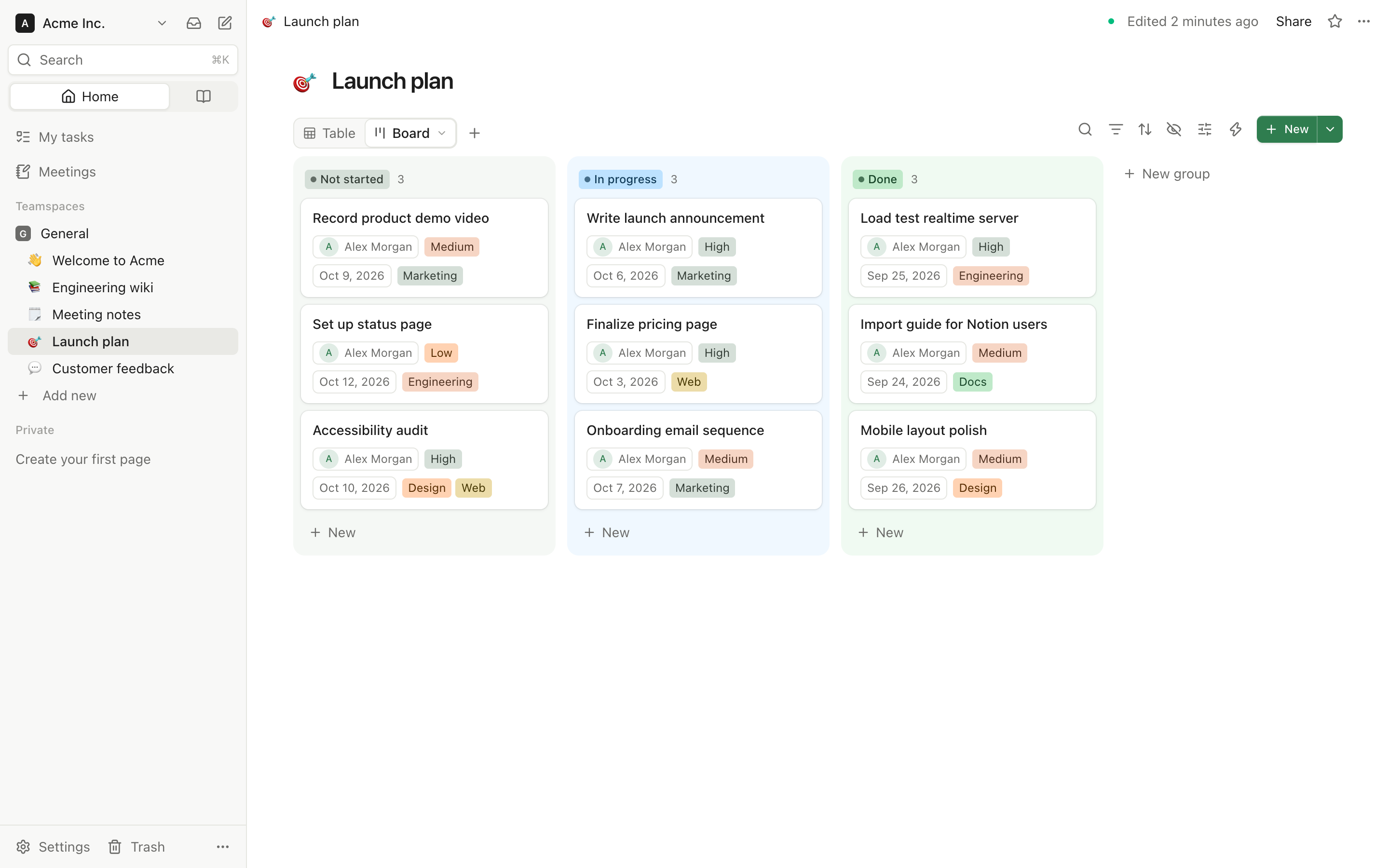
- Pages and databases: a block editor with slash commands, and databases whose rows are pages,
shown as table, board, calendar, gallery, list, feed, timeline, map, chart, dashboard or form, with relations,
formulas and rollups; dashboards put numbers, charts and lists from several databases on a page. - Realtime and offline: edit together with live cursors, keep working without a connection.
- Built for AI assistants: connect Claude or any other MCP client over OAuth 2.1 and approve
what it may read or change; optional AI writing, AI properties, a chat that remembers what you
tell it, reusable skills, and agents that work on database rows, with Anthropic, OpenAI, Google
or a local model. - Bring your pages: import a Notion Markdown & CSV export, an Obsidian vault, a Confluence space, Evernote notebooks,
OneNote pages and sections, a Trello board, an Asana project, a Monday.com board, Markdown files, TextBundles, Word
documents, Google documents, PDFs, web pages saved as one file, a folder or CSV, and keep a database of Jira issues,
GitHub pull requests, a calendar's events, a PostgreSQL table or a Google Sheets sheet in sync. - Ready for a team: teamspaces, page permissions, guests, single sign-on (OIDC, SAML), SCIM,
two-step verification, passkeys and an audit log. - Yours to run: one
docker compose upon your own server, data in your PostgreSQL,
AGPL-3.0 licensed, in 24 languages. - Or on your computer: the desktop app for macOS, Windows and Linux runs Leafdesk on its own,
with no server to set up, and backs your workspace up every day; it connects to a server too.
Claude planning a launch in Leafdesk over MCP: a database, its tasks, a board view and a kickoff
page, all showing up live (sped up):
https://github.com/user-attachments/assets/3540e7dd-1939-414b-a828-4729b12c20e4
Try it in a minute:
mkdir leafdesk && cd leafdesk
curl -fsSLO https://raw.githubusercontent.com/esmworks/leafdesk/main/docker-compose.yml
docker compose up -d
Then open http://localhost:3000 and create an account; the first one administers the server. See
Quick start for settings, versions, upgrades and running behind a domain.
Just for yourself, with no server: download the desktop app from the
latest release (.dmg for macOS, .exe
for Windows, .AppImage for Linux) and choose On this computer. See Desktop app.
Quick start (Docker)
Prebuilt images for amd64 and arm64 are published to
GitHub Container Registry for every release.
You only need the compose file:
mkdir leafdesk && cd leafdesk
curl -fsSLO https://raw.githubusercontent.com/esmworks/leafdesk/main/docker-compose.yml
docker compose up -d
Open http://localhost:3000 and create an account. The first account created on a new server is
its administrator (see Instance administrators), and sign-up stays
open to anyone who can reach the server until you close it (below). Migrations run automatically
when the app container starts.
Nothing has to be edited first. On its first start, the short-lived secrets service makes a
random auth secret (BETTER_AUTH_SECRET) and a random password for the bundled PostgreSQL into thesecrets volume, readable only by the app and the database, and never replaces them; a seconddocker compose up -d uses the same ones. Back up that volume along with pgdata: without the
auth secret every sign-in ends and connections' stored tokens can't be opened. Settings go into a
file named .env next to docker-compose.yml (see
.env.example: the common ones come
first), followed by docker compose up -d. A BETTER_AUTH_SECRET or POSTGRES_PASSWORD set there
takes precedence over the generated one.
- Pin a version: set
LEAFDESK_VERSION=0.6.5in.env. The default islatest. - Upgrade: run
docker compose pull && docker compose up -d. Read the Upgrading notes of
each release in CHANGELOG.md first. Some migrations rewrite a large table, and
pages can't be read or written until they finish; some releases have every page embedded again
for semantic search. On a large server, upgrade at a quiet time. Coming from 0.2.0
(released under the previous name), first follow its upgrade notes. - Upgrading an install whose
.envsetsBETTER_AUTH_SECRETandPOSTGRES_PASSWORD(every
install before one-command setup): download the newdocker-compose.ymland rundocker compose up -d. The.envkeeps working unchanged; its values take precedence over the
generated ones.COMPOSE_PROFILES=bundled-dbno longer does anything and can go. With an
external database (EXTERNAL_DATABASE_URL), addBUNDLED_DB=0, or an unused bundled database
starts next to it. - Build from source: clone the repository and run
docker compose up -d --build.
To stop new sign-ups after creating your own account, set DISABLE_SIGNUP=true in .env and rundocker compose up -d. Server administration shows whether sign-up is open.
You can still bring people in: in Settings → Members, add their email. If they have no account
yet (or its address isn't verified), you get an invitation link to send them. The link works for
7 days and lets only that email sign up, even while sign-up is closed. The workspace join link (Settings → Members → Add members
with a link) is different: anyone holding it can join as a member (or ask an owner to let them
in, see Who can join a workspace), so it never opens closed sign-up.
People without an account can use it only while sign-up is open.
If the app is reachable under another URL (a domain behind a reverse proxy, another port), setAPP_URL to that public origin. It is the OAuth issuer and the MCP resource identifier, so it
must match what clients see.
SOURCE_URL is where people can get the source code of what your server runs. The About tab in
My account links to it, and so does the foot of every published page and public form, for visitors
without an account. Unset, it is the tag of the running release
(https://github.com/esmworks/leafdesk/tree/v<version>), which is right as long as you run
Leafdesk unchanged. If you change Leafdesk and let others use your version over a network, the
license asks you to offer them its source: publish your changes and set SOURCE_URL to them, e.g.https://git.example.com/you/leafdesk/tree/my-changes. Only http:// and https:// links count.
TRUSTED_PROXIES says how many reverse proxies stand in front of the app. Public forms, uploads
and sign-in limit attempts per visitor address, the audit log records it and a workspace's approved
networks are checked against it (the collaboration websocket too); the app reads that
address from X-Forwarded-For only as far as these proxies wrote it. Left unset, it trusts one
proxy, and only for requests that come from a private address (loopback, a private network, as a
proxy on the same machine or Docker network does): a visitor reaching the app's port straight from
the internet is counted by its own address, whatever header it sends. That holds where connections
arrive with the visitor's own address; where every connection comes from Docker's gateway (Docker
Desktop, some IPv6 setups), set TRUSTED_PROXIES yourself. Set 0 when clients reach
the app directly, 1 for a proxy that connects from a public address, 2 behind a CDN plus a
proxy. A number you set is trusted for every request, so then clients must not be able to reach the
app past the proxies. The server log says at start which of these applies.
For load balancers, reverse proxies and orchestrators there are two health endpoints, both
without sign-in and never cached. GET /api/health answers 200 {"status":"ok"} while the server
handles requests and touches nothing else (a liveness probe). GET /api/health/ready also checks
that PostgreSQL answers within 2 seconds and has the newest migration: 200 {"status":"ok"} when
it does, otherwise 503 with the failed check, e.g.{"status":"unavailable","checks":{"database":"unreachable","migrations":"unknown"}} (database:ok, unreachable or timeout; migrations: ok, pending or unknown). Neither says anything
else about the instance; the reason behind a 503 goes to the server log as an error code. The
compose file marks the app healthy on /api/health/ready; the image's own HEALTHCHECK (fordocker run and Docker Swarm) uses /api/health, so a database outage doesn't get the app
container replaced.
On SIGINT or SIGTERM (docker compose stop, a redeploy, Ctrl+C) the server takes no new
requests, closes the editors' connections and waits until every open page is saved, at most eight
seconds, inside Docker's ten-second grace period; it logs it when it had to stop waiting. A second
Ctrl+C exits at once. Browsers keep what they hadn't sent and send it again when they reconnect.
Workspace site on its own domain
A workspace owner can give the workspace site a domain of its own (Settings → Site → Own domain),
like docs.example.com. Requests whose Host is that name (lowercased, port ignored) get the site
at the root: / is its home page, its pages are /<title>-<id>, and links between them stay on
that host. Nothing else is served there: no sign-in, app pages, API, MCP or collaboration socket
(they answer 404; Duplicate goes to the app's own address, APP_URL), so no session is ever used
on that host. The site keeps working at /s/<slug> too, and search engines are pointed athttps://<domain>/…. Other hosts behave as before. The server reads sites' domains every 15
seconds, so with several app instances a new domain may take that long to work on all of them.
A domain only takes effect when the reverse proxy sends it to the app, but any host name it does
send there (other than APP_URL's) can be claimed by a workspace owner: route only APP_URL's
host and the domains you set up for sites to the app.
Leafdesk doesn't verify domains or get certificates; whoever runs the server does:
DNS: a
CNAMErecord from the domain to the app's host name (orA/AAAArecords to the
server's address).Reverse proxy and certificate: route the domain to the app like
APP_URL, passing the
originalHostheader, and serve it over HTTPS. With Caddy, which gets the certificate
itself:docs.example.com { reverse_proxy app:3000 }With nginx, add the domain to a
serverblock with its certificate,proxy_passto the app andproxy_set_header Host $host;.
When the site has a Google Analytics measurement ID, visitors' browsers load Google's tag fromhttps://www.googletagmanager.com on each page of the site at its own domain and send what they
view to Google Analytics (*.google-analytics.com, *.analytics.google.com). Those pages'
Content-Security-Policy allows exactly these hosts. The same pages at /s/<slug> on the app's
address never load it, since members' session cookies live there, and neither does any other page;
without a domain the ID has no effect.
Use an external PostgreSQL
The compose file runs PostgreSQL 18 as its db service. To use a database you already run, setEXTERNAL_DATABASE_URL to its connection URL and BUNDLED_DB=0 in .env; the db service is then
not started. For a Supabase project, see Use Supabase as the database.
Documentation
- Features: everything Leafdesk does, area by area.
- Install and offline use: installing Leafdesk as an app, working offline, the desktop app.
- Running a server: file storage, email, push notifications, social login, maps, administrators, Dokploy, Railway, Supabase.
- Export: Markdown, CSV, PDF and whole-workspace exports, backups, editing a page as Markdown.
- Email on rows: members' mailboxes, mail on database rows, follow-ups.
- Accounts and security: accounts, who can join, two-step verification, SSO and SCIM, security switches, audit log streaming, sensitive content.
- Automations and webhooks: database automations, webhooks in and out, page webhooks.
- AI features: AI providers and models, usage limits, your own AI keys, voice and meeting notes, semantic search, the AI chat from Telegram, skills, snippets.
- Agents: agents, built-in agents, their tools and limits.
- Connections and MCP: connections to other services, and the MCP server for AI assistants.
- REST API: the REST API, tokens and scopes.
- Development: running from source, tests, translations, architecture.
Security
Please report vulnerabilities privately, not in a public issue: SECURITY.md says
how, what is in scope, how quickly we answer and which versions get fixes (the latest release).
It also lists the settings that matter when you run Leafdesk on a server.
License
GNU Affero General Public License v3.0 (AGPL-3.0-only). See NOTICE.
In short: you may use, change and share Leafdesk, and run it for yourself, your team or your
customers. If you change it and let people use your changed version over a network, you have to
offer them its source code under the same license. Releases up to and including 0.5.4 were
published under the Apache License 2.0 and stay available under it.
Trademarks
Notion is a trademark of Notion Labs, Inc. Leafdesk is an independent project, not affiliated with,
endorsed by or sponsored by Notion Labs, Inc. The name appears only to describe what Leafdesk is an
alternative to and what it imports from. Obsidian, Evernote, Trello, Asana, Monday.com, Jira, Confluence, Atlassian and GitHub are trademarks of their owners;
Leafdesk is not affiliated with them either, and names them only to describe what it imports or syncs. The names and logos of
the services in the connection catalog are trademarks of their owners; Leafdesk shows them only to
identify the service a connection reaches, and is not affiliated with or endorsed by them.
Reviews (0)
Sign in to leave a review.
Leave a reviewNo results found