Inferpal
Health Uyari
- License — License: NOASSERTION
- Description — Repository has a description
- Active repo — Last push 0 days ago
- Low visibility — Only 5 GitHub stars
Code Gecti
- Code scan — Scanned 12 files during light audit, no dangerous patterns found
Permissions Gecti
- Permissions — No dangerous permissions requested
Bu listing icin henuz AI raporu yok.
Your AI pair programmer for Visual Studio 2022/2026 & VS Code - 100% local, no API key, no telemetry. Agentic loop with 28 tools: reads, edits, builds, tests, reviews your diff, even drives a live debug session. Ghost-text completions, semantic search, MCP, plans & background tasks, model bench/router. Ollama, LM Studio or OpenAI-compatible.

Inferpal
An agentic developer assistant for Visual Studio 2026 and VS Code — powered entirely by local LLMs: Ollama, LM Studio, or any OpenAI-compatible server. Full tool calling, inline ghost-text completions, semantic codebase search, and zero required cloud dependency.









Inferpal for Visual Studio ·
Inferpal for VS Code
or download the latest release —
Inferpal-vs2026-*.vsix for Visual Studio,
inferpal-vscode-<platform>-*.vsix for VS Code (Windows x64, Linux x64 or Apple Silicon).
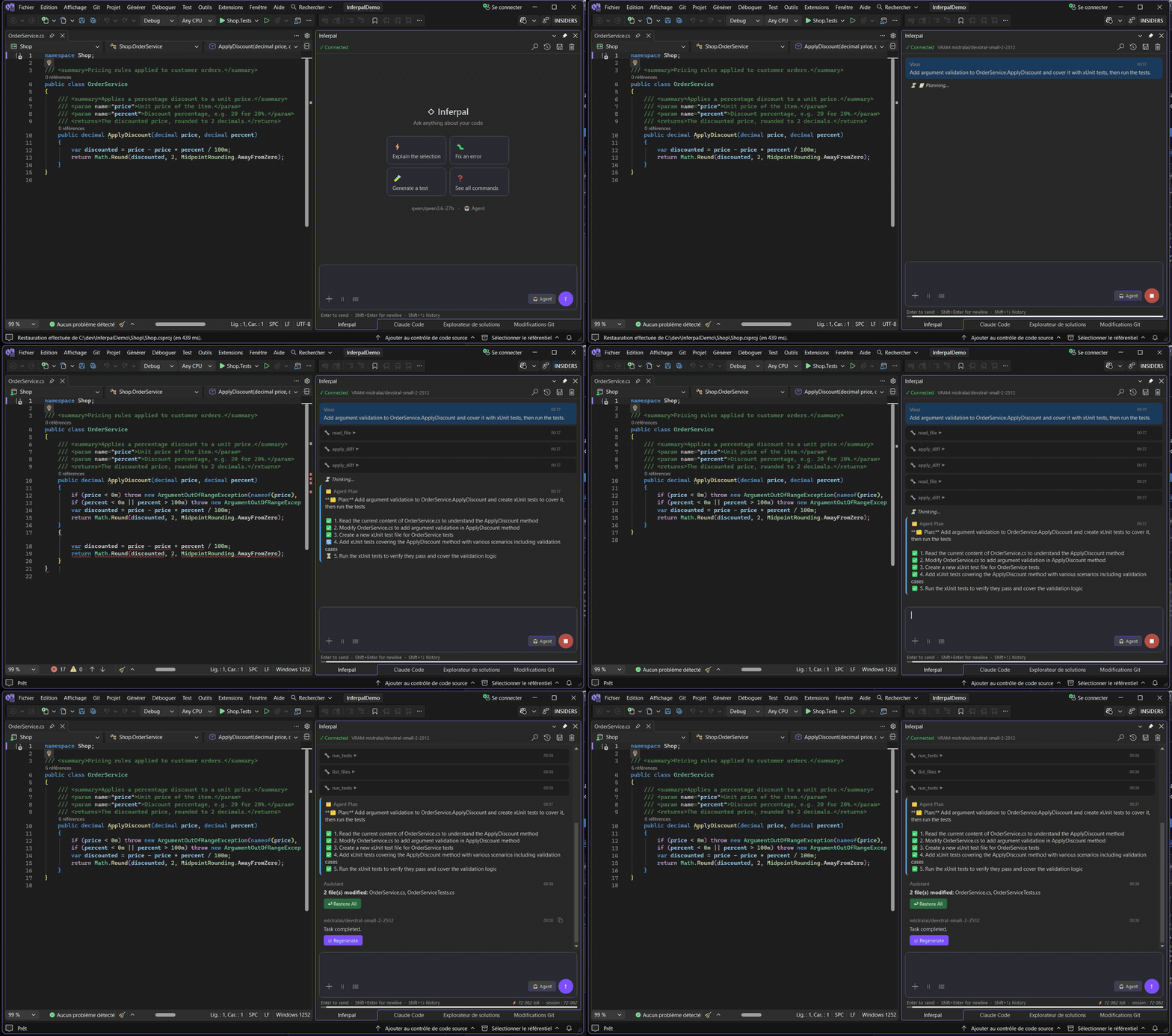
What is Inferpal?
Inferpal turns a local model into a fully agentic coding assistant living inside your IDE.
The model autonomously chains tool calls — reading and writing files, running commands,
building, testing, and searching your codebase — to complete real tasks, while every write
and every command stays behind an approval gate and a workspace sandbox. No API key, no
telemetry, no cloud required.
It ships as a Visual Studio 2026 extension (the primary target) and a
VS Code extension at feature parity since 1.2.0 — one shared engine (Inferpal.Core),
two editors.
Highlights
- Agentic loop — 28 built-in tools, plus user-defined shell tools and MCP servers; independent read-only tools run in parallel.
- Local-first — Ollama, LM Studio, or any OpenAI-compatible server (llama.cpp, vLLM); run the backend locally or on a remote GPU host.
- Inline ghost-text completions — Fill-in-the-Middle as you type (Tab / Esc), with Fast / Default / High-Accuracy presets.
- Semantic codebase search — background indexing with hybrid retrieval (cosine + BM25 fused with RRF) and per-turn auto-context.
- Smart Fix Protocol — after every edit, a polyglot build/typecheck (.NET / TypeScript / Rust / Go) feeds compile errors back so the agent fixes them in the same loop.
- Code actions & Inline Edit — Explain / Fix / Refactor / Add Tests / Add Docstring, plus Ctrl+Shift+I to rewrite a selection in place.
- Safety by default — approval-gated writes/commands, a catastrophic-command hard denylist, force-prompt on indirect execution (
iex,-EncodedCommand, …) and on anything a cloned repository authored (committed validators, permission overlays), committable permission rules, and a hardened SSRF guard. - Governance & knowledge — repo-versioned
.inferpal/rules& AI checks,@Docsexternal-doc indexing, typed@-mentions, and 50+ slash commands. - Built for the IDE — live debugger awareness, VRAM monitoring, VS theme adaptation, and 10 UI languages.
- Debugger loop —
/debug [goal]lets the agent drive a real debug session from the chat: breakpoints, stepping, locals and call-stack inspection, in both editors (Visual Studio via an in-process driver, VS Code via a DAP bridge). Read-only, and starting a session always asks first. /tddwith a debugger (new in 1.6.0) — when a test fails, the loop stops guessing from the runner's text: the failing test is re-run under the editor's debugger and the exception, the stack and the expanded locals go into the fix prompt. Measured on a fixed 12-case bench with a local 27B model: 12/12 fixed against 10/12 without it. It asks once per run, degrades cleanly when no debugger is available — and says so instead of silently looping. Writing a test file during a/tddrun always asks, whatever the permission rules say.- Compiler-backed code intelligence —
analyze_impact,analyze_codeandrename_symbolresolve C# symbols with the Roslyn compiler instead of name matching: real references, not homonyms — andrename_symbolno longer rewrites unrelated tokens that merely share the name. - Anchored diff review —
/checkreviews your pending diff against repo-versioned AI checks and anchors every finding to a diff line (and says so when a location can't be confirmed);/commitdrafts the message,/commit-execruns it only after you've read it. - Persistent plans —
/plan save|list|next|doneturns the current plan into a committable markdown file under.inferpal/plans/that survives/clear, restarts and editors; a plan can never execute anything by itself. - Background agent tasks —
/task [goal]runs a read-only agent while you keep coding (serial queue behind the GPU scheduler);/task proposerecords the writes it would make, and/task applyreplays each one through the normal approval prompt — never granted in advance. - Project onboarding — a committable, non-privileged
.inferpal/project.jsonprofile plus/onboard(report, apply model-role recommendations, generate the project context file). Classified by allow-list: unknown keys are ignored, never interpreted. - Multi-model toolkit —
/benchscores your installed models per role,/arenaruns blind A/B duels, and the Model Router sends background tasks (titles, commit messages, summaries) to a small utility model — never cold-loading one. - Conversation branching —
/branch <n>forks a conversation at any turn: the branch keeps turns 1..n and the conversation continues there, while the original is written back to disk first./branchlists the branch points and the family tree,/branch <name>switches. Branches are plain session files, so nothing else had to learn about them. - Transparency — the Context X-Ray panel breaks down the exact prompt sent to the model, layer by layer, with per-layer toggles;
/replayreconstructs an agent run post-mortem;/fix/refactor/docshow a per-hunk inline diff preview before touching your buffer. - VS Code at parity — the same chat (markdown, tool bubbles, plan display, typed
@-mentions, slash commands with autocomplete), the same settings, the same approvals and inline FIM completions, backed by a bundled self-contained host (no .NET install needed).
See docs/features.md for the full functional tour.
Requirements
| Requirement | Details |
|---|---|
| Editor | Visual Studio 2026 — Community / Professional / Enterprise — or VS Code (Windows x64, Linux x64, or Apple Silicon). ⚠ The Visual Studio listing shows 17.14 as its floor: since Visual Studio 2026 only the lower bound of an installation target is evaluated, and 18.0 is refused as experimental. The in-editor half (ghost text, inline-diff preview, /tdd debugger driver) still requires 2026. |
| .NET SDK | .NET 8 (building from source only — the VS Code VSIX bundles its own runtime) |
| Model server | Ollama (default — full hardware-aware features), LM Studio, or any OpenAI-compatible server, local or remote |
Tool calling is required (e.g.
llama3.1,qwen2.5-coder,mistral-nemo;llama3v1 does not).
Inline completions need a FIM model; semantic search works best with a dedicated embedding model.
Quick Start
Install the extension:
- Visual Studio: search Inferpal in Extensions → Manage Extensions, or
install it from the Marketplace; - VS Code: search Inferpal in the Extensions view, or
install it from the Marketplace; - or from the latest release:
double-clickInferpal-vs2026-<version>.vsix(close Visual Studio first — the merge that
registers an extension gives up, silently, if any part of the configuration is in use), orcode --install-extension inferpal-vscode-<platform>-<version>.vsix; - or build from source:
dotnet build Inferpal/Inferpal.csproj— see Development.
- Visual Studio: search Inferpal in Extensions → Manage Extensions, or
Start a model server:
ollama serve          # LM Studio / any OpenAI-compatible server also work
ollama pull llama3.1
In Visual Studio open Tools → Inferpal (or Alt+B / Alt+O); in VS Code, open the Inferpal view in the Activity Bar.
Open Inferpal Settings, pick the provider, set the server URL, select a model, click Test, then start chatting. (Both editors share the same Inferpal configuration.)
Full walkthrough: Getting Started.
Documentation
Complete functional and technical documentation lives in docs/.
| Functional | Technical |
|---|---|
| Getting Started · Providers · Configuration | Architecture |
| Features · Slash Commands · Tools · Mentions | Development |
| Search & Indexing · MCP · Rules & Checks · Remote Inference |
Contributing
Contributions are welcome — see Development for the build, the
project layout, and how to add a tool or a language. Quick version: implement ITool,
register it in ToolRegistry.cs, and add any new strings to all 10 .resx files and toStrings.cs.
License
Licensed under the GNU GPL v3.
Acknowledgments
Developed with the assistance of Claude Opus 5.0 (Anthropic).
Yorumlar (0)
Yorum birakmak icin giris yap.
Yorum birakSonuc bulunamadi