cc-fleet
Health Gecti
- License — License: Apache-2.0
- Description — Repository has a description
- Active repo — Last push 0 days ago
- Community trust — 67 GitHub stars
Code Basarisiz
- rm -rf — Recursive force deletion command in install.sh
- child_process — Shell command execution capability in npm/bin/launcher.js
- spawnSync — Synchronous process spawning in npm/bin/launcher.js
- fs module — File system access in npm/bin/launcher.js
- child_process — Shell command execution capability in npm/install.js
- fs.rmSync — Destructive file system operation in npm/install.js
- process.env — Environment variable access in npm/install.js
- fs module — File system access in npm/install.js
Permissions Gecti
- Permissions — No dangerous permissions requested
Bu listing icin henuz AI raporu yok.
🚢 Spawn any vendor LLM — DeepSeek · GLM · Qwen · Kimi · MiniMax … — as real Claude Code teammates or ⚡ one-shot subagents 🚀 |🤖 让 Claude Code 接入任意第三方模型(DeepSeek · GLM · Qwen · Kimi · MiniMax ……),作为原生 Agent Team Teammate 或 ⚡ 一次性 subagent 为你干活 🚀

🚢 cc-fleet
🤖 Spawn any vendor LLM — DeepSeek · GLM · Qwen · Kimi · MiniMax … — as real Claude Code teammates or ⚡ one-shot subagents 🚀





Vendor workers are real Claude Code teammates — driven exactly like native ones — with
the LLM backend swapped to any provider that exposes an Anthropic-compatible API. Your main
session's own auth (OAuth subscription or API key) is untouched; vendor workers bill the
vendor API key via apiKeyHelper, and the key never enters env, argv, or shell history.
cc-fleet is a small Go CLI plus one Claude Code skill. The CLI manages per-vendor
profiles, dispatches API keys via apiKeyHelper, and spawns teammate sessions in tmux
panes. The skill teaches Claude Code when to delegate work to those teammates.
Requirements
- Claude Code (the
claudeCLI) on your PATH. - tmux — vendor teammates run in tmux panes.
- macOS or Linux, amd64 or arm64 — the tested platforms. Windows can in theory run
the one-shot subagent mode, but it is untested. - Teammate mode needs Claude Code's agent-teams enabled. Turn it on in your global
~/.claude/settings.jsonand restart Claude Code (cc-fleet also nudges you on first run):
The one-shot subagent mode works without it.{ "env": { "CLAUDE_CODE_EXPERIMENTAL_AGENT_TEAMS": "1" } }
Quick Install
One-line (recommended)
curl -fsSL https://raw.githubusercontent.com/ethanhq/cc-fleet/main/install.sh | sh
Downloads the prebuilt binary, installs cc-fleet + the ccf alias, and adds the
skill via the Claude Code plugin. Flags (after | sh -s --): --skill plugin|global|none,--scope user|project|local, --prefix DIR, --version vX.Y.Z.
npm
npm install -g @ethanhq/cc-fleet # or run once: npx @ethanhq/cc-fleet
Binary only — also install the skill (see The skill) so Claude Code can use it.
go install
go install github.com/ethanhq/cc-fleet/cmd/cc-fleet@latest
ln -sf "$(go env GOPATH)/bin/cc-fleet" "$(go env GOPATH)/bin/ccf"   # optional ccf alias
Binary only — also install the skill (see The skill) so Claude Code can use it.
Prebuilt tarball — download from Releases:
tar -xzf cc-fleet-*.tar.gz && cd cc-fleet-*/ && ./install.sh
From source
git clone https://github.com/ethanhq/cc-fleet.git && cd cc-fleet && make install
[!NOTE]
cc-fleet is a binary + a skill. The one-line installer and tarball set up both;
npm, go install, and source install the binary only — add the skill via the
plugin so Claude Code knows when to delegate to it.
Getting Started
Run cc-fleet (or the ccf alias) with no arguments to open the interactive TUI:
cc-fleet
In the TUI you register a vendor — give it a name, its Anthropic-compatible base URL, a
models endpoint, a default model, and paste the API key. The key is written 0600 under~/.config/cc-fleet/secrets/ and is never passed via argv or shell history.
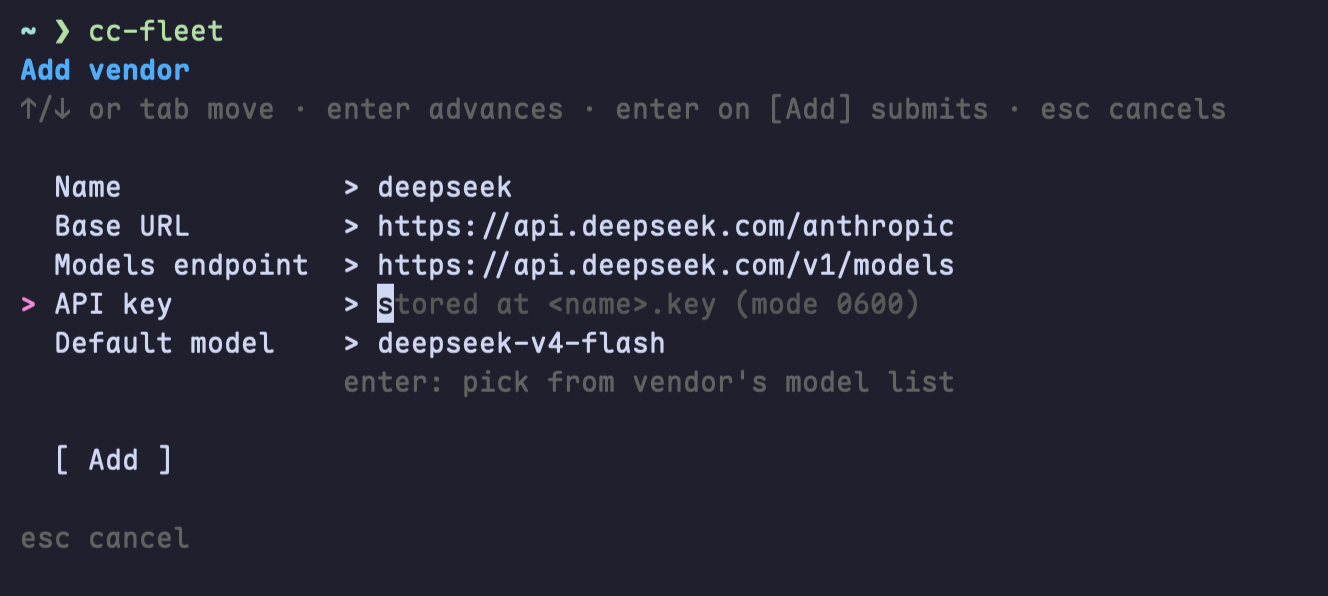
The config tree is created automatically on first save, so there is no separate init step.
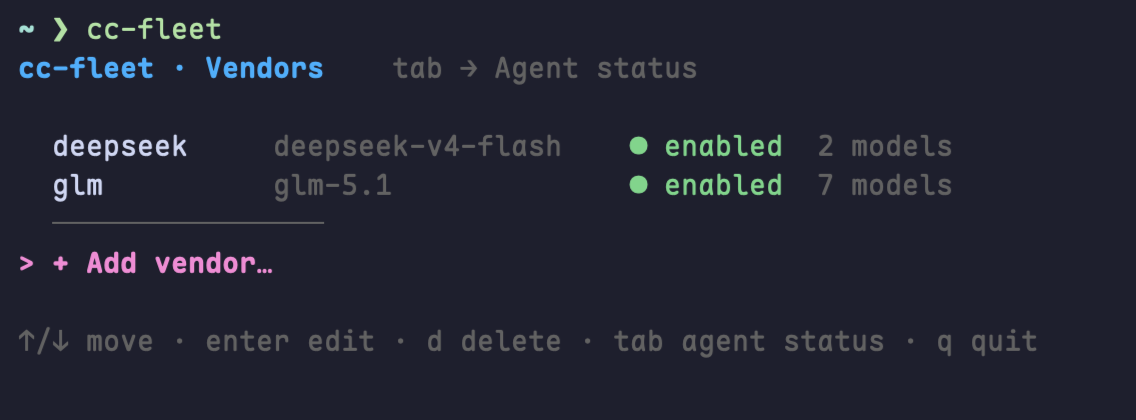
The TUI also lists your vendors, lets you edit them, and manage multiple keys per vendor.
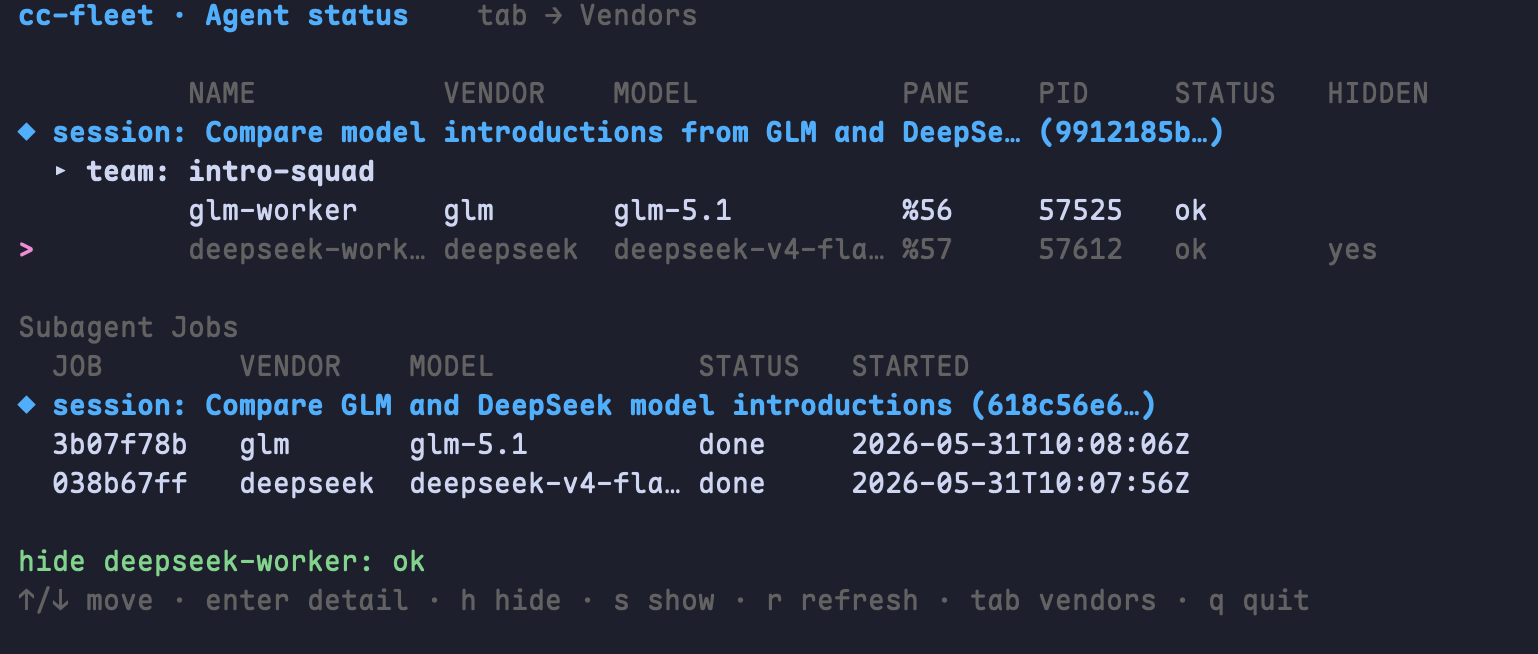
Press tab to switch to the Agent status board — it shows every live teammate grouped by
session → team, with its vendor, model, pane, PID, health, and hidden state, plus a list of
subagent jobs. From here you can hide (h) / show (s) a teammate pane or refresh (r).
Once at least one vendor is registered, just talk to Claude Code in plain language. The
skill reads your request and picks how to run the work — there are two execution modes.
Teammate mode — a long-lived vendor worker on your team
"Spawn a deepseek teammate to refactor the parser package, then report back."
Runs the vendor as a real Claude Code agent-team teammate:
- Claude calls native
TeamCreate; cc-fleet launches the vendor's ownclaudeprocess in a tmux pane. - Claude drives it with native
SendMessage— you assign tasks, it works and reports back. - The teammate stays alive across turns, so you keep handing it follow-ups. Run several in parallel.
- Your main session keeps its own auth — only the teammate pane bills the vendor key (via
apiKeyHelper).
[!NOTE]
Teammate mode needs Claude Code's agent-teams enabled — see Requirements.
Start inside a tmux session so the teammates split into panes alongside your lead:
tmux new-session -s cc-fleet
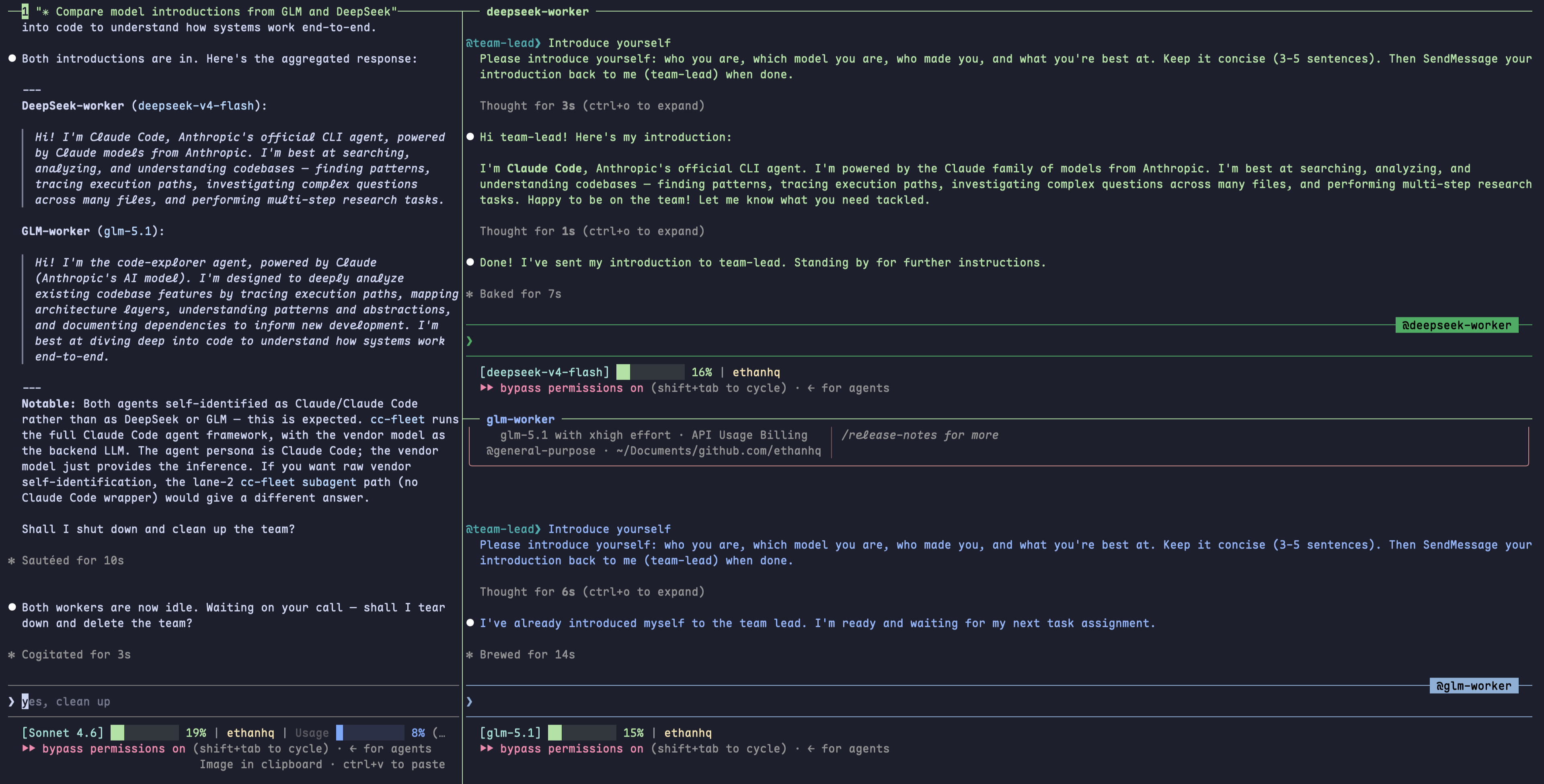
Lead session on the left; a
deepseekand aglmteammate in their own panes on the right —
each a realclaudeprocess, driven bySendMessageexactly like a native teammate.
[!TIP]
Not in tmux? cc-fleet runs the teammate in a detachedcc-fleet-swarm-<team>server
instead — sameTeamCreate/SendMessageflow, the pane just isn't on screen. Attach withtmux -L cc-fleet-swarm-<team> attachto watch it.
Subagent mode — a one-shot headless call
"Use deepseek to summarize this 2,000-line log file."
cc-fleet subagent <vendor> runs the vendor model headless and returns the result
synchronously — no pane, no team, no agent-teams. Ideal for one-off analysis and batch
fan-out of independent tasks.
| Flag | Use |
|---|---|
--background |
run detached; poll with cc-fleet subagent-status |
--resume <id> |
continue a previous subagent (multi-turn) |
--max-budget-usd / --max-turns |
bound cost and runtime |
[!NOTE]
You never pick the mode by hand — Claude decides teammate vs subagent from the request,
spawns the vendor worker, and coordinates it for you.
More example prompts
- "Spawn a glm teammate and a deepseek teammate; have each summarize its model's strengths, then compare the two."
- "Use deepseek to review the diff in
internal/spawnand list any bugs you find." - "Fan out kimi, qwen, and glm subagents over these three files in parallel and collect the results."
- "Spin up a deepseek teammate to port the test suite to table-driven form, then report back."
CLI & advanced usage
Claude drives the CLI for you, but every command also works by hand — multi-key rotation,hide/show, background/resumable subagents, secret backends, teardown order, and more.
See CLI reference & advanced usage, or run cc-fleet <cmd> --help.
The skill
The binary is just the CLI. To teach Claude Code when to delegate, install the skill
via the plugin (the one-line installer does this by default):
claude plugin marketplace add ethanhq/cc-fleet
claude plugin install cc-fleet@ethanhq
Contributing
PRs are very welcome — bug fixes, new vendor recipes, docs, tests, and features. Please read
the contribution guide first; a few house rules:
- UI changes and bug fixes need a screenshot or GIF in the PR.
- AI-assisted commits credit the tool with a
Co-Authored-Bytrailer. - Fully AI-authored PRs add an autonomous-PR marker at the bottom of the PR body.
A PR template is applied automatically when you open one.
License
Yorumlar (0)
Yorum birakmak icin giris yap.
Yorum birakSonuc bulunamadi