fonos
Health Warn
- License — License: MIT
- Description — Repository has a description
- Active repo — Last push 0 days ago
- Low visibility — Only 8 GitHub stars
Code Pass
- Code scan — Scanned 12 files during light audit, no dangerous patterns found
Permissions Pass
- Permissions — No dangerous permissions requested
No AI report is available for this listing yet.
Hold a hotkey, speak, and route the result where you need it: cursor, notebooks, meeting notes, text-to-speech, or an AI agent. A local-first, provider-agnostic voice terminal for macOS & Linux — bring your own OpenAI/Anthropic/Google/OpenRouter keys, or run locally with Ollama/LM Studio.
Fonos
A voice terminal for macOS and Linux. Inspired by Whisper Flow and Taplines, Fonos lets you hold a hotkey, speak naturally, and send the result to the place you actually need it: the cursor, clipboard, a notebook, a meeting transcript, text-to-speech, or an AI agent.



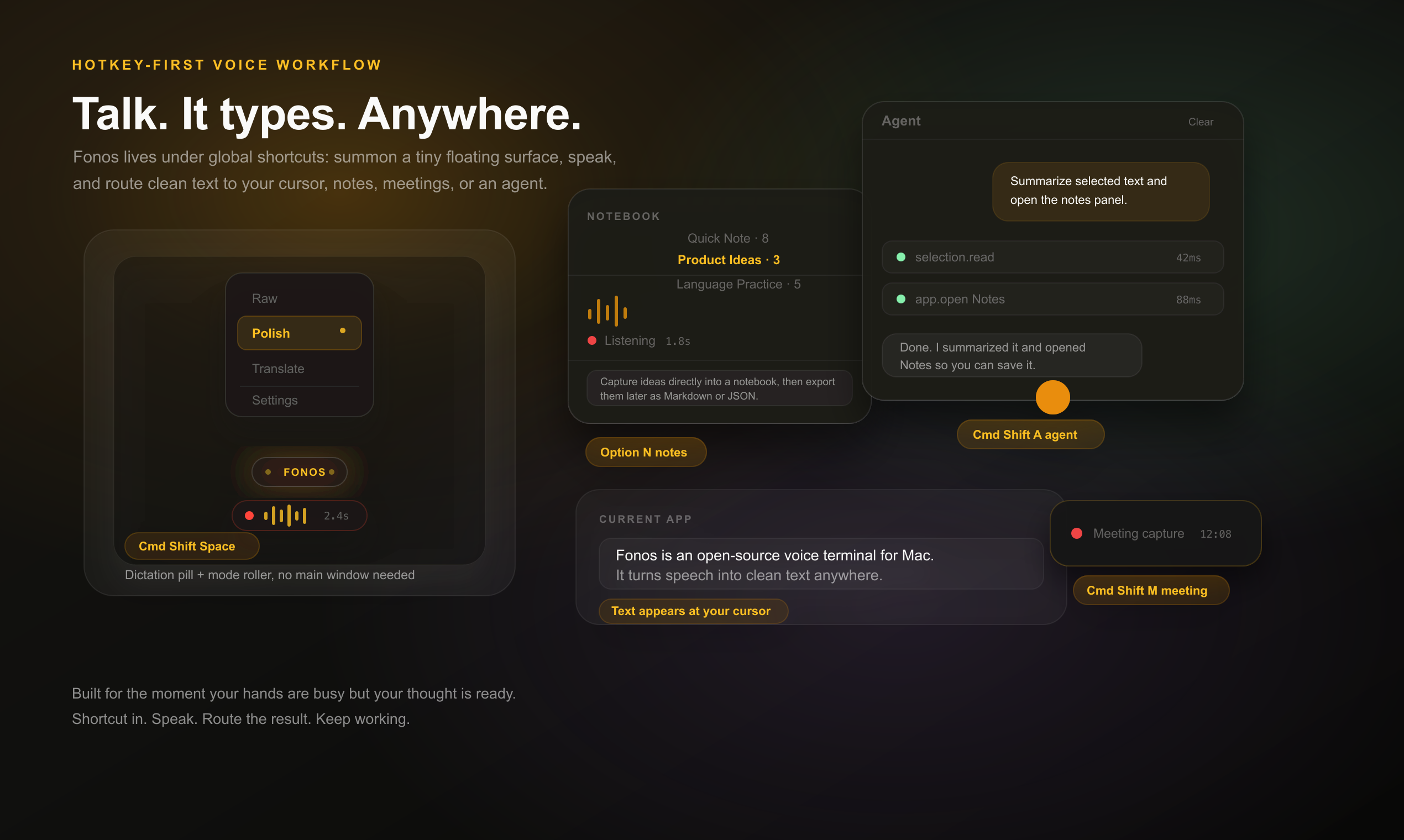
Fonos is open source, local-first, and provider-agnostic. Bring your own API keys for OpenAI, Anthropic, Google, OpenRouter, and more, or run locally with Ollama / LM Studio. Your keys, transcripts, notebooks, and meeting notes stay on your machine.
What it does
- Dictate anywhere: press-and-hold to record, release to transcribe, then optionally clean, rewrite, translate, or paste.
- Stay out of the main window: global hotkeys summon floating controls, so most captures happen without opening the full app.
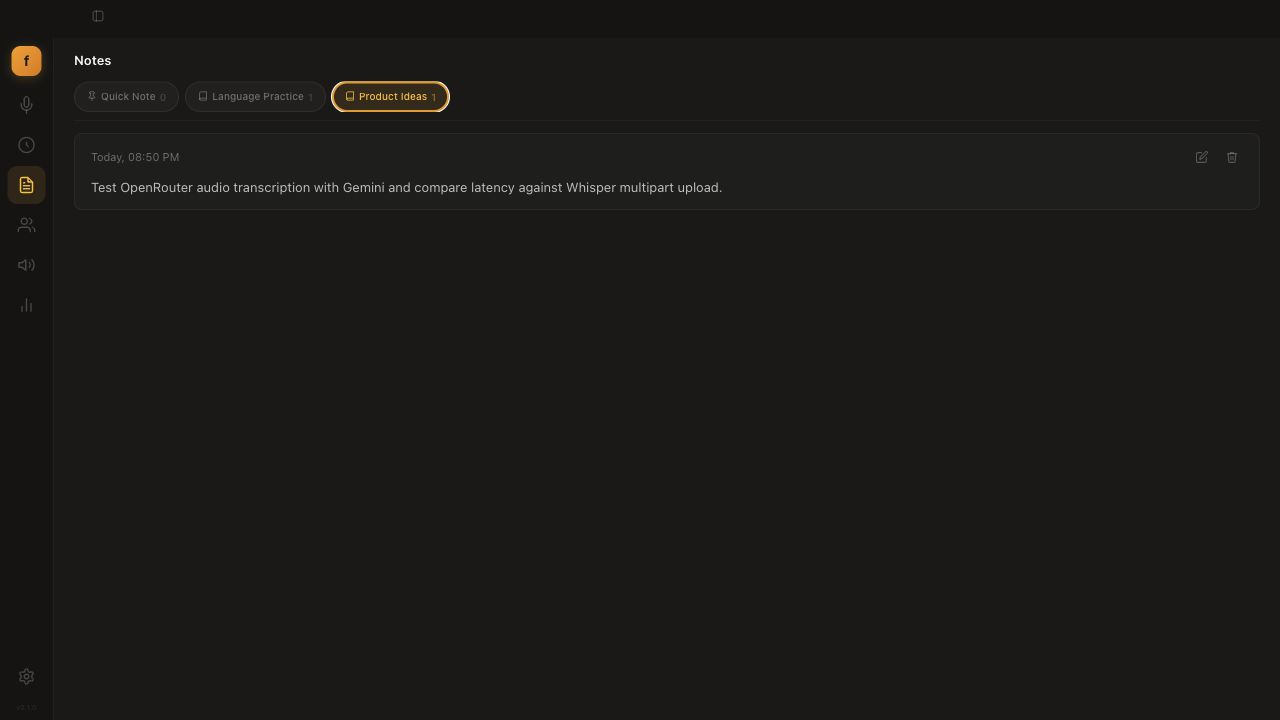
- Turn speech into structured notes: route voice captures into notebooks with custom prompts and export to Markdown or JSON.
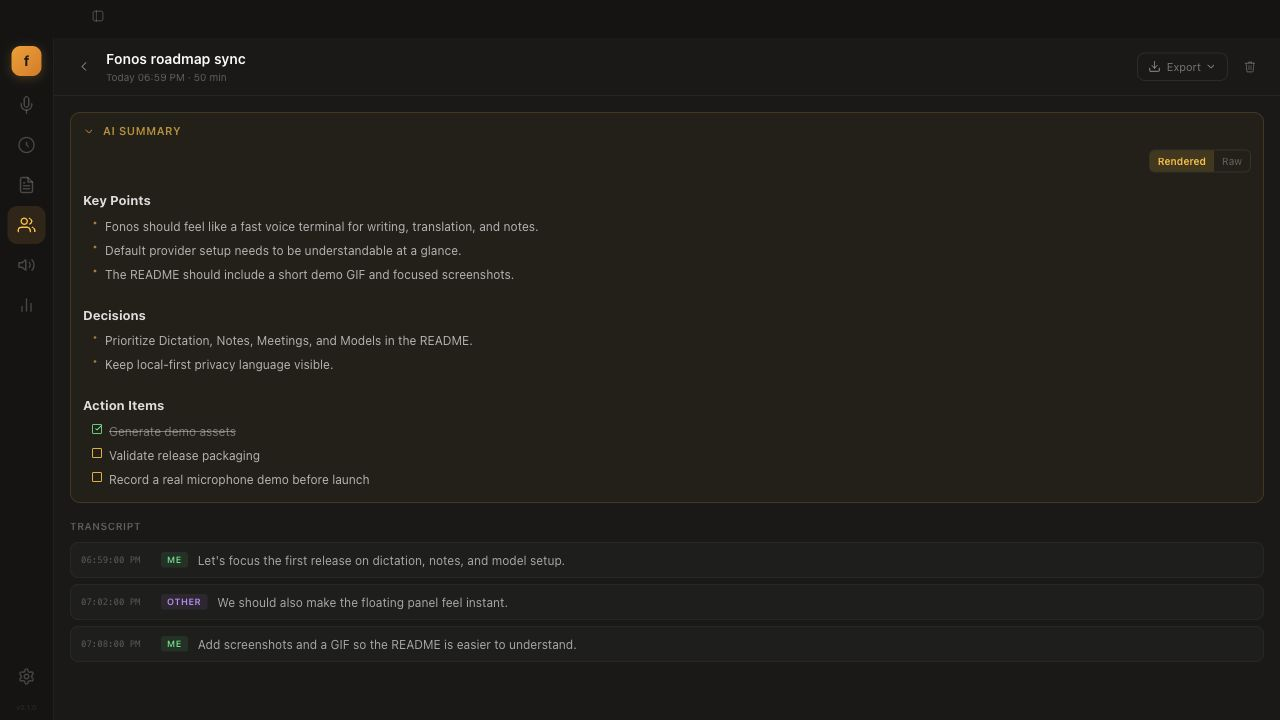
- Capture meetings: record mic + system audio as separate speaker channels, then generate an AI summary with decisions and action items.
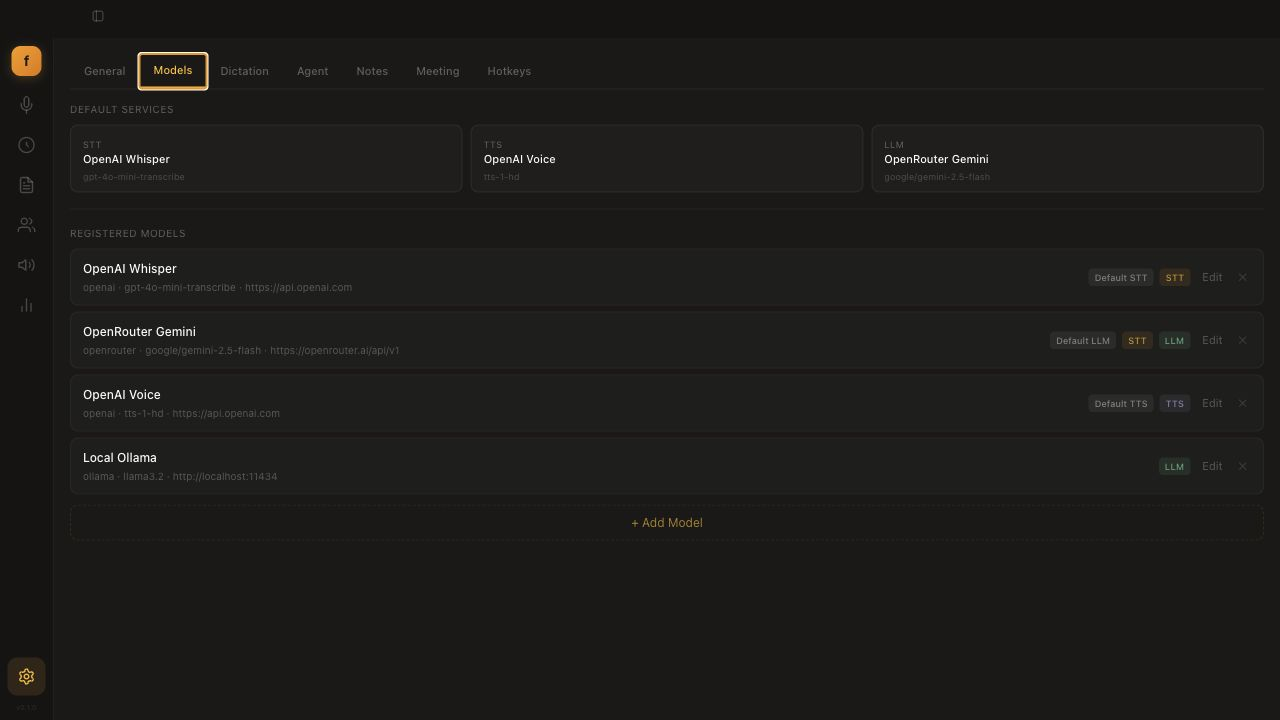
- Configure your own model stack: mix cloud and local STT, LLM, and TTS providers per mode, notebook, or workflow.
- Use your voice as an agent input: talk to an AI agent with allow/block lists for tool execution.
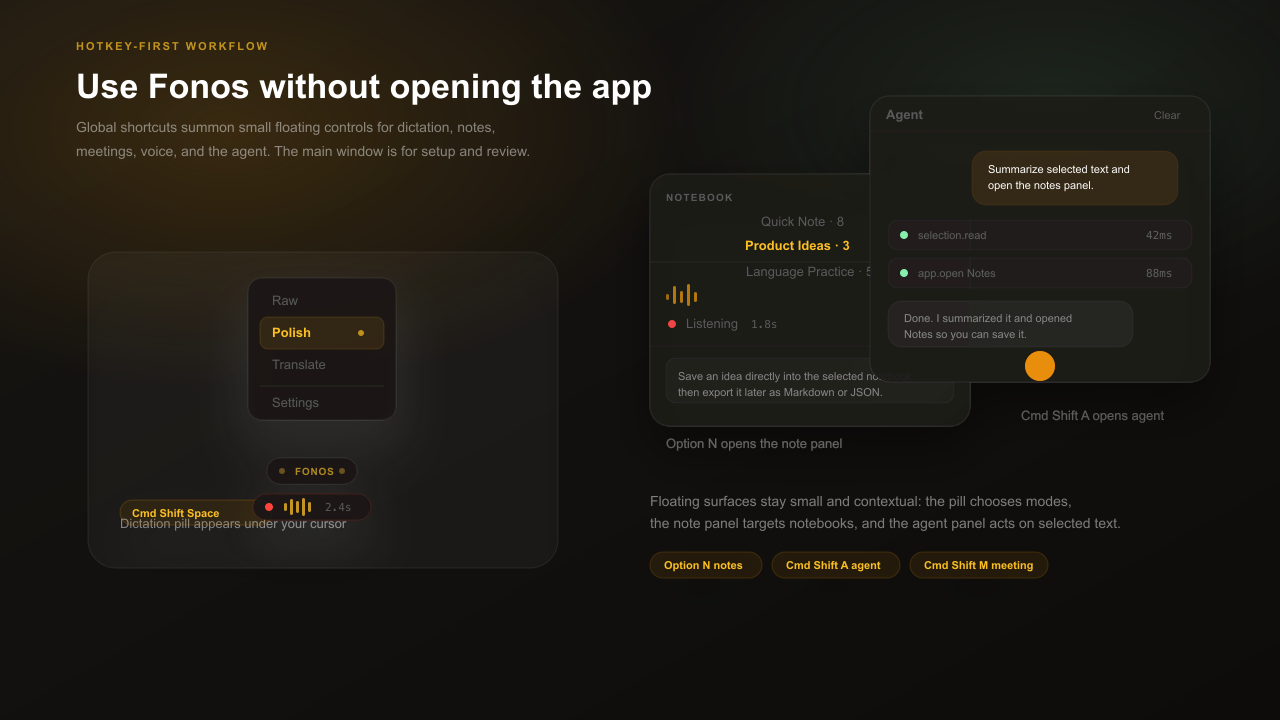
Hotkey-first floating controls
Fonos is designed to live under your shortcuts, not as a window you constantly manage. Use the global hotkeys to bring up small, contextual surfaces:
- Float pill: appears near the cursor for dictation, recording state, processing state, and quick mode switching.
- Mode roller: switch between Raw, Polish, Translate, Note, or custom modes without opening Settings.
- Note panel: pick a notebook and capture directly into it from a compact floating panel.
- Agent panel: talk to the agent or act on selected text, with tool execution shown inline.
Screenshots
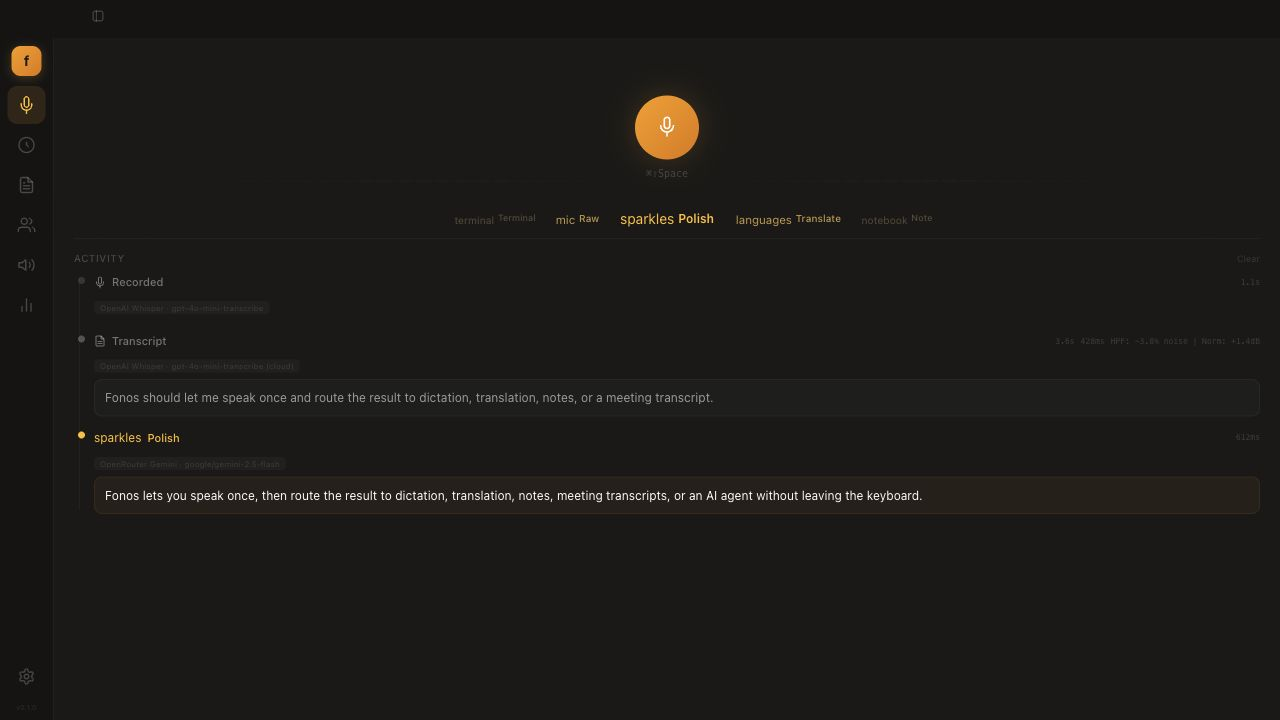
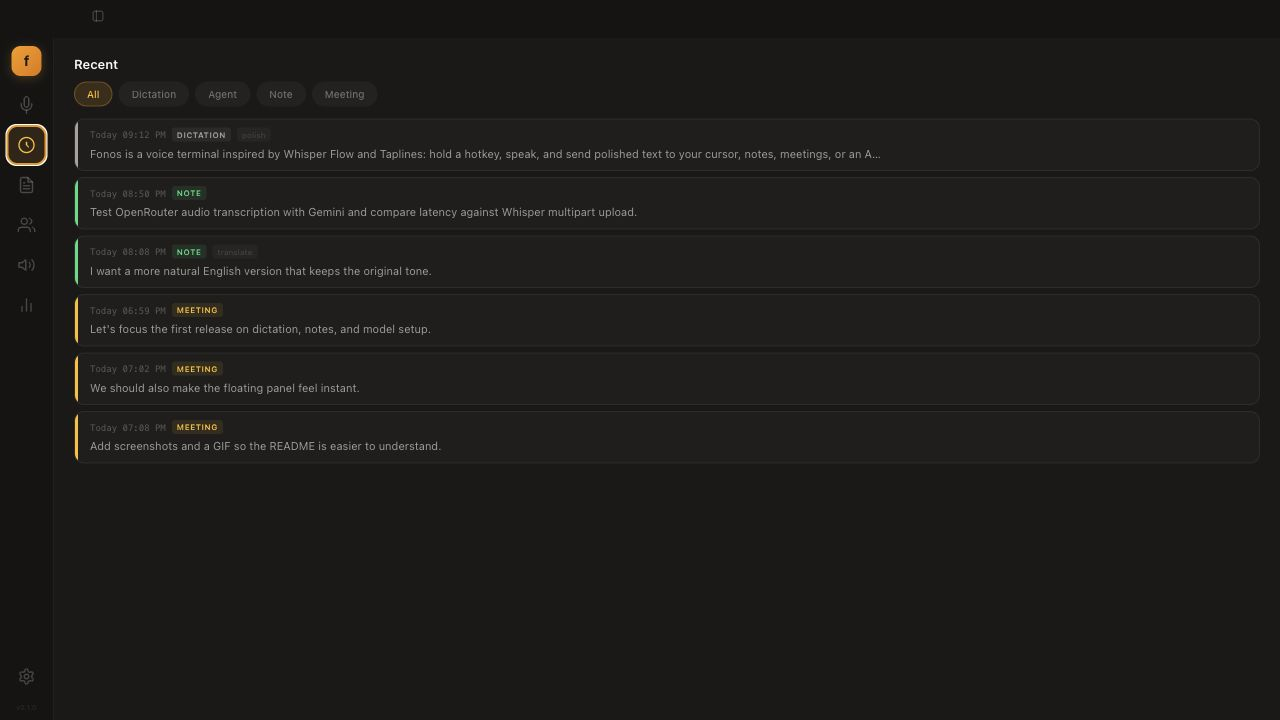
| Dictation activity | Recent timeline |
|---|---|
 |
 |
| Voice notes | Meeting summary |
|---|---|
 |
 |
| Model setup |
|---|
 |
Features
🎙️ Dictation
Press-and-hold to record, release to process. Each mode is a transcription plus an optional LLM pass with its own prompt.
- Built-in modes: Raw (verbatim), Polish (natural writing), Formal, Translate, Clean (filler removal).
- Unlimited custom modes — your own system prompt, template, temperature, model override, and auto-paste behavior.
- Live activity feed with model + latency, animated waveform, and a horizontal mode selector.
📓 Voice Notes
Organize recordings into notebooks.
- Quick Note catch-all plus unlimited custom notebooks, each with its own STT/LLM model, processing mode, and prompt.
- Bind up to 3 notebooks to dedicated hotkeys; capture from a compact floating panel.
- Export any notebook to Markdown or JSON.
👥 Meeting Capture
Real-time transcription with separate speaker channels.
- Dual capture — your mic and system audio (remote participants, via ScreenCaptureKit) are transcribed independently.
- Live timestamped transcript panel, plus an AI summary with key points, decisions, and checkable action items when you stop.
🤖 Agent
Voice-driven AI conversations with tool execution.
- Hold a hotkey to talk; responses stream with thinking indicators.
- Skill execution with allow/block command lists; optional spoken (TTS) replies.
🔊 Voice (TTS & cloning)
- Type or paste text, pick a voice, adjust speed (0.5×–2×), and synthesize.
- Clone a voice from a 3–10s recording or an uploaded clip.
📊 Stats & Recent
- Usage over 7 / 30 / 90 days: words dictated, session counts, estimated time saved.
- A unified, filterable timeline across dictation, agent, notes, and meetings.
Install
macOS
Download the latest .dmg from Releases, open it, and drag Fonos to Applications. Apple Silicon, macOS 13.0+. Signed and notarized — no Gatekeeper workaround needed.
Linux
Download the .deb or .rpm (amd64 / arm64) from Releases:
sudo apt install ./fonos_*.deb    # Debian / Ubuntu
sudo dnf install ./fonos-*.rpm    # Fedora / RHEL
Text injection (paste-at-cursor) needs xdotool (sudo apt install xdotool). On Wayland it works via XWayland.
Build from source
Prerequisites
- Rust (stable) and the Tauri CLI —
cargo install tauri-cli --version "^2" - Node.js 20+
- macOS: Xcode Command Line Tools (
xcode-select --install) — providesswiftcfor the Speech / ScreenCaptureKit helpers - Linux: the system packages listed in
.github/workflows/build-linux.yml(libwebkit2gtk-4.1-dev,libgtk-3-dev,libasound2-dev, …)
Run it
git clone https://github.com/ethannortharc/fonos.git
cd fonos/fonos-desktop
npm ci
cargo tauri dev          # hot-reloading dev build
Package a release — .app / .dmg on macOS, .deb / .rpm on Linux:
cargo tauri build
The compiled macOS helper binaries are checked in, so builds work out of the box. To rebuild them after editing the Swift sources:
./src-tauri/swift/build.sh # macOS only
Providers
Configure any mix in Settings → Models — set global defaults, then override per-mode or per-notebook.
| Provider | Type | Notes |
|---|---|---|
| OpenAI | STT · TTS · LLM | Whisper, GPT-4o, TTS-1 |
| OpenRouter | STT · LLM | Audio-capable models (Gemini, Voxtral, GPT-Audio) via chat completions |
| Anthropic | LLM | Claude models |
| LLM | Gemini models | |
| Ollama | STT · LLM | Local (localhost:11434) |
| LM Studio | LLM | Local (localhost:1234) |
| OMLX | STT · LLM | Local (localhost:8000) |
| Custom | Any | Any OpenAI-compatible endpoint |
STT supports two API paths: Whisper multipart upload, or chat-completions base64 audio for multimodal models.
Keyboard shortcuts
All remappable in Settings → Hotkeys.
| Shortcut | Action |
|---|---|
Cmd+Shift+Space |
Dictation (hold) |
Cmd+Shift+S |
Text-to-speech |
Cmd+Shift+A |
Agent (hold) |
Cmd+Shift+G |
Toggle agent panel |
Option+N |
Note panel (hold) |
Cmd+Shift+M |
Toggle meeting capture |
Option+1/2/3 |
Quick notebooks |
Repository layout
Fonos is a monorepo. This README focuses on the desktop app.
| Path | What it is |
|---|---|
fonos-desktop/ |
The Tauri desktop app — Rust backend + React / TypeScript UI. |
fonos-core/ |
Platform-independent Rust crate: provider clients (STT/TTS/LLM), modes, meetings, storage, agent, stats. Shared by the apps. |
fonos-ios/ |
SwiftUI companion app for iOS (app + keyboard extension + widget + App Intents). |
assets/ |
README screenshots and demo media. |
Tech stack
Desktop: Tauri 2 · Rust · React 19 · TypeScript · Vite · Tailwind CSS · SQLite (rusqlite). macOS speech and system-audio capture run through small Swift helpers built on Speech and ScreenCaptureKit.
Contributing
Issues and pull requests are welcome. Run the tests with:
cargo test                              # Rust (core + desktop)
cd fonos-desktop && npm run test:e2e    # Playwright end-to-end
Some desktop tests need microphone / accessibility permissions. Please keep changes focused and match the surrounding style.
License
MIT © Ethan
Reviews (0)
Sign in to leave a review.
Leave a reviewNo results found