astro-conversion-kit
Health Warn
- License — License: MIT
- Description — Repository has a description
- Active repo — Last push 0 days ago
- Low visibility — Only 5 GitHub stars
Code Warn
- process.env — Environment variable access in skills/capture-site/scripts/capture.mjs
- network request — Outbound network request in skills/capture-site/scripts/capture.mjs
- network request — Outbound network request in skills/capture-site/scripts/fingerprint.mjs
Permissions Pass
- Permissions — No dangerous permissions requested
No AI report is available for this listing yet.
Agent Skills that convert a WordPress site (or any live site) into a static Astro site with URL, SEO, content and pixel parity, then take it through launch. Works in Claude Code, Codex and any agent that reads SKILL.md.
astro-conversion-kit
Convert a WordPress site to static Astro with your coding agent, and get back the same site: the
same URLs, the same content, the same titles, descriptions, canonicals and structured data, the
same media at the same paths, every redirect the old site performs, and a design checked pixel by
pixel at 390, 768 and 1440 px. No PHP, no plugins, no database, no server to patch.
It is a set of Agent Skills, so it runs in Claude Code, Codex or any agent that reads SKILL.md.
Plain Node scripts do everything that has to be exact, and gates prove each part before the work
moves on. A run ends with a pull request, a noindexed staging deploy and a launch runbook.
WordPress is the first-class case. Anything served over HTTP works, because the capture reads the
rendered HTML; see docs/platforms.md.
Start
Paste this into your coding agent, with your site in place of example.com:
Convert https://example.com to Astro with https://github.com/ethanplusai/astro-conversion-kit
That is the whole job. The agent installs the skills, asks you one message of questions (each
with a stated default: where the repo goes, which host, how forms are handled), and runs to a pull
request without stopping again. Answer "defaults" and it picks every default.
To install the skills first, into any agent that reads Agent Skills:
npx skills add ethanplusai/astro-conversion-kit
In Claude Code, from its plugin marketplace:
/plugin marketplace add ethanplusai/astro-conversion-kit
/plugin install astro-conversion@astro-conversion-kit
Or from a clone, which also lets you run any script by hand:
git clone https://github.com/ethanplusai/astro-conversion-kit
cd astro-conversion-kit
npm install
npx playwright install chromium
node skills/convert-site/scripts/preflight.mjs
preflight.mjs says which tools the run needs (Node, git, gh, the hosting CLI, the Playwright
browser) and whether each is installed and logged in. Every script prints --help.
Results
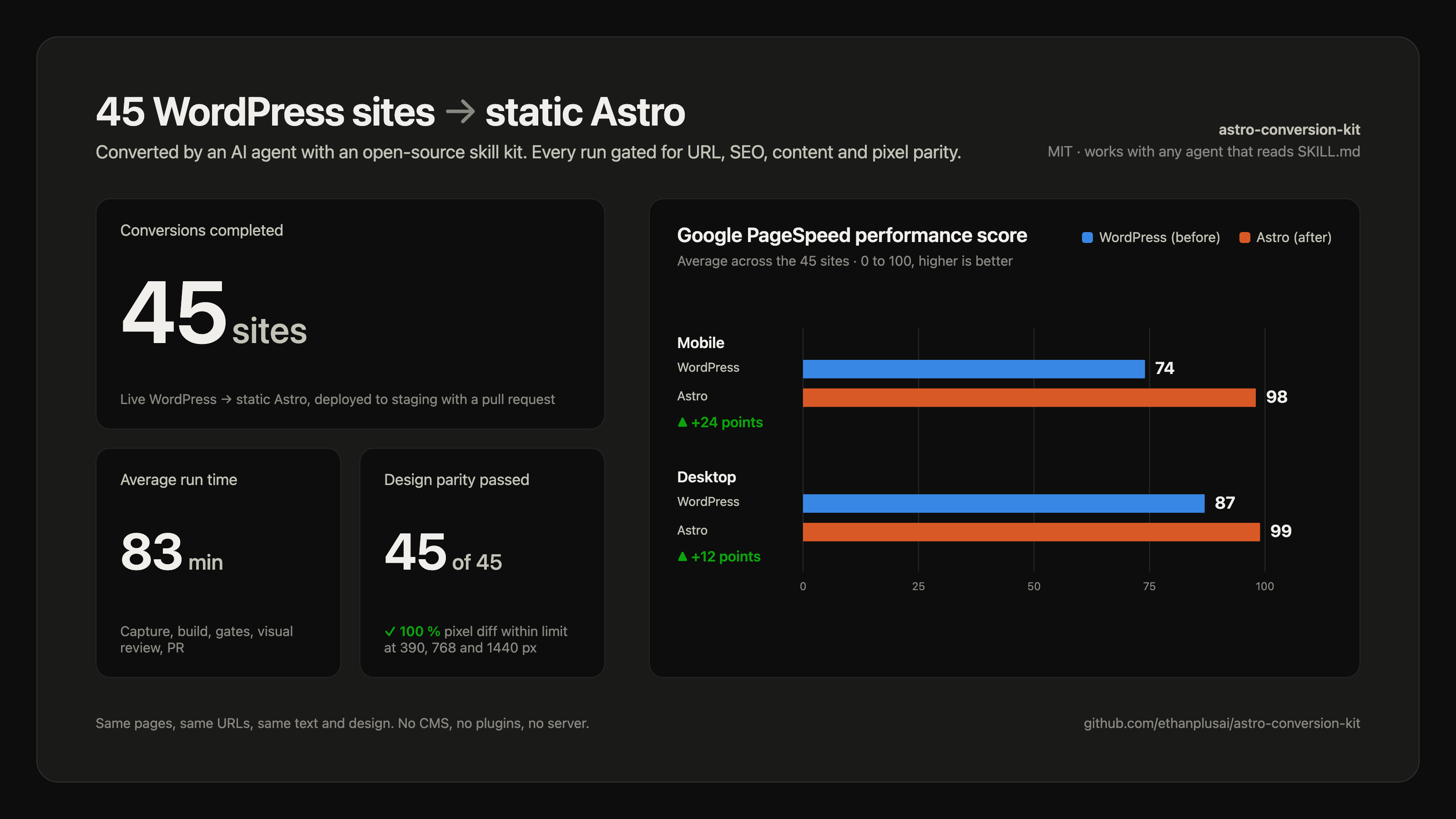
Averages over 45 WordPress conversions run with the kit, intake to pull request. Every run passed
the pixel-parity review at all three widths.
Public demos, converted by a coding agent following the skills as published:
sxsw.com (WordPress VIP, block theme, 71 pages) and
harvard.edu (WordPress multisite, 457 pages). Drag between
the live page and the Astro build on the
before and after page; the counts, timings and
screenshots are in docs/examples.

What happens
- Intake. At most four requests fingerprint the platform; one message asks you where the
repo and hosting go, how forms are handled, and what the agent cannot detect. - Capture. A paced, read-only crawl (sitemaps, the WordPress REST API, links) saves every
page's HTML, head tags, redirects, media list, fonts, feeds and screenshots intocapture/. - Plan.
docs/plan.md: templates, counts, the media decision, and a row for every oddity. - Scaffold and baseline. A new Astro repo on an
astro-rebuildbranch, with the capture
frozen intobaseline/so the gates never need the old site again. - Build. Layouts first, then pages from the captured markup, the captured CSS pruned by
coverage, media at the original paths, forms and third-party scripts carried over by list. - Gates. Routes, redirects, SEO tags, visible text, links, media, sitemap, feeds, forms and
scripts, checked against the baseline on every commit. - Visual review. Live and new screenshots per template at three widths, pixel-diffed, plus a
computed-style check, until every pair passes; then every page at 390 and 1440. - Launch checks.
pre-launchon the repo, a staging deploy,launch-auditagainst staging,
a suggestions report, and the PR. You merge and launch;post-launchwatches the first 30 days.
docs/process.md says what each phase produces and what proves it done.
What you get
- A pull request from
astro-rebuildtomainin a repo you own, with the gate output, counts,
every exception and proposal, and the launch skills' "Not covered" sections quoted in full. - A noindexed staging deploy on Vercel or Cloudflare Pages (or a local preview and a first
runbook step to deploy, if you have no hosting account yet). - Contact sheets: live, new and diff screenshots side by side for every template and width.
docs/suggestions.md: broken links, missing alt text, duplicate titles, slow images and other
improvements the agent found but did not make, each with evidence, effort and risk.docs/LAUNCH.md: the runbook, in order, with the exact commands for your host.npm run verifyin the new repo, so the gates keep working after the old site is gone.
The default build reproduces the live site, faults included. Fixes are proposals you approve.
WordPress, specifically
The capture needs no admin login, plugin or database export; it reads what the site serves.
- Every public page and post, from the sitemaps, the REST API (
wp/v2/pages,posts,media,categories,tags) and the links between pages, so nothing the sitemap forgot is
missed. Drafts and private content never appear; the API only returns what is public. - Every image size. The resized copies WordPress writes (
photo-300x200.jpg, ...) and lists
insrcsetall stay at their paths, because other sites and old emails may link to any of them. - Media that fits the repo stays in it; larger libraries go to Vercel Blob or Cloudflare R2
at the same URLs, with the decision made per site and written into the plan. ?p=shortlinks, category-base collisions, shortcodes left in content, lazy-load
attributes, and the other WordPress habits, handled as listed in
docs/platforms.md.- Classic themes, page builders and block themes. The build keeps the theme's CSS, pruned to
the rules the pages use, and the per-page inline styles block themes emit. - Forms post to a third-party endpoint you name at intake. Analytics, tag managers, consent
banners and chat widgets are carried over by list, so nothing is silently dropped. - Redirects the old site performs (including
wwwand trailing-slash rules) become host
rules, and the launch skills check that every old URL still lands somewhere.
What a static site cannot do (site search, comments, carts, logins, user-generated content) is
found at intake and reported as out of scope with the options: a third-party embed, keeping that
part on the old platform under a subdomain, or a separate project.
What it refuses
To run on end-of-life Node; to submit forms or log in on the live site; to touch DNS; to commit
anything but the scaffold to main (all work goes on astro-rebuild and reaches main through
a pull request you merge); to soften a gate. One site per run.
Security
The converted site is static HTML, CSS, images and the scripts you keep. There is no PHP and no
Node running on your server, so a runtime vulnerability has nothing to attack there. The build
tooling runs Node on your machine and in CI and has to stay patched; third-party scripts you keep
are their vendor's responsibility; TLS and security headers are handled at your host's edge, with
a baseline set shipped in vercel.json or _headers. More in docs/security.md.
Requirements
- Node 22.23.4 or newer on the 22 line, or 24.22.1 or newer. Node 20 is end of life and refused.
- git, and a GitHub account with
ghlogged in if you want the repo and PR created for you. - A Vercel or Cloudflare account for staging and production. Optional for the conversion itself.
- Playwright's Chromium (
npx playwright install chromium), for screenshots and visual review. - macOS or Linux. Windows is not supported in this version.
- A coding agent that can run shell commands. If your agent has its own browser or can run
subagents, the skills use them; without them every step still runs.
Further reading: hosting, platforms,
dependencies, FAQ. AGENTS.md tells an agent
which skill to use when.
Licence
MIT. See LICENSE.
Reviews (0)
Sign in to leave a review.
Leave a reviewNo results found