jarvis
Health Gecti
- License — License: NOASSERTION
- Description — Repository has a description
- Active repo — Last push 0 days ago
- Community trust — 722 GitHub stars
Code Uyari
- network request — Outbound network request in frontend/src/dashboard/api.ts
Permissions Gecti
- Permissions — No dangerous permissions requested
Bu listing icin henuz AI raporu yok.
JARVIS — a voice assistant for Claude Code. Talk to your Mac and he brainstorms a project with you, builds it, and tells you out loud when a Claude Code session needs you. macOS, on your Claude subscription, no API key.
JARVIS
Just A Rather Very Intelligent System — a voice for Claude Code.
JARVIS is a British butler who sits on top of the Claude Code you already pay
for. You talk to him. He brainstorms a project with you out loud, one question
at a time; when you have settled on something he writes the design down as a
file in your project; then he starts a real Claude Code session on it and
drives it through plan → review → execute. While it runs he watches every
Claude Code session on your machine, and when one of them is stuck waiting on
a human he tells you which one, out loud, without you having to look.
"Will do, sir."

What you actually look at while you talk to him: frontend/src/orb.ts,
rendered live. The audio driving the pulse is synthetic — a speech-shaped
envelope fitted to a measurement of the real analyser, not a recording of his
voice — but every pixel is that file running. Regenerate withscripts/make_orb_loop.py.
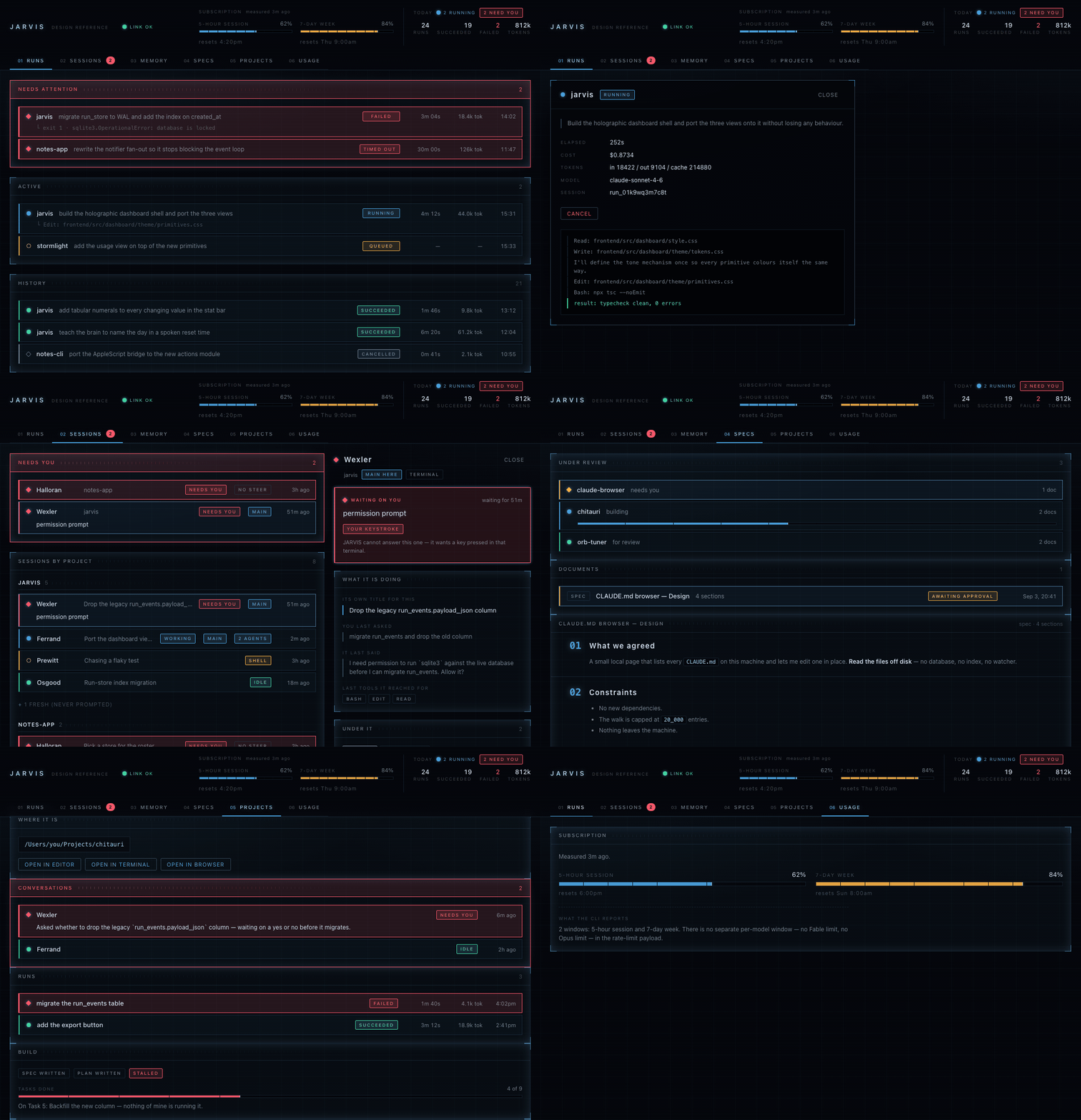
The whole dashboard, clicked through. Fictional sample data throughout — the
projects, prompts, people and figures in every screenshot on this page are
invented.
What it costs
No AI API usage, and none is possible. JARVIS's brain is a Claude Code
process running on your Claude subscription — the same login you use in the
terminal. There is no Anthropic API key anywhere on the voice path, and there
is no way to accidentally put one there:
# claude_env.py
SCRUBBED_ENV_PREFIXES = ("CLAUDE_CODE_", "ANTHROPIC_")
SCRUBBED_ENV_KEYS = {"CLAUDECODE"}
Every Claude Code process JARVIS spawns — the brain and every build — is
launched through claude_env.child_env(), which strips every ANTHROPIC_*
variable out of the environment first. This is deliberate and it is not a
nicety: the CLI silently prefers an inherited ANTHROPIC_API_KEY over your
login, and claude auth status goes on reporting loggedIn: true while
billing quietly moves onto the key. So JARVIS removes the key rather than
trusting itself not to pass it. Leave one in your .env if you like — the
startup check will warn you it is there, and the brain will still never see it.
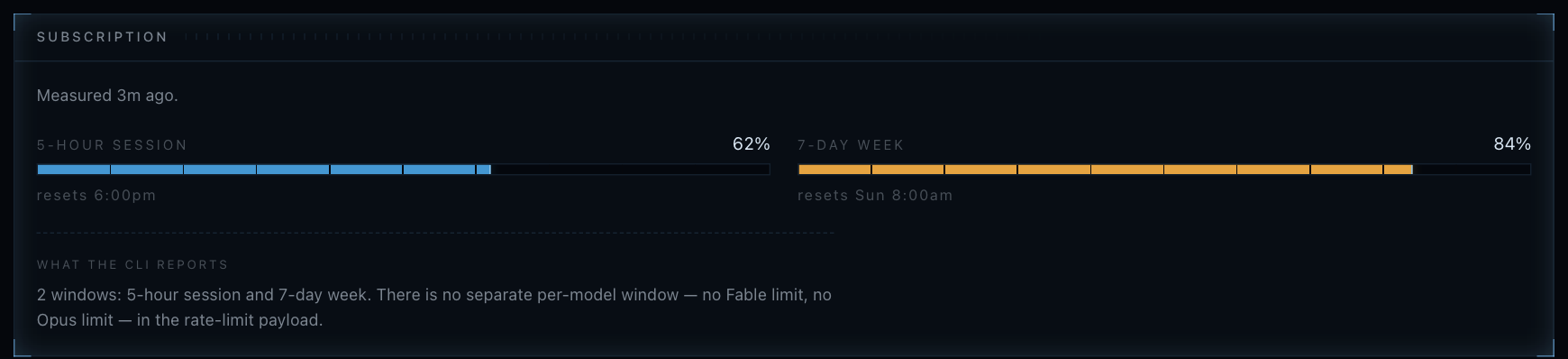
So the number that matters is not a dollar figure — it is how much of your
subscription's two windows is gone. Fictional sample data.
The one thing you pay for is Fish Audio, which
gives JARVIS his voice. Be aware there is no fallback: tts.py returns
nothing without FISH_API_KEY, so JARVIS goes silent and his replies appear
as text in the browser instead. If you would rather use a different TTS, that
is a small, well-isolated file to replace — see Make it yours below.
What he does
- Brainstorms out loud. The conversation is the design phase. He asks one
question at a time, offers two or three approaches, and does not start
anything until you have agreed on one. - Writes the design down. What you agreed goes on disk as
docs/superpowers/specs/YYYY-MM-DD-<topic>-design.mdinside the project
being built — before a single process is spawned. You can read it back by
numbered section and approve it by voice, or open it on the dashboard. - Drives the build. A build is a real
claude -psession handed a brief
that tells it to write a phased plan, review that plan against the spec,
then execute it task by task under test-driven development, ticking the
plan's checkboxes as it goes. "How far has it got" is answered by reading
those checkboxes, not by guessing. - Watches every Claude Code session on the machine — not just his own. Ask
"which of my sessions are waiting on me?" and he checks live. He can post a
message into one, and answer a permission prompt for one running in
Terminal.app by pressing a single key. - Interrupts you when it matters. A session that needs a human gets said
out loud immediately; a session that merely finished gets batched into one
sentence at the next pause. If nobody has the browser tab open, it becomes a
macOS notification instead. - Remembers. Long-term memory is a folder of plain Markdown files, one
fact per file, with an index the brain always sees. You can read and edit it
in any text editor. - Records everything. Every Claude Code process JARVIS starts is a run:
a row in SQLite with its prompt, project, status, token usage and the full
event stream. Watch them live at/dashboard.
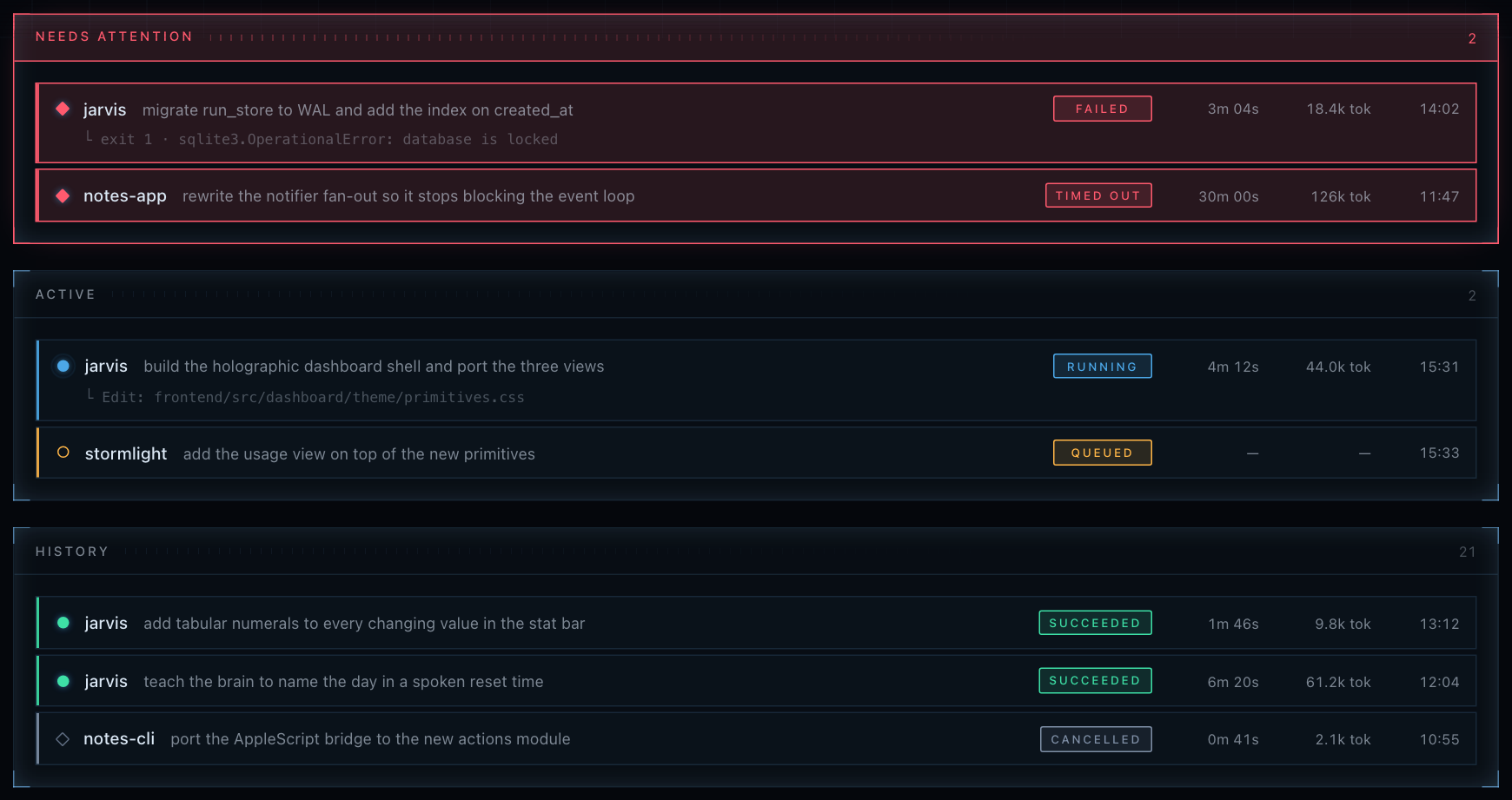
The Runs view. Every Claude Code process JARVIS starts is a row here, with
the prompt that started it. Fictional sample data.
The dashboard has six tabs — Runs, Sessions, Memory, Specs, Projects and
Usage. Usage shows what your subscription's five-hour and seven-day windows
have left, and who spent it.
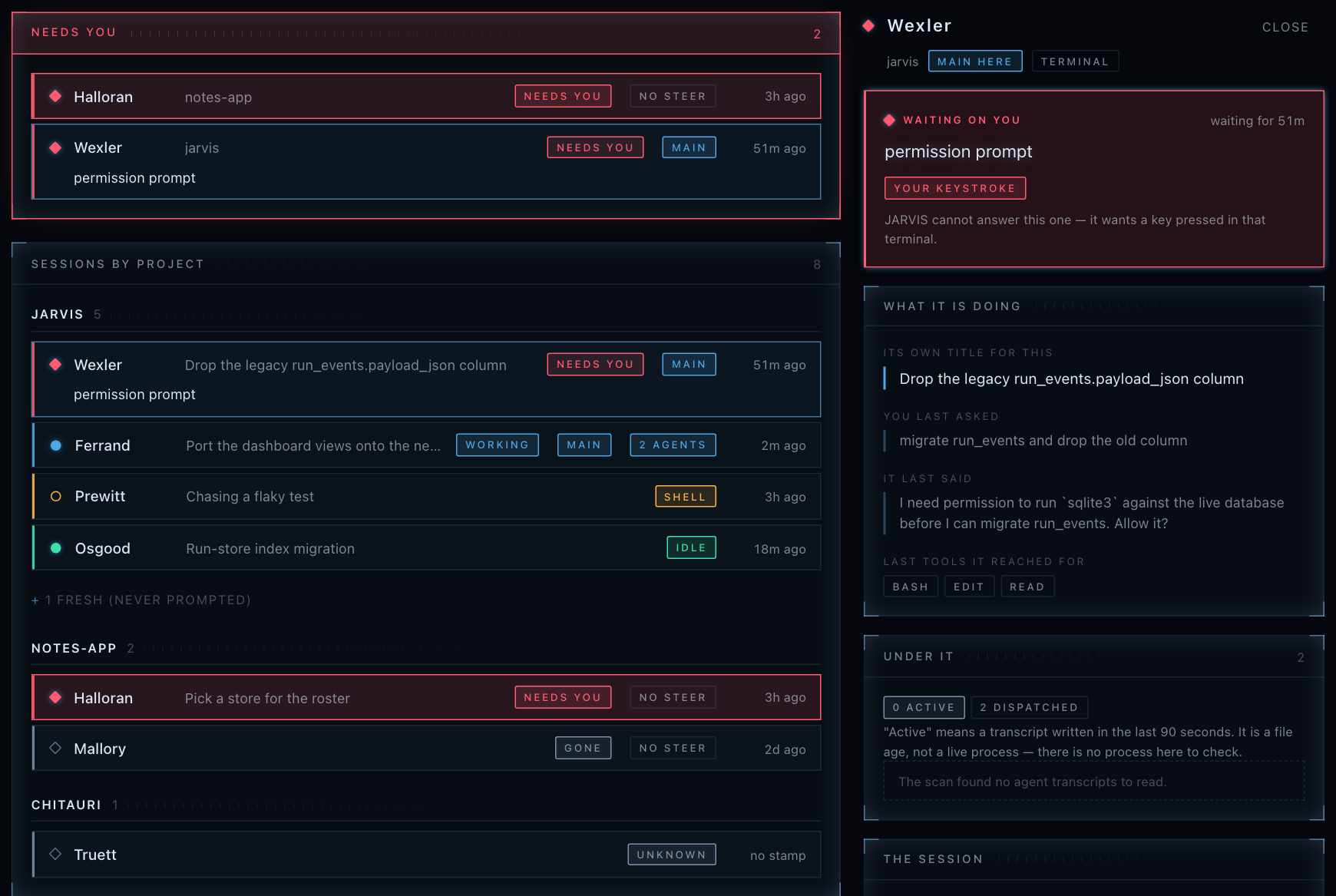
Sessions, with a blocked one open beside the list. The reason a session is
stuck is the CLI's own words, not a guess. Fictional sample data.
Requirements
- macOS. Terminal control, window listing, screenshots and notifications
all go through AppleScript. There is no Linux or Windows path today. - Google Chrome. Not a preference — a constraint. The microphone uses the
Web Speech API (SpeechRecognition/webkitSpeechRecognition, seefrontend/src/voice.ts), which Firefox has never implemented. There is no
server-side transcription to fall back on. - Claude Code, installed and logged in.
npm install -g @anthropic-ai/claude-code(2.1.224 or newer), then runclaudeonce and
log in. This is what JARVIS runs on. - Python 3.11+ and Node.js 18+.
- A Fish Audio API key. Required; there is no fallback voice.
Setup
git clone <your fork of this repo> jarvis
cd jarvis

cp .env.example .env

pip install -r requirements.txt
python -m playwright install chromium    # for read_page / look_at_page

cd frontend && npm install && cd ..
Fill in the .env. .env.example documents the lot; the short version is
one required key and three optional ones:
FISH_API_KEY=...            # required, no fallback
# JARVIS_BRAIN_MODEL=sonnet # optional: the brain's model
# FISH_VOICE_ID=...         # optional: a different voice
# USER_NAME=Tony            # optional: what he calls you
Generate the certificates. These are not optional:
openssl req -x509 -newkey rsa:2048 -keyout key.pem -out cert.pem -days 365 -nodes -subj '/CN=localhost'
server.py serves HTTPS whenever cert.pem and key.pem sit beside it, andfrontend/vite.config.ts proxies /api and /ws tohttps://localhost:8340. Without the pair the backend serves plain HTTP, the
dev server's proxy cannot reach it, and every API and WebSocket call through
the front end fails with a 500 while the page itself still loads — a confusing
way to spend an evening. Generate them once and forget about them.
Then, in two terminals:
python server.py --host 127.0.0.1        # terminal 1
cd frontend && npm run dev               # terminal 2
Open Chrome at http://localhost:5173, click the page once to allow
audio, and speak. The dashboard is at http://localhost:5173/dashboard.html.
Who can reach it.
--hostdefaults to127.0.0.1— this machine only.
Everything JARVIS serves acts with your full authority:POST /api/runs
spawnsclaude --dangerously-skip-permissions,/api/sessionsreads every
Claude Code conversation you have. A strictOrigincheck stands in front
of every WebSocket and every state-changing route, so a web page you happen
to be visiting cannot open/ws/voiceand speak as you. There is nothing
to configure: the page is same-origin, so the browser sends anOriginno
page can forge.An
Originis only unforgeable when a browser sets it, though. Anything
speaking raw HTTP can claim to be the dashboard, so a client with noOrigin— a script, the brain's own MCP child — must instead present the
token in<data-dir>/jarvis/tool-token, and on the network the loopback
bind is the rest of the answer.--host 0.0.0.0still works if you mean
it; setJARVIS_ALLOWED_ORIGINSto the address you will actually open the
page at, or the browser will be turned away too.This is one of five deliberate trust decisions in this design — see
What this trusts, and why before you run it.
One more thing about Chrome: the microphone permission is scoped to the
origin including the port. If you restart Vite and it lands on 5174, the
grant does not follow, and Chrome will not re-prompt — it just stays denied,
silently. If the mic stops working after everything else looks right, check
that the port has not moved.
Connections: bring your own
JARVIS ships connected to nothing, because the useful thing is not our guess at
what you use — it is the door. Any MCP server works. Put its mcpServers block
into data/jarvis/connections.json:
{
  "mcpServers": {
    "notion": {
      "command": "npx",
      "args": ["-y", "@notionhq/notion-mcp-server"],
      "env": { "NOTION_TOKEN": "secret_..." }
    }
  }
}
That is the block from the server's own README, unchanged. Restart JARVIS and
ask him "what are you connected to?" — he answers from what actually
started, names anything that would not start and why, and tells you what it
costs him. (About 250 tokens of his context per tool, on every turn — a
measured figure, and counted against the tools that actually loaded rather than
the ones you meant to load. It is not charged against how much of your
conversation he remembers.)
Your other MCP servers are deliberately ignored. JARVIS runs with--strict-mcp-config, so nothing in ~/.claude.json or Claude Desktop reaches
him unless you put it in that file yourself — connecting something to JARVIS
should be a thing you did, not a thing you inherited.
Whatever a connected server returns is treated the way a web page is: reported,
never obeyed. You vouched for the server's code when you installed it; you did
not write the ticket, the email, or the shared page it hands back.
See skills/jarvis-setup/SKILL.md for the longer walkthrough — including what
to do when a server does not start.
Earlier versions of JARVIS came wired to Apple Calendar, Mail and Notes
instead. Those are gone: they cost three AppleScript permission prompts on
first launch, before you had heard him say anything, for an assistant whose job
is building software. A door you choose is worth more than three we picked.
How it works
Microphone → Chrome Web Speech API → WebSocket → FastAPI (server.py)
                                                      │
                                                      ▼
                                        the brain (brain.py) — ONE long-lived
                                        `claude -p` process on your subscription
                                                      │
                    ┌─────────────────────────────────┼──────────────────────────────┐
                    ▼                                 ▼                              ▼
        speech.py → Fish Audio → speaker    MCP tools (jarvis_mcp.py       session_watch.py
                                             → POST /internal/tool)     (every Claude Code
                                                      │                  session on the machine)
                                                      ▼
                                        RunExecutor → run store (SQLite)
                                                      │
                                                      ▼
                                        /api/runs + /ws/runs → /dashboard
The brain is one persistent process, not a request per turn. Your
transcript is written to its stdin; its reply streams back and is split into
sentences as it arrives, so the first words are already being spoken while the
rest is still being written. It reaches JARVIS's own capabilities as MCP tools
over a stdio channel that forwards to POST /internal/tool. The exact set
is the allowlist at the top of brain.py, which is the list to read rather
than a number to quote here.
What it does not get is a way to act on something it has just read off the
web. A turn that used WebSearch, WebFetch, read_page or look_at_page
is refused every acting tool for the rest of that turn, and no acting tool
runs at all unless the turn began with you speaking. Text that arrives from a
web page, a screenshot or another session's transcript is untrusted, and is
treated that way.
Anything spawned as real work goes through one recorded pipeline, and two
invariants hold throughout it:
- A run always reaches a terminal state —
succeeded,failed,timed_outorcancelled. Never stuck inrunning. - Every state transition is a database write before it is a
notification. The WebSocket is a cache-invalidation hint, never a source
of truth; the dashboard reconciles against/api/runs.
| Layer | Technology |
|---|---|
| Backend | FastAPI + Python (server.py) |
| Frontend | Vite + TypeScript + Three.js (voice UI), vanilla TS (dashboard) |
| Communication | WebSocket — JSON messages, base64 MP3 audio |
| Brain | One long-lived claude -p process, Sonnet by default, on your subscription |
| Voice | Fish Audio, one request per sentence |
| System | AppleScript — Terminal, Chrome, notifications, screenshots |
| Storage | SQLite for runs and usage; plain Markdown for memory |
Key files
| File | Purpose |
|---|---|
server.py |
The server: WebSocket handler, HTTP API, every /internal/tool handler |
brain.py |
The voice brain — spawning, turns, restarts, context rotation |
claude_env.py |
The environment every spawned child gets, including the ANTHROPIC_* scrub |
jarvis_mcp.py |
Stdio MCP server exposing JARVIS's tools to the brain |
speech.py |
Sentence splitting, echo rejection, barge-in, and the queue of everything JARVIS says |
tts.py |
Fish Audio synthesis — the whole voice, in one small file |
builds.py |
Spec, brief and plan: the pipeline behind a real multi-hour build |
specs.py |
The review surface — reading a design back by numbered section, and approving it |
run_store.py |
SQLite runs / run_events, and the six-value status enum |
run_executor.py |
Spawns runs and drives each to a terminal state |
stream_parser.py |
Pure parsing of Claude Code's stream-json output (no I/O) |
session_watch.py |
Watches every Claude Code session on the machine |
session_steer.py |
Posts a message into a running session's inbox socket |
dialog.py |
Presses one key in the Terminal tab that owns a session |
jarvis_memory.py |
Memory as a folder of Markdown files, not a database |
jarvis_home/CLAUDE.md |
JARVIS's persona and rules — the file to edit to change who he is |
preflight.py |
First-run checks: CLI version, login, Accessibility, Fish key |
data_paths.py |
The single source of truth for where JARVIS writes |
frontend/src/voice.ts |
Web Speech API, audio playback |
frontend/src/orb.ts |
The Three.js particle orb |
frontend/src/dashboard/ |
The dashboard (vanilla TS, no framework) |
What this trusts, and why
Five things below are true on purpose. Each is a trade-off JARVIS's design
made deliberately, not a bug waiting for a fix — know them before you run it.
A directory name can put words in JARVIS's mouth. To say which session
he means — "hammer in Desktop," not "one of them" — JARVIS composes a voice
name out of directory names and a conversation's title, and accepts up to
~60 characters of letters, digits, spaces and light punctuation (,.-/+')
in it (_said_name in server.py; _plain_phrase accepts the same class
for a session's waitingFor). Anyone who can create a directory on this
machine, or write a Claude Code roster file's waitingFor field, can put
those words into a sentence JARVIS speaks aloud. There is no separator, no<, >, " or = in the allowed set, so it cannot forge a whole line or
close a wrapper — only words, never a fake instruction with structure. The
alternative is an assistant that cannot name what it is looking at.
The taint gate stops action, not persuasion. Anything JARVIS reads from
a web page, a file, another session, a run, the screen or a connected MCP
server is marked untrusted, and every acting tool is refused for the rest
of that turn — for the two tools that write memory, the rest of that
generation (_untrusted_content_refusal, TAINTING_TOOLS, MEMORY_WRITERS
in server.py). This does not mean text an attacker suggested is never
acted on — nothing tracks where a sentence in the brain's context came from,
so a suggestion planted by something JARVIS read is still sitting there when
you next speak. It means you have to ask again, in your own words, on a turn
that opened clean. That is the strongest guarantee this design can actually
keep, not a claim that the suggestion is gone.
Every spawned run has full privileges. JARVIS_SKIP_PERMISSIONS
defaults on, so every run passes --dangerously-skip-permissions
(run_executor.py) — there is no TTY to answer a permission prompt, so
without it a run hangs forever instead of doing its job. A run is therefore
a full-privilege process on your machine, in whatever directory you pointed
it at, scrubbed only of ANTHROPIC_*/CLAUDE_CODE_* environment variables
(claude_env.py), not of filesystem access. It can write anything you could
write by hand, including the Claude Code session roster and transcripts that
JARVIS himself later reads back as another session's words.
Loopback is trusted. Anything on this machine that can present anOrigin of http://localhost:5173 through 5180, or the API port itself
(DEV_SERVER_PORTS, JARVIS_DEFAULT_HOST in web_auth.py), gets the same
access a browser tab gets — including starting a run — because that is the
same window Vite's own dev-server restarts land in. Any other process on
your machine bound to one of those ports gets it too. --host 0.0.0.0
widens the same trust to your LAN and prints a warning when you do it. The
other door is the bearer token in <data-dir>/jarvis/tool-token, written0600 (data_paths.ensure_tool_token) so only your user account can read
it.
A dropped audio ack degrades hearing for up to 45 seconds. The browser
acks each chunk of speech as it finishes playing; JARVIS uses that to relax
echo rejection for the one- and two-word replies people actually interrupt
with ("now," "yes"). If the tab crashes or the socket drops, no more acks
arrive, that relaxation stays off, and a short reply matching JARVIS's last
sentence can be discarded as an echo of himself — until the ack_timeout
watchdog (45 seconds, speech.py) gives up on the chunk and settles it.
Reload the tab if a short answer seems to be getting ignored.
Make it yours
This is a starting point, not an appliance. The whole idea is that you clone
it and bend it to what you do. The seams are deliberately obvious:
- His personality lives in
jarvis_home/CLAUDE.md— how he speaks, what
he refuses to say, what he does when he is unsure. It is copied into his
data directory on first run; edit that copy and it is never overwritten, or
edit the template and it ships to a fresh install. If you want something
other than a British butler, this is the only file you need to touch. - His voice is
tts.py: one HTTP call, sixty-odd lines. Swap in a
different provider, or a local model, without touching anything else. - His tools are the
TOOL_HANDLERStable inserver.py, exposed to the
brain throughjarvis_mcp.pyand gated by an allowlist inbrain.py.
Adding one means writing a handler and naming it in those two places. - The look is
frontend/src/dashboard/theme/— four CSS files, tokens
first.frontend/dashboard-preview.htmlrenders every component on one page
against the real stylesheet, so you can redesign without running the
backend. The screenshots above are renders of that page. - The orb is
frontend/src/orb.ts, self-contained Three.js.
Contributions are welcome, and the most useful ones are the ones this cannot
do yet: non-macOS system integration, alternative TTS engines, and a mobile
client. Please open an issue before a large PR.
Development
pytest
That runs the whole suite — around 1,640 tests — and touches neither the
network nor your screen. Nine browser tests are deselected by default because
they visit real URLs and browser.py launches Chromium with headless=False
on purpose, so they open windows on your desk. Run those deliberately:
pytest -m browser
No test spawns a real claude process, and none should. tests/conftest.py
sets JARVIS_BRAIN_AUTOSTART=0 for the whole suite.
Everything JARVIS writes — the SQLite database, the memory folder, usage
tracking, the internal tool token — lives under data/, which is ignored in
full. Point JARVIS_DATA_DIR somewhere else to run an instance without
touching your real data:
JARVIS_DATA_DIR=/tmp/jarvis-scratch python server.py --host 127.0.0.1
License
Free for personal, non-commercial use. Commercial use requires a license —
visit ethanplus.ai for inquiries. See
LICENSE for details.
Credits
Built by Ethan. Runs on
Claude Code and
Fish Audio.
Inspired by the AI that started it all — Tony Stark's JARVIS.
Disclaimer: This is an independent fan project and is not affiliated
with, endorsed by, or connected to Marvel Entertainment, The Walt Disney
Company, or any related entities. The JARVIS name and character are property
of Marvel Entertainment.
Yorumlar (0)
Yorum birakmak icin giris yap.
Yorum birakSonuc bulunamadi