atelier
Health Gecti
- License — License: MIT
- Description — Repository has a description
- Active repo — Last push 0 days ago
- Community trust — 14 GitHub stars
Code Gecti
- Code scan — Scanned 12 files during light audit, no dangerous patterns found
Permissions Gecti
- Permissions — No dangerous permissions requested
Bu listing icin henuz AI raporu yok.
Claude Code plugin, listed in awesome-claude-code. One brand.json drives tokens, social cards, icons, images, video and two audits across 8 skills. Also a CLI and a GitHub Action.
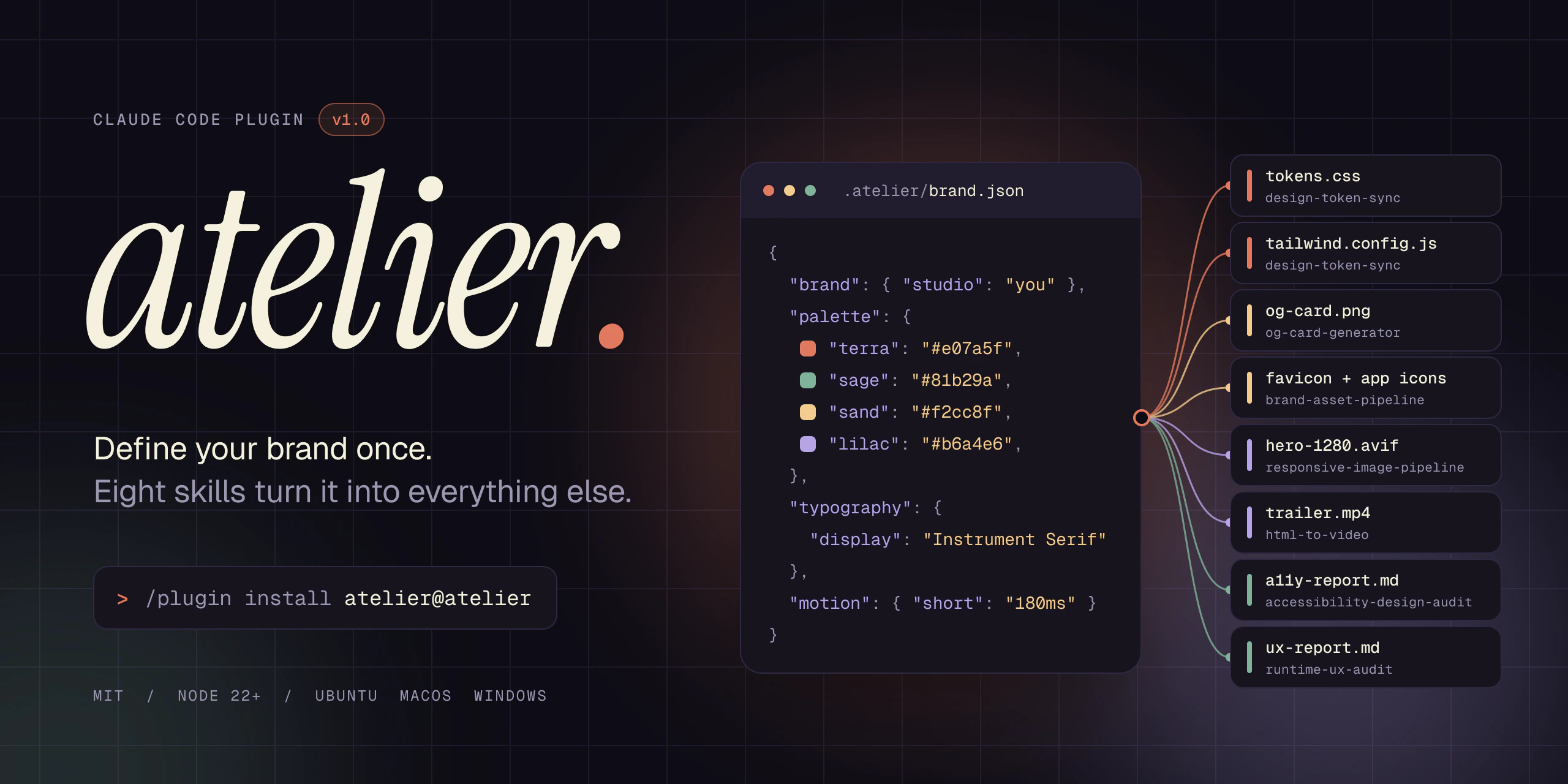





Design automation for Claude Code. One .atelier/brand.json drives your design tokens, social cards,
icons, responsive images and video, and two audits keep the shipped page honest.
Install / The eight skills / runtime-ux-audit / CI / Docs
Who it is for: front-end developers and small studios who want brand assets and UX checks generated from one config file. It runs inside Claude Code, and the same skills also run without it through the atelier CLI and the GitHub Action. atelier calls no model API.
Install
In Claude Code:
/plugin marketplace add EthanY33/atelier
/plugin install atelier@atelier
Claude Code installs the plugin's Node dependencies for you. Then:
/atelier-doctor      checks Node, dependencies, Chromium, ffmpeg and your brand file
/brand-init          a few questions, then writes .atelier/brand.json
The browser skills need Playwright's Chromium once. /atelier-doctor prints the exact command for your version (npx playwright@<version> install chromium). html-to-video also needs ffmpeg on your PATH.
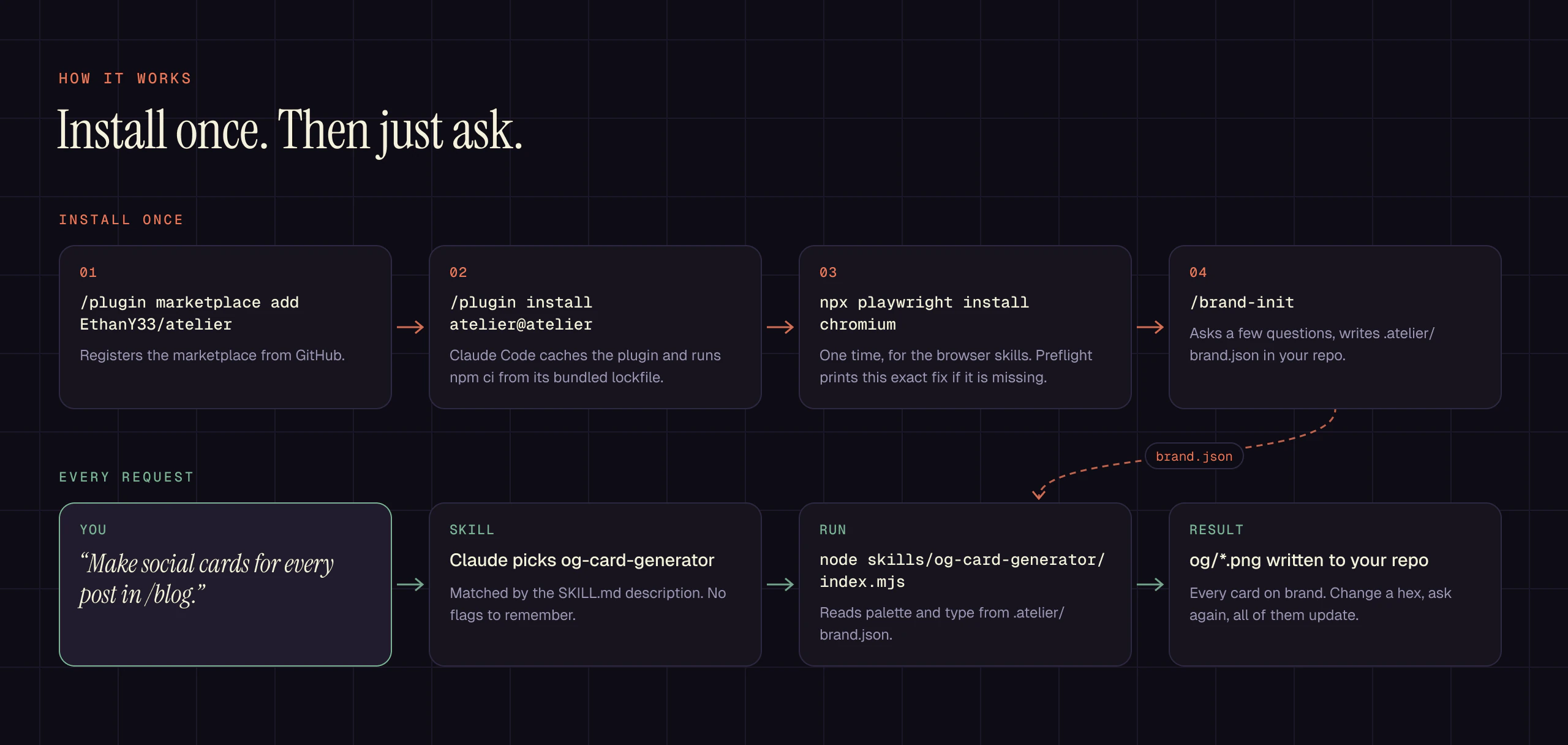
After that you just ask. "Make social cards for every post in /blog." "Audit the pricing page for mobile problems." "Regenerate the favicons from the new mark." Claude picks the skill from its description; there are no flags to memorize.
The eight skills
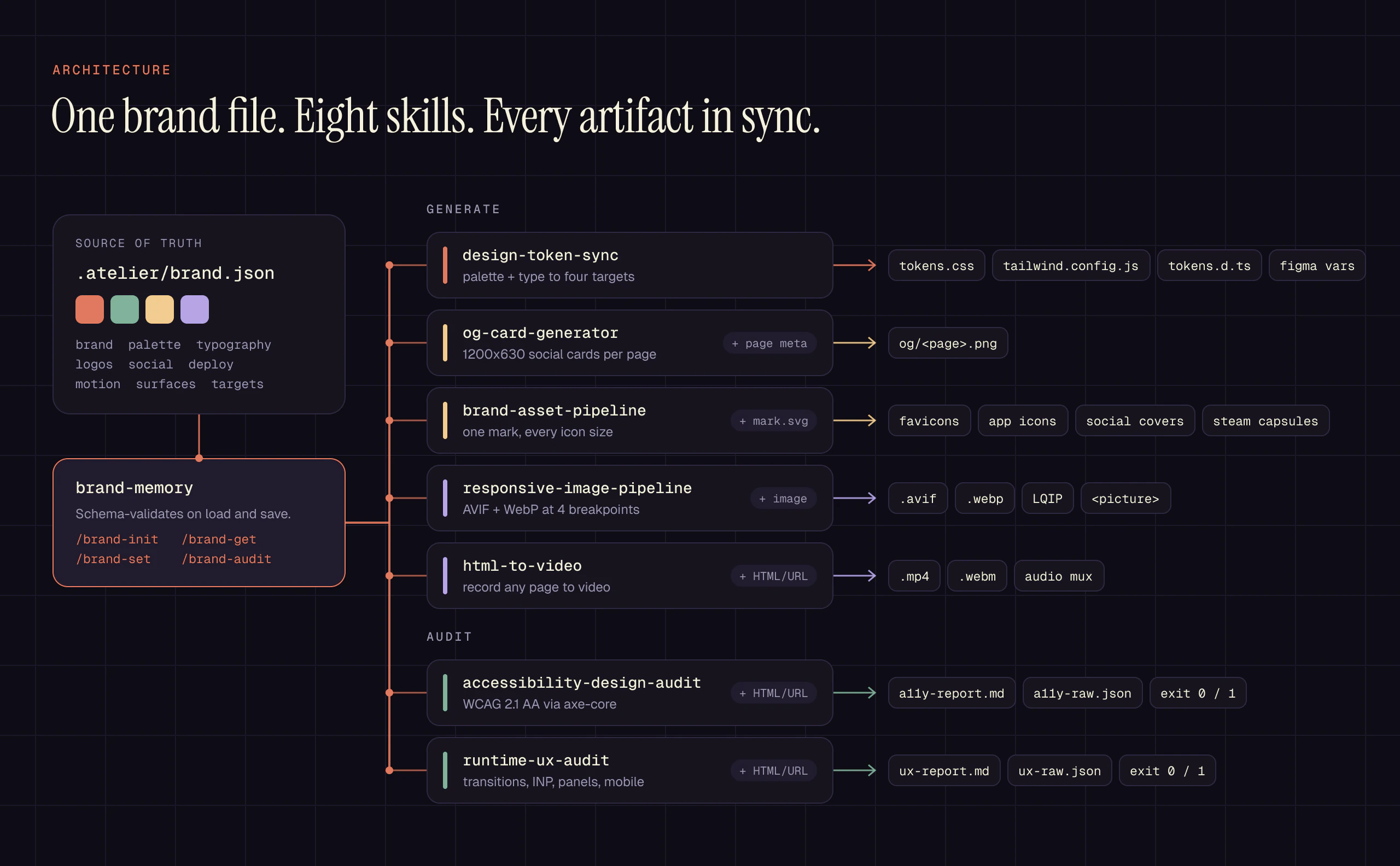
| Skill | Ask Claude | Or run | Writes |
|---|---|---|---|
| brand-memory | "set up our brand" | atelier brand |
.atelier/brand.json, schema-validated on every load and save |
| design-token-sync | "sync the brand into Tailwind" | atelier tokens |
tokens.css, tailwind.config.js, tokens.d.ts, Figma variables |
| og-card-generator | "social cards for every blog post" | atelier og |
1200x630 PNG per page |
| brand-asset-pipeline | "favicons and app icons from mark.svg" | atelier assets |
favicons, app icons, social covers, Steam capsules |
| responsive-image-pipeline | "make the hero images responsive" | atelier images |
AVIF + WebP at 480 to 1920px, LQIP, a <picture> snippet |
| html-to-video | "record the landing page as a 10 second clip" | atelier video |
MP4 (H.264) or WebM (VP9), optional audio track |
| accessibility-design-audit | "check this page against WCAG AA" | atelier a11y |
a11y-report.md + raw axe JSON, CI exit code |
| runtime-ux-audit | "audit the pricing page for mobile problems" | atelier ux |
ux-report.md + ux-raw.json, CI exit code |
Every skill is also a plain Node module and a CLI, so the same work runs in scripts and CI. The full contract for each is in docs/api.md.
See it run

A reconstructed Claude Code session: each command shows its real output (paths shortened), the four fixes are the smallest edits that clear the audit, and every card and icon was generated by atelier for a demo brand. Watch it with sound (MP4). Built frame by frame from demos/trailer with npm run demo:trailer.
One brand, many outputs
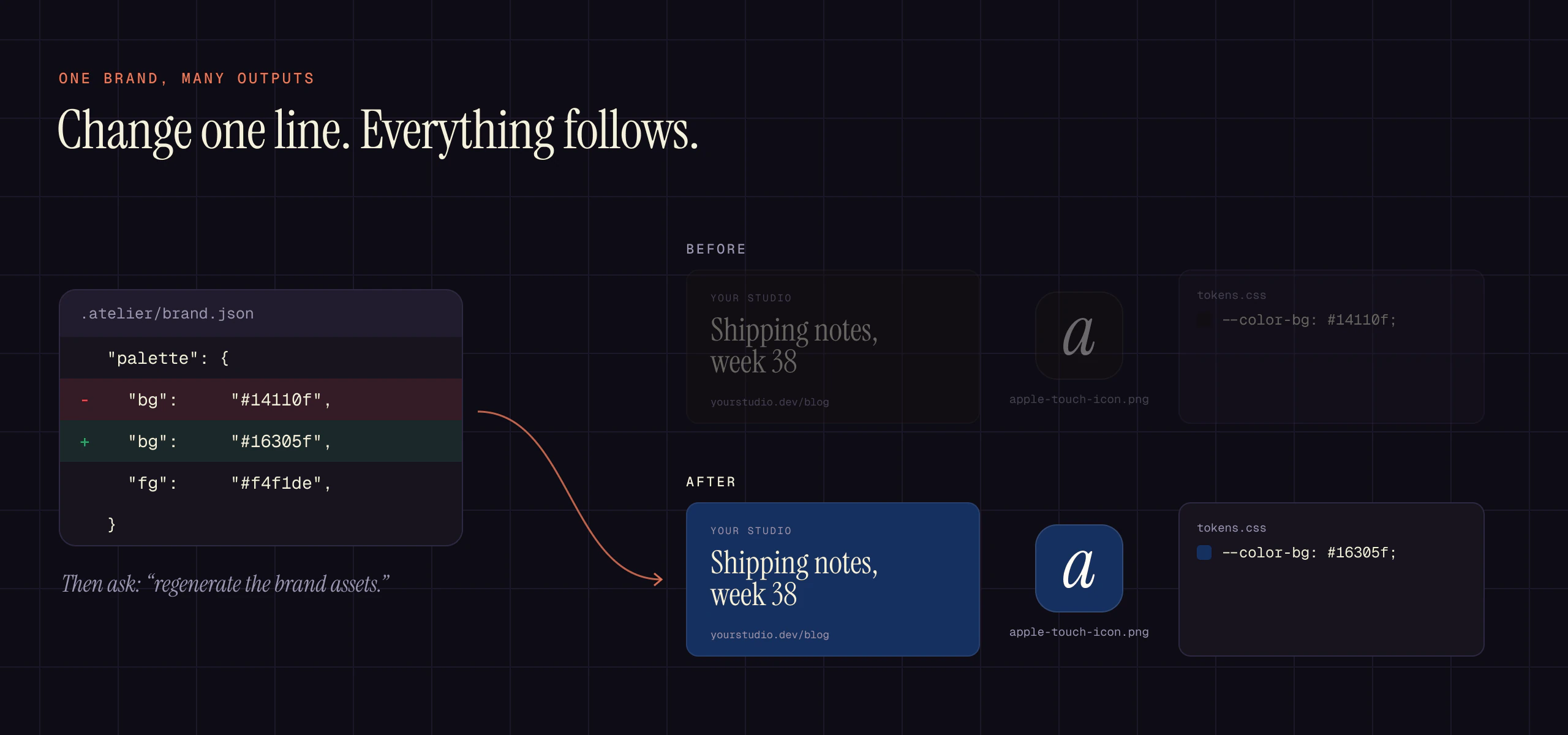
Most design tooling owns one slice: Tailwind has colors, sharp has images, Playwright has screenshots, axe has accessibility. atelier sits one layer up and treats the brand as the object that persists. Every artifact is derived from it, so a rebrand is a one-line diff and a regenerate, not a scavenger hunt.
// .atelier/brand.json
{
  "$schema": "https://raw.githubusercontent.com/EthanY33/atelier/main/plugins/atelier/schemas/brand.schema.json",
  "brand":      { "studio": "goneIdle", "product": "TideWane", "voice": ["pithy", "briny"] },
  "palette":    { "bg": "#110f1b", "accent": "#e07a5f", "sage": "#81b29a", "sand": "#f2cc8f" },
  "typography": { "display": "Instrument Serif, serif", "body": "Inter, system-ui, sans-serif" },
  "logos":      { "mark": "brand/mark.svg" },
  "motion":     { "duration": { "short": "180ms", "medium": "240ms" } },
  "targets":    { "minTapPx": 44, "inpBudgetMs": 200 }
}
The $schema line gives you autocomplete and validation in VS Code and other JSON-schema-aware editors.
New in 1.0: runtime-ux-audit
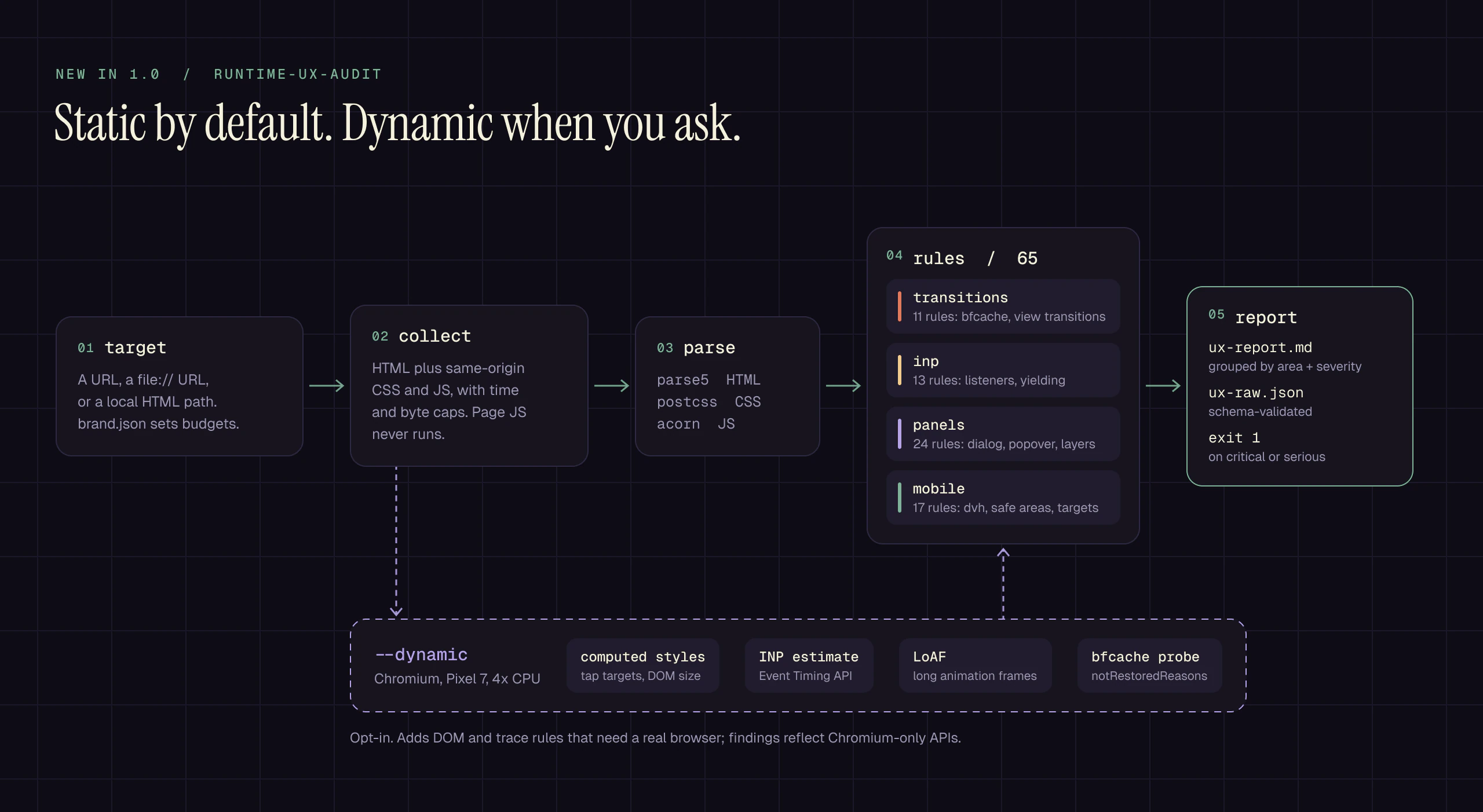
Accessibility audits tell you whether a page is correct. runtime-ux-audit tells you whether it feels right: how it transitions, how fast it answers input, how its dialogs and popovers behave, and how it holds up on a phone. 65 rules across four areas, each with a detection written down in the spec and a fixture that must trigger it and one that must not.
| Area | Catches, for example |
|---|---|
| transitions | unload handlers that evict the page from the back/forward cache, view transitions without a reduced-motion guard |
| inp | non-passive scroll and touch listeners, setTimeout(fn, 0) used as a yield, forced layout inside click handlers |
| panels | z-index: 9999 layers, <div role="dialog"> where <dialog> would do, backdrop-filter over a playing video |
| mobile | 100vh without a dvh fallback, safe-area insets without viewport-fit=cover, tap targets under 24px |
The static pass parses HTML, CSS and JS without executing anything and finishes in seconds, so it belongs on every pull request. Add --dynamic to load the page in Chromium as a Pixel 7 with a 4x CPU throttle, script interactions, estimate INP from the Event Timing API, and probe the back/forward cache. Budgets come from targets, motion and surfaces in your brand file, with Core Web Vitals and WCAG 2.2 defaults.
Use it in CI
Both audits exit 1 on critical or serious findings, 0 when clean, and 2 when they could not run. The repo doubles as a GitHub Action:
- uses: actions/checkout@v7
- run: npm ci && npm run build          # whatever produces your HTML
- uses: EthanY33/atelier@v1
  with:
    target: dist/index.html             # a path, file:// URL, or http(s) URL
    audits: a11y,ux                     # default
    dynamic: false                      # true adds the Chromium pass
    brand: .atelier/brand.json          # optional budgets
Both reports are appended to the job summary and written to atelier-reports/. The action uses the job's Node when it is 22 or newer and installs Node 22 otherwise. Outside GitHub, the same checks run with atelier a11y <target> and atelier ux <target>.
Commands and CLI
| Slash command | What it does |
|---|---|
/brand-init |
Interview, then write .atelier/brand.json |
/brand-get <path> / /brand-set <path> <value> |
Read or change one field, validated |
/brand-audit |
List recommended fields that are still missing |
/ux-audit <url-or-file> |
Run runtime-ux-audit and summarize the fixes |
/atelier-doctor |
Check the environment and offer the fix for anything missing |
/atelier-demo |
Run every skill on bundled fixtures into ./atelier-demo |
Inside a Claude Code session the plugin's bin/ is on the PATH, so atelier doctor, atelier demo and atelier <skill> --help work directly.
Proven on a real site
atelier was built for and dogfooded on goneidle.com before its first release: 3.89 MB of site PNGs became 167 KB of 1280px AVIF, zero critical or serious WCAG AA violations, and OG cards, favicons and tokens regenerated from the same brand file. The backdrop-filter rules in runtime-ux-audit come from a modal-stutter fix on that site.
Stability
1.0 is a promise about these surfaces, which follow semver from here on:
- each skill's exported functions and CLI flags documented in docs/api.md
- the
.atelier/brand.jsonschema (1.x only adds optional fields) - the
ux-raw.jsonformat (schemaVersion: "1.0") and audit exit codes
Requirements
- Claude Code with plugin support
- Node.js 22 or newer
- Playwright Chromium for
og-card-generator,accessibility-design-audit,html-to-videoandruntime-ux-audit --dynamic ffmpegon PATH forhtml-to-video(winget install Gyan.FFmpeg,brew install ffmpeg,apt install ffmpeg)
Development
git clone https://github.com/EthanY33/atelier
cd atelier
npm install                 # also installs the plugin's own dependencies
npm run setup:browsers      # Chromium matching the pinned Playwright
npm test
npm run smoke:plugin        # install the plugin the way Claude Code does, then run it
npm run demo                # every skill against bundled fixtures into ./.atelier-demo
CI runs the suite on Ubuntu, macOS and Windows with Node 22 and 24, enforces a 70% coverage gate, validates the plugin with claude plugin validate, and repeats a marketplace-style install on every OS. See CONTRIBUTING and the architecture notes.
Planned work for 1.2 to 1.4 is in ROADMAP.md, with an issue and a plan doc for each item.
License
MIT. No telemetry: atelier never phones home.
Yorumlar (0)
Yorum birakmak icin giris yap.
Yorum birakSonuc bulunamadi