open-robotics-plugin
Health Gecti
- License — License: Apache-2.0
- Description — Repository has a description
- Active repo — Last push 0 days ago
- Community trust — 153 GitHub stars
Code Gecti
- Code scan — Scanned 12 files during light audit, no dangerous patterns found
Permissions Gecti
- Permissions — No dangerous permissions requested
Bu listing icin henuz AI raporu yok.
Robotics agent skills (MuJoCo, perception, planning, sim2real, bring-up) for Claude Code, Antigravity, Codex, Gemini CLI, Cursor and more. Adapted from google-deepmind/robotics-antigravity-plugin (Apache-2.0).






Teach any coding agent to do robotics. MuJoCo simulation, perception, motion planning,
sim-to-real checks and robot bring-up, installed into the agent you already use with one command.
Quick start · Works with · Showcase · What's inside · Safety · 中文
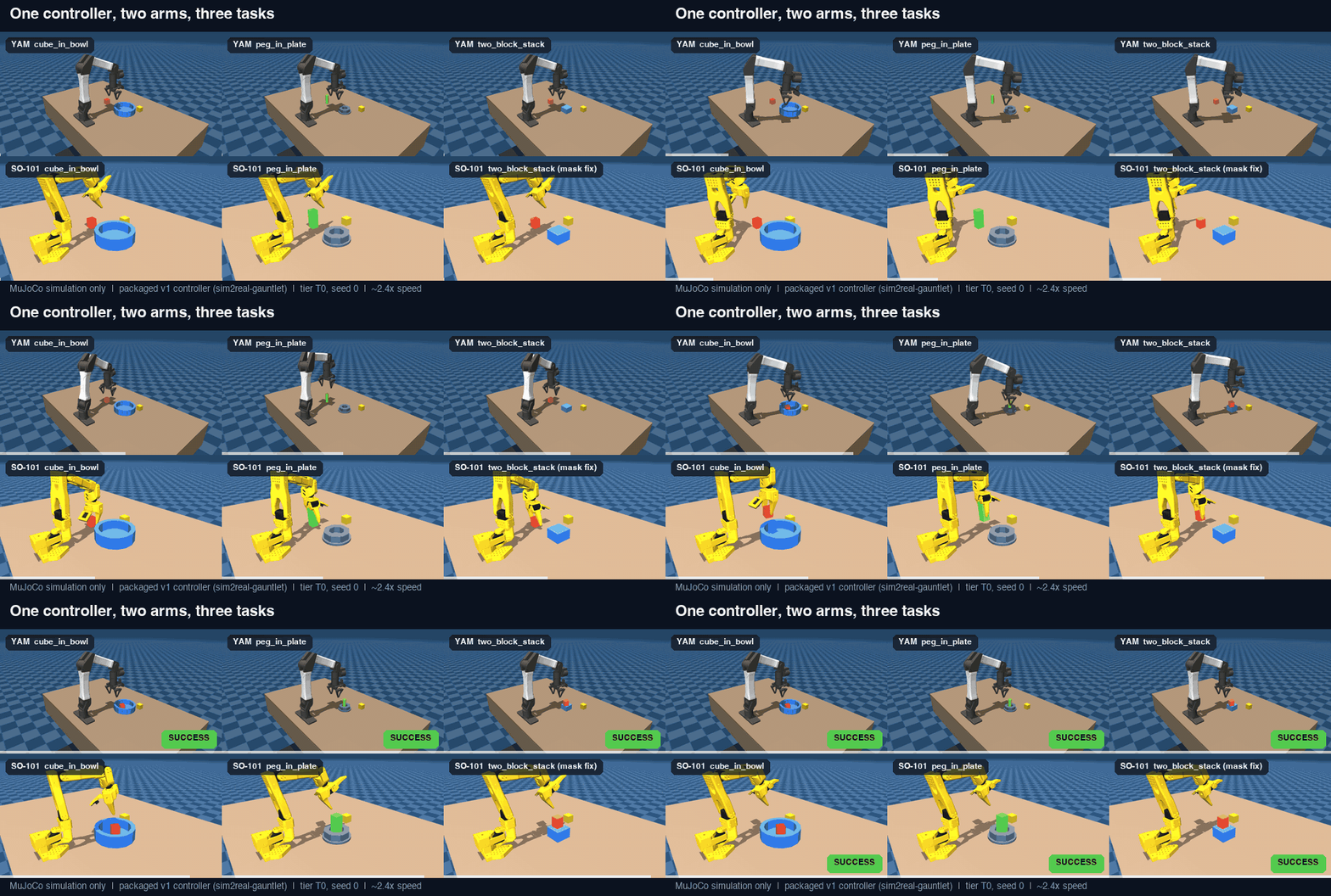
MuJoCo simulation, packaged example controller, one episode per panel at about 2.4x speed. Nothing here ran on a real robot.
Why this exists
Google DeepMind published a strong set of robotics skills for Antigravity
(robotics-antigravity-plugin,
Apache-2.0). The skills are plain SKILL.md folders plus Python, so they are not
really tied to one tool. This project is the adapter layer that was missing:
- One source, ten targets. The same skills land in Claude Code, Codex, Gemini CLI, Cursor, Windsurf, Cline, Copilot, anything that reads
AGENTS.md, Antigravity itself, and a ChatGPT bundle. - Safe by default. The real-robot safety rule travels with every install, and uninstall removes exactly what was added.
- Tested, with receipts. Skills were run end to end in simulation; failures were traced to root causes and sent upstream. See Showcase.
Community project, not affiliated with Google or Google DeepMind. Skill content is
adapted from upstream; see NOTICE.
Quick start
Let your agent install it: one sentence
Open your coding agent in the project where you want the skills and paste the sentence for
your tool. The agent reads INSTALL.md, clones this repo, previews the install,
runs it and reports what it wrote.
| Your agent | Paste this |
|---|---|
| Claude Code | Read https://raw.githubusercontent.com/eust-w/open-robotics-plugin/main/INSTALL.md and follow it to install the robotics skills with target claude for this project. |
| OpenAI Codex CLI | Read https://raw.githubusercontent.com/eust-w/open-robotics-plugin/main/INSTALL.md and follow it to install the robotics skills with target codex for this project. |
| Gemini CLI | Read https://raw.githubusercontent.com/eust-w/open-robotics-plugin/main/INSTALL.md and follow it to install the robotics skills with target gemini for this project. |
| Cursor | Read https://raw.githubusercontent.com/eust-w/open-robotics-plugin/main/INSTALL.md and follow it to install the robotics skills with target cursor for this project. |
| Windsurf | Read https://raw.githubusercontent.com/eust-w/open-robotics-plugin/main/INSTALL.md and follow it to install the robotics skills with target windsurf for this project. |
| Cline | Read https://raw.githubusercontent.com/eust-w/open-robotics-plugin/main/INSTALL.md and follow it to install the robotics skills with target cline for this project. |
| GitHub Copilot | Read https://raw.githubusercontent.com/eust-w/open-robotics-plugin/main/INSTALL.md and follow it to install the robotics skills with target copilot for this project. |
| Roo Code / opencode / Zed | Read https://raw.githubusercontent.com/eust-w/open-robotics-plugin/main/INSTALL.md and follow it to install the robotics skills with target codex for this project. |
| Google Antigravity | Read https://raw.githubusercontent.com/eust-w/open-robotics-plugin/main/INSTALL.md and follow it to install the robotics skills with target antigravity for all my projects. |
Not listed, or not sure? Paste this and the agent picks the target itself:
Read https://raw.githubusercontent.com/eust-w/open-robotics-plugin/main/INSTALL.md and follow it to install the robotics skills for this project.
Want the skills in every project on your machine? Say for all my projects instead offor this project. Want only a few? Add only the skills mujoco-audit and motion-planning.
Then start a new session and ask for robotics work in plain words. The agent loads the
matching skill by itself:
Audit this MuJoCo model.xml and fix what fails.Plan a collision-free trajectory for the YAM arm in simulation.Use the sim2real-gauntlet skill to compare my two controllers.
Naming a skill ("use the <name> skill") forces it when the agent does not pick it up.
To update or remove later: Update the open-robotics-plugin skills orUninstall the open-robotics-plugin skills; INSTALL.md covers both.
ChatGPT has no local agent, so its bundle is built by hand: see the manual steps below with--target chatgpt, then upload dist/chatgpt/ as the bundle's README.txt says.
Or install by hand
git clone https://github.com/eust-w/open-robotics-plugin
cd open-robotics-plugin
python3 tools/orp.py list                                            # targets and skills
python3 tools/orp.py install --target claude --scope user --dry-run  # preview, writes nothing
python3 tools/orp.py install --target claude --scope user            # do it
python3 tools/orp.py status                                          # what is installed where
Swap claude for any target below. For a project install, run the command from that project's
folder and drop --scope user. Python 3.9+, standard library only. Undo with the same flags
and uninstall.
Options: --scope user|project (default project), --dest DIR, --force, --dry-run, and--skills a,b,c to install a subset. A subset also gets the skills whose scripts it uses.
Skills it only links to are listed, not installed: --with-related adds them, --no-deps
installs exactly what you named.
Works with
| Harness | --target |
Project install | User install (--scope user) |
Verification status |
|---|---|---|---|---|
| Claude Code | claude |
.claude/skills + block in CLAUDE.md |
~/.claude/skills + ~/.claude/CLAUDE.md |
installed and loaded in a live session; two skills run end to end |
| Google Antigravity | antigravity |
n/a | upstream plugin layout incl. MuJoCo Studio sidecar | layout matches upstream; not run inside Antigravity |
| OpenAI Codex CLI | codex |
.agents/skills + block in AGENTS.md |
~/.agents/skills + ~/.codex/AGENTS.md |
paths from vendor docs; not run in the product |
| Gemini CLI | gemini |
.gemini/skills + block in GEMINI.md |
~/.gemini/skills + ~/.gemini/GEMINI.md |
paths from vendor docs; not run in the product |
| Cursor | cursor |
.cursor/skills + .cursor/rules/orp-safety.mdc |
~/.cursor/skills |
paths from vendor docs; not run in the product |
| Windsurf | windsurf |
.windsurf/skills + .windsurf/rules/orp-safety.md |
~/.codeium/windsurf/skills |
paths from vendor docs; not run in the product |
| Cline | cline |
.cline/skills + .clinerules/orp-safety.md |
~/.cline/skills |
paths from vendor docs; not run in the product |
| GitHub Copilot | copilot |
.github/skills + block in .github/copilot-instructions.md |
~/.copilot/skills + ~/.copilot/copilot-instructions.md |
paths from vendor docs; not run in the product |
No skill loader, reads AGENTS.md |
agents-md |
orp/ folder + skill index in AGENTS.md |
~/orp + ~/AGENTS.md |
installer-tested only |
| ChatGPT | chatgpt |
dist/chatgpt/ bundle, upload by hand |
n/a | simulation and code only, no hardware access |
Roo Code, opencode and Zed read .agents/skills according to their docs, so use --target codex
for them. Every harness in the table except ChatGPT now loads SKILL.md folders natively, so the
skills are installed as real skills, not as rule files that point at them.
"Paths from vendor docs" means the install locations were checked against each vendor's
documentation in November 2026 and the generated files are covered by 20 automated tests
(run in CI on Python 3.9 and 3.13), not that I opened that product and confirmed it behaves.
If your version differs, override the location with --dest and see
docs/harnesses.md. Corrections via issues are very welcome.
What the installer guarantees:
- It only removes what it installed. Each target records
.orp-manifest.<target>.json.
Several targets can share a project; uninstalling one leaves the others intact. - It does not overwrite your files. If a file exists that this tool did not install
(for example your own skill with the same name), install stops before writing anything.--forceoverrides. - Your instruction files stay yours. Edits to shared files (
CLAUDE.md,AGENTS.md, ...)
are confined to a markedBEGIN/END open-robotics-pluginblock. - Nothing machine-specific is written into a project. Project installs use relative paths,
so the generated files can be committed and work for teammates. - Skills are readable outside Antigravity. Every installed
SKILL.mdgets a short note
linking the safety rule (hardware skills) andharness_notes.md, which translates
Antigravity tool names,$PLUGIN_DIRand the aux pane for the harness you installed into.
Showcase
All clips are MuJoCo simulation, driven by the example tasks and controller shipped with the
upstream sim2real-gauntlet skill, after installing it into a non-Antigravity harness with this repo.
| Arm | Task | v1 controller, 20 paired episodes (tiers T0-T4) | v0 baseline |
|---|---|---|---|
| YAM | cube_in_bowl | 18 / 20 | 0 / 20 |
| YAM | peg_in_plate | 17 / 20 | 0 / 20 |
| YAM | two_block_stack | 16 / 20 | 0 / 20 |
| SO-101 | cube_in_bowl | 18 / 20 | 15 / 20 |
| SO-101 | peg_in_plate | 16 / 20 | 0 / 20 |
| SO-101 | two_block_stack | 2 / 20 | 0 / 20 |
Four episodes per tier is a smoke test, so single cells are noisy. T4 injects camera and gripper
faults, where aborting is the correct outcome: counted as safe, not as a success. Safety violations,
the paired statistics and the install workaround are in the
run record.
The failure that became a fix
SO-101 two_block_stack is the weak cell. Tracing it showed the controller's orange colour test
rejects the over-exposed top face of the block, so it aims about 15 mm off-centre and the jaw hits
the edge. Relaxing that one test in-process (installed skill untouched) lifted a small test from
1/8 to 7/8. Left: as shipped. Right: with the fix.
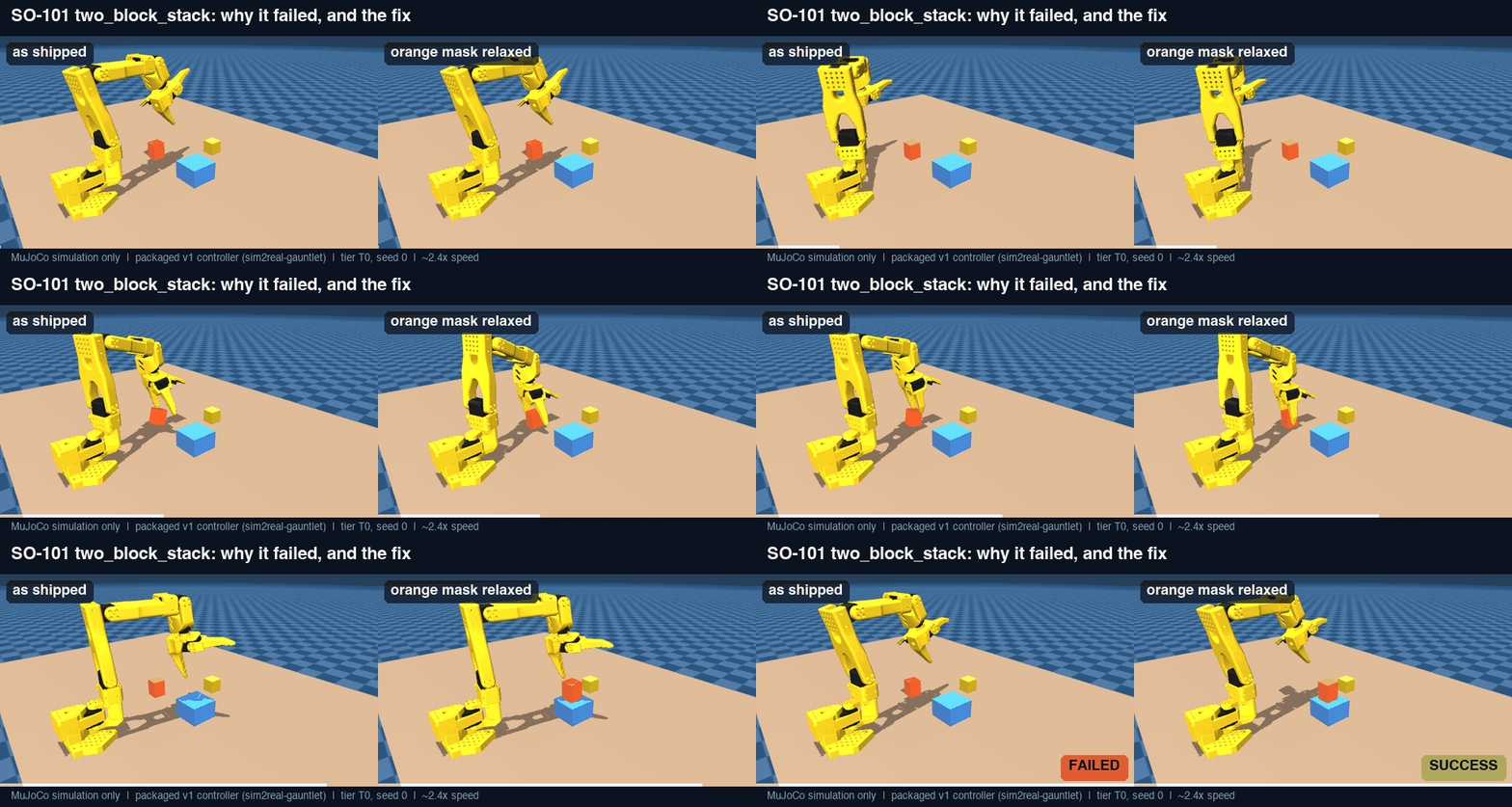
Full write-up with evidence and caveats: diagnosis.
More clips: each arm on its own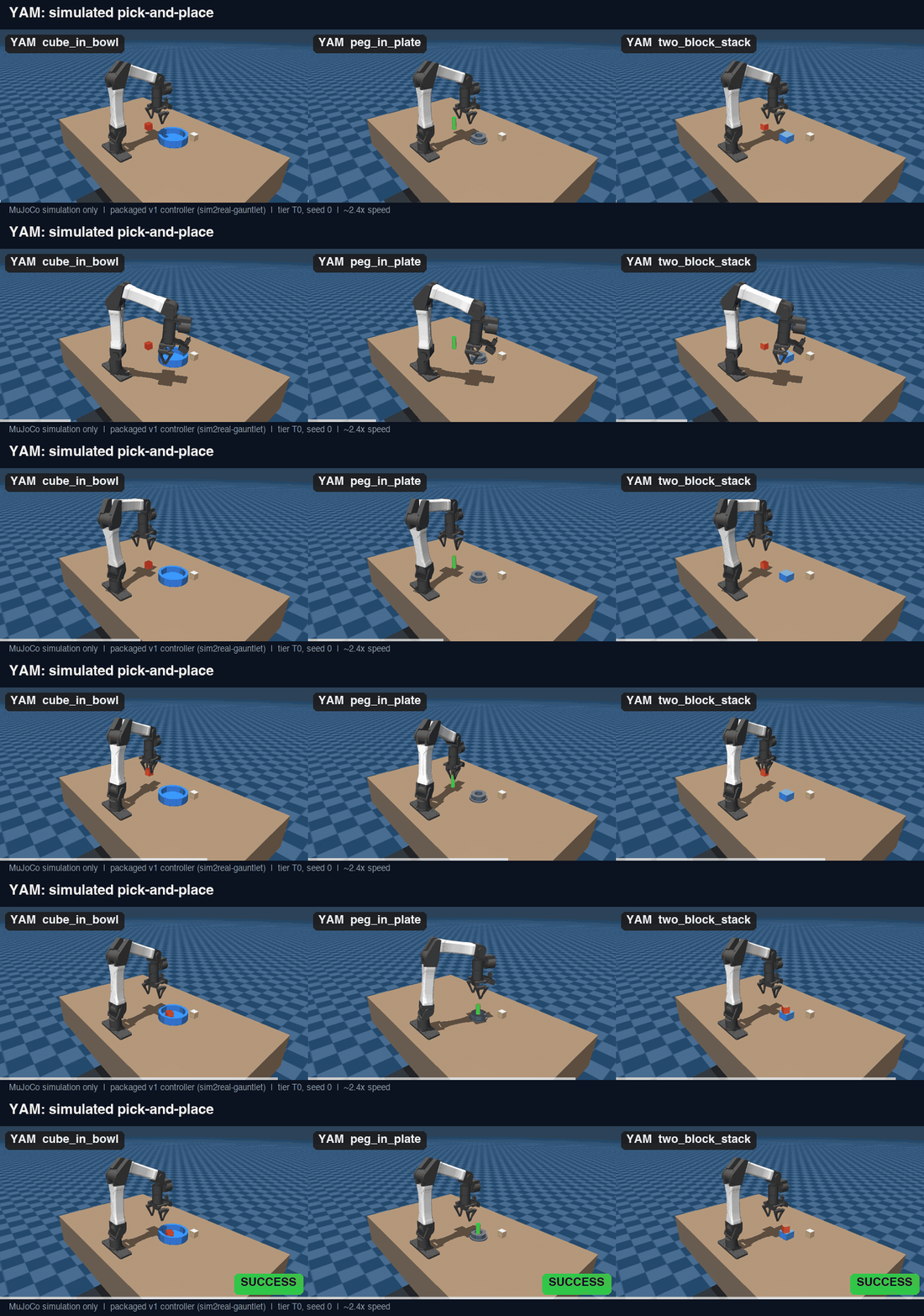
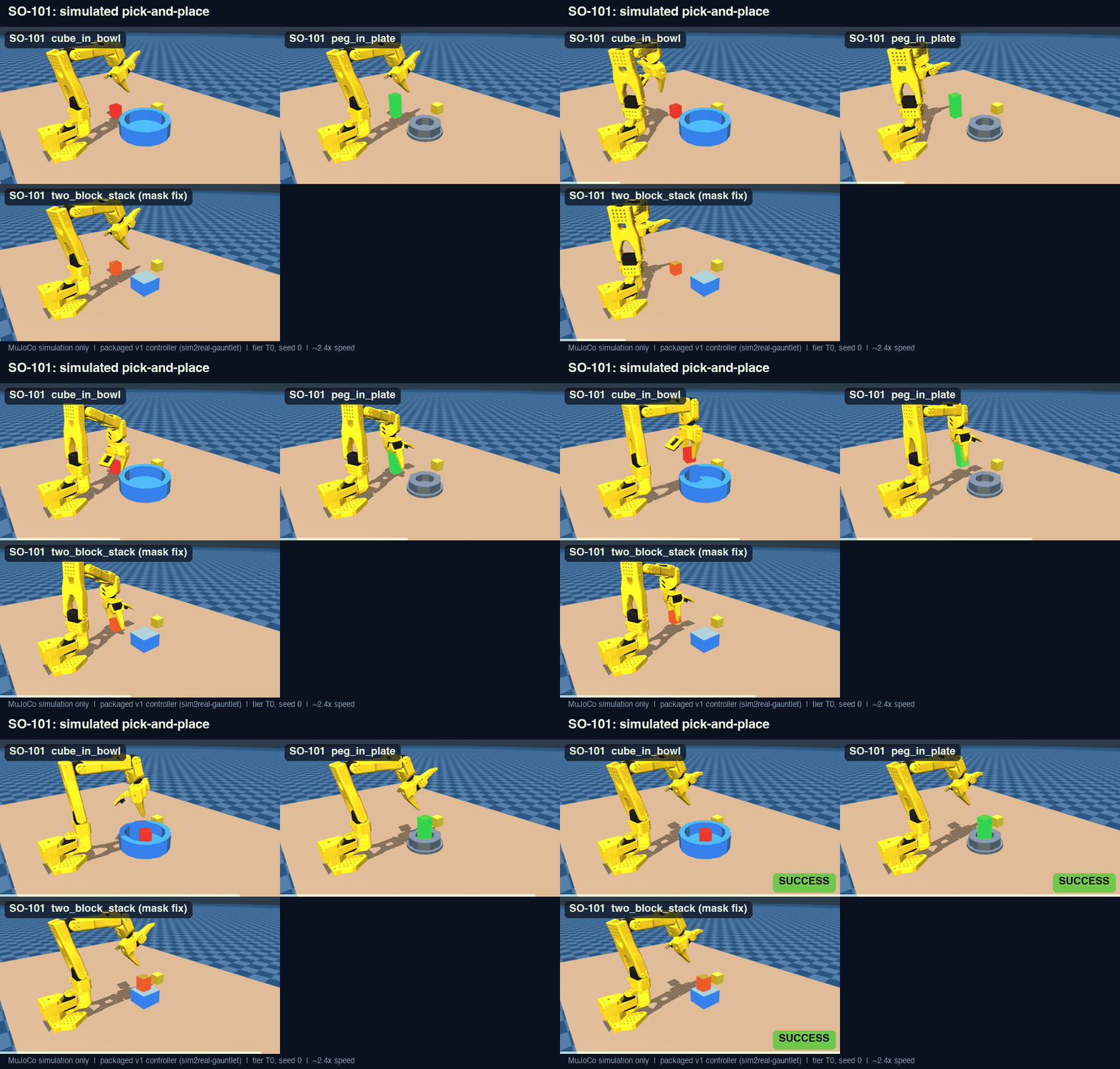
MP4 versions are in showcase/media.
Findings sent upstream
| What | Status | |
|---|---|---|
| issue #11 | orange colour mask rejects over-exposed block tops | open |
| issue #12 | sim2real-gauntlet dependencies do not resolve; README mentions missing tests/ |
open |
| PR #13 | mujoco-audit warns on physically impossible density |
open |
| PR #14 | harness-neutral wording in mujoco-audit |
open |
Upstream states it is not accepting external pull requests, so the PRs are offered as reference patches.
What's inside
19 skills. Items marked ⚠ command real hardware.
| Area | Skills |
|---|---|
| Perception | rgb-object-localization · visual-servoing ⚠ · workspace-calibration ⚠ |
| Planning and manipulation | motion-planning · pick-and-place ⚠ · i2rt-yam-ik · iteration ⚠ |
| Simulation and sim-to-real | mujoco-playground ⚠ · mujoco-playground-rl · sim2real-gauntlet · sim2real-iteration · mujoco-studio-sidecar |
| Robot bring-up | so101-bringup ⚠ · i2rt-yam-bringup ⚠ · fr3-duo-control ⚠ |
| Assets and auditing | blender-creation · mujoco-audit · mujoco-showcase-shot |
| Sharing | share-example |
Each skill is a SKILL.md with a trigger description plus bundled scripts, so the agent loads one
only when your task matches it.
Real-robot safety
[!WARNING]
A moving robot can injure people and damage equipment. Stay next to the robot, keep the
workspace clear and keep a way to cut power within reach. You are responsible for safe operation.
Every target installs rules/physical_robot_safety.md and injects a short "read this before moving
hardware" instruction. Start with --dry-run scripts and simulation before touching a real arm.
Limits you should know
- ChatGPT cannot reach USB or serial hardware. Its bundle is for simulation, planning, code review and scripts you run locally.
- Skills that call Gemini perception models need
GEMINI_API_KEY, in every harness. Using another vision model means editing those scripts. - The MuJoCo Studio sidecar is an Antigravity side panel and is only installed for
--target antigravity. Elsewhere runskills/mujoco-studio-sidecar/scripts/studiod.pyand open the local URL it prints.sidecar://links in skill text only resolve in Antigravity. - The seven MuJoCo API skills (
mujoco-python, ...) are not included; install them from google-deepmind/mujoco. - Running
sim2real-gauntletneeds extra setup because its own dependency list does not resolve; the working recipe is in the run record.
Roadmap
- Installer for 10 targets with exact uninstall and CI
- Simulation runs for
mujoco-auditandsim2real-gauntleton YAM and SO-101, with records - Root-cause analysis of the weakest case, sent upstream
- Native skill installs for Codex, Gemini CLI, Cursor, Windsurf, Cline and Copilot, with paths taken from vendor docs
- One-sentence install: paste a prompt and the agent installs the skills itself
- Confirm those installs in the real products
- A one-command upstream sync that keeps
skills/byte-identical - Real-robot demo footage (needs hardware; contributions welcome)
Contributing
Issues and PRs are welcome here, especially verified install paths for a harness you use
(docs/harnesses.md explains how to add one). Skill content under skills/,rules/ and sidecars/ mirrors upstream and changes by re-syncing from it.
python3 -I tests/test_orp.py
If this saves you time, a ⭐ helps other people find it.
Credits and license
Skills, rules and sidecar: Google LLC and DeepMind Technologies Limited, Apache-2.0, from
robotics-antigravity-plugin
v0.1.13 (commit 0f640d8). Installer, tests, docs and showcase: this repository, Apache-2.0.
Robot models used in the clips are fetched at run time from MuJoCo Menagerie under their own
licences and are not stored here. See NOTICE and LICENSE.
Yorumlar (0)
Yorum birakmak icin giris yap.
Yorum birakSonuc bulunamadi