Wheel-Mcp
Health Uyari
- License — License: MIT
- Description — Repository has a description
- Active repo — Last push 0 days ago
- Low visibility — Only 6 GitHub stars
Code Uyari
- process.env — Environment variable access in .github/workflows/release.yml
- network request — Outbound network request in .github/workflows/release.yml
Permissions Gecti
- Permissions — No dangerous permissions requested
Bu listing icin henuz AI raporu yok.
Godot MCP server for AI-assisted game development|连接 Codex、Cursor 等 AI 助手,运行游戏、检查场景与运行时状态、调试 GDScript,通过断言、日志和截图验证修改。
Wheel-mcp
English | 简体中文
Godot MCP server for AI-assisted game development. Run games, inspect state, and verify every change.
Wheel-mcp connects Codex, Cursor and other Model Context Protocol (MCP) clients
to real Godot projects and game runtimes. Use it for GDScript debugging, runtime
testing and AI-assisted game development: inspect scenes and runtime state,
send inputs, read diagnostics, and verify changes with assertions, logs and screenshots.
Your assistant writes the code. Wheel-mcp runs the checks and returns evidence.
Client setup adapters are available; form approval and end-to-end compatibility
depend on the client version. See client compatibility.
Windows local stable · Godot 4.7.2 · MCP · MIT application code
Website · Quick start · Documentation · Latest download · Contributing
If this helps your Godot workflow, give it a Star. Bug reports, reproducible examples, and focused PRs are just as welcome.
Token and interaction efficiency
Fewer tool exchanges. Leaner context. In a seven-case test, dev_loop reduced estimated payload tokens by 94.61% and MCP requests by 95.39% compared with a fine-grained workflow.
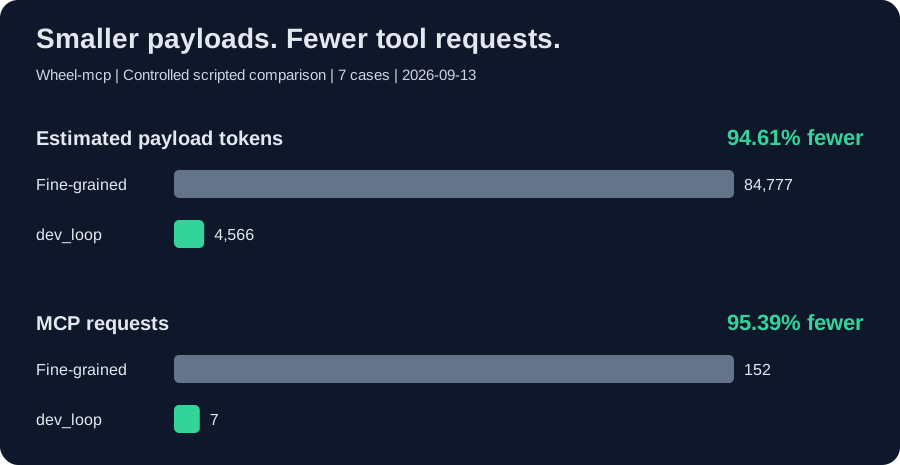
Use responseMode: "compact" for concise results and dev_loop to combine actions, assertions, and screenshots into one verification call.
Seven controlled cases on 2026-09-13; payload tokens estimated as JSON characters / 4, not billable tokens or runtime speedups.
With a real GODOT_PATH, npm run benchmark:comparison reproduces three alternating-order one-shot/persistent SDK query pairs. It records end-to-end time, engine starts, tool calls and serialized bytes, retaining every pair. Actual tokens, billing and whole-workflow efficiency are not measured; these results must not be mixed with the historical estimates above.
Why Wheel-mcp?
| Workflow | What the server provides |
|---|---|
| Explore a project | Scene, script, and resource discovery |
| Inspect a running game | Persistent runtime sessions and property inspection |
| Check behavior | Inputs, events, physics-frame waits, and explicit assertions |
| Diagnose failures | Engine diagnostics, runtime logs, and failure evidence |
| Verify a change | Screenshots, comparisons, and evidence artifacts |
The client plans and writes code; Wheel-mcp executes bounded Godot operations and reports evidence. This project is not an autonomous game generator, model provider, or replacement for your coding assistant.
Current status
The local stable release
targets Windows, Godot 4.7.2 and trusted local projects over stdio. Each release
includes the runtime package, SBOM, checksums and its source-bound acceptance receipt.
The historical v0.2.0 receipt
covers that frozen release, not later commits on main.
See the local release scope.
Long-session/high-load performance, public HTTP, other platforms/clients and
advanced authoring are outside this stable profile. Automated approvals are
explicit test doubles, not human desktop UX certification. Full production
qualification remains NOT_QUALIFIED; T31–T35/G4–G6 remain future work, not
completed tasks. Daily CI runs short Windows push/PR checks. The separate
release workflow runs bounded real-engine/package
acceptance only for version tags or explicit dispatch. No npm version is published.
Godot runs project code with your OS permissions; headless operation is not a
sandbox. Configure explicit project/evidence roots and use only trusted local
projects. HTTP non-loopback binding is disabled. MIT applies to application code,
not automatically to website media or copied UI sources; see
third-party notices before redistributing the full site.
Quick start
One-command setup
Use Windows, Node.js 24 and Godot 4.7.2 for the accepted profile. The server
requires Node.js >=20.19.0; source development also needs the current toolchain.
Clone the release tag for a reproducible starting point:
git clone --branch v0.2.6 https://github.com/EVEDensity/Wheel-Mcp.git
cd Wheel-Mcp
npm.cmd run go:global
Global setup also includes project configuration. It installs dependencies,
builds, detects Godot and updates supported client entries. Existing JSON entries
retain their environment, roots/scopes and client settings; changed JSON and.env files are backed up before writing. Malformed JSON is left unchanged.
Keep backups private because they may contain credentials. The installer configures
the Wheel-Mcp checkout, not every separate game workspace.
Restart your client and call get_godot_version to verify the connection.
Before opening your own game, set explicit project/evidence roots in the
server environment. Follow the first-project guide
for a read-only starting configuration and troubleshooting
if the client cannot connect. Download from GitHub Releases or build from source;
this release was not published to npm.
- Windows shortcut: double-click install.cmd for project setup; use the global command for Codex. If PowerShell blocks npm, use
npm.cmd. - Godot not found: set
GODOT_PATH=/absolute/path/to/godotin the repository's.envand retry. Setup updates this file when Godot is detected. - Start the service only: after installation,
npm run mcpstarts the MCP service, not a game.
Manual installation and client configuration
Use the following as an alternative to one-command setup.
1. Build from source
Install Godot and Node.js >=20.19.0; also satisfy the installed development toolchain's requirements. On Windows:
git clone https://github.com/EVEDensity/Wheel-mcp.git
cd Wheel-mcp
npm.cmd ci
npm.cmd run build
2. Connect your client
Replace every example path with your own absolute path. Merge these entries into existing configuration rather than overwriting it.
Cursor configurationUse your game's workspace .cursor/mcp.json:
{
  "mcpServers": {
    "wheel-mcp": {
      "command": "node",
      "args": ["D:/tools/Wheel-mcp/build/src/mcp-server-sdk.js"],
      "env": { "GODOT_PATH": "D:/tools/Godot_console.exe" }
    }
  }
}
Use ~/.codex/config.toml:
[mcp_servers.wheel-mcp]
command = "node"
args = ["D:/tools/Wheel-mcp/build/src/mcp-server-sdk.js"]

[mcp_servers.wheel-mcp.env]
GODOT_PATH = "D:/tools/Godot_console.exe"
3. Check the connection
Reload your client and ask it to call get_godot_version. If Node is not on the client's PATH, use its absolute executable path.
Examples
Background operation without repeated windows
MCP launch_project and open_runtime_bridge default to headless: true: logic,
physics, input and state checks run without a game window. Open one runtime bridge,
then reuse its returned session_id as sessionId for subsequentcall_runtime_bridge requests; stop it when finished. Do not reopen the bridge for
every query. Existing editor tools connect to an authorized editor; they do not
launch another editor.
Screenshots still need a real renderer, not a dummy/headless framebuffer.capture_runtime_screenshot and screenshot-enabled dev_loop now start off-screen
and minimize an unfocusable render window. A taskbar entry may remain; OS/driver
startup or error dialogs are not suppressed. This is not a promise that arbitrary
project scripts can never request another window or change focus during startup.
For repeated screenshots use open_runtime_bridge with headless: false, background: true and reuse its session. Request headless: false, background: false
only for an intentional visible preview. One-shot screenshots still use a separate
process; existing headless sessions cannot be converted to rendered ones in place.
Restart the MCP server after updating to load the new code/bridge. CLI/core launch
defaults are unchanged; use --headless true for CLI background launches.
GitHub CI is enabled for pushes and pull requests to main. Pages publishes the
existing showcase. A separate tag/manual release workflow packages and publishes
only after its bounded acceptance passes; none of these workflows publishes to npm.
The retained Windows workflow runs npm run check
(one build, style/lint, core MCP transport, approval/transaction safety and site
checks). Dependency auditing runs on manifest/lockfile changes, unknown diffs or
manual dispatch; obsolete runs are cancelled. In Actions, manually enableengine to add the short headless Godot smoke. No automatic engine matrix,
release gate, full regression or soak runs; failure diagnostics expire after
seven days. CI passing is not release qualification.
Use npm run check for daily work, npm run check:full for full regression,
and npm run test:godot-ci for the small native smoke. npm test still runs all
tests. npm run release:gate -- --plan previews the bounded acceptance steps
without running them or publishing. Follow the GitHub release procedure
for version tags, artifacts and failure recovery.
Try asking your connected client:
Inspect this scene and check whether Camera2D is enabled at runtime.
Run the test scene, send input, and collect logs and a screenshot. Report failed assertions with evidence.
After applying this patch, run the same checks again and compare the results.
These are client workflow examples, not guarantees of autonomous completion. See the tool catalog for actual interfaces.
Reproduce the bundled runtime checkFrom the repository root, import the fixture first:
$env:GODOT_PATH = 'D:/tools/Godot_console.exe'
$repo = (Get-Location).Path
& $env:GODOT_PATH --headless --path "$repo/tests/fixtures/runtime-behavior" --editor --import
Then ask the connected client to call dev_loop with the following arguments, replacing the repository prefix. This is a minimal state/physics fixture, not a polished game demo.
{
  "projectPath": "D:/games/Wheel-mcp/tests/fixtures/runtime-behavior",
  "bridgePath": "D:/games/Wheel-mcp/godot-plugin/runtime_bridge.gd",
  "evidenceDir": "D:/games/Wheel-mcp/runs/readme-smoke",
  "scenePath": "res://main.tscn",
  "actions": [{ "method": "wait_physics_frames", "params": { "frames": 12 } }],
  "checks": [
    {
      "id": "camera-enabled",
      "method": "get_property",
      "params": { "nodePath": "Camera2D", "property": "enabled" },
      "path": "value",
      "op": "equals",
      "expected": true
    }
  ],
  "screenshot": true,
  "maxRetries": 0,
  "timeoutMs": 30000,
  "responseMode": "compact"
}
Expected result: PASS, zero diagnostic errors, and a 320 × 180 screenshot. The README smoke test reads these arguments directly; an engine test that is skipped is not a successful runtime validation.
Know the boundaries
- Runtime property changes do not imply a saved editor scene. Optional editor tools require a separately authorized running editor and support only their declared native types. See the editor bridge contract.
- Project-file writes normally require the client's separate form confirmation of the exact transaction.
approved: trueis not permission. Clients without form support fail closed unless a separate, exact local preauthorization policy is configured; do not disable approval checks. See the transaction contract. - Persistent sessions and one-shot runs use separate instances; do not assume they share state.
- Only run trusted projects. Project scripts execute code; this server is not an operating-system sandbox.
- Advanced 3D, animation, and shader workflows are not advertised as complete. See the roadmap before depending on them.
Declared scene operations cover node creation, deletion, rename, reparenting, controlled instantiation and inheritance overrides. A batch is one native Godot Undo/Redo action; saving requires separate exact approval. Save checks reload the actual native staged bytes, and tests also close and reopen the editor. The product does not automatically reload the live document.
- Scenes and resources: at most 32 operations per batch, 100 nodes per scene and 14 declared resource types. Documents containing scripts, undeclared node classes or unique-name nodes are not supported by native batches. Inherited scenes require explicit bounded overrides. Approved
.tscnfile writes are not native editing or native undo. - UI: basic controls, containers, Theme/StyleBoxFlat and limited
pressed → hide/showconnections. Not all common controls such as LineEdit/ScrollContainer, arbitrary script callbacks or font resource graphs. - 3D and physics: basic transforms, meshes, static collisions, Area3D, RayCast3D and bounded shape queries. Not complete character/rigid-body authoring, skeletal workflows, navigation baking or contact-event history.
- Animation: local 2D/3D position keys, bounded state machines and two-source Blend2. Rotation/scale, skeletal, audio and method tracks, and in-place imported-animation editing are not supported.
- Materials and shaders: basic material fields, fixed shader text templates and bounded Color/Mix graphs. Not arbitrary shader source or complete PBR/VisualShader editing.
Advanced authoring remains experimental under the local release profile. Completed T12–T21 records describe historical acceptance of their declared subsets, not completion of both roadmap directions below. See the UI, physics, animation and shader contracts.
Major roadmap
The limited local release is available. The following work extends its scope;
existing bounded editor/semantic implementations are not promises of complete
authoring support. See the implementation plan
and task state for individual acceptance records.
- Reliability beyond the local profile: long-session/high-load and independent-machine installation checks.
- Broader editor-native editing: expand bounded scene/resource operations while retaining native undo and safe save/reopen verification.
- Broader Godot workflows: bounded, tested support for UI, 3D, animation, materials, shaders, and physics.
- Project intelligence and context: semantic resource indexing, structured Resources/Prompts, and predictable context budgets.
- Client compatibility and verification: Codex/Cursor integration tests, reproducible operation sequences, external patch validation, and regression evidence.
- Production reliability and safety: cross-platform validation, installation/upgrades, long-running stability, permission boundaries, and failure recovery.
Contributing
Help with reproducible bugs, real-engine/client testing, documentation, translations, or authorized demos. For a larger change, open an Issue to agree on scope before implementation. Keep PRs focused and include a minimal fixture when possible.
npm.cmd run check
Engine-related changes also need real Godot tests with GODOT_PATH configured. Include versions and sanitized logs in reports. Never commit secrets, private project content, or assets without permission. Read CONTRIBUTING.md before starting.
Documentation
- Documentation index and first-project setup
- Troubleshooting and support
- Tool catalog
- Feature status, limitations and proposed priorities (Chinese)
- Development loop
- Client repair protocol
- Deployment and security boundaries
- Implementation roadmap (Chinese)
License
MIT. Independent community project; not an official Godot, OpenAI, or Cursor product.
Star to follow progress. Fork and open a PR to help build it.
Project website
Open the existing project showcase.
It introduces the product; browser demos do not connect to your local MCP server.
The static website and browser playground live in docs/. Runnpm run site:serve and open http://127.0.0.1:4173/Wheel-mcp/.
Run npm run site:test for static-link and game-logic checks.
See website setup and game integration.
By EVEDensity.
Yorumlar (0)
Yorum birakmak icin giris yap.
Yorum birakSonuc bulunamadi