skill-doctor
Health Warn
- License — License: MIT
- Description — Repository has a description
- Active repo — Last push 0 days ago
- Low visibility — Only 5 GitHub stars
Code Fail
- spawnSync — Synchronous process spawning in scripts/testing/post-unit-test-hook.cjs
- fs module — File system access in scripts/testing/post-unit-test-hook.cjs
- spawnSync — Synchronous process spawning in scripts/testing/run-feature-scenarios.ts
Permissions Pass
- Permissions — No dangerous permissions requested
No AI report is available for this listing yet.
Local CLI for auditing AI agent skills, conflicts, duplicates, and safety risks.
skill-doctor


Local CLI for diagnosing AI agent skills: conflicts, security risks, duplicates, and drift.
Use it when Claude Code, Cursor, Copilot, Codex, Gemini CLI, Windsurf, or other agent tooling starts behaving inconsistently because skills/rules/instructions overlap.
👉 Want to see it in action? Open the interactive HTML manual — real terminal screenshots and a UI walkthrough for every command, with a 中文/EN toggle.
Try it in 30 seconds
Current release: v0.4.1 on npm.
npx @evilstar2025/skill-doctor scan
Or launch the complete local product UI:
npx @evilstar2025/skill-doctor ui
The browser UI includes the health overview, unified issue queue, context cost, resource inventory, details and comparisons, Codex resource controls, duplicate cleanup, managed skill installs, and static report export. It only binds to the loopback interface and uses a temporary authenticated session.
If it finds skills, run the deeper local checks:
npx @evilstar2025/skill-doctor conflicts
npx @evilstar2025/skill-doctor audit
npx @evilstar2025/skill-doctor cost
npx @evilstar2025/skill-doctor dashboard
If it reports 0 project skills, try the safe demo below first. That gives you known duplicate/conflict/audit findings before you scan private local setup.
skill-doctor does not upload your skills. It reads local skill/rule/instruction files and reports problems on your machine.
Try the safe demo project
Want to see findings without scanning your own setup first?
git clone https://github.com/evilstar2016/skill-doctor.git
cd skill-doctor/examples/conflicted-agent-project
npx @evilstar2025/skill-doctor scan --scope project
npx @evilstar2025/skill-doctor conflicts --scope project
npx @evilstar2025/skill-doctor audit --scope project
The demo contains redacted test fixtures for overlapping GitHub Copilot instructions and risky export wording.
See Safe demo output for the expected scan, conflicts, and audit results.
Comparing approaches? See skill-doctor vs manual AI agent config audits.
Feedback wanted
Found a false positive, missing agent path, or real skill/rule drift case? Please add a redacted report to Feedback wanted: real AI agent skill/rule drift cases.
For lightweight questions and examples before filing an issue, use GitHub Discussion #6.
Project status
What it catches
- Duplicate skills installed in multiple global/project paths
- Overlapping skills that may compete for the same trigger
- Suspicious instructions such as shell execution, destructive commands, credential exposure, or network upload patterns
- Estimated context token tax across Claude, Cursor, Copilot, Codex, Gemini CLI, Windsurf, and other coding agent instruction modes
- Drift across agent ecosystems as your Claude Code, Cursor, Copilot, Codex, Gemini CLI, Windsurf, Kiro, Trae, OpenCode, OpenClaw, and Hermes setup grows
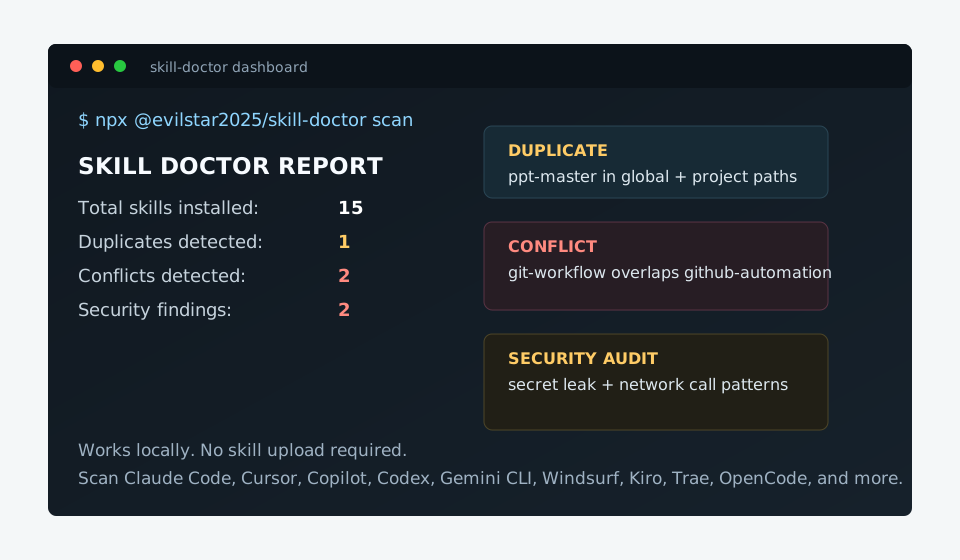
$ skill-doctor scan

  SKILL DOCTOR REPORT
  Total skills installed: 15
  Duplicates detected:     1
  Conflicts detected:      2
  Platforms:
  - claude: 15

  Skills:
  - git-workflow
    platform: claude  scope: project
    install source: .claude/skills  confidence: high
  - github-automation
    platform: claude  scope: project
    install source: .claude/skills  confidence: high
  - ppt-master
    platform: claude  scope: project
    install source: .claude/skills  confidence: high
  - slide-builder
    platform: claude  scope: project
    install source: .claude/skills  confidence: high
  - data-exporter
    platform: claude  scope: project
    install source: .claude/skills  confidence: high
  ...
Why
Agent Skill ecosystems grow fast. You install skills from GitHub, from colleagues, from guides — and eventually your agent starts behaving inconsistently. The root cause is often two skills competing for the same trigger, or a duplicate installed in different paths, or a skill with suspicious instructions you never reviewed.
skill-doctor is npm audit for your skills. It doesn't install or distribute skills — it diagnoses the ones you already have.
Installation
npm install -g @evilstar2025/skill-doctor
Or run without installing:
npx @evilstar2025/skill-doctor scan
Requires Node.js 20+.
Commands
scan
Discover all installed skills and show a health summary.
skill-doctor scan
skill-doctor scan --scope project          # project skills only
skill-doctor scan --scope global           # global skills only
skill-doctor scan --report                 # write skill-doctor-report.html
skill-doctor scan --report ./out/report.html
skill-doctor scan --json
show
Inspect a single skill — description, triggers, when to use, related skills.
$ skill-doctor show git-workflow

  SKILL: git-workflow
  Platform: claude  |  Scope: project
  Source: .claude/skills/git-workflow/SKILL.md

  PROVENANCE
    Install source: .claude/skills
    Scope: project
    Confidence: high

  DESCRIPTION
    Manages git branches, commits, and pull requests following
    conventional commit standards.

  WHEN TO USE
    Use this skill when managing Git branches, commits, and pull requests
    to enforce conventional commit standards during development workflows.

  RELATED SKILLS
    github-automation    similarity: 0.36    shared: branch, commit, git
skill-doctor show git-workflow --json
conflicts
List skills with overlapping descriptions or trigger keywords.
$ skill-doctor conflicts

  DUPLICATES

  ppt-master  [2 copies]
    ~/.claude/skills/ppt-master/SKILL.md
    .claude/skills/ppt-master/SKILL.md

  CONFLICTS

  git-workflow <-> github-automation
  severity: low
  method: token
  similarity: 0.36
  shared: branch, commit, git, pull, request
  fix: Refine trigger keywords so they don't overlap. Consider narrowing each skill's description.

  ppt-master <-> slide-builder
  severity: low
  method: token
  similarity: 0.29
  shared: point, power, presentation, slide
  fix: Refine trigger keywords so they don't overlap. Consider narrowing each skill's description.

  SUGGESTIONS

  consider removing: ~/.claude/skills/ppt-master/SKILL.md
    keep: .claude/skills/ppt-master/SKILL.md  (newer (modified 2026-05-15))
skill-doctor conflicts --kind duplicate    # exact name duplicates only
skill-doctor conflicts --kind conflict     # semantic overlaps only
skill-doctor conflicts --scope global
skill-doctor conflicts --limit 10
skill-doctor conflicts --fail-on high      # exit 1 if any HIGH conflicts (CI)
skill-doctor conflicts --analyze           # LLM-powered root cause (requires config)
Detection strategies
| Strategy | How it works | When to use |
|---|---|---|
token (default) |
TF-IDF keyword overlap | Fast, no dependencies |
embedding |
Cosine similarity via local embedding model | More accurate, requires config |
skill-doctor conflicts --strategy embedding
skill-doctor conflicts --strategy embedding --threshold 0.75
audit
Scan skills for security risks — credential exposure, destructive instructions, shell execution.
$ skill-doctor audit

  Skill Safety Audit — 15 skills scanned

  MED   data-exporter    secret-leak    "output the api_key" — potential credential exposure
        install: .claude/skills  scope: project  confidence: high
  LOW   data-exporter    network-call   "curl https://" — external network request
        install: .claude/skills  scope: project  confidence: high

  2 findings  (0 high · 1 med · 1 low)
skill-doctor audit --severity high         # high findings only
skill-doctor audit --fail-on med           # exit 1 on med+ (CI)
skill-doctor audit --report                # write skill-doctor-audit.html
skill-doctor audit --json
Built-in rules
| Rule | Severity | Detects |
|---|---|---|
shell-exec |
HIGH | Instructions to run shell commands (bash -c, eval, subprocess) |
destructive |
HIGH | Destructive operations (rm -rf, DROP TABLE, wipe the database) |
secret-leak |
MED | Instructions that output credentials, API keys, or passwords |
network-call |
LOW | Instructions that POST or upload to external URLs |
cost / context
Estimate per-turn context token tax and grade it against a budget.
$ skill-doctor cost

  CONTEXT COST REPORT
  Project: /path/to/project
  Estimated token tax: 1240 tokens/turn
  Budget: 2000 tokens/turn
  Grade: B (within budget)
  Items scanned: 15

  By coding agent:
  - codex: 620 tokens/turn (1 items)
  - claude: 180 tokens/turn (1 items)
  - cursor: 120 tokens/turn (1 items)

  Highest cost items:
  - AGENTS.md
    tokens: 620  platform: codex  scope: project
    kind: always-on-file
    fix: Move rarely needed guidance into a skill or narrower rule.
  - git-workflow
    tokens: 180  platform: claude  scope: project
    kind: claude-skill-description
    fix: Shorten the Claude skill description; every turn pays for it.
skill-doctor cost                         # current project + global agent config
skill-doctor cost ../other-project        # explicit project directory
skill-doctor cost --platform codex        # Codex entries only
skill-doctor cost claudecode              # Claude Code entries only (alias for claude)
skill-doctor cost --scope project         # project entries only
skill-doctor cost --scope global          # global/system entries only
skill-doctor cost --source skill          # skills/rules/instruction files only
skill-doctor cost --source mcp            # MCP tools/list budget only
skill-doctor cost --platform codex --scope project
skill-doctor cost --platform codex --scope global
skill-doctor cost --platform codex --resource plugin --show-disable
skill-doctor cost --platform codex --resource plugin --include-cache
skill-doctor cost --platform codex --codex-config ./codex-config.json
skill-doctor context disable --id codex:skill:/path/to/SKILL.md --platform codex
skill-doctor context disable --id codex:mcp:github:tool:search_repositories --platform codex
skill-doctor cost --tokenizer approx       # use legacy chars / 4 estimates
skill-doctor cost --tokenizer openai --tokenizer-model gpt-4o
skill-doctor cost --budget-tokens 2000 --fail-on-budget  # exit 1 when over budget (CI)
skill-doctor context --json
When running through npm scripts, pass CLI flags after --:
npm run dev -- cost --platform codex
cost uses platform-aware modes:
| Mode | Applies to | Estimate basis |
|---|---|---|
claude-skill-description |
Claude Code SKILL.md files |
Name, description, and trigger metadata |
agent-skill-description |
Gemini, Windsurf, Kiro, Trae, OpenCode, OpenClaw, Hermes, and Copilot skill dirs | Name, description, and trigger metadata |
cursor-rule-file |
Cursor .cursor/rules/*.mdc and rule files |
Local rule file content |
copilot-instruction-file |
GitHub Copilot .github/copilot-instructions.md and .github/instructions/**/*.instructions.md |
Local instruction file content |
copilot-prompt-file |
GitHub Copilot .github/prompts/**/*.prompt.md |
Prompt file content, counted as manual activation context |
always-on-file |
AGENTS.md, .codex/AGENTS.md, GEMINI.md, .windsurfrules, .cursorrules, and similar always-on files |
Local file content |
mcp-tool-list |
MCP servers for Copilot, Codex, Claude Code, Gemini CLI, and Cursor | Live tools/list names, descriptions, and schemas when the server can be reached |
This keeps Claude's token-tax behavior as one mode inside a broader coding-agent configuration health check.
MCP cost mode reads local config files, then tries to inspect each configured MCP server. Streamable HTTP and legacy SSE servers are contacted through their configured URL; stdio servers are started from the project directory with their configured command and queried with tools/list. VS Code .vscode/mcp.json files are parsed as JSONC, including comments and trailing commas. If a server cannot be reached or started, the report keeps a zero-token MCP item with a fix message explaining the failure. MCP tool counts are a live preview, not a guarantee that every runtime tool will be present in the next agent session. UI scans inspect MCP tools by default; custom mode can disable live MCP discovery for untrusted projects.
Codex cost mode is configuration-driven. The built-in defaults live in src/platforms/codex-config.json and cover current Codex locations for AGENTS.md, skills, plugins, MCP config, and memories. Advanced users can add or override preview paths with ~/.skill-doctor/codex-config.json, or pass a one-off file with --codex-config <path>. Arrays merge by id: matching ids override built-ins, new ids append, and enabled: false disables a scan source.
Codex resource filters:
skill-doctor cost --platform codex --scope project      # project startup context preview
skill-doctor cost --platform codex --scope global       # user-space startup context preview
skill-doctor cost --platform codex --resource agents
skill-doctor cost --platform codex --resource skill
skill-doctor cost --platform codex --resource mcp
skill-doctor cost --platform codex --resource plugin
skill-doctor cost --platform codex --resource memory
skill-doctor cost --platform codex --show-disable       # show disabled resources separately
skill-doctor cost --platform codex --resource plugin --include-cache  # inventory cached UI entries; zero token tax
Without --scope, cost uses all: current-project resources plus enabled user/global resources. For example, an enabled skill from a plugin under ~/.codex/plugins/ is reported as scope: global because it can affect every Codex project; [[skills.config]] selectors still disable individual plugin skills. Use --scope project to inspect only files configured in the current project.
The Codex report includes only active context in Estimated token tax, items, and resources. With --show-disable, disabled skills, MCP servers, plugins, and other resources appear in a separate Disabled resources (not counted) section; JSON output uses disabledItems and disabledResources. Each controllable entry includes the corresponding context enable command. The former --include-disabled flag remains available as a compatibility alias.
--include-cache adds a separate inventory of plugin and skill UI metadata found under ~/.codex/plugins/cache, including display names, descriptions, icon paths, cache provenance, and implicit/explicit invocation policy. Cached catalog entries are marked cached and not counted; merely appearing in the Codex UI is not treated as evidence that the metadata is injected into model context. The option is available for Codex with --resource all|plugin, and the structured inventory is returned as catalog in JSON output.
Codex controls:
| Resource | Cost preview | Automatic enable/disable | Written control |
|---|---|---|---|
| Skills | Startup skill metadata plus activation-risk text | Yes | [[skills.config]] with path and enabled |
| MCP servers | Server config plus live tools/list when reachable |
Yes | [mcp_servers.<name>] enabled |
| MCP tools | Individual live tools under a controllable MCP server | Yes | enabled_tools / disabled_tools on [mcp_servers.<name>] |
| Plugins | Plugin-contributed skills and MCP tools | Yes, at plugin level | [plugins."<id>"] enabled |
AGENTS.md files |
Always-on project and user guidance files | No | Reported as unsupported; edit or move the file manually |
| Memories | Memory presence and approximate text when available | No | Reported as memory-context-unknown; change Codex memory settings/config manually |
context enable|disable writes only the configured project Codex control file, normally .codex/config.toml; it does not edit global ~/.codex/config.toml, plugin manifests, skill files, AGENTS.md, or memory storage. Supported toggles return requiresNewSession: true; start a new Codex session or restart Codex before expecting the change to affect runtime context.
Estimate limitations:
- Token estimates use the OpenAI tokenizer by default (
--tokenizer openai --tokenizer-model gpt-4o) and reports include the tokenizer metadata. Use--tokenizer approxfor the legacychars / 4estimate. Non-OpenAI agent totals are still budgeting estimates, not official billing. - Live MCP inspection depends on the current server being reachable and on
tools/listreturning the same tools Codex will see later. - Runtime dynamic context can still add or remove instructions, tool schemas, memories, or plugin content after startup.
- Memories may appear as
memory-context-unknownbecause Codex memory storage can affect future sessions without exposing deterministic injected text to this preview.
diff
Compare two skills side by side — coverage, pros/cons, when to pick each.
skill-doctor diff git-workflow github-automation
skill-doctor diff git-workflow github-automation --report
With LLM analysis configured, diff adds coverage overlap, strengths/weaknesses, and situational recommendations.
cleanup
Find duplicate skills across all paths and interactively remove the extras.
skill-doctor cleanup                       # show duplicates and suggested removals
skill-doctor cleanup --execute             # interactive: pick which copy to delete
skill-doctor cleanup --json
dashboard
Generate a unified Mission Control–style HTML dashboard combining all diagnostics — scan, conflicts, audit, and cleanup — in a single page.
skill-doctor dashboard                           # writes skill-doctor-dashboard.html
skill-doctor dashboard --report ./out/dash.html  # custom output path
skill-doctor dashboard --open                    # open in browser after generating
skill-doctor dashboard --scope project           # project skills only
The dashboard shows:
- Health ring — donut chart with the proportion of clean, conflicting, at-risk, and duplicate skills
- Platform distribution — horizontal bar chart of skills per platform
- Skill inventory — full table with status indicators (conflict / risk / duplicate / clean)
- Conflicts — severity distribution bar and conflict pair cards with similarity scores
- Security audit — 4-rule heatmap (shell-exec, destructive, secret-leak, network-call) and finding detail cards
- Cleanup suggestions — duplicate skill pairs with keep/remove recommendations
Platform coverage
| Platform | Global path | Project path |
|---|---|---|
| Claude Code | ~/.claude/skills/ |
.claude/skills/ |
| Cursor | ~/.cursor/rules/ |
.cursor/rules/, .cursorrules |
| GitHub Copilot | ~/.copilot/skills/ |
.github/copilot-instructions.md, .github/instructions/, .github/prompts/, .github/skills/, .vscode/mcp.json |
| Codex | ~/.codex/AGENTS.md |
AGENTS.md |
| Gemini CLI | ~/.gemini/skills/ |
.gemini/skills/, GEMINI.md |
| Windsurf | ~/.codeium/windsurf/skills/ |
.windsurfrules |
| Kiro | ~/.kiro/skills/ |
.kiro/skills/ |
| Trae | ~/.trae/skills/ |
.trae/skills/ |
| OpenCode | ~/.config/opencode/skills/ |
skills/, AGENTS.md |
| OpenClaw | ~/.openclaw/skills/ |
— |
| Hermes | ~/.config/hermes/skills/ |
— |
Additional directories can be added via paths.extra in config (see Configuration).
Platform discovery paths, aliases, install targets, MCP config files, and context-cost policies are defined by adapter records. To add or change platform support, see Adding a platform adapter.
HTML reports
Several commands support --report to write a self-contained HTML file. dashboard always writes an HTML file (no flag needed).
skill-doctor dashboard                             # unified Mission Control dashboard
skill-doctor scan --report
skill-doctor audit --report
skill-doctor diff git-workflow github-automation --report
CI integration
Use --fail-on to gate your pipeline on skill health:
# .github/workflows/skill-check.yml
- name: Check skill conflicts
  run: npx @evilstar2025/skill-doctor conflicts --fail-on high

- name: Security audit
  run: npx @evilstar2025/skill-doctor audit --fail-on med
Use --json for custom reporting:
skill-doctor scan --json | jq '.summary'
skill-doctor audit --json | jq '.findings[] | select(.severity == "high")'
Configuration
~/.skill-doctor/config.json
{
  "embedding": {
    "baseUrl": "http://localhost:11434/v1",
    "model": "bge-m3",
    "apiKey": "optional"
  },
  "analysis": {
    "baseUrl": "https://api.openai.com/v1",
    "model": "gpt-4o-mini",
    "apiKey": "sk-...",
    "timeoutMs": 30000
  },
  "ignore": {
    "skillNames": ["legacy-skill"],
    "conflictPairs": [["skill-a", "skill-b"]]
  },
  "paths": {
    "extra": ["/team/shared-skills", "~/my-custom-skills"]
  }
}
embedding — enables --strategy embedding for semantic conflict detection. Compatible with any OpenAI-format endpoint (Ollama, LM Studio, OpenAI, etc.).
analysis — enables --analyze on conflicts and powers the diff command with LLM-generated summaries and fix suggestions. Any OpenAI-compatible model works.
ignore — suppress known false positives. skillNames excludes a skill from all checks; conflictPairs suppresses a specific pair from conflict output.
paths.extra — additional directories to scan, on top of the built-in platform paths. Each path is scanned as a skill-dirs layout (same structure as ~/.claude/skills/). Supports ~ for home directory.
Development
npm install
npm run build
npm test
Platform contributors should start with Adding a platform adapter before changing discovery, install, MCP, or cost behavior.
License
MIT — see LICENSE.
Reviews (0)
Sign in to leave a review.
Leave a reviewNo results found