SkillCompass
Health Warn
- License — License: MIT
- No description — Repository has no description
- Active repo — Last push 0 days ago
- Community trust — 71 GitHub stars
Code Pass
- Code scan — Scanned 12 files during light audit, no dangerous patterns found
Permissions Pass
- Permissions — No dangerous permissions requested
This tool is a local-first quality evaluator and management utility for AI agent skills. It provides a six-dimension scoring system to help developers measure, track, and improve the quality of their installed AI skills.
Security Assessment
Overall Risk: Low. The automated code scan analyzed 12 files and found no dangerous patterns or hardcoded secrets. The tool does not request dangerous permissions. It operates locally and relies on Node.js to run local validators. Users should be aware that during setup, the CLI requires permission to execute local `node` commands. The repository lacks a description, which is a minor transparency warning, but no other security, network, or sensitive data access risks were identified.
Quality Assessment
The project is actively maintained, with its most recent code push occurring today. It is released under the permissive and standard MIT license. Community trust appears to be moderate and growing, currently backed by 71 GitHub stars. The documentation is thorough and clearly outlines the intended use cases, prerequisites, and setup instructions.
Verdict
Safe to use.
SkillCompass
Evaluate quality. Find the weakest link. Fix it. Prove it worked. Repeat.
GitHub · SKILL.md · Schemas · Changelog




| What it is | A local-first skill quality evaluator and management tool for Claude Code / OpenClaw. Six-dimension scoring, usage-driven suggestions, guided improvement, version tracking. |
| Pain it solves | Turns "tweak and hope" into diagnose → targeted fix → verified improvement. Turns "install and forget" into ongoing visibility over what's working, what's stale, and what's risky. |
| Use in 30 seconds | /skillcompass — see your skill health at a glance. /eval-skill {path} — instant quality report showing exactly what's weakest and what to improve next. |
Evaluate → find weakest link → fix it → prove it worked → next weakness → repeat.
Meanwhile, Skill Inbox watches your usage and tells you what needs attention.
Who This Is For
|
For
|
Not For
|
Quick Start
Prerequisites: Claude Opus 4.6 (complex reasoning + consistent scoring) · Node.js v18+ (local validators)
Claude Code
git clone https://github.com/Evol-ai/SkillCompass.git
cd SkillCompass && npm install

# User-level (all projects)
rsync -a --exclude='.git'  . ~/.claude/skills/skill-compass/

# Or project-level (current project only)
rsync -a --exclude='.git'  . .claude/skills/skill-compass/
First run: SkillCompass auto-triggers a brief onboarding — scans your installed skills (~5 seconds), offers statusLine setup, then hands control back. Claude Code will request permission for
nodecommands; select "Allow always" to avoid repeated prompts.
OpenClaw
git clone https://github.com/Evol-ai/SkillCompass.git
cd SkillCompass && npm install
# Follow OpenClaw skill installation docs for your setup
rsync -a --exclude='.git'  . <your-openclaw-skills-path>/skill-compass/
If your OpenClaw skills live outside the default scan roots, add them to skills.load.extraDirs in ~/.openclaw/openclaw.json:
{
  "skills": {
    "load": {
      "extraDirs": ["<your-openclaw-skills-path>"]
    }
  }
}
Usage
/skillcompass is the single entry point. Use it with a slash command or just talk naturally — both work:
/skillcompass                              → see what needs attention
/skillcompass evaluate my-skill            → six-dimension quality report
"improve the nano-banana skill"            → fix weakest dimension, verify, next
"what skills haven't I used recently?"     → usage-based insights
"security scan this skill"                 → D3 security deep-dive
What It Does
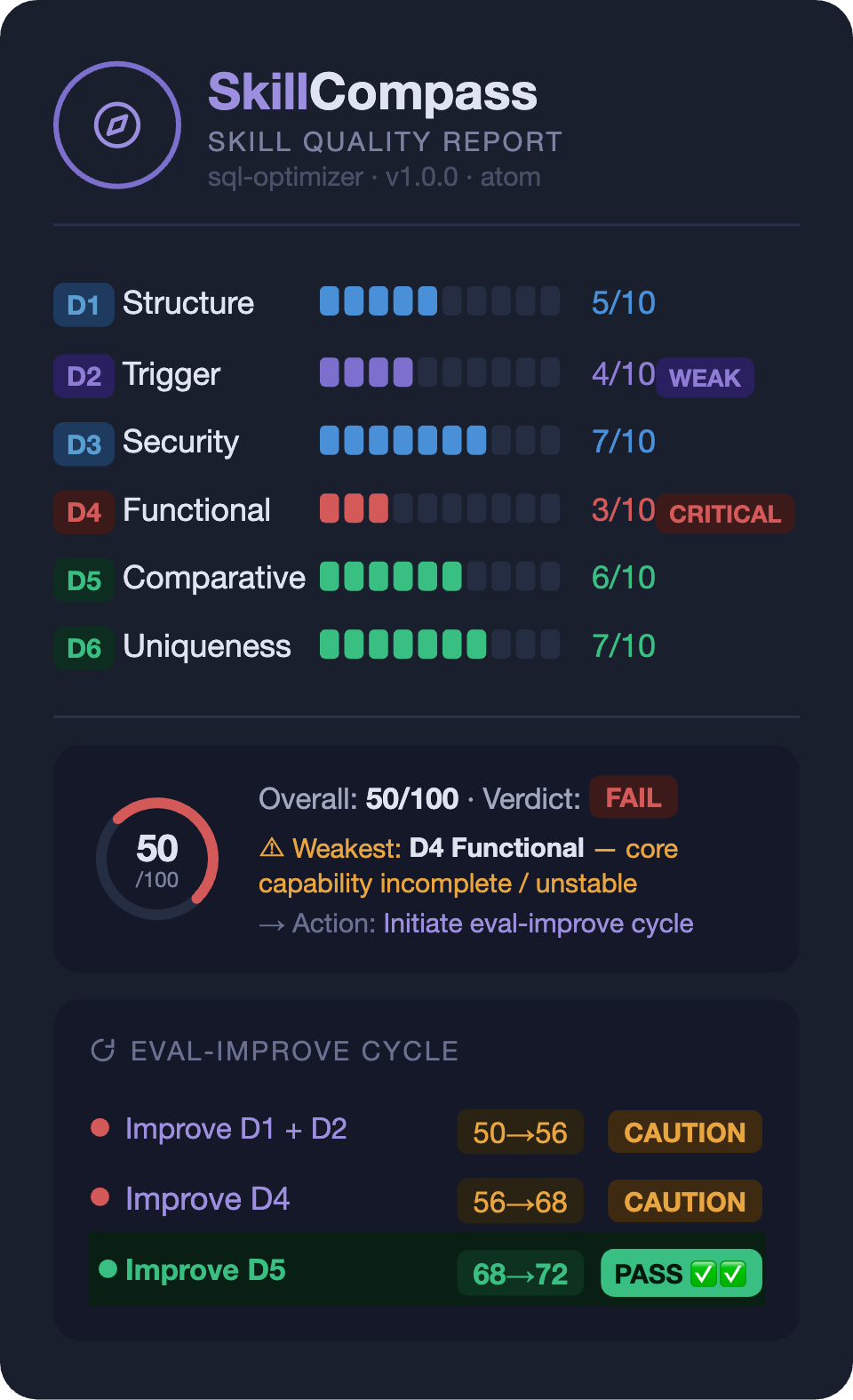
The score isn't the point — the direction is. You instantly see which dimension is the bottleneck and what to do about it.
Each /eval-improve round follows a closed loop: fix the weakest → re-evaluate → verify improvement → next weakest. No fix is saved unless the re-evaluation confirms it actually helped.
Six-Dimension Evaluation Model
| ID | Dimension | Weight | What it evaluates |
|---|---|---|---|
| D1 | Structure | 10% | Frontmatter validity, markdown format, declarations |
| D2 | Trigger | 15% | Activation quality, rejection accuracy, discoverability |
| D3 | Security | 20% | Secrets, injection, permissions, exfiltration, embedded shell |
| D4 | Functional | 30% | Core quality, edge cases, output stability, error handling |
| D5 | Comparative | 15% | Value over direct prompting (with vs without skill) |
| D6 | Uniqueness | 10% | Overlap with similar skills, model supersession risk |
overall_score = round((D1×0.10 + D2×0.15 + D3×0.20 + D4×0.30 + D5×0.15 + D6×0.10) × 10)
| Verdict | Condition |
|---|---|
| PASS | score >= 70 AND D3 pass |
| CAUTION | 50–69, or D3 High findings |
| FAIL | score < 50, or D3 Critical (gate override) |
Skill Inbox — Usage-Driven Suggestions
SkillCompass passively tracks which skills you actually use and surfaces suggestions when something needs attention — unused skills, stale evaluations, declining usage, available updates, and more. 9 built-in rules, all based on real invocation data.
- Suggestions have a lifecycle: pending → acted / snoozed / dismissed, with auto-reactivation when conditions change
- All data stays local — no network calls unless you explicitly request updates
- Tracking is automatic via hooks (~one line per skill invocation), zero configuration
Features
Evaluate → Improve → Verify
/eval-skill scores six dimensions and pinpoints the weakest. /eval-improve targets that dimension, applies a fix, and re-evaluates — only saves when the target dimension improved and security/functionality didn't regress. Then move to the next weakness.
Skill Lifecycle
SkillCompass covers the full lifecycle of your skills — not just one-time evaluation.
Install — auto-scans your inventory, quick-checks security patterns across packages and sub-skills.
Ongoing — usage hooks passively track every invocation. Skill Inbox turns this into actionable insights: which skills are never used, which are declining, which are heavily used but never evaluated, which have updates available.
On edit — hooks auto-check structure + security on every SKILL.md write through Claude. Catches injection, exfiltration, embedded shell. Warns, never blocks.
On change — SHA-256 snapshots ensure any version is recoverable. D3 or D4 regresses after improvement? Snapshot restored automatically.
On update — update checker reads local git state passively; network only when you ask. Three-way merge preserves your local improvements region-by-region.
Scale
One skill or fifty — same workflow. /eval-audit scans a whole directory and ranks results worst-first so you fix what matters most. /eval-evolve chains multiple improve rounds automatically (default 6, stops at PASS or plateau). --ci flag outputs machine-readable JSON with exit codes for pipeline integration.
Works With Everything
No point-to-point integration needed. The Pre-Accept Gate intercepts all SKILL.md edits regardless of source.
| Tool | How it works together | Guide |
|---|---|---|
| Claudeception | Extracts skill → auto-evaluation catches security holes + redundancy → directed fix | guide |
| Self-Improving Agent | Logs errors → feed as signals → SkillCompass maps to dimensions and fixes | guide |
Design Principles
- Local-first: All data stays on your machine. No network calls except when you explicitly request updates.
- Read-only by default: Evaluation and reporting are read-only. Write operations (improve, merge, rollback) require explicit opt-in.
- Passive tracking, active decisions: Hooks collect usage data silently. Suggestions are surfaced, never auto-acted on.
- Dual-channel UX: Keyboard-selectable choices for actions, natural language for queries. Both always available.
Feedback Signal Standard
SkillCompass defines an open feedback-signal.json schema for any tool to report skill usage data:
/eval-skill ./my-skill/SKILL.md --feedback ./feedback-signals.json
Signals: trigger_accuracy, correction_count, correction_patterns, adoption_rate, ignore_rate, usage_frequency. The schema is extensible (additionalProperties: true) — any pipeline can produce or consume this format.
License
MIT — Use, modify, distribute freely. See LICENSE for details.
Reviews (0)
Sign in to leave a review.
Leave a reviewNo results found