dachshund
Health Uyari
- License — License: MIT
- Description — Repository has a description
- Active repo — Last push 0 days ago
- Low visibility — Only 9 GitHub stars
Code Basarisiz
- process.env — Environment variable access in scripts/build-mcp.mjs
- network request — Outbound network request in scripts/fetch-agent-icons.mjs
- process.env — Environment variable access in scripts/screenshot.mjs
- fs.rmSync — Destructive file system operation in scripts/seed-demo.mjs
- spawnSync — Synchronous process spawning in scripts/test-agents.mjs
- fs.rmSync — Destructive file system operation in scripts/test-agents.mjs
- exec() — Shell command execution in scripts/test-agents.ts
- fs.rmSync — Destructive file system operation in scripts/test-agents.ts
Permissions Gecti
- Permissions — No dangerous permissions requested
Bu listing icin henuz AI raporu yok.
One memory across all agents.

dachshund
Every agent's memory. One local place.
Claude Code remembers one decision. Codex remembers another. Cursor remembers the exception.
dachshund finds the memory files your agents already keep, brings them into one
Markdown library, and serves that library back through MCP. No account, no cloud,
no model requirement.




Download · First run · Supported agents · How it works · Docs · Research
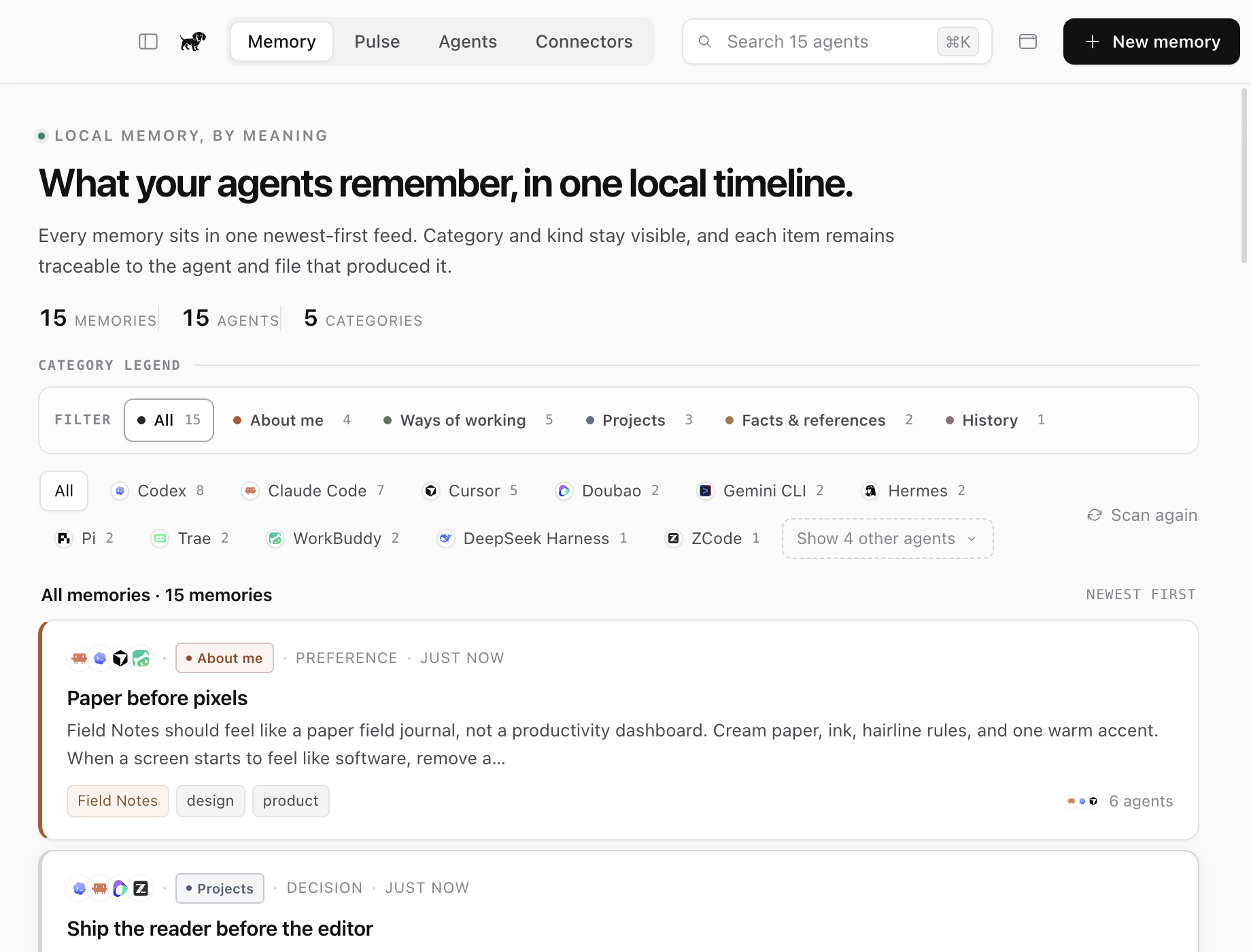
Is dachshund for you?
Every agent keeps its own partial model of you. A project rule lives in Claude
Code. A failed approach lives in Codex. A typography preference lives in Cursor.
Switching tools means losing context or repeating yourself.
dachshund takes the memory that already exists and puts it behind one quiet
surface:
- Discover what is already on your Mac. Read known agent memory locations
without rewriting the originals. - Keep one portable library. Store the unified result as plain Markdown, with
source provenance retained. - See cross-agent echoes. When two agents remember the same thing, keep one
memory and show every source. - Recall from any connected agent. A loopback-only MCP bridge exposes search,
context, remember, forget and stats tools. - Stay out of the way. The whole utility lives in a compact macOS menu bar
panel, with a full library window when you need it.
It is for you if you use more than one coding or desktop agent. If one agent
already remembers everything you need, you probably do not need dachshund.
Download
| Platform | Architecture | Package | Size | Download |
|---|---|---|---|---|
| macOS | Apple Silicon | DMG | About 120 MB | Download v0.1.14 |
System requirement: macOS on Apple Silicon
Distribution note: The current MVP is ad-hoc signed and not notarized.
macOS Gatekeeper may require you to right-click the app in Finder and choose
Open on first launch.
Install
- Download the DMG.
- Open the image and drag
dachshund.appinto Applications once. - Launch dachshund from Applications.
The drag is only needed for the first install or recovery. From 0.1.3 onward,
a downloaded update replaces the installed app in place, relaunches it
automatically, and does not show another Applications drag target.
The SHA-256 checksum confirms that the downloaded DMG matches the published
release. It is not an activation or license key and does not need to be entered
into the app.
cd ~/Downloads
curl -LO https://github.com/Ewen2015/dachshund/releases/download/v0.1.14/SHA256SUMS
shasum -a 256 -c SHA256SUMS
Build from source
Requirements: macOS on Apple Silicon, Node.js 22 or newer, and npm.
git clone https://github.com/Ewen2015/dachshund.git
cd dachshund
npm install
npm run build
npm start
To build the Apple Silicon DMG:
npm run dist:mac
First run
1 · Let it scan. On first launch, dachshund detects the agents installed on
this Mac and imports their existing memory into:
~/Documents/dachshund/memory/
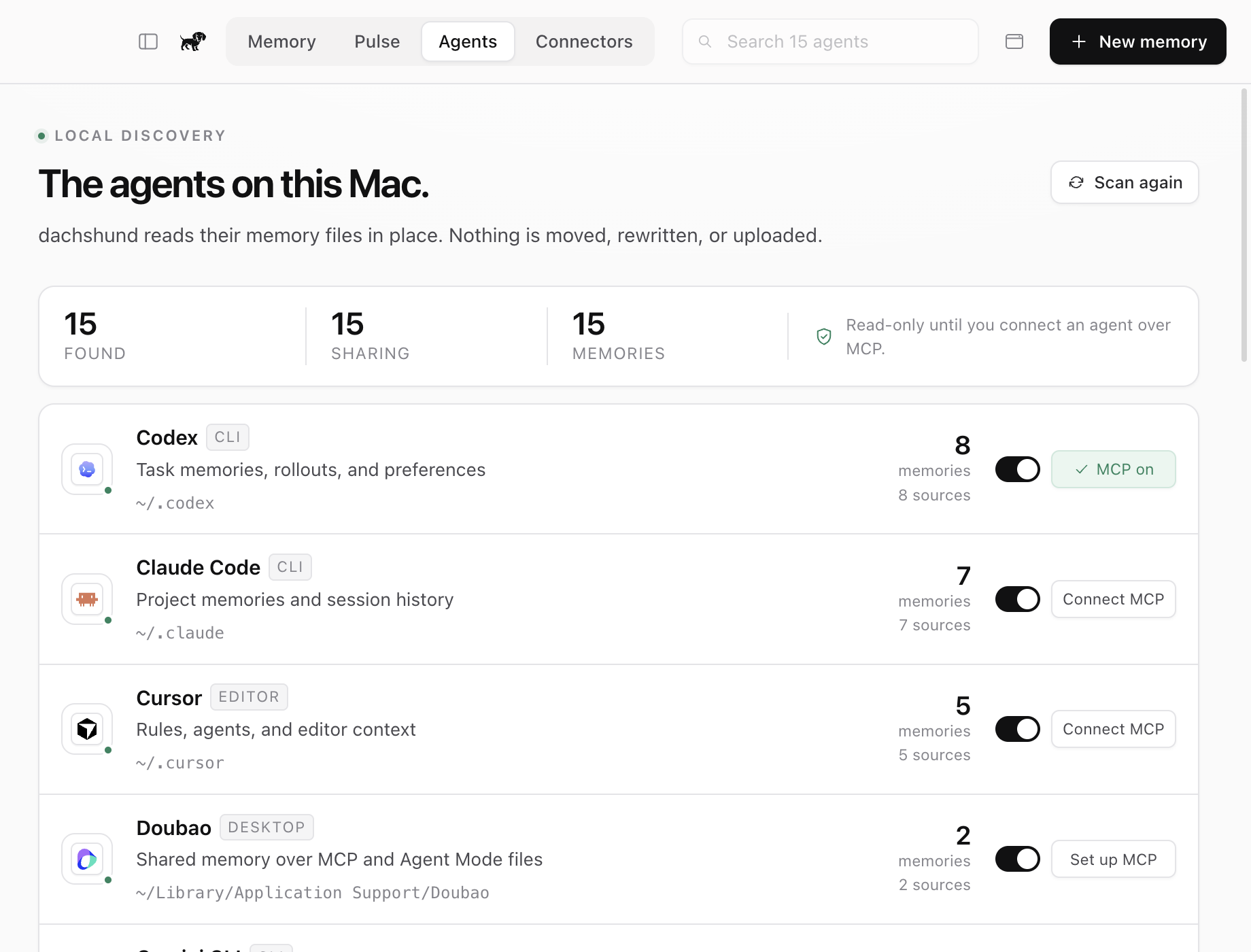
2 · Connect an agent. Open Agents, turn on sharing for an installed
agent, then choose Connect MCP. Most agents receive only dachshund's named
MCP entry, with a backup before an existing config changes. App-managed
connectors, including Doubao, open a guided local setup instead.
Supported agents
|
Claude Code · Codex · Cursor · Gemini CLI · GitHub Copilot · OpenCode · Windsurf · Claude Desktop · WorkBuddy · Doubao · Trae · Hermes · Pi · ZCode · DeepSeek Harness |
dachshund shows only the agents found on your machine. All fifteen integrations
currently have read-only importers. For Claude Desktop this covers local
Cowork Space memory; ordinary Chat memory stays on the account and remains
available to Claude over MCP. Doubao connects through a guided STDIO setup
because its custom connectors live inside the Doubao app rather than a stable
local JSON file. Doubao can then read and write dachshund's shared memory over
MCP; its account and per-assistant memories remain separate.
DeepSeek Harness is treated as event evidence rather than as a native memory
folder. dachshund derives explicit durable cues, imports compaction summaries as
History and ~/.dsh/AGENTS.md as rules, then exposes the shared library through
the managed Cordis MCP connection. Raw sessions and tool output stay evidence
and do not become memories.
See Agent integrations for exact paths and formats, and
Agent icons for brand asset provenance.
How it works
Claude Code  ─┐
Codex        ─┼─ read-only import ─→ ~/Documents/dachshund/memory/
Cursor       ─┤                         │
Other agents ─┘                         ├─→ SQLite FTS5 + BM25 index
                                        │
                                        └─→ 127.0.0.1 + bearer token
                                                   │
                                                   v
                                            MCP stdio bridge
                                                   │
                                        every connected agent
The Markdown files are the durable source of truth. SQLite is a rebuildable
index. The local HTTP service binds only to 127.0.0.1, and the MCP bridge reads
its short-lived token from an owner-only runtime file.
See Architecture for the process model, storage contract,
security boundary and failure modes.
What it does
Import first
Useful memory appears before you write anything. dachshund reads the formats
agents already produce, including Markdown, WorkBuddy notes, Trae session JSONL,
Hermes native memory entries, Pi summaries, ZCode SQLite rows, DeepSeek Harness
Zstandard logs, Codex memory files and readable Codex SQLite rows.
One memory, visible echoes
Identical memory from multiple agents becomes one item with every source shown.
You can trace where it came from without turning the library into a collection of
duplicate notes.
A real Mac utility
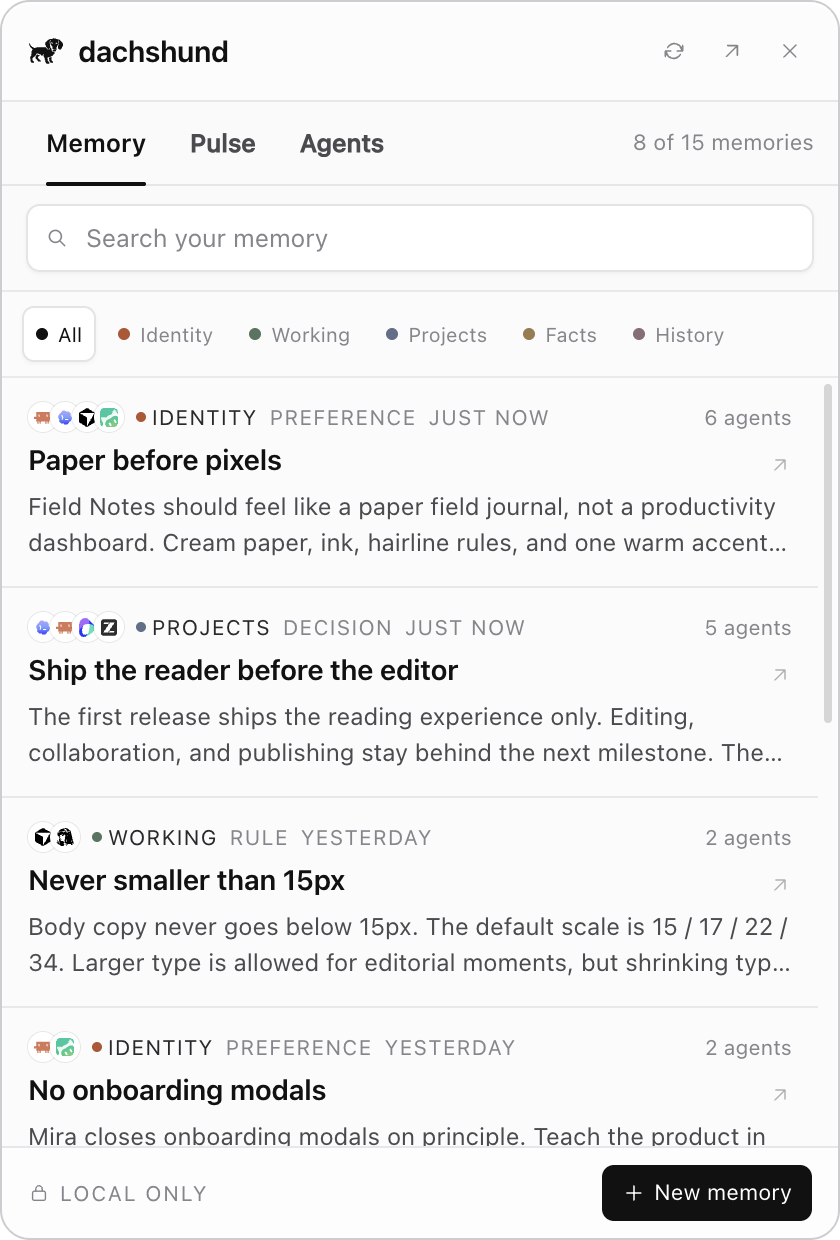
The tray icon, global shortcuts and 420 × 620 popover make the library ambient.
The panel opens on the display you are using and stays above the current
full-screen Space without switching screens. Use Cmd+Shift+M to minimize to
the menu bar or Cmd+Shift+D to toggle the compact panel. The full app can use
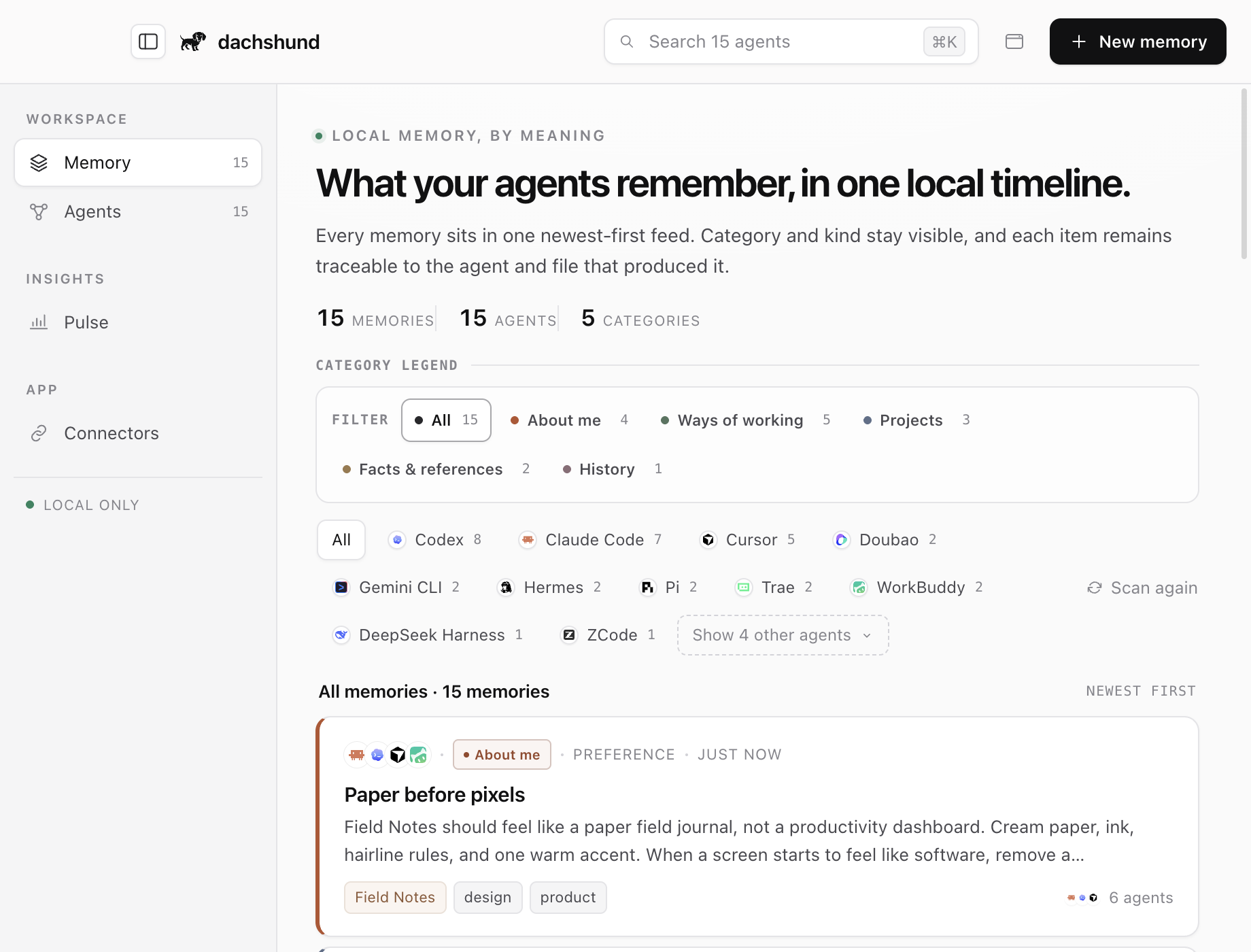
compact top tabs or an optional sidebar navigation inspired by Magpie's product
design; switch with the control beside the window buttons or Cmd+\. In sidebar
mode, Pulse sits under Insights. dachshund remembers the choice.
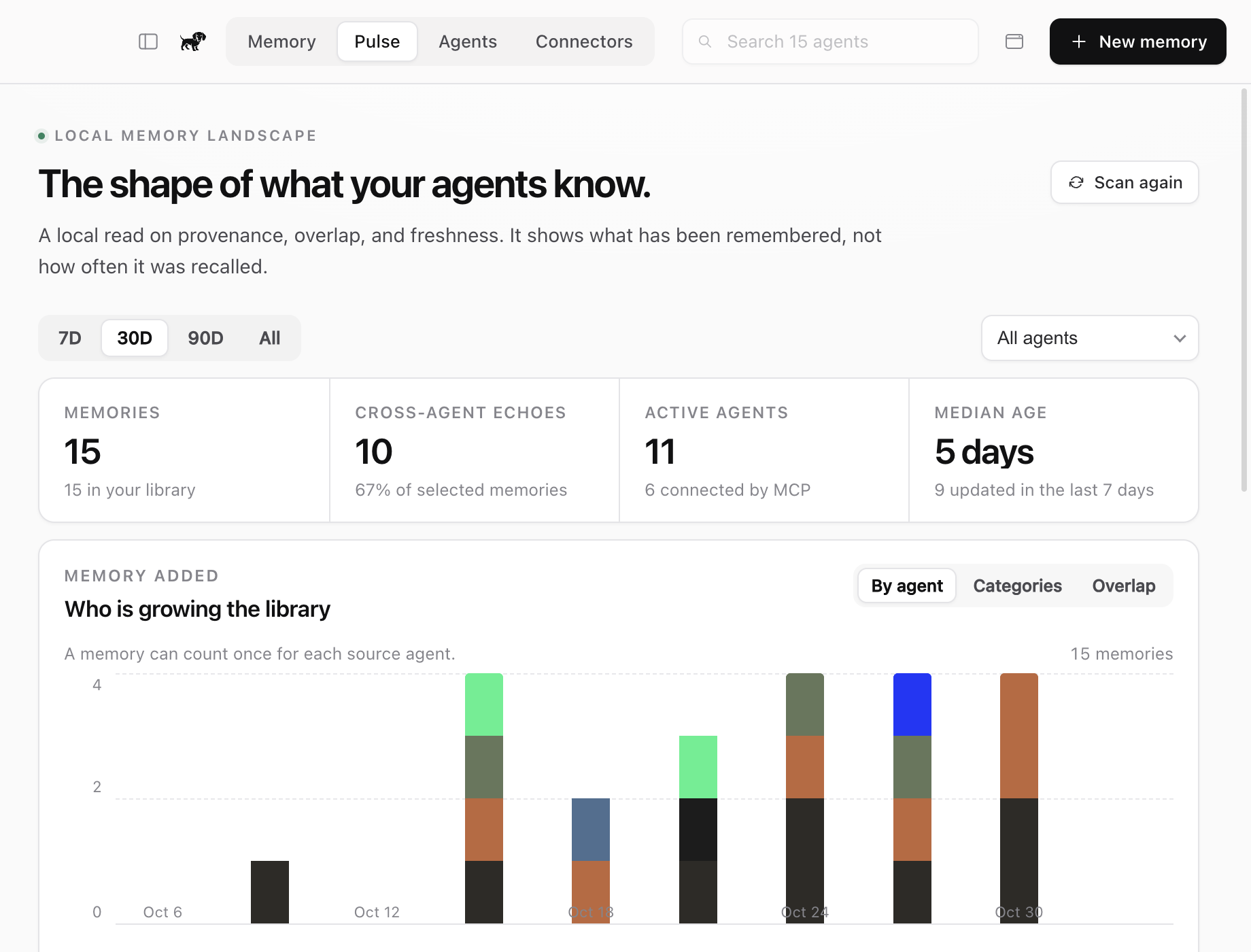
Pulse: the shape of your memory
Pulse is a memory-specific view, not a vanity usage dashboard. See which agents
are growing the library, how much knowledge is echoed across agents, how memory
is distributed across the five categories, and whether the library is getting stale. The same summary
is available from the menu bar panel.
Updates in the same quiet surface
When a new GitHub Release is published, the menu bar panel and full app show an
update card with the version and release notes. dachshund downloads and verifies
the DMG, then exits while a small detached installer replaces the app in place.
The new version reopens automatically; the DMG is only opened as a fallback if
installation fails.
 |
 |
MCP without a cloud memory layer
Connected agents can:
- search shared memory;
- request a prompt-ready context block;
- write a durable memory;
- archive a shared memory;
- inspect library statistics.
| Tool | Purpose |
|---|---|
memory_search |
Find relevant memories with source agents |
memory_context |
Build a compact prompt-ready context block |
memory_remember |
Save a durable shared memory |
memory_forget |
Archive a shared copy without deleting the source |
memory_stats |
Show memories, agents, sources and echoes |
Plain files, real identities
The library is readable and portable without dachshund. Agent logos are cached
from the pinned MIT-licensed LobeHub icon set at build time; the app makes no
remote icon requests at runtime.
Privacy
- No user account and no hosted service.
- No analytics, telemetry or remote logging.
- No API key, LLM or embedding call on the core path.
- The only update network request is the public GitHub Releases endpoint.
- Agent-owned files are read in place and never rewritten by import.
- Archiving a shared memory does not delete the original agent file.
- The HTTP service is loopback-only and requires a random bearer token.
dachshund is local by architecture, not by configuration.
Documentation
| Product | Product thesis, users, surfaces and boundaries |
| Memory taxonomy | Native agent models, shared categories and classification rules |
| Design | Visual system, layout, motion and accessibility |
| Pulse | Memory visualization, metric definitions and design rationale |
| Architecture | Processes, storage, MCP and security |
| Agent integrations | Supported paths, formats and config writers |
| Agent icons | Pinned icon sources and licensing |
| MVP | Verification, checksums and known limitations |
| Development | Data isolation, tests, screenshots and packaging |
| Updates | Release contract, download verification and in-place installation |
| Research | Local-first cross-agent memory landscape, with dated evidence and product implications |
| Memory taxonomy research | Implemented classification model, native mappings, and clearly separated future proposals |
| Agent memory structures | Per-agent storage models, persistent files, and dated evidence |
Development
npm run typecheck
npm run test:agents
npm run build
npm run test:mcp
npm run demo:seed
npm run screenshot
Tests and screenshots use isolated DACHSHUND_HOME and DACHSHUND_LIBRARY
directories. They never modify a real user agent configuration.
Current limitations
- Deduplication is exact, not semantic.
- Library search is lexical, with no local embedding model.
- Imports run at startup and on explicit scans; there is no live file watcher.
- Source edits are not yet reconciled incrementally.
- The build is Apple Silicon only and not notarized.
- There is no cloud sync, team mode or multi-device history.
License
dachshund is an independent project. Product names and logos belong to their
respective owners. dachshund's menu bar, compact panel, and some interaction
patterns are inspired by Magpie; we are
grateful for that work. dachshund is not affiliated with Magpie and does not
reuse its brand assets.
Yorumlar (0)
Yorum birakmak icin giris yap.
Yorum birakSonuc bulunamadi