hermes-agent-vs-code
Health Warn
- License — License: MIT
- Description — Repository has a description
- Active repo — Last push 0 days ago
- Low visibility — Only 6 GitHub stars
Code Fail
- child_process — Shell command execution capability in background/host.js
- os.homedir — User home directory access in background/host.js
- process.env — Environment variable access in background/host.js
- fs module — File system access in background/host.js
- child_process — Shell command execution capability in lib/acp-client.js
- process.env — Environment variable access in lib/acp-client.js
- process.env — Environment variable access in lib/acp-render.js
- child_process — Shell command execution capability in lib/background-client.js
- process.env — Environment variable access in lib/background-client.js
- fs module — File system access in lib/background-client.js
- fs module — File system access in lib/background-protocol.js
Permissions Pass
- Permissions — No dangerous permissions requested
No AI report is available for this listing yet.
Hermes Agent chat sidebar for VS Code — editor-aware context, workspace file references, skills, sessions, and approval modes.
Hermes Agent for VS Code
Bring Hermes Agent into the editor where the work already lives. Hermes Agent for VS Code combines editor-aware context, visible agent execution, reusable skills, persistent memory, session continuity, and run controls in one focused workspace.
Why Hermes Agent for VS Code
Editor-native context
Hermes works beside your code instead of in a detached chat window. The current file or selection can travel with the prompt, while workspace search and local attachments make it easy to add the exact context a task needs.
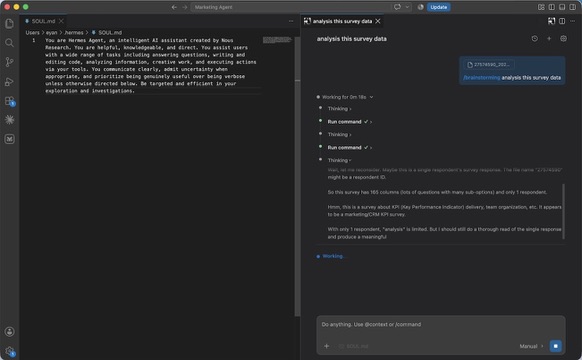
Transparent and controllable execution
Follow long-running work through structured Thinking and Action records rather than an opaque stream of text. Review sensitive edits before they are applied, stop an active turn when the direction is wrong, and use Queue or Steer to control what happens next without losing the conversation.
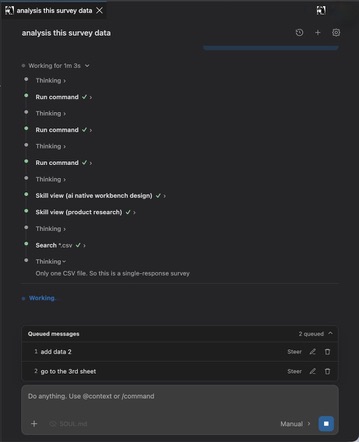
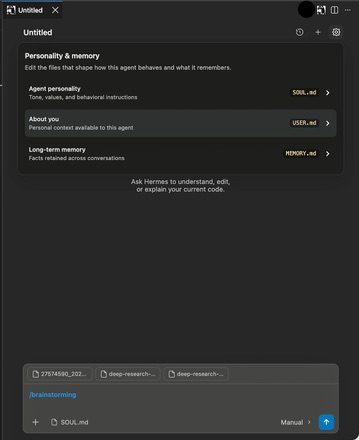
A persistent agent workspace
Sessions preserve the flow of a project, while editable personality, memory, and reusable skills let Hermes carry stable working preferences across tasks. Model, reasoning-effort, and approval-mode controls stay close to the composer so each run can match the level of autonomy you want.
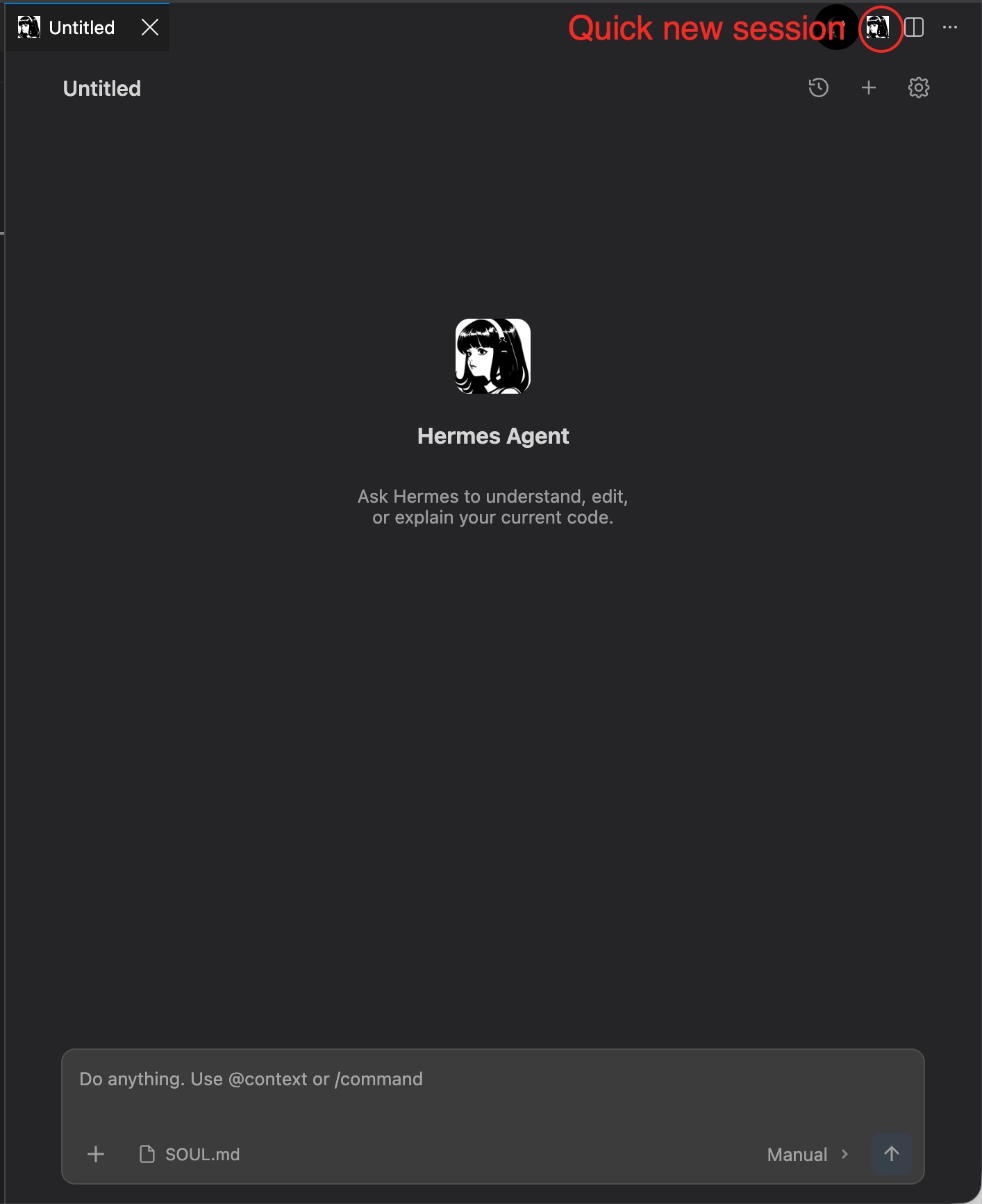
Start a clean session directly from the editor whenever a task needs a fresh context, then continue with the same editor-aware composer and workspace tools.
Background session continuity
Active Auto-mode tasks can continue in a standalone background host after VS Code closes. Reopening the same workspace restores the previous Agent workspace and session, including structured Thinking, Actions, and the final response. History shows running sessions and marks completed sessions that have not yet been viewed.
This capability requires a standalone Node.js installation. The extension can detect Node.js automatically, or you can set an explicit executable with hermesAgent.nodePath. Closing the computer, signing out of the operating system, or terminating the standalone Node.js process stops the background session.
Feature overview
- ACP-powered streaming conversation UI in the VS Code Activity Bar.
- Structured Thinking and Action timeline with expandable details.
- Current file and selection context, with an explicit mute control.
@workspace search and+local file or folder attachments.- Clickable local document references and external links.
- Slash commands, reusable skills, Queue, and Steer workflows.
- Approval, Diff, and document-review flows for sensitive changes.
- Immediate Stop controls with isolated turn cancellation.
- Session history with running and unseen-completion indicators, rename, delete, and quick new-session actions.
- Workspace and Editor Session restoration when the same VS Code workspace reopens.
- Background task continuation after VS Code closes when standalone Node.js is installed.
- Persistent personality and memory documents.
- Run settings for approval mode, model selection, and per-model reasoning effort.
- Enter to send and Shift+Enter for a new line.
Hermes CLI Integration
The extension requires a local Hermes Agent CLI installation. ACP is the default transport for structured Thinking, Actions, permissions, model controls, and resumable session state. Install Hermes with ACP support and keep the hermes command available on your PATH.
Background session continuity also requires a standalone Node.js installation. The extension automatically checks common Node.js locations; use hermesAgent.nodePath when Node.js is installed somewhere else.
The CLI fallback remains configurable through hermesAgent.commandArgs:
{
  "hermesAgent.command": "hermes",
  "hermesAgent.commandArgs": ["chat", "-q", "{{prompt}}", "-v"]
}
The extension sends the user prompt, selected skill, attachments, and current editor context to Hermes. If ACP is unavailable or disabled, the configured CLI fallback streams Hermes output into the same conversation UI. If hermesAgent.command is empty, the extension uses a local preview response instead of starting Hermes.
Community project notice
Hermes Agent for VS Code is an independent, unofficial community extension. It is not affiliated with, endorsed by, or connected to Nous Research. The Hermes Agent name and the Nous girl logo (nous-girl.png) are property of Nous Research and are used here only to identify compatibility with Hermes Agent.
Reviews (0)
Sign in to leave a review.
Leave a reviewNo results found