vidbucks
Health Pass
- License — License: MIT
- Description — Repository has a description
- Active repo — Last push 0 days ago
- Community trust — 64 GitHub stars
Code Fail
- spawnSync — Synchronous process spawning in bin/vidbucks.mjs
Permissions Pass
- Permissions — No dangerous permissions requested
No AI report is available for this listing yet.
Reference-to-video studio for AI coding agents: measures a reference, builds an original video in its style, edits your own footage, draws films in seven hand-made media and ships kits for chat stories, data races, countdowns, ads, logos and whiteboards - every output gated by measured checks.
Vidbucks
Show it a video you love. Get an original one in that style, and the numbers that prove it.
Reference-to-video for AI coding agents: Vidbucks measures a reference (a link, a file, or just a description), verifies the measurement shot by shot, works out what kind of video it is, builds an original video in that style with your own content (Remotion, HyperFrames, or AI video models such as Google Flow), then runs every result through measured quality gates and refines it until it matches. It also edits your own raw footage, draws whole films in seven hand-made media from a voice-over alone, and ships ready kits for chat stories, data races, countdowns, ad variants, logo reveals and whiteboard explainers.
Quick start · What it does · What it makes · Quality gates · Motion and sound · AI video models · Skills · How it works · Voice engines · Ownership & licence
 REFERENCE      MEASURE        REVIEW         PLAN           BUILD          GATE           VERIFY         DELIVER
 ┌────────┐   ┌────────┐    ┌────────┐    ┌────────┐    ┌─────────┐    ┌────────┐    ┌────────┐    ┌────────┐
 │ link / │──▶│ cuts   │──▶ │ shot by│──▶ │ script │──▶ │ Remotion│──▶ │ hook   │──▶ │ score +│──▶ │ files +│
 │ file / │   │ takes  │    │ shot,  │    │ words  │    │ or AI   │    │ life   │    │ side-  │    │ credits│
 │ brief  │   │ tempo  │    │evidence│    │ check  │    │ video   │    │ text   │    │ by-side│    │ + jury │
 └────────┘   └────────┘    └────────┘    └────────┘    └─────────┘    └───┬────┘    └───┬────┘    └────────┘
                                                                           └── fix and repeat ┘
What it does
You give Vidbucks a reference and say what you want to say. It does the rest and only asks the things that are yours to decide (language, topic and claims, money, accounts, publishing).
- Measures instead of guessing: cuts per minute, shot lengths, palette, brightness, motion, transitions (hard cut / flash / blur-whip-zoom / dissolve / fade), loudness, tempo, sound hits, time curves, captions, channel context; the cut list is cross-checked by a second detector and the disagreements are listed for a look. Works on a video file (full measurement) or on a link (public metadata, captions, thumbnail + a visual pass in the browser; nothing is downloaded).
- Verifies its own measurement: a shot-by-shot review where the agent is the vision model (shot type, size, camera, method, action, the prompt that would remake it) with required evidence, a coverage rule and contradiction checks against the measured camera. It separates real shot changes from jump cuts and AI-generation seams, so you get both the edit rhythm and how long a take is held, plus the screen-time mix (e.g. selfie 79 % / third-person 9 % / B-roll 11 %).
- Proves its analysers are right: a self-test builds videos with known answers (cuts, a seam, a dissolve, fades, a light ramp that must not count, BPM, loudness, a pan, burned-in text) and scores every analyser against them before you trust it on a real reference (12/12).
- Classifies the video type and picks the route: your own footage, chat story, data race, countdown, ad variants, logo reveal, whiteboard, a named drawing style, kinetic typography, object-metaphor / editorial, minimal icon story, particle / 3D look, product or UI promo, motion-design, stickman long-form, maps, character animation, filmed real-world (with honest limits).
- Gathers its own assets: visual research in the browser, licence-clean media with credits (Wikimedia, Openverse, Pexels, Pixabay), transparent cut-outs without any ML model, procedural art.
- Builds with the renderer you choose: Remotion (templates and kits), HyperFrames, or your own tool; 9:16, 4:5, 1:1 and 16:9 from one composition, with text kept clear of the phone UI.
- Plans before it spends: three cheap approvals (story beat table, 2-4 look frames, a storyboard) before any full render; a changed story re-opens them.
- Directs a whole film from the words: a style director reads every line and decides how many styles the film needs and which one each segment gets (115 catalogued styles); the segments are drafted from the narration and rendered on one timeline.
- Voice and sound: open-source voice engines (Kokoro, Piper, Chatterbox, OmniVoice); the script itself force-aligned to the narration for word times; a beat map of any track; synthesised sound effects for every visible hit; a mood track at an exact BPM; a two-pass loudness mix.
- Gates every output: a measured quality gate (picture vs sound, hook, still share, repeats, dead air, burned-in text via OCR, loudness, script adherence, the user's brief) blocks delivery on a FAIL; a words check catches clichés, machine-written lines and prompts that video models refuse or caption; a six-question jury gives an anchored score and at most three fixes.
- Verifies the match:
--comparescore table +--sidebysideimage against the reference, fix rows mapped to concrete actions, repeated until it matches or returns diminish. Delivers with the real scores and what could not be verified. - Works with AI video models: the historical / character POV-vlog route (format measured on a top channel, script engine, character lock, nameless prompts, continuity by extending clips, cost and failure rules) and flow-bridge, a Chrome extension + Python bridge that drives Google Flow with each user's own account and assembles the clips.
- Installs itself: the setup skill finds what is missing on your machine, installs it step by step, proves it with a voice test and a smoke test, then tells you "ready - send your reference video".
What it makes
| You want | Vidbucks uses | Notes |
|---|---|---|
| a video in the style of one you love | the reference path (measure, review, plan, build, gate, compare) | any type below can be the build step |
| your own raw footage edited | tools/footage.py + skill vidbucks-footage-edit |
transcript-first cuts snapped to words, filler and silence trimmed and re-heard, active-speaker 9:16 reframe, long -> shorts highlights, word-anchored B-roll, captions, cards, 4 aspects from one edit |
| a documentary or explainer from a script | style director + MultiStyle |
one or many styles per film; kits BoardFilm, TypeCards, LayerScene, Swiss, media, whiteboard, countdown |
| a hand-made look with no hand-drawn art | MediaScene (crosshatch ink, sketchbook, cut paper, riso print, pixel, isometric, math stage) |
every sentence becomes a beat: one of 40 icons, a counted number, a comparison, a list or a title, drawn in the medium; shape-morph and iris bridges between worlds |
| a text-message story | ChatStory + tools/chat_story.py |
drip timing, typing indicator, reactions, auto-scroll, one voice per side; fictional people, a generic messenger look |
| a bar chart race | DataRace |
smooth overtakes, a mandatory source line ("Illustrative data" when it is not real) |
| a top-N countdown | Countdown |
rank slam, whip slide, progress rail, one flash on #1 |
| many ad variants | AdSpot + tools/ad_variants.py |
one CSV row per hook (question, claim, pain, number, POV), every aspect, an index sheet; proof only when real and sourced |
| a logo sting / intro / outro | LogoReveal + tools/logo_prep.py |
your own SVG; draw, assemble or mask, with a synthesised sound logo |
| a whiteboard explainer | Whiteboard |
a drawn hand whose marker rides the stroke end; several boards with an eraser between |
| a motion-graphic overlay | card library (tools/cards.py) |
5 styles x 8 tiered cards (big stat, thesis, section title, quote, label, list, lower third, versus) |
| a historical / character POV vlog | AI video models + skill vidbucks-historical-pov |
prompt blocks, character lock, Flow costs and failure rules |
| a 3-10 minute stickman explainer | the long-form pipeline | script -> voice sample -> scenes -> QA -> packaging |
Quick start
git clone https://github.com/eynalliomer/vidbucks
cd vidbucks
node scripts/setup.mjs          # skills + dependencies, then shows what is still missing
Open Claude Code in the folder. A SessionStart hook reports the status; say "set up Vidbucks" (or run /vidbucks-setup). The assistant installs the rest with you (ffmpeg, Python packages, the official Remotion agent skills, a voice engine, Whisper), verifies everything, and then asks for your first reference video.
> Set up Vidbucks
  ... installs, tests a voice, runs the smoke test ...
  Vidbucks is ready. Send me a reference video (link or file) and tell me what you want to say.
> Here is a Short I like: <link>. Make one for my coffee brand - vertical and horizontal, English voice-over.
Requirements: Node 20+, ffmpeg, Python 3.10-3.12. A GPU is optional. See docs/getting-started.md.
Commands
| What you are doing | Command | Key principle |
|---|---|---|
| Install and verify everything | /vidbucks:setup |
Prove it works before building |
| See what is missing / what is next | /vidbucks:status |
One source of truth for the state |
| Make a video from a reference | /vidbucks:make <link or file> [brief] |
Measure, look, build, verify |
| Analyse only | /vidbucks:measure <video or link> |
Numbers first, then eyes |
| Refine a render | /vidbucks:iterate <ref> <render> |
Fix the rows that differ |
| Full tool check | /vidbucks:doctor |
Exact fix per problem |
In a clone the commands are project commands named /vidbucks-setup, /vidbucks-make, ...; installed as a plugin they are /vidbucks:setup, ... CLI equivalents: node bin/vidbucks.mjs <setup|status|doctor|smoke|analyze> (or npm link to get vidbucks).
Quality gates
| Tool | When | What it measures (FAIL blocks delivery) |
|---|---|---|
core/tools/words_check.py |
before narrating or generating | dashes read as noise, clichés and machine-written tells (TR/EN), scenes > 40 words; --prompts: real-person / IP names that video models refuse, prompts that invite on-screen text, a missing no-text guard |
core/tools/quality_gate.py |
after every render or clip assembly | picture shorter than sound, hook motion in 0-2 s, near-still share and static shots, same framing back to back, one-frame pops, black/frozen stretches, silences, burned-in text (Apple Vision OCR on macOS, tesseract elsewhere), loudness and true peak, resolution, every script line spoken as written (Whisper), the user's brief (length, aspect, still share, required lines), rhythm against a reference |
core/tools/shot_review.py |
after measuring a reference | builds per-shot sheets with the measured camera and the spoken words; check refuses missing evidence, unknown values and < 80 % coverage; apply writes the verified screen-time mix, takes, hook and the prompt formula per shot type |
core/tools/analysis_selftest.py |
after installing and after changing an analyser | cuts, seam vs shot change, dissolve, fades, no false transition on a light ramp or a pan, BPM, LUFS, pan/still camera, OCR, false alarms (12/12 on our machine) |
core/tools/sync_check.py |
after every re-voice, re-time or re-render | the sound is the master clock: timing vs narration length, the first word against where speech really starts, times only move forward, the last line vs the last speech, picture vs sound streams of the file |
core/tools/text_check.py |
every render with words on screen | text cut by the frame, overlapping text, outside the safe area or under the phone UI, contrast under 3:1, garbled words (OCR every 0.5 s) |
core/tools/gates.py |
before a full render | story -> look -> board approvals; check exits 1 until all three are approved |
core/tools/review_sheets.py |
before showing a draft | contact sheet, cut strips, the first 2.5 s, phone-width sheet, REFERENCE / OURS pairs and a stacked sync video |
the jury (vidbucks-qa-revise) |
with every draft | hook, hero moment, generic frame, weakest 5 s, sound on the big cuts, words; an anchored score (5 student … 9 award) and at most three fixes |
python core/tools/quality_gate.py out/video.mp4 --script script.txt --speech --brief brief.json
# GATE PASS  fail=0 warn=1  shots=14 still=0.27 hook=6.4 lufs=-16.4
Motion and sound
- One motion language (
core/src/kits/motion.ts): five personalities (calm, premium, confident, playful, snappy) set every entrance, exit, stagger, bounce, label lag and camera push of a film; curves by role (enter ease-out, exit ease-in at half the time, move ease-in-out); durations that grow with distance; group reveals capped at ~0.8 s; colour mixed in OKLCH; a sync-safe speed ramp. The rules behind it are numbered in docs/motion-rules.md. - Sound follows the picture: each kit announces its own hits (a pencil scratch, a paper pop, a plate slide, a chime, ticks under a counting number, a whoosh into a new world);
sfx_synth.pyplays a real CC0 recording for each hit when the sound packs are installed (sfx_packs.py install sfx-kit uisfx opus: 1,324 sounds, each placed on its own sync point, takes rotating so repeats differ) and synthesises the rest andmix_film.pyputs compressed voice, ducked music and effects at -16 LUFS.beatmap.pyfinds a track's beats and snaps big moments onto them.
AI video models (flow-bridge)
flow-bridge/ turns a written brief into clips with your own Google Flow account and credits, then downloads and assembles them (ffmpeg, -16 LUFS). No third-party server, no API key; the agent only writes the brief. Standard (agent-off) mode with a price check before every send, grouped downloads, recovery of undownloaded clips, and a stop with a cool-down at Flow's first "unusual activity" warning. The skill vidbucks-historical-pov holds the format, prompt blocks, Flow costs and failure rules learned in real runs. Setup and limits (in Turkish): flow-bridge/README.md.
Templates
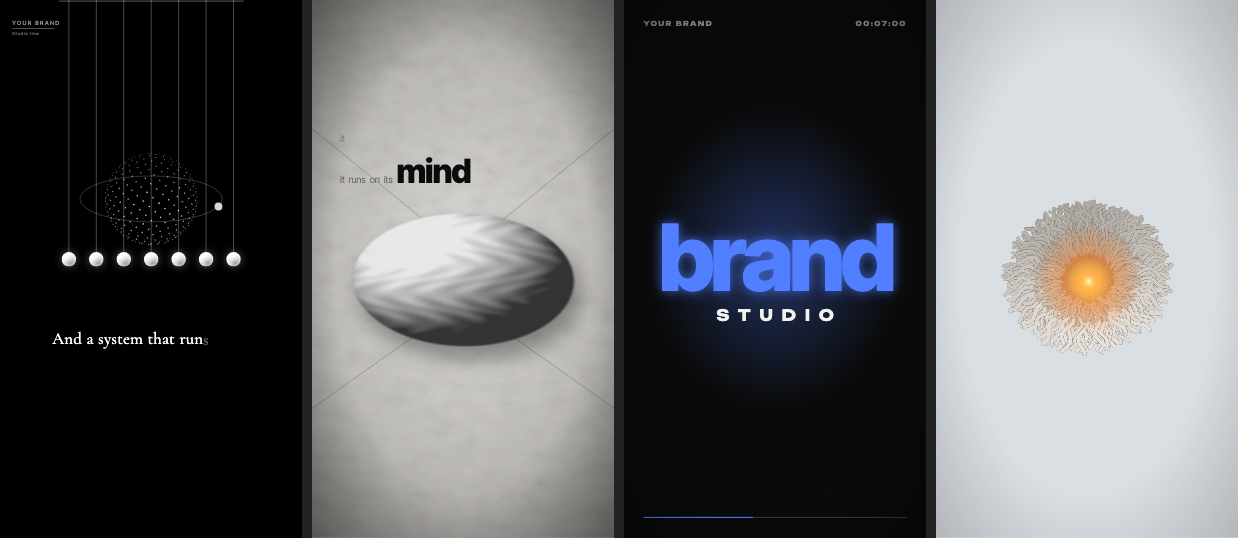
| Template | For references like | Config |
|---|---|---|
| KineticType | trailers made of big type on solid colours, one word per beat, whips, glitch, orb-to-logo | events on a BPM grid |
| ObjectStory | monochrome editorial films: split-open photo frame, objects on paper, light cone over a dark stage, small light + one bold word captions | photos + captions + times |
| IconStory | minimal Shorts: one ball, thin lines, tiny serif captions typed with a voice, an icon per phrase | phrases + icon timeline |
| ParticleBloom | "3D scroll site" loops: a word of particles dissolves into ropes and a glowing bloom | one word + palette |
Kits (see docs/kits.md): Tpl-BoardFilm (one camera over a designed wall: prints, documents, stamps, counters, maps, routes), Tpl-LayerScene (agent-authored vector scenes with a strict motion and caption contract), Tpl-SwissDance (grid typography on the beat), the media kit (MediaReel, MediaScene: seven drawing media), the format kits (ChatStory, DataRace, Countdown, AdSpot, LogoReveal, Whiteboard), FootageEdit (the layer over an edited cut) and the card library (CardGallery). The style library in third_party/lemo-opuscar/ (98 style prompts by Lemomo, CC BY-NC 4.0, see its README) plus Vidbucks' own styles form a registry of 115 entries; each routes to the kit that draws it (27 native, 30 drawn by a related kit in the style's palette, 14 agent-authored, 10 templates; 34 still need a kit of their own). Also registered: promo compositions built on the same discipline (AiAgents, HoloPromo / DolarPromo, DollarLira, LaptopGlass, JericoLaptop, JericoCinematic in 4K). Everything else is built with the same discipline from scratch: the templates are starting points, not limits. See docs/templates.md and examples/worked-examples.md.
Bring your own renderer and voice
Vidbucks is not tied to one video engine or one voice. The measuring and verifying layer reads any MP4; the build layer is a choice:
| built-in | also works | |
|---|---|---|
| Renderer | Remotion (four config-driven templates + the doodle engine) | HyperFrames (HTML + GSAP; tested round trip in the smoke test), or any tool that ends in a video file through a small registry entry |
| Voice | Kokoro, Piper, Chatterbox, OmniVoice | any command that turns text into an audio file (--engine custom --tts-cmd ...): a local model, an OS voice, a cloud service you have an account for |
| Agent | Claude Code (hook, commands, plugin) | other agents can follow the SKILL.md workflows (not tested) |
node bin/vidbucks.mjs config set renderers hyperframes
node core/tools/smoke.mjs        # proves the selected renderer end to end
Details, limits and what was tested: docs/integrations.md.
Skills
| Skill | What it does | Use when |
|---|---|---|
vidbucks |
Entry point: reads the status, routes to the right skill | any video request |
vidbucks-setup |
Detects and installs missing tools, voice test, smoke test, announces readiness | first run or a missing tool |
vidbucks-footage-edit |
Your own raw footage: transcribe, tighten, re-hear the cuts, reframe to the speaker, highlights, B-roll, captions, formats | "edit my podcast", "make shorts from this interview" |
vidbucks-reference-to-video |
The main path: measure, classify, collect, build, verify, deliver | a reference or a style wish |
vidbucks-channel-study |
A channel's repeatable formula (titles, thumbnails, length, cadence) | "the style of channel X" |
vidbucks-script |
Retention-first narration script with a linter | writing a long-form script |
vidbucks-longform-build |
Script to scenes to render to packaging (doodle / stickman engine) | a 3-10 minute explainer |
vidbucks-stickman-engine |
Reference for the JSON scene engine | editing scenes.json |
vidbucks-style-library |
Films in one or many of 115 catalogued styles: a style director reads the topic and every line and decides how many styles the film needs and which one each segment gets; kits BoardFilm, TypeCards, LayerScene, Swiss, media, whiteboard and countdown render them in one timeline | "a neon-sign film about…", "cork-board documentary", "in the ukiyo-e style" |
vidbucks-historical-pov |
Historical / character POV vlogs with AI video models: measured format, script engine, character lock, prompt blocks, Flow costs and failure rules | "a sultan's vlog", "like the Tudor channel" |
vidbucks-qa-revise |
Words check, quality gate, the jury and the revision protocol | before delivery, feedback on a built video |
vidbucks-metrics |
Reads YouTube Studio numbers and recommends ONE action | "why is it not growing" |
Agent personas: reference-analyst, fidelity-reviewer. Checklists: references/.
How the loop works
- Measure the reference (
core/tools/analyze_reference.py) ->knowledge/references/<slug>/withreport.md,fingerprint.json(cuts, takes and seams, transcript words),style_spec.json,scene_plan.md,sheet.png. - Review shot by shot (
core/tools/shot_review.py build / check / apply): evidence for every shot, then the verified screen-time mix and the prompt formula; name the type and devices; choose the route. - Plan scenes for your content and pass the three approval gates (story, look, board); collect licensed assets; build from a template, a kit or new code; add voice, synthesised hits and a beat-matched track.
- Gate and verify:
quality_gate.py,text_check.pyandsync_check.pyon the render (a FAIL blocks delivery), look at the review sheets, measure it,--compareagainst the reference,--sidebyside, and look; offer the jury. Fix rows -> actions (slow the easing, change the tempo, move hits onto transitions, match loudness...). - Deliver with the score table, credit lines and an honest note about what was and was not verified.
A clean score never replaces looking, and a photographic reference caps what code can reach (a filmed room, a real face): Vidbucks says so instead of pretending.
Voice and audio
Open-source engines, installed on demand by the setup skill: Kokoro (Apache-2.0, CPU, simplest), Piper (offline, many languages; voices carry their own licences), Chatterbox (MIT, expressive, multilingual, cloning), OmniVoice (NVIDIA GPU). Word timing by forced alignment of the script itself (stable-ts) when it is installed, else faster-whisper (plain Whisper starts each line's first word about 0.4 s early; sync_check.py catches it). See docs/voice-engines.md and the engine matrix.
Project structure
vidbucks/
├── skills/            # the Vidbucks skills (SKILL.md workflows)
├── commands/          # slash commands
├── agents/            # reviewer / analyst personas
├── hooks/             # SessionStart status hook
├── references/        # checklists (fidelity, licensing, voice engines)
├── docs/              # getting started, templates, motion rules, FAQ
├── examples/          # worked examples (one per video type)
├── knowledge/         # playbook, metrics rules, lessons learned, style archetypes
├── core/              # Remotion project: engine, templates, kits, tools
│   ├── src/templates/ #   IconStory, ObjectStory, KineticType, ParticleBloom + the composition registry
│   ├── src/kits/      #   board, type, layers, swiss, multi (style films), media (7 drawing media, bridges,
│   │                  #   whiteboard), chat, data, list, ad, logo, cards, footage, motion.ts
│   ├── src/engine/    #   doodle/stickman engine + character, meme and map kits
│   ├── styles/        #   registry.json (115 styles -> kits), cards.json
│   └── tools/         #   analyze_reference, shot_review, quality_gate, text_check, sync_check, words_check,
│                      #   analysis_selftest, footage, style_director, segment_draft, kit_timing, beatmap,
│                      #   chat_story, ad_variants, logo_prep, media_cues, sfx_synth, mix_film, gates, ...
├── flow-bridge/       # Chrome extension + Python bridge for Google Flow (your own account)
├── scripts/           # setup, status, release
├── bin/vidbucks.mjs   # CLI
├── .claude-plugin/    # plugin + marketplace manifests
└── CLAUDE.md          # the operating manual the assistant follows
Principles
- Measure, don't guess. Every number is tagged measured or inferred.
- Look before you ship. Side-by-side with the reference, every time.
- Gate before you ship. No delivery without a passing quality gate; analysers are self-tested.
- Form, never copy. A reference gives rhythm, structure and look; ideas, lines, characters and shots are new.
- Autonomy with boundaries. The assistant never asks for references, photos or analysis; it asks only what is yours to decide.
- Honest limits. No claim of hearing audio, no invented statistics, no pretending code can match a photograph.
- Clean licences. No downloading of others' videos, credits for every licensed asset, no private people's faces.
Ownership and licence
Vidbucks is created, owned and maintained by The Vidbucks Authors. The name "Vidbucks", the project identity and all original code, documentation, skills, templates and tools in this repository are © 2026 The Vidbucks Authors and released under the MIT License.
Vidbucks builds on third-party software that keeps its own licences (Remotion, ffmpeg, Python libraries, voice engines and models, fonts): see NOTICE. Remotion has its own licence - it is free for individuals and small teams and requires a company license for larger companies: check remotion.dev/license before commercial use. The Remotion agent skills are not bundled; the setup skill installs them from their official source.
Contributing
Issues and pull requests are welcome: see CONTRIBUTING.md and the Code of Conduct. Security reports: SECURITY.md.
Reviews (0)
Sign in to leave a review.
Leave a reviewNo results found