design-brain
Health Gecti
- License — License: MIT
- Description — Repository has a description
- Active repo — Last push 0 days ago
- Community trust — 12 GitHub stars
Code Basarisiz
- spawnSync — Synchronous process spawning in bin/design-brain.ts
- process.env — Environment variable access in bin/design-brain.ts
- network request — Outbound network request in scripts/app/api.js
- process.env — Environment variable access in scripts/brain.ts
- spawnSync — Synchronous process spawning in scripts/check.test.ts
Permissions Gecti
- Permissions — No dangerous permissions requested
Bu listing icin henuz AI raporu yok.
Capture your design decisions across projects, review them in a swipe queue, compile them into agent skills.
design-brain

Capture the design decisions you keep re-teaching AI, review them one at a time, and
compile the ones you stand behind into agent skills that load on every project.
What is design-brain
You correct the same things in every session. The accent belongs on one action. The CTA is
squared on this brand. The table is a table, not a mosaic of cards. None of it survives
into the next project, so you type it again.
design-brain is a ledger for those corrections. It mines what you already said and built,
turns each finding into a candidate rule with its evidence attached, and waits. You accept
or reject them one at a time. The set you accept compiles into skills an agent loads before
it proposes anything.
The unit is a rule, not a note. A rule states what to do or avoid, carries a stance
(always, never, prefer, avoid), a scope, and at least one piece of evidence: the
line you actually typed, a repo path, or the article it came from. No evidence, no
candidate.
Two things stay separate. The tool is this repository. A brain is a private data
directory it operates on, holding your rules, your evidence, and your clients. The tool
never contains one, and the skills it compiles never name a project.
Product tour
Screens below run against a brain freshly created from the seed pack, so every rule in them
is a published heuristic, bias or component practice rather than anyone's private ledger.
Queue
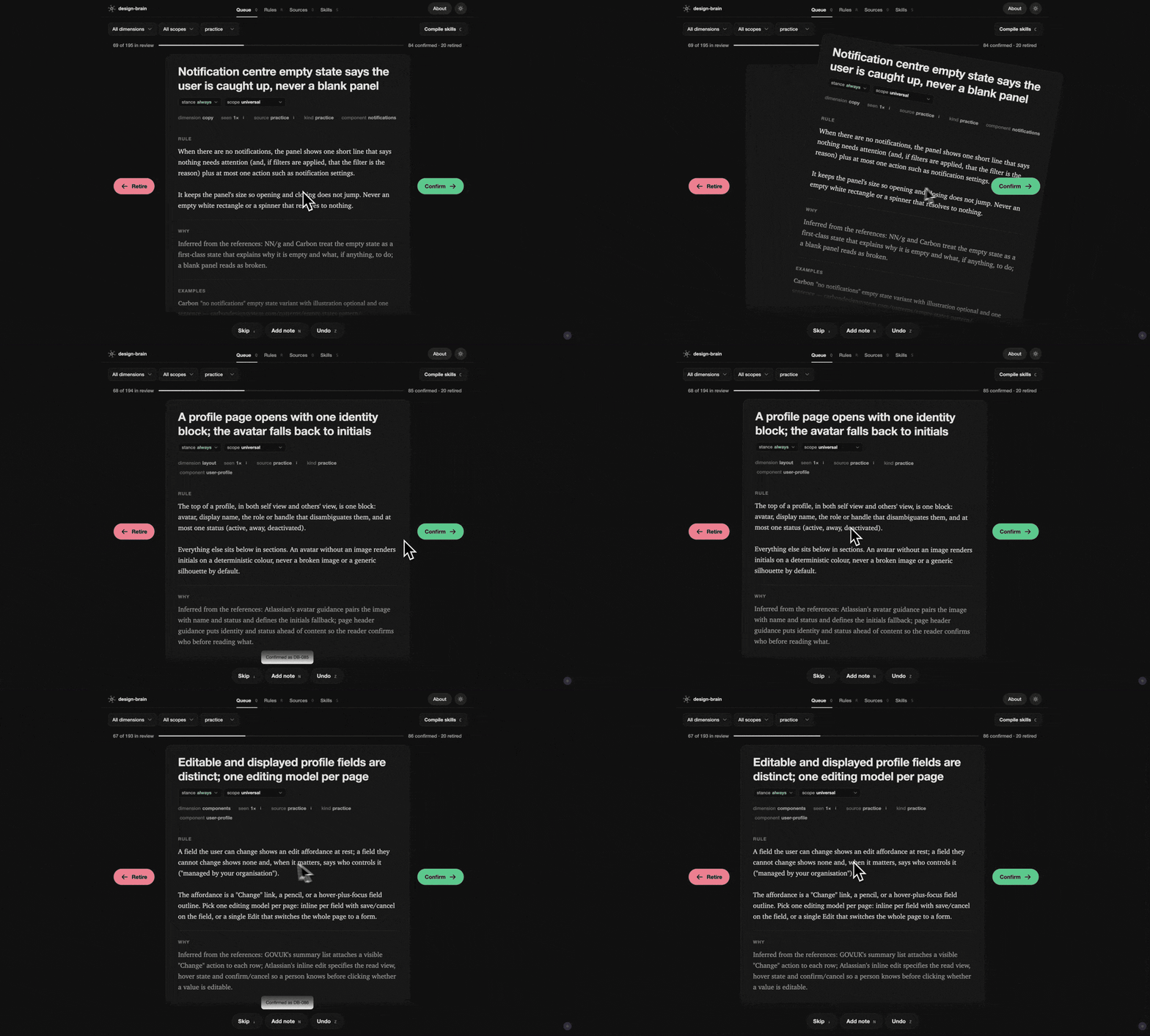
One card at a time, with its evidence. Right confirms, left retires, down skips. Stance and
scope are editable on the card before you decide, N leaves a dated note, and Z undoes.
The bar at the top counts what is left.
Rules
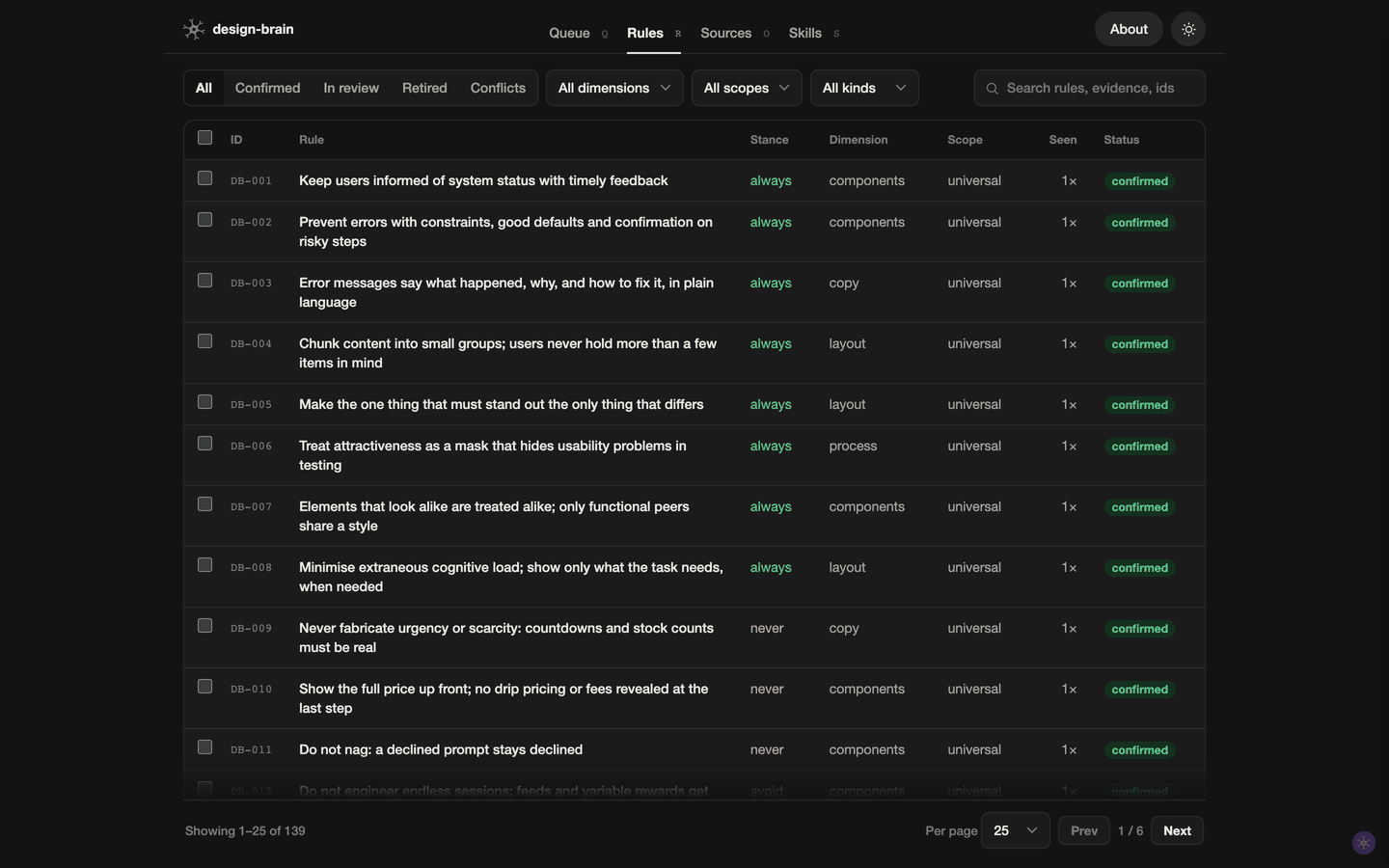
The whole ledger as a sortable, paged table: confirmed, in review, retired, and the
conflicts. Filter by dimension, scope or kind, search across evidence and ids, select rows
for a bulk verdict, or open one to edit it, send it back to review, or resolve a conflict.
Sources
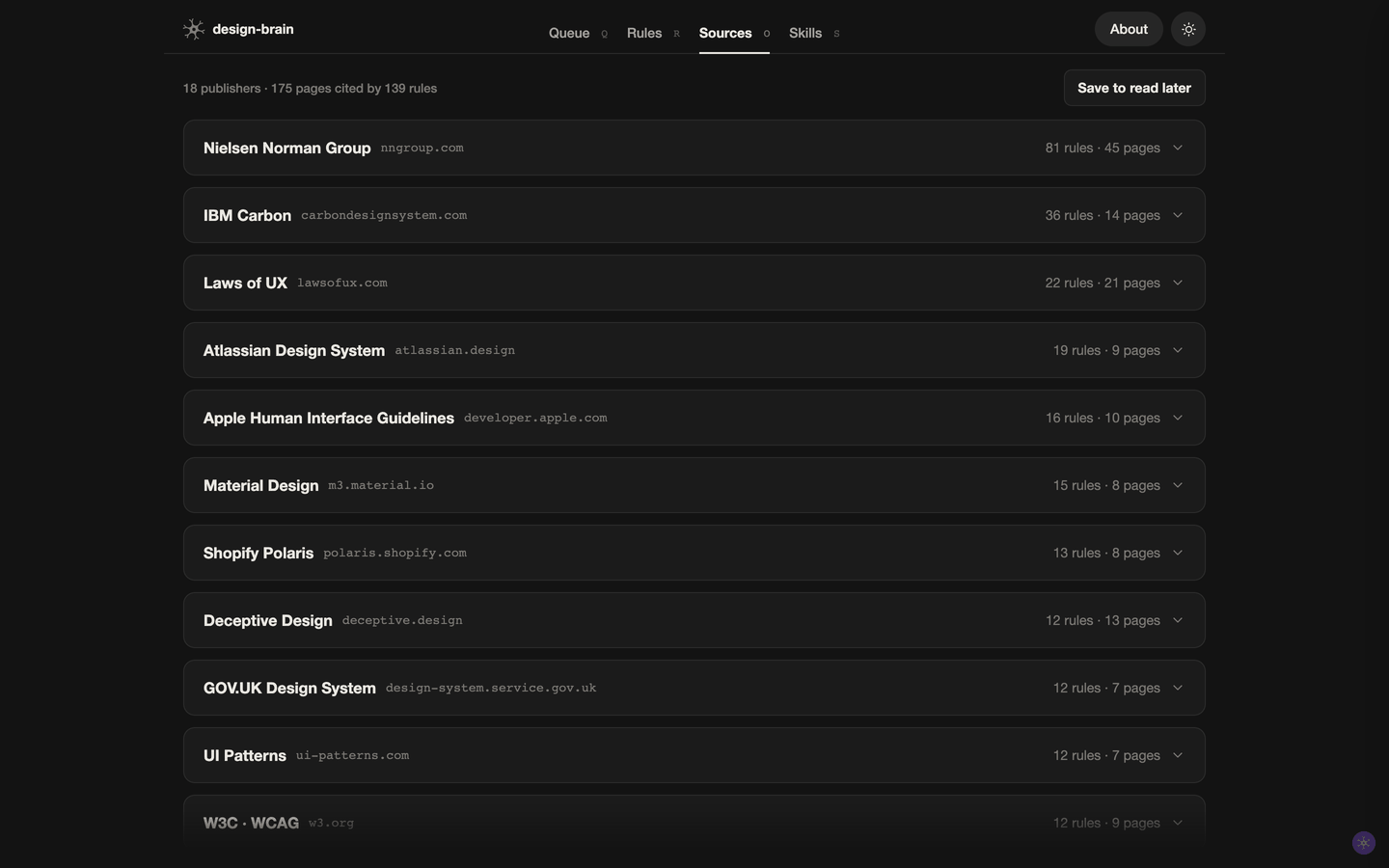
Every published reference the ledger cites, grouped by publisher, with the rules each page
supports. Anything you want to read later parks here until you do.
Skills
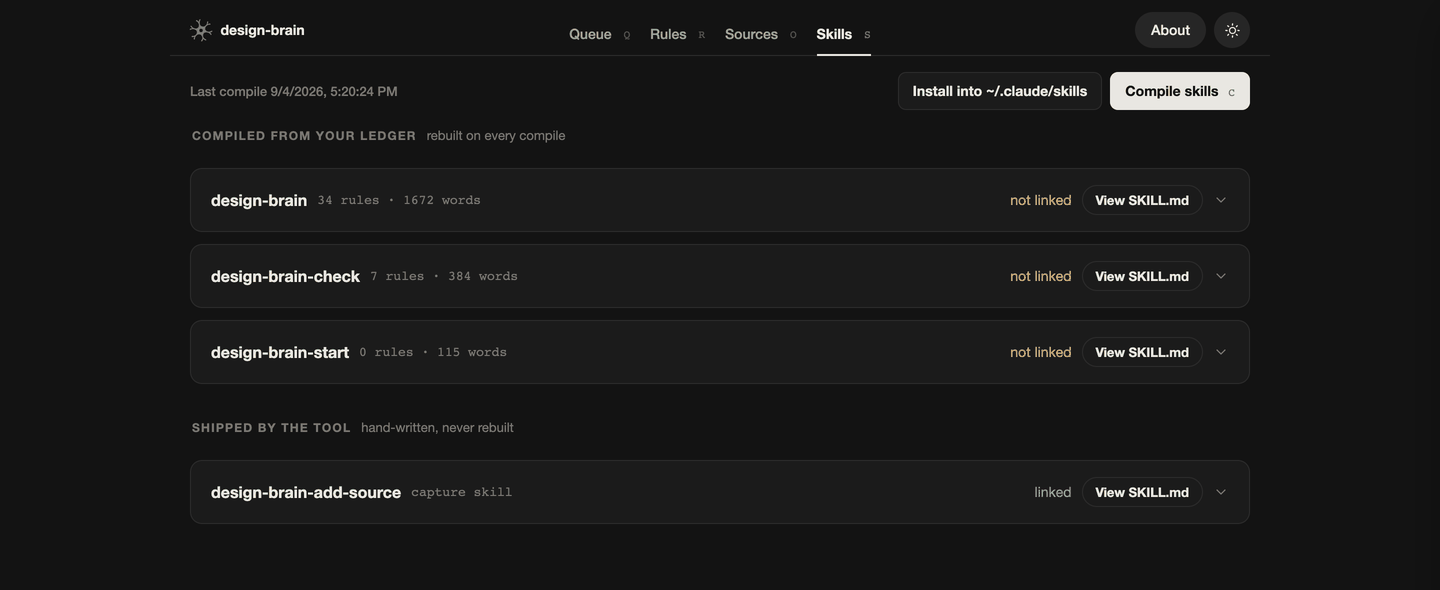
What compiled into each skill, section by section, with its rule and word counts and
which agents it is linked for. Compile and install without leaving the page.
Install
Requires Bun 1.1 or newer.
bun install -g @forgedesign/design-brain
Or try it without installing anything:
bunx design-brain init ~/design-brain-me
Create a brain
design-brain init ~/design-brain-me
cd ~/design-brain-me
You start with 139 reference candidates, already written and cited, waiting for your
verdict: 32 usability heuristics (Nielsen's ten, the Laws of UX stated as checkable rules,
WCAG floors), 26 biases to avoid (manipulative patterns that exploit users, and the ones
designers fall into themselves), and 81 practices for common components, covering
notifications, settings, search, data tables, sorting, filtering, modals, drawers, details
pages and more.
Nothing is accepted on your behalf. They arrive in the queue like everything else.
Fill it
Point sources.yaml at your projects, marking each personal or client:<slug>. Client
work yields universal craft and constraints, never your taste. Then:
design-brain harvest:repos          # fonts, palettes, tokens, components → inventory/
design-brain harvest:transcripts    # your directives, from Claude Code, Codex or exported chats
design-brain harvest:ddrs           # accepted decision records from projects that keep a design/decisions/
Sessions are matched to projects by working directory, so there is nothing to configure per
agent: if a project's path contains the folder a session ran in, its turns belong to that
project. For any other tool, point transcripts: at a folder of exported chats.
Five routes in, all landing in the same queue:
| Route | What it mines |
|---|---|
harvest:repos |
tokens, palettes, fonts and component choices across your repos |
harvest:transcripts |
the corrections you actually typed to any coding agent, quoted verbatim |
harvest:ddrs |
the decisions a project already settled in its design/decisions/, cited back to the DDR |
templates/external-extract-prompt.md |
a read-only prompt to run on a repo you cannot share; drop its output into inbox/_imports/ |
design-brain-add-source skill |
an article or guideline page you just read, cited back to its page |
Decide
design-brain review # http://localhost:4455
Four tabs:
- Queue. One card at a time. Swipe, or use the arrows: right confirms, left retires,
down skips. Adjust stance and scope on the card before deciding, leave a dated note, undo
withZ. Every card carries its evidence: the line you actually typed, the repo path,
the article it came from. - Rules. The whole ledger as a sortable, paged table: confirmed, in review, retired,
and the conflicts. Select rows for bulk verdicts, or open one to edit it, move it back to
review, or resolve a conflict. - Sources. Every published reference the ledger cites, grouped by publisher, with the
rules each page supports. Park links here to read later. - Skills. What compiled into each skill, section by section, and which agents it is
linked for. Compile and install from here.
Use
design-brain compile                # skills/ and exports/ from the confirmed decisions
design-brain install                # symlink them into every agent on this machine
Install links the skills for Claude Code and for the open Agent Skills directory Codex reads,
and for Gemini CLI, Copilot, Cursor and OpenCode when those are present. One command, every
agent, and the links follow the brain, so a recompile is picked up everywhere.
Three skills come out of your ledger:
design-brain. Your standing defaults, grouped by universal craft, your own taste,
each client, and by component. Loads whenever a task touches UI.design-brain-check. The named failure patterns to detect: what each looks like, and
the fix in a line. Run before calling UI work done.design-brain-start. Project kickoff. Establishes scope, starts from what you have
built before, and states the non-negotiables.
Plus one the tool ships hand-written, design-brain-add-source, which turns something
you just read into candidates.
Compile also writes exports/: a gstack taste-profile.json, a learnings.jsonl, and aCLAUDE.md snippet for a new project.
The rules the tool keeps
Enforced, not aspirational:
- A brain is private. The tool repo never contains one, and names no client.
- Candidates never self-accept. Every harvester writes
status: candidate. Only you
confirm, in the queue or withdesign-brain confirm. - Compiled skills are project-agnostic. No project name, path, quote or
project-specific value leaves the ledger; a guard re-reads the output on every compile
and reports any leak. - Evidence is mandatory. No source, no candidate. Quotes stay verbatim, in the language
you typed them. - Conflicts are declared, then resolved. Two confirmed rules that disagree stop the
compile until one of them says which wins, and when. - Titles are two lines; bodies read in short paragraphs.
checkenforces the first and
warns on the second. - Provenance is a field. Ids are allocated, never meaningful.
What it reads, and where it goes
Everything stays on your machine.
harvest:reposreads the repositories listed in yoursources.yaml, and only those:
token files, stylesheets and component sources. It writes what it finds toinventory/
inside the brain.harvest:transcriptsreads the session files your coding agents keep locally (Claude Code
under~/.claude/projects, Codex under~/.codex/sessions) and any export folder a project
points at. It keeps only sessions that ran inside a project listed insources.yaml, and
only the lines you typed, not the agent's replies.- The review app listens on
127.0.0.1and is not reachable from the network. - The tool makes no network requests. Nothing you harvest or decide leaves the machine
unless you push the brain somewhere yourself.
Commands
init <dir>            create a brain seeded with the reference pack
review                the review app
check                 validate inbox/, decisions/, patterns/
compile               build skills/ and exports/ from the confirmed decisions
harvest:repos         design facts from the projects in sources.yaml
harvest:transcripts   design directives from your coding-agent sessions (--all, --agents a,b)
harvest:ddrs          accepted decision records from projects with a ddr_dir (--all)
add <staged.json>     write staged candidates into inbox/
confirm|retire|restore <DB-c-###> …
rescope <id> <scope>  |  note <id> <text>
install [dir]         symlink the skills into every agent on this machine
Every command takes --brain <dir>, or reads $DESIGN_BRAIN, or uses the current
directory.
Working on the tool
git clone https://github.com/fabioalencar/design-brain.git
cd design-brain && bun install && bun link   # `design-brain` now runs from your checkout
bun test scripts/                             # 71 tests, each driving a real brain in a temp directory
The package on npm is @forgedesign/design-brain; design-brain is an alias so the short
name works with bunx.
brain.ts resolves a brain and hands out its paths. ledger.ts owns every mutation of it
(confirm, retire, restore, edit, note, and id allocation), so the CLI and the review app
cannot diverge. skills.ts owns the compiled skills and the installer. compile-skills.ts
renders, check.ts validates. The review app is review-ui.html plus two modules inapp/: the API client, and the one card renderer the queue and the drawer share.
Decisions about the tool itself are recorded as DDRs in design/decisions/.
Contributions are welcome, and the easiest one needs no code: a heuristic or a component
practice for the seed pack, with its source cited. See CONTRIBUTING.md.
Yorumlar (0)
Yorum birakmak icin giris yap.
Yorum birakSonuc bulunamadi