naso
Health Uyari
- License — License: AGPL-3.0
- Description — Repository has a description
- Active repo — Last push 0 days ago
- Low visibility — Only 7 GitHub stars
Code Uyari
- network request — Outbound network request in .github/workflows/security-scan.yml
Permissions Gecti
- Permissions — No dangerous permissions requested
Bu listing icin henuz AI raporu yok.
Self-hosted breach and dark-web exposure monitoring: ingest leaks, correlate identities, triage with a local LLM. Your infrastructure, your data.

NASO Forensic Engine
Breach and dark-web exposure monitoring, self-hosted
Ingest, correlate identities, and triage with a local LLM — on infrastructure you control.


NASO watches breach corpora, paste sites, public GitHub, Telegram channels and
onion services for your organisation's exposure, correlates what it finds into
identities, and triages it with a language model you run yourself. Every
component — database, search index, object store, LLM — runs in your own Compose
stack; nothing leaves it. That is the whole design constraint: this software
handles other people's personal data, and the safest place for it is somewhere
you can point at.
[!IMPORTANT]
Authorised and defensive use only. NASO is a dual-use tool. It is built for
monitoring your own organisation's exposure, incident response, and engagements
you have written authorisation to perform. Finding a credential in a breach
corpus does not entitle you to use it, and scanning infrastructure you do not
own is a criminal offence in most jurisdictions.Breach data is personal data. If you deploy NASO you are the data
controller under the GDPR and equivalent regimes, with everything that implies.Read LEGAL.md before pointing NASO at anything.
See it in 69 seconds
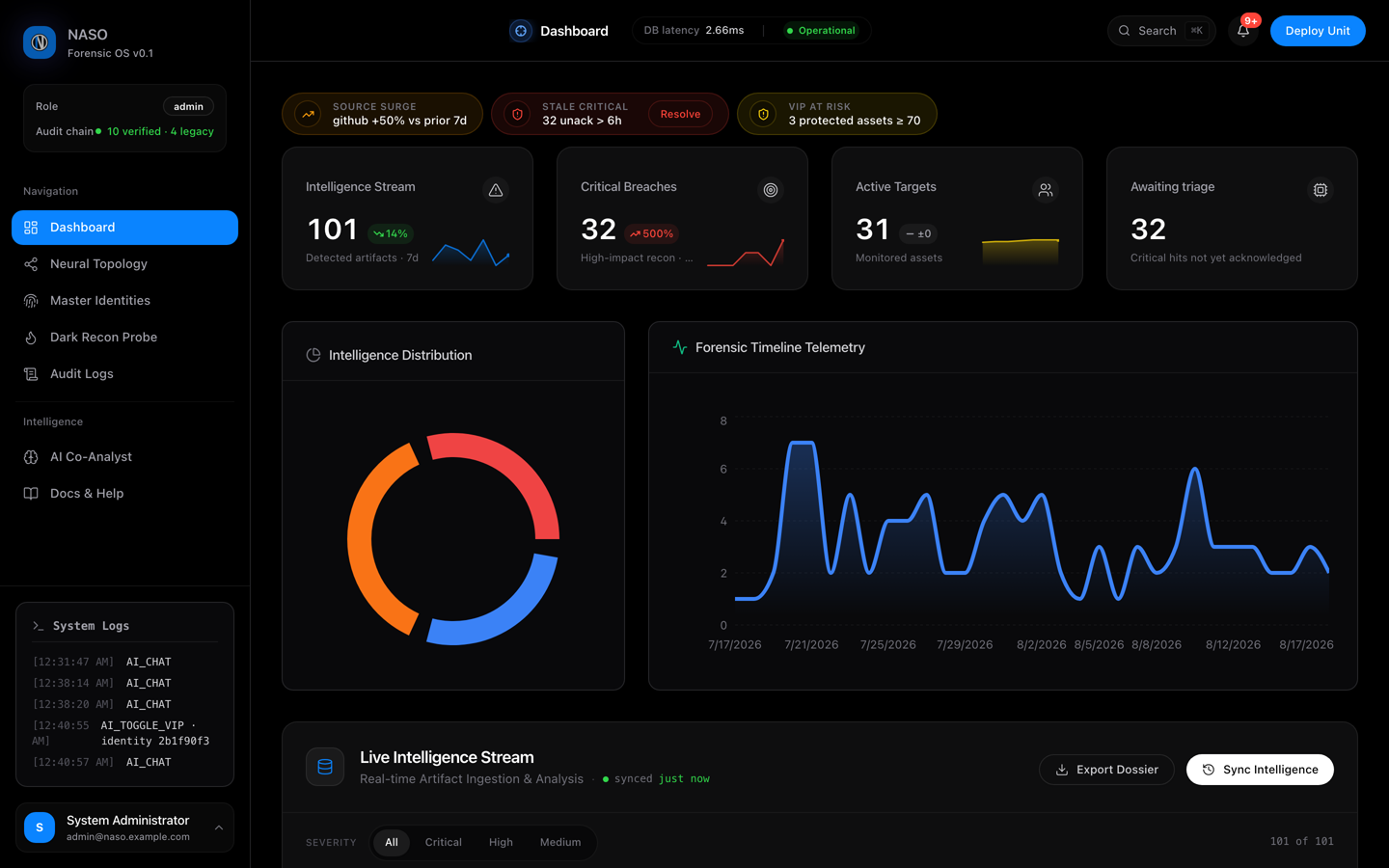
Click the image to watch: sign-in, live dashboard, the identity graph, dark-web recon over Tor, the tamper-evident audit ledger and the local AI co-analyst.
The recording is scripted — regenerate it after any UI change with frontend/demo/record.mjs.
Key Features
🛡️ Hardened Container Baseline
The API and worker containers run as uid 10001 with cap_drop: ALL, no-new-privileges:true, and a read_only root filesystem. The JWT signing keys are mounted as files under /run/secrets and never appear in the environment; the datastore passwords the application connects with come from .env, which make bootstrap renders with the same generated values the containers are provisioned from. Sessions are EdDSA (Ed25519) with iss/aud/nbf verified on every decode, and Redis JTI blacklisting for immediate revocation.
The shipped
docker-compose.ymlis a development and evaluation baseline, not a production configuration — it mounts generated secrets from a local directory and publishes management ports. See SECURITY.md before running it against real data.
⚡ High-Performance Ingestion API
The ingest webhook (POST /leaks/ingest/webhook) uses orjson and aio_pika to stream raw unstructured data directly into RabbitMQ. Processing is decoupled from the API via Celery workers.
🧠 Local AI with Response Caching
Answers are cached in Redis under a SHA-256 key over the conversation history and the tenant id, so a repeated question returns without touching the model and no cache entry can be shared across tenants. The React frontend consumes the stream over SSE with exponential-backoff-and-jitter reconnection.
🔍 Identity Correlation Engine
Master identity merging clusters overlapping indicators across breach sources. Risk scoring is computed from breadth, depth, and recency of exposure. Protected (VIP) identities receive elevated monitoring.
System Architecture
Ingestion is decoupled from processing: the API publishes to RabbitMQ and returns, and Celery workers do the analysis. Two worker pools, because the workloads are different — worker-pipeline runs the per-hit path at concurrency 4, worker-massive runs bulk dump processing at concurrency 1 so one large job cannot starve the rest.
graph TD
    classDef intel fill:#18181b,stroke:#6366f1,stroke-width:2px,color:#FFFFFF,rx:8,ry:8;
    classDef worker fill:#09090b,stroke:#8b5cf6,stroke-width:2px,color:#FFFFFF,rx:8,ry:8;
    classDef storage fill:#18181b,stroke:#10b981,stroke-width:2px,color:#FFFFFF,rx:8,ry:8;

    A1((OSINT Feeds)):::worker
    A2((Dark Web JSON)):::worker

    B("⚡ POST /leaks/ingest/webhook"):::intel
    A1 & A2 -->|orjson + aio_pika| B

    B --> C["Message Broker<br/>(RabbitMQ)"]:::worker
    C --> D["Task Cluster<br/>(Celery Workers)"]:::worker

    D --> E{"Local LLM (AI cache)<br/>& YARA Engine"}:::intel

    E -->|Identities & leak hits| F1("Relational store<br/>(PostgreSQL)"):::storage
    E -->|Full-Text Index| F2("Search Engine<br/>(Elasticsearch)"):::storage
    E -->|Screenshots & dossiers| F3("Object Store<br/>(MinIO)"):::storage
Stack
| Component | Technology |
|---|---|
| API | FastAPI (async/await, SQLAlchemy 2.0 async) |
| Task Queue | Celery + RabbitMQ |
| Database | PostgreSQL 15 |
| Cache / Blacklist | Redis 7 |
| Search | Elasticsearch 8 |
| Object Storage | MinIO |
| Tracing | Jaeger (OpenTelemetry) |
| Frontend | React 18 + Vite + Zustand |
| Dark Web | Tor cluster (5 nodes) + HAProxy |
| AI | Local LLM via SSE (Ollama / LM Studio compatible) |
Getting Started
Requirements: Docker with Compose v2, Python 3.11, Node 20.
git clone https://github.com/fabriziosalmi/naso.git
cd naso

# 1. Generate .secrets-mock/ (docker-compose mounts it at /run/secrets and
#    will not start without it) and render .env with the same values.
make bootstrap

# 2. Bring up Postgres, Redis, Elasticsearch, MinIO, RabbitMQ, Jaeger, the
#    Tor cluster, the API, and the workers — fifteen containers.
make up
make bootstrap fills in every credential it generates, so there is nothing to
edit before make up. What is left blank in .env is optional and annotated:
third-party API keys (SHODAN_API_KEY, the Telegram pair), the AI endpoint, and
the tracing toggle.
The API is then on http://localhost:8000. The frontend is not part of the
Compose stack — it runs as a Vite dev server on the host:
cd frontend
npm install
npm run dev          # http://localhost:5173
Create the schema, provision the first admin, and seed synthetic data:
docker exec naso-api python init_db.py   # create_all + alembic upgrade head + admin
make demo                                # 100+ synthetic leak artefacts
init_db.py reads NASO_ADMIN_EMAIL and NASO_ADMIN_PASSWORD from the
container's environment, which Compose populates from .env — exporting them
in your own shell before docker exec does nothing, because that shell is not
where the process runs. make bootstrap has already generated a password; read
it out of .env, or set your own there before make up:
grep '^NASO_ADMIN_' .env
Do not give the admin an address under
.local,.test,.localhost,.invalid,.arpa, or.onion. Those are special-use TLDs and the API'sEmailStrvalidation rejects them, so/users/mewould fail for that
account.
Environment Variables
.env.example is the complete, annotated reference. The
variables you are most likely to touch:
| Variable | Description |
|---|---|
NASO_ADMIN_EMAIL |
Initial admin email (default: [email protected]) |
NASO_ADMIN_PASSWORD |
Initial admin password — required on first run |
DATABASE_URL |
PostgreSQL connection string used by the application |
REDIS_HOST |
Redis connection URL, used for the JWT blacklist |
RABBITMQ_HOST / RABBITMQ_USER / RABBITMQ_PASS |
Celery broker — a worker will not start without the credentials |
AI_ENDPOINT |
Local LLM endpoint (e.g. http://host.docker.internal:1234/v1) |
AI_MODEL |
LLM model name (default: gemma-4-e2b-it) |
NASO_OTEL_ENABLED |
Opt in to OTLP tracing. Off by default |
SOAR_WEBHOOK_URL |
Optional JSON webhook fired on severity_score >= 90 |
NASO_COOKIE_SECURE |
Set to true in production, behind HTTPS |
Note that several services take one variable to provision the container and a
different one for the application to connect with (ELASTIC_PASSWORD vsES_PASSWORD, RABBIT_USER vs RABBITMQ_USER, MINIO_ROOT_USER vsMINIO_ACCESS_KEY). .env.example marks every such pair.
Validation
cli/validate.sh is what CI runs on every pull request against main. Two
gates first — every container has to reach a steady running state, andGET /system/health has to report every component ok or disabled — then
backend pytest inside the API container, frontend Vitest, and the Playwright
end-to-end flows:
./cli/validate.sh
Documentation
Roadmap
Planned hardening work is tracked in ROADMAP.md.
Contributing
Contributions are welcome. Read CONTRIBUTING.md for the
development setup, the quality bar, and the commit conventions, and
CODE_OF_CONDUCT.md for how we expect people to behave.
One rule up front: never contribute real data. Fixtures, tests, and issue
reports must use synthetic values — never real personal data, real credentials,
or excerpts from a real breach corpus.
Security
Found a vulnerability? Do not open a public issue. Report it privately
through a GitHub security advisory
or by email. See SECURITY.md for the process, scope, and safe
harbour terms — and for the hardening checklist you should work through before
running NASO against real data.
Legal and acceptable use
NASO processes personal data and can reach systems you do not own.
LEGAL.md covers intended use, authorisation, prohibited uses, your
obligations as a data controller under the GDPR, third-party service terms, and
the absence of any warranty. It is not optional reading.
License
NASO is licensed under the GNU Affero General Public License v3.0.
In short: you may use, study, modify, and redistribute NASO freely — but if you
run a modified version as a network service, you must make your modified source
available to its users. See the full text for the terms that actually
bind; this summary does not.
Copyright © 2026 Fabrizio Salmi.
Yorumlar (0)
Yorum birakmak icin giris yap.
Yorum birakSonuc bulunamadi