flow
Health Gecti
- License — License: MIT
- Description — Repository has a description
- Active repo — Last push 0 days ago
- Community trust — 119 GitHub stars
Code Gecti
- Code scan — Scanned 5 files during light audit, no dangerous patterns found
Permissions Gecti
- Permissions — No dangerous permissions requested
Bu listing icin henuz AI raporu yok.
Turn isolated Claude sessions into a continuous working relationship
flow


A complete task manager for Claude Code — and the working memory
layer that turns every session from a brilliant new hire into the
engineer on your team.
See it in action
A four-act demo of how flow compounds context across days and tasks.
The work is silly on purpose — Star Trek bridge starships — so the
mechanic is what you watch, not the code.
Act 1 — Capture the work. Just talk. flow interviews you for
what / why / where / done-when, drafts a structured brief, and opens
a dedicated Claude session for the task in a new tab.
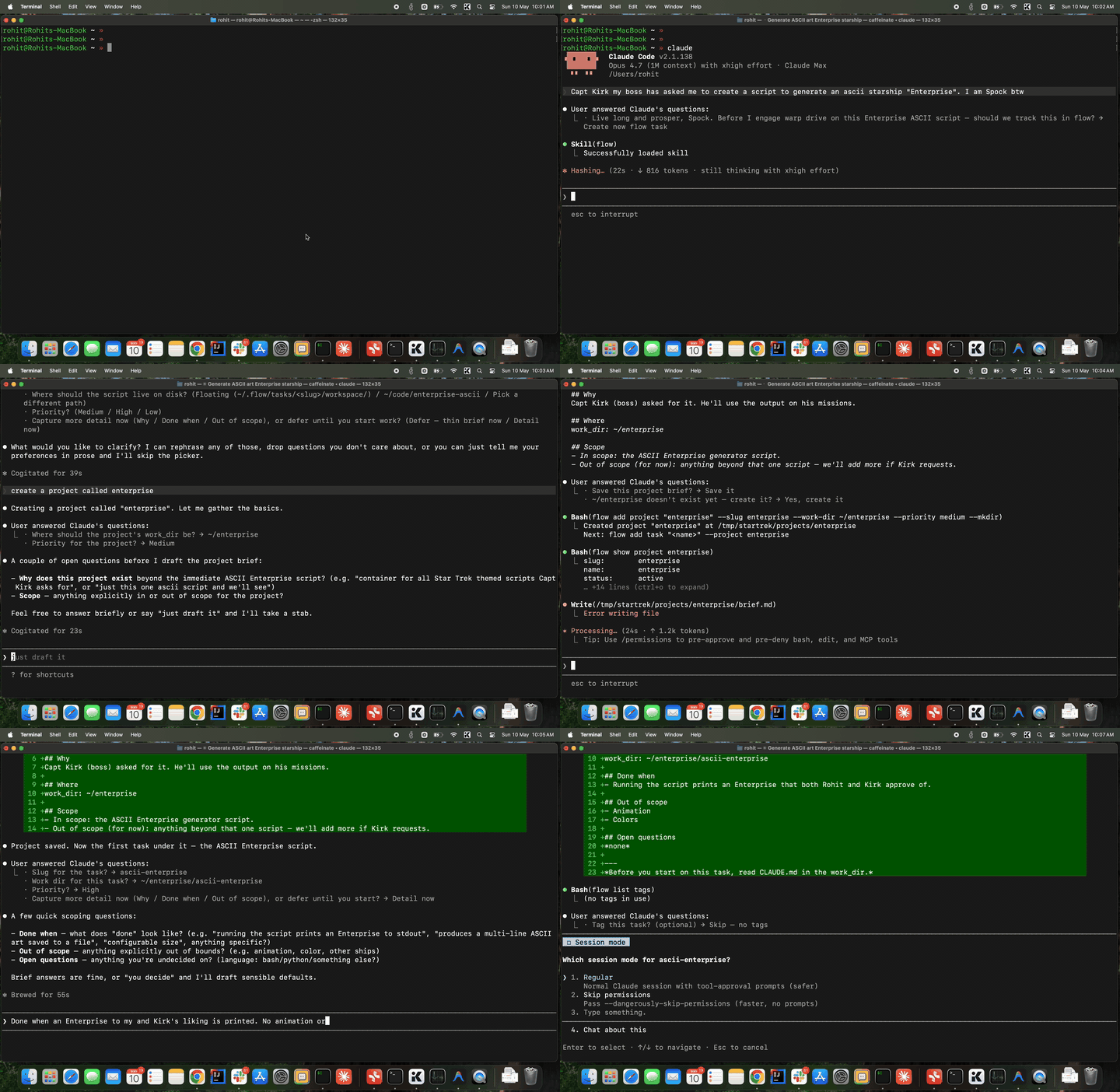
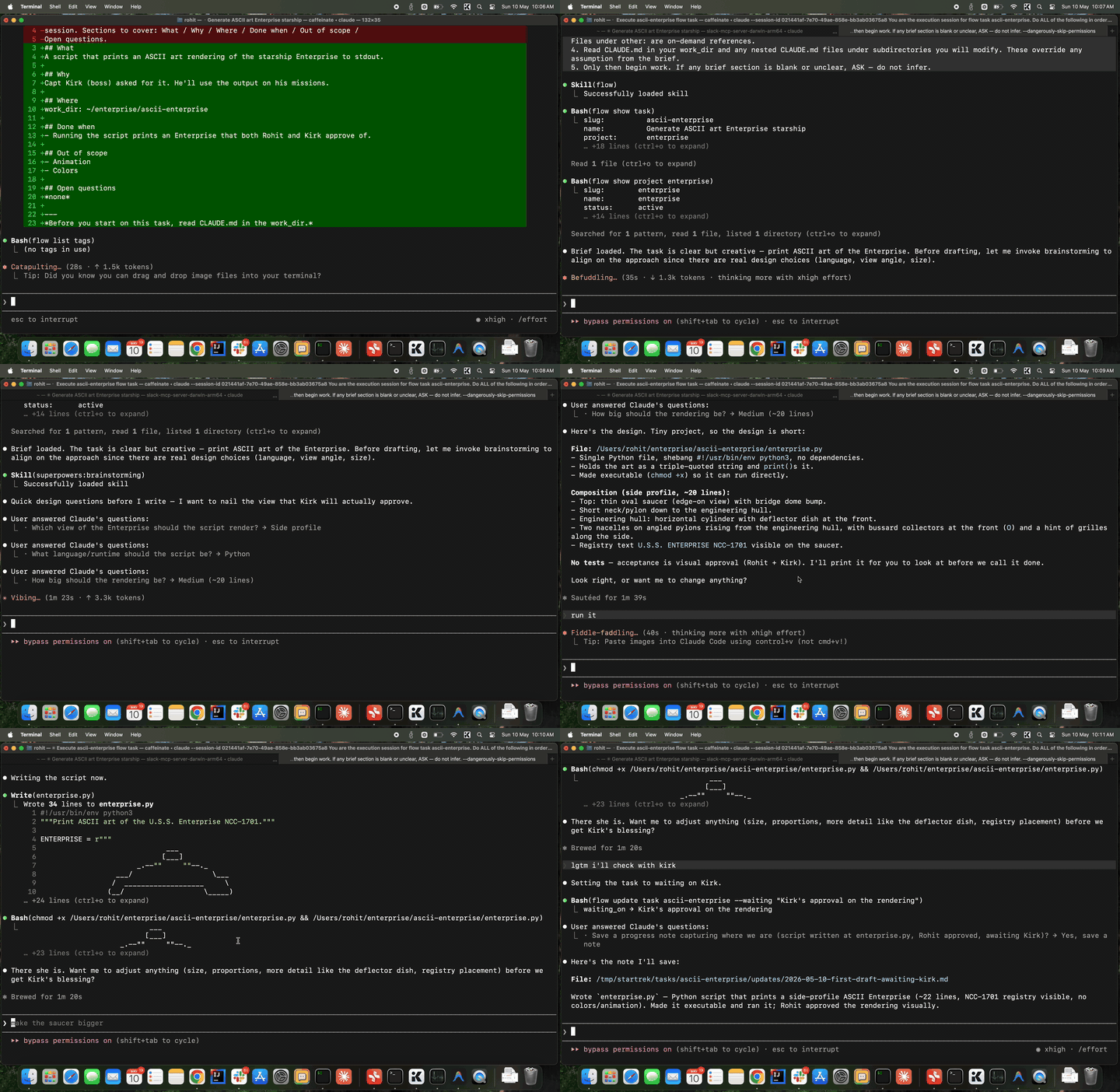
Act 2 — Work, then park. The session has the brief, the project
context, and the knowledge base loaded. You build until you hit a
blocker — here, "Kirk needs to review this" — and tell Claude to
park it. Status flips to waiting. Tab can close.
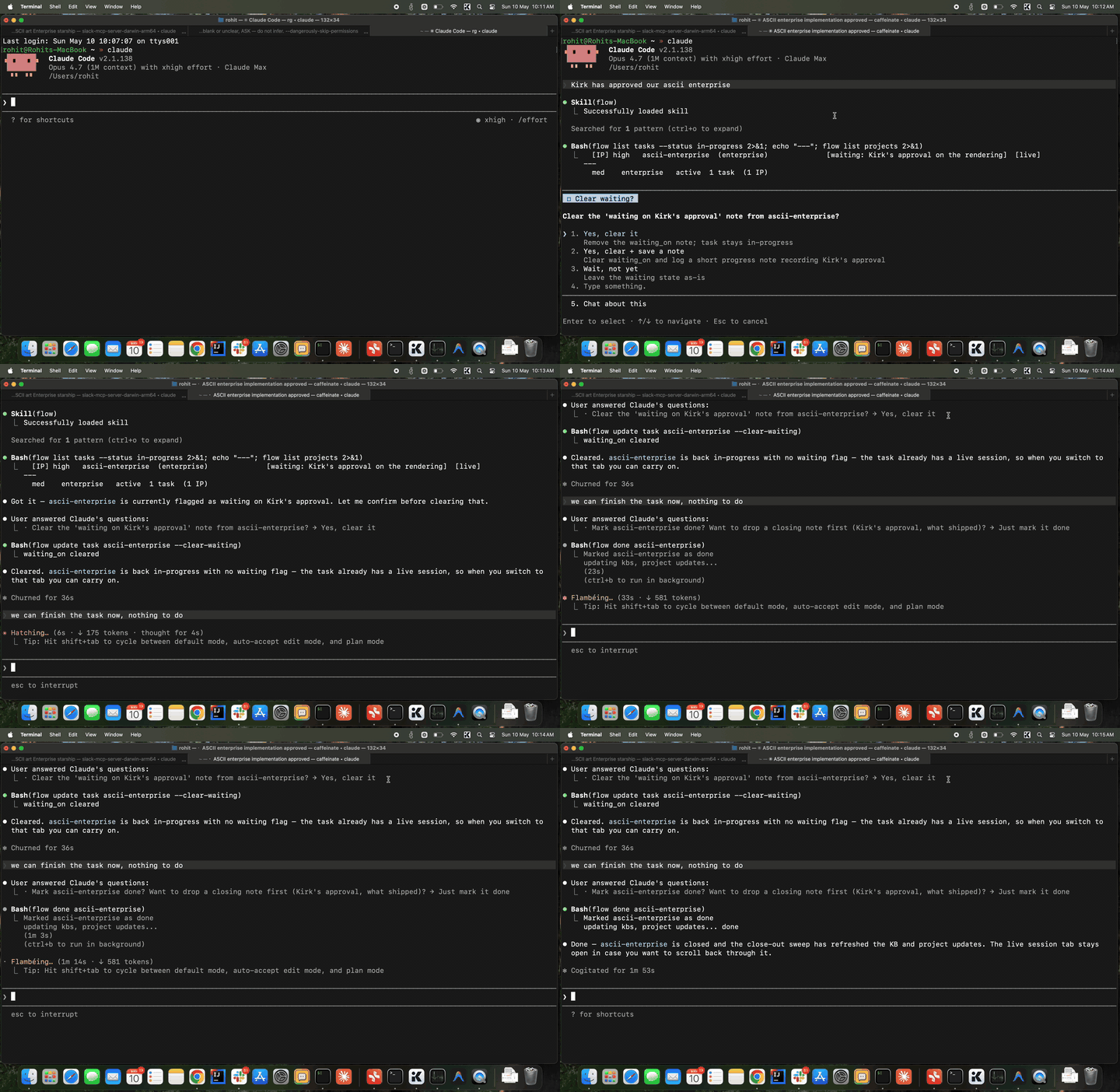
Act 3 — Resume and close. A day later you say "Kirk signed off."
Same session resumes with full memory of where it left off. flow done flips status and triggers the sweep — Claude re-reads the
whole transcript and writes durable facts (Kirk approved the design,
the ship class, the conventions used) into the knowledge base.
Act 4 — Months later, a new captain. New task: "Picard's the new
boss, he wants the starship as an SVG." Brand new session, but it
already knows the ship, knows the design choices Kirk approved,
knows the project conventions — because the KB carried it. Claude
just gets to work.
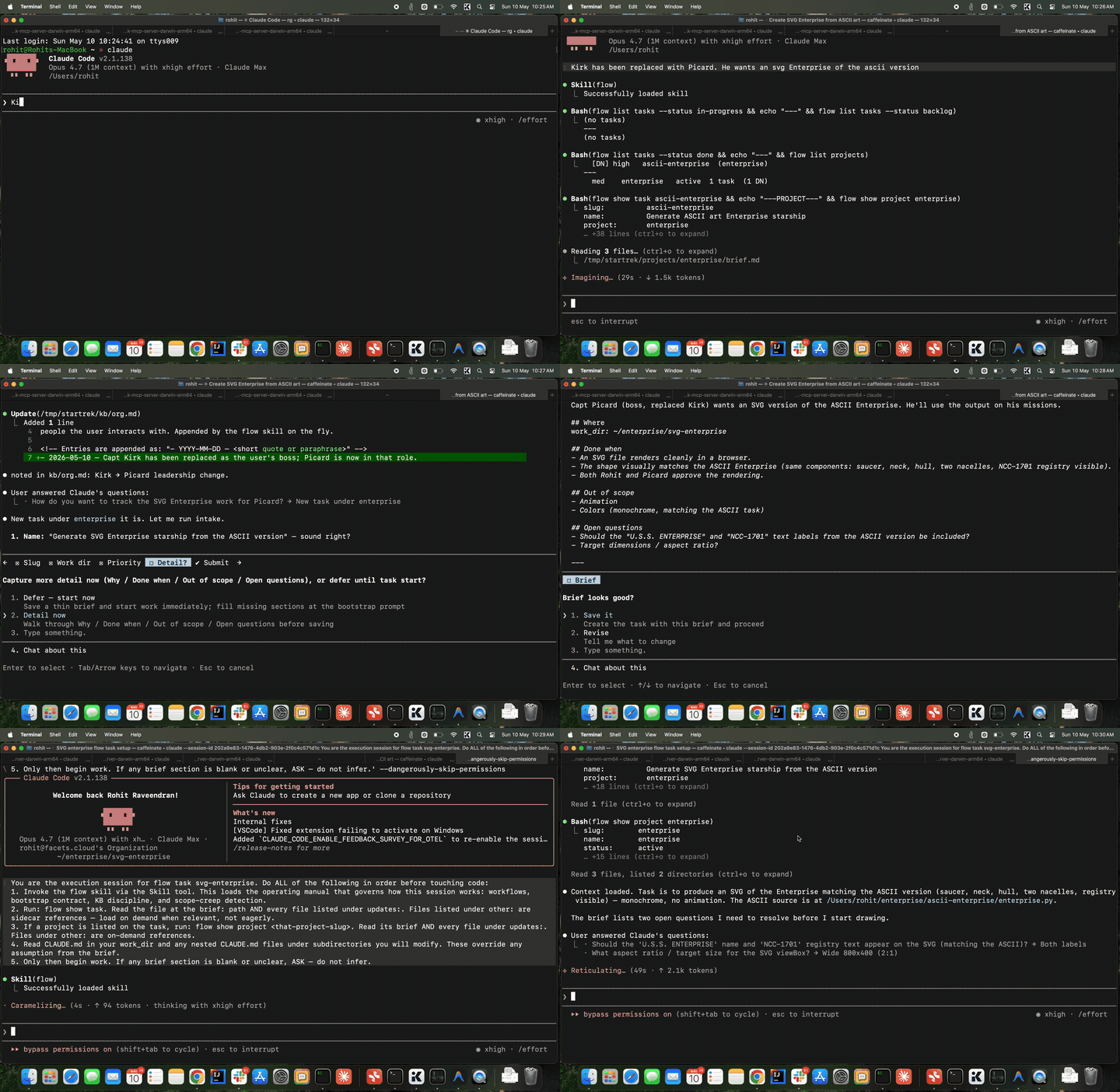
That fourth session is what flow is really about. Not the first
session — the fiftieth.
Why flow
If you use Claude Code daily, you've felt the ceiling: every session
is a new hire. Brilliant, capable, ready to help — but with no memory
of yesterday's decisions, last week's migrations, or the half-finished
threads in your other tabs. You spend the first ten minutes of every
session catching it up.
flow changes the relationship. It's a complete task manager —
projects, tasks, structured briefs, progress notes, playbooks for
recurring work — and a working memory layer that injects all of it
into every Claude session automatically. Capture once, work with
Claude on it forever.
The first session feels normal. By session ten, Claude knows your
codebase quirks, your team, the customer you keep mentioning, and
the migration you're three steps into. By session fifty, it's the
engineer on your team — not a new hire you re-explain yourself to
every morning.
Built for power users who want Claude to work with them, not just
help them.
How context compounds
Every task feeds the same knowledge base. Every closed task makes
the next one smarter.
                                       ┌────────────────────────┐
                                       │   ~/.flow/kb/          │
                                       │   user · org · products│
                                       │   processes · business │
                                       └─────▲──────────▲───────┘
                                             │          │
                  flow do <task>             │ scoop    │ sweep
   ┌────────┐  ─────────────────▶  ┌─────────┴──────────┴─────┐
   │  Task  │                      │      Claude session      │
   │  brief │  ◀──── updates ───── │  loads brief + kb +      │
   │ +notes │                      │  notes + repo conventions│
   └────────┘  ─── flow done ───▶  └──────────────────────────┘
                                       (auto-sweep transcript
                                        into kb on done)
- Scoop (live): during a session the flow skill listens for
durable facts you mention — your role, a teammate's name, a
product convention — and appends them to the matching kb file
on the fly. - Sweep (on
flow done): when you close a task, flow spawns
a headless Claude pass that re-reads the entire transcript and
pulls anything kb-worthy that the live scoop missed. The status
flip is the contract; the sweep is best-effort. - Cross-reference:
flow transcript <sibling-task>lets a
current session read what was decided in a related one — useful
when the brief alone doesn't carry enough context.
Net effect: the longer you use flow, the more your knowledge base
grows, the less you re-explain yourself.
Playbooks for the work you do on cadence
Some work repeats. Weekly reviews. Daily PR triage. On-call rotations.
Customer-meeting prep.
A playbook is a reusable run definition — a markdown brief that
describes what a run does. flow run playbook weekly-review snapshots
that brief into a fresh task and spawns a new Claude session against
it. Every run is reproducible (it executes against a frozen snapshot,
so editing the playbook later doesn't rewrite history) and contributes
back to the knowledge base on flow done like any other task.
┌──────────┐  flow run playbook weekly-review
│ Playbook │ ────────▶ snapshot ─────▶ new task ─────▶ new session
│  brief   │           (frozen for                     (executes
└──────────┘            reproducibility)                against snapshot)
Same compounding mechanic — your weekly review session two months from
now will know everything every prior weekly review surfaced.
Install
In any Claude Code session, paste this:
Install flow from https://github.com/Facets-cloud/flow
Claude reads the repo, downloads the binary, and runs flow init —
which installs the flow skill into ~/.claude/skills/flow/SKILL.md
and registers a SessionStart hook so every future Claude session
loads the skill automatically. Then say "let's get to work" and
follow along.
# 1. Download the binary for your Mac.
ARCH=arm64        # Apple Silicon (M1/M2/M3/M4) — use amd64 for Intel.

curl -fsSL -o /usr/local/bin/flow \
  "https://github.com/Facets-cloud/flow/releases/latest/download/flow-darwin-${ARCH}"
chmod +x /usr/local/bin/flow
xattr -d com.apple.quarantine /usr/local/bin/flow 2>/dev/null || true

# 2. Initialize. This is required — it creates ~/.flow/, the SQLite
#    index, the knowledge base, AND installs the Claude skill +
#    SessionStart hook. Without this step, Claude can't talk to flow.
flow init
flow init is the step that wires flow into Claude Code. It:
- Creates
~/.flow/(database, kb, projects, tasks, playbooks) - Writes the flow skill to
~/.claude/skills/flow/SKILL.md - Adds a SessionStart hook to
~/.claude/settings.jsonso every new
Claude Code session auto-loads the skill
The xattr step removes Gatekeeper's quarantine attribute so macOS
doesn't refuse to run the unsigned binary.
Upgrade
In any Claude Code session:
Upgrade flow from https://github.com/Facets-cloud/flow
Claude fetches the latest release binary and runs flow skill update to refresh the skill and re-wire the SessionStart and
UserPromptSubmit hooks. Check the running version withflow --version.
Quickstart
Just open Claude and say "let's get to work". The skill
handles the rest.
What you get
- One task, one Claude session, one tab.
flow do <task>
spawns a dedicated tab in iTerm2, stock macOS Terminal, or your
current zellij session (requires zellij ≥ 0.40) — flow picks
whichever you launched it from. Tomorrow'sflow do <task>
resumes the same conversation. - Interview-driven task capture. No forms. flow asks
what / why / where / done-when, then writes a structured brief. - A knowledge base that grows. Five markdown buckets for
durable facts about you, your team, products, processes, and
customers. Live-appended during sessions; auto-swept from
transcripts onflow done. - Per-task progress notes. Append-only logs. Pick up where
you left off, even after a week away. - Playbooks for cadence work. Weekly reviews, daily triage,
on-call rotations — define once, run on demand. - A Claude skill that speaks plain English. "What should I
work on", "resume auth", "save a note" — the skill turns intent
into flow commands.
How it works under the hood
flow do <task> pre-allocates a session UUID, writes it to the
task row, and spawns a tab in zellij (when $ZELLIJ is set), iTerm2,
or stock Terminal.app — chosen in that priority order, with iTerm as
the historical fallback — running claude --session-id <uuid> withFLOW_TASK / FLOW_PROJECT inlined. The jsonl file lands at the deterministic path~/.claude/projects/<encoded-cwd>/<uuid>.jsonl, so futureflow do calls run claude --resume <uuid> to continue the same
conversation. A SessionStart hook re-injects the task brief,
updates, and CLAUDE.md context on every resume; a UserPromptSubmit
hook keeps the flow skill discoverable in ad-hoc Claude sessions.
The first flow do from stock Terminal.app needs macOS Accessibility
permission for the app hosting your shell — not the flow binary
itself. Terminal.app's AppleScript dictionary has no "make new tab"
verb, so flow drives cmd-T through System Events, and System Events
checks Accessibility against the responsible parent app. Until that's
granted, flow do errors out with a multi-line explanation pointing at
System Settings → Privacy & Security → Accessibility (enable the
toggle for "Terminal" if you launched flow from Terminal.app, "iTerm"
from iTerm2, "Claude" if Claude Code is the host, etc.; add it via the
- button if it's not listed). After the grant the spawn is silent.
iTerm2 doesn't need this — it has a nativecreate tabverb.
Your data — local, portable, yours
Everything flow stores lives under ~/.flow/ (override with$FLOW_ROOT). No server, no cloud, no telemetry. Plain markdown
beside a SQLite index — readable in any editor, versionable in git.
~/.flow/
  flow.db                          # SQLite — projects, tasks, playbooks index
  kb/
    user.md  org.md  products.md
    processes.md  business.md      # 5 markdown buckets, append-only
  projects/<slug>/
    brief.md
    updates/YYYY-MM-DD-*.md
  tasks/<slug>/
    brief.md
    updates/YYYY-MM-DD-*.md
  playbooks/<slug>/
    brief.md
    updates/YYYY-MM-DD-*.md
The SQLite database is an index, not the source of truth — every
task and project has its real content in the markdown files next to
it. You could delete flow.db and rebuild it from the markdown if
you had to.
Backup & sync
Pick whichever fits your workflow:
Git (recommended for single-user history).
cd ~/.flow && git init && git add . && git commit -m "initial"Commit periodically. The SQLite file is binary, so diffs aren't
useful, but each commit is a clean snapshot. If you push to a
shared remote, addkb/to.gitignorefirst — kb files often
contain personal or org-sensitive notes you don't want public.Time Machine / system backup. Just works, no setup.
iCloud Drive / Dropbox / Google Drive. Symlink
~/.flowinto
the synced folder:mv ~/.flow ~/Library/Mobile\ Documents/com~apple~CloudDocs/flow ln -s ~/Library/Mobile\ Documents/com~apple~CloudDocs/flow ~/.flow⚠️ Don't run flow on two machines simultaneously through a
synced folder — SQLite doesn't tolerate concurrent writes from
separate hosts and you can corruptflow.db. Use this for backup- occasional second-machine access, not active multi-machine use.
Manual rsync.
rsync -a ~/.flow/ /path/to/backup/flow/on a
schedule. Same caveat about concurrent writes.
To move flow to a new machine: copy ~/.flow/ over, install the
binary, and run flow init once — it'll pick up the existing data
and reinstall the skill + hook.
Where flow runs (and where we'd love help)
Today flow runs on **macOS (iTerm2, stock Terminal.app, or zellij)
- Claude Code only**. That's the stack we use, and that's what the
session-spawn layer was built and tested against. zellij works on
Linux too as a side effect — it's cross-platform and flow's zellij
backend doesn't depend on any macOS APIs.
The architecture is portable — session spawning is one small
package — but other harnesses (Codex, Cursor, plain shell) and other
terminals (Linux + tmux/wezterm, Windows Terminal) need contributors
who run those stacks daily and care enough to wire them in. If that's
you, a PR is very welcome.
Where flow came from
flow started as an internal tool at Facets. We use Claude Code every
day, and the context-loss problem was eating into how much of the
tool's capability we could actually use. flow fixed that for us — to
the point where we couldn't imagine working without it. We're
open-sourcing it as-is because it might do the same for you.
This is not a Facets product. There's no signup, no cloud, no upsell.
Just the tool we built for ourselves.
Docs & contributing
- Contributing — bug reports, PRs, dev setup
- Changelog
- Security — how to report issues
- Code of Conduct
License
MIT — © 2026 Facets Cloud
Yorumlar (0)
Yorum birakmak icin giris yap.
Yorum birakSonuc bulunamadi