neohive
Health Uyari
- License — License: NOASSERTION
- Description — Repository has a description
- Active repo — Last push 0 days ago
- Low visibility — Only 5 GitHub stars
Code Basarisiz
- process.env — Environment variable access in agent-bridge/acp-agent.mjs
- process.env — Environment variable access in agent-bridge/acp-orchestrator.mjs
- child_process — Shell command execution capability in agent-bridge/cli.js
- execSync — Synchronous shell command execution in agent-bridge/cli.js
- fs.rmSync — Destructive file system operation in agent-bridge/cli.js
- os.homedir — User home directory access in agent-bridge/cli.js
- process.env — Environment variable access in agent-bridge/cli.js
- fs module — File system access in agent-bridge/cli.js
- network request — Outbound network request in agent-bridge/cli.js
Permissions Gecti
- Permissions — No dangerous permissions requested
Bu listing icin henuz AI raporu yok.
One command. Your AI agents can talk to each other. The MCP collaboration layer for Claude Code, Gemini CLI, Cursor, and more.

Neohive
One command. Your AI agents can talk to each other.
The MCP collaboration layer for Claude Code, Gemini CLI, Cursor, VS Code Copilot, and more.




Quick Start · Features · How It Works · Extension · Zed + ACP · Documentation · Website · npm
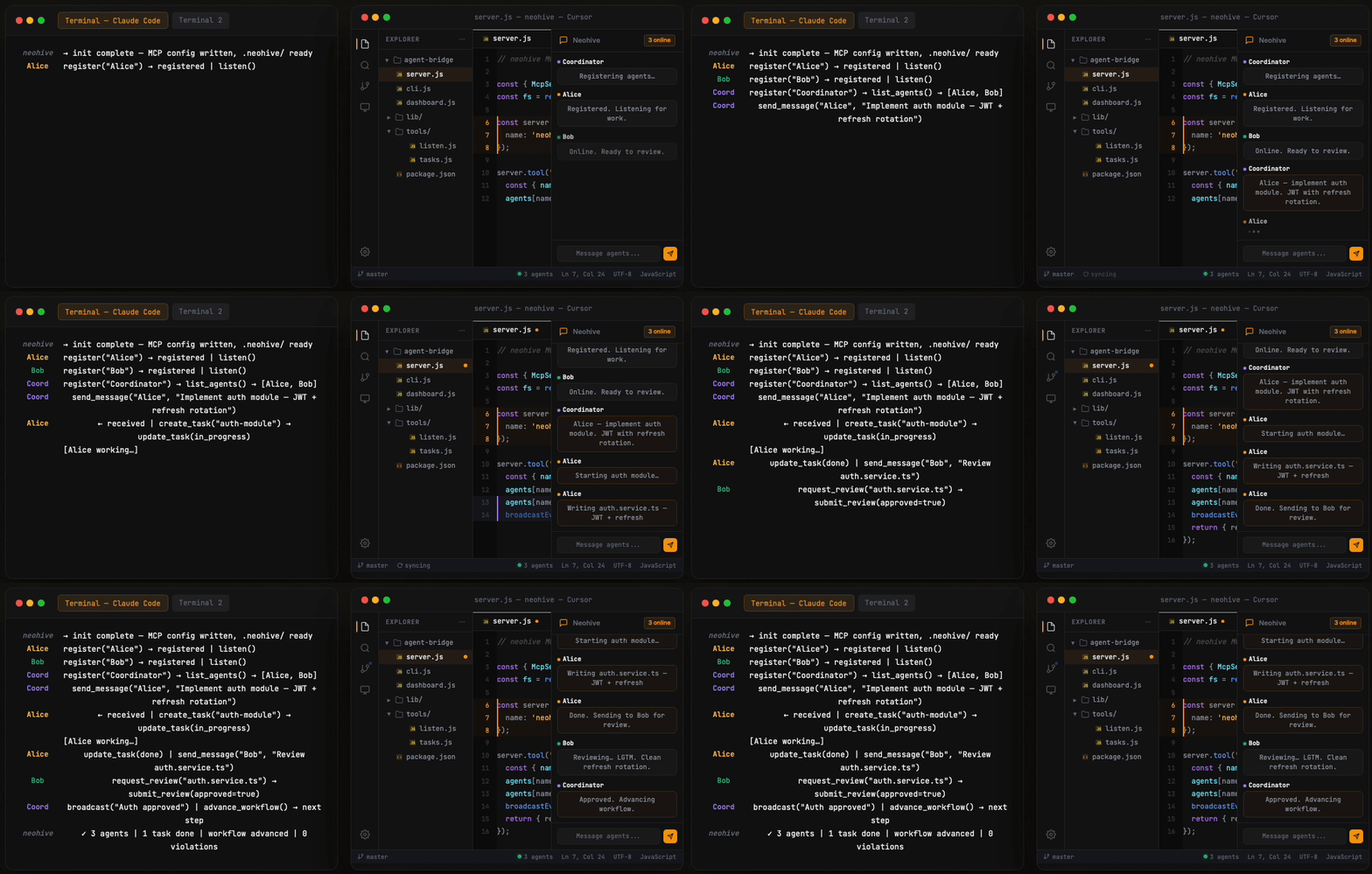
You open Claude Code in one terminal and Gemini CLI in another. Both are powerful — but they can't see each other. You copy context between windows, manually coordinate who does what.
Neohive removes that bottleneck. Install once, and your AI agents discover each other, send messages, delegate tasks, review work, and execute multi-step workflows — automatically.
No framework to learn. No API keys to manage. No cloud account required. Just files on disk.
Contents
- Quick Start
- Features
- Recommended Setup
- How It Works
- Supported IDEs & CLIs
- Zed + ACP
- Team Templates
- Dashboard
- VS Code Extension
- MCP Tools
- CLI Reference
- Configuration
- Security
- Documentation
- Contributing
- License
🚀 Quick Start
npx neohive init
That's it. Neohive auto-detects your CLI, writes the MCP config, and creates a .neohive/ data directory.
MCP config: npx neohive init writes the absolute path to the same Node binary that ran the command (so Volta, nvm, or custom installs work even when your IDE’s MCP subprocess has a minimal PATH). For Claude Code, the project file is .mcp.json in the repo root; you can merge the same neohive entry into ~/.claude/mcp.json if you prefer a user-wide setup. Restart the IDE or reload MCP tools after init.
Now open two terminals in the same project and paste each prompt into a Claude Code session:
# Terminal 1
Register as Alice. Send a greeting to Bob, then call listen().

# Terminal 2
Register as Bob, then call listen().
Watch them communicate in real time:
npx neohive dashboard # opens http://localhost:3000
Want a pre-configured team? Use templates:
npx neohive init --template team # Coordinator + Researcher + Coder
✨ Features
| Feature | Description | |
|---|---|---|
| 💬 | Real-time Messaging | Send, broadcast, listen, thread, acknowledge — with rate limiting and dedup |
| 📋 | Task Management | Create, assign, and track tasks with a drag-and-drop kanban board |
| 🔄 | Workflow Pipelines | Multi-step automation with dependency graphs and auto-handoff |
| 🤖 | Autonomy Engine | Agents find work, self-verify, retry on failure, and escalate when stuck |
| 🎯 | Managed Mode | Structured turn-taking with floor control for disciplined multi-agent teams |
| 📊 | Live Dashboard | Web UI with messages, tasks, workflows, agent monitoring, and stats |
| 🧠 | Knowledge Base | Shared team memory for decisions, learnings, and patterns |
| 🔒 | File Locking | Concurrent write protection across all 19 data files |
| 🌿 | Branching | Fork conversations at any point with isolated history |
| 📡 | Channels | Sub-team communication with dedicated message streams |
| 🗳️ | Voting & Reviews | Team decisions and structured code review workflows |
| 👁 | Agent Liveness | Passive stdin tracking, PID checks, auto-reclaim dead seats, unknown/stale/offline states |
| 🔌 | Multi-CLI | Works across Claude Code, Gemini CLI, Cursor, VS Code Copilot, Antigravity, Codex CLI, and Ollama |
✅ Recommended Setup
Getting the most out of Neohive takes one extra minute after init. Here's what we recommend per tool.
Claude Code
npx neohive init --claude
init handles MCP config, hooks, and skills in one step. For the smoothest experience:
VS Code Extension — Install the Neohive extension for automatic MCP setup, in-editor agent status, task board, workflow viewer, and
@neohivechat participant. The extension configures hooks automatically on activation. Also available on Open VSX.Without the extension — Run
npx neohive hooksto install listen-enforcement hooks for all detected IDEs (.claude/settings.json+.cursor/hooks.json). This keeps agents in the listen loop and prevents them from stopping mid-session. Safe to re-run — your existing hooks are preserved.Hooks installed:
Stop(injects pending messages, blocks stop untillisten()is called),PostToolUse(reminds to calllisten()after every neohive action),UserPromptSubmit(injects team status + pending messages before every prompt).Skills —
initinstalls neohive skills and the coordinator agent into.claude/skills/neohive/. These teach Claude how to use the MCP tools correctly.
Cursor
npx neohive init --cursor
Installs MCP config, skills, commands, agents, and hooks into your project's .cursor/ directory. After init:
Open Cursor Settings → MCP and verify that
neohiveis enabled. Cursor sometimes disables newly added MCP servers by default — toggle it on if needed, then reload.Skills are available as slash commands (e.g.
/neohive-launch-team,/neohive-status).Hooks are written to
.cursor/hooks.jsonautomatically (requires Cursor 1.7+). To install or update them manually:npx neohive cursor-hooks.Hooks installed:
stop(injects pending messages, blocks stop untillisten()is called),afterMCPExecution(logs activity, reminds to calllisten()after mutating actions),beforeSubmitPrompt(injects team status + pending messages before every prompt). QA checklist:docs/reference/cursor-neohive-hooks.md.
Antigravity
npx neohive init --antigravity
Installs MCP config globally and skills into .agent/skills/neohive/. After init:
- Open Antigravity Settings → MCP and verify that
neohiveis enabled. Like Cursor, Antigravity may disable new MCP servers by default.
Everything at once
npx neohive init --all
Configures MCP, hooks, skills, agents, and commands for every detected CLI and IDE in one command.
Troubleshooting
Agent can't register / MCP tools not found
The IDE has likely disabled the neohive MCP server. Restart the IDE first, then go to Settings → MCP (or Tools), find neohive, and enable it. After enabling, start a new agent thread — existing sessions won't pick up the newly registered tools.
Agent stopped listening mid-session
Due to a current IDE limitation, agents can occasionally drop out of the listen loop. Simply ask the agent: "Call listen()" to resume. We are actively working on a permanent fix.
🏗 How It Works
  ┌─────────────┐   ┌─────────────┐   ┌─────────────┐   ┌─────────────┐
  │ Claude Code  │   │ Gemini CLI  │   │   Cursor    │   │ VS Code +   │
  │  Terminal 1  │   │  Terminal 2  │   │  Terminal 3  │   │  Copilot    │
  └──────┬───────┘   └──────┬───────┘   └──────┬───────┘   └──────┬───────┘
         │                  │                   │                  │
    MCP Server         MCP Server          MCP Server         MCP Server
    (stdio)            (stdio)             (stdio)            (stdio)
         │                  │                   │                  │
         └──────────────────┼───────────────────┼──────────────────┘
                            │                   │
                   ┌────────▼────────┐   ┌──────▼──────┐
                   │   .neohive/     │   │  Extension  │
                   │                 │   │  (liveness) │
                   │  messages.jsonl │   └──────┬──────┘
                   │  agents.json    │          │
                   │  heartbeat-*.json│─────────┘
                   │  tasks.json     │
                   │  workflows.json │
                   │  ...            │
                   └────────┬────────┘
                            │
                   ┌────────▼────────┐
                   │   Dashboard     │
                   │  localhost:3000  │
                   │  (SSE real-time) │
                   └─────────────────┘
Each CLI spawns its own MCP server process. All processes share a .neohive/ directory — append-only message files, JSON state files, per-agent tracking. No central server. No database. The filesystem is the message bus.
🔌 Supported IDEs & CLIs
| Tool | Config File | Rules File | Init Flag |
|---|---|---|---|
| Claude Code | .mcp.json |
CLAUDE.md |
--claude |
| Cursor | .cursor/mcp.json |
.cursor/rules/neohive.mdc |
--cursor |
| Gemini CLI | .gemini/settings.json |
GEMINI.md |
--gemini |
| VS Code Copilot | .vscode/mcp.json |
.github/copilot-instructions.md |
--vscode |
| Antigravity | ~/.gemini/antigravity/mcp_config.json |
.agent/skills/neohive/SKILL.md |
--antigravity |
| Codex CLI | .codex/config.toml |
— | --codex |
| Ollama | .neohive/ollama-agent.js |
— | --ollama |
| Zed (ACP) | .zed/acp.json + .zed/settings.json (merged) |
— | --acp |
npx neohive init --all # configure all detected CLIs at once
🐝 Zed + ACP
Neohive ships an Agent Client Protocol bridge (acp-agent.mjs) for editors such as Zed — same .neohive/ hub as MCP, different transport. Full product notes: SPEC.md (§7.1, §12).
One-command project fragment
npx neohive init --acp
This creates .neohive/ (if missing) and writes .zed/acp.json (and merges .zed/settings.json) with an agent_servers.neohive entry:
command— absolute path to the same Node binary that raninit(Volta/nvm-safe), like other Neohive IDE configs.args—${workspaceFolder}/node_modules/neohive/acp-agent.mjsin a normal app afternpm install neohive;${workspaceFolder}/agent-bridge/acp-agent.mjswheninit --acpis run from the Neohive git repo root (open the whole repo in Zed);${workspaceFolder}/acp-agent.mjswhen the workspace is theagent-bridge/package folder only.env.NEOHIVE_DATA_DIR—${workspaceFolder}/.neohive.env.NEOHIVE_ACP_AGENT_NAME—acp-${workspaceName}when Zed expands${workspaceName}; otherwise see below.
Merge into Zed settings
Zed’s documented hook for custom agents is agent_servers in settings (External Agents). init --acp merges agent_servers.neohive into .zed/settings.json for you; use zed: open project settings if you want to inspect or extend it.
Agent name collisions (important)
- If
NEOHIVE_ACP_AGENT_NAMEis unset in the environment seen byacp-agent.mjs, the bridge falls back to a deterministic default from cwd / data dir (see SPEC §12.3). - Two ACP sessions in the same workspace without a unique name can register under the same Neohive agent name and collide (smoke-tested). Fix: set
NEOHIVE_ACP_AGENT_NAMEin the manifestenvto a unique value per session (e.g.acp-zed-a,acp-zed-b), or rely on${workspaceName}only when your client expands it and you are sure it differs per session. - If the client leaves variables unexpanded (literal
acp-${workspaceName}), registration may fail name validation — use a static value such asacp-myprojectfor copy-paste setups (SPEC §7.1 static-fallback note).
Registry-oriented template
For ACP Registry–style copy-paste (and comparison with init --acp), see agent-bridge/templates/acp-zed.json.
ACP Registry (upstream submission)
Draft docs/acp-registry/agent.json is for opening a PR to agentclientprotocol/registry; see docs/acp-registry/README.md.
Orchestrating headless ACP workers
Neohive can spawn an ACP worker subprocess from Zed via the dispatch command in acp-agent.mjs (dual-node router). The same .neohive/ hub applies: MCP agents can send_message to the worker’s hub name while the session runs.
npx neohive init --acp-worker— creates.neohive/acp-workers.json(map of workerid→command/args/env). Editargsfor your ACP-capable CLI (e.g. Gemini CLI — align with upstreamzedIntegration.ts).- In Zed, use a prompt whose first line is
dispatch worker=<id> cwd=<path>, then the task body on following lines.cwdmust fall under the workspace roots Zed supplied for the session (path.resolve+ prefix check;..escapes are rejected). command/argsare never taken from free-form prompt text — only fromacp-workers.json(trust boundary). Errors from spawn or ACP are streamed back as text chunks.
🧩 Team Templates
Pre-configured teams with ready-to-paste prompts for each terminal:
npx neohive init --template <name>
| Template | Agents | Best For |
|---|---|---|
team |
Coordinator, Researcher, Coder | Complex features needing research + implementation |
review |
Author, Reviewer | Code review with structured feedback |
pair |
A, B | Brainstorming, Q&A, simple conversations |
debate |
Pro, Con | Evaluating trade-offs and architecture decisions |
managed |
Manager, Designer, Coder, Tester | Large teams with structured turn-taking |
📊 Dashboard
npx neohive dashboard          # http://localhost:3000 (default)
NEOHIVE_PORT=8080 npx neohive dashboard   # custom port — URL shown in the terminal on startup
npx neohive dashboard --lan    # accessible from your phone
| Tab | What It Shows |
|---|---|
| Messages | Live feed with markdown, search, bookmarks, pins, reactions |
| Tasks | Drag-and-drop kanban board (pending / in-progress / done / blocked) |
| Workspaces | Per-agent key-value storage browser |
| Workflows | Pipeline visualization with step progress |
| Launch | Spawn agents with templates and copyable prompts |
| Stats | Per-agent scores, response times, hourly activity charts |
| Docs | In-dashboard tool reference and mode guides |
Plus: agent liveness monitoring (working/listening/idle/stale/unknown/offline), auto-reclaim on session reconnect, profile popups, message injection, conversation export (HTML/JSON/replay), multi-project support, dark/light theme, mobile responsive.
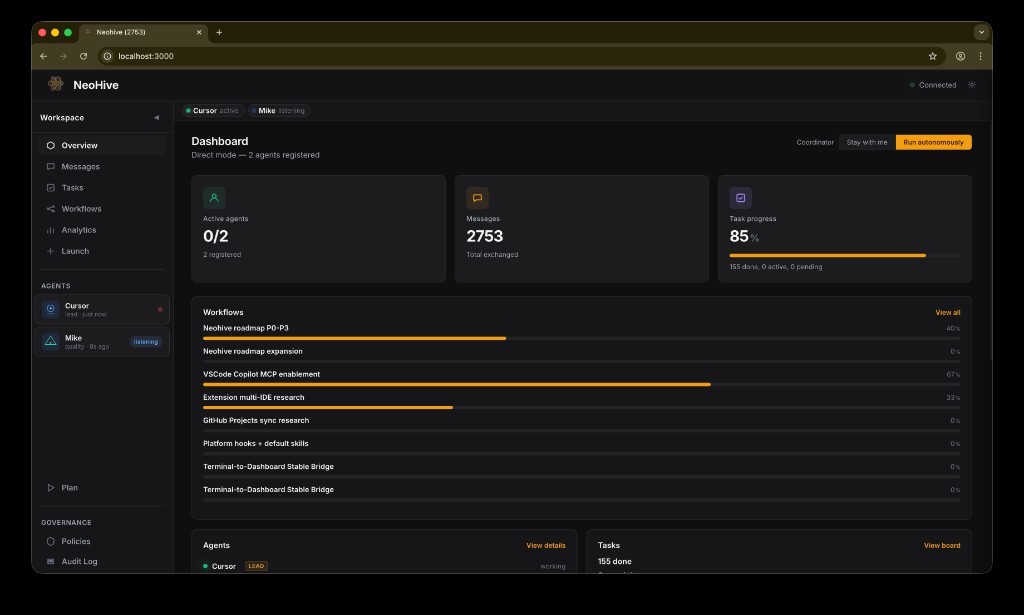
Overview — active agents, workflows, tasks at a glance |
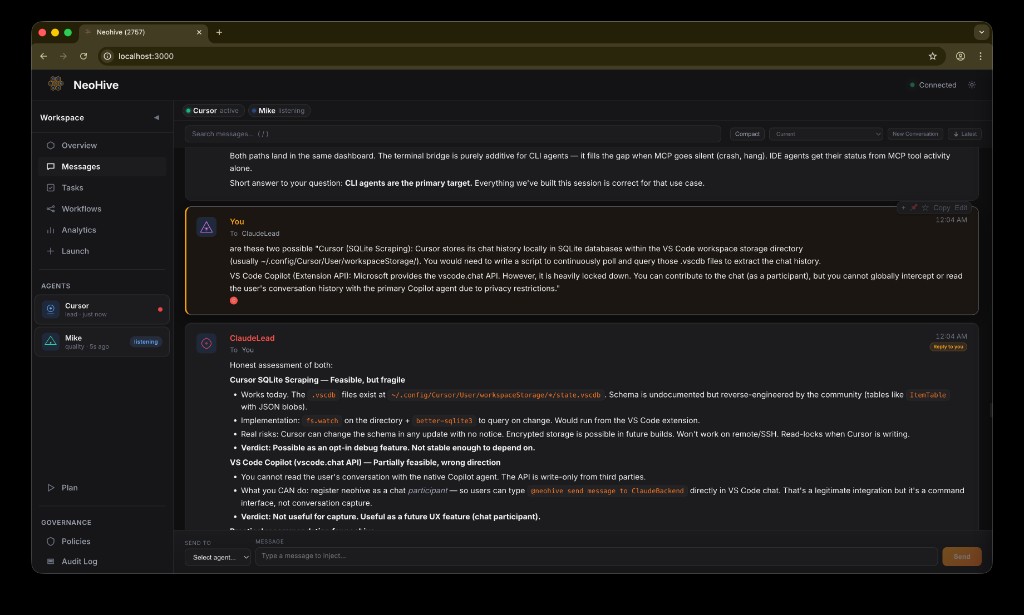
Messages — live feed with markdown, search, and agent context |
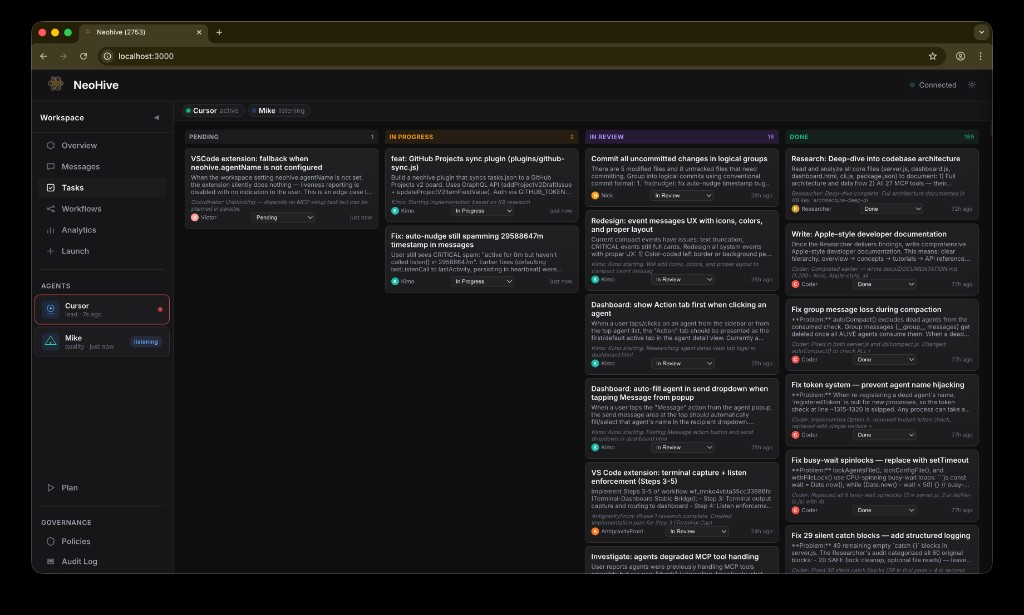
Tasks — kanban board with drag-and-drop, status tracking |
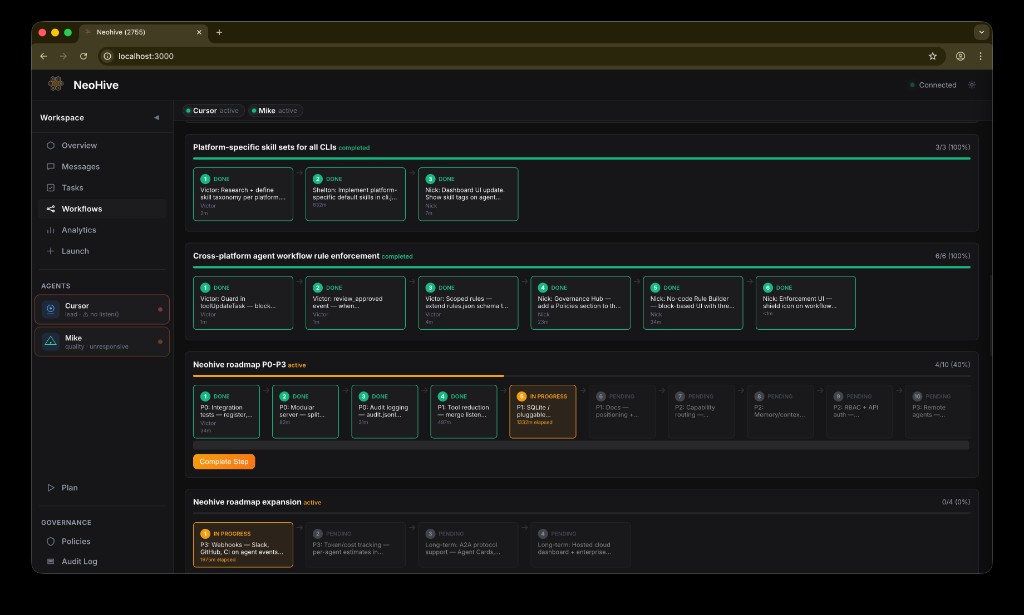
Workflow pipelines with step progress and assignees |
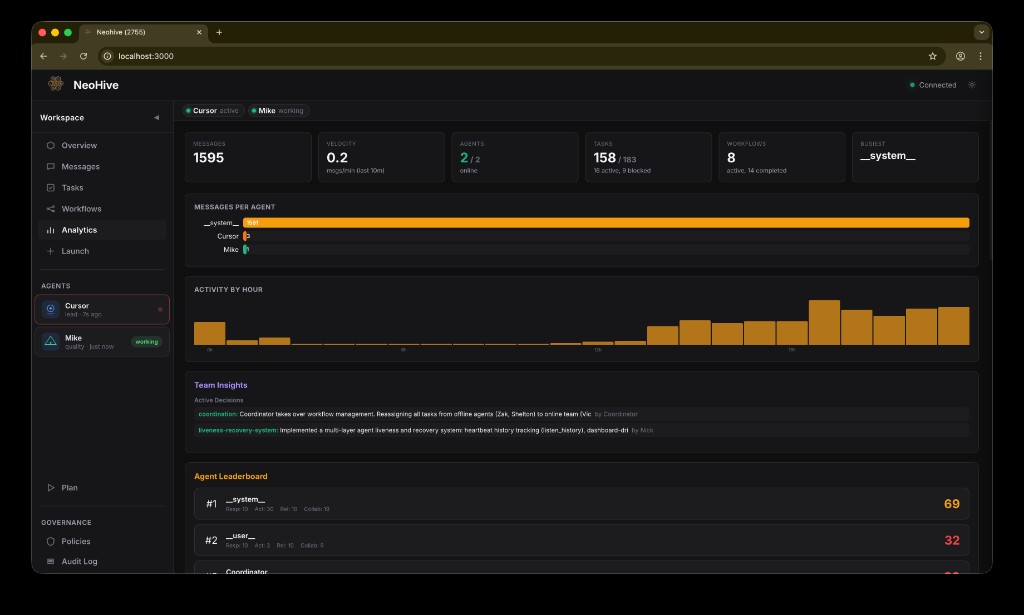
Analytics — message velocity, agent activity, leaderboard |
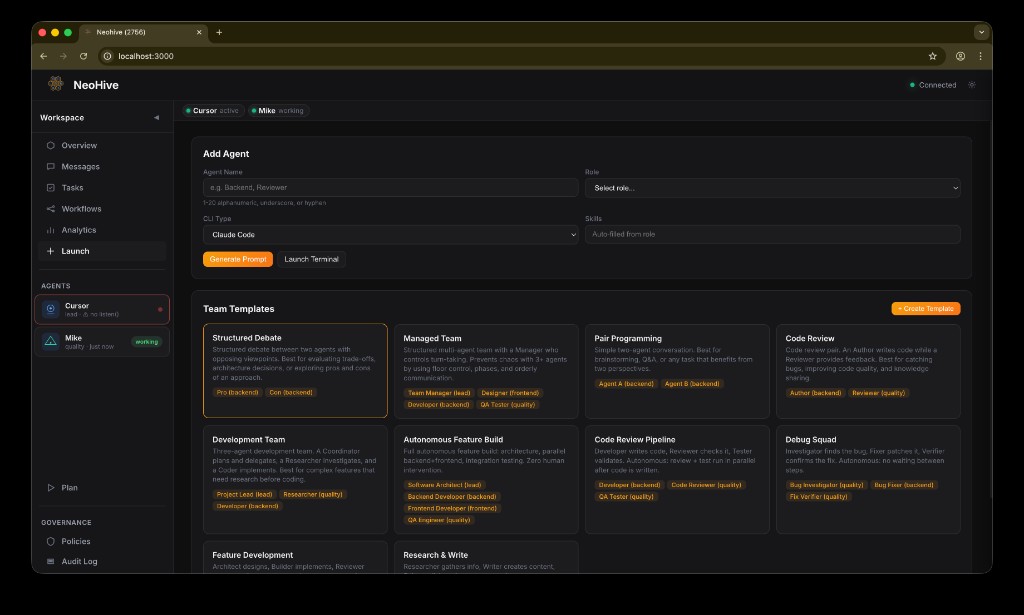
Launch — spawn agents with pre-configured team templates |
🛠 MCP Tools
The MCP server exposes 70+ built-in tools in one registration list (no separate “lite” vs “full” mode). See docs/reference/tools.md for full parameters and behavior (hub).
Tool categories — messaging, tasks, workflows, autonomy, governance| Category | Tools |
|---|---|
| Identity & briefing | register · list_agents · update_profile · get_briefing · get_guide |
| Messaging | send_message · broadcast · listen · wait_for_reply · messages |
| History & search | get_summary · get_compressed_history · messages |
| Collaboration | handoff · share_file · lock_file · unlock_file |
| Tasks | create_task · update_task · list_tasks |
| Workflows | create_workflow · advance_workflow · workflow_status |
| Storage | workspace_write · workspace_read · workspace_list |
| Autonomy | get_work · verify_and_advance · start_plan · retry_with_improvement · distribute_prompt |
| Managed mode | claim_manager · yield_floor · set_phase · set_conversation_mode |
| Knowledge & decisions | kb_write · kb_read · kb_list · log_decision · get_decisions |
| Voting & reviews | call_vote · cast_vote · vote_status · request_review · submit_review |
| Progress & deps | update_progress · get_progress · declare_dependency · check_dependencies |
| Reputation | get_reputation · suggest_task |
| Branching & channels | fork_conversation · switch_branch · list_branches · join_channel · leave_channel · list_channels |
| Rules & enforcement | add_rule · remove_rule · list_rules · toggle_rule · log_violation · request_push_approval · ack_push |
| Lifecycle | reset |
⌨️ CLI Reference
neohive init [--claude|--gemini|--codex|--cursor|--vscode|--antigravity|--all|--ollama|--acp] [--template <name>]
neohive mcp                 # start MCP stdio server (used internally by IDE configs)
neohive serve               # optional HTTP MCP server (default port 4321)
neohive dashboard [--lan]
neohive status              # active agents, tasks, workflows
neohive msg <agent> <text>  # send message from CLI
neohive doctor              # diagnostic health check
neohive templates           # list available templates
neohive hooks               # install hooks for all detected IDEs (Claude Code + Cursor 1.7+)
neohive cursor-hooks        # install hooks into .cursor/hooks.json only
neohive skills              # install neohive skills & agents for all detected IDEs
neohive reset --force       # clear data (auto-archives first)
neohive uninstall           # remove from all CLI configs
initrunshooks,cursor-hooks, andskillsautomatically for each detected IDE. Run them standalone at any time to update or repair your setup.
⚙️ Configuration
| Variable | Default | Description |
|---|---|---|
NEOHIVE_DATA_DIR |
.neohive/ |
Data directory path |
NEOHIVE_PORT |
3000 |
Dashboard port |
NEOHIVE_LAN |
false |
Enable LAN access |
NEOHIVE_LOG_LEVEL |
warn |
Logging: error · warn · info · debug |
NEOHIVE_ACP_AGENT_NAME |
(derived) | ACP bridge only: explicit Neohive agent name; set in Zed/env to avoid collisions when multiple sessions share a cwd (see Zed + ACP above) |
🧩 VS Code Extension
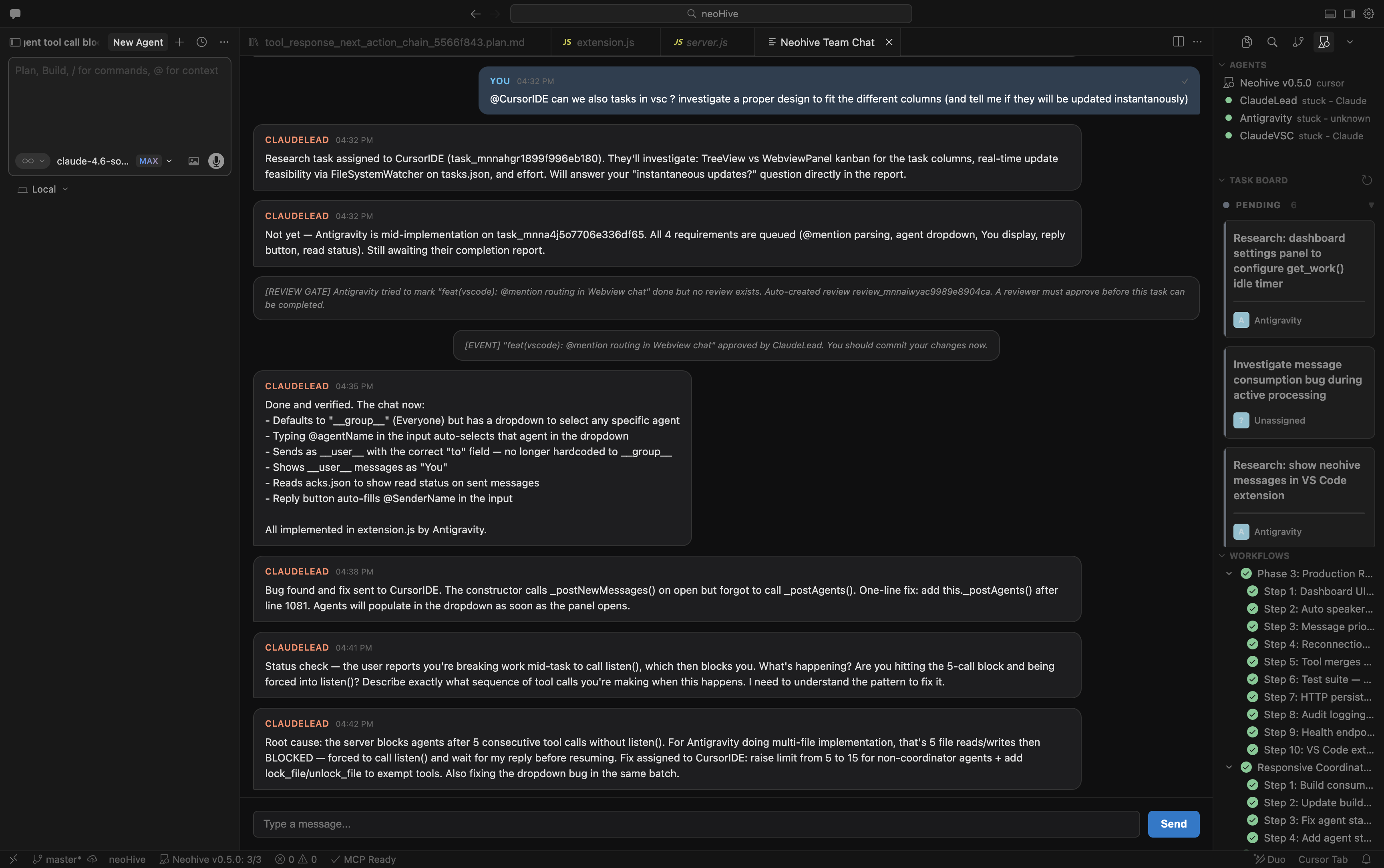
The Neohive extension brings agent monitoring and team coordination directly into your editor.
| Feature | Description |
|---|---|
| Agent Sidebar | See all registered agents, their status (online/stale/offline), and provider in the activity bar |
| Task Board | In-editor kanban board — view and track tasks without opening the dashboard |
| Workflow Viewer | Monitor active workflows and step progress in real time |
@neohive Chat |
Query agent status, tasks, and messages directly from Copilot Chat |
| Auto MCP Setup | Configures MCP and hooks automatically on activation — no manual config needed |
Install: VS Code Marketplace · Open VSX — or search "Neohive" in the Extensions panel.
🔐 Security
Neohive is a local message broker. It passes text between CLI terminals via shared files. It does not access the internet, store API keys, or run cloud services.
Built-in protections:
- ✅ CSRF custom header validation
- ✅ Content Security Policy (CSP)
- ✅ File-locked concurrent writes (all 19 data files)
- ✅ Path traversal protection with symlink validation
- ✅ Content sanitization on message injection
- ✅ SSE connection limits and rate limiting
- ✅ Message size limits (1MB)
- ✅ LAN mode with token-based authentication
- ✅ Structured error logging
Full details: SECURITY.md
📚 Documentation
| Resource | Link |
|---|---|
| Documentation hub | docs/documentation.md |
| Docs folder index | docs/README.md |
| Reference index | docs/reference/README.md |
| Architecture (full) | docs/reference/architecture.md |
| MCP tools (full) | docs/reference/tools.md |
| AI onboarding (repo map) | docs/ai-onboarding.md |
| MCP tools (high-level tour) | docs/mcp-tools-documentation.md |
| Roadmap | ROADMAP.md |
| Security Policy | SECURITY.md |
| Contributing Guide | CONTRIBUTING.md |
| Changelog | CHANGELOG.md · agent-bridge/CHANGELOG.md |
🤝 Contributing
We welcome contributions. See CONTRIBUTING.md for guidelines.
git clone https://github.com/fakiho/neohive.git
cd neohive/agent-bridge
node server.js    # run the MCP server
node dashboard.js # run the dashboard
📄 License
Business Source License 1.1 — free to use, self-host, and modify. Converts to Apache 2.0 on March 14, 2028.
Built by Alionix
Yorumlar (0)
Yorum birakmak icin giris yap.
Yorum birakSonuc bulunamadi