paseo-ha-addon
Health Uyari
- License — License: Apache-2.0
- Description — Repository has a description
- Active repo — Last push 0 days ago
- Low visibility — Only 5 GitHub stars
Code Basarisiz
- rm -rf — Recursive force deletion command in .github/scripts/check-providers.sh
- fs module — File system access in .github/scripts/check-providers.sh
- rm -rf — Recursive force deletion command in .github/scripts/paseo-anchors.sh
Permissions Gecti
- Permissions — No dangerous permissions requested
Bu listing icin henuz AI raporu yok.
Run Claude Code, Codex, Copilot, OpenCode, Pi, Muse Code and Antigravity inside Home Assistant via Paseo - sidebar + mobile app, config checks, git rollback
Paseo Home Assistant Add-on



Run Claude Code, Codex, Copilot, OpenCode, Pi and more inside Home Assistant, from the
sidebar or your phone, with a config check and git rollback built in.
Paseo is a self-hosted daemon and web UI for coding agents. This
add-on runs it on your Home Assistant box. It opens as a sidebar panel, and Home Assistant
handles the login. Agents start inside your Home Assistant configuration with live API
access. Ask for an automation. The agent edits the YAML, runs a config check, reloads the
domain and verifies the result against real entity states.
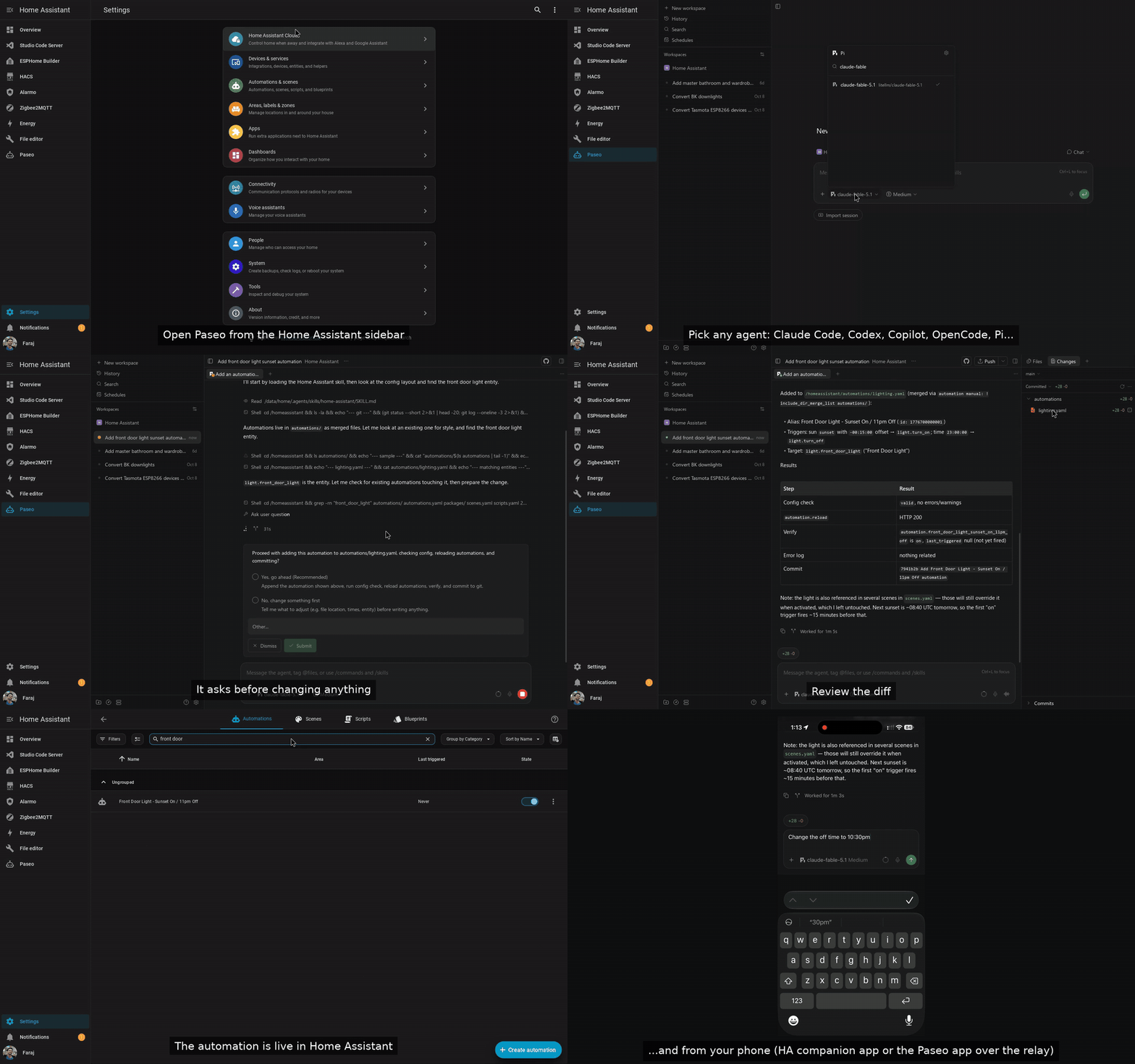
▶ Watch the 80-second demo on YouTube
Why this add-on
- Eight agents, your subscription. Claude Code, Codex, GitHub Copilot, OpenCode, Pi
(default), Oh My Pi, Muse Code (Meta) and Antigravity (Google). Pick any mix in one
option and sign in with the plan or API key you already have. - A real UI, not a terminal in an iframe. Chat, diffs, file explorer, terminals,
permission prompts and optional voice, from Paseo's web UI. Works on a phone, and the
Paseo iOS/Android/desktop apps connect through Paseo's encrypted relay or a direct port. - Always current. Every selected agent CLI is installed at its latest stable release on
each start, with automatic rollback if a new release does not run. No waiting for an
add-on update to get a new Claude or Codex. - Knows Home Assistant. Agents get the Core REST and WebSocket APIs, the
haCLI, the
Home Assistant MCP server (auto-wired when enabled) and a bundled HA skill that enforces
edit →check_config→ reload → verify. - Undo button. Optional git snapshots of
/homeassistantso every agent change is a
commit you can review or revert. - Sees your whole box.
/homeassistant, every add-on's config (Node-RED, ESPHome, …),/share,/media,/backup, plusgit,ghand SSH keys for your dotfiles repo. - No second login. Ingress uses your Home Assistant session. No ports, tokens or pairing
unless you want remote access.
Installation
Home Assistant renamed add-ons to apps in 2026.2. Same thing, new name. This repo
keeps "add-on" in its name because the Supervisor derives the app id from the repository
URL, so the URL has to stay put for existing installs.
- Click the Show app badge above. It adds this repository to your Home Assistant if
needed and opens the Paseo app page (Home Assistant 2026.3 or newer; on 2026.2 add the
repository by hand first). Or do it by hand: go to
Settings > Apps > Install app, open the ⋮ menu in the top right, pick
Repositories, addhttps://github.com/farajfarook/paseo-ha-addonand close the
dialog. Paseo then appears in the store under "Paseo for Home Assistant". - Install Paseo, choose your
providers, start it and enable Show in sidebar. - Open Paseo from the sidebar, start a terminal and run the agent's login
(claude,codex login,copilot login, …) or put an API key inenv_vars.
Requirements: Home Assistant OS or Supervised, 64-bit (amd64 or aarch64, e.g.
Raspberry Pi 4/5), internet access on first start, and an account or API key for the
agents you select. The add-on itself is free.
Full setup, every option and the troubleshooting guide are inpaseo/DOCS.md.
How it compares with the Claude Code terminal add-ons
Several community add-ons put Claude Code in a web terminal inside Home Assistant. They
proved people want this. This add-on is the next step:
| Terminal add-ons | Paseo add-on | |
|---|---|---|
| Agents | Claude Code only | 8, selectable, mixed |
| Interface | ttyd terminal in an iframe |
Paseo web UI: chat, diffs, files, terminals, voice |
| Mobile | terminal in a phone browser | Paseo mobile apps via relay, or the web UI |
| Agent version | baked into the image | latest stable on every start, auto-rollback |
| HA awareness | manual | HA APIs, ha CLI, HA MCP server, bundled skill |
| Safety net | none | config check before reload, optional git snapshots |
| Other add-on configs | usually not mounted | /addon_configs read-write |
Security, in one paragraph
Agents run as root in the container with read-write access to your live configuration
and a Home Assistant token with Supervisor manager rights. Anyone who can open the panel
can drive them. That is what makes the add-on useful and what makes it dangerous, so the
bundled guidance never exposes values from secrets.yaml, forbids editing .storage/ while
Core runs, requires your approval before changing other add-ons or restarting Core, and
requires a config check before every reload. git_snapshot gives you a revert. Read Security and trust model before
you enable it, keep a backup, and give the panel only to people you trust with your home.
FAQ
Does my configuration leave my network? Only what the agent you chose sends to its own
vendor (Anthropic, OpenAI, GitHub, Google, Meta, or your Pi model provider). If you turn on
dictation or voice mode with speech_provider: openai, speech and spoken replies go to
OpenAI as well. Paseo itself is self-hosted and has no telemetry. The optional relay is
end-to-end encrypted.
What does it cost? Nothing for the add-on. Agents use your existing subscription
(Claude Pro/Max, ChatGPT Plus/Pro, Copilot, Google, Meta) or API key.
Which agent should I start with? Pi is on by default and works with any model provider
via API key. Claude Code and Codex are the most popular for Home Assistant YAML.
Can I use it from my phone? Yes: the sidebar panel works in the HA companion app, and
Paseo's mobile apps pair over the relay (no port forwarding) or a password-protected direct
port.
Does it support Raspberry Pi? 64-bit Home Assistant OS on a Pi 4 or 5, yes. 32-bit
(armv7) is not supported, in line with Home Assistant OS 17.
Versioning
Versions are <paseo>-<rev>: the bundled Paseo release plus an add-on revision. Seepaseo/CHANGELOG.md and the
GitHub releases.
Contributing and support
- Bugs and feature requests: Issues.
- Questions and show-and-tell: Discussions.
- Paseo itself: getpaseo/paseo.
If this saved you an evening, a star helps other Home Assistant users find it.
License
Apache-2.0, matching upstream Paseo. See LICENSE. Paseo is © the Paseo
authors; this add-on is not affiliated with or endorsed by the Paseo project.
Maintainer notes: releasing and bumping Paseo
Releasing
Home Assistant installs the pre-built image whose tag equals version inpaseo/config.yaml on main
(ghcr.io/farajfarook/{arch}-addon-paseo:<version>). The version is<paseo>-<rev>: the pinned Paseo release plus an add-on revision that resets to1 on every Paseo bump. Releasing is automatic once a bump reaches main:
- On a branch, bump
versioninpaseo/config.yaml(for example0.10.3-2, or0.10.4-1for a new Paseo release) and add a matching## <version>entry at
the top ofpaseo/CHANGELOG.md. Lint warns on a PR that changes shipped files
without a bump and fails if the changelog entry is missing. Wait for the Lint
and Builder checks to pass. - Merge to
main. The Tag release workflow sees the
new version, creates thev<version>tag (skipping if it exists) and starts
Publish. - Publish checks that the tag (minus
v) equalspaseo/config.yamlversion, then pushesghcr.io/farajfarook/{amd64,aarch64}-addon-paseo:<version>and:latest.
Both take a few minutes. - When every image exists, Publish creates the GitHub Release with the
CHANGELOG.mdsection for that version as its notes
(.github/scripts/release-notes.sh). - To re-run a publish for an existing tag (or add a missing Release), use
Actions → Publish → Run workflow and enter the tag (for examplev0.10.3-2).
Pushing av*tag by hand also works.
Check a tag locally before pushing it:
.github/scripts/check-version.sh v0.10.3-2 # prints the version, or fails on mismatch
First release only: GHCR creates new packages as private. After the first
publish, open each of the two packages (amd64-addon-paseo andaarch64-addon-paseo) under the repository's Packages, go
to Package settings → Change visibility and set it to Public. The
Supervisor pulls anonymously. Confirm withdocker logout ghcr.io && docker pull ghcr.io/farajfarook/amd64-addon-paseo:<version>.
Rules:
- Never push a
v*tag for a version that isn't inpaseo/config.yamlonmain. The guard fails and nothing is published. - Merging a version bump is the release. Until the images exist, users who see the
new version get "image not found" when they update, so watch the Publish run.
Bumping Paseo
The add-on does not fork Paseo. Its ingress adapter rewrites what the upstream web UI
emits, so it depends on Paseo internals: root-absolute asset paths, the hard-coded /ws
WebSocket path, the window.__PASEO_INITIAL_DAEMON_CONNECTION__ hint, thepaseo.bearer.<token> subprotocol, and, for the stale-host heal, the @paseo:daemon-registry
and paseo:last-workspace-route-selection storage keys, the /h/<serverId>/ routes and the$PASEO_HOME/server-id file. A version bump that moves one of those silently breaks
the sidebar panel. Check them before raising the pin.
Check the anchors of the candidate release against the pinned one:
./.github/scripts/paseo-anchors.sh --diff <current> <candidate> # e.g. --diff 0.10.3 0.11.0It downloads
@getpaseo/serverand@getpaseo/protocolfor both versions and diffs a
report of every fact the adapter relies on. Non-zero exit means an anchor moved. Use.github/scripts/paseo-anchors.sh --installedto print the report for the tree already
installed.Diff the upstream sources for the same files, plus the exported app shell, to see
why something moved (paths are the same when only behaviour changed):BASE=https://raw.githubusercontent.com/getpaseo/paseo for tag in v0.10.2 v0.10.3; do # the two versions you are comparing for f in packages/server/src/server/web-ui.ts \ packages/protocol/src/daemon-endpoints.ts; do curl -fsSL -o "/tmp/$(basename "$f").$(tr . _ <<<"$tag")" "$BASE/$tag/$f" done done diff -u /tmp/web-ui.ts.v0_10_2 /tmp/web-ui.ts.v0_10_3 diff -u /tmp/daemon-endpoints.ts.v0_10_2 /tmp/daemon-endpoints.ts.v0_10_3In the published package the exported
web-ui/index.htmland the bundle carry the same
asset paths, and their file names are content-hashed - that is normal and is not an
anchor change (the anchors report ignores hashes).If an anchor moved, update the adapter before anything else:
paseo/rootfs/opt/paseo-ha/nginx/paseo.conf.tpl- thesub_filterlist of
root-absolute strings and the shim injection point.paseo/rootfs/opt/paseo-ha/www/shim.js- the hint global, the/wsrewrite, the/api/,/mcp/,/public/fetch prefixes and the history/location mapping.paseo/rootfs/opt/paseo-ha/nginx/render.js- the bearer header and WS subprotocol
used for the direct-port password (design D4).- Record the new Paseo version's facts in
openspec/changes/.../design.mdD3.
Re-pin and document:
PASEO_VERSIONinpaseo/Dockerfileandpaseo/build.yaml
(both must match),HA_CLI_VERSIONif it moves with it, the add-onversioninpaseo/config.yaml, and a newpaseo/CHANGELOG.mdentry naming the Paseo
version.Prove it works: build amd64 and run the suites -
paseo/tests/smoke/run.sh(curl
level through the ingress adapter),paseo/tests/agent-config/run.shand, when the
adapter changed,paseo/tests/ingress/run.sh(browser behind a mock ingress). CI runs
the same smoke test on every PR; a bump is not done until that job passes.
Baseline for the pinned release: paseo-anchors.sh --diff 0.10.2 0.10.3 and--diff 0.10.3 0.11.0-beta.3 both report no anchor change, and web-ui.ts /daemon-endpoints.ts are byte-identical between v0.10.2, v0.10.3 andv0.11.0-beta.3.
Yorumlar (0)
Yorum birakmak icin giris yap.
Yorum birakSonuc bulunamadi