the-engineer
Health Uyari
- License — License: MIT
- Description — Repository has a description
- Active repo — Last push 0 days ago
- Low visibility — Only 9 GitHub stars
Code Gecti
- Code scan — Scanned 12 files during light audit, no dangerous patterns found
Permissions Gecti
- Permissions — No dangerous permissions requested
Bu listing icin henuz AI raporu yok.
The orchestration layer that turns Claude Code, OpenCode, and other AI coding CLIs into autonomous engineers — driving real work from task intake to merged pull request, with humans in the loop only where it counts. Swappable plugins for any trigger, chat, agent, or git host.
The Engineer


An autonomous orchestrator for AI coding agents. The Engineer drives Claude Code, OpenCode, and other CLI agents through the full engineering lifecycle — from task intake to merged pull request — with safety rails, a full audit trail, and a swappable plugin architecture for any tool you use.
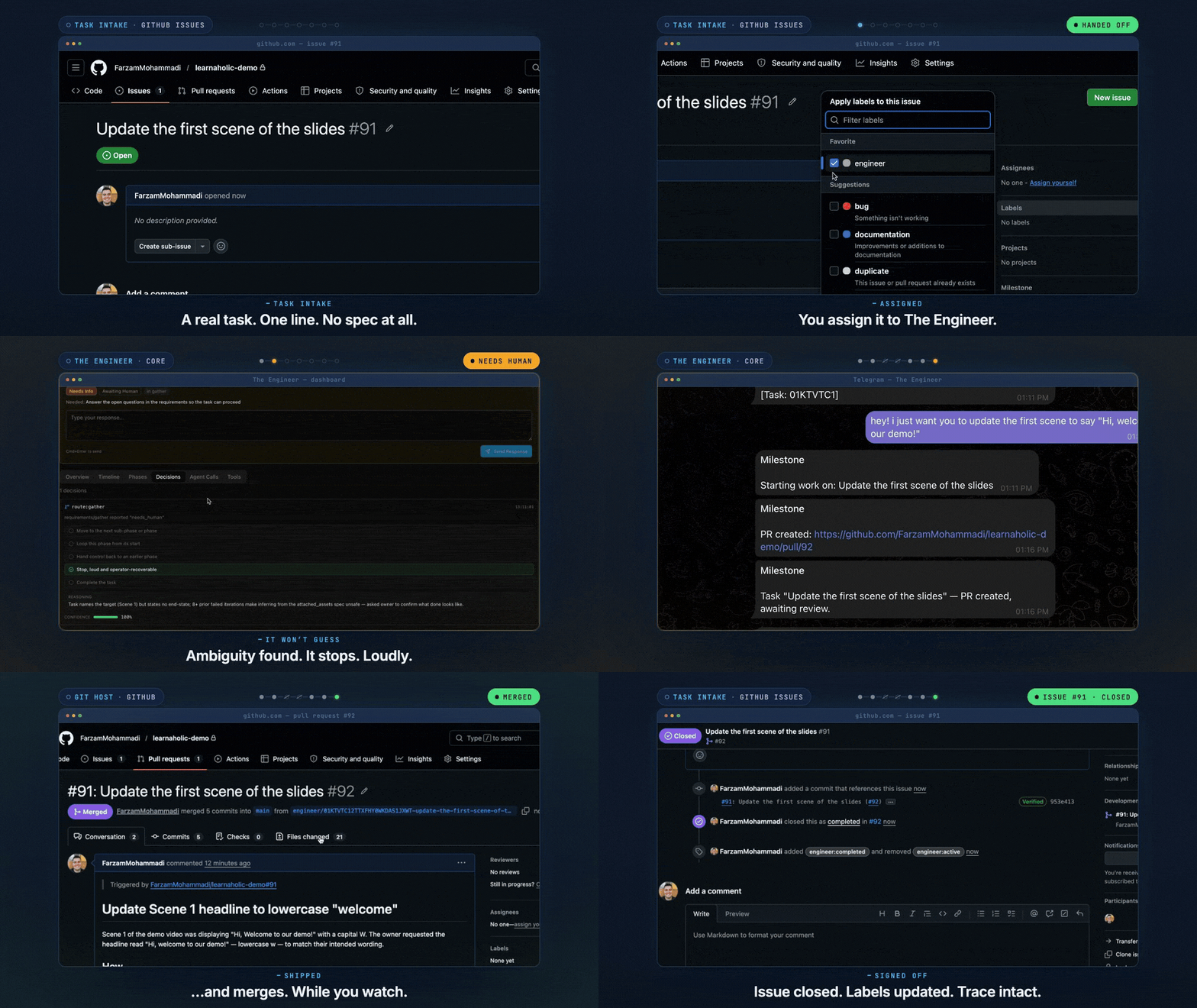
One issue, one label — then it grounds itself, asks when it's unsure, ships a pull request, and merges on your approval. Intake to delivery.
[!IMPORTANT]
v1.0.0 — it works, end to end.
The Engineer runs the full pipeline today: task intake → requirements → research → planning → execution → review → delivery. It's young and built by one person, so expect rough edges — use it, read the code, file issues, and help shape where it goes. The build journal traces how it got here.
AI coding agents: if you're an AI agent working on this codebase — not just reading about it —
AGENTS.mdis your required entry point. Read and follow it before making any change.
What it is
AI coding CLIs like Claude Code, OpenCode, and other AI coding agents are extraordinarily capable inside a single prompt. They fall short the moment you want them to do real engineering work — receiving tasks, gathering requirements, researching across the codebase, the web, and adjacent systems, planning the approach, executing safely, self-reviewing, shipping a pull request that survives review, iterating on review comments and CI failures, and merging only after sign-off.
The Engineer is the orchestration layer that closes that gap. It runs as a long-lived daemon that listens for tasks wherever engineering work actually lives — GitHub Issues today; Jira, Azure DevOps, and other popular ticket-management systems as plugin support lands.
From there it drives a coding CLI through that lifecycle end-to-end — preserving context across phases, isolating each task in its own workspace, and reaching out through your communication plugins when it hits a blocker or needs a decision.
Humans stay in the loop where it matters — requirements, key decisions, and the final review — by design, not by omission. Every action is observable, every plugin is swappable, every decision is auditable.
Think of it as the conductor. The coding CLIs are the instrumentalists.
Get Running
Prerequisites: Node.js 22+, pnpm
git clone https://github.com/FarzamMohammadi/the-engineer.git && cd the-engineer
pnpm run setup    # install dependencies, build, link the `engineer` CLI
engineer start    # first-run setup, then start the daemon
pnpm run setup confirms before it acts and is safe to re-run any time. If pnpm's global bin directory isn't configured yet, it offers to set that up and tells you what to do next. engineer start walks you through first-run configuration, then runs the daemon in the foreground — Ctrl+C to stop. When engineer start reports the daemon is ready, the dashboard is at http://localhost:3847. If anything misbehaves, docs/troubleshooting.md walks symptom → fix.
Dev mode (without a global install): use
pnpm dev <command>in place ofengineer.
AI agents (no TTY):
engineer startprompts interactively and can't be driven headless. Configure non-interactively withengineer start --seed <dir>— copyseed-example/, fill in values, pass the directory. Start atAGENTS.md, your entry point.
Commands
engineer start              # Setup (first run) + start daemon
engineer stop               # Graceful shutdown
engineer status             # Daemon state + task listing (IDs, state, title, age)
engineer status --all       # Include completed and failed tasks
engineer logs               # View daemon logs (--follow, --raw)
engineer doctor             # Health checks
engineer why <task-id>      # Explain a task's decision trail
engineer retry <task-id>    # Re-queue a blocked or failed task
engineer cancel <task-id>   # Cancel a task that hasn't finished
<task-id> accepts a full ULID or a unique prefix — copy the short form from engineer status.
All commands accept --home <path> to use a custom data directory instead of ~/.engineer.
Full command reference, options, and configuration details: docs/cli.md
How it works
graph TB
    subgraph Core["Core — the conductor"]
        direction LR
        Daemon ~~~ Orchestrator ~~~ TaskEngine ~~~ EventBus ~~~ SafetyLayer
    end

    subgraph Adapters["Adapters — the score"]
        direction LR
        TriggerAdapter ~~~ CommunicationAdapter ~~~ AgentAdapter ~~~ GitHostingAdapter
    end

    subgraph Plugins["Plugins — the instruments"]
        direction LR
        github-trigger ~~~ telegram-comm ~~~ claude-code-agent ~~~ github-hosting
    end

    Core -->|"calls contracts"| Adapters
    Adapters -.->|"implemented by"| Plugins
Three tiers, one invariant — Plugin Opacity:
- Core — task engine, orchestrator, safety layer, event bus, daemon. The conductor.
- Adapters — contracts (
TriggerAdapter,CommunicationAdapter,AgentAdapter,GitHostingAdapter). The score. - Plugins — swappable implementations behind each adapter. The instruments.
Core verifies each adapter has a plugin registered — nothing more. The specific implementation is opaque; the adapter contract is the integration boundary. Swap GitHub for GitLab, Telegram for Slack, Claude Code for OpenCode — Core's code does not change. Plugin Opacity is deliberate: The Engineer plugs into any tooling you bring, and an architecture test breaks the build the moment that boundary is crossed.
How a task moves through the daemon:
- Trigger and schedule. The daemon polls the trigger plugin. New work lands as a task on an OS-scheduler-inspired state machine — priority sets the order, with preemption when something more urgent arrives (preempted tasks pause between phases and resume from their last checkpoint). Crashes and transient failures retry with bounded backoff.
- Isolate the workspace. Each task gets its own git worktree — concurrent runs don't collide, and your main checkout stays untouched.
- Run the engineering pipeline. Six phases — requirements → research → planning → execution → review → delivery — with a checkpointed session journal carrying context across them. Anywhere in the pipeline, if the agent hits something it can't resolve alone — most commonly during requirements — the task moves to
blocked. The system reaches out via your comms plugins to whoever can unblock the task, and work resumes when they respond. - Iterate until ready. Work can be handed back to an earlier phase when review finds the root cause lives upstream — the agent reports an outcome and the orchestrator decides the route (it never picks a phase itself). After the pull request opens, review comments, CI failures, and merge conflicts re-enter the pipeline as typed events. Each new push dismisses stale approvals. Rework is bounded — past the ceiling, the task escalates to you.
- Merge after sign-off. Humans stay in the loop on requirements, key decisions, and the final approval. When a pull request is approved with CI green, The Engineer can merge it automatically — auto-merge is off by default, so by default the approval completes the task and you merge — and an external merge is detected and finalized too.
Architecture guide: docs/architecture/overview.md
Three-tier model: docs/architecture/three-tier-model.md
Scheduling: docs/architecture/scheduling-dispatch.md
Safety
The Engineer runs CLI agents as subprocesses inside isolated git worktrees. Core can't intercept individual file writes or git commands inside the CLI — but it controls when the agent runs and what it costs.
Autonomous operation requires the CLI to skip its own permission prompts — Claude Code launches with --dangerously-skip-permissions, for example. The worktree is the containment boundary, not in-CLI prompts.
State machine. Every agent invocation passes through the Task Engine, which permits or denies it based on the task's current state. A task in requirements_gathering can't trigger execution; a failed task can't run until you engineer retry.
Cost ceilings. Every agent call emits a cost.incurred event. Spending accumulates per task, per day, per month, plus per-provider request budgets. At 80% of any limit, The Engineer warns. At 100%, it terminates the in-flight work and notifies you immediately — before the next agent call can accrue more spend. A per-task or per-provider breach terminates that one task and DMs you about it; a global daily or monthly breach terminates every in-flight task at once and sends a single alert naming the limit and how many tasks it stopped — never one DM per task.
Autonomy escalation. The agent surfaces discretionary decisions it makes (a rename, a new dependency, a structural change), and Core consults your safety.yaml autonomy policy per decision: it proceeds silently where you let it, and pauses to ask you where you said to — by category, with size thresholds. (See autonomy configuration.)
Scope boundaries (which files and branches the CLI may touch) are configurable in safety.yaml but not yet enforced at runtime — Core can't gate the CLI's internal file writes today. (Merge policy, cost ceilings, and autonomy escalation are enforced.) Runtime scope enforcement and sandboxed task execution are on the roadmap — see docs/future-considerations.md for what's planned next.
Observability
Two channels record what the system does, both persisted to SQLite. The Event Bus is the audit trail — what happened. The Observer is the diagnostic layer — how it happened.
Event Bus. Every action is published with a ULID and a monotonic sequence number, persisted before subscribers see it, and replayed on restart. The cost tracker rebuilds its accumulators this way on every boot. engineer status lists active tasks with their IDs; engineer why <id> walks a task's event log, state transitions, and journal.
Observer. Structured spans capture durations and nested operations. Decisions are recorded with context, alternatives, chosen option, reasoning, and confidence. Errors carry the operation, component, and recovery context. Large payloads (agent prompts, responses) are content-addressed by SHA-256 in a blob store — identical content stored once.
Dashboard
A local React dashboard starts with engineer start and shows the daemon's live activity — tasks, costs, decisions, spans, errors. Served on http://localhost:3847.
Plugin Architecture
Every plugin built against The Engineer multiplies what it can do. Core defines the protocol; plugins do the work. The same protocol governs every agent — no CLAUDE.md, no GEMINI.md, no per-tool accommodations. One protocol, any agent.
| Adapter | Today's plugins | Your plugin |
|---|---|---|
TriggerAdapter |
github-trigger |
GitLab, Jira, Linear, webhooks, cron — anything that emits a task |
CommunicationAdapter |
github-comm, telegram-comm |
Slack, Discord, email, SMS |
AgentAdapter |
claude-code-agent, opencode-agent, gemini-cli-agent |
Codex, Aider, any CLI agent that edits files from a prompt |
GitHostingAdapter |
github-hosting |
GitLab, Bitbucket, Gitea, self-hosted git |
Build a plugin once, and every existing Core capability — audit trail, retries, cost tracking, observability — applies automatically.
See docs/plugins/ for adapter contracts, and Authoring a Plugin for the one executable, agent-drivable methodology that takes any of the four adapter types from idea to a contributed-back plugin.
Philosophy
- Real engineer behavior — requirements first, research without bounds, plan then question the plan, build for the next person.
- Orchestrate, don't build — leverage existing coding CLIs (Claude Code, OpenCode, Gemini CLI). They keep evolving, we inherit every improvement.
- Radical observability — every action leaves a trail. The owner is never in the dark.
- Boundaries as discipline — modular everything, enforced contracts, swappable plugins. Plugin Opacity is the core architectural invariant.
- Post-completion rigor — reassess architecture, refine until beautiful, verify what matters, ship and refine through feedback.
- Every decision earned — no dogma. Strong defaults, deliberate deviations. Question, evaluate, evolve.
Full philosophy: docs/philosophy.md · Identity: docs/the-engineer-persona.md
Documentation
User-facing documentation lives in docs/ — the system blueprint. Anyone who never reads a line of source can understand how The Engineer works, what it does, and why, purely from these docs.
- Philosophy — core beliefs and principles
- Constraints — deliberate v1 scope decisions (single-user)
- Architecture — system design and data flow
- CLI Reference — full command documentation
- Usage Guides — writing tickets, reading the dashboard
- Troubleshooting — symptom → fix for common failures
- Coding Standards — the law for all code
- Configuration — daemon, orchestrator, safety, workspaces
- Plugins — adapter contracts and per-plugin references
- Contribution Guides — guided how-tos for adding plugins
- Build Journal — Archive — phase-by-phase development history (not authoritative; read the code and
docs/for ground truth)
Development
pnpm test             # Unit tests
pnpm test:all         # All tiers (unit + integration + E2E)
pnpm run typecheck    # tsc --noEmit (strict)
pnpm run lint         # Biome + tsc + knip (unused exports) + madge (circular deps)
pnpm run build        # Production build (tsdown + Vite dashboard)
npx tsx src/index.ts  # Run CLI in dev mode
CI runs lint, typecheck, and tests on every push and pull request. See .github/workflows/ci.yml.
Documentation site
The docs in docs/ are also published as a VitePress site on GitHub Pages — it reads docs/ directly, so there's one source of truth and no duplication.
pnpm docs:dev       # Run the docs site locally with hot reload
pnpm docs:build     # Build the static site to docs/.vitepress/dist
pnpm docs:preview   # Preview the production build locally
The site deploys automatically on every push to main via .github/workflows/docs.yml. One-time repo setup: Settings → Pages → Source: GitHub Actions. (This is separate from pnpm run docs:bundle, which regenerates the plugin docs the CLI ships.)
Resetting
For a clean rebuild:
./scripts/reset.sh                    # Full wipe — rebuild, relink, fresh interactive setup
./scripts/reset.sh --persist-data     # Keep the database, workspaces, and .env
./scripts/reset.sh <seed-dir>         # Wipe, then non-interactive setup from a seed directory
A seed directory holds saved configuration (configs/ and plugins/ YAML) so setup runs with no prompts. seed-example/ shows the structure — copy it into a gitignored seed-example-<name>/ and fill in your own values.
Project Status
- Want to use it? Clone, run
pnpm run setup, followengineer start. - Want to share an idea, give feedback, or report a bug? Open an issue.
- Want to contribute code? Read CONTRIBUTING.md and docs/philosophy.md — the philosophy governs how every decision gets made.
- Want to report a security issue? See SECURITY.md. Do not file public issues for security concerns.
- Want to understand the journey? The full build history is preserved in
docs/archived/— or reach out to me!
Versioning
v1.0.0 is the first release that runs the lifecycle end to end — not a stability guarantee. The project is young and still moving fast, so a minor release can reshape configuration or internals. Additive database migrations apply automatically at startup, but breaking schema or config changes do not migrate your existing state — when one lands, a reset is the upgrade path. Releases ship as GitHub releases (npm publish is deferred); if something breaks across a release, open an issue.
License
Yorumlar (0)
Yorum birakmak icin giris yap.
Yorum birakSonuc bulunamadi