fatsearch
Health Pass
- License — License: Apache-2.0
- Description — Repository has a description
- Active repo — Last push 0 days ago
- Community trust — 48 GitHub stars
Code Fail
- rm -rf — Recursive force deletion command in scripts/ci-linux.sh
Permissions Pass
- Permissions — No dangerous permissions requested
No AI report is available for this listing yet.
Search and read the web for AI agents at 99% fewer tokens. Free CLI + MCP.
Reads the pages your agent's built-in fetch can't (JS pages, PDFs) through your own provider key,
kept on disk as clean Markdown, navigated by outline and ids.




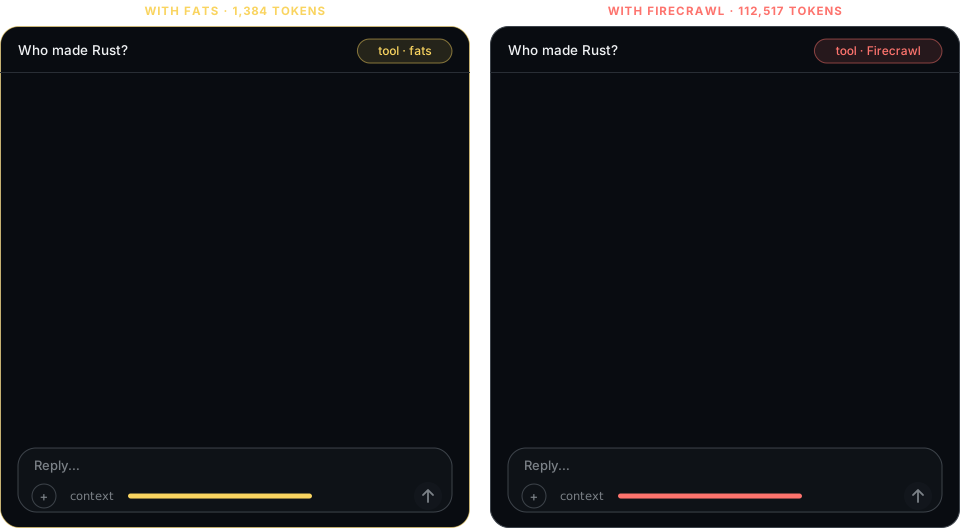
same question · same answer · 81× less context
That's the point.
Every page your agent reads costs you this
| Wikipedia · Rust · model input at $2 / M tokens (Claude Sonnet 5.5, 2026-10-19) | Tokens in context | Fetch | Model bill |
|---|---|---|---|
| Firecrawl | 112,517 | 1 credit | $0.23 |
| Bright Data Unlocker | 103,625 | 1 request | $0.21 |
| Oxylabs Web API | 102,609 | 1 request | $0.21 |
| Tavily Extract | 97,504 | 0.2 credit | $0.20 |
| Jina Reader | 94,415 | free | $0.19 |
| FATSEARCH | 918 | $0 | $0.002 |
Your agent gets a short outline. It reads one section when it needs depth, not the whole page.
Menus, cookie banners, navigation, footer links, tracking scripts: gone.
Prices, dates, numbers: kept (loss guard counts every one).
[!TIP]
The "free" fetch costs ~100× more at the model. And it stays in context, every turn after.
Your key never touches the chat
fats setup <provider> opens a one-time key form on 127.0.0.1, behind a random token, for 10 minutes.
You paste the key there in your browser, so it stays out of the chat, the model's context and the agent's logs.
The form refuses a POST from another origin; the key is checked live, saved with mode 0600, sent only to its provider.
$ fats setup decodo
= setup decodo · waiting for the key at http://127.0.0.1:59802/k/e0c8baba7a5b058947f4fdab97dabb05/decodo · 10 min · $0
tell the user (never ask for the key in chat):
1. open https://dashboard.decodo.com/web-data/playground  (no account yet: https://dashboard.decodo.com/register)
2. Copy the API key shown on the Web Data playground. Do NOT paste it in this chat.
3. open http://127.0.0.1:59802/k/e0c8baba7a5b058947f4fdab97dabb05/decodo , paste the key, press Save
then: fats setup   (when the user says done; end your turn, do not poll · checks it, $0)
browser not on this machine (SSH)? the user runs fats setup decodo in a terminal there and pastes the key
On hard pages
fats tries plain HTTP first (free). If the page is a JS shell, a captcha, or a wall,
it climbs to your providers: cheapest first, hedged, with cost tracking on every call.
$ fats https://www.nytimes.com/ dry:true
nytimes.com/ fetch plain → oxy (after a captcha) → bd ∥ oxyjs after 5s → new u1 · up to $0.0040

$ fats stats
u1 rust-lang.org · Rust Programming Language · plain 230ms $0.0000 · 1.2ktok
u2 en.wikipedia.org · Rust (programming language… · plain 558ms $0.0000 · 40.9ktok
fats stats is the marketing: real numbers, not claims.
38 hard pages social · news · shops · travel · classifieds · search · one run each
| answer in the returned text, within | 1 s | 10 s | 20 s | 60 s |
|---|---|---|---|---|
| FATSEARCH 0.2.0 2026-10-21 | 12 | 19 | 19 | 35 /38 |
| Firecrawl 2026-10-16 | 0 | 22 | 24 | 24 |
| Tavily 2026-10-16 | 9 | 17 | 18 | 19 |
FATSEARCH reads more of the hard pages; Firecrawl and Tavily are faster on the pages they do read (same pages, medians: 23.7 s vs 4.9 s, 23.7 s vs 1.0 s). Readers ran on different days. Method and every row → · the table above: one page, six readers →
Tested in agents FATSEARCH 0.1.3 · Claude Code 2.1.280, one run each, 2026-10-19
- 51 tasks, FATSEARCH MCP vs Firecrawl MCP: 50/51 vs 51/51 right · $15.06 vs $53.48 per 1k tasks · median 5.3 s vs 6.7 s · slowest tenth 43.8 s vs 21.5 s. Details →
- Claude Code's WebFetch got 403 on npm, Medium and G2; FATSEARCH read all three. Details →
- One Wikipedia page, open-source readers: FATSEARCH 1,384 tokens to the answer; mcp-server-fetch, Crawl4AI, mcp-searxng and self-hosted Firecrawl 75k–117k for the whole page. Details →
- Full tables, losses included: docs/benchmarks.md
Get started
| 1 · INSTALL | 2 · KEYS (optional) | 3 · PLUG IN |
|---|---|---|
brew install fatsearch/tap/fatsearch |
fats setup |
claude mcp add --scope user fats -- fats mcp |
or curl -fsSL https://fatsearch.com/install.sh | sh · Windows: npm i -g fatsearch · cargo install --locked fatsearch · every host →
[!NOTE]
The package isfatsearch; the command isfats(likeripgrep→rg). Homebrew, npm and the install
script also addfatsearchas a second name for it;cargo installadds onlyfats.
No account needed. Without a provider key,fatsreads what a plain request gets; web search needs an Oxylabs or Bright Data key.
With any one key (Oxylabs, Bright Data or Decodo) it renders and unblocks pages through that provider.
Setup
You, at a terminal: run fats setup. It is a menu (↑↓ Enter): the free fetch and each provider with its
state, then Settings (agent connection, cache, stats, telemetry). Pick a provider, paste its key (shown as • and a count), andfats checks it live before it saves it. fats setup oxy jumps
straight to one (also bd, decodo, gh).
Your agent, or no terminal: the agent runs fats setup oxy (or bd, decodo, gh). It prints the
provider's dashboard link and a one-time form on 127.0.0.1, open for 10 minutes. The agent gives you the URL;
you paste the key into the form in your browser, never into the chat (what it prints).
Then the agent runs fats setup to check it ($0).
Keys go to auth.json in the key dir (mode 0600) and are sent only to their provider. auth.json is the one
key source: fats never sends a key from the environment, so the key you saved is the key every call uses
(fats shows each one's last 4 characters: keys oxy …6XBR · bd none · decodo none · gh none · auth.json). On
a machine without a browser (CI, SSH), pipe the key in: printf %s "$KEY" | fats setup oxy checks it and saves
it. Keys already exported: run fats setup import-env once: it checks them, copies them in where no key is
saved, and never replaces a saved one. Replacing a key keeps the old file as auth.json.bak (0600).
| Provider | Key | Page, no JS | Page, rendered | Web search |
|---|---|---|---|---|
| free (plain HTTP, your IP) | none | $0 | — | — |
| Oxylabs Web API | fats setup oxy (import: OXYLABS_WEB_API_KEY) |
$0.0010 | $0.0015 | $0.0010 |
| Bright Data Web Unlocker | fats setup bd (import: BRIGHTDATA_API_KEY; zone BRIGHTDATA_UNLOCKER_ZONE) |
— | $0.0015 | $0.0015 |
| Decodo Web Data API | fats setup decodo (import: DECODO_AUTH_TOKEN) |
$0.0010 | $0.0015 | — |
GitHub (fats gh) |
fats setup gh copies the gh CLI's token (import: GH_TOKEN) |
$0 | — | — |
List prices per page, the ones dry:true and fats stats use. Oxylabs and Bright Data spend can be checked
with fats account; Decodo has no usage read for this key, so its $ is the list price, never reconciled.
Turn one off without losing its key: fats setup oxy off, back with fats setup oxy on.
The free fetch is your own connection: one request per page from your IP, at most one start per site per
second; a page waits its turn rather than buying a provider call. Providers use their own IPs and have no pace.fats setup free off sends every page to a provider instead, so every page costs.
MCP
One tool. One string. Same commands.
claude mcp add --scope user fats -- fats mcp                      # Claude Code
codex mcp add fats -- fats mcp                                    # Codex
{"mcpServers": {"fats": {"command": "fats", "args": ["mcp"]}}}   # Cursor, Desktop, …
The tool is fats(cmd) and its card is ~60 tokens. An agent that knows fats u1#3 knows the whole tool.
MCP Registry: mcp-name: io.github.fatsearch/fats
Commands
| Command | Does |
|---|---|
fats <url> |
fetch → clean → outline, cached as u1 |
fats u1#3 |
read section 3 |
fats u1 price |
filter inside the page |
fats u1 links · fats l4 |
numbered links · follow one |
fats rust async runtime |
web search → results as ids |
fats gh rust markdown |
GitHub repos by stars |
fats ./report.pdf |
local file, one section per page |
fats stats |
every fetch: provider, ms, cost, tokens |
… dry:true |
what would run, what it would cost |
mods limit:20 country:de js:true wait:30 fresh:true · one screen of all of it: fats help · how to use it well: fats guide
For agents
The agent skill is versioned in this repo (skills/fatsearch/SKILL.md): how to read
pages without flooding context, and how to install, connect and verify fats when it is missing.
npx skills add fatsearch/fatsearch        # Agent Skills standard: Claude Code, Codex, Cursor, Copilot, Gemini CLI, …
gh skill install fatsearch/fatsearch      # the same through GitHub CLI ≥ 2.90
An agent without either CLI reads it pinned to a release:https://raw.githubusercontent.com/fatsearch/fatsearch/v0.2.3/skills/fatsearch/SKILL.md.
That way the agent sees versioned text it can review, and nothing it runs comes from a website.
Docs as plain Markdown for agents: fatsearch.com/llms.txt.
Telemetry
FATSEARCH shares anonymous usage stats so we can fix what breaks. It never shares what you read or search.
- Never sent: URLs, searches, page text, files, API keys, your IP address, any id.
- Sent: fatsearch version, OS, which package (npm, Homebrew, cargo…), commands used, errors,
which providers worked, crashes in our code.
See exactly what's sent with fats telemetry show. Turn it off in fats setup → Settings → Telemetry,
with fats setup telemetry off, FATS_TELEMETRY=0 or DO_NOT_TRACK=1. Details: docs/telemetry.md
17–21 MB binary 4 ms start 5 ms cached read $0 plain pages $0.001–0.0065 hard pages (three keys)
17 MB (macOS arm64) to 21 MB (Linux x86_64) · 4 ms native; the npm shim adds Node's ~40 ms
no daemon · no browser · anonymous usage stats (off: fats setup telemetry off · FATS_TELEMETRY=0 · DO_NOT_TRACK=1) · every run →
What it doesn't do (yet)
match:near/match:topic: needs a local model- OCR for scanned PDFs →
! no_text - DOCX / XLSX →
! not_in_v1 zip - OS keychain: keys live in
auth.json(mode 0600) - Remote MCP: stdio only
- Logins: a page behind a login stays behind it
Each prints a ! row explaining what's missing and what to do. Never silence.
reference · benchmarks · changelog · security · contributing
MIT or Apache-2.0, at your option.
Reviews (0)
Sign in to leave a review.
Leave a reviewNo results found