learnship
Health Pass
- License — License: MIT
- Description — Repository has a description
- Active repo — Last push 0 days ago
- Community trust — 24 GitHub stars
Code Fail
- fs module — File system access in .github/workflows/ci.yml
- fs.rmSync — Destructive file system operation in bin/install.js
- os.homedir — User home directory access in bin/install.js
- process.env — Environment variable access in bin/install.js
- fs module — File system access in bin/install.js
- rm -rf — Recursive force deletion command in install.sh
Permissions Pass
- Permissions — No dangerous permissions requested
This tool acts as an open-source agent harness designed to add persistent memory, structured workflows, and knowledge compounding to AI coding assistants like Claude Code, Cursor, and Windsurf.
Security Assessment
Overall risk: High. The installation scripts exhibit several highly concerning behaviors that are major red flags. The file `bin/install.js` accesses the user's home directory, reads environment variables, and performs destructive file system operations (`fs.rmSync`). Additionally, the `install.sh` script contains an `rm -rf` recursive force deletion command. Unrestricted shell execution, home directory access, and aggressive file deletions during a basic setup routine pose a significant threat to your local system and files. No hardcoded secrets were detected, and the tool does not request dangerous broad permissions.
Quality Assessment
The project appears to be actively developed and well-documented, with a very recent last push (0 days ago). It is protected under the standard MIT license. However, community trust is quite low given the early stage of the project, having only accrued 24 GitHub stars.
Verdict
Use with caution — while the project itself is legitimate, the installation scripts perform aggressive file deletions and access sensitive local directories, meaning you should thoroughly review the code before running it on your machine.
Learn as you build. Build with intent. Ship real products. Agentic engineering done right.
learnship
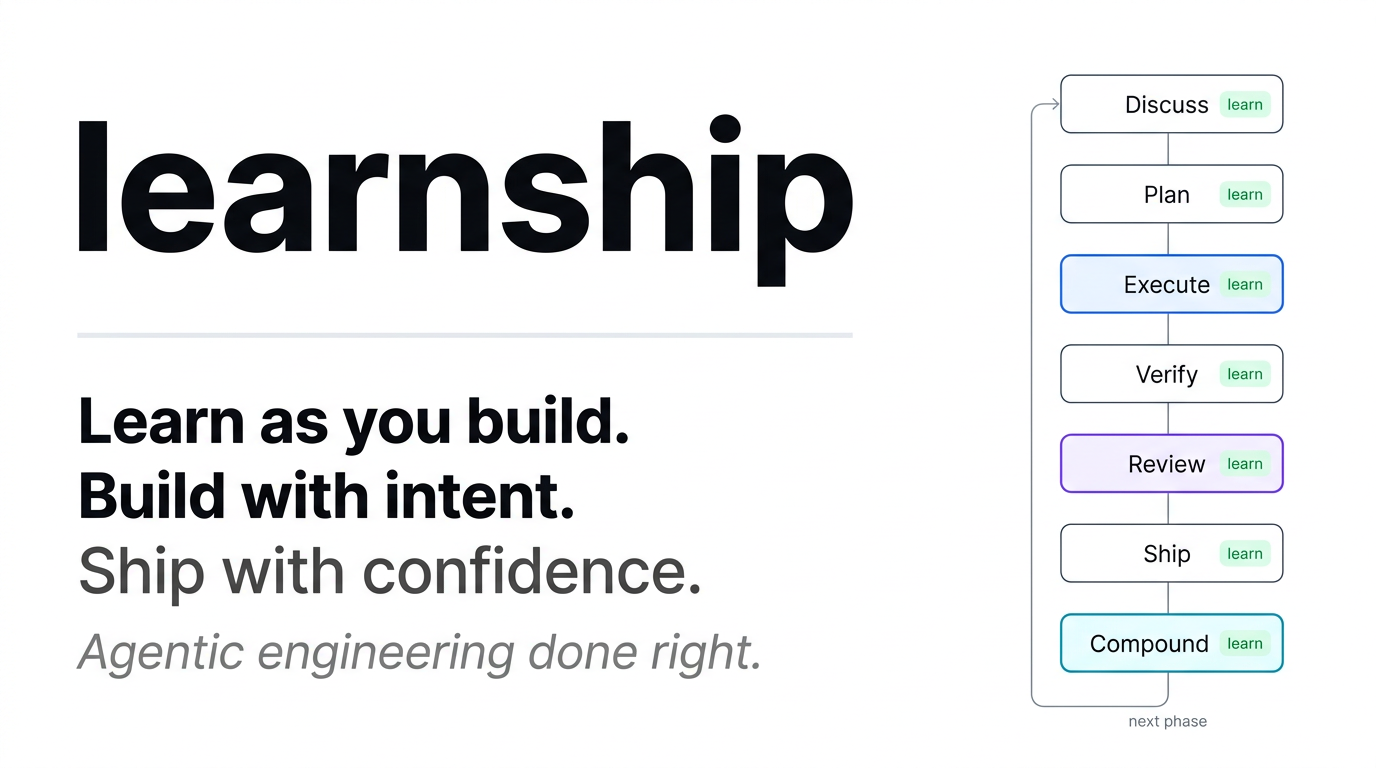





Agentic engineering done right.
📚 Full Docs ·
Get Started ·
How it works ·
Phase Loop ·
All Workflows ·
Configuration ·
Contributing ·
Changelog
What is learnship?
learnship is an agent harness for anyone who wants to build, learn, and ship real products using AI agents. It's the scaffolding that makes your AI coding agent actually reliable across real projects.
Every serious AI coding tool (Claude Code, Cursor, Manus, Devin) converges on the same architecture: a simple execution loop wraps the model, and the harness decides what information reaches the model, when, and how. The model is interchangeable. The harness is the product.
learnship gives you that harness as a portable, open-source layer that runs inside Windsurf, Claude Code, Cursor, OpenCode, Gemini CLI, or Codex CLI and adds three things your agent doesn't have by default:
- Persistent memory.
/new-projectgenerates anAGENTS.mdat your project root. Windsurf, Claude Code, and Cursor load it automatically every session; on other platforms the workflows reference it explicitly. No more repeating yourself. - Structured process. A repeatable phase loop (Discuss → Plan → Execute → Verify → Review → Ship → Compound) with spec-driven plans, wave-ordered execution, and UAT-driven verification. The harness controls what context reaches the agent at each step.
- Knowledge compounding (v2.0).
/compoundcaptures solved problems as searchable documentation./reviewruns multi-persona code review./challengestress-tests scope./shipruns the full delivery pipeline./ideategenerates codebase-grounded ideas./guardadds safety mode./sync-docsdetects stale documentation. - Built-in learning. Neuroscience-backed checkpoints at every phase transition so you understand what you shipped, not just that you shipped it.
What problem does it solve?
If you've used AI coding assistants for more than a few sessions, you've hit this wall:
The agent forgets everything. Each session starts from scratch. Decisions get repeated. Code quality drifts. You ship fast but understand less. The more you rely on the AI, the less you own the outcome.
This is a harness problem, not a model problem. Research shows the same model on the same benchmark scores 42% with one scaffold and 78% with another. Cursor's lazy context loading cuts token usage by 47%. Vercel deleted 80% of their agent's tools and watched it go from failing tasks to completing them. Same model. The only variable is the harness.
learnship solves this with progressive disclosure, the pattern that separates working agents from impressive demos. Context is revealed incrementally, not dumped upfront. The right files, decisions, and phase context reach the agent exactly when needed, nothing more.
| Without learnship | With learnship |
|---|---|
| Context resets every session | AGENTS.md loaded automatically every conversation |
| Ad-hoc prompts, unpredictable results | Spec-driven plans, verifiable deliverables |
| Architectural decisions get forgotten | DECISIONS.md tracked and honored by the agent |
| Everything dumped into context at once | Phase-scoped context: only what this step needs |
| You ship code you don't fully understand | Learning checkpoints build real understanding at every step |
| UI looks generic, AI-generated | impeccable design system prevents AI aesthetic slop |
Who is it for?
learnship is built for anyone who wants to build and ship real products with AI agents, not just developers. If you're a founder, designer, researcher, or maker who uses AI tools to build things, this is for you.
It's the right tool if:
- You're building a real project (not just experimenting) and want the AI to stay aligned across sessions
- You're learning while building and want to actually understand what gets shipped
- You care about code quality and UI quality beyond "it works"
- You want parallel agent execution on Claude Code, OpenCode, or Gemini CLI to ship phases faster
- You've felt the frustration of context loss: repeating yourself every session while the agent forgets past decisions
It's probably overkill if you just need one-off scripts or quick fixes. Use /quick for that.
⚡ Get Started in 30 Seconds
1. Install
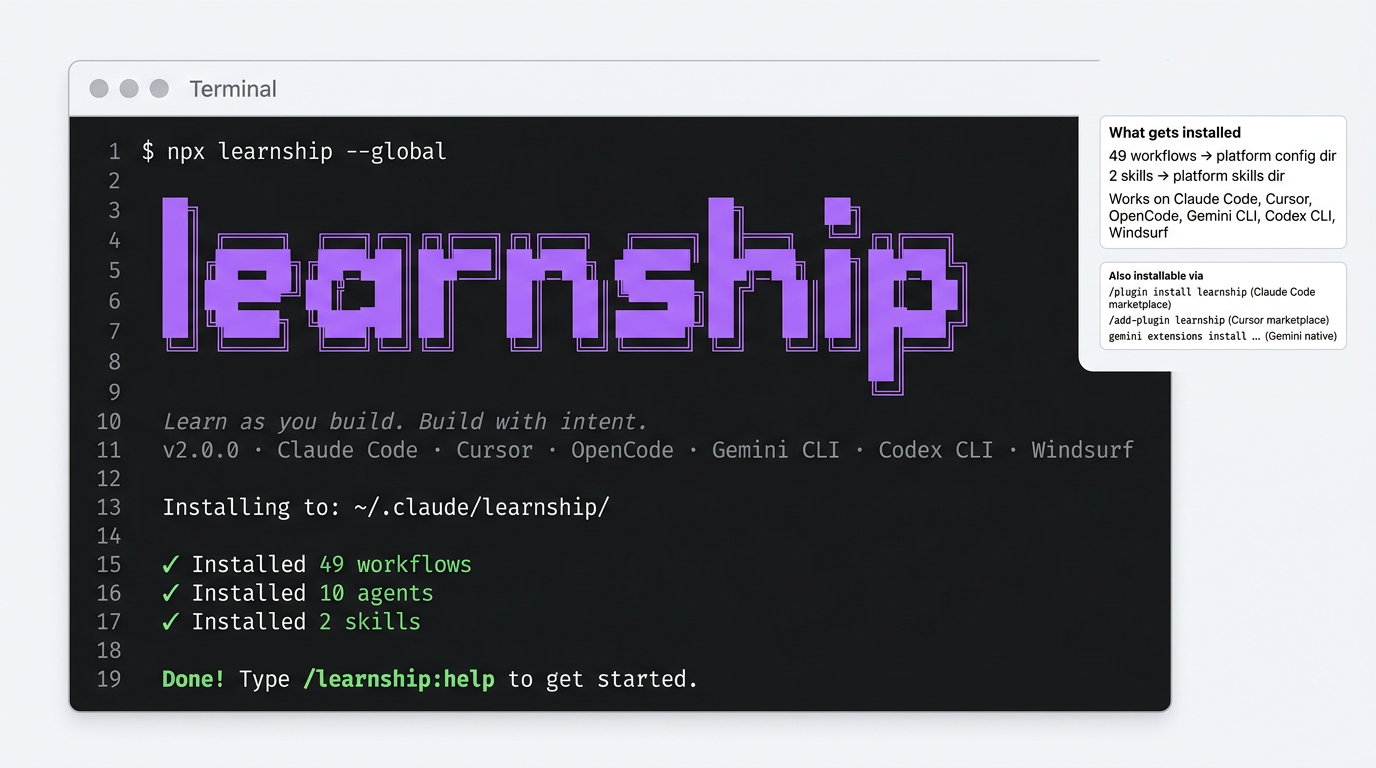
Requirements: Node.js ≥ 18, Git. Details →
Via npm (all platforms — recommended):
npx learnship
The installer auto-detects your platform. Choose global (all projects) or local (current project only):
npx learnship --global   # all projects
npx learnship --local    # this project only
Via platform marketplace (no terminal required):
# Claude Code — community marketplace
/plugin marketplace add FavioVazquez/learnship-marketplace
/plugin install learnship@learnship-marketplace

# Cursor — after marketplace approval
/add-plugin learnship

# Gemini CLI — native extension
gemini extensions install https://github.com/FavioVazquez/learnship
Or specify your platform explicitly. See Platform Support below.
Why npx learnship?
learnship is published to npm — npx learnship pulls the latest release directly. No github: prefix, no clone needed, no version pinning. The same bin/install.js runs regardless of whether you install via npm, marketplace, or native extension.
2. Start your AI agent and type
/ls
(or the platform equivalent; see the table below). /ls detects whether you have a project, walks you through starting one if not, or tells you exactly where you are and what to do next.
📚 Documentation
The full documentation site is at faviovazquez.github.io/learnship, built with MkDocs Material and deployed automatically on every release.
What's covered:
- Getting Started: install commands, first project walkthrough, the 5 commands you need to know
- Platform Guide: dedicated pages for Windsurf, Claude Code, Cursor, OpenCode, Gemini CLI, and Codex CLI
- Core Concepts: phase loop, context engineering, planning artifacts, agentic vs vibe coding
- Skills: all 11
@agentic-learningactions and all 21impeccabledesign commands - Workflow Reference: all 49 workflows documented with when and why to use each
- Configuration: full
.planning/config.jsonschema, speed presets, parallelization
🌐 Platform Support
learnship works on 6 platforms. Pick your tool:
| Platform | Install command | Invoke commands as |
|---|---|---|
| Windsurf | npx learnship --windsurf --global |
/ls, /new-project |
| Claude Code | npx learnship --claude --global |
/learnship:ls, /learnship:new-project |
| Cursor | /add-plugin learnship (after marketplace approval) |
@learnship rules load automatically |
| OpenCode | npx learnship --opencode --global |
/learnship-ls, /learnship-new-project |
| Gemini CLI | npx learnship --gemini --global |
/learnship:ls, /learnship:new-project |
| Codex CLI | npx learnship --codex --global |
$learnship-ls, $learnship-new-project |
# All platforms at once
npx learnship --all --global
🤖 Platform capabilities
Each platform gets the best experience it supports:
| Feature | Windsurf | Claude Code | OpenCode | Gemini CLI | Codex CLI |
|---|---|---|---|---|---|
| Slash commands | ✓ | ✓ | ✓ | ✓ | $skills |
| Real parallel subagents | — | ✓ | ✓ | ✓ | ✓ |
| Parallel wave execution | — | ✓ opt-in | ✓ opt-in | ✓ | ✓ opt-in |
| Specialist agent pool | — | ✓ | ✓ | ✓ | ✓ |
Skills (native @invoke) |
✓ | — | — | — | — |
| Skills (context files) | ✓ | ✓ | ✓ | ✓ | ✓ |
What "parallel subagents" means: On Claude Code, OpenCode, and Codex, execute-phase can spawn a dedicated executor agent per plan within a wave, each with its own full 200k context budget. Plans in the same wave run in parallel. Enable with "parallelization": true in .planning/config.json. All platforms default to sequential (always safe).
🗺️ The 5 Commands You Actually Need
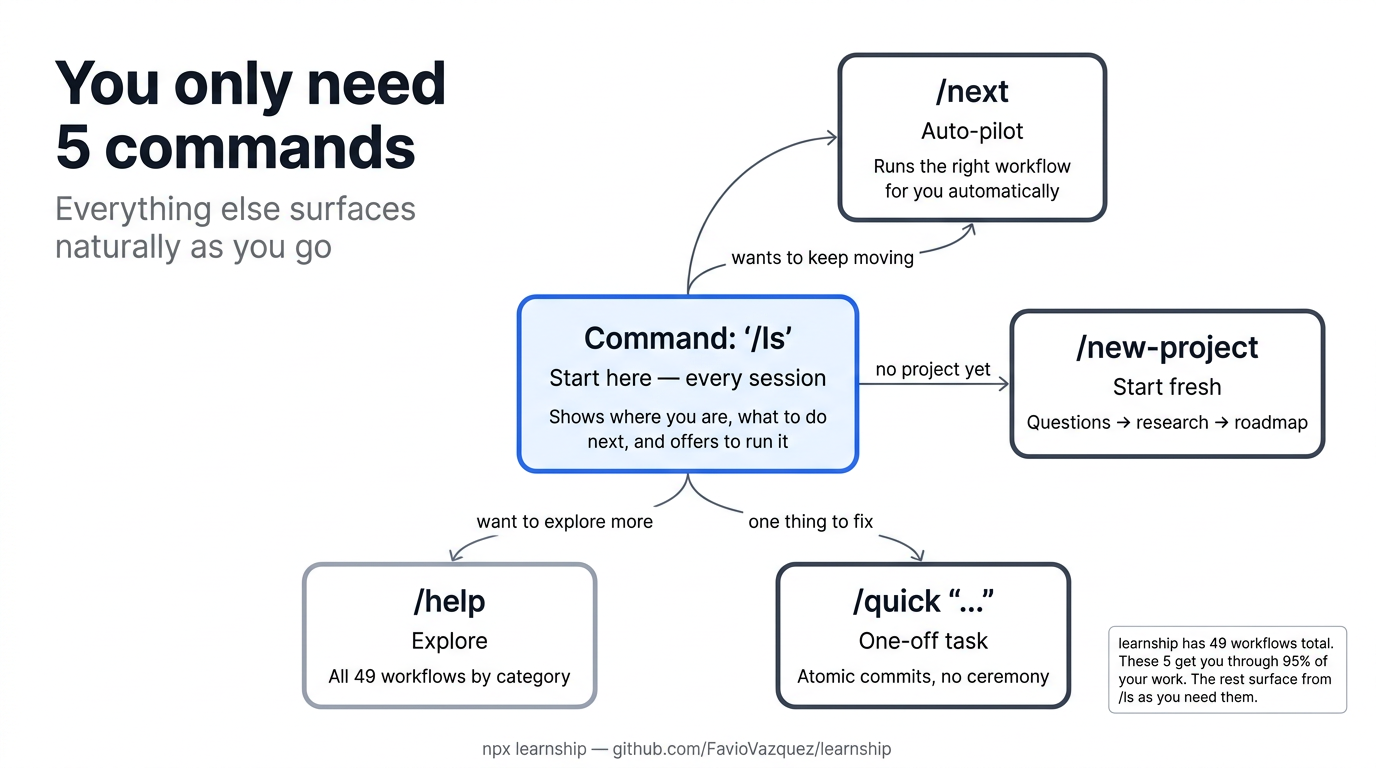
learnship has 49 workflows. You don't need to know them all. Start with these five and everything else surfaces naturally from /ls.
| Command | What it does | When to use |
|---|---|---|
/ls |
Show status, recent work, and next step (and offer to run it) | Start every session here |
/next |
Read state and immediately run the right next workflow | When you just want to keep moving |
/new-project |
Full init: questions → research → requirements → roadmap | Starting a new project |
/quick "..." |
One-off task with atomic commits, no planning ceremony | Small fixes, experiments |
/help |
All 49 workflows organized by category | Discovering capabilities |
Tip:
/lsworks for both new and returning users. New user with no project? It explains learnship and offers to run/new-project. Returning user? It shows your progress and suggests exactly what to do next.
🔄 The Phase Loop
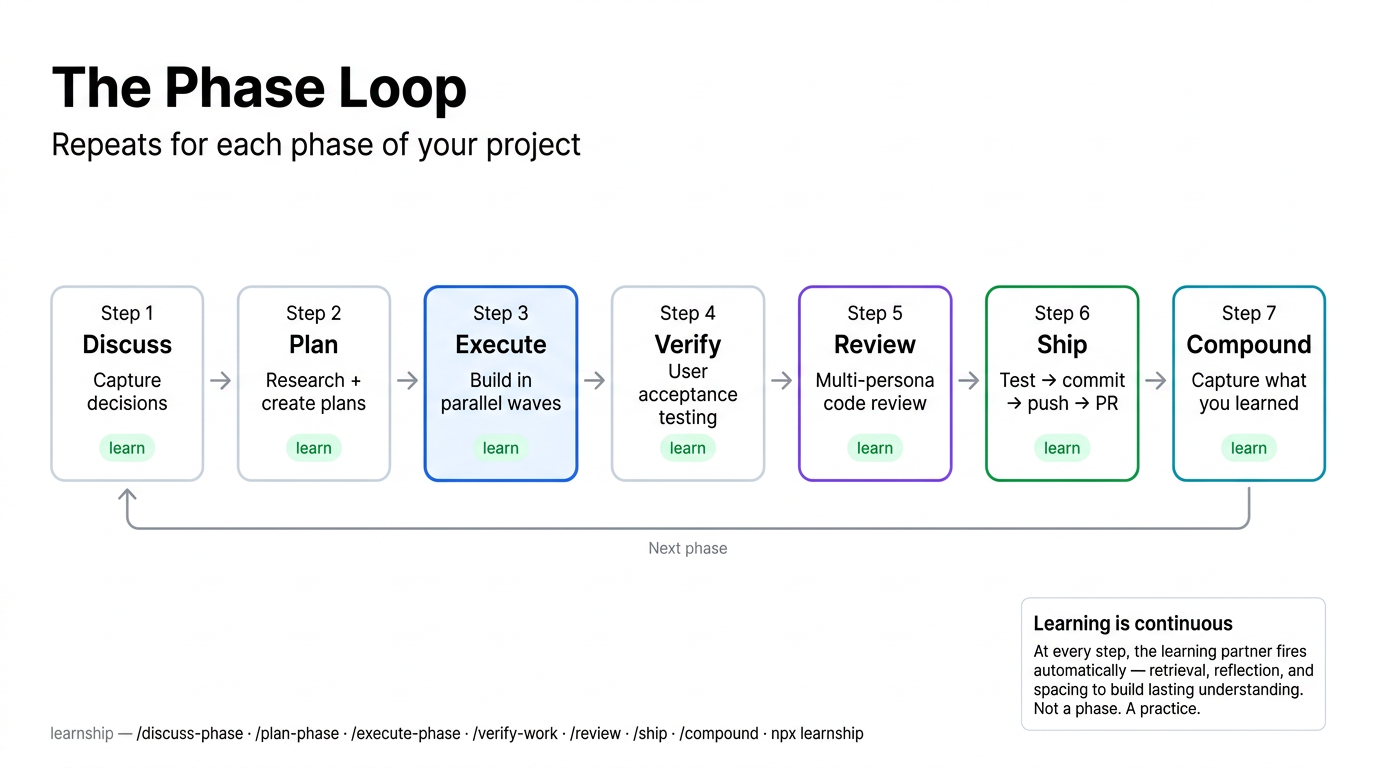
Once you have a project, every feature ships through the phase loop. The core is four steps, and v2.0 extends it with three optional quality steps:
flowchart LR
    DP["/discuss-phase N<br/>Capture decisions"]
    PP["/plan-phase N<br/>Research + plans"]
    EP["/execute-phase N<br/>Build + commit"]
    VW["/verify-work N<br/>UAT + diagnose"]
    RV["/review<br/>Multi-persona review"]
    SH["/ship<br/>Test → PR"]
    CP["/compound<br/>Capture knowledge"]

    DP --> PP --> EP --> VW
    VW --> RV --> SH --> CP
    CP -->|"next phase"| DP
    VW -->|"all done"| DONE["✓ /complete-milestone"]
| Step | Command | What happens |
|---|---|---|
| 1. Discuss | /discuss-phase N |
You and the agent align on implementation decisions before any code |
| 2. Plan | /plan-phase N |
Agent researches the domain, creates executable plans, verifies them |
| 3. Execute | /execute-phase N |
Plans run in dependency order, one atomic commit per task |
| 4. Verify | /verify-work N |
You do UAT; agent diagnoses any gaps and creates fix plans |
| 5. Review | /review |
Multi-persona code review through 6 lenses (v2.0) |
| 6. Ship | /ship |
Test → lint → commit → push → PR (v2.0) |
| 7. Compound | /compound |
Capture what you learned as searchable documentation (v2.0) |
Just starting? /ls or /next will route you into the right step automatically.
🏗️ How It Works
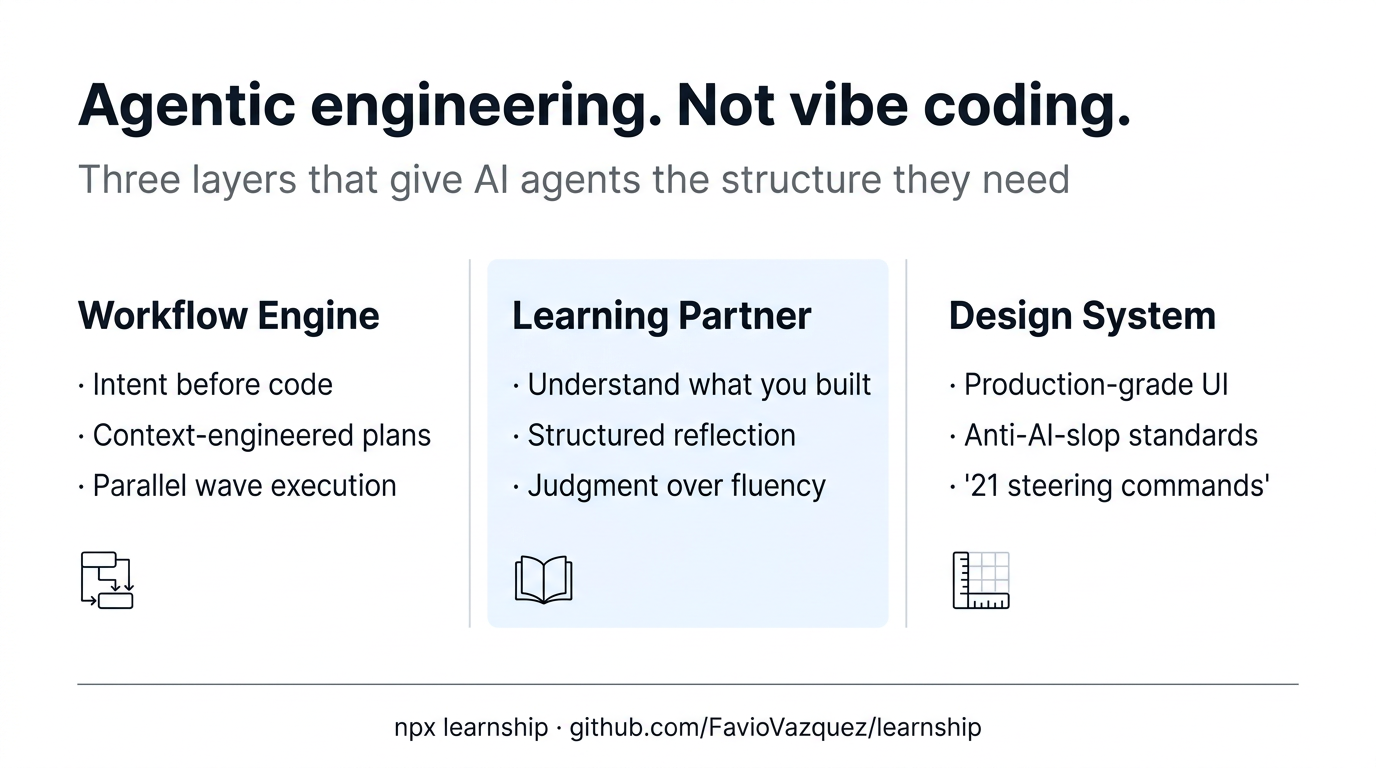
Three integrated layers that reinforce each other:
| Layer | What it does |
|---|---|
| Workflow Engine | Spec-driven phases → context-engineered plans → wave-ordered execution → verified delivery |
| Learning Partner | Neuroscience-backed checkpoints at every phase transition: retrieval, reflection, spacing, struggle |
| Design System | 21 impeccable steering commands for production-grade UI: /audit, /critique, /polish, and more |
graph LR
    WE["Workflow Engine<br/>Spec-driven phases<br/>Context-engineered plans<br/>Atomic execution"] --> LP["Learning Partner<br/>Neuroscience-backed<br/>Woven into workflows<br/>Builds real understanding"]
    WE --> DS["Design System<br/>Production-grade UI<br/>Impeccable aesthetics<br/>Anti-AI-slop standards"]
    LP --> DS
    DS --> LP
🆚 Agentic Engineering vs Vibe Coding
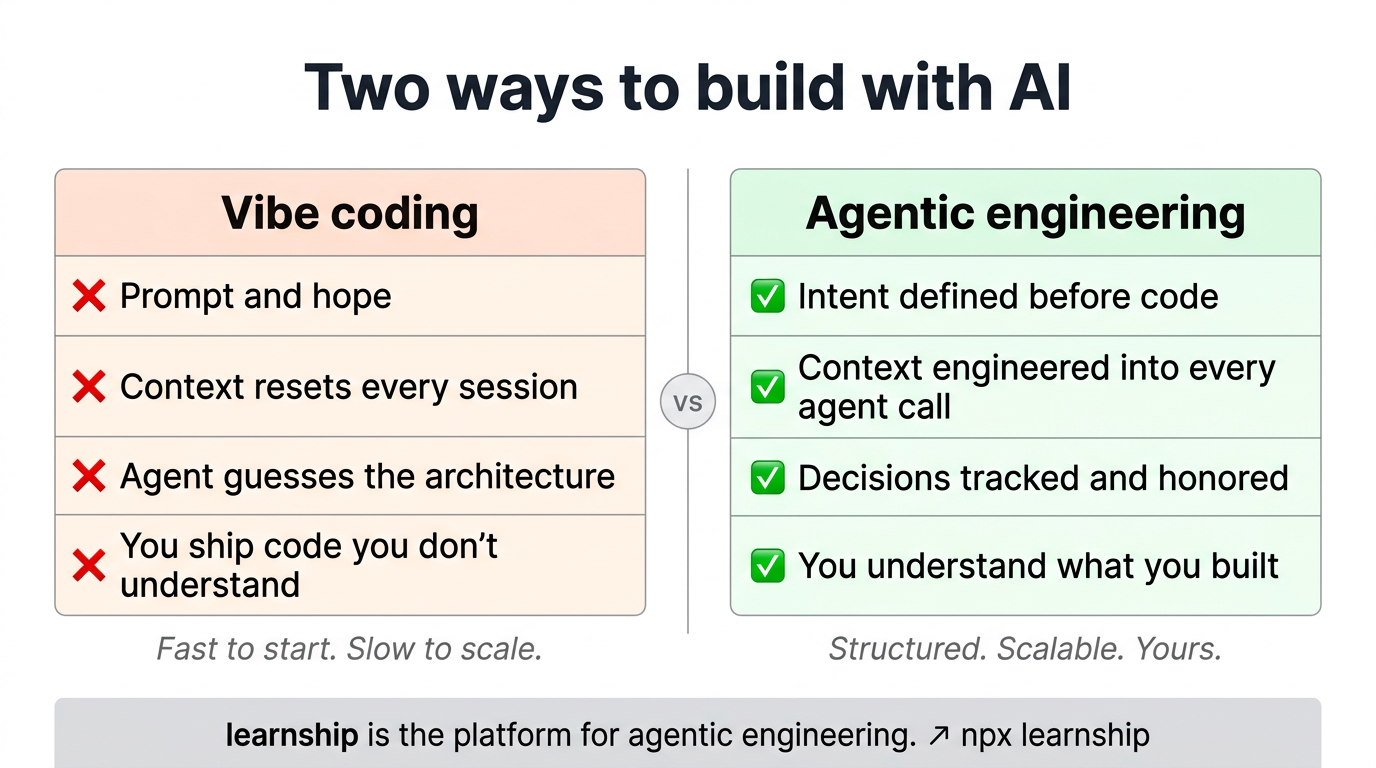
| Vibe coding | Agentic engineering | |
|---|---|---|
| Context | Resets every session | Engineered into every agent call |
| Decisions | Implicit, forgotten | Tracked in DECISIONS.md, honored by the agent |
| Plans | Ad-hoc prompts | Spec-driven, verifiable, wave-ordered |
| Outcome | Code you shipped | Code you shipped and understand |
🧠 Context Engineering
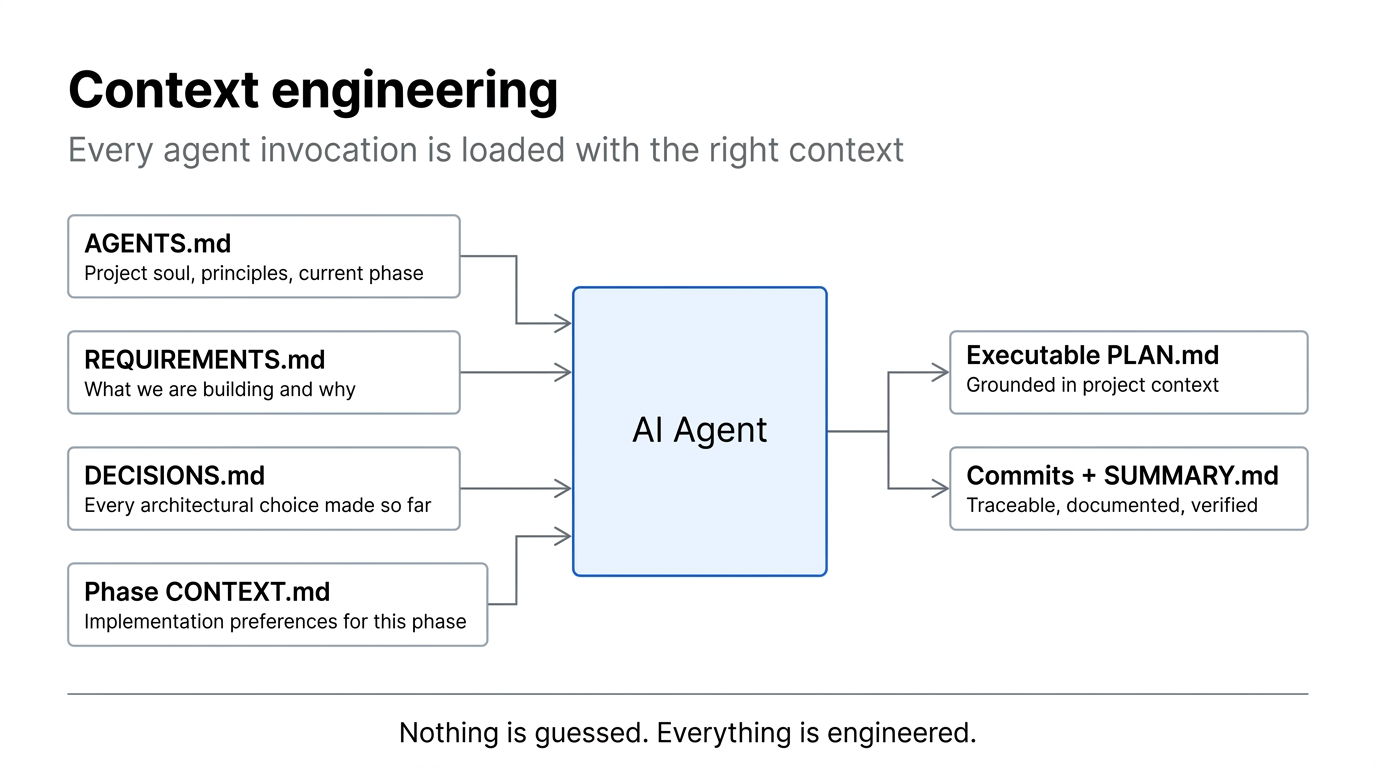
Every agent invocation in learnship is loaded with structured context. Nothing is guessed:
flowchart LR
    subgraph CONTEXT["Loaded into every agent call"]
        A["AGENTS.md<br/>Project soul + current phase"]
        B["REQUIREMENTS.md<br/>What we're building"]
        C["DECISIONS.md<br/>Every architectural choice"]
        D["Phase CONTEXT.md<br/>Implementation preferences"]
    end
    CONTEXT --> AGENT["AI Agent"]
    AGENT --> P["Executable PLAN.md"]
    AGENT --> S["Commits + SUMMARY.md"]
🗂️ AGENTS.md: Persistent Project Memory
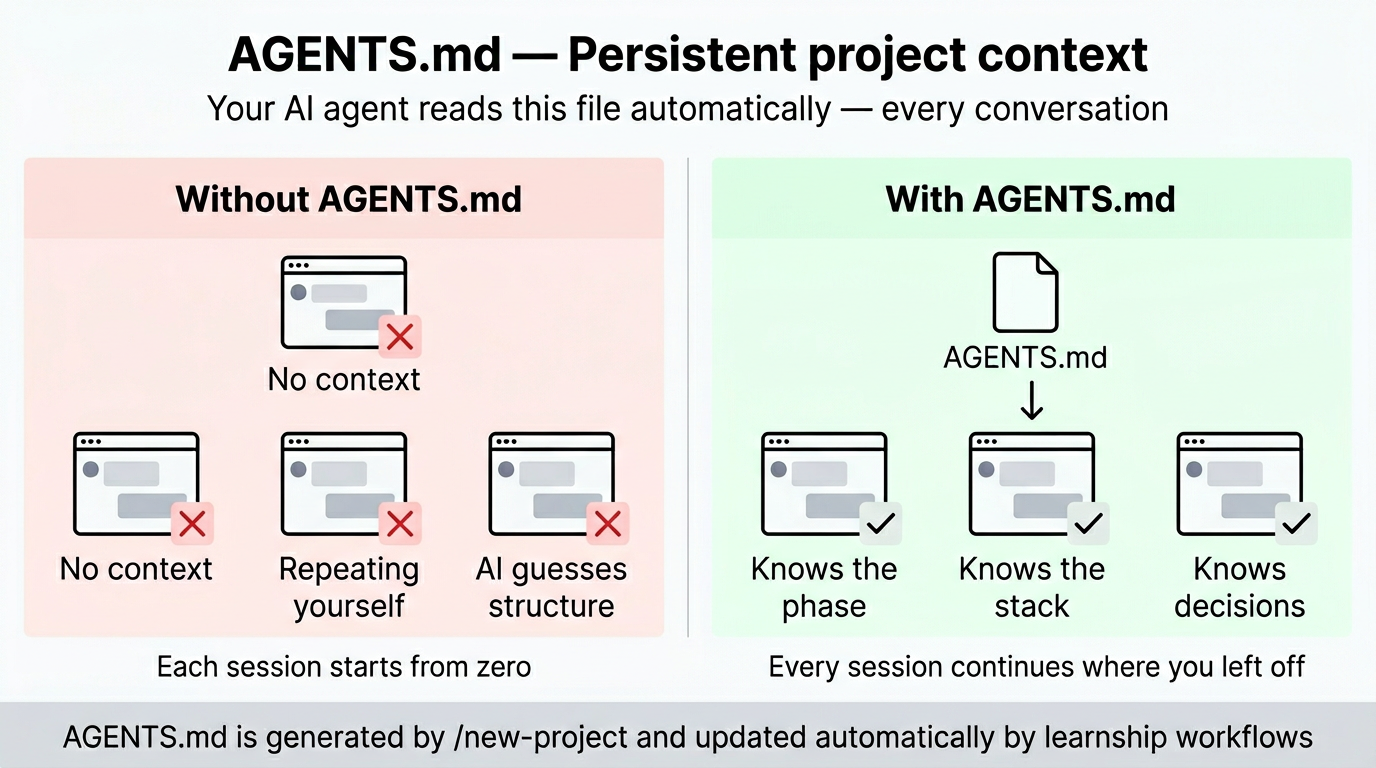
/new-project generates an AGENTS.md at your project root. On Windsurf, Claude Code, and Cursor it is loaded automatically every session as a project rule. On OpenCode, Gemini CLI, and Codex CLI the learnship workflows reference it explicitly. Either way, the agent always knows the project, current phase, tech stack, and past decisions without you repeating yourself.
AGENTS.md                   ← your AI agent reads this every conversation
├── Soul & Principles        # Pair-programmer framing, 10 working principles
├── Platform Context         # Points to .planning/, explains the phase loop
├── Current Phase            # Updated automatically by workflows
├── Project Structure        # Filled during new-project from your answers
├── Tech Stack               # Filled from research results
└── Regressions              # Updated by /debug when bugs are fixed
📖 Workflow Reference: Advanced
These are all 49 workflows. Most users discover them naturally from
/ls. Scan this when you want to know if a specific capability exists.
Core Workflow
| Workflow | Purpose | When to use |
|---|---|---|
/new-project |
Full init: questions → research → requirements → roadmap | Start of any new project |
/discuss-phase [N] |
Capture implementation decisions before planning | Before every phase |
/plan-phase [N] |
Research + create + verify plans | After discussing a phase |
/execute-phase [N] |
Wave-ordered execution of all plans | After planning |
/verify-work [N] |
Manual UAT with auto-diagnosis and fix planning | After execution |
/complete-milestone |
Archive milestone, tag release, prepare next | All phases verified |
/audit-milestone |
Pre-release: requirement coverage, stub detection | Before completing milestone |
/new-milestone [name] |
Start next version cycle | After completing a milestone |
Navigation
| Workflow | Purpose | When to use |
|---|---|---|
/ls |
Status + next step + offer to run it | Start every session here |
/next |
Auto-pilot: reads state and runs the right workflow | When you just want to keep moving |
/progress |
Same as /ls: status overview with smart routing |
"Where am I?" |
/resume-work |
Restore full context from last session | Starting a new session |
/pause-work |
Save handoff file mid-phase | Stopping mid-phase |
/quick [description] |
Ad-hoc task with full guarantees | Bug fixes, small features |
/help |
Show all available workflows | Quick command reference |
Phase Management
| Workflow | Purpose | When to use |
|---|---|---|
/add-phase |
Append new phase to roadmap | Scope grows after planning |
/insert-phase [N] |
Insert urgent work between phases | Urgent fix mid-milestone |
/remove-phase [N] |
Remove future phase and renumber | Descoping a feature |
/research-phase [N] |
Deep research only, no plans yet | Complex/unfamiliar domain |
/list-phase-assumptions [N] |
Preview intended approach before planning | Validate direction |
/plan-milestone-gaps |
Create phases for audit gaps | After audit finds missing items |
Brownfield, Discovery & Debugging
| Workflow | Purpose | When to use |
|---|---|---|
/map-codebase |
Analyze existing codebase | Before /new-project on existing code |
/discovery-phase [N] |
Map unfamiliar code area before planning | Entering complex/unfamiliar territory |
/debug [description] |
Systematic triage → diagnose → fix | When something breaks |
/diagnose-issues [N] |
Batch-diagnose all UAT issues by root cause | After verify-work finds multiple issues |
/execute-plan [N] [id] |
Run a single plan in isolation | Re-running a failed plan |
/add-todo [description] |
Capture an idea without breaking flow | Think of something mid-session |
/check-todos |
Review and act on captured todos | Reviewing accumulated ideas |
/add-tests |
Generate test coverage post-execution | After executing a phase |
/validate-phase [N] |
Retroactive test coverage audit | After hotfixes or legacy phases |
Decision Intelligence
| Workflow | Purpose | When to use |
|---|---|---|
/decision-log [description] |
Capture decision with context and alternatives | After any significant architectural choice |
/knowledge-base |
Aggregate all decisions and lessons into one file | Before starting a new milestone |
/knowledge-base search [query] |
Search the project knowledge base | When you need to recall why something was built a certain way |
Milestone Intelligence
| Workflow | Purpose | When to use |
|---|---|---|
/discuss-milestone [version] |
Capture goals, anti-goals before planning | Before /new-milestone |
/milestone-retrospective |
5-question retrospective + spaced review | After /complete-milestone |
/transition |
Write full handoff document for new session/collaborator | Before handing off or long break |
Compounding & Quality (v2.0)
| Workflow | Purpose | When to use |
|---|---|---|
/compound |
Capture solved problem as searchable documentation | After /debug, /verify-work, or any aha moment |
/review |
Multi-persona code review (6 lenses) | After /verify-work, before shipping |
/challenge |
Stress-test scope through product + engineering lenses | Before committing to a milestone or large feature |
/ship |
Test → lint → commit → push → PR | After review, ready to deploy |
/ideate |
Codebase-grounded idea generation | Before /discuss-milestone, between milestones |
/guard |
Safety mode: protect sensitive directories | Working on auth, payments, migrations |
/sync-docs |
Detect stale documentation | Before /complete-milestone, after refactors |
Maintenance
| Workflow | Purpose | When to use |
|---|---|---|
/settings |
Interactive config editor | Change mode, toggle agents |
/set-profile [quality|balanced|budget] |
One-step model profile switch | Quick cost/quality adjustment |
/health |
Project health check | Stale files, missing artifacts |
/cleanup |
Archive old artifacts | End of milestone |
/update |
Update the platform itself | Check for new workflows |
/reapply-patches |
Restore local edits after update | After /update if you had local changes |
⚙️ Configuration
Project settings live in .planning/config.json. Set during /new-project or edit with /settings.
Full Schema
{
  "mode": "yolo",
  "granularity": "standard",
  "model_profile": "balanced",
  "learning_mode": "auto",
  "parallelization": false,
  "test_first": false,
  "planning": {
    "commit_docs": true,
    "search_gitignored": false
  },
  "workflow": {
    "research": true,
    "plan_check": true,
    "verifier": true,
    "validation": true,
    "review": true,
    "solutions_search": true
  },
  "review": {
    "auto_after_verify": false
  },
  "ship": {
    "auto_test": true,
    "conventional_commits": true,
    "pr_template": true
  },
  "git": {
    "branching_strategy": "none",
    "phase_branch_template": "phase-{phase}-{slug}",
    "milestone_branch_template": "{milestone}-{slug}"
  }
}
Core Settings
| Setting | Options | Default | What it controls |
|---|---|---|---|
mode |
yolo, interactive |
yolo |
yolo auto-approves steps; interactive confirms at each decision |
granularity |
coarse, standard, fine |
standard |
Phase size: 3-5 / 5-8 / 8-12 phases |
model_profile |
quality, balanced, budget |
balanced |
Agent model tier (see table below) |
learning_mode |
auto, manual |
auto |
auto offers learning at checkpoints; manual requires explicit invocation |
Workflow Toggles
| Setting | Default | What it controls |
|---|---|---|
workflow.research |
true |
Domain research before planning each phase |
workflow.plan_check |
true |
Plan verification loop (up to 3 iterations) |
workflow.verifier |
true |
Post-execution verification against phase goals |
workflow.validation |
true |
Test coverage mapping during plan-phase |
workflow.review |
true |
Enable /review suggestions after /verify-work (v2.0) |
workflow.solutions_search |
true |
Search .planning/solutions/ during /plan-phase (v2.0) |
v2.0 Settings
| Setting | Default | What it controls |
|---|---|---|
test_first |
false |
TDD mode: write failing test first, verify red, implement, verify green |
review.auto_after_verify |
false |
Auto-run /review after /verify-work passes |
ship.auto_test |
true |
Run test suite before shipping |
ship.conventional_commits |
true |
Use conventional commit format |
ship.pr_template |
true |
Auto-generate PR description |
Git Branching
branching_strategy |
Creates branch | Best for |
|---|---|---|
none |
Never | Solo dev, simple projects |
phase |
At each execute-phase |
Code review per phase |
milestone |
At first execute-phase |
Release branches, PR per version |
Model Profiles
| Agent | quality |
balanced |
budget |
|---|---|---|---|
| Planner | large | large | medium |
| Executor | large | medium | medium |
| Phase Researcher | large | medium | small |
| Debugger | large | medium | medium |
| Verifier | medium | medium | small |
| Plan Checker | medium | medium | small |
| Solution Writer | medium | medium | small |
| Code Reviewer | large | medium | medium |
| Challenger | large | medium | medium |
| Ideation Agent | large | medium | small |
Platform note: Tiers map to the best available model on your platform:
large= Claude Opus 4.6 / Gemini 3.1 Pro / GPT-5.4,medium= Claude Sonnet 4.6 / Gemini 3.1 Flash / GPT-5.4-mini,small= Claude Haiku 4.5 / Gemini 3.1 Flash-Lite / GPT-5.4-nano. Windsurf, Cursor, and OpenCode use the platform default model — tiers signal intended task complexity.
Speed vs. Quality Presets
| Scenario | mode |
granularity |
model_profile |
Research | Plan Check | Verifier |
|---|---|---|---|---|---|---|
| Prototyping | yolo |
coarse |
budget |
off | off | off |
| Normal dev | yolo |
standard |
balanced |
on | on | on |
| Production | interactive |
fine |
quality |
on | on | on |
🧩 Learning Partner
The learning partner is woven into the platform, not bolted on. It fires at natural workflow transitions to build genuine understanding, not just fluent answers.
How it fires
learning_mode: "auto"    → offered automatically at checkpoints (default)
learning_mode: "manual"  → only when you explicitly invoke @agentic-learning
All 11 actions
| Action | Trigger | What it does |
|---|---|---|
@agentic-learning learn [topic] |
Any time | Active retrieval: explain before seeing, then fill gaps |
@agentic-learning quiz [topic] |
Any time | 3-5 questions, one at a time, formative feedback |
@agentic-learning reflect |
After execute-phase |
Three-question structured reflection: learned / goal / gaps |
@agentic-learning space |
After verify-work |
Schedule concepts for spaced review → writes docs/revisit.md |
@agentic-learning brainstorm [topic] |
After new-project |
Collaborative design dialogue before any code |
@agentic-learning struggle [topic] |
During quick |
Hint ladder: try first, reveal only when needed |
@agentic-learning either-or |
After discuss-phase |
Decision journal: paths considered, choice, rationale |
@agentic-learning explain-first |
Any time | Oracy exercise: you explain, agent gives structured feedback |
@agentic-learning explain [topic] |
Any time | Project comprehension log → writes docs/project-knowledge.md |
@agentic-learning interleave |
Any time | Mixed retrieval across multiple topics |
@agentic-learning cognitive-load [topic] |
After plan-phase |
Decompose overwhelming scope into working-memory steps |
Core principle: Fluent answers from an AI are not the same as learning. Every action makes you do the cognitive work, with support rather than shortcuts.
Skills across platforms
| Platform | How agentic-learning works |
|---|---|
| Windsurf | Native skill: invoke with @agentic-learning learn, @agentic-learning quiz, etc. |
| Claude Code, OpenCode, Gemini CLI, Codex CLI | Installed as a context file in learnship/skills/agentic-learning/. The AI reads and applies the techniques automatically. Reference it explicitly with use the agentic-learning skill or just work normally and it activates at checkpoints. |
🎨 Design System
The impeccable skill suite is always active as project context for any UI work. It provides design direction, anti-patterns, and 21 steering commands that prevent generic AI aesthetics. Based on @pbakaus/impeccable.
Commands
| Command | What it does |
|---|---|
/teach-impeccable |
One-time setup: gathers project design context and saves persistent guidelines |
/audit |
Comprehensive audit: accessibility, performance, theming, responsive design |
/critique |
UX critique: visual hierarchy, information architecture, emotional resonance |
/polish |
Final quality pass: alignment, spacing, consistency before shipping |
/normalize |
Normalize design to match your design system for consistency |
/colorize |
Add strategic color to monochromatic or flat interfaces |
/animate |
Add purposeful animations and micro-interactions |
/bolder |
Amplify safe or boring designs for more visual impact |
/quieter |
Tone down overly aggressive designs to reduce intensity and gain refinement |
/distill |
Strip to essence: remove complexity, clarify what matters |
/clarify |
Improve UX copy, error messages, microcopy, labels |
/optimize |
Performance: loading speed, rendering, animations, bundle size |
/harden |
Resilience: error handling, i18n, text overflow, edge cases |
/delight |
Add moments of joy and personality that make interfaces memorable |
/extract |
Extract reusable components and design tokens into your design system |
/adapt |
Adapt designs across screen sizes, devices, and contexts |
/onboard |
Design onboarding flows, empty states, first-time user experiences |
The AI Slop Test: If you showed the interface to someone and said "AI made this", would they believe you immediately? If yes, that's the problem. Use /critique to find out.
learnship integration
Automatic UI standards during execute-phase: When a phase involves UI work, learnship detects it automatically and activates @impeccable frontend-design principles before any code is written. You'll see a banner announcing it. The agent then applies typography, color, layout, and component standards across every task in the phase — not as a post-hoc review but as an active constraint during execution.
Post-action milestone recommendation: After any impeccable action produces recommendations, the agent suggests running /new-milestone to create a dedicated "UI Polish" milestone. This turns impeccable findings into versioned, traceable phases with plans and commits — so improvements don't disappear into chat history. Applying directly is always an option too.
Skills across platforms
| Platform | How impeccable works |
|---|---|
| Windsurf | Native skills: invoke each command directly with /audit, /polish, /critique, etc. |
| Claude Code, OpenCode, Gemini CLI, Codex CLI | Installed as context files in learnship/skills/impeccable/. The AI reads design principles and anti-patterns automatically. Reference commands explicitly with run the /audit impeccable skill or just ask for UI work and it applies the standards. |
💡 Usage Examples
New greenfield project
/new-project              # Answer questions, configure, approve roadmap
/discuss-phase 1          # Lock in your implementation preferences
/plan-phase 1             # Research + plan + verify
/execute-phase 1          # Wave-ordered execution
/verify-work 1            # Manual UAT
/review                   # v2.0: multi-persona code review
/ship                     # v2.0: test → commit → push → PR
/compound                 # v2.0: capture what you learned
                          # Repeat for each phase
/sync-docs                # v2.0: detect stale documentation
/audit-milestone          # Check everything shipped
/complete-milestone       # Archive, tag, done
Existing codebase (brownfield)
/map-codebase             # Structured codebase analysis
/new-project              # Questions focus on what you're ADDING
# Normal phase workflow from here
Quick bug fix
/quick "Fix login button not responding on mobile Safari"
Quick with discussion + verification
/quick --discuss --full "Add dark mode toggle"
Resuming after a break
/ls                       # See where you left off (offers to run next step)
# or
/next                     # Just pick up and go: auto-pilot
# or
/resume-work              # Full context restoration
Scope change mid-milestone
/add-phase                # Append new phase to roadmap
/insert-phase 3           # Insert urgent work between phases 3 and 4
/remove-phase 7           # Descope phase 7 and renumber
Preparing for release
/audit-milestone          # Check requirement coverage, detect stubs
/plan-milestone-gaps      # If audit found gaps, create phases to close them
/complete-milestone       # Archive, tag, done
Debugging something broken
/debug "Login flow fails after password reset"
🧭 Decision Intelligence
Every project accumulates decisions: architecture choices, library picks, scope trade-offs. The platform tracks them in a structured register so future sessions understand why the project is built the way it is.
.planning/DECISIONS.md is the decision register:
## DEC-001: Use Zustand over Redux
Date: 2026-03-01 | Phase: 2 | Type: library
Context: Needed client-side state for dashboard filters
Options: Zustand (simple, no boilerplate), Redux (complex, overkill for scope)
Choice: Zustand
Rationale: 3x less boilerplate, sufficient for current data flow complexity
Consequences: Locks React as UI framework; migration would require state rewrite
Status: active
Populated automatically by:
discuss-phasesurfaces prior decisions before each phase discussionplan-phasereads decisions before creating plans (never contradicts active ones)debugputs architectural lessons from bugs into the registerdecision-logmanually captures any decision from any conversation
Queried by:
audit-milestonechecks decisions were honored in implementationknowledge-baseaggregates all decisions into a searchableKNOWLEDGE.md
📁 Planning Artifacts
Every project creates a structured .planning/ directory:
.planning/
├── config.json               # Workflow settings
├── PROJECT.md                # Vision, requirements, key decisions
├── REQUIREMENTS.md           # v1 requirements with REQ-IDs
├── ROADMAP.md                # Phase breakdown with status tracking
├── STATE.md                  # Current position, decisions, blockers
├── DECISIONS.md              # Cross-phase decision register
├── KNOWLEDGE.md              # Aggregated lessons (from knowledge-base)
├── research/                 # Domain research from new-project
│   ├── STACK.md
│   ├── FEATURES.md
│   ├── ARCHITECTURE.md
│   ├── PITFALLS.md
│   └── SUMMARY.md
├── codebase/                 # Brownfield mapping (from map-codebase)
│   ├── STACK.md
│   ├── ARCHITECTURE.md
│   ├── CONVENTIONS.md
│   └── CONCERNS.md
├── todos/
│   ├── pending/              # Captured ideas awaiting work
│   └── done/                 # Completed todos
├── solutions/               # Knowledge compounding (from /compound) (v2.0)
│   ├── auth/                # Solutions by category
│   ├── performance/
│   └── ...
├── debug/                    # Active debug sessions
│   └── resolved/             # Archived debug sessions
├── quick/
│   └── 001-slug/             # Quick task artifacts
│       ├── 001-PLAN.md
│       ├── 001-SUMMARY.md
│       └── 001-VERIFICATION.md (if --full)
└── phases/
    └── 01-phase-name/
        ├── 01-CONTEXT.md     # Your implementation preferences
        ├── 01-DISCOVERY.md   # Unfamiliar area mapping (from discovery-phase)
        ├── 01-RESEARCH.md    # Ecosystem research findings
        ├── 01-VALIDATION.md  # Test coverage contract (from /validate-phase)
        ├── 01-01-PLAN.md     # Executable plan (wave 1)
        ├── 01-02-PLAN.md     # Executable plan (wave 1, independent)
        ├── 01-01-SUMMARY.md  # Execution outcomes
        ├── 01-UAT.md         # User acceptance test results
        └── 01-VERIFICATION.md # Post-execution verification
🔧 Troubleshooting
"Project already initialized"
/new-project found .planning/PROJECT.md already exists. If you want to start over, delete .planning/ first. To continue, use /progress or /resume-work.
Context degradation during long sessions
Start each major workflow with a fresh context. The platform is designed around fresh context windows; every agent gets a clean slate. Use /resume-work or /progress to restore state after clearing.
Plans seem wrong or misaligned
Run /discuss-phase [N] before planning. Most plan quality issues come from unresolved gray areas. Run /list-phase-assumptions [N] to see the intended approach before committing to a plan.
Execution produces stubs or incomplete code
Plans with more than 3 tasks are too large for reliable single-context execution. Re-plan with smaller scope: /plan-phase [N] with finer granularity.
Lost track of where you are
Run /ls. It reads all state files, shows your progress, and offers to run the next step.
Need to change something after execution
Use /quick for targeted fixes, or /verify-work to systematically identify and fix issues through UAT. Do not re-run /execute-phase on a phase that already has summaries.
Costs running too high
Switch to budget profile via /settings. Disable research and plan-check for familiar domains. Use granularity: "coarse" for fewer, broader phases.
Working on a private/sensitive project
Set commit_docs: false during /new-project or via /settings. Add .planning/ to .gitignore. Planning artifacts stay local.
Something broke and I don't know why
Run /debug "description of what's broken". It runs triage → root cause diagnosis → fix planning with a persistent debug session.
Phase passed UAT but has known gaps
Run /audit-milestone to surface all gaps, then /plan-milestone-gaps to create fix phases before release.
🚑 Recovery Quick Reference
| Problem | Solution |
|---|---|
| Lost context / new session | /ls or /next |
| Phase went wrong | git revert the phase commits, re-plan |
| Need to change scope | /add-phase, /insert-phase, or /remove-phase |
| Milestone audit found gaps | /plan-milestone-gaps |
| Something broke | /debug "description" |
| Quick targeted fix | /quick |
| Plans don't match your vision | /discuss-phase [N] then re-plan |
| Costs running high | /settings → budget profile, toggle agents off |
📂 Repository Structure
learnship/
├── .windsurf/
│   ├── workflows/          # 49 workflows as slash commands
│   └── skills/
│       ├── agentic-learning/   # Learning partner (SKILL.md + references), native on Windsurf + Claude Code
│       └── impeccable/         # Design suite: 21 skills, native on Windsurf + Claude Code
│           ├── frontend-design/ #   Base skill + 7 reference files (typography, color, motion…)
│           ├── audit/           #   /audit
│           ├── critique/        #   /critique
│           ├── polish/          #   /polish
│           └── …14 more/        #   /colorize /animate /bolder /quieter /distill /clarify…
│                               # → on OpenCode/Gemini/Codex: both skills copied to learnship/skills/ as context files
├── commands/               # 49 Claude Code-style slash command wrappers
│   └── learnship/          # /learnship:ls, /learnship:new-project, etc.
├── learnship/              # Payload installed into the target platform config dir
│   ├── workflows/          # 49 workflow markdown files (the actual instructions)
│   ├── references/         # Reference docs (questioning, verification, git, design, learning)
│   └── templates/          # Document templates for .planning/ + AGENTS.md template
├── agents/                 # 10 agent personas (planner, researcher, executor, verifier, debugger, plan-checker, solution-writer, code-reviewer, challenger, ideation-agent)
├── assets/                 # Brand images (banner, explainers, diagrams)
├── bin/
│   └── install.js          # Multi-platform installer (Claude Code, OpenCode, Gemini CLI, Codex CLI, Windsurf)
├── tests/
│   └── validate_multiplatform.sh  # 94-check test suite
├── SKILL.md                # Meta-skill: platform context loaded by Cascade / AI agents
├── install.sh              # Shell installer wrapper
├── package.json            # npm package (npx learnship)
├── CHANGELOG.md            # Version history
└── CONTRIBUTING.md         # How to extend the platform
🙏 Inspiration & Credits
learnship was built on top of ideas and work from three open-source projects:
- get-shit-done: the spec-driven, context-engineered workflow system that inspired the phase lifecycle, planning artifacts, and agent coordination patterns
- agentic-learning: the learning partner skill whose neuroscience-backed techniques (retrieval, spacing, generation, reflection) power the Learning Partner layer
- impeccable: the frontend design skill that raised the bar on UI quality standards and powers the Design System layer
learnship adapts, combines, and extends these into a unified, multi-platform system. All three are used as inspiration and learnship is original work built on their shoulders.
License
MIT © Favio Vazquez
Reviews (0)
Sign in to leave a review.
Leave a reviewNo results found