feathersheet
Health Warn
- License — License: GPL-3.0
- Description — Repository has a description
- Active repo — Last push 0 days ago
- Low visibility — Only 6 GitHub stars
Code Fail
- rm -rf — Recursive force deletion command in .github/workflows/macos.yml
- rm -rf — Recursive force deletion command in pacote/gerar.sh
Permissions Pass
- Permissions — No dangerous permissions requested
No AI report is available for this listing yet.
Planilha da suíte FeatherOffice: fórmulas em português, arquivos enormes, .xlsx e macros, em Rust com interface nativa Iced — tudo local
FeatherSheet
The spreadsheet of the FeatherWorks suite, written in Rust with a native pelicano interface.
It opens huge files, calculates in parallel, takes formulas in Portuguese or English,
and runs entirely on your machine: no account, no login, no telemetry.
Status: under active development. Alpha release planned for 10/30/2026.
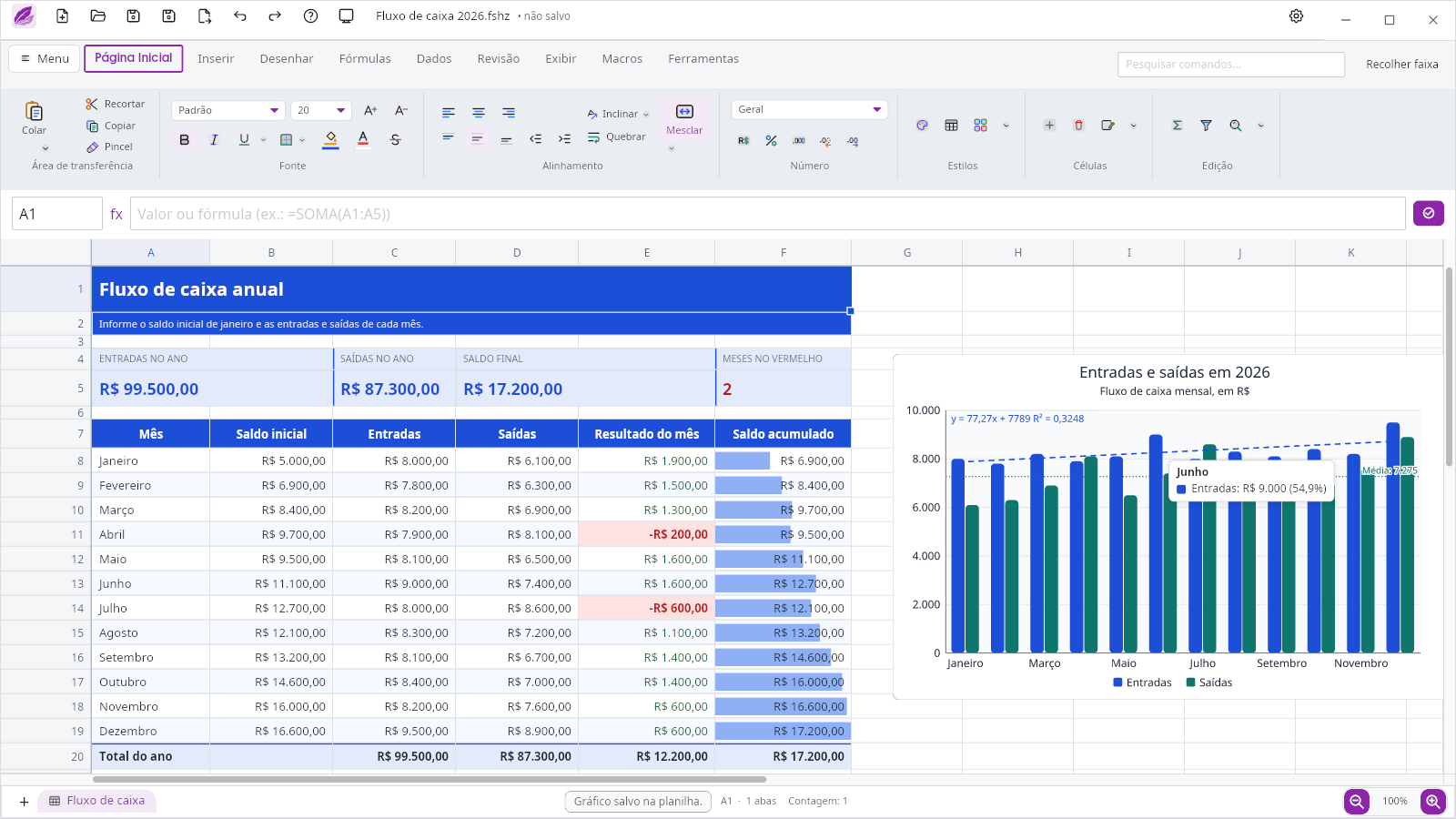
Download




| System | File | How to install |
|---|---|---|
| Windows 10/11 | FeatherSheet-windows-x64.exe | run the installer (no administrator rights needed) |
| Linux (Ubuntu, Debian, Mint…) | feathersheet-linux-amd64.deb | sudo apt install ./feathersheet-linux-amd64.deb |
| Linux (any distribution) | feathersheet-linux-x86_64.tar.gz | extract it and run ./instalar.sh |
| macOS (Apple Silicon) | FeatherSheet-<version>-macos-apple-silicon.dmg, on the releases page |
open the .dmg and drag it to Applications |
All versions and their checksums (SHA256SUMS) are on the
releases page.
To update, download the new file and install over the old one: apt and
the Windows installer replace the previous version.
v0.0.1 for Linux requires Ubuntu 26.04 or newer (glibc 2.43).
New in v0.2.0: Excel macros
FeatherSheet opens an .xlsm with its VBA macro inside, converts it to
JavaScript on the fly and runs it. A month-end closing macro over 196 thousand
sales (cleaning names, fixing dates, computing commissions, highlighting
targets, a ranking and one sheet per region) runs in ~8 s; in Excel, the same
macro took 25 s.
- Our own JavaScript engine: macros run on Falcão, written from scratch in Rust (~4× faster than the previous engine).
- A long macro doesn't freeze the window: "Running… N s" and a Stop button that undoes what it wrote.
- A more complete VBA converter: block
Range.Value, dates,RemoveDuplicates,FormatConditions,On Error Resume Next,Worksheets.Add, UserForms.
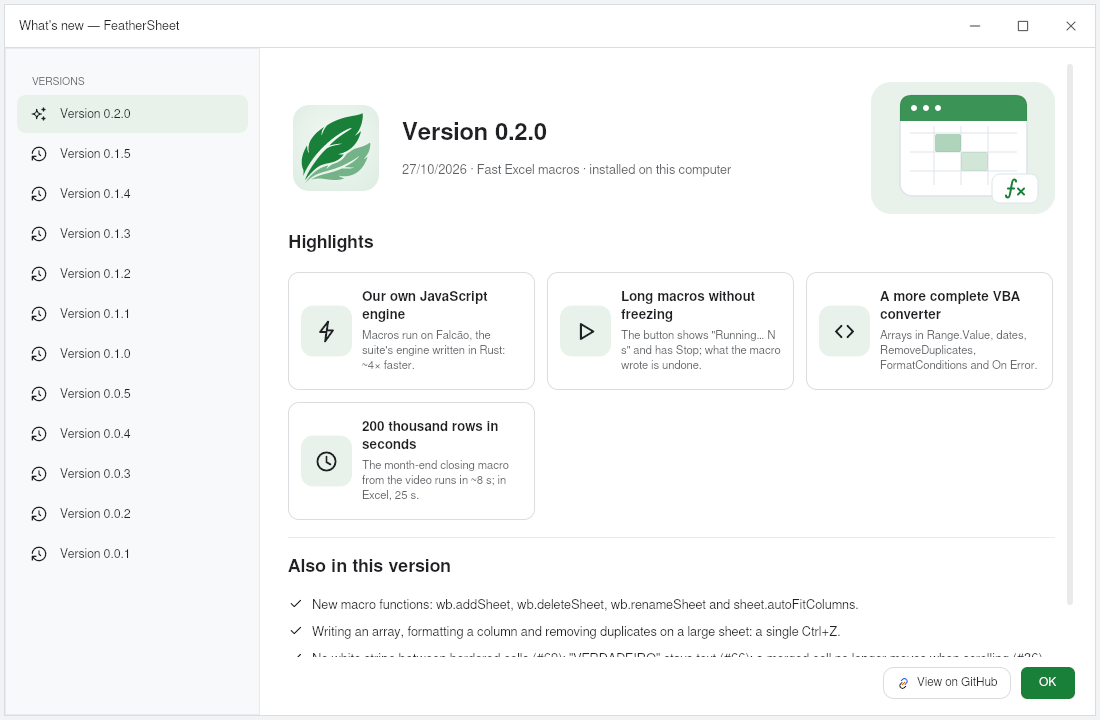
The same window opens by itself the first time after an update (and in the
Help menu, under What's new).
Coming in the next version
- OpenQuery with no size limit, with a ▾ menu on each column, multi-column selection (Ctrl/Shift), steps editable through the ⚙ gear and Split column into columns, like Power Query.
- OpenQuery script: each query is a short editable script:
let fonte = lerCsv("sales.csv");and then one line per step, such asfonte.renomearColuna("DT", "date");, with columns referenced by name. - Data › Get & Transform Data: from Text/CSV, from the Web, from Table/Range, recent sources and existing connections.
- CSV in any encoding: UTF-8, UTF-16 (Excel's "Unicode Text") and Windows-1252 ("ANSI", common in government data); dates and times come in already formatted; saving writes UTF-8 with a BOM, which Excel reads without mangling accents.
- Page Layout: Scale to Fit (width and height in pages) and cell size.
- Review: Protect Workbook, with a password in the same format as Excel.
What it does
| Area | Highlights |
|---|---|
| Formulas | all 520 Excel functions, with Portuguese or English names following the interface language; step-by-step formula evaluation; dynamic arrays, LAMBDA, volatile functions |
| Big files | up to 100 million rows; opens .parquet and large .csv; parallel calculation with selective invalidation; instant sum and count in the status bar; pasting a value into all 100 million rows of a column in 0.3 s; a formula over a whole 13.7-million-row column in milliseconds; pivot tables computed in the background, without freezing the window |
| Excel | opens and saves .xlsx with theme colors, shapes, images, gradients, charts in the right place, pivot tables and links to other files; opens .xlsm, converts the VBA macros to JavaScript and runs them, with buttons, shapes and UserForms |
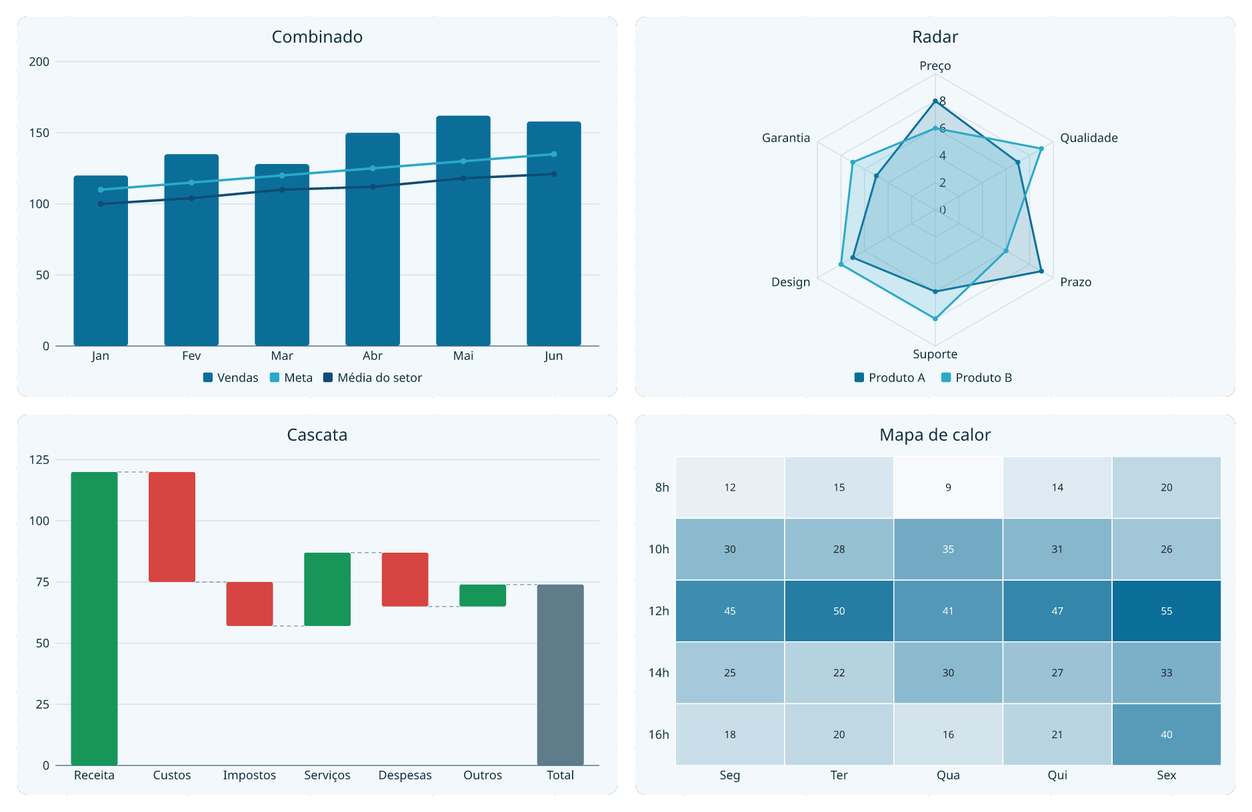
| Charts | 25 types (combo, waterfall, radar, Gantt, heat map…), mouse tooltip and clickable legend; charts editable through the Format chart panel (themes, per-point color, axes, labels), using the shared feather-charts engine |
| Data | OpenQuery (the Power Query equivalent: get data from a file, the Web or a table and transform it in editable steps), tables, pivot tables (show values as, pivot charts, slicers, drill-down on double click), conditional formatting, data validation, group/subtotal, sheet protection, Text to columns |
| Links | references to another file (=[Sales.fshz]Data!A1) that stay live while both are open; point to a cell by clicking in the other window |
| Macros | Alt+F11 editor with JavaScript macros (local Falcão engine) stored inside the file itself; forms like VBA UserForms |
| Local AI | MCP server (feathersheet --mcp) so an AI can read, write, sort, filter and check spreadsheets over stdio; turned on and off in Settings |
| Drawing | pen with pressure (graphics tablet) over the sheet |
Charts
 |
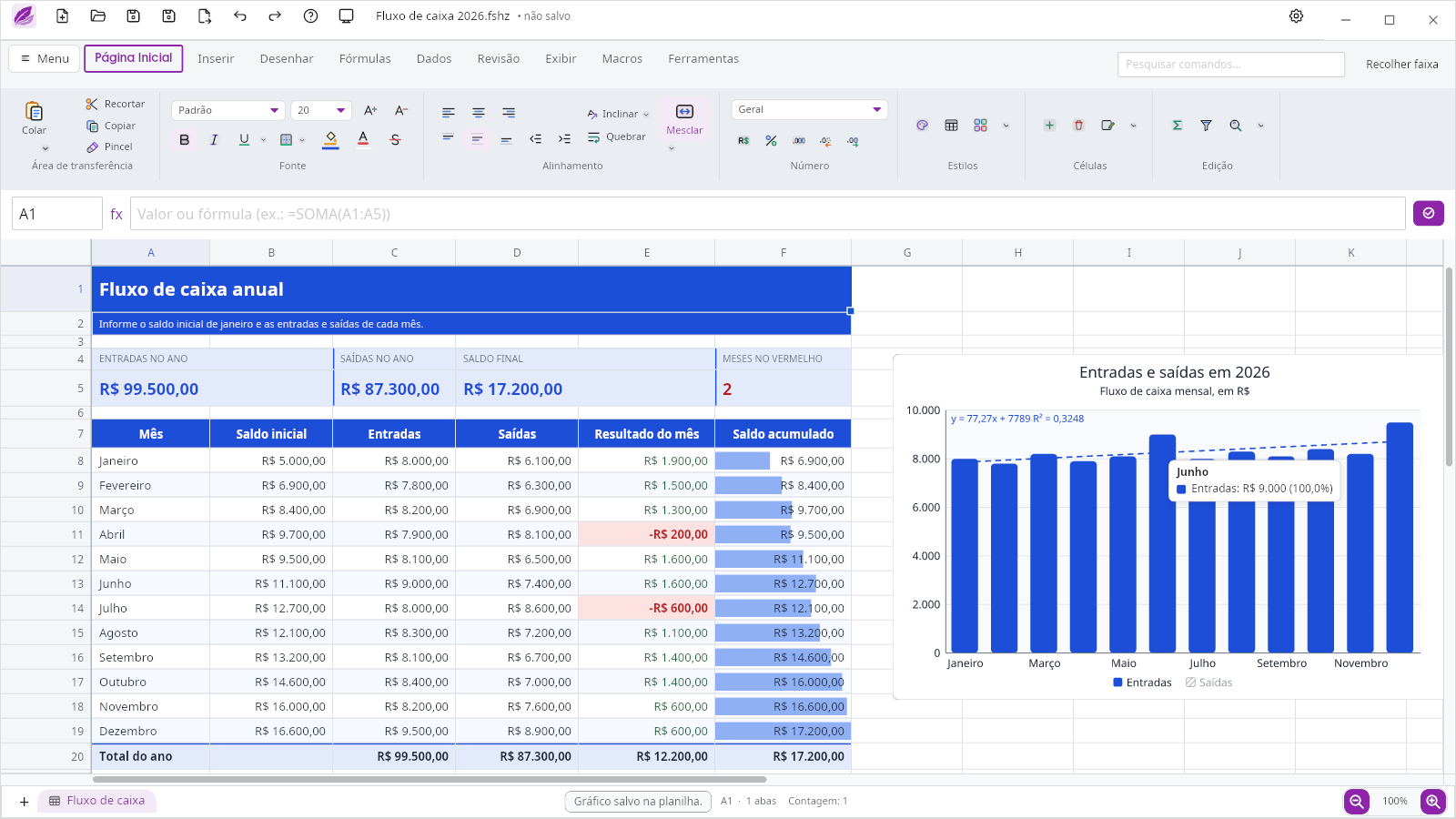 |
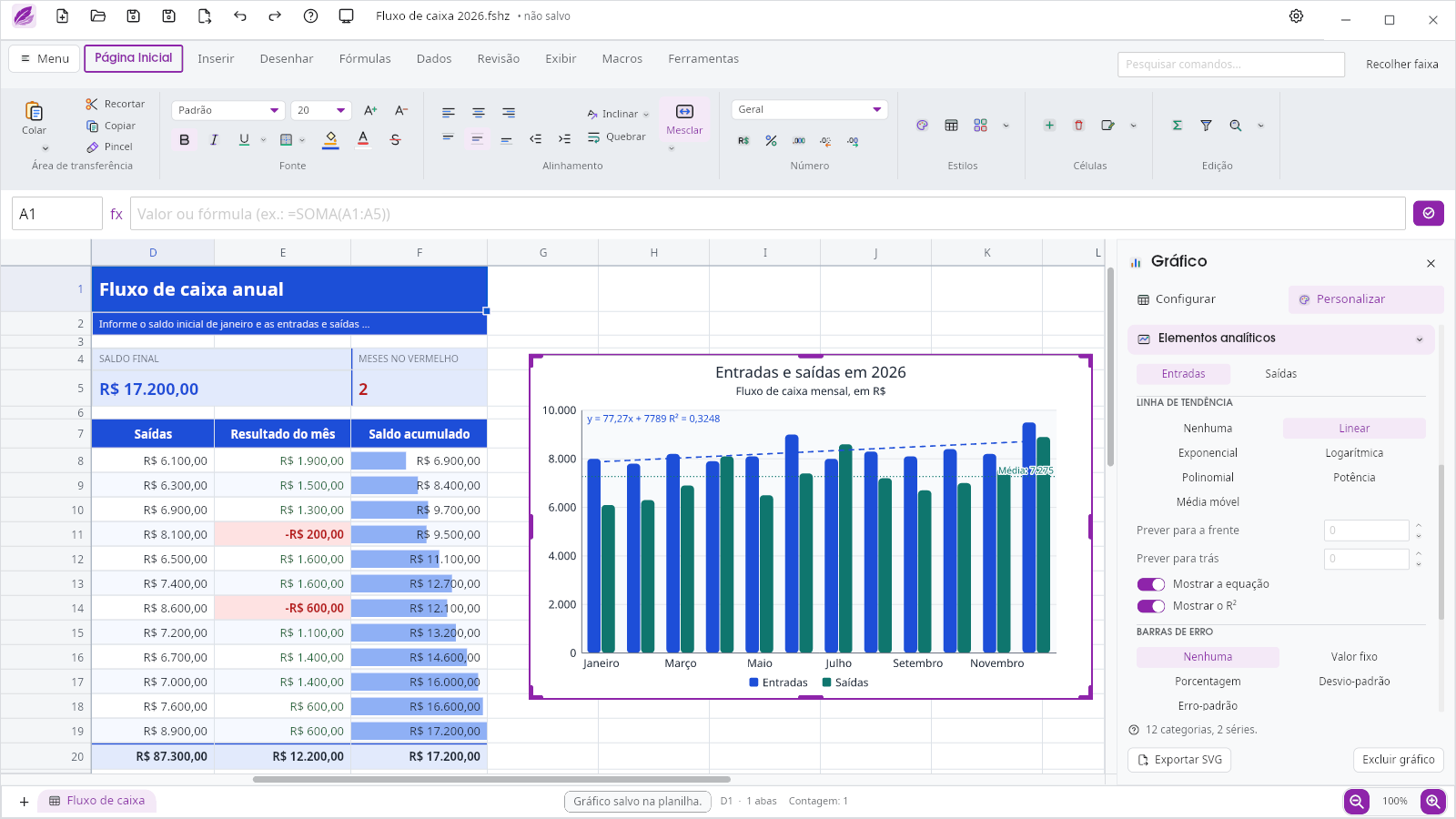
| Format chart: trendlines (linear, exponential, logarithmic, polynomial, power, moving average) with equation and R², error bars and max, min and average lines | Clickable legend and mouse tooltip: click an item to hide the series (it becomes hatched); the tooltip shows category, series, value and percentage, and can be customized |
Performance: the Heavy Spreadsheet
To measure speed we use a script-generated .xlsx that looks like a large
sales spreadsheet:
| Sheet | Contents | Formulas |
|---|---|---|
| Data | 1,000,000 rows × 13 columns: date, region, product, quantity, price and 7 computed columns (multiplication, nested IF, MONTH, XLOOKUP on a product table and a chain where each row adds the previous one) |
7,000,000 |
| Products | 200 products with SUMIFS, COUNTIFS and average ticket over the million rows |
600 |
| Summary | net amount and orders by region and month (SUMIFS/COUNTIFS over 1 million rows), SUMPRODUCT, AVERAGEIFS |
207 |
| Total | 13 million cells | 7,000,807 |
The file carries no stored results (fullCalcOnLoad): everything is
calculated on open.
| AMD Ryzen 7 5700G, 16 threads, 32 GB | v0.0.4 | v0.0.5 | v0.1.0 | v0.2.0 |
|---|---|---|---|---|
Read the .xlsx |
27.8 s | 7.4 s | 5.8 s | 5.2 s |
| Calculate the 7 million formulas | 6.3 s | 2.4 s | 2.4 s | 2.3 s |
| Until the sheet is ready | ~34 s | 9.7 s | 8.2 s | 7.4 s |
The v0.0.4 column comes from the app console (F12); the others from themedir_abrir_calcular bench (the same open-and-calculate code, without the
window; median of 3 runs). In v0.1.0 a formula repeated row by row
(E2*F2, E3*F3…) is translated from Excel only once; on a 2-core
computer, reading this .xlsx dropped from 33.7 s to 8.4 s.
The same file saved as .fshz, FeatherSheet's own format:
| v0.2.0, same machine and bench | .xlsx |
.fshz |
|---|---|---|
| File size | 93.6 MB | 29.8 MB |
| Read the file | 5.2 s | 0.4 s |
| Calculate on open | 2.3 s (7,000,807 formulas) | 0.5 s (807 formulas) |
| Until the sheet is ready | 7.4 s | 0.9 s |
| Peak RAM (bench) | 0.78 GB | 0.42 GB |
The .fshz stores the columns already split by type, along with the formula
results: on open, only the 807 summaries over the million rows (SUMIFS,COUNTIFS) are recalculated. The .xlsx in this test carries no results at
all, so everything is calculated again.
Compared with other programs (same file; FeatherSheet times from v0.2.0, its RAM from v0.1.1):
FeatherSheet (.fshz) |
FeatherSheet (.xlsx) |
Microsoft Excel ² | LibreOffice Calc 26.2 | OnlyOffice 9.4 | WPS Office 12.1 | |
|---|---|---|---|---|---|---|
| Machine | Ryzen 7 5700G, 32 GB | Ryzen 7 5700G, 32 GB | Core Ultra 7 155H, 64 GB (laptop) | Ryzen 7 5700G | Ryzen 7 5700G | Ryzen 7 5700G |
| Ready to use | 0.8 s | 7.6 s | 1 min 36.8 s | ~3 min 40 s | did not open in 10 min | hung: shows the sheet in ~50 s, but it can't be used and doesn't calculate |
| Peak RAM | 270 MB ⁴ | ~0.69 GB | 4.5 GB | 3.5 GB | 5.1 GB ¹ | 2.5 GB |
| RAM once ready | 270 MB | 362 MB | 4.5 GB ³ | 3.5 GB |
¹ Built on Chromium, with several processes; adding up each one's RAM counts
the memory they share twice, so the real peak is somewhat lower.
² Timed by hand on another machine: it loaded in 1 min 24.9 s and finished
calculating the formulas at 1 min 36.8 s. A reference, not an exact
measurement.
³ Assumed equal to the peak (not measured once ready).
⁴ Assumed equal to the RAM once ready (peak not measured).
FeatherSheet's times are those shown in the app's status bar; LibreOffice's
was read off the screen; the other programs' RAM is the sum of all their
processes. One measurement per program, not repeated.
Pivot table and paste on the Data sheet (1 million rows, v0.1.0,
times from the F12 console):
| Operation | Time |
|---|---|
| Create the pivot table (starts empty, like in Excel) | instant |
| Change a field (1 field in Rows + 1 in Values) | 130–205 ms |
| Change a field (2 fields in Rows + 1 in Values)¹ | ~350 ms |
| Double-click a value with 124 thousand source rows (drill-down) | 353 ms |
| Paste a value into A2:A100000000 (undo: 0.07 s) | 0.33 s |
¹ From the medir_etapas_da_troca bench (the same code, without the window); the other rows from F12.
For comparison, Microsoft Excel opening the same file on a laptop with an
Intel Core Ultra 7 155H and 64 GB took 1 min 24.9 s to load and finished
calculating the formulas at 1 min 36.8 s (timed by hand). The machines
are different, so the comparison is a reference, not an exact measurement.
To generate the file and test it on your machine (Python 3, no external
libraries; the optional second argument is the number of rows):
python3 scripts/gerar_xlsx_pesado.py Planilha_Pesada.xlsx 1000000
Excel parity
| What is compared | Score | Details |
|---|---|---|
| Features (ribbon commands, button by button) | 211 / 290 (72.8%) | PARIDADE-EXCEL.md · overall assessment |
| Worksheet functions | 520 / 520 | function catalog · known limits |
| VBA functions (VBA → JavaScript converter) | 52 covered and 12 partial, out of 141 | PARIDADE-VBA-FUNCOES.md |
The scores measure breadth (the command or function exists and works), not
visual fidelity; each document explains its criteria. The linked documents
are in Portuguese.
The .fshz format
The native file is a compressed container with embedded Git history
(built with gix, pure Rust): each save
can become a browsable version, with no server at all.
Structure
| Crate | Role |
|---|---|
feathersheet-core |
the engine: references, values, formulas and recalculation |
feathersheet-io |
.fshz, .xlsx, .xlsm, .csv and .parquet |
feathersheet |
the application: the native interface (pelicano) |
feathersheet-macros |
JavaScript macros on the Falcão engine |
feathersheet-vba |
VBA to JavaScript macro converter |
feathersheet-mcp |
MCP server for local AI |
Shared suite libraries used here:feather-io (files, tables, images and macros),feather-ui (theme, icons and components),feather-charts (charts),feather-draw (vector drawing, SVG and PDF) andfeather-shapes (shapes and icons).
Building
The suite libraries come from GitHub by tag, through Cargo itself: just
clone this repository.
git clone https://github.com/feather-works/feathersheet
cd feathersheet/crates/feathersheet
cargo run --release
On Linux, the window needs the system libraries (libxkbcommon,libwayland or libx11, libfontconfig). Commands, tests and pending
interface work are in Interface Pelicano.
Privacy
Everything runs locally. No spreadsheet content leaves the machine; there is
no account, login, telemetry or server. Connectors that fetch outside data
only act on explicit request, and one way only.
Documentation
- Roadmap to 1.0 — what is left to be 100% functional
- Documentation index
- Task log — history of deliveries up to the repository split
License
Reviews (0)
Sign in to leave a review.
Leave a reviewNo results found