camofox-opencli
Health Warn
- License — License: MIT
- Description — Repository has a description
- Active repo — Last push 0 days ago
- Low visibility — Only 5 GitHub stars
Code Fail
- Hardcoded secret — Potential hardcoded credential in docker-compose.yml
Permissions Pass
- Permissions — No dangerous permissions requested
No AI report is available for this listing yet.
Cloud OpenCLI on Camofox anti-detection Firefox — 163+ site adapters in one Docker container. noVNC for QR login, cookies persist in volume. Exposes REST + MCP server (and a Claude skill) at :8080 for external agents.
Camofox · OpenCLI ☤
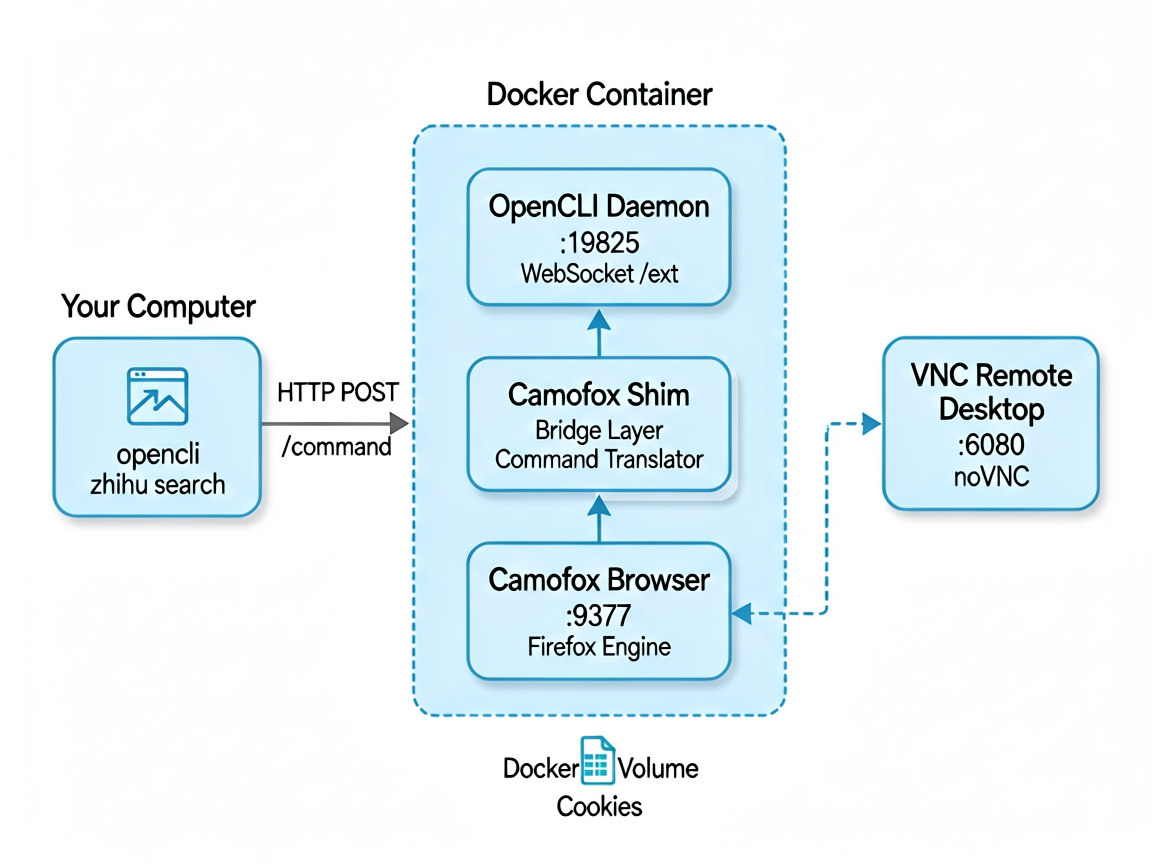
Camofox + OpenCLI — 163+ website adapters in the cloud. One Docker container combining Camofox anti-detection browser + Shim bridge layer.




Cloud OpenCLI + VNC Remote Login
OpenCLI runs natively on your desktop — a Chrome browser on your laptop, a local daemon controlling it via Chrome Extension. It stops working the moment you close your laptop.
Camofox · OpenCLI moves it to the cloud:
Your computer            Cloud server
───────────              ─────────────
                           ┌──────────────────────────────┐
                           │   Docker container            │
                           │                              │
  opencli zhihu            │   OpenCLI Daemon             │
  search 'AI agent'  ─────▶   (:19825)                    │
                           │        │                     │
                           │        │ WebSocket           │
                           │        ▼                     │
                           │   Camofox Shim               │
                           │        │                     │
                           │        │ REST API            │
                           │        ▼                     │
                           │   Camofox Firefox browser    │
                           │   (:9377)                    │
                           │                              │
  Open noVNC link          │   VNC remote desktop (:6080) │
  in browser ─────────────▶  ← scan QR, cookies persist   │
                           │                              │
                           └──────────────────────────────┘
Log in once, always online. Open Zhihu/Xiaohongshu/Xianyu via noVNC, scan the QR code once, and the cookies are written to the Docker Volume. After that, every opencli command automatically carries the login session — even after container restarts or rebuilds.
Zero changes to OpenCLI source. All 163 adapters call page.goto(), page.evaluate(), and other browser APIs. The Shim impersonates a Chrome Extension, connects to the OpenCLI daemon's WebSocket, intercepts commands, translates them into Camofox REST API calls, and sends results back. OpenCLI has no idea the browser behind it is Firefox.
How It Works
┌──────────────────────────────────────────────────────────────────┐
│                        Docker container                           │
│                                                                  │
│  User runs: opencli zhihu search 'AI agent'                      │
│         │                                                        │
│         │ HTTP POST /command                                     │
│         ▼                                                        │
│  ┌──────────────────────────────────┐                            │
│  │  OpenCLI Daemon (:19825)         │  ← unmodified daemon       │
│  │  HTTP Server + WebSocket /ext    │                            │
│  └──────────┬───────────────────────┘                            │
│             │ WebSocket forwards commands                        │
│             ▼                                                    │
│  ┌──────────────────────────────────┐                            │
│  │  Camofox Shim (v2)               │  ← bridge layer            │
│  │  • Impersonates Chrome Extension │                            │
│  │  • Connects to daemon /ext WS    │                            │
│  │  • Translates commands → REST    │                            │
│  └──────────┬───────────────────────┘                            │
│             │ HTTP REST                                          │
│             ▼                                                    │
│  ┌──────────────────────────────────┐                            │
│  │  Camofox browser (:9377)         │  ← Firefox engine          │
│  │  • Anti-detection fingerprinting │                            │
│  │  • VNC remote desktop (:6080)    │                            │
│  │  • Cookie persistence            │                            │
│  └──────────────────────────────────┘                            │
└──────────────────────────────────────────────────────────────────┘
Command Translation: DaemonCommand → Camofox REST API
OpenCLI sends 14 DaemonCommand types over WebSocket. The Shim maps them to Camofox REST endpoints:
| OpenCLI Command | Purpose | → Camofox API | Status |
|---|---|---|---|
navigate |
Page navigation | POST /tabs/:tabId/navigate |
✅ |
exec |
JS evaluation | POST /tabs/:tabId/evaluate |
✅ |
screenshot |
Screenshot | GET /tabs/:tabId/screenshot |
✅ |
cookies |
Get cookies | GET /sessions/:userId/cookies |
✅ |
tabs |
Tab management | POST/GET/DELETE /tabs |
✅ |
insert-text |
Text input | POST /tabs/:tabId/press |
✅ |
bind |
Bind tab | Internal mapping | ✅ |
close-window |
Close window | DELETE /sessions/:userId |
✅ |
cdp |
Chrome DevTools | — | ❌ Firefox has no CDP |
set-file-input |
File upload | — | ❌ Not implemented |
network-capture-* |
Network capture | — | ❌ No Firefox equivalent |
wait-download |
Download wait | — | ❌ Not implemented |
frames |
Iframe list | — | ❌ Not implemented |
8/14 commands implemented, covering all core social platform adapter needs. Unimplemented CDP/network commands don't affect Bilibili, Zhihu, Xiaohongshu, Twitter, etc.
A Complete Data Flow
1. User: opencli zhihu search 'AI agent'
2. CLI → HTTP POST /command → daemon(:19825)
3. Daemon → WebSocket /ext → Shim (impersonating Chrome Extension)
4. Shim parses: {action: "navigate", url: "https://www.zhihu.com/search?q=..."}
5. Shim → Camofox: POST /tabs/:tabId/navigate {userId, url}
6. Shim parses: {action: "exec", code: "wait for page load → scrape results"}
7. Shim → Camofox: POST /tabs/:tabId/evaluate {expression: code, timeout: 120000}
8. Camofox returns JSON → Shim → WebSocket → Daemon → CLI → user sees results
MCP + Skill for External Agents
The container also runs an opencli gateway (:8080) that exposes all 163+ platform adapters to external agents through two transports, plus a ready-made Claude skill:
| Transport | Endpoint | Auth |
|---|---|---|
| REST | GET/POST /health, /sites, /sites/:site/help, /run, /login |
Authorization: Bearer $GATEWAY_API_KEY |
| MCP | POST /mcp (streamable HTTP) |
same Bearer token |
Tools exposed via MCP
- Generic:
list_sites,site_help,run_command,browser,login,doctor - Per-site for 10 primary platforms (each description embeds its own command list):
xiaohongshu_command,bilibili_command,twitter_command,reddit_command,zhihu_command,douyin_command,weibo_command,youtube_command,hackernews_command,github_command - All other ~160 sites are reachable through
run_command+site_help
Connect an MCP client
Claude Desktop (claude_desktop_config.json) or Claude Code (.mcp.json):
{
  "mcpServers": {
    "camofox-opencli": {
      "url": "http://localhost:8080/mcp",
      "headers": { "Authorization": "Bearer YOUR_GATEWAY_API_KEY" }
    }
  }
}
The login tool returns a noVNC URL — open it in your browser to scan a QR code and persist cookies for sites that need authentication.
Drop-in Claude skill
skills/opencli-camofox/ ships with the container — stdlib-only Python scripts calling the gateway over HTTP. Set OPENCLI_GATEWAY_URL + GATEWAY_API_KEY (or ~/.opencli-gateway.env) and your Claude agent can list_sites, site_help, run, browser, and vnc_login with no extra setup.
Gateway env
| Variable | Default |
|---|---|
GATEWAY_PORT |
8080 |
GATEWAY_API_KEY |
(required for auth on REST + MCP) |
OPENCLI_BIN |
opencli |
OPENCLI_MANIFEST |
/opt/opencli/cli-manifest.json |
Quick Deploy
Option A — Pre-built image (recommended)
A self-contained image is published to GitHub Container Registry on every
change to main. The build bakes in the Camoufox binary, uBlock Origin and
GeoLite2-City.mmdb, so you only need to pull — no network access, no build
context preparation.
docker pull ghcr.io/fectivnfy112357/camofox-opencli:latest
docker run -d --name camofox \
  --privileged --shm-size=2g \
  -p 9377:9377 -p 6080:6080 -p 19825:19825 -p 8080:8080 \
  -e CAMOFOX_USER_ID=yourname \
  -e GATEWAY_API_KEY=$(openssl rand -hex 32) \
  -e CAMOFOX_API_KEY=my_secret_api_key_123 \
  -v camofox_data:/home/node/.camofox \
  ghcr.io/fectivnfy112357/camofox-opencli:latest
Then open http://localhost:6080 (noVNC) and log in to the sites you want
through a real browser. Cookies are persisted in camofox_data so subsequent
runs stay signed in.
Option B — Build from source
Forks are checked in as git submodules, so a build needs your fork URLs in.gitmodules. Run this in a clean checkout:
git clone --recurse-submodules https://github.com/Fectivnfy112357/camofox-opencli.git
cd camofox-opencli
docker compose build --no-cache
docker compose up -d
If you only want OpenCLI / Shim changes to hot-reload without rebuilding the
image, prefer --no-build:
./deploy.sh --no-build
Usage
docker exec -it camofox bash

# No login required
opencli bilibili search 'gaming'
opencli v2ex hot

# Login required (see VNC login below)
opencli zhihu search 'AI agent'
opencli xiaohongshu search 'camping'

# List all 163 platforms
opencli list
VNC Remote Login
For platforms requiring login (Zhihu, Xiaohongshu, Twitter, etc.), use noVNC to scan a QR code once — cookies persist automatically:
# Generate a VNC link and auto-navigate to the target site
python3 scripts/camofox-vnc-login.py fectivnfy --url https://www.zhihu.com

# Output: http://textvision.top:6080/vnc.html?autoconnect=true&resize=scale&token=xxxx
# Open in browser → scan QR → done
After logging in once, all opencli commands automatically reuse the session. Cookies are stored in a Docker Volume — they survive container restarts and rebuilds.
Updating
cd camofox-opencli
git pull
git submodule update --init --remote
docker compose down && docker compose build --no-cache && docker compose up -d
Submodules stay fresh automatically.
camofox-opencli/.github/workflows/bump-submodules.ymlruns on a daily cron (UTC 03:17) — every submodule pointer lands on upstream HEAD within 24h of a sub-repo push. No secrets to configure: the workflow uses the auto-injectedGITHUB_TOKEN, which hascontents: write+pull-requests: writeon this repo via the workflow'spermissions:block.For instant bumps (instead of waiting up to 24h), each sub-repo has a
.github/workflows/notify-aggregate.ymlthat callsrepository_dispatchon every push. Cross-repo dispatch needs a PAT, so that step is guarded and skipped silently if the sub-repo doesn't haveAGGREGATE_DISPATCH_TOKENset — the daily cron still catches everything.
Subprojects
| Repository | Description | License |
|---|---|---|
| camofox-browser | Camofox fork, added GET cookies endpoint | MIT |
| camofox-shim | WebSocket bridge, OpenCLI ↔ Camofox | MIT |
| OpenCLI | 163+ site adapters CLI tool | MIT |
License
This project is licensed under the MIT License.
Subproject licenses:
- camofox-browser — Based on jo-inc/camofox-browser (MIT), fork adds
GET /sessions/:userId/cookiesendpoint andentrypoint-camofox.sh. - camofox-shim — Original project, MIT.
- OpenCLI — Based on jackwener/OpenCLI (MIT), fork is unmodified, used as a submodule.
All three subprojects retain their upstream MIT licenses. This project is also MIT.
Built with ❤️
Reviews (0)
Sign in to leave a review.
Leave a reviewNo results found