unslop-ui
Health Gecti
- License — License: MIT
- Description — Repository has a description
- Active repo — Last push 0 days ago
- Community trust — 21 GitHub stars
Code Gecti
- Code scan — Scanned 12 files during light audit, no dangerous patterns found
Permissions Gecti
- Permissions — No dangerous permissions requested
Bu listing icin henuz AI raporu yok.
Agent skill that cuts AI tells from interface and chart copy: eyebrow labels, 01/02/03 numbering, botsplaining captions, decorative badges and status dots.
unslop-ui
An agent skill that strips the AI look out of interface and chart copy, and optionally its visual surface.



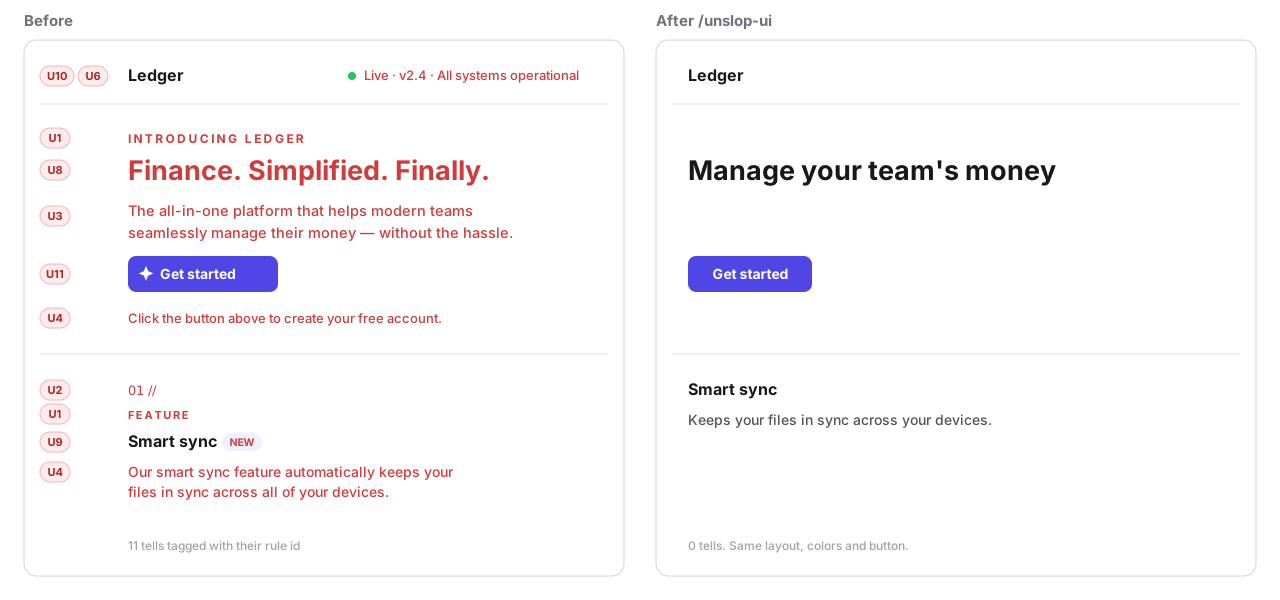
Agents decorate everything they build: a tiny uppercase label over every heading, 01 // before each feature, a subtitle that repeats the title, a caption explaining the button you are looking at, a green "LIVE" dot wired to nothing. unslop-ui finds those patterns, removes them, and tells you what it cut and what it left for you to decide.
It is the interface companion to /pstack:unslop, which cleans prose. unslop-ui loads unslop's rules when it runs and applies them to every string it keeps.
What it removes
| Id | Pattern | Example |
|---|---|---|
| U1 | Eyebrow labels | INTRODUCING LEDGER above the H1 |
| U2 | Decorative numbering | 01 //, 02 // on features with no real order |
| U3 | Subtitle reflex | "Analytics" with "Understand your data better" under it |
| U4 | Botsplaining | "Click the button above to get started" |
| U5 | Leaked design notes | "(updates in real time)", "This card shows..." |
| U6 | Status strings | Live · v2.4 · Synced · Updated just now |
| U7 | Labeling everything | Label, placeholder and helper text that all say "email" |
| U8 | Staccato slogans | "Finance. Simplified. Finally." |
| U9 | Badges without state | NEW, AI, Beta added for flavor |
| U10 | Status dots | animate-pulse dot next to static data |
| U11 | Decorative emojis | 🚀 Get started, 💰 Revenue |
| U12 | Chart titles that name the chart | "Line chart of weekly active users" |
| U13 | Reading instructions | "Each point represents one week. Hover for details." |
| U14 | Saying it twice | A value on every point plus axis plus gridlines; ▲ 12% up plus "Revenue grew 12%..." |
| U15 | Chart scaffolding | Frame box around the plot, dark or dense gridlines, thick axes, shadows, 3D |
| U16 | Legend instead of a label | A legend box when each line could carry its name at its end |
Surface rules (opt-in)
Add --surface and the skill also fixes four visual tells, each with a concrete replacement value from references/tokens.md:
| Id | Pattern | Fix |
|---|---|---|
| U17 | Hue-to-hue gradients, gradient text, colored glows, blurred blobs | Solid neutral surface, hairline border, shadow no stronger than 0 1px 2px rgb(0 0 0 / 0.05) |
| U18 | Off-scale spacing: mt-[13px], gap: 7px |
Nearest step of 4, 8, 12, 16, 20, 24, 32, 40, 48, 64 |
| U19 | font-extrabold, font-black, weights 800 and 900 |
500 or 600 |
| U20 | transition-all, hover:scale-* on cards, animate-bounce |
Named properties at 150ms ease-out |
/unslop-ui src/pages/dashboard.tsx --surface
Without the flag these four never run, so a plain /unslop-ui behaves as before. They replace a value with a better value. They don't change the palette, the type family or the layout. For that, see Pairs well with.
Every run ends with a verdict: heavy (work through every rule), light (fix only what was found) or none (edit nothing, say so). A screen with nothing to cut is left alone.
Without --surface it leaves logic, data, colors and layout alone. It keeps aria-label, alt and screen-reader text, and a form field keeps its visible label. Anything that reflects real state (a badge rendered from a prop, a real step order) stays, and the report says why.
It cuts first and writes little. When a slogan has to become a sentence, the new text uses only what the page already says: it never adds a number, a speed or a feature. Claims the code can't verify, such as "Trusted by 10,000+ teams" or a testimonial, are left in place and listed as tasks for you.
Examples
All three come from examples/: the files in before/ were written to be full of tells, and after/ is the unedited output of one /unslop-ui run in a fresh Claude Code session. The drawings show those files rendered with sample data, and each tell carries the id of the rule that removed it.
A dashboard
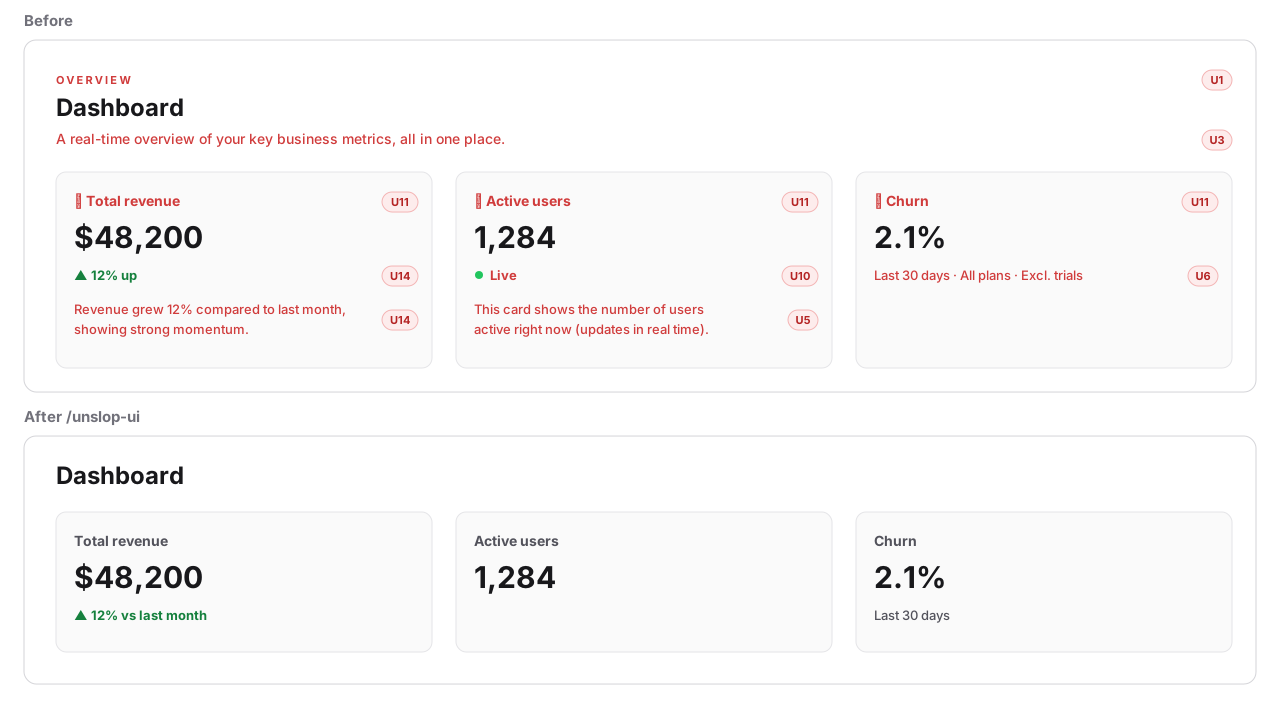
-  <div>
-    <p className="... uppercase tracking-[0.2em] ...">Overview</p>
     <h1 className="text-2xl font-semibold">Dashboard</h1>
-    <p className="text-muted-foreground">A real-time overview of your key business metrics, all in one place.</p>
-  </div>

-  <CardTitle>💰 Total revenue</CardTitle>
+  <CardTitle>Total revenue</CardTitle>
-  <span className="text-green-600">▲ 12% up</span>
-  <CardDescription>Revenue grew 12% compared to last month, showing strong momentum.</CardDescription>
+  <span className="text-green-600">▲ 12% vs last month</span>

-  <span ...><span className="size-2 rounded-full bg-emerald-500 animate-ping" />Live</span>
-  <CardDescription>This card shows the number of users active right now (updates in real time).</CardDescription>

-  <span className="text-xs">Last 30 days · All plans · Excl. trials</span>
+  <span className="text-xs">Last 30 days</span>
A chart
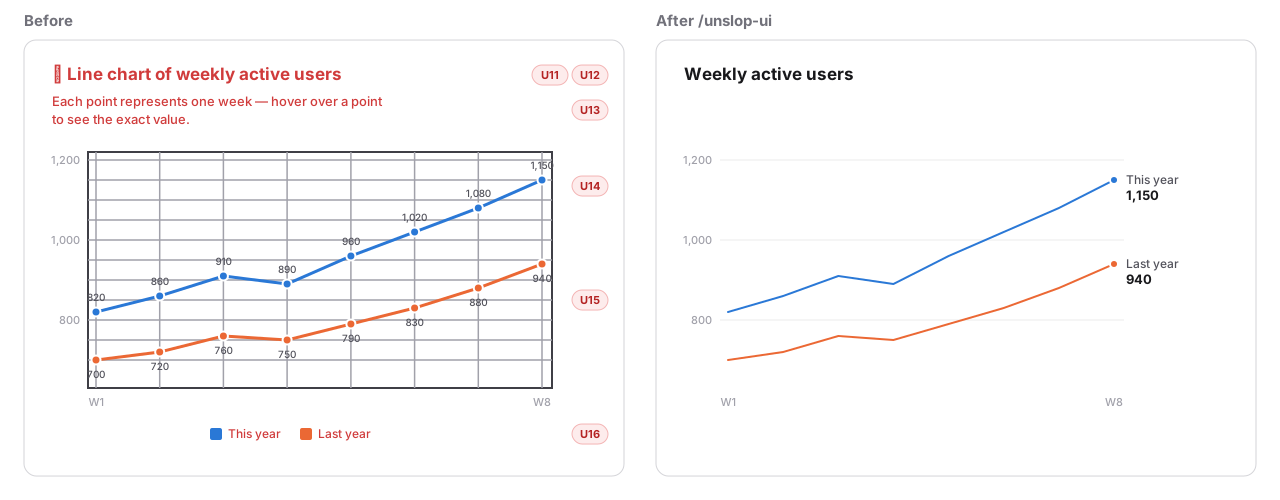
   plugins: {
-    title: { display: true, text: "📈 Line chart of weekly active users" },
-    subtitle: { display: true, text: "Each point represents one week — hover over a point to see the exact value." },
-    legend: { display: true, position: "bottom" },
-    datalabels: { display: true },
+    title: { display: true, text: "Weekly active users" },
+    legend: { display: false },
+    datalabels: {
+      display: (ctx) => ctx.dataIndex === ctx.dataset.data.length - 1,
+      formatter: (value, ctx) => `${ctx.dataset.label} ${value}`,
+      align: "right",
+    },
   },
   scales: {
-    x: { grid: { color: "#9ca3af", lineWidth: 2 }, border: { display: true, width: 2, color: "#111827" } },
-    y: { grid: { color: "#9ca3af", lineWidth: 2 }, border: { display: true, width: 2, color: "#111827" }, ticks: { stepSize: 25 } },
+    x: { grid: { color: "#e5e7eb", lineWidth: 1 }, border: { display: true, width: 1, color: "#e5e7eb" } },
+    y: { grid: { color: "#e5e7eb", lineWidth: 1 }, border: { display: true, width: 1, color: "#e5e7eb" }, ticks: { stepSize: 25 } },
   },
A landing page
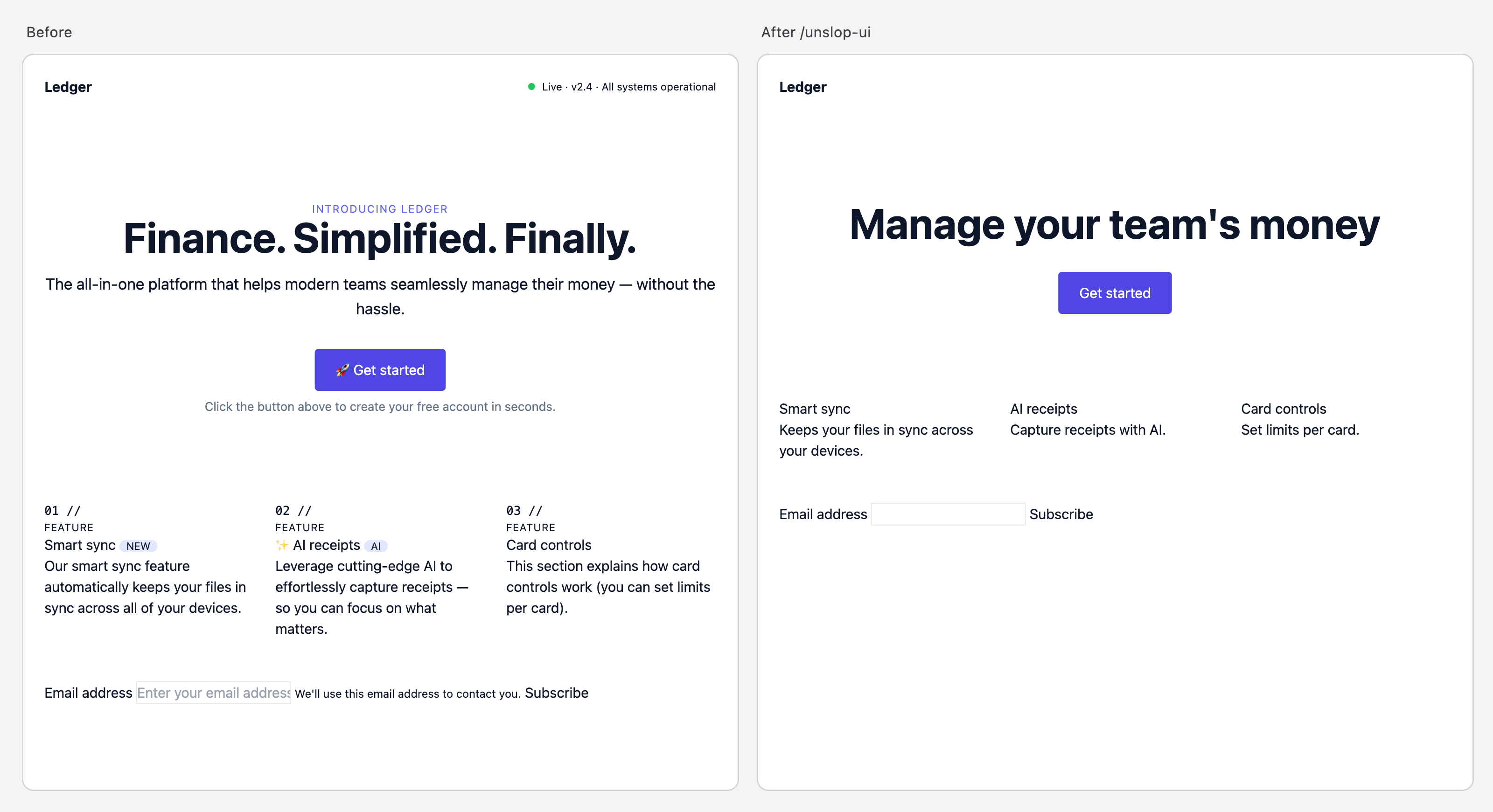
The page from the drawing at the top, rendered in a browser. Full files: before, after.
By the numbers
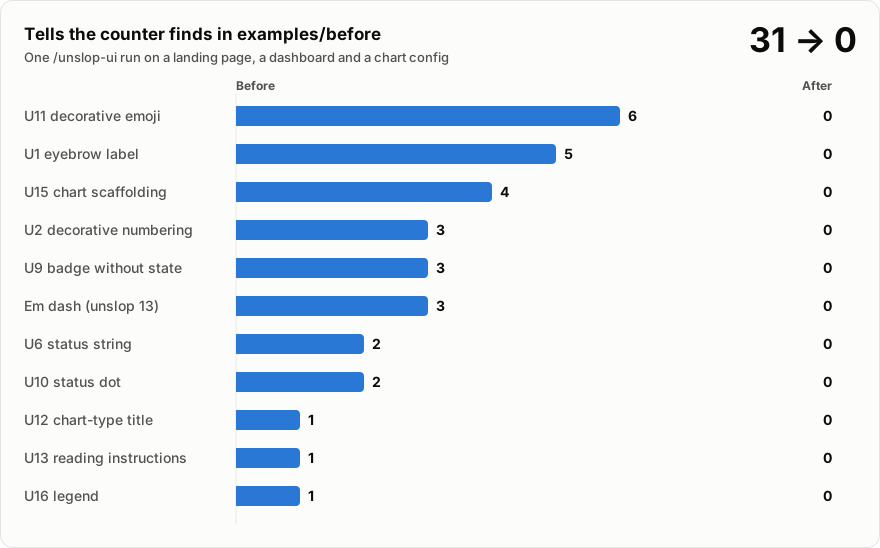
The counter only sees the patterns a regex can find. The run also removes the ones that need reading, such as subtitles, botsplaining and slogans, and its report counts those separately.
Install
With the skills CLI, for Claude Code, Cursor, Codex and other agents:
npx skills add felipebasurto/unslop-ui -g
As a Claude Code plugin:
claude plugin marketplace add felipebasurto/unslop-ui
claude plugin install unslop-ui@unslop-ui
By hand:
git clone https://github.com/felipebasurto/unslop-ui && cp -R unslop-ui/skills/unslop-ui ~/.claude/skills/
Install pstack too and unslop-ui reads its unslop rules on every run, so it follows their updates. Without it, the skill uses a condensed copy of the same rules that ships in references/unslop-fallback.md. Either way it loads only the rules that apply to interface text and skips the ones written for documents.
Use
/unslop-ui src/pages/landing.tsx
Pass a file, a folder or a component name. With no argument it works on the files changed in the conversation. As a Claude Code plugin the command is /unslop-ui:unslop-ui. In Codex, type $unslop-ui.
The skill only runs when you call it. It never triggers on its own, because cutting copy is a decision you should make.
Each run ends with a report. This one is from the run that produced examples/after, shortened:
| Rule | Before | After | Kept |
|---|---|---|---|
| U1 eyebrow | 5 | 0 | |
| U4 botsplaining | 5 | 0 | |
| U11 emoji | 6 | 0 | |
| unslop 13 em dash | 3 | 0 |
Rewritten
"Finance. Simplified. Finally." → "Manage your team's money" (U8, from the cut hero line "manage their money")
"▲ 12% up" → "▲ 12% vs last month" (U14, the period came from the cut description)
"📈 Line chart of weekly active users" → "Weekly active users" (U12)
Kept on purpose
aria-label="Subscribe to newsletter": guardrail.- The email label: it stays visible. I added
for="email"andid="email"so it is tied to the input.
Tasks
-
Dashboard.tsx:15"12%" is hard-coded, not bound to data. Bind it to a prop or confirm it is a placeholder. -
landing.htmlThe hero now has no supporting line. If you want one, add a fact you can verify (price, free tier, integrations).
The table counts what was found and what is left. "Rewritten" lists every string the skill wrote, old and new, because that is the part you have to check. Deletions are in the diff. "Kept" is how many hits it left on purpose, so the count doesn't have to reach 0: the skill is told never to delete something legitimate to get there.
The counter
scripts/count_tells.py is a regex counter for the patterns that can be found mechanically: U1, U2, U6, U9, U10, U11, em dashes, and the common code forms of U12, U13, U15 and U16 (a title that names the chart type, "hover over", shadows, thick axis borders and gridlines, legends turned on). With --surface it also counts U17 to U20. The skill runs it before and after editing. You can run it on its own, and --max makes it fail a CI job:
python3 skills/unslop-ui/scripts/count_tells.py src/
python3 skills/unslop-ui/scripts/count_tells.py --surface src/
python3 skills/unslop-ui/scripts/count_tells.py --max 0 src/   # exit 1 above 0
It reads HTML, JSX, TSX, JS, TS, Vue, Svelte, Astro, Markdown and MDX, plus CSS, SCSS and Less for the styling rules, JSON for translation files, and Python for matplotlib and Plotly charts. It prints JSON with a count and up to five file:line locations per rule.
It is a heuristic. It can't see the patterns that need reading (U3 to U5, U7, U8, U14). It skips what usually isn't a tell: comments, loading skeletons, uppercase table headers, a lone "—" in an empty cell, a single "·" between two facts, "New" on a button. It still flags some legitimate cases, such as a badge that is wired to real data.
Compatibility
| Agent | Status |
|---|---|
| Claude Code | Full support: loads unslop rules automatically, takes arguments |
| Cursor | Works. Run scripts/load_unslop.py yourself if the unslop rules don't appear |
| Codex | Works, explicit invocation only (agents/openai.yaml) |
The counter needs Python 3.9 or newer and no packages.
Development
python3 -m unittest discover -s tests
The tests check that the counter finds every planted pattern in examples/before, finds none in examples/after, ignores comments and the legitimate look-alikes, and that the loader picks the newest pstack install, keeps only the rules for interfaces, or falls back to the bundled copy.
The counter can only reward deleting, so the behavior of the skill itself has its own check. evals/ holds five small screens and what must be true after a run:
| Fixture | What it checks |
|---|---|
clean |
A screen with nothing to cut comes back byte-identical |
real-state |
A badge, a dot and numbering tied to real state or real order survive; the decorative ones go |
i18n |
Copy in a translation file is fixed there, not hard-coded into the component |
form |
Labels stay visible and tied to their inputs; a real constraint and an accessible name stay |
claims |
Slogans go without invented facts or numbers; unverifiable social proof is reported, not deleted |
python3 evals/run.py                       # runs `claude -p` on every fixture, then checks
python3 evals/run.py form claims           # only these
python3 evals/run.py --agent 'codex exec' --prompt '$unslop-ui .'   # another agent
It copies the fixtures to a temporary folder, runs the agent there, and prints what failed with the path to the edited copies and each run's report. It needs an agent CLI and spends tokens, so it is not part of CI. Run it after changing SKILL.md.
Pairs well with
tufte-claude-skill builds charts from Edward Tufte's principles: chart choice, graphical integrity, small multiples. unslop-ui doesn't redesign charts. It borrows the subtractive half of those ideas (one encoding per quantity, faint scaffolding, direct labels over legends) as U14 to U16, so you can build with the Tufte skill and clean up any interface with this one.
unslop by Damir Sokolovsky (@heydamir) covers the whole screen instead of the copy: it writes a short design direction first, then works through spacing, color, icons, copy, type, layout, details, visuals and motion, with starting tokens for each. If a dashboard needs a redesign and not only a cleanup, run it first, then run unslop-ui as the final copy and chart pass. unslop-ui stays subtractive on purpose: it won't pick a direction, a palette or a type family for you.
Credits
The --surface rules, the verdict step and the report-as-tasks list were suggested by user feedback after comparing this skill with unslop (CC BY 4.0). The values in references/tokens.md are written for this skill, using common practice (a 4px grid, 4.5:1 contrast, hairline borders).
The unslop rules are by Lauren Tan, from pstack (MIT). U14 to U16 follow Edward Tufte's data-ink and chartjunk principles. The other UI patterns come from what designers and developers keep pointing out about AI-built interfaces in 2026.
License
Yorumlar (0)
Yorum birakmak icin giris yap.
Yorum birakSonuc bulunamadi