claude-statusline
Health Warn
- License — License: MIT
- Description — Repository has a description
- Active repo — Last push 0 days ago
- Low visibility — Only 6 GitHub stars
Code Pass
- Code scan — Scanned 9 files during light audit, no dangerous patterns found
Permissions Pass
- Permissions — No dangerous permissions requested
This tool provides a configurable status line for Claude Code, displaying contextual information like the current directory, git branch, model name, session cost, and context window usage. It runs as a local command-line utility written in Go and integrates directly into the Claude Code settings.
Security Assessment
Overall risk: Low. The light code audit scanned 9 files and found no dangerous patterns, hardcoded secrets, or elevated permission requests. The tool operates entirely locally; it does not appear to make external network requests. It inherently accesses local file system data (to read configurations and check git status) and executes as a local shell command to generate the status line prompt. Because it is limited to reading local repository and configuration data to format a display string, the attack surface is minimal.
Quality Assessment
The project is in active development, with the most recent push occurring today. It uses the permissive MIT license and provides clear, comprehensive documentation with straightforward installation methods (Homebrew and Go). The main drawback is its low community visibility, currently sitting at only 6 GitHub stars. Consequently, it should be viewed as an early-stage or niche project rather than a battle-tested community standard, though its underlying code structure appears clean.
Verdict
Safe to use.
Configurable status line for Claude Code
claude-statusline
Configurable status line for Claude Code.
Installation
With Homebrew:
brew install felipeelias/tap/claude-statusline
Or with Go:
go install github.com/felipeelias/claude-statusline@latest
Setup
Add to your Claude Code settings (.claude/settings.json or global settings):
{
  "statusLine": {
    "type": "command",
    "command": "claude-statusline prompt"
  }
}
Generate a starter config:
claude-statusline init
Preview with mock data:
claude-statusline test
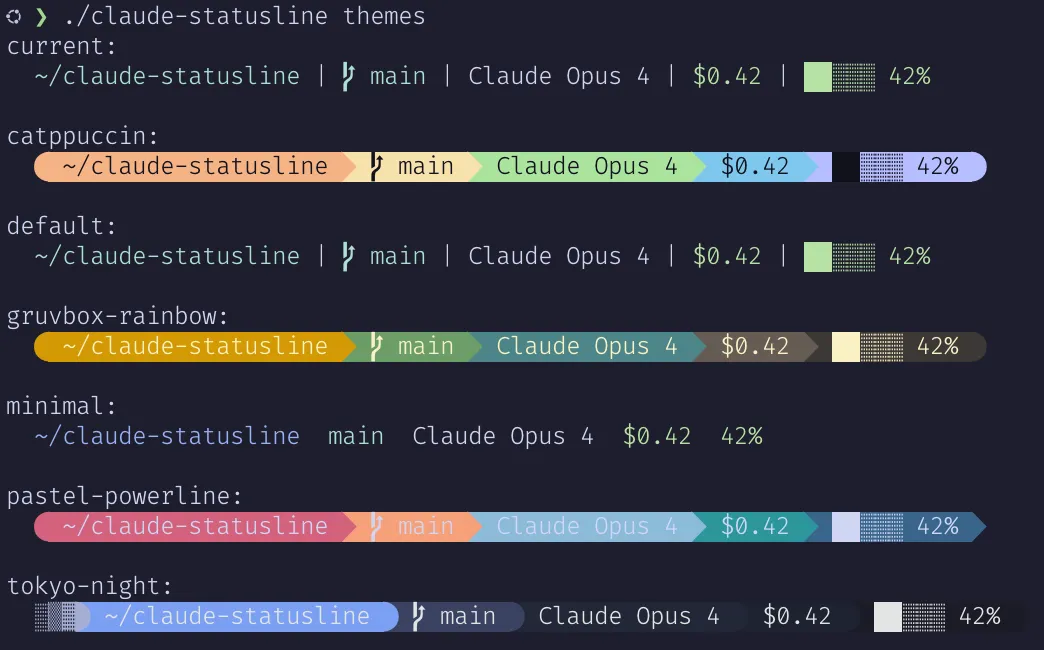
claude-statusline themes
Commands
| Command | Description |
|---|---|
prompt |
Render the status line (also the default when no command is given) |
init |
Create default config at ~/.config/claude-statusline/config.toml |
test |
Render with your config and mock data (for config iteration) |
themes |
Preview all built-in presets with mock data |
Global flags: --config / -c to override config path, --version.
Configuration
Config file location: ~/.config/claude-statusline/config.toml
Works with zero config. The default format is:
format = "$directory | $git_branch | $model | $cost | $context"
Presets
Presets are inspired by Starship presets. Each preset defines the layout, separators, colors, and module configuration.
preset = "catppuccin"
Preview all presets: claude-statusline themes
Built-in presets
| Preset | Description | Nerd Font |
|---|---|---|
default |
Flat with | pipes, standard colors |
No |
minimal |
Clean spacing, no separators | No |
pastel-powerline |
Pastel powerline arrows (pink/peach/blue/teal) | Yes |
tokyo-night |
Dark blues rounded powerline with gradient | Yes |
gruvbox-rainbow |
Earthy rainbow powerline | Yes |
catppuccin |
Catppuccin Mocha powerline | Yes |
Overriding preset defaults
Presets set the format string and module configs, but you can override any field:
preset = "catppuccin"

# Override just one module
[model]
format = " {{.DisplayName}} "
style = "fg:#11111b bg:#cba6f7 bold"
Modules
| Module | Default | Description |
|---|---|---|
directory |
on | Current directory (tilde-collapsed, truncated) |
git_branch |
on | Git branch with status indicators (dirty, ahead/behind, worktree) |
model |
on | Model name (display name, short name, or raw ID) |
cost |
on | Session cost in USD |
context |
on | Context window usage with progress bar |
session_timer |
off | Session elapsed time |
lines_changed |
off | Lines added/removed |
usage |
off | Plan usage limits (5-hour block and weekly) |
vim_mode |
off | Vim mode indicator (NORMAL, INSERT, etc.) |
agent_name |
off | Agent name when running with --agent |
Enabling modules
To enable a disabled module, set disabled = false and add it to the format string:
format = "$directory | $git_branch | $model | $cost | $context | $session_timer"

[session_timer]
disabled = false
Model module
Template fields:
| Field | Description | Example |
|---|---|---|
{{.DisplayName}} |
Display name from Claude Code (default) | Claude Sonnet 4.6 |
{{.Short}} |
Compact name extracted from model ID | Sonnet 4.6 |
{{.ID}} |
Raw model ID | claude-sonnet-4-6-20250514 |
[model]
format = "{{.Short}}"
style = "bold"
Usage module
The usage module shows your Claude plan usage limits (5-hour rolling window and 7-day). Requires Claude Code 2.1.80+ which provides rate_limits in the status line payload.
format = "$directory | $git_branch | $model | $cost | $context | $usage"

[usage]
disabled = false
Template fields:
| Field | Description |
|---|---|
{{.BlockPct}} |
5-hour rolling window usage (0-100) |
{{.WeeklyPct}} |
7-day usage (0-100) |
{{.BlockBar}} |
Progress bar for 5-hour window |
{{.WeeklyBar}} |
Progress bar for 7-day window |
{{.BlockResets}} |
Time until 5-hour reset (e.g. "2h13m") |
{{.WeeklyResets}} |
Time until 7-day reset (e.g. "3d2h") |
To only show usage when it exceeds a threshold (e.g. 5-hour block above 70%, weekly above 80%):
[usage]
disabled = false
format = '{{if ge .BlockPct 70.0}}{{.BlockBar}} {{printf "%.0f" .BlockPct}}%{{end}}{{if ge .WeeklyPct 80.0}} W:{{printf "%.0f" .WeeklyPct}}%{{end}}'
The module renders empty if rate_limits is not present in the Claude Code payload (older versions).
Vim mode module
The vim_mode module shows the current vim editor mode when vim mode is enabled in Claude Code.
format = "$vim_mode | $directory | $git_branch | $model | $cost | $context"

[vim_mode]
disabled = false
Template fields:
| Field | Description |
|---|---|
{{.Mode}} |
Current vim mode (e.g. NORMAL, INSERT) |
The module renders empty if vim mode is not enabled or the mode string is empty.
Clickable hyperlinks (OSC 8)
Modules can wrap their output in OSC 8 terminal hyperlinks, making text clickable in supported terminals.
git_branch
When enabled, the branch name becomes a clickable link to the branch page on the remote. The base URL is auto-detected from git remote get-url origin, and the branch path pattern is selected based on the host:
- GitHub (default):
/tree/<branch> - GitLab (hosts containing "gitlab"):
/-/tree/<branch> - Bitbucket (hosts containing "bitbucket"):
/src/<branch>
Branch names are percent-encoded so characters like # don't break the URL.
[git_branch]
hyperlink = true
# hyperlink_base_url = "https://github.com/owner/repo"  # override auto-detection
directory
When enabled, the directory text links to the path using a configurable URL template. The default opens file:// URLs with properly encoded paths; set hyperlink_url_template for VS Code or other editors.
Template fields:
{{.AbsPathEncoded}}— percent-encoded absolute path (use for URLs){{.AbsPath}}— raw absolute path (use for schemes that handle raw paths, likevscode://)
[directory]
hyperlink = true
# hyperlink_url_template = "file://{{.AbsPathEncoded}}"  # default
# hyperlink_url_template = "vscode://file{{.AbsPath}}"   # open in VS Code
Style system
Modules support a style field that accepts several formats:
| Format | Example |
|---|---|
| Named | red, green, cyan, bold, dim, italic |
| Hex | fg:#ff5500, bg:#333333 |
| 256-color | 208, fg:208, bg:238 |
| Combined | fg:#aabbcc bg:#333333 bold |
Alternatives
Other statusline tools from the awesome-claude-code list:
Contributors
License
MIT
Reviews (0)
Sign in to leave a review.
Leave a reviewNo results found