magi
Health Warn
- License — License: MIT
- Description — Repository has a description
- Active repo — Last push 0 days ago
- Low visibility — Only 8 GitHub stars
Code Fail
- rm -rf — Recursive force deletion command in cielago/scripts/checkout.sh
Permissions Pass
- Permissions — No dangerous permissions requested
No AI report is available for this listing yet.
Run coding agents across your machines: cielago moves and sends the work, magi shows it and suggests moves

magi
See your coding agents on all your machines, and move their work to the one that fits.
magi · cielago · How it works · FAQ
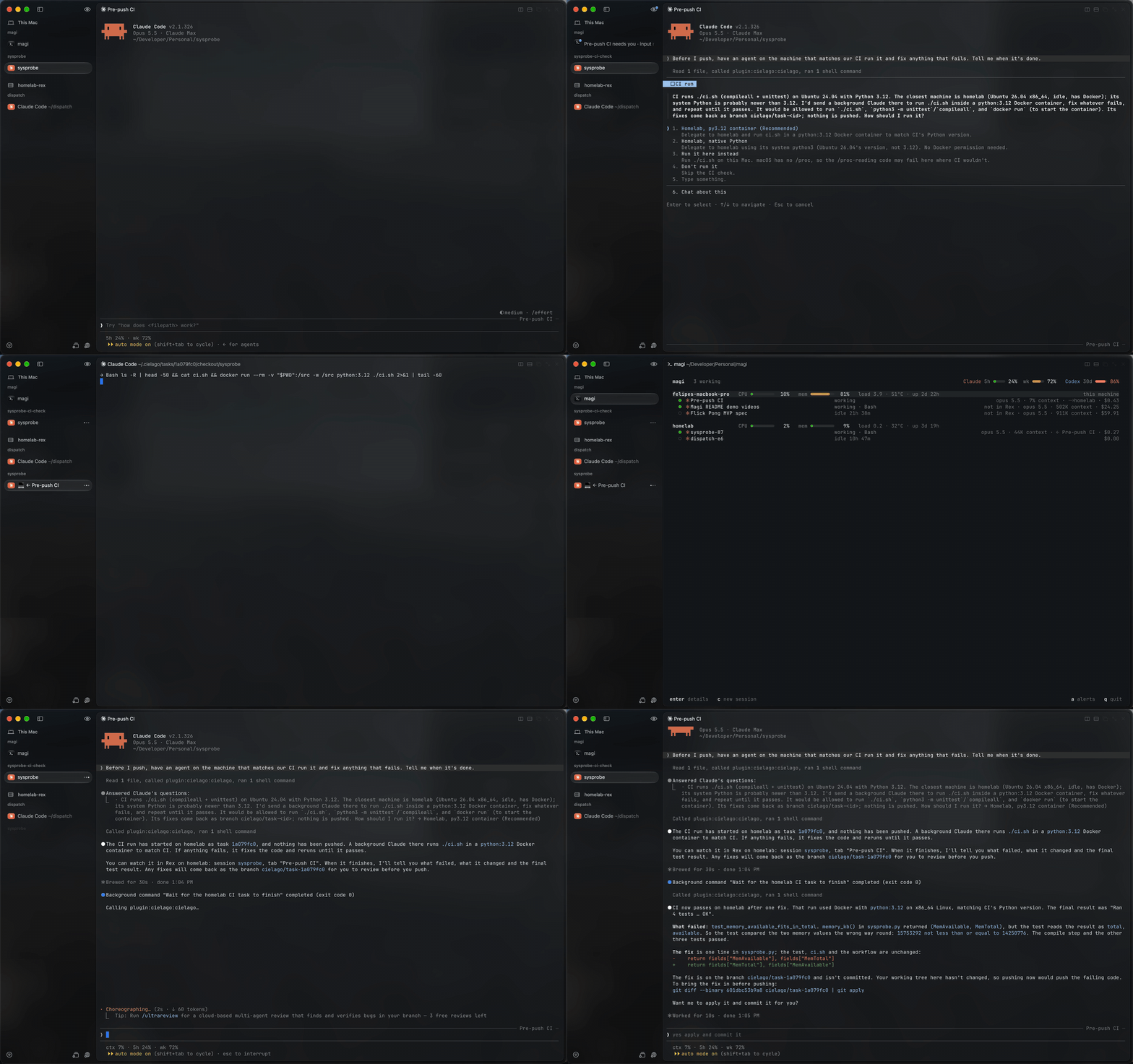
Claude on a Mac sends CI to the Linux homelab. A Claude there fixes the failing test, and the Mac session is told when it's done.
This repo holds two apps:
- cielago does what you ask. It hands a Claude Code or Codex session
off to another machine, along with its conversation and uncommitted work.
It also lets Claude send work there and be told when it's done. It works
on its own, from any Claude Code session, over SSH. - magi is the layer on top. It's an overview of your agents and
machines in one Rex pane: each
machine's load, every session's state, and what needs you. When a machine
is busy and another has room, it suggests moving a session there, and
moves it through cielago when you say so.
magi
magi is an overview of your agents and machines, built to sit next to Rex's
sidebar. It handles any number of machines and needs no server or config
file.
- It suggests moves. A machine counts as busy when its memory is 90%
full, its CPU has averaged 80% for a minute, or its load reaches its core
count. If a session there is using a lot of it and another machine has
room, magi says so under that session.mmoves it there through
cielago, with its conversation and uncommitted work. magi never moves or
starts anything by itself. - Every session, every machine. What needs you is at the top. Below
that, each machine has a row with its load, and its sessions are listed
under it, one line each, saying what each is doing. - Sent work stays in view. When Claude sends work with cielago, the
session's line shows⇢ homelabwhile it runs there, and the Claude
doing it shows← Pre-push CI, the session that sent it. With magi,
cielago also knows each machine's live load when it picks one. - Answer from the overview. You can allow or deny a prompt, see a
session's diff, or jump to its pane. Everything else happens in the
session itself. - Limits and alerts. magi shows your 5-hour and weekly windows for Claude
and Codex. It alerts you when a session needs you, a machine goes quiet or
a plan nearly runs out. - Sessions start where there's room. A new session opens on whichever
machine has room, in a Rex session named after its folder and a tab for
its repo. Each subagent gets its own tab beside it, which shows its work
live and closes when it's done. - Drive it from the Claude app. Sessions that magi starts run with Remote
Control and are named after their repo and machine. That lets the Claude
app on your desktop or phone talk to them.magi startprints the link. - Light and private. The agent idles at 0% CPU. Only devices signed in to
your tailnet as you can connect.
curl -fsSL https://github.com/felitrejos/magi/releases/latest/download/install.sh | sh
magi agent install    # on every machine
magi                  # in a Rex pane
This installs magi and cielago. magi needs Tailscale
and Rex 0.1.0-preview.20 on every machine, and it only runs in Rex. While
Rex is in preview, magi follows only its latest release. To see Claude Code's
context use and plan windows, run magi statusline install where you use it.
cielago
cielago works on its own, over SSH, with or without magi. You ask, and it
moves a session to another machine or lets Claude send work there.
To move a session, say "hand this off to my homelab" in any Claude Code
session. When the turn ends, the conversation, branch, uncommitted changes
and listed secrets land there. The session carries on in a tab of its own.
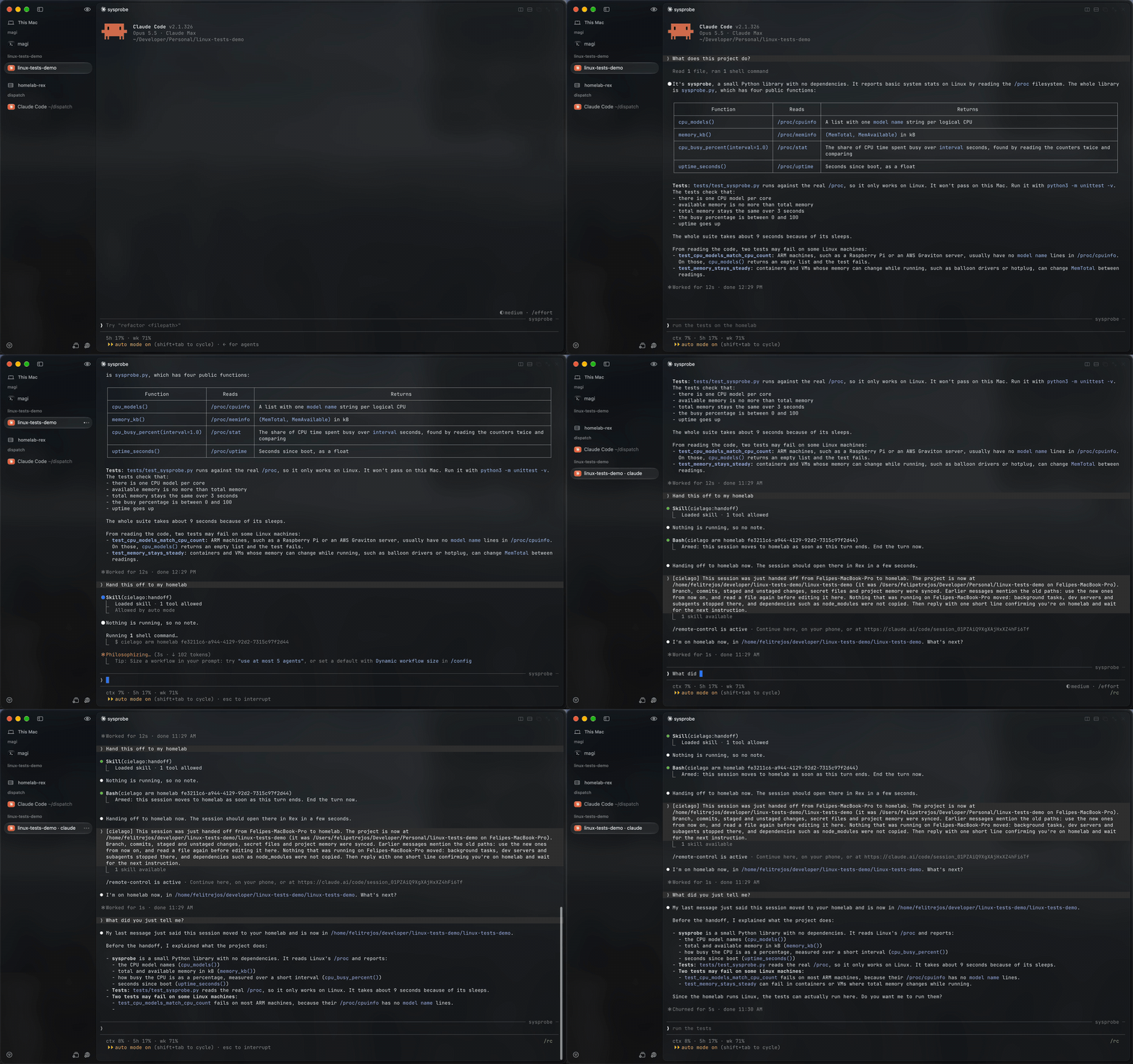
A session handed off to the homelab still remembers what it said.
- Hand off.
cielago move <session> <host>sends a session,cielago pull <host>brings one back, andcielago doctorchecks both ends.
Codex sessions move the same way and reopen withcodex resume. - Send work. Ask in plain words, as in the demo at the top. Claude can
run a command on another machine, hand a task to a background Claude, or
open a second session. Each runs in its own copy of your working tree, in
a tab you can watch, and never touches your checkout. Rex shows a
background Claude as Claude Code and a plain command as a process. - Claude asks first. It picks the machine by what the work needs: one
that runs it natively, or else a Docker or Podman container on the least
busy machine. Work that needs nothing in particular goes to the first
machine in your list with room. It gets each machine's system,
architecture and tools from magi, or over SSH for a machine magi doesn't
report. Then it proposes the machine and waits for your yes, even when
you tell it to pick. - Told when it's done. Claude runs
cielago tasks wait <id>in the
background, so the session is woken when the task finishes. A background
Claude's changes come back as the branchcielago/task-<id>.cielago taskslists what you've sent,cielago tasks show <id>prints a task's
output, andcielago tasks cancel <id>stops it and removes its copy. - Ports follow. A project's
.cielago.tomlnames what to start when it
arrives and which ports to forward back, solocalhost:3000keeps working. - Rex or tmux. Sessions open in Rex when it's there and in tmux when it
isn't. Both work over plain SSH.
curl -fsSL https://raw.githubusercontent.com/felitrejos/magi/main/install.sh | sh -s cielago
cielago init          # on each machine
claude plugin marketplace add felitrejos/magi && claude plugin install cielago@magi
From scripts and other tools
The same actions work from the command line. That way another orchestrator,
a script or Claude itself can use magi underneath:
magi sessions --json            # every session on every machine
magi send fix-login "now run the tests"   # queued until it's idle
magi answer fix-login yes       # or: magi choose fix-login 2
magi move fix-login homelab
magi start homelab ~/developer/stampr/stampr
magi events                     # what needs you, as JSON lines
magi subagents                  # every running subagent and the step it's on
magi recent fix-login           # its latest steps, one line each
magi wait fix-login             # returns once it's done or needs you
wait and recent are the cheap way for an agent to keep an eye on other
work. wait is one blocking command, so the agent doesn't have to check
again and again. recent gives a few lines per step instead of a whole
transcript. Both take a subagent too: magi wait fix-login "find auth".
magi mcp offers the same actions as MCP tools, so Claude can look after
your other sessions from Claude Desktop, Claude Code or any MCP client. In
Claude Code, run claude mcp add magi -- magi mcp. In Claude Desktop, add
this to claude_desktop_config.json:
{ "mcpServers": { "magi": { "command": "/Users/you/.local/bin/magi", "args": ["mcp"] } } }
The tools that only look (machines, sessions, subagents, recent work,
waiting, diffs, alerts) need no approval from the tools' side. The tools
that act (message, answer, choose, move, start) are marked as such, so your
client asks you first.
How it works
Each machine runs magi agent in the background (launchd or a systemd user
service). The viewer finds the agents through Tailscale and gets a small
sample from each one every second. The agent reads the files the coding
agents already write (~/.claude, ~/.codex) and follows Rex's events to
know each pane's state. When you answer a session, the agent on that machine
types your answer into the session's Rex pane.
| Agent on an M4 MacBook | CPU | Memory |
|---|---|---|
| Nobody watching | 0% | 6 MB |
| 32 viewers, every core busy | 0.7% | 7 MB |
| 32 viewers, 5 live Claude sessions | 2.9% | 12 MB |
FAQ
Can magi tell when Codex needs approval? Yes, from Codex 0.164 on.
Codex reports its prompts to Rex the way Claude Code does, and magi follows
them.
How do I move a Codex session? With cielago move, cielago pull orm in magi, since Codex has no "hand this off". The conversation, branch,
changes and secrets move the same way. If Codex is in the middle of a turn,
it moves when the turn ends. If a plain codex is open in the same folder,
quit it first, because cielago can't tell which session it shows. The other
machine needs Codex installed, and cielago init asks for its path.
Does the status line slow Claude Code down? No. It prints first and
gives the agent at most 300 ms. It never replaces a status line you already
have.
What if Claude Code changes its files? They aren't a documented format.
magi notices, says so, and falls back to what the transcripts show.
What's next is in ROADMAP.md. What magi and cielago read, send
and change is in SECURITY.md. Licensed MIT.
Reviews (0)
Sign in to leave a review.
Leave a reviewNo results found