brand-docs
Health Gecti
- License — License: MIT
- Description — Repository has a description
- Active repo — Last push 0 days ago
- Community trust — 23 GitHub stars
Code Gecti
- Code scan — Scanned 12 files during light audit, no dangerous patterns found
Permissions Gecti
- Permissions — No dangerous permissions requested
Bu listing icin henuz AI raporu yok.
Turn a company’s Word, PowerPoint or Excel template into unlimited on-brand documents. Open-source Claude Code skill bundle that extracts a reusable Brand Profile and generates faithful .docx/.pptx/.xlsx — off-brand output impossible by construction.
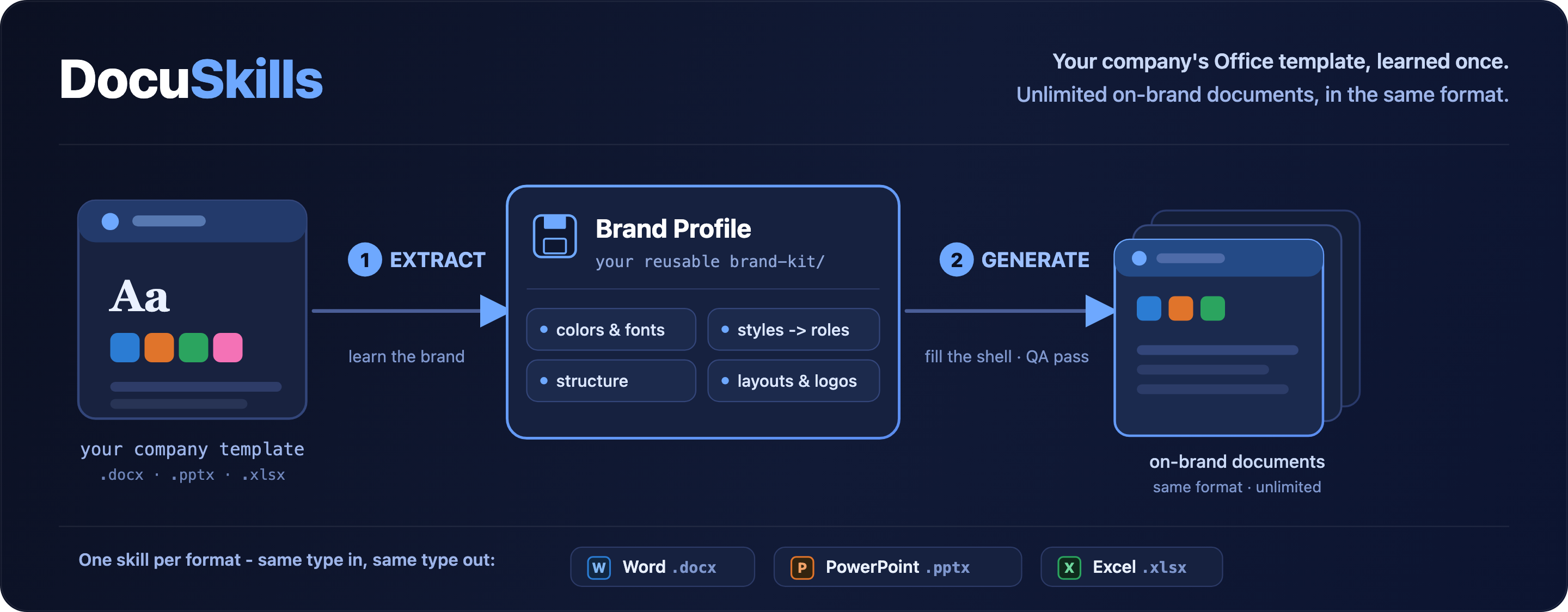
Turn a company's Word, PowerPoint or Excel template into unlimited on-brand documents of the same type.




Contents
- What is BrandDocs?
- Why not just ask an AI to "use this template"?
- Highlights
- How it works
- Full plugin workflow
- Structure-aware, not just style-aware
- Reliability & repair loop
- The three skills
- The Brand Kit
- Prerequisites & installation
- Quick start
- Project status
- Development
- FAQ
- License & acknowledgements
What is BrandDocs?
BrandDocs is an agent-skill bundle - for Claude Code, Codex, and compatible AI agents - that turns a company's existing Office template into a reusable brand memory, then writes new documents that stay faithful to it.
In one sentence: make Claude (or any compatible agent) repeatedly generate Office documents - DOCX, PPTX and XLSX - from your company's existing templates, while letting the content vary freely and keeping the brand fixed.
You give it one branded .docx, .pptx, or .xlsx. It extracts the brand - theme colors and fonts, named styles, the document's structure, layouts, cover anchors, logos and tables - into a portable Brand Profile. From then on, every document it generates is built from the original template shell and uses only the artifacts the template actually defines. Each format stays in its own lane: a Word template makes Word documents, a deck makes decks, a workbook makes workbooks - there is no cross-format conversion.
The core guarantee: off-brand output is impossible by construction. No generator ever writes a literal style name, hex color, or font - those live only in the Brand Profile, and
verifyrefuses a profile that points at anything the template doesn't contain. There is no "creative" path that drifts from the brand.
Why not just ask an AI to "use this template"?
General-purpose document skills generate freely and only loosely imitate a reference file - fonts drift, the palette wanders, the corporate structure is lost. BrandDocs is the opposite: narrow and faithful. It learns the template as a set of rules and reusable parts, remembers them in a brand-kit/, and respects them across an unlimited number of documents.
| General-purpose Office skills | BrandDocs | |
|---|---|---|
| Mental model | "create a nice document" | "fill the company's template" |
| Brand fidelity | best-effort imitation | by construction - opens from the shell, applies only its artifacts |
| Reusability | re-explain the brand every time | extract once, reuse forever via brand-kit/ |
| Structure | free-form | respects the template's cover → contents → body order |
| Guardrails | none | verify fails if a profile references a missing style/layout/range |
Highlights
- 🎯 Brand-faithful by construction - generation opens from the real template shell and applies only its named styles, theme colors, fonts and layouts. The content model is brand-agnostic; the Brand Profile is the single source of brand truth.
- 🧠 Extract once, reuse forever - a portable
brand-kit/<name>/is the template's memory; every later document reads it. No re-explaining the brand. - 🏛️ Structure-aware - captures the template's ordered skeleton (e.g. cover → table of contents → body) and tags each component as a fixed structure to keep in order or a style to use on demand. (details)
- ✅ Enforced, not just promised -
verifyopens the shell and fails if a role resolves to a style/layout/named-range that doesn't exist. Deterministic checks also cover allowed styles, palette adherence, residual template text, broken tables, formula preservation (Excel), native-component survival and language rules. - 🧪 Auditable generation -
doctorpreflights dependencies,--qa fast|auto|deep|strictmakes QA depth explicit, and--qa deep/strictwrites a visual manifest for render-based review and targeted repair. - 🧩 One shared engine - a single profile schema, resolver, OOXML layer and QA gate underpin all three formats. The Word vertical is the reference implementation; PowerPoint and Excel build on the same foundation.
- 🗂️ Full artifact catalog - records OOXML parts, styles, media, layouts, formulas and named ranges, so an agent can reason about anything the template exposes - even artifacts it can't yet regenerate.
- 🔓 Self-contained & MIT - pure
python-docx/python-pptx/openpyxl+ OOXML. No cloud, no external services, no vendor lock-in.
How it works
 company template ──▶ ① EXTRACT ──▶ brand-kit/<name>/ ──▶ ② GENERATE ──▶ on-brand document
   .docx/.pptx/.xlsx      │          (profile + shell)         │
                          │                                    ├─ opens FROM the template shell
                          ├─ theme colors & fonts              ├─ resolves semantic blocks → brand styles
                          ├─ named styles → roles              ├─ keeps the template's structure order
                          ├─ document structure (skeleton)     └─ runs the QA gate
                          ├─ layouts / cover anchors
                          ├─ logos, media, tables, formulas
                          └─ full artifact catalog
Same format throughout. A
.docxtemplate yields.docxdocuments, a.pptxyields.pptx, a.xlsxyields.xlsx. Each skill is its own lane: there is no cross-format conversion.
- Extract unpacks the template's OOXML and records its brand: theme, named styles mapped to semantic roles, the document structure (the ordered skeleton plus which parts are fixed vs free), layouts, cover anchors, logos, and a complete artifact catalog. The original file is kept byte-for-byte as the shell.
- Generate turns your content into an IntermediateDocument of brand-agnostic typed blocks (heading, paragraph, callout, list, table, …). A pure resolver maps each block to the concrete brand artifact from the profile, fills the shell in the template's structural order, and saves.
- Verify / QA runs deterministic checks - every role resolves to a real artifact, only allowed styles are used, the palette holds, no residual template text remains, tables are intact, Excel formulas survive every region fill - and, when LibreOffice is available, a render-based visual pass. When renderers are unavailable, the audit degrades explicitly instead of pretending visual proof happened.
Full plugin workflow
The end-to-end agent workflow is documented indocs/PLUGIN_WORKFLOW.md. It covers skill selection,doctor preflight, extract/comprehend/generate/QA, visual manifests, autonomous
repair rounds, and the final clean-output criteria.
Structure-aware, not just style-aware
Most "use my template" tools copy styling. BrandDocs also learns the template's document structure and reproduces it. During extraction it detects the ordered skeleton - typically cover → table of contents → body - and annotates every captured component with how it is used:
- Structural parts (cover, table of contents) are kept in order in every generated document - the cover is filled in place, the TOC is preserved and refreshed.
- Freeform parts (headings, callouts, lists, tables, quotes, captions) are styles to use on demand, in whatever order your content needs.
So a generated report opens with the company cover, keeps a live table of contents, and fills only the body with your content - exactly like a person starting from the corporate template, rather than a bare wall of text.
Reliability & repair loop
BrandDocs is designed so reliability is visible, testable, and improvable. The
agent should not just produce a file; it should know which guarantees were
proven, which were degraded, and what to repair next.
| Layer | What it proves | What happens on failure |
|---|---|---|
| Preflight | doctor checks required Python packages, optional renderers (soffice, pdftoppm, PyMuPDF/fitz), and optional OCR (tesseract) before work starts. |
Missing required packages must be installed/repaired. Missing visual/OCR tools downgrade only that proof layer. |
| L0 deterministic QA | Schema validity, resolver targets, allowed styles/layouts/ranges, residual demo text, markdown leaks, structural diffs, formula preservation. | The gate fails or emits explicit findings before the output is treated as clean. |
| L1 visual proxies | Rendered-page signals such as blank pages, zero pages, content near page/slide edges, and optional OCR hits for visible residual template text. | Findings are warnings because the engine can detect symptoms, not intent. |
| L2 visual judgement | The orchestrator opens the PNGs from visual_manifest.json, judges checklist items, and decides whether the result is visually acceptable. strict turns unclean visual evidence into gate errors. |
Apply a targeted repair, regenerate, and rerun --qa deep or --qa strict until clean or honestly blocked. |
The template is treated as a source of reusable brand affordances, not a script
to preserve blindly. If an inherited section break, slide scaffold, print area,
field cache, or named-region geometry creates blank pages, stale entries,
overlap, or clipped output, the right move is to diagnose the cause and make the
smallest targeted composition change. Preserving a broken structure is less
important than producing a clean branded document.
The most valuable next reliability improvements are:
- Native PPTX object authoring - continue beyond native tables into real PowerPoint charts/images/SmartArt instead of down-rendering them to text, while keeping component-survival warnings.
- Richer visual analysis - build on the PyMuPDF fallback with optional
numpy/opencv-pythonorscikit-imagefor overlap, clipping, and large-empty-region detection. - Broader skill evals - expand the current template-based eval set with more corporate templates, visual-repair traces, and with/without-skill comparisons.
The three skills
| Skill | Format | Generates |
|---|---|---|
brand-docx |
Word .docx |
reports, letters, memos: cover, headings, paragraphs, callouts, quotes, captions, lists, tables - in the template's structural order |
brand-pptx |
PowerPoint .pptx |
decks: title / section / content slides from the template's real masters & layouts, with real bullet levels and long-text splitting |
brand-xlsx |
Excel .xlsx |
workbooks: fills named cells & regions while preserving formulas and workbook structure |
All three expose the same three verbs: extract → verify → generate - each skill is self-contained and same-format (a Word template makes Word documents, never a deck or a sheet).
The Brand Kit
Each extracted template produces a self-contained, copyable directory:
brand-kit/<name>/
├─ profile.json          # the brand rules: theme, roles, structure, anchors, catalog
├─ PROFILE.md            # human-readable summary (role map + structure)
├─ template/shell.docx   # the original template, kept byte-for-byte (the shell)
└─ provenance.sha256     # source hash for drift detection
brand-kit/ lives either in your project (./brand-kit/, versionable, wins) or globally (~/.claude/brand-kit/, reusable across projects). It is the template's portable memory - copy the folder and the brand travels with it.
Prerequisites & installation
Required (core extract / generate / deterministic QA)
- Python ≥ 3.10
- Python packages (installed via
requirements.txt):python-docx>=1.1,python-pptx>=1.0,openpyxl>=3.1,lxml>=5.0,Pillow>=10.0
git clone https://github.com/ferdinandobons/brand-docs.git
cd brand-docs
python3 -m venv .venv && . .venv/bin/activate     # Windows: .venv\Scripts\activate
pip install -r requirements.txt
Optional (visual QA - render-based checks)
Needed only for the visual verification pass; their absence degrades gracefully and never blocks extraction, generation, or deterministic QA.
- LibreOffice (
soffice) - headless render to PDF - Poppler (
pdftoppm) - PDF → PNG - PyMuPDF (
fitz) - optional PDF → PNG fallback when Poppler is unavailable - Tesseract (
tesseract) - optional OCR for rendered residual placeholder/demo text
# macOS (Homebrew)
brew install --cask libreoffice && brew install poppler tesseract
python -m pip install PyMuPDF   # optional fallback
# Debian / Ubuntu
sudo apt-get install -y libreoffice poppler-utils tesseract-ocr
python -m pip install PyMuPDF   # optional fallback
# Fedora
sudo dnf install -y libreoffice poppler-utils tesseract
python -m pip install PyMuPDF   # optional fallback
# Windows: winget install TheDocumentFoundation.LibreOffice
#          + Poppler via conda-forge or a prebuilt binary on PATH
#          + optional: winget install UB-Mannheim.TesseractOCR
#          + optional: python -m pip install PyMuPDF
Check what's available at any time:
python scripts/brandkit/cli.py doctor
doctor lists each dependency (present or missing) and prints the exact install command for anything missing - it never fails the run.
Install as an agent skill
Claude Code (loads all three skills + the shared engine together):
/plugin marketplace add ferdinandobons/brand-docs
/plugin install brand-docs
Codex (clone + symlink the skills):
git clone https://github.com/ferdinandobons/brand-docs.git ~/.codex/brand-docs
cd ~/.codex/brand-docs && python3 -m venv .venv && . .venv/bin/activate && pip install -r requirements.txt
mkdir -p ~/.codex/skills
for s in brand-docx brand-pptx brand-xlsx; do ln -s ~/.codex/brand-docs/skills/$s ~/.codex/skills/$s; done
Restart/reload the agent after installing if the skills don't appear immediately.
Quick start
With an AI agent (the intended experience)
Just describe what you want and attach a template:
"Use this company Word template and write a report on the history of Napoleon."
The agent activates brand-docx, extracts a Brand Profile from the template (or reuses an existing one), turns your request into the template's structure, generates the .docx from the original shell, runs QA, and returns the file.
Direct CLI (the engine - for tests & debugging)
# 1) Extract the brand from a template into a reusable kit
python scripts/brandkit/cli.py extract --name acme --template template.docx --scope project

# 2) Verify the profile (role mapping + QA; fails if a role points at a missing artifact)
python scripts/brandkit/cli.py verify --name acme --scope auto --qa auto

# 3) Generate a new on-brand document from structured content
python scripts/brandkit/cli.py generate --name acme --input idoc.json --output out.docx --scope auto --qa auto
The content you pass in (idoc.json) is an IntermediateDocument - brand-agnostic typed blocks. Notice there is no style, color or font anywhere: the profile resolves all of that.
{
  "cover": { "title": "Quarterly Review", "fields": { "doc_id": "RPT-001" } },
  "blocks": [
    { "type": "heading", "level": 1, "text": "Highlights" },
    { "type": "paragraph", "text": "This paragraph resolves to the brand body style." },
    { "type": "callout", "intent": "info", "text": "The profile chooses the callout style." },
    { "type": "list", "items": [{ "text": "List styling comes from the profile." }] },
    { "type": "table", "columns": ["Area", "Status"], "rows": [["Pipeline", "Healthy"], ["Delivery", "Green"]] }
  ]
}
PowerPoint uses the same IntermediateDocument; Excel uses a GridDocument (named-region fills, formulas preserved).
Project status
Alpha. The Word vertical (brand-docx) is the reference implementation, verified end-to-end on real templates; PowerPoint and Excel share the engine and are catching up.
| Area | Status |
|---|---|
| Shared engine (profile schema, resolver, OOXML, CLI, dual store) | ✅ working |
brand-docx - extract → verify → generate |
✅ working |
| Document structure extraction & order-aware generation | ✅ working |
Brand-guarantee enforcement (verify fails on missing artifacts) |
✅ working |
| Deterministic QA (L0: styles, palette, residual text, tables, formula preservation, language) | ✅ working |
brand-pptx - roles from real layouts, basic generation |
🚧 early |
brand-xlsx - named-region fills, formula-preserving |
🚧 early |
| Visual QA (LibreOffice render + manifest-driven repair loop) | 🚧 implemented with graceful degraded mode |
| Native PPTX charts / SmartArt / richer component regeneration | 🔭 catalogued, regeneration staged |
| PyMuPDF PDF raster fallback | ✅ working |
| Optional OCR rendered-text residual scan | ✅ working when Tesseract is installed |
| Template-based skill eval set (DOCX/PPTX/XLSX) | ✅ working in CI |
Strict visual mode (--qa strict) |
✅ working |
| Richer image analysis | 🔭 planned |
Visual Word overflow needs LibreOffice, since Word lays out at render time.
Development
python3 -m venv .venv && . .venv/bin/activate
pip install -r requirements.txt pytest
PYTHONPATH=scripts pytest -q        # docx / pptx / security / integration / smoke suites
Never commit real templates or company assets.
brand-kit/andgenerated/are intentionally git-ignored, andtests/test_no_proprietary.pyfails the build if any Office binary is tracked outsidetests/fixtures(or a vendored proprietary import sneaks in). SeeCONTRIBUTING.mdand the frozen vocabulary inCONVENTIONS.md.
FAQ
What is BrandDocs in one line?
An open-source Claude Code skill bundle that turns a company's Word, PowerPoint or Excel template into unlimited on-brand documents of the same format.
How do I generate on-brand Word, PowerPoint and Excel documents from a company template?
Point BrandDocs at one branded .docx, .pptx or .xlsx. It extracts a reusable Brand Profile (theme colors, fonts, named styles, document structure, layouts, logos, tables, formulas), then generates new documents from the original template shell. See Quick start.
How is this different from asking ChatGPT or Claude to "use this template"?
General-purpose document skills only loosely imitate a reference file, so fonts drift, the palette wanders and the corporate cover → contents → body structure is lost. BrandDocs is faithful by construction: generators never write a literal style name, hex color or font, and verify refuses any profile that points at something the template doesn't define. See the comparison table.
Does it work with Codex or other agents, not just Claude Code?
Yes. The three skills (brand-docx, brand-pptx, brand-xlsx) are plain agent skills; installation covers both Claude Code and Codex. The underlying engine is also usable as a direct Python CLI.
Is it free and open source?
Yes — MIT licensed, self-contained, pure python-docx / python-pptx / openpyxl + OOXML. No cloud, no external services, no vendor lock-in.
Does it keep my templates private?
Everything runs locally. brand-kit/ and generated/ are git-ignored, and a test fails the build if any real Office binary is committed. Never commit real company templates — use synthetic fixtures.
Can it preserve Excel formulas and the template's structure?
Yes. Excel generation fills named cells and regions while preserving formulas, and Word/PowerPoint generation keeps the template's ordered skeleton (cover → table of contents → body). See Structure-aware.
Keywords: Claude Code skill · AI agent skill · on-brand document generation · brand template automation · corporate template to document · docx / pptx / xlsx generator · Office automation · OOXML · python-docx · python-pptx · openpyxl · brand profile · brand kit · document automation.
License & acknowledgements
Yorumlar (0)
Yorum birakmak icin giris yap.
Yorum birakSonuc bulunamadi