CodeDebrief
Health Warn
- License — License: Apache-2.0
- Description — Repository has a description
- Active repo — Last push 0 days ago
- Low visibility — Only 5 GitHub stars
Code Pass
- Code scan — Scanned 12 files during light audit, no dangerous patterns found
Permissions Pass
- Permissions — No dangerous permissions requested
No AI report is available for this listing yet.
Visual code workflow explorer for coding agents. Deterministic source-grounded flowcharts with MCP, Mermaid, no API key.
CodeDebrief
CodeDebrief turns source code into deterministic, source-grounded workflow flowcharts for
humans and coding agents.
It is a local-first code comprehension tool that builds a source-grounded workflow model
of a codebase and exposes that model in two ways:
codedebrief viewfor manual exploration of the complete graph.- MCP
agent_contextfor coding agents that need a bounded, source-groundedworkflow_slice.
The product unit is the workflow_slice: a deterministic slice of the modeled code
logic selected from a question, changed file, symbol, state, flow id, or dependency path.
Agents can render that slice visually, explain it, expand it, or trace a path without
inventing steps that are not in the graph.
CodeDebrief is not a bug finder, a generic graph database, or an LLM enrichment service.
The core workflow is deterministic, local, and offline. No LLM provider key is required.
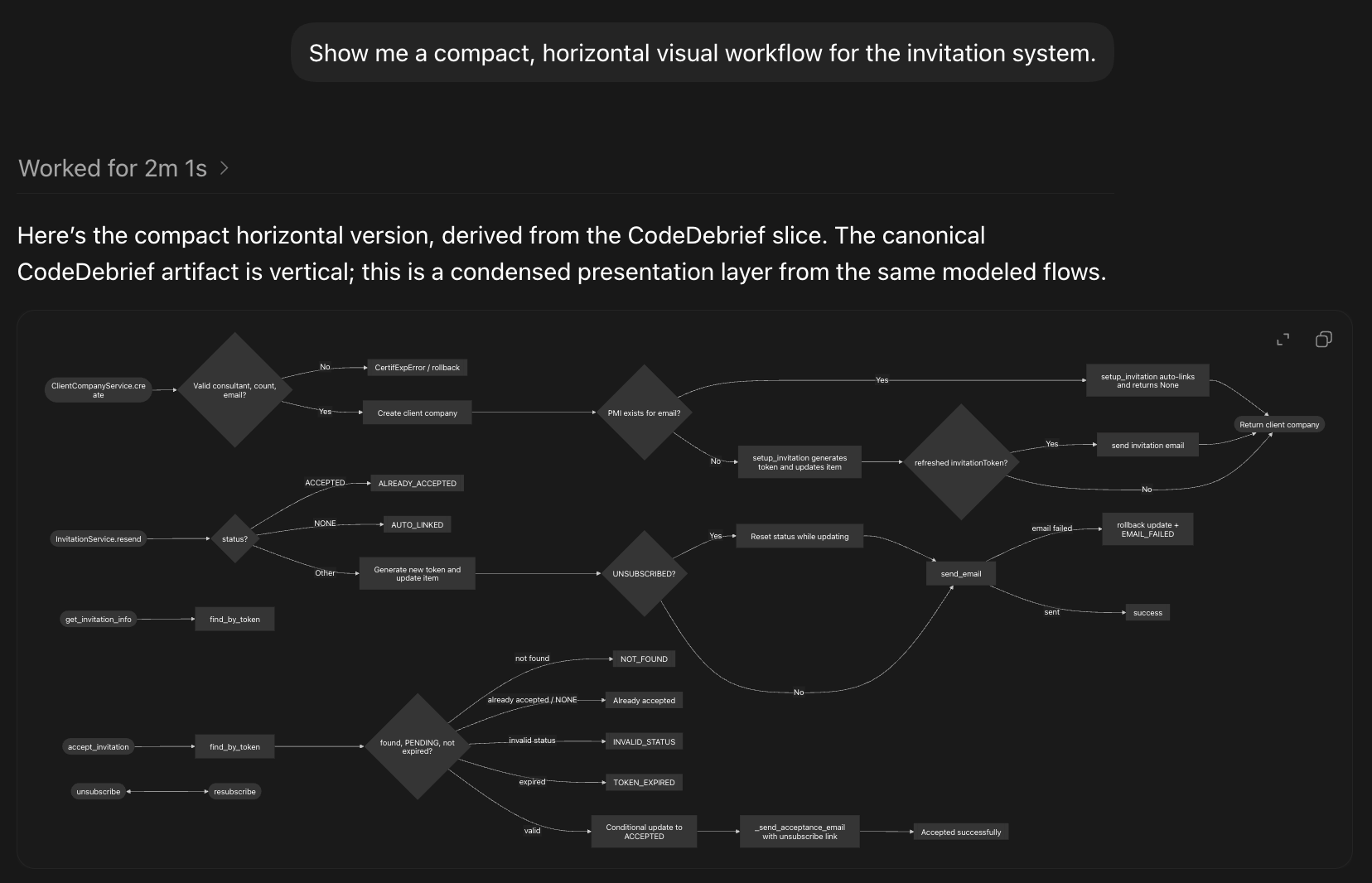
Example output: a compact presentation layer generated from local CodeDebrief artifacts.
Canonical workflow visuals are vertical by default; horizontal diagrams are used when the
user explicitly asks for a compact overview.
Status: pre-1.0 alpha. The model is versioned, but schema and MCP payloads may evolve
before 1.0.
Why It Exists
Coding agents are useful only when they understand the logic they are about to explain or
change. Reading files one by one is slow and inconsistent; asking an LLM to reconstruct a
workflow from source often produces different diagrams for the same prompt.
CodeDebrief gives agents a deterministic navigation layer:
- entrypoints, decisions, branches, calls, outcomes, and source ranges;
- domain concepts such as statuses, roles, permissions, enums, and feature flags;
- affected-workflow context for changed files, symbols, flows, and dependency paths;
- canonical visual slices with stable diagram hashes;
- optional language-friendly labels derived as a presentation layer from analyzer facts.
Quick Start
Install from PyPI. MCP support is included by default:
uv tool install codedebrief
To install a pinned GitHub release instead:
uv tool install "git+https://github.com/ferdinandobons/[email protected]"
Or install from a source checkout:
git clone https://github.com/ferdinandobons/CodeDebrief.git codedebrief
cd codedebrief
uv tool install .
From the codebase you want to analyze:
codedebrief setup-agent codex
setup-agent creates codedebrief.toml when needed, installs the selected agent
instruction file, installs a provider-native CodeDebrief skill where supported, registers
project-scoped MCP where supported, generates initial artifacts, runs doctor, and
validates the result.
After setup, ask the coding agent ordinary questions:
How does checkout work?
Show me the workflow for certificate upload.
Which workflows are affected by this change?
Where is this status handled?
What should I test after editing this file?
For manual exploration:
codedebrief view
For explicit refresh during development:
codedebrief update
codedebrief validate --check-sync
The generated agent instructions treat CodeDebrief artifacts as part of done for
workflow-relevant changes: after meaningful source, route, config, or agent-instruction
edits, run codedebrief update and codedebrief validate --check-sync before finalizing
or committing so MCP answers and codedebrief view use current graphs.
Ask Your Agent
Once setup-agent has configured the project MCP server and agent instructions, ask
ordinary code-logic questions:
Show me a visual workflow for the invitation system.
Explain this code path with a source-grounded flowchart.
Which workflows are affected by this change?
Where is this status handled?
Expand the omitted branches in this workflow_slice.
Rewrite the diagram labels in plain English.
The agent should use CodeDebrief first, then decide how much of the deterministic graph to
show for the specific question.
Setup-Agent
Supported targets:
codedebrief setup-agent codex
codedebrief setup-agent claude ../my-app
codedebrief setup-agent gemini
codedebrief setup-agent cursor --full
The selected target controls which files are written:
| Target | Files |
|---|---|
codex |
AGENTS.md, .agents/skills/codedebrief/SKILL.md, project MCP config |
claude |
CLAUDE.md, .claude/skills/codedebrief/SKILL.md, project MCP config |
gemini |
GEMINI.md, .gemini/skills/codedebrief/SKILL.md, .gemini/settings.json MCP config |
cursor |
.cursor/rules/codedebrief.mdc, project MCP config |
setup-agent <target> writes only that target's files. Run it separately for each agent
surface you want to configure.
The gemini target follows Gemini CLI / Antigravity conventions: GEMINI.md provides
project context, .gemini/skills/codedebrief/SKILL.md provides provider-native workflow
guidance, and .gemini/settings.json registers the project-scoped CodeDebrief MCP server.
Agent Workflow
For natural-language questions, agents should start with MCP agent_context.
agent_context returns a workflow_slice with:
- normalized intent and task type;
- primary and supporting flows;
- ordered source-grounded steps;
- decision nodes, branches, values, and outcomes;
- calls, callers, callees, and unresolved call context;
- domain logic for relevant state-like concepts;
- source ranges the agent can cite;
- visual handles for
snapshot_sliceandcodedebrief view; - omissions caused by token budget, ambiguity, stale artifacts, or unsupported capability;
- follow-up tools for expansion, path tracing, focused explanation, and snapshots.
When a user asks for a visual workflow, the agent should first render the deterministic
Mermaid visual returned by CodeDebrief:
- Render
workflow_slice.presentation.canonical_visual.diagramexactly as returned only
when the client renders Mermaid inline. - If the client cannot render Mermaid inline, use
snapshot_slicewithinclude_svg=falseand provide the returned.mmdor Mermaid Markdown artifact
before prose. Do not paste a long Mermaid code block as the primary visual unless the
user asks for raw or copyable Mermaid. These generated files are meant to be opened
with the best available local preview path, for example opening the Markdown artifact
in VS Code and using Markdown/Mermaid preview support. - Use SVG snapshot artifacts only when the user explicitly asks for SVG or local
inspection; they are not the canonical chat visual.
The model may choose the first visible depth, but the text inside shown blocks must come
from CodeDebrief payloads. After the visual, the answer should include a short
high-level written flow in the user's language, derived from ordered steps, selected
flows, decisions, domain logic, and source ranges. That written flow should explain the
happy path first and include only the branches needed by the request. The answer should
also say that the diagram is a bounded summary and can be expanded. If the user wants a
more language-friendly view, the agent may rewrite both labels and the written flow in
the user's language as a separate presentation layer, preserving ids or source anchors
and without adding facts.
MCP Surface
Primary MCP tools:
| Tool | Purpose |
|---|---|
agent_context |
Default entrypoint for natural-language questions and changed-code context. |
expand_slice |
Widen or deepen a workflow slice from stable flow handles. |
workflow_path |
Trace a deterministic path between flows, symbols, or concepts. |
snapshot_slice |
Render a deterministic visual snapshot for a slice. |
explain_flow |
Explain one flow with ordered steps, decisions, calls, and source anchors. |
explain_node |
Explain one flowchart node with local edge and source context. |
explain_edge |
Explain one modeled edge with source context. |
validate_artifacts |
Check generated model validity and optional sync. |
update_codedebrief |
Refresh JSON, Markdown, and HTML artifacts from local source. |
Use codedebrief view for the manual UI. The CLI intentionally stays small:setup-agent, update, view, validate, doctor, and mcp.
Generated Artifacts
CodeDebrief writes deterministic artifacts under codedebrief-out/:
| File | Commit? | Purpose |
|---|---|---|
codedebrief.json |
Yes | Canonical model consumed by MCP, CI, scripts, and the viewer. |
codedebrief.md |
Yes | Human-readable Markdown summary with Mermaid flowcharts. |
codedebrief.html |
Usually no | Local interactive viewer generated from the model. |
Commit codedebrief.json and codedebrief.md when CodeDebrief is part of the project
workflow. Regenerate HTML locally when a human needs the viewer.
Manual Viewer
codedebrief view opens the complete interactive flowchart for a human. It is the official
manual experience for broad exploration:
codedebrief view
codedebrief view --render-only --no-open
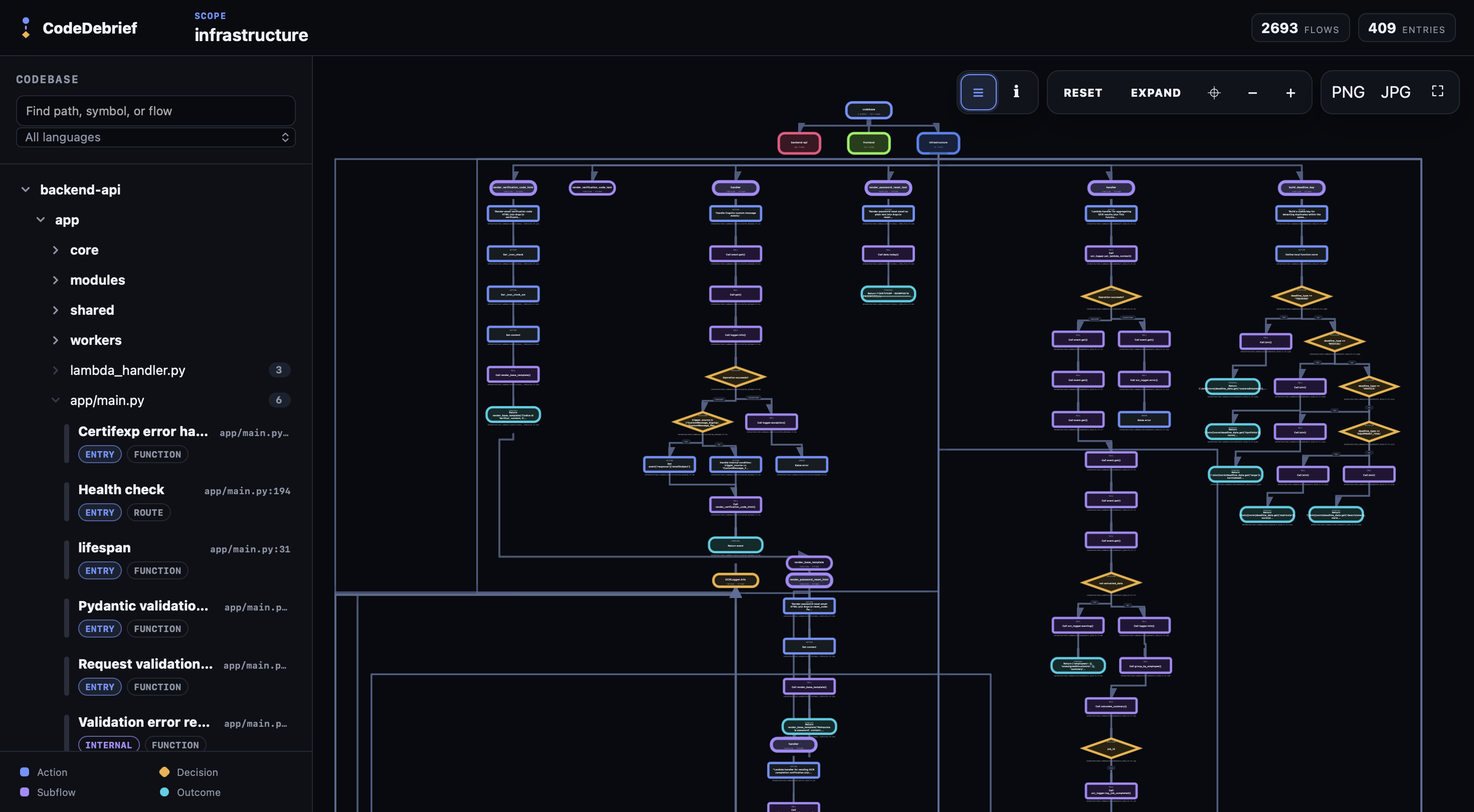
Example manual view: the interactive browser canvas for exploring scopes, files, entry
points, and connected workflow flows.
Use the viewer when you need to inspect the whole project graph, navigate scopes, compare
neighboring flows, or visually follow callers and callees. Use MCP when an agent should
answer a bounded question with a focused workflow_slice.
Domain Logic
CodeDebrief extracts and aggregates domain concepts such as:
- enum members;
- status and lifecycle states;
- roles and permissions;
- feature flags;
- handled values and the decisions that branch on them.
agent_context includes relevant domain logic inside the returned workflow_slice, with
links back to flows, nodes, source ranges, snapshots, and viewer targets. Value matching
uses modeled code facts, including enum-style suffix matches such as PAID forStatus.PAID.
Supported Code
CodeDebrief currently extracts control flow for 11 language ids:
| Language | Current coverage |
|---|---|
Python (.py) |
AST analyzer with functions, methods, decisions, loops, calls, returns, exceptions, tests, enum harvest, and import dependencies. |
TypeScript / TSX (.ts, .tsx) |
Tree-sitter analyzer with Next.js and React entrypoint detection, decisions, loops, calls, returns, expression-bodied arrows, tests, enum harvest, and import dependencies. |
JavaScript / JSX (.js, .jsx, .mjs, .cjs) |
Tree-sitter analyzer with JavaScript labeling, decisions, loops, calls, returns, expression-bodied arrows, tests, and import dependencies. |
Go (.go) |
Profile-driven tree-sitter analyzer with functions, methods, decisions, loops, calls, returns, tests, and import dependencies. |
Java (.java) |
Profile-driven tree-sitter analyzer with methods, decisions, loops, calls, returns, exceptions, tests, imports, and Spring route annotations. |
C# (.cs) |
Profile-driven tree-sitter analyzer with methods, decisions, loops, calls, returns, exceptions, and tests. |
PHP (.php) |
Profile-driven tree-sitter analyzer with functions, methods, decisions, loops, calls, returns, exceptions, and tests. |
C (.c, .h) |
Profile-driven tree-sitter analyzer with functions, decisions, loops, calls, returns, and tests. |
C++ (.cc, .cpp, .cxx, .hh, .hpp, .hxx, .ipp, .tpp) |
Profile-driven tree-sitter analyzer with functions, methods, decisions, loops, calls, returns, exceptions, and tests. |
Rust (.rs) |
Profile-driven tree-sitter analyzer with functions, decisions, loops, calls, match handling, returns, and tests. |
Ruby (.rb) |
Profile-driven tree-sitter analyzer with methods, decisions, loops, calls, returns, and tests. |
Generated models include metadata.language_capabilities, with feature flags and
limitation notes per language. Agents should use that contract when explaining analyzer
depth.
Configuration
CodeDebrief works without config. Add codedebrief.toml only when defaults are not enough:
[codedebrief]
source_roots = ["."]
exclude = []
exclude_dirs = []
include_public_functions = true
max_call_depth = 4
output_dir = "codedebrief-out"
self_exclude = true

[codedebrief.entrypoints]
include = []
exclude = []

[codedebrief.scopes]
backend = ["backend/**", "services/**"]
frontend = ["frontend/**", "web/**"]
edge = ["edge/**", "workers/**"]
Defaults prune common VCS, dependency, cache, temporary, generated, and output
directories, including .git, node_modules, virtualenv folders, .next, .turbo,.svelte-kit, dist, build, out, target, coverage, vendor, Pods, andcodedebrief-out.
Limitations
CodeDebrief does not run code, observe runtime state, perform full symbolic execution,
prove business correctness, or reconstruct deep framework state. It statically models
source files, control flow, selected framework conventions, and resolvable internal calls.
Important practical limits:
- dynamic dispatch may remain unresolved;
- language capability varies by analyzer frontend;
- generated or unsupported files may be skipped;
- large slices are token-budgeted and report omissions;
- the displayed first slice is a bounded summary and can be expanded with MCP tools.
FAQ
Is CodeDebrief an AI code review tool?
No. CodeDebrief is for code comprehension and workflow navigation. It helps humans and
coding agents understand modeled logic; it does not present possible defects as product
output.
Does CodeDebrief require an LLM API key?
No. The analyzer, artifacts, Mermaid diagrams, manual viewer, and MCP server are
local-first and deterministic. Coding agents can use the MCP tools without any required
provider key.
How is CodeDebrief different from a call graph?
A call graph shows relationships between symbols. CodeDebrief models workflow slices with
entrypoints, decisions, branches, ordered steps, source ranges, domain concepts, visual
targets, and expansion tools for coding agents.
Can CodeDebrief generate Mermaid workflow diagrams from code?
Yes. agent_context returns a canonical top-to-bottom Mermaid visual for the selectedworkflow_slice, and snapshot_slice can persist Mermaid files for clients that cannot
render Mermaid inline.
Can I use CodeDebrief only as a manual visual explorer?
Yes. Run codedebrief view to open the interactive local viewer. MCP is the primary agent
surface, but the viewer remains the official manual exploration surface.
Development
For local development in this repository:
uv sync --extra dev
uv run codedebrief --help
Standard gates:
UV_CACHE_DIR=/tmp/codedebrief-uv-cache uv run ruff check .
UV_CACHE_DIR=/tmp/codedebrief-uv-cache uv run ruff format --check .
UV_CACHE_DIR=/tmp/codedebrief-uv-cache uv run mypy
UV_CACHE_DIR=/tmp/codedebrief-uv-cache uv run pytest --cov
UV_CACHE_DIR=/tmp/codedebrief-uv-cache uv run codedebrief validate . --check-sync --json
Viewer gates:
npm run viewer:typecheck
npm run viewer:test
npm run viewer:build
UV_CACHE_DIR=/tmp/codedebrief-uv-cache uv run codedebrief update
UV_CACHE_DIR=/tmp/codedebrief-uv-cache uv run codedebrief view --render-only --no-open
Schemas:
- schema/codedebrief.schema.json documents the canonical
artifact model.
Reviews (0)
Sign in to leave a review.
Leave a reviewNo results found