stash
Health Warn
- License — License: MIT
- Description — Repository has a description
- Active repo — Last push 0 days ago
- Low visibility — Only 7 GitHub stars
Code Pass
- Code scan — Scanned 12 files during light audit, no dangerous patterns found
Permissions Pass
- Permissions — No dangerous permissions requested
No AI report is available for this listing yet.
Agent memory for your repos

Agent memory for your repos.
Stash is the hive mind for your team's coding agents. Every session, decision,
and search flows into one shared brain. The next agent that touches your
repo already knows what's been learned.




Shared agent memory can save up to 46% of your team's coding work
that's otherwise wasted re-investigating fixes an earlier session already tried and ruled out.
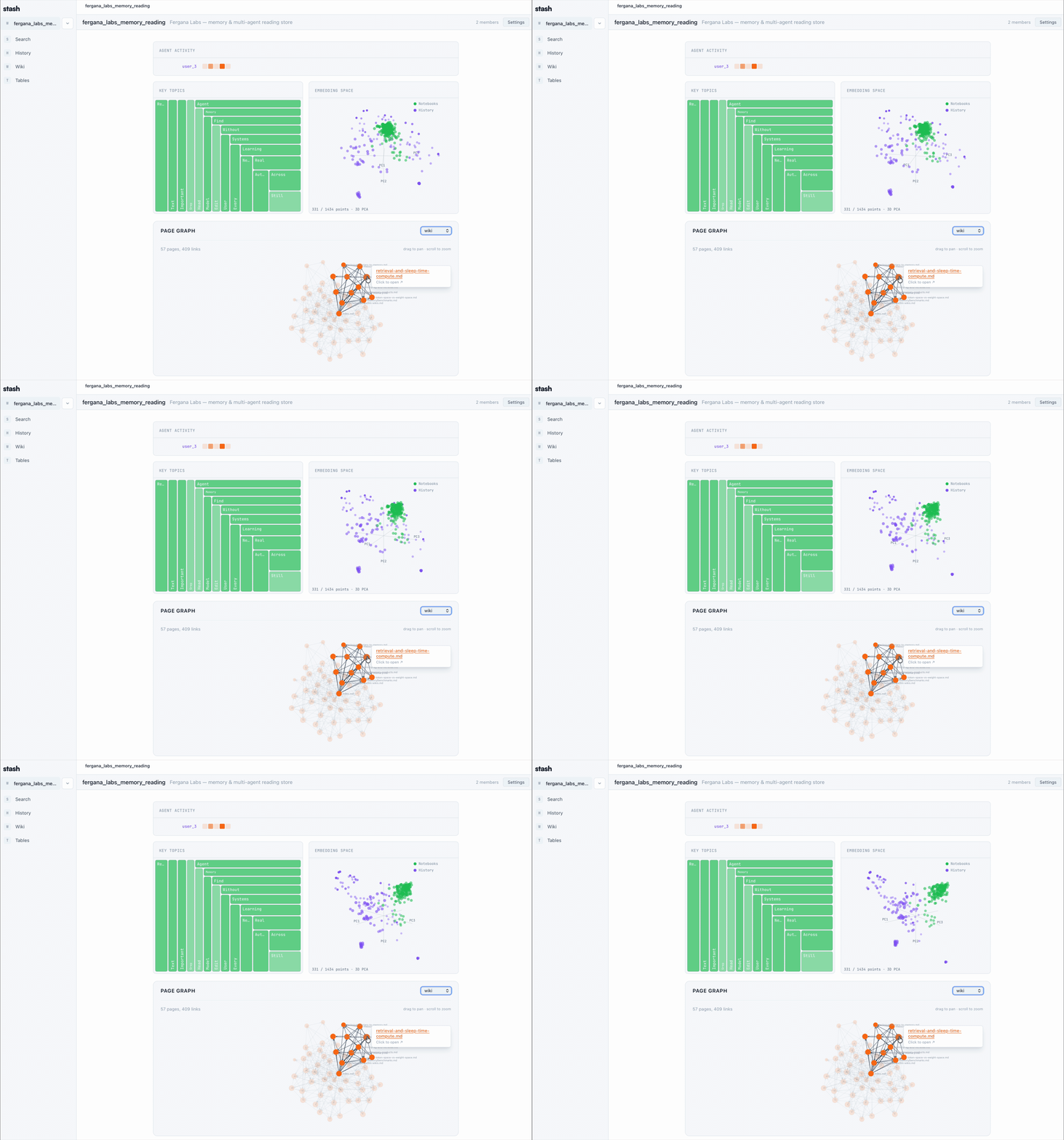

Table of Contents
- Why Stash
- How it works
- Quick Start
- Features
- What you get
- Integrations
- Coming from...
- CLI
- Self-Hosted
- Privacy
- Documentation
- FAQ
- Latest updates
- Contributing
- License
Why Stash
Every coding agent on your team starts from zero. Your agent just debugged a flaky auth test. An hour later, a teammate's agent hits the same test and starts from scratch. Multiply that across a week and half the team is reinventing the same fixes.
With Stash, every agent on the repo can ask (and answer):
- "Why did Sam bump the rate limit from 100 to 500?"
- "Has anyone already tried fixing the memory leak in auth?"
- "What pattern did we land on for background workers last sprint?"
"raw data from a given number of sources is collected, then compiled by an LLM into a .md wiki, then operated on by various CLIs by the LLM to do Q&A and to incrementally enhance the wiki… I think there is room here for an incredible new product instead of a hacky collection of scripts."
— Andrej Karpathy, LLM Knowledge Bases
Stash is that product. For teams of coding agents working on the same repo. Your agents' streamed sessions are the raw data. The wiki is curated automatically by our sleep agent. Everything lands in one workspace your whole team can query.
How it works
Stream → Curate → Search. Three steps running over a shared workspace:
- Stream — Prompts, tool calls, and session summaries automatically push to the workspace's history as they happen. Nothing to remember to save.
- Curate — On
SessionEnd, a curation agent reads recent history and organizes it into wiki notebooks with[[backlinks]]and a page graph. Sleep-time compute, not session time. Auto-runs with a 24h cooldown; trigger manually with the/curateslash command. - Search —
stash searchvia Stash's CLI runs a cross-resource agentic loop over files, history, notebooks, tables, and chats. Your agent answers with sources, not hallucinations.
Quick Start
One line installs the CLI, signs you in, picks a workspace, and installs plugins for your coding agent (currently supports Claude Code, Cursor, Codex, Openclaw, and OpenCode):
bash -c "$(curl -fsSL https://raw.githubusercontent.com/Fergana-Labs/stash/main/install.sh)"
Then try it:
stash history search "authentication patterns"      # Full-text search over events
stash history push "session notes here"             # Push an event
stash --help                                        # Full command list
pipx install stashai        # or: uv tool install stashai
stash connect               # Interactive: sign in, pick a workspace, install plugin
Features
| Capability | What it does |
|---|---|
| Shared history | Every prompt, tool call, and session summary streams to a workspace-wide event log. Searchable, filterable, attributable per agent and per human. |
| Sleep-time curation | On SessionEnd, a curation agent reads recent history and writes wiki notebooks with [[backlinks]] and a page graph. 24-hour cooldown; manual via /curate. |
| Agentic search | stash search runs a cross-resource loop over files, history, notebooks, tables, and chats. One query, every source, with citations. |
| Wiki notebooks | Rich collaborative pages with wiki-style links, page-graph visualization, backlinks, and pgvector semantic search. |
| Visualizations | See the team's memory as it forms — embedding projections, page graphs, knowledge-density treemaps, agent-activity heatmaps. |
| Local-first option | Self-host the entire stack with Docker Compose. Embeddings default to local sentence-transformers — zero API keys required to run. |
| Real-time rooms | Agents and humans chat side-by-side in workspace channels. Coordinate, hand off, unblock — all in one place. Comming soon |
| Shareable pages | Publish reports, dashboards, and HTML deliverables behind a link. No login walls between teams. Comming soon |
What you get
Stash organizes your team's agent activity into a workspace that looks like this:
your-workspace/
├── history/                       # append-only event log — every prompt, tool call, summary
│   └── (streamed live from every agent + human)
├── notebooks/                     # auto-curated wiki, written by stash:sleep
│   ├── auth-patterns.md           #   ...with [[backlinks]] between pages
│   ├── memory-leak-v2.md          #   ...folder structure inferred from your work
│   └── rate-limits/
│       ├── gateway-500-per-min.md
│       └── batch-import-flow.md
├── tables/                        # structured data with optional row embeddings
└── files/                         # PDFs, screenshots, attachments (S3-compatible)
A live page graph, embedding projection, and knowledge-density treemap render over the same workspace — the visualizations you see in the GIFs above.
Integrations
The one-line installer auto-detects which agent you have and wires up the plugin. To install one manually:
| Agent | Plugin | Install |
|---|---|---|
| Claude Code | plugins/claude-plugin |
claude plugin marketplace add Fergana-Labs/stash && claude plugin install stash@stash-plugins |
| Cursor | plugins/cursor-plugin |
symlinks hooks.json into ~/.cursor/ — see plugin README |
| Codex | plugins/codex-plugin |
renders hooks.json into ~/.codex/ — see plugin README |
| OpenCode | plugins/opencode-plugin |
adds a plugin entry to ~/.config/opencode/opencode.json |
| Gemini CLI | plugins/gemini-plugin |
merges hooks into ~/.gemini/settings.json |
| Openclaw | plugins/openclaw-plugin |
openclaw plugins install github:Fergana-Labs/stash#plugins/openclaw-plugin |
Every plugin streams session activity to the same workspace, injects relevant memory into prompts, and uses the shared stash CLI underneath. Mix and match — different teammates can use different agents against the same shared brain.
Coming from...
Stash sits alongside whatever you have today. Here's how it maps:
| You're using | What Stash gives you on top |
|---|---|
CLAUDE.md / AGENTS.md/ Built-in agent memory |
A shared, searchable, multi-agent version that updates itself from real session data. Single source for agent session history about your code. |
| Mem0 / Letta / Supermemory | MIT-licensed, self-hostable, with team collaboration and UI |
| Notion / Confluence | Session hstory automatically pushed. Pages curated automatically by your agent. No one has to remember to write the doc. |
| Slack threads | A persistent, searchable record that survives the 90-day retention cliff and is queryable by your agents. |
CLI
stash connect                        # Configure API key + default workspace
stash history push <content>         # Push an event
stash history search <query>         # Full-text search over history events
stash notebooks list --all           # List notebooks across your workspaces
stash --help                         # Full command list
Every command accepts --json for machine-readable output and --ws ID to target a specific workspace. Full reference at joinstash.ai/docs/cli.
Self-Hosted
git clone https://github.com/Fergana-Labs/stash.git
cd stash
cp .env.example .env          # fill in credentials + API keys
# edit Caddyfile → replace app.example.com with your domain
docker compose -f docker-compose.prod.yml up -d
Brings up four containers: PostgreSQL 16 + pgvector, FastAPI backend (:3456), Next.js frontend (:3457), and Caddy for automatic HTTPS via Let's Encrypt. Alembic migrations run on backend startup.
Embeddings default to local sentence-transformers — no API keys required to run. Set EMBEDDING_PROVIDER to switch to OpenAI, Hugging Face, or any OpenAI-compatible endpoint. Optional S3-compatible object storage (R2, S3, MinIO) for file uploads.
Local development? Use
docker compose up -d(no-fflag) — simple setup with hardcoded dev credentials.
Privacy
Stash is built so you can keep your team's memory under your control:
- Transcripts are opt-in. You can give your agent shared read access to the workspace's memory without uploading any of your own session data.
- No LLM calls from the server. Curation and search run inside your agent (Claude Code, Cursor, etc.) using the keys it already has. The Stash backend itself makes no model calls.
- Self-hostable end-to-end. One Docker Compose file. PostgreSQL + pgvector, local sentence-transformer embeddings, no required external API keys.
- Permissioned workspaces. On the hosted version, only invited members can read or write a workspace. Public visibility is per-resource, opt-in.
Documentation
| Document | What it covers |
|---|---|
| Quickstart | Install the CLI, connect your agent, push your first events |
| Concepts | Workspaces, history, notebooks, tables, files, search, curation |
| CLI | Every command, every flag |
| Self-hosting | Full Docker Compose deploy with environment reference |
| Architecture | System diagram, data model, backend/frontend structure |
| Use Cases | End-to-end scenarios — team KB, research, multi-agent |
| Contributing | Local dev setup, running tests, submitting PRs |
| Design System | Colors, typography, spacing, agent/human visual language |
| Testing | Test frameworks, suites, conventions |
| Security | Vulnerability reporting policy |
| Changelog | Release history |
FAQ
What LLMs does Stash use?
None on the server. Curation and agentic search run inside your agent (Claude Code, Cursor, etc.) as plugin skills, so they use whatever model and keys the agent is already configured with — the Stash backend itself makes no LLM calls. Embeddings are pluggable and default to local sentence-transformers (no key). Set EMBEDDING_PROVIDER in .env to switch to OpenAI, Hugging Face, or any OpenAI-compatible endpoint.
Can I use this without Claude Code?
Yes. The CLI and REST API work standalone with any client, and there are first-party plugins for Cursor, Codex, OpenCode, Gemini CLI, and Openclaw.
Where does the "save up to 46%" number come from?
A 4-session memory-leak benchmark documented in On Agent Velocity by Henry Dowling (one of Stash's maintainers). Without transcript sharing, nearly half of agent actions re-investigated fixes earlier sessions had already tried and ruled out. With shared transcripts, wasted work dropped ~97% and tool calls dropped ~50%.
Latest updates
- 2026-04-22 — Initial open-source release
For the full log, see CHANGELOG.md.
Contributing
Contributions are welcome. See CONTRIBUTING.md to get started.
Found a bug? Open an issue.
Maintainers
| Name | Role | Contact |
|---|---|---|
| @henry-dowling | Creator & Lead maintainer | GitHub issues or [email protected] for vulnerabilities |
| @samzliu | Creator | GitHub issues |
| @triobaba | Creator | GitHub issues |
License
MIT — Copyright (c) 2026 Fergana Labs
Built by Fergana Labs.
Reviews (0)
Sign in to leave a review.
Leave a reviewNo results found