AutoJob
Health Warn
- License — License: NOASSERTION
- Description — Repository has a description
- Active repo — Last push 0 days ago
- Low visibility — Only 6 GitHub stars
Code Warn
- process.env — Environment variable access in app/agents/context-usage.mjs
Permissions Pass
- Permissions — No dangerous permissions requested
No AI report is available for this listing yet.
AI job search & auto-apply desktop app: finds jobs on LinkedIn, Indeed, StepStone and 25+ job sites, scores them against your CV, applies for you and writes a cover letter for every job.

AutoJob
AI job search assistant that finds jobs and applies for you.
It finds jobs on dozens of job sites, applies for you, writes a cover letter for every application
and reaches out to the recruiter or hiring manager on LinkedIn.
Download · Website · What it does · Getting started · Privacy
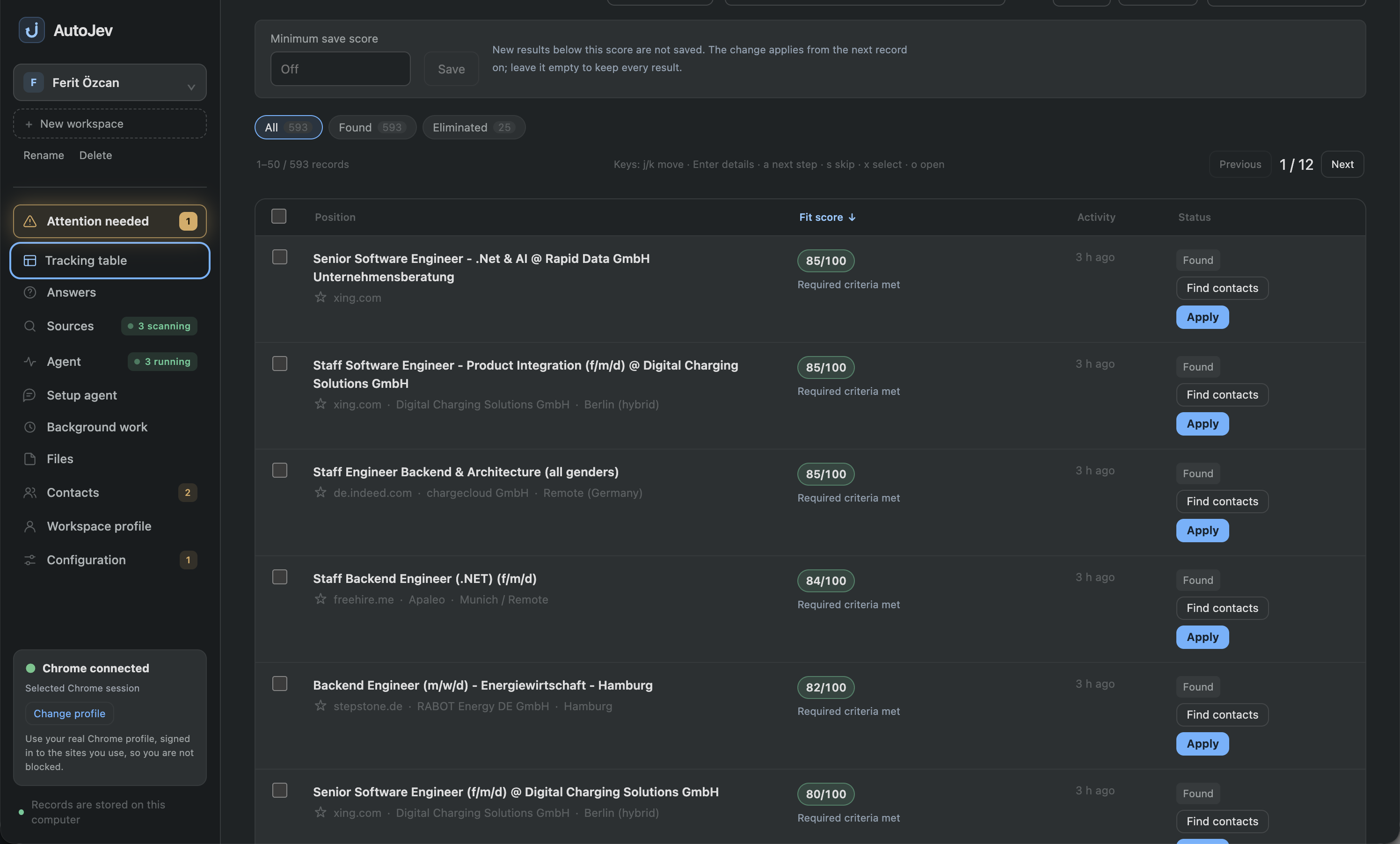
Every job it finds, scored against your CV, with one-click Apply and Find contacts.
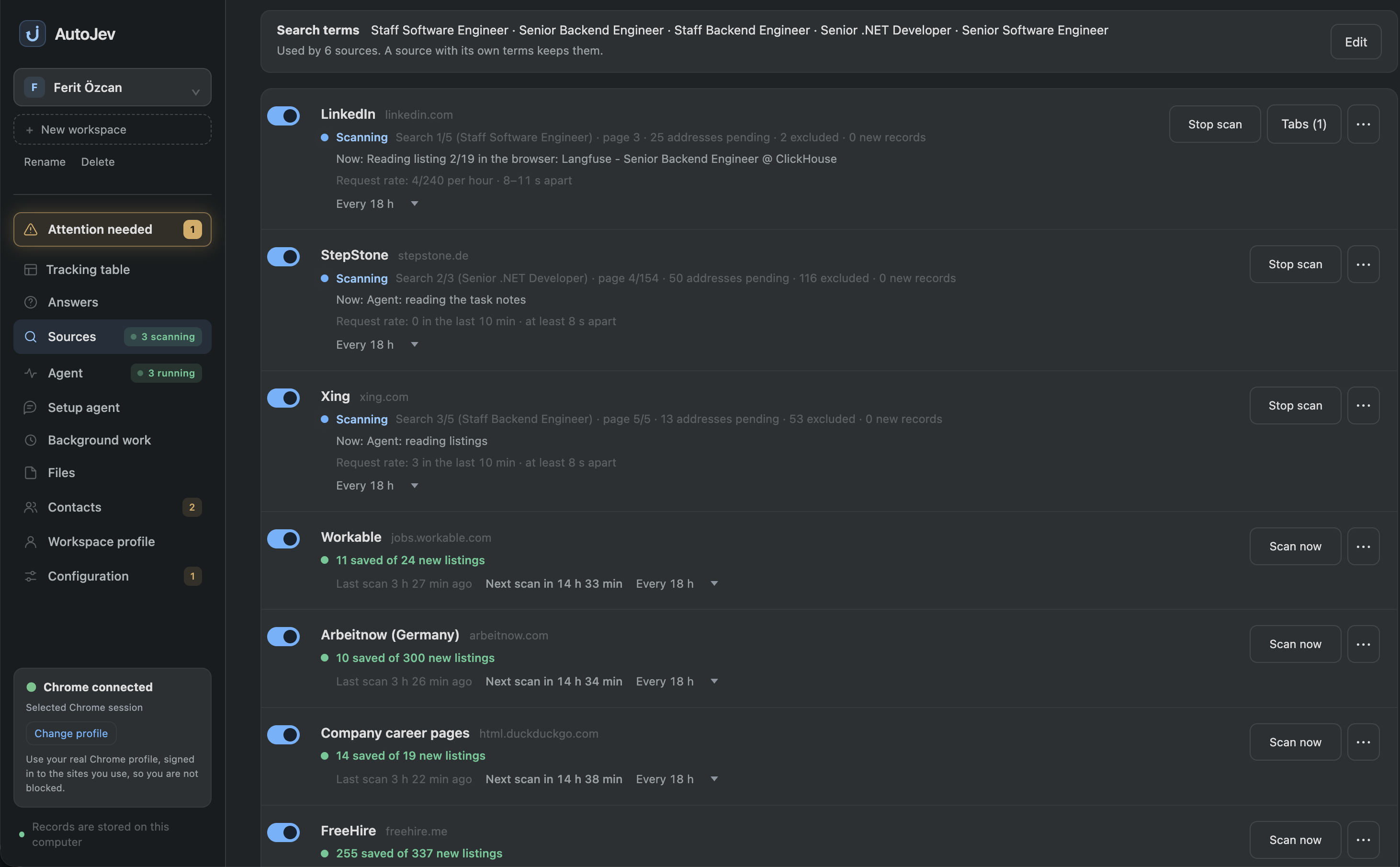
Your job sites, scanned in the background on a schedule.
Stop applying by hand
Job hunting means checking the same sites every day, reading hundreds of listings
that do not fit, filling in the same forms again and again, and writing yet another
cover letter. AutoJob is an open-source AI job search app for your desktop that does
all of that for you: automatic job search across dozens of job boards, AI job
matching against your CV, automatic job applications and an AI cover letter for
every job, using the AI assistant you already have.
What it does
🔎 Finds jobs for you
Tell it once what you are looking for: role, city, salary, remote or on-site. AutoJob
goes through LinkedIn, Indeed, StepStone, XING and many other job sites, page by
page, and on a schedule if you want. It can also find new job sites for your field
and country by itself.
🎯 Picks the jobs that fit you
Every listing is read and compared with your CV and profile. Each job gets a score
and a short reason, so you know why it fits or not. Jobs that break your rules
(wrong city, no visa sponsorship, wrong language) are left out.
📝 Applies automatically
AutoJob opens the application form, fills in every field from your profile, uploads
your CV and submits it. If a site needs an account, it creates one for you. When a
fact is missing, it asks you once and remembers the answer for the next
applications.
✉️ Writes a cover letter for every job
Each application gets its own cover letter, written for that company and that role
from your CV. Read and approve each one, or let them go out automatically.
🤝 Reaches out to the right people
For a job you care about, AutoJob looks for the people behind it on LinkedIn: the
person who posted the job, the recruiter or the hiring manager. It writes a short,
personal note for each of them. You pick the note you like, and it sends the
connection request or message for you.
📋 Keeps track of everything
Every job and every application is in one table: found, applied, interview,
rejected. You get updates on Telegram and can answer its questions from your phone.
How it works
- Talk to the assistant. It asks what you are looking for and reads your CV.
- Choose how much it may do. Only collect jobs, prepare applications for you
to check, or apply on its own. - Press run. AutoJob works on the real job sites in Chrome, just like you
would, and fills your table with matching jobs and sent applications. - Step in only when needed. A login, a CAPTCHA or a code sent to your email?
It stops, tells you, and continues once you are done.
Supported job sites
| Site | Country | Good for | How AutoJob reads it |
|---|---|---|---|
| 🌍 Worldwide | The largest professional network | 🌐 Your Chrome, signed in | |
| Indeed | 🌍 Worldwide | Largest job search engine, a site for each country | 🌐 Your Chrome |
| Company career pages | 🌍 Worldwide | Jobs posted only on employers' own sites | ⚡ Direct |
| Workable | 🌍 Worldwide | Jobs from thousands of companies that hire with Workable | 🔌 Public API |
| Himalayas | 🌍 Remote | Remote jobs, filtered by where you may work from | 🔌 Public API |
| We Work Remotely | 🌍 Remote | One of the largest remote job boards | 🌐 Your Chrome |
| FreeHire | 🌍 Worldwide | Remote, hybrid and on-site jobs with country filters | 🔌 Public API |
| Hacker News "Who is hiring?" | 🌍 Worldwide | Monthly startup and tech hiring thread | 🔌 Public API |
| StepStone | 🇩🇪 Germany | One of Germany's largest job sites | 🌐 Your Chrome |
| 🇩🇪 🇦🇹 🇨🇭 DACH | Professional network of the German-speaking countries | ⚡ Direct | |
| Arbeitnow | 🇩🇪 🇬🇧 🇫🇷 🇨🇭 🇳🇱 Europe | Jobs with a visa sponsorship filter | 🔌 Public API |
| Berlin Startup Jobs | 🇩🇪 Berlin | Berlin startups | ⚡ Direct |
| Reed | 🇬🇧 United Kingdom | One of the UK's largest job sites | ⚡ Direct |
| Nationale Vacaturebank | 🇳🇱 Netherlands | Large Dutch job site | 🌐 Your Chrome |
| Werk.nl | 🇳🇱 Netherlands | Dutch public employment service (UWV) | ⚡ Direct |
| Jobindex | 🇩🇰 Denmark | Denmark's largest job site | ⚡ Direct |
| Jobnet | 🇩🇰 Denmark | Danish public employment service | 🔌 Public API |
| Jobdanmark | 🇩🇰 Denmark | Danish job site | ⚡ Direct |
| Akademikernes Jobbank | 🇩🇰 Denmark | Jobs for graduates and professionals | 🌐 Your Chrome |
| Kariyer.net | 🇹🇷 Türkiye | Türkiye's largest job site | 🌐 Your Chrome |
| Dice | 🇺🇸 United States | Tech jobs | ⚡ Direct |
| Built In | 🇺🇸 United States | Tech and startup jobs | ⚡ Direct |
| SimplyHired | 🇺🇸 United States | Job search engine | ⚡ Direct |
| The Muse | 🇺🇸 United States | Jobs with company profiles | 🔌 Public API |
| Job Bank | 🇨🇦 Canada | Government of Canada's job site | ⚡ Direct |
| Gupy | 🇧🇷 Brazil | Brazil's job portal of companies hiring with Gupy | 🔌 Public API |
| Naukri | 🇮🇳 India | India's largest job site | 🌐 Your Chrome |
| Wantedly | 🇯🇵 Japan | Japanese startup and tech jobs | ⚡ Direct |
🔌 Public API: the site's official data feed, fast and without opening pages.
⚡ Direct: pages are read straight from the site, without a browser tab.
🌐 Your Chrome: read in your own browser, just like you browse.
Any other job site works too. Add its address and the assistant learns how to
search it.
Getting started
1. Install AutoJob
Download the package for your computer from
Releases:
| System | File |
|---|---|
| macOS (Apple Silicon and Intel) | .dmg |
| Windows (x64) | .exe installer |
2. Connect an AI assistant
AutoJob uses the AI assistant you already have. Install one of these and sign in
with your own account:
AutoJob itself is free. The AI usage counts against your own subscription with that
provider.
3. Install Google Chrome
AutoJob applies through the real job sites in Chrome. Press Open browser in the
app and sign in to LinkedIn and the other sites you use once.
4. Start your job search
New workspace → Job search → talk to the assistant → add your CV → run.
Run it once or on a schedule. Scheduled runs need the app and the computer to stay
on.
Privacy
- Your data stays on your computer. Your profile, CV and application history are
stored locally. There is no AutoJob account and no AutoJob server. - You choose what leaves it. The parts needed for a task are sent to the AI
provider you connected, to Telegram if you turn it on, and to Jev if you add a
TypeSafe key (optional). - Backups are yours. Export everything under Configuration → Data and
backups. Saved passwords and API keys are removed from backups.
Good to know
- You stay in charge. It only takes the actions you allowed. It never invents
facts about you; when something is unclear, it asks. - No double applications. It checks whether you already applied before it
submits, and it clicks submit only once. - Polite on LinkedIn. Contact messages are sent only after you approve them,
with a daily limit. - CAPTCHAs. AutoJob does not solve CAPTCHAs or bypass site protections. When a
site asks for verification, it hands the tab over to you. - Not only jobs. The same assistant can also search for a home or watch for free
appointment slots.
Help and contributing
- Found a bug or have an idea? Open an
issue. Please do not post CVs,
personal data, tokens or raw logs. - Security problem? Use the private channel in SECURITY.
- Want to build from source or add a job site? See
docs/development.md,
site extensions and
CONTRIBUTING.
License
AutoJob is open source under GPL-3.0-or-later, with a commercial license option.
See LICENSE and third-party notices.
Reviews (0)
Sign in to leave a review.
Leave a reviewNo results found