qanat
Health Uyari
- License — License: MIT
- Description — Repository has a description
- Active repo — Last push 0 days ago
- Low visibility — Only 8 GitHub stars
Code Basarisiz
- rm -rf — Recursive force deletion command in docker/entrypoint.sh
Permissions Gecti
- Permissions — No dangerous permissions requested
Bu listing icin henuz AI raporu yok.
Agent-native workflow engine for building and backtesting alphas as DAGs.

Qanat
Declare the alpha as a DAG. Hand the backtest to an agent.


Quick start · Agents · How it works · Console · The stage contract · A project file · Backward and forward · Backtest · Connectors · Status · Contributing · Words
Qanat is an agent-native workflow engine for building and backtesting alphas as DAGs.
An alpha is the step that writes a weights table: a target weight per symbol, no budget.
Behind it sits a DAG, the features it reads and the tables those came from, back to the source.
You point sources at staged tables and write each step as .sql or .py. Qanat resolves the
graph, runs the steps in order, and serves a console where you watch the tables fill.
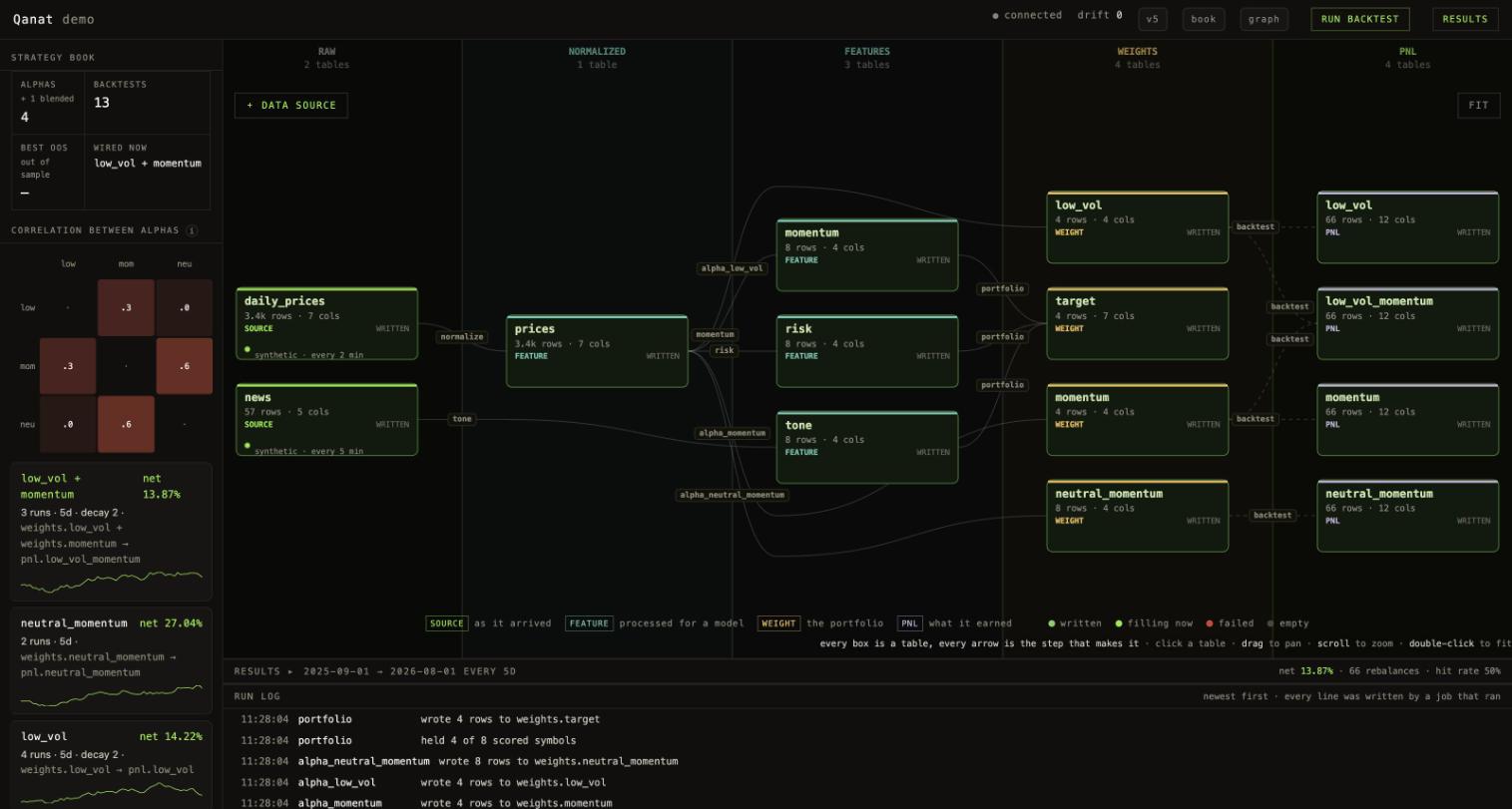
Four alphas in one project. Each writes its own weights table, and each has a
pnl table beside it holding what it earned. low_vol + momentum is two
of them priced as one book, which is why two arrows run into its result.
qanat init --demo builds a project like this one.
The store is one local database: a DuckDB file by default, or Postgres on localhost
(qanat init --postgres, or docker compose). Qanat makes no network calls on its own; the only
outbound requests are the ones your sources make. One real dataset ships with it, 27 years of ECB
reference rates in examples/fx-bundled, and every other source is one you configure.
First packaged release, and a public beta. It does what this page says on my own work, but
nobody else has run it yet. If something breaks or looks wrong, open an
issue or say so on Discord.
Quick start
Two ways in. Both end at the same console on http://127.0.0.1:8420.
Install it. Needs Python 3.10+:
uv tool install qanat-fdtl                 # or: pip install qanat-fdtl
qanat init my-alpha --demo && cd my-alpha
qanat serve
Or run it in Docker. Needs nothing but Docker, and brings its own Postgres:
git clone https://github.com/fidetolabs/qanat.git && cd qanat
docker compose up --build
--demo wires the four shelf alphas, runs the pipeline and prices each one, so the console opens
on a book with numbers in it. About ten seconds. Leave it off for an empty starter project, thenqanat check to hold it against the stage contract and qanat run for one pass over the graph.
Either way the data is synthetic, so the first run succeeds with no API key and no network.
When you are ready, point sources: at a real feed. Nothing else has to change — that isexamples/fx-bundled and examples/fx-real, the same project reading a file and fetching over
HTTP.
The package is qanat-fdtl on PyPI; the command it installs is qanat. No uv yet?curl -LsSf https://astral.sh/uv/install.sh | sh. From a clone, write uv run qanat … instead ofqanat … — see CONTRIBUTING.md.
| Postgres, no Docker | qanat init my-alpha --postgres — a real server on localhost:5432 instead of the file |
| Console only | qanat serve --no-schedule — read the tables and run things by hand, nothing on a clock |
| One pass, no server | qanat run — runs the graph once and exits. This is what goes in your own cron, or in CI |
In Docker, Postgres is on localhost:5433, not 5432, because 5432 is often taken already. User,
password and database are all qanat. To use your own project instead of the demo, bind a
directory to /project.
Wipe Postgres and the project, start fresh:
docker compose down -v && docker compose up --build
Keep the Postgres data, reset only the demo project:
QANAT_RESET=1 docker compose up --build
Port already in use? Set the host ports yourself:
POSTGRES_HOST_PORT=5434 QANAT_HOST_PORT=8421 docker compose up --build
Give it to an agent
Most people will drive this through an agent rather than the CLI. Add it to any MCP client:
{ "mcpServers": { "qanat": { "command": "qanat", "args": ["mcp"], "cwd": "/path/to/my-alpha" } } }
Claude Code: claude mcp add qanat -- qanat mcp. Add --read-only and it keeps the 20 tools that
read and drops the 7 that write.
The console and the MCP server are two thin adapters over one service layer, and no logic lives
above them. That is what agent-native means here, and it is testable: an agent can do everything
the console can, and the two cannot disagree about the state of a project.
| 27 tools | |
|---|---|
| Discover | list_tables, describe_table, sample_table (honours as_of), lineage, list_steps, read_step |
| Validate | check, plan, stale_tables |
| Choose | list_alphas, read_alpha, use_alpha, alpha_book, backtest_conditions |
| Run | run, backtest, list_backtests, report, period, weights, compare, list_runs |
| Author | save_step, remove_step, save_source |
| Watch | open_console, console_status |
What that looks like
"What is in this project, and what feeds the momentum alpha?"
The agent calls list_tables, then lineage, and gets the answer as data rather than prose:
{ "ref": "weights.momentum",
  "upstream": [ { "from": "normalized.prices", "step": "alpha_momentum" } ],
  "breaks_portfolio": false }
"Add a momentum alpha and backtest it."list_alphas → use_alpha → run → backtest_conditions → backtest. The fourth call is the
one that matters. Rather than guessing a window, it comes back with what the project can actually
answer, and a list of what to ask you first:
{ "ask_the_person_for": ["alpha", "from", "to", "universe", "rebalance", "decay", "split"],
  "window": { "data_available": { "earliest": "2025-07-13", "latest": "2026-09-05" } },
  "rebalance": { "default": "5d", "note": "shorter means more decisions and more turnover" },
  "why": "each one changes the number. A backtest run on conditions nobody chose is a guess with
          a decimal point on it." }
"Which of my alphas actually works?"alpha_book returns every alphaset with what it earned, so the agent compares rather than
speculates. report and compare open any two of them side by side.
"Why did it lose money in March?"report gives the periods, period opens one of them in full — what was held, what each name
returned, what was traded to get there — and weights shows the portfolio it decided on.
"Watch me work." open_console serves the console from the same session, so you can see the
graph light up while the agent runs. One process, one store, nothing to keep in sync.
Notes on the tool surface: docs/agents.md.
How it works
Everything is declared in one qanat.yaml: stages, sources, steps, schedules, universes.
Nothing hides in application code. Thirteen commands act on that file:
| command | |
|---|---|
qanat init |
scaffold a project |
qanat check |
hold the pipeline against the stage contract |
qanat plan |
what would change if this file were applied. Configuration, not row values |
qanat prune |
drop tables nothing produces any more |
qanat ls |
stages, tables, jobs |
qanat run |
one pass over the whole graph, or one job |
qanat serve |
scheduler and console |
qanat backtest |
replay the pipeline and price what it held |
qanat backtests |
every replay this project has run |
qanat report |
one backtest, period by period |
qanat compare |
what moved between two backtests |
qanat alphas |
the alphas that ship with qanat, and how to wire one |
qanat mcp |
serve this project to an agent over MCP (stdio) |
A step is a .sql file, wrapped into CREATE OR REPLACE TABLE, or a .py file with run(ctx)
returning a DataFrame. ctx.read() refuses any table the step did not list in from:, so a missing
dependency is an error instead of a stale number.
State is recorded when a job succeeds, not when the file loads. "Changed" in qanat plan means this
job differs from the last time it worked, and a failed run is never the baseline for a later diff.
sources ─→ raw ─→ normalized ─→ features ─→ weights ─→ pnl
   │         │         │            │          │        │
 rest      never     typed,      a chain    one table  what it
 sql       edited    deduped     of steps   per alpha  earned,
 csv                                       (no budget) per rebalance
Console
qanat serve starts the scheduler and a web console. Every box in it is a table and every arrow is
the step that makes it, laid out left to right by stage.
You configure the whole pipeline from the console — sources, steps, alphas, stages, retention — and
everything you change is written to qanat.yaml on disk. There is no settings panel and no edit
mode. See docs/console.md.
Five stages, named for what they hold
A pipeline is table — (step) — table — … — table. The tables are what you have; the steps are
the named work between them.
raw— landed exactly as it arrived, never edited. No step may write into it.normalized— typed, deduplicated, conformed to one key set.features— a chain: a feature step may read another feature step.weights— one table per alpha. A target weight per symbol, no budget. The step that
writes one of these tables is the alpha. What it reads is its lineage.pnl— optional, and last. What each alpha earned, per rebalance. Nothing writes it by
hand:qanat backtestdoes, once it knows what the portfolio was worth.
No alpha may read another alpha's weights, so no edge is ever counted twice.
qanat check enforces six rules, and refuses to serve a project that breaks one. They are
written out with the reasoning in docs/contract.md.
What a project looks like
project: equity
store: ./data/qanat.duckdb

universes:                         # which symbols a portfolio may hold
  - id: sp500
    index: S&P 500
    symbols: ./universes/sp500.csv   # symbol,name,sector,from,to

stages:                          # order here is order in the pipeline
  - { id: raw,        kind: raw }
  - { id: normalized, kind: features }
  - { id: features,   kind: features }
  - { id: weights,    kind: weights }
  - { id: pnl,        kind: pnl }    # optional, last; written by `qanat backtest`

sources:                         # many sources may feed one stage
  - id: prices
    to: [raw.daily_prices]
    connector: rest
    schedule: "*/5 * * * *"
    options:
      url: https://api.example.com/v1/bars
      headers: { Authorization: "Bearer ${PRICE_API_KEY}" }
      records: data.items

steps:                           # n:m -- `from` and `to` are both lists
  - id: momentum
    from:   [normalized.prices]
    to:     [features.momentum]
    script: steps/momentum.py
    when:   [normalized.prices]    # or `schedule:` for a clock, or neither
    options: { lookback: 20 }

  - id: alpha_momentum             # an alpha: the step that writes a weights table
    from:   [features.momentum, features.risk]
    to:     [weights.momentum]
    script: steps/alpha_momentum.py
    universe: sp500
    rebalance: 20d                 # how this alpha wants to be run; a backtest
    decay: 4                       # uses these unless you say otherwise

retention:                         # a source on a clock fills its table forever.
  raw.daily_prices: 7d             # delete rows older than this; `24h` and `2w` work too
  normalized.prices: 30d

backtest:                          # what prices the portfolio, and what it costs
  prices: normalized.prices        # the rest of the keys are under Backtest, below
  fee_bps: 5
  slippage_bps: 10
Retention runs every minute. It finds the date in whichever of ts, timestamp, time, date,as_of, datetime, created_at or updated_at the table has.
A .py step implements run(ctx):
def run(ctx):
    bars = ctx.read("normalized.prices")      # only what the step declared in `from`
    held = ctx.universe()                     # the symbols it may hold
    ctx.log("scoring")
    return df                                 # or {"table": df, ...} for n:m
Each term has one meaning and one spelling. See docs/words.md.
Backward and forward
The same graph runs two ways.
Backward — one pass over a period that already happened. qanat backtest replays the pipeline
once per as-of date and prices what it held. You run it, you read the number, it is done. See
Backtest.
Forward — the graph keeps up as new data arrives. Some feeds only tell you today's number, so
the only way to have last year's is to have saved it.
A job is anything that runs: a source or a step. A job goes forward in one of two ways.
On a clock. Give the job a cron line:
- id: prices              # a source: poll the feed every five minutes
  schedule: "*/5 * * * *"
- id: momentum            # a step: recompute the feature after it lands
  schedule: "*/15 * * * *"      # cron is UTC
Set it here, or in the console: click a source or a step and fill in fetch again. The graph then
reads on */5 * * * * instead of only when you ask. A job that is still running is never started
twice.
When its input changes. A clock is a guess about when the data arrives. This is the arrival
itself:
- id: momentum
  from: [normalized.prices]
  when: [normalized.prices]     # run when this gets new rows
Each woken step wakes whatever waits on its own tables, so one source landing rows reaches the far
end of the graph on its own. A step may set both schedule: and when:, or neither, in which case
it runs when you ask. It can only wait on a table it reads.
Sources stay on a clock either way. A source waits on something outside qanat, so the only way to
find out is to ask.
sh scripts/demo-run.sh polls a mock feed for two minutes while the console fills.
See examples/scheduled-ingest.
Backtest
A backtest is the same run loop with a clock and a bill.
qanat backtest --from 2026-01-05 --to 2026-06-01 --rebalance 10d --seed 7
    gross            +25.150%
    fees              -0.636%
    slippage          -1.272%
    ------------------------------
    net              +23.242%

    per period        +1.660%  over 14 periods
    hit rate           64.3%
The clock. Before each pass, every table is shadowed by a view holding only the rows that
existed at that moment. A step reads the past without knowing it is being replayed, so a step that
forgot to filter still cannot see the future.
The bill. The weights table says what to hold. Turnover is how much had to be traded to get
there. Fees and slippage are charged on turnover, and what is printed is net.
Set it in qanat.yaml. Any of it can be overridden on the command line for one run:
backtest:
  prices: normalized.prices     # where a symbol's price per day comes from
  price_column: close
  fee_bps: 5                    # charged on turnover
  slippage_bps: 10              # estimated, charged on turnover too
  rebalance: 5d                 # gap between as-of dates
  purge: 0d                     # hold rows back this long before a step may read them
  embargo: 0d                   # wait this long after as_of before a return counts
  decay: 0                      # blend the last N portfolios; 0 or 1 is off
Decay usually changes the verdict. An alpha is often right about direction and wrong about how
often. Acting on every twitch pays fees for noise. --decay N holds a blend of the last N
portfolios, newest heaviest:
                    turnover      net
  --decay off          45.00    -5.05%
  --decay 4            25.32    -2.88%
Rebalancing does the same thing from the other side. Same alpha, same window, only --rebalance
changed:
  --rebalance 10d     turnover   10.8     net  +23.2%
  --rebalance 1d      turnover  128.5     net  -27.1%
That gap is why net is the headline number and gross is not. Raising the fee until the edge dies is
how you find out how much of it was real.
In sample and out of sample are separated. --split <date> cuts the run in two and reports
both. The lookback, the rebalance and the decay were all chosen by someone who could see the
in-sample half, so that number is partly a measure of the choosing:
    in sample        -22.055%  19 periods,  -1.161% each
    out of sample     -2.843%  14 periods,  -0.203% each
    split at 2026-03-01 — out of sample is the line to believe
Several alphas can be priced as one book. That is a different strategy from either alpha alone:
qanat backtest --alpha alpha_momentum,alpha_low_vol --allocation momentum=3,low_vol=1 \
               --from … --to … --rebalance 5d
Each alpha keeps its own weights table. The run holds the sum, renormalised so the book size stays
1, and the result lands in one PnL table fed by all of them.
Same seed, same answer. --seed pins every generator a step might reach for, and the run
records a digest of the project, the window and the seed. Two runs with the same digest that give
different numbers mean something moved underneath.
More in docs/backtest.md: point-in-time universes and survivorship bias,
how net compounds, opening a single rebalance, scoring as the run goes, and how an alpha states its
own rebalance and decay.
Alphas on the shelf
Four plain alphas ship with Qanat, so the first replay is three commands away:
qanat alphas                                        # what is on the shelf
qanat alphas momentum --reads normalized.prices     # wire one up; add as many as you like
qanat run && qanat backtest --from … --to …
momentum |
rank by trailing return, hold the top names. Long only |
reversal |
the same over days rather than months, buying what just fell |
low_vol |
hold the quietest names, sized inversely to their own volatility |
neutral_momentum |
momentum with the average taken out. Long / short, equal sides |
They are rules you could write on a napkin, and that is the point: something real to replay on
day one. qanat alphas <name> writes an ordinary step script into steps/. Edit it, or throw it
away and write your own. The tool is what is given away here. The alpha never is.
Connectors
| connector | what it is |
|---|---|
rest |
An HTTP endpoint returning JSON. ${ENV_VAR} is expanded in url, params, and headers, so keys never enter the file |
sql |
Any database SQLAlchemy can reach. pip install "qanat-fdtl[sql]" |
csv |
A local path or a URL |
synthetic |
A deterministic fake market, so a new project runs green before any API key exists |
A connector is one function, fetch(source, root) -> DataFrame, registered inqanat/sources/__init__.py. That is the entire plugin surface.
Status
Beta. Working end to end: the stage contract, the runner, the DuckDB/Postgres store, the console,
per-table retention, cron scheduling, Docker, plan / prune, the
point-in-time replay engine with its net-edge report, and the MCP server.
Four examples ship with it:
examples/equity |
synthetic prices, runs green with no network and no keys. cd examples/equity && qanat run && qanat serve |
examples/fx-bundled |
real data, in the repo: 27 years of ECB rates, 126 KB, no key and no network |
examples/fx-real |
the same project fetching the same rates over HTTP instead, from api.frankfurter.dev |
examples/scheduled-ingest |
a source on a cron, fetching over HTTP while you watch the console |
Not implemented: live backtesting (scoring a period as each rebalance date arrives), backfills,
incremental windows, diffs over the data itself, and a live trading path. Qanat produces a
portfolio, it does not place an order.
Qanat runs one kind of pipeline: an alpha that ends in a portfolio. Airflow, Dagster and Prefect
handle arbitrary DAGs, distributed execution and large connector ecosystems. Reach for those when
you need them.
Known limits of the numbers. These are real, and worth knowing before you trust a figure:
- There is no benchmark. Nothing separates edge from beta, so a long-only alpha in a rising
market looks good and the report cannot tell you why. purgeandembargoare borrowed words. Here they mean "hold rows back before a step may
read them" and "wait before a return counts". Related to purging and embargoing in
cross-validation, but not the same thing.
Issues and pull requests are welcome. See CONTRIBUTING.md. Questions on
Discord.
License
MIT License. See LICENSE.
Copyright (c) 2026 fidetolabs
Yorumlar (0)
Yorum birakmak icin giris yap.
Yorum birakSonuc bulunamadi