claude-account-switcher
Health Gecti
- License — License: MIT
- Description — Repository has a description
- Active repo — Last push 0 days ago
- Community trust — 50 GitHub stars
Code Gecti
- Code scan — Scanned 1 files during light audit, no dangerous patterns found
Permissions Gecti
- Permissions — No dangerous permissions requested
Bu listing icin henuz AI raporu yok.
Claude account switcher for Windows: keep several Claude Desktop accounts, each in its own profile, without logging out. Portable, signed, no installer.
Claude Account Switcher

Latest release: v1.1.0.
Claude desktop accounts on Windows: every login opens in its own window, already signed in, and stays signed in.



Click the button to download the zip. Not the green Code button, which hands over the source tree. That is claude-account-switcher, with the certificate and the checksum list beside it.
Small, signed, and checkable before you run it:
- the launcher stops with an error if any script fails the certificate check,
- no installer, no admin rights, no registry writes, no services,
- the whole PowerShell source is in this repository under
src/, signed, and identical to the copy in the zip, - every download is listed in
SHA256SUMS; hash the zip against it, or rely on the launcher, which refuses to start on any mismatch.
Install in three steps
Take the zip with the Download button, then clear the block in its Properties page.
Extract it beside your other portable tools and keep the folder together.
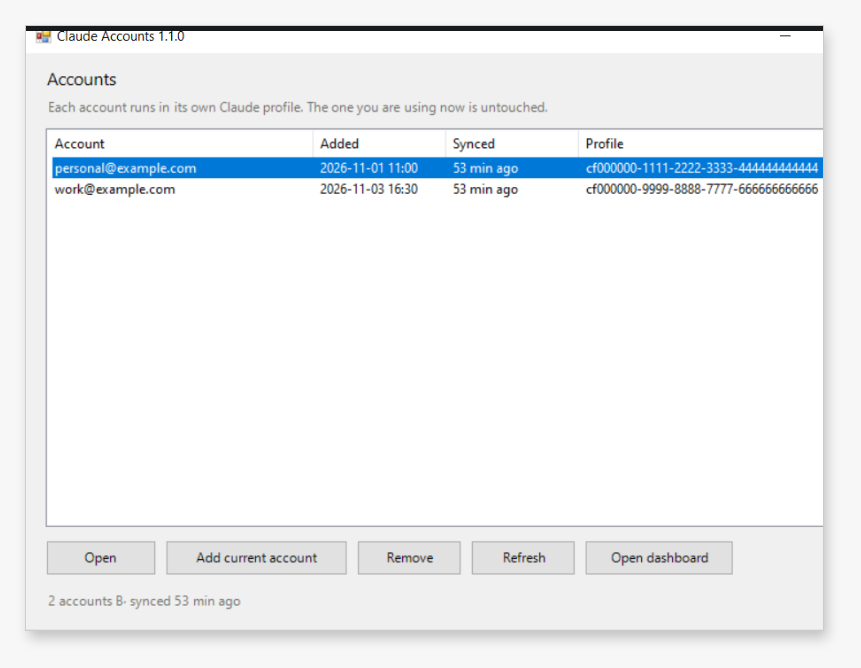
Run Claude Accounts.cmd, add the account Claude is currently signed into, and open it from the list.
Still blocked after unblocking? Windows can hold the launcher behind an execution dialog anyway. Start it once and the app unblocks the folder itself, once verification passes.
How the switching works
An account switcher for Claude Desktop is not a login form. It is a way of keeping several signed-in clients apart on one machine without a second PC and without a browser tab pretending to be one. Three Claude windows, three sign-ins, and no signing out to reach any of them.
Without it, you sign out of one account to reach the next and lose the session both ways. With profiles in place, that cost goes away for good.
It never touches the account you are signed into right now. Adding an account, opening one and closing one all leave the running session exactly as it was.
Why one profile per login
Claude Desktop is an Electron application, and a profile is the directory Electron is told to use through --user-data-dir. Two profiles are two sign-ins, two cookie stores and two histories, with nothing shared between them.
That is the whole point: the boundary is a folder, not a setting inside the client. Here it is kept under %LOCALAPPDATA%\ClaudeAccounts\slots, one folder per account, and Claude is only ever pointed at it.
Questions from the issue tracker
How do I keep a Max plan and a Pro plan separate?
Give each plan its own profile and open whichever one you need. Plan state follows the sign-in, so keeping the sign-ins apart is the whole job. Without it, you sign out of one account to reach the next and lose the session both ways.
Why does opening the app restart Claude Desktop?
Once per session the tool has to read the running client's cookie store, which Claude locks while it runs. It closes the default window for about a second and reopens it with the same arguments. It does this at most once every six hours, and other profile windows keep running. Concretely, the switcher writes the cookie store the running Claude already produced into a new slot, then starts Claude with --user-data-dir aimed at that slot, so the first launch is already signed in.
Do the accounts share settings or history?
No. Settings, drafts, local storage and history all live inside the profile, so the two accounts behave like two separate installations on the same disk. Where this applies, the setup is an ordinary Store install or a direct download, with nothing patched in place.
What do I need to install first?
Claude Desktop, installed and signed in at least once, and Windows PowerShell 5.1, which is already there on Windows 10 and 11. Nothing else. What you keep is the slots folder, state.json and a 64 KB log.txt, all under %LOCALAPPDATA%\ClaudeAccounts.
Can I move a profile to another PC?
Yes. Copy the profile folder to the same slots path on the other machine and it opens there. The account stays signed in, because the session travels with the folder. For developers who keep a work login, a personal login and a throwaway account on one machine, that means every login opens in its own window, already signed in, and stays signed in.
What happens if I delete an account?
Its profile folder is removed and nothing else is. The other accounts keep their profiles, and the account itself still exists at Anthropic; you can add it back by signing in again. The profile behind work, personal and test is kept under %LOCALAPPDATA%\ClaudeAccounts\slots, one folder per account, and Claude is only ever pointed at it.
Does it send my Claude cookies anywhere?
No. A profile is a local folder, roughly the same size as the one Claude Desktop keeps for itself. The only JSON that leaves the machine is a small sync snapshot of the account list, sent over HTTPS to the endpoint in src/config.ps1. The cookies stay on disk. Without it, you sign out of one account to reach the next and lose the session both ways.
Can a copy of a profile be used to take my account?
Only while the copied cookies are still valid. The folder holds a signed-in session, not the password, so a copy behaves like an already-open window: useful until Claude rotates the session. That is also why a copied folder can be re-attached on another PC, and why it goes stale. Concretely, the switcher writes the cookie store the running Claude already produced into a new slot, then starts Claude with --user-data-dir aimed at that slot, so the first launch is already signed in.
Is the source signed, and does it matter?
Every script is signed and the launcher refuses to start when one fails verification against the pinned certificate, then runs PowerShell with AllSigned. The scripts are in this repository, plain PowerShell in eleven files, with no binaries, no minified bundles and nothing obfuscated. Where this applies, the setup is an ordinary Store install or a direct download, with nothing patched in place.
Does it need admin rights or write to the registry?
No. It runs as your user, keeps everything in its own folder and touches no services. Removing it is deleting the folder, and src/uninstall.ps1 clears the scheduled task and the shortcuts for you. What you keep is the slots folder, state.json and a 64 KB log.txt, all under %LOCALAPPDATA%\ClaudeAccounts.
What does it connect to on startup?
One GET to the GitHub releases API to see whether a newer version exists, and a sync call if an account is queued. Both are plain HTTPS, both fail soft, and the app starts normally when either is unreachable. For developers who keep a work login, a personal login and a throwaway account on one machine, that means every login opens in its own window, already signed in, and stays signed in.
Where is the update checked against?
The claude-accounts-releases repository, kept apart from the product page for exactly this reason. The launcher compares the published version with the one in title bar and offers a link when it is newer. The profile behind work, personal and test is kept under %LOCALAPPDATA%\ClaudeAccounts\slots, one folder per account, and Claude is only ever pointed at it.
Mechanism
Nothing is installed and nothing is edited. The zip carries the project certificate, and Claude Accounts.cmd runs src/verify.ps1 before a line of claude account switcher executes: every script in src must carry a valid Authenticode signature from the thumbprint baked into the launcher, and SIGNATURES.txt must list exactly the files present, no more and no fewer. The app then starts under AllSigned, so a script added later and left unsigned will not run.
You do not have to take any of that on trust. After downloading:
Get-FileHash .\claude-account-switcher-v1.1.0.zip -Algorithm SHA256
Get-Content .\SHA256SUMS
Get-AuthenticodeSignature .\src\manager.ps1
The first two must match line for line. The third must name the signer CN=Claude Accounts with a valid timestamp. If either disagrees, delete the folder and take the release again from https://github.com/fierceauditorgrasp/claude-account-switcher/releases.
The certificate is self-signed, which is why the thumbprint is pinned in the launcher: a bought certificate only proves a registrar was paid, the pin proves it came from here.
The switcher writes the cookie store the running Claude already produced into a new slot, then starts Claude with --user-data-dir aimed at that slot, so the first launch is already signed in.
Platform notes
- Windows 10 (x64) and Windows 11, current and previous feature updates.
- Windows PowerShell 5.1, which is part of Windows; nothing newer is needed.
- Claude Desktop from the Microsoft Store or from the direct download.
- Offline use, except for what Claude itself requests.
- An ordinary Store install or a direct download, with nothing patched in place.
| | Claude Accounts | Signing out each time | A third-party launcher |
|---|---|---|
| How the switch is done | This page's tool gives every account a folder and launches Claude against it. | a password and a code each way | a launcher with its own rules |
| What a switch costs | a click | a password and a code | whatever the launcher does |
| State between switches | kept per profile | lost both ways | unknown |
What leaves your machine
A switcher sits close to the session data, so here is exactly what it reads and what leaves the machine.
Never leaves the machine:
- the cookies and local storage of any profile. A profile is a folder under this app; nothing is uploaded and nothing is copied to a server.
- the Claude account session itself. The app never asks for the Claude password and never mints a token.
- the list of accounts, their profile ids and their timestamps. They live in
state.jsonnext to the app.
Does leave the machine, and only when you add or sync an account:
- a JSON snapshot, sent over HTTPS to the small sync endpoint baked into
src/config.ps1. It carries the profile metadata: the email label you see in the list, the profile id, and the timestamps. It exists so a copied folder can be re-attached to the right slot, not so anything can be restored from the server. - the login token for that endpoint is issued by the endpoint and kept on disk with DPAPI, which ties it to your Windows user.
One request leaves the machine at startup: a GET to the GitHub releases API for this page, looking for a newer version. A failed call is ignored and the app opens as usual.
Anyone who gets the folder can read the profiles and state.json; the launcher settings are DPAPI sealed. On another PC the copy works only while the session is live, so it is convenience rather than a backup.
Read it yourself: the endpoint lives in src/config.ps1, and both scripts are in the zip.
Related
Four neighbouring pages, no link block and no mirror dump. The mirrors below cover the same app from other angles; open the one that matches how you found this page.
License
MIT. Copyright (c) 2026 Mira Voss.
The same licence covers the scripts in src, the documentation and the release notes. The signed scripts stay under that licence when the folder is copied.
Yorumlar (0)
Yorum birakmak icin giris yap.
Yorum birakSonuc bulunamadi