Moony
Health Uyari
- License — License: AGPL-3.0
- Description — Repository has a description
- Active repo — Last push 0 days ago
- Low visibility — Only 6 GitHub stars
Code Gecti
- Code scan — Scanned 12 files during light audit, no dangerous patterns found
Permissions Gecti
- Permissions — No dangerous permissions requested
Bu listing icin henuz AI raporu yok.
Local-first personal finance for macOS, Windows and Linux: your whole net worth – accounts, investments, crypto, property, loans – in an encrypted database on your computer. No account, no cloud, no telemetry.
Moony
Your whole net worth. Only on your computer.


macOS · Windows · Linux · ten languages
Moony tracks your bank accounts, stocks, crypto, bonds, real estate, loans and insurance in one
net-worth view, in ten languages and 45 currencies. There is no account, no cloud and no sync:
your records, photos and documents live AES-256 encrypted on your computer (exports and copies
you open in other apps are readable, see Privacy and security). The app contacts the
internet only for market data and update checks, all listed in PRIVACY.md.
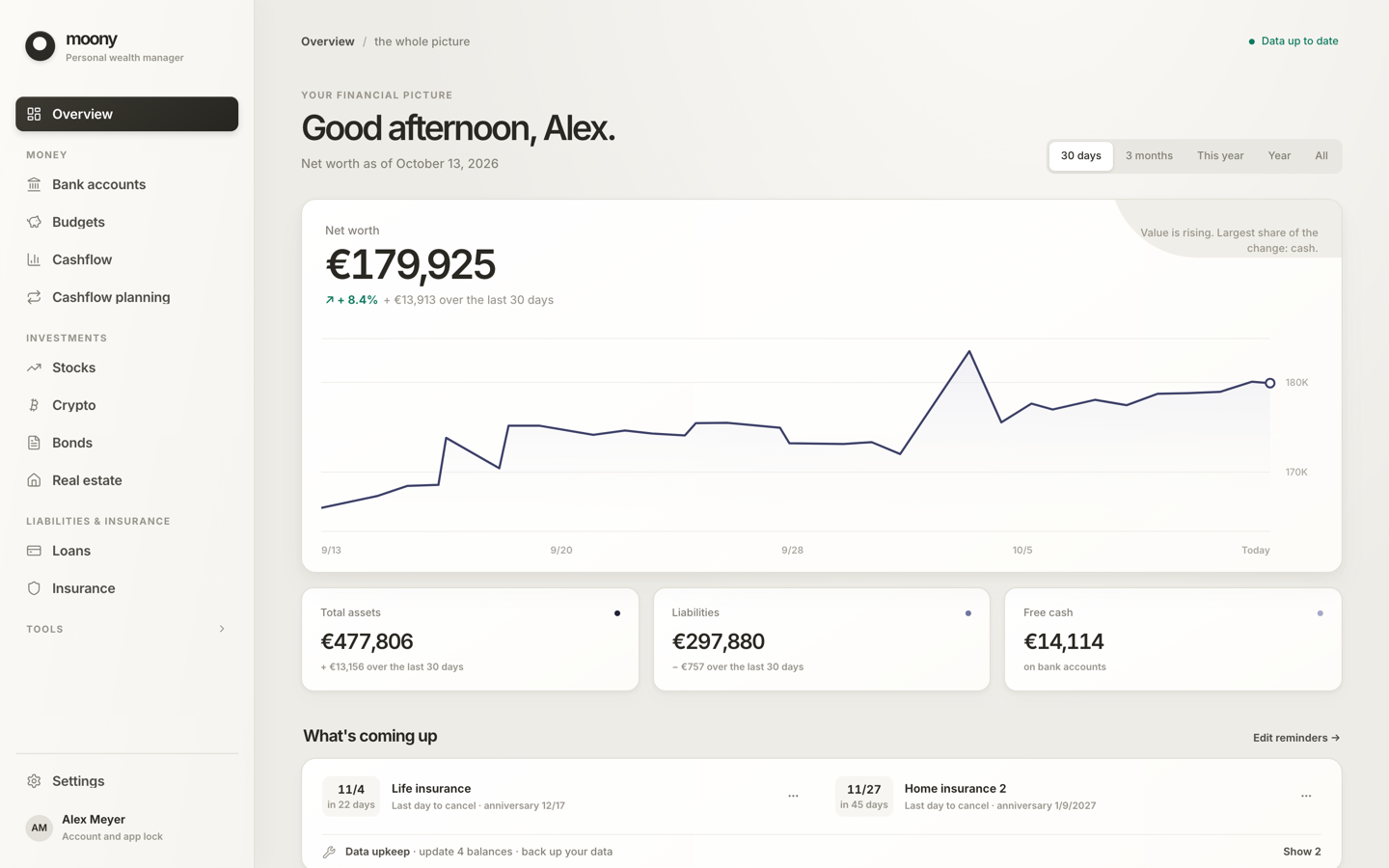
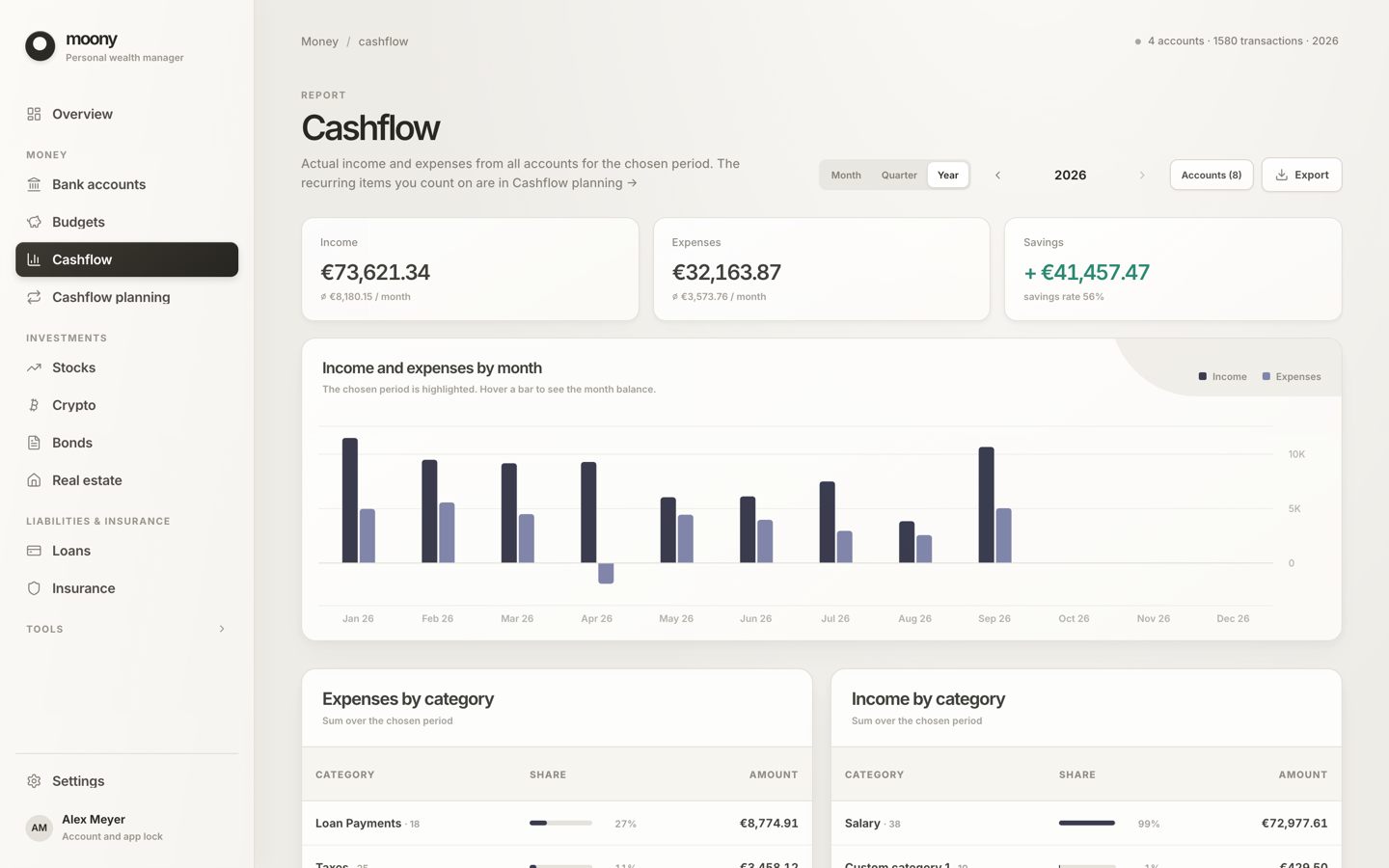
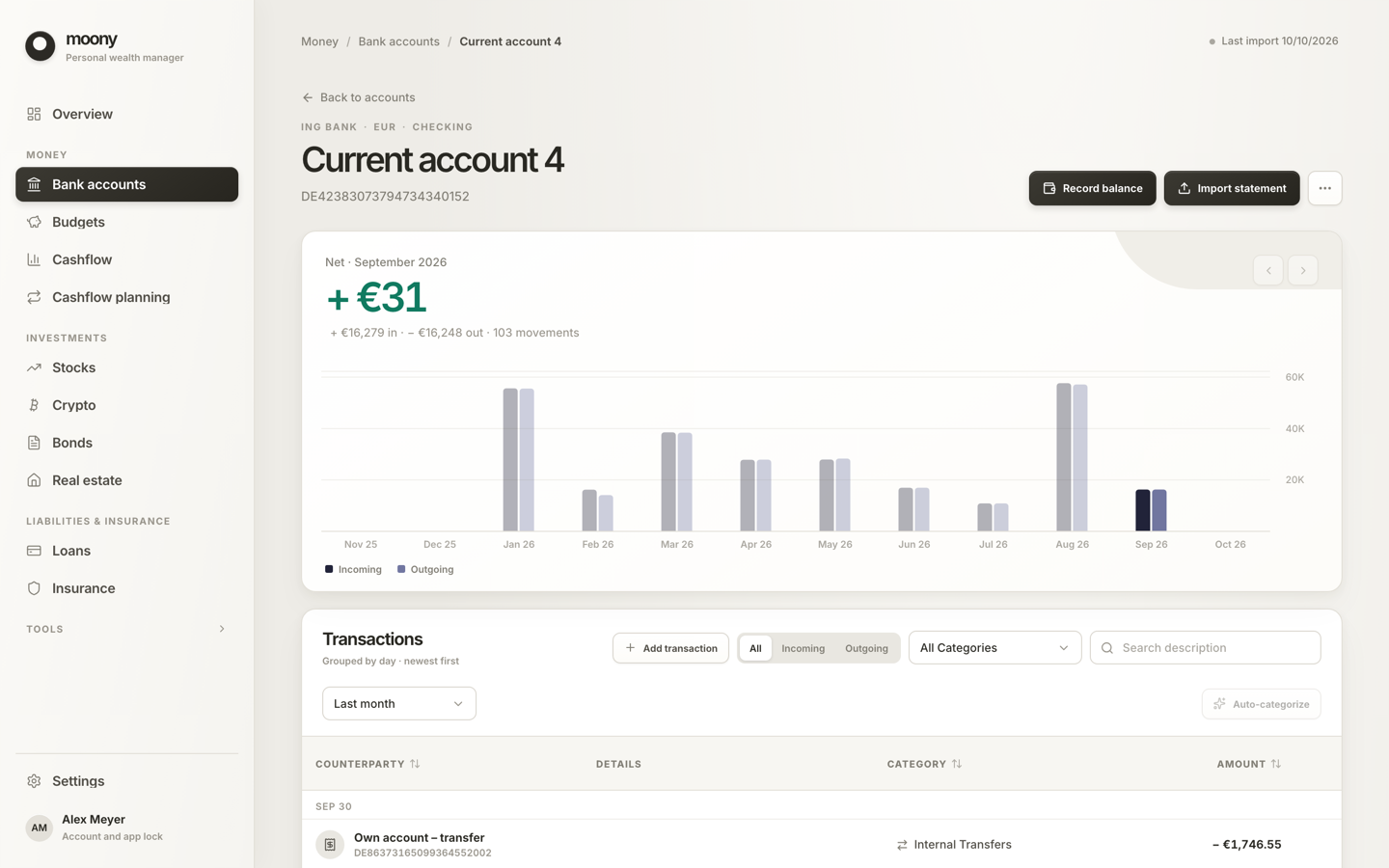
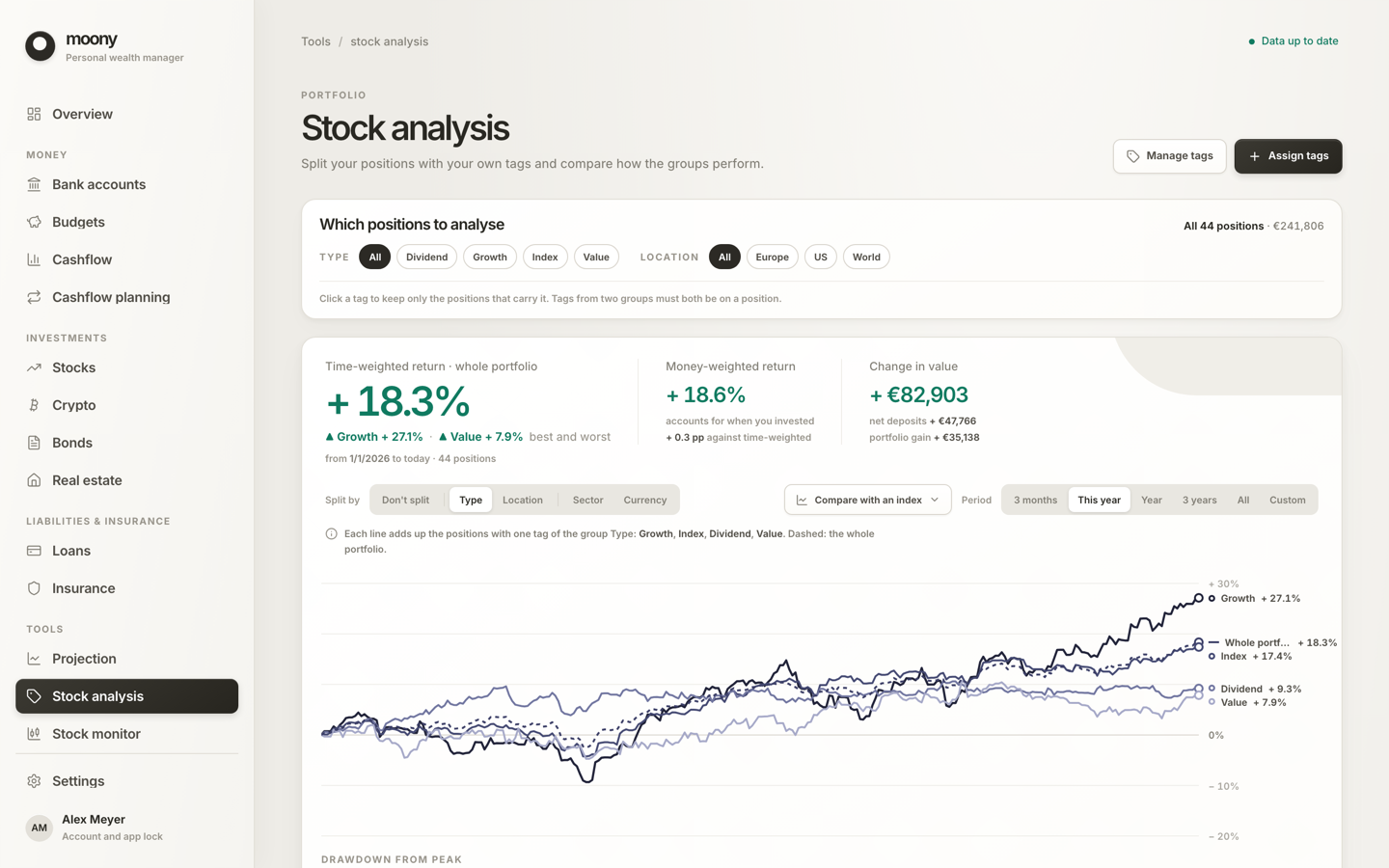
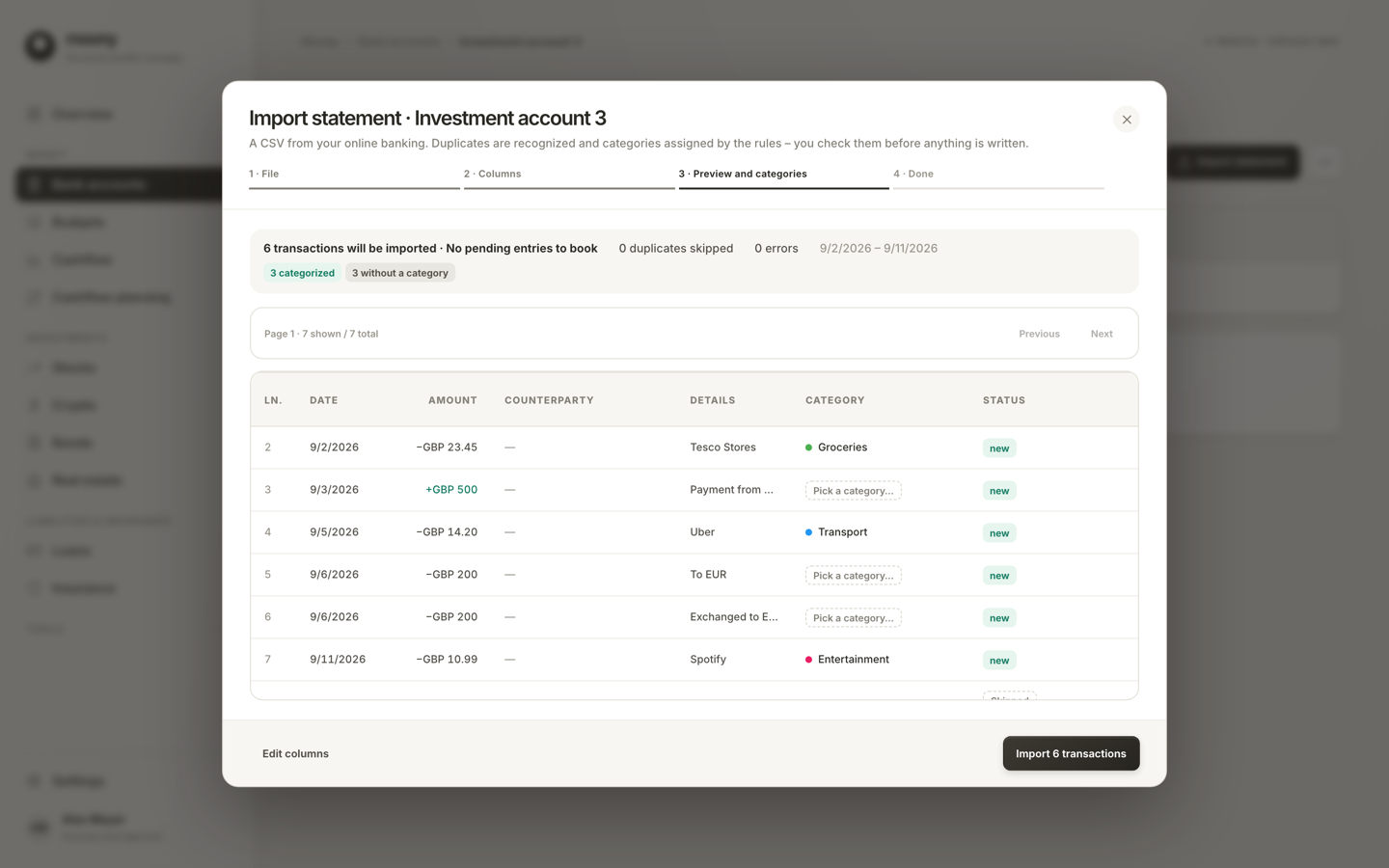
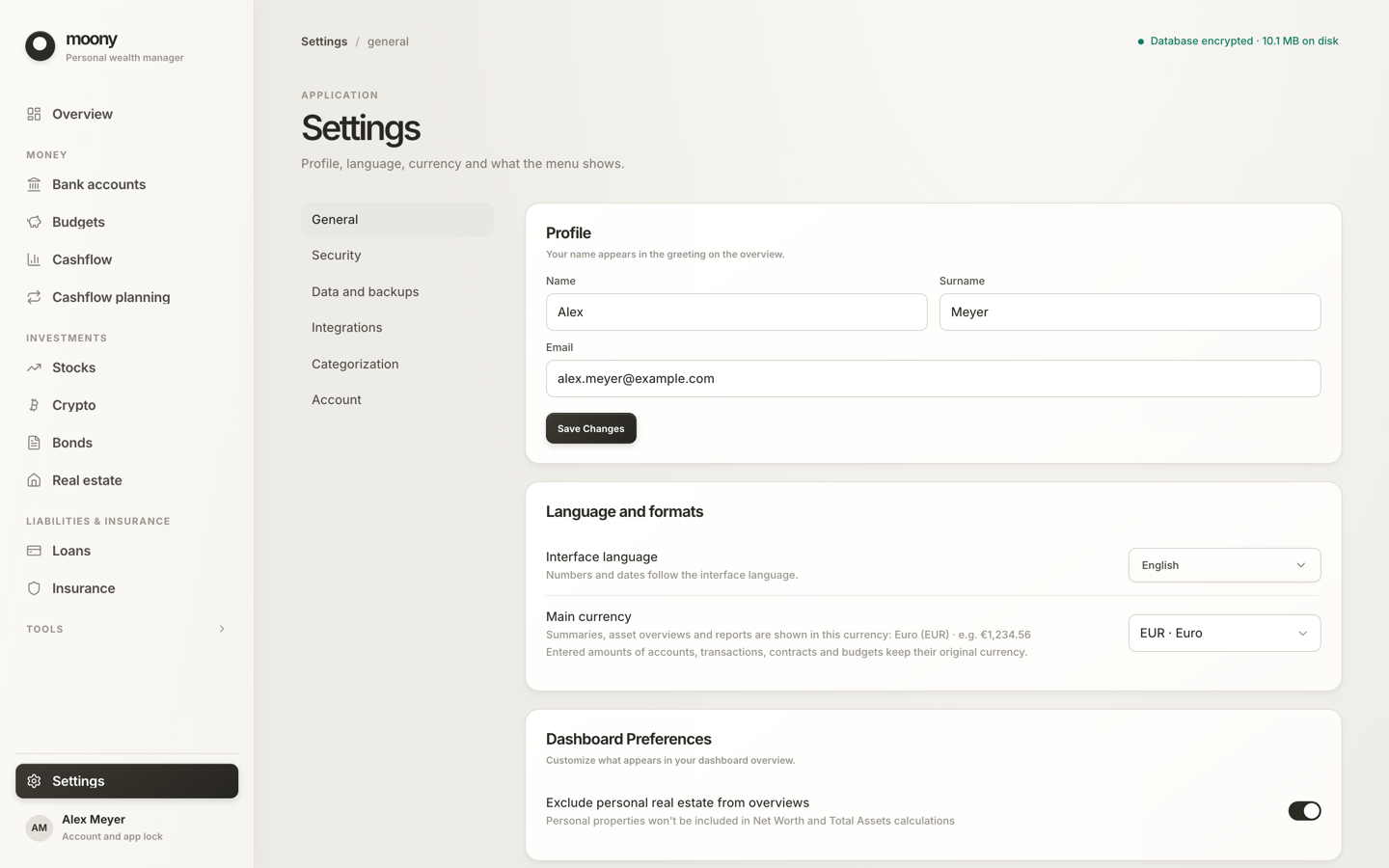
The screenshots show a sample profile (synthetic data).
Who it is for
Moony is for people with several accounts, investments, loans and insurance policies who want
one net-worth number and do not want to hand their statements to a service. It is not the
right tool today if you need automatic bank sync (you import bank statements or enter data yourself), a phone or
tablet app, or a budget shared by a household (one profile on one computer, no sync).
What it does
- Net worth and its history across bank accounts, stocks, crypto, bonds, real estate, loans,
insurance and other assets. A What's coming up agenda lists insurance notice deadlines,
fixed-rate ends, maturities, larger payments and watchlist targets that were reached. - Bank accounts with statement import (CSV with 16 bank presets and column detection for other
files, and CAMT.053, MT940, OFX/QFX and QIF statements; a preview, duplicate skipping, one-click
undo) and an account page built around dated balance records. Categorization uses your own
rules, rules learned from your choices and rule packs for many countries. - Stocks with prices from Yahoo Finance (or set by hand), a yearly dividend estimate, the
dividends each position received (from Yahoo Finance, or entered by hand where Yahoo has none),
company logos (from Yahoo Finance, or Financial Modeling Prep where Yahoo has none), and a watchlist that never counts toward net worth. Broker CSV import reads XTB, Trading 212,
Degiro and Interactive Brokers exports and your own table. The analysis shows time-weighted and
money-weighted return, drawdown, each position's contribution, deposits against gain and an
optional comparison with S&P 500 or MSCI World. Stock splits are detected from Yahoo Finance
and wait for your confirmation before your earlier trades are converted; the broker import
checks the file's prices against them and converts pre-split rows on request. - Crypto, bonds, other assets, real estate, loans and insurance, with dated valuations,
rental income, recurring costs, linked loans and policies, loan schedules and attachments. - Budgets, cashflow and planning: a cashflow report by month, quarter or year, cashflow
planning with categories as groups (any row or category can be left out of the plan), a
net-worth projection, and annuity and real estate investment calculators. Budgets show
spending against the limits; one "Manage budgets" dialog lists each category's limit in
effect with its scheduled changes and earlier limits. A limit can run from one month to
another (the earlier limit returns afterwards) or for good; the newest limit replaces the
ones it overlaps after a warning, and equal neighbouring limits merge. Deleting a budget removes all its
limits, past months included; deleting one earlier limit removes exactly that interval
without extending earlier limits into the gap. - Spending plans: a yearly budget for one purpose (a holiday, a renovation, a wedding) in its
own currency. Tag payments from any account to a plan from the ledger, one by one or in bulk
(with undo), or pick them in the plan; the plan shows spending by month and by category against
the planned amount, and next year's plans can be taken over from last year. - Ten languages and 45 currencies. English, Czech, German, Spanish, Italian, Norwegian
(bokmål), Polish, Swedish, Japanese and Simplified Chinese; the languages other than English
and Czech are machine-translated and corrections are welcome.
The main currency can be any of the 36 that have an exchange-rate source; every amount keeps its
own currency and nothing is converted 1:1 or at an invented rate (details). - Light and dark. Settings → General → Appearance: System (follows macOS, Windows or Linux),
Light or Dark.
Bank presets, recognized from the header row of an export. Fintechs: Revolut, Wise, N26.
Germany: Sparkasse, DKB*, ING Germany*. United Kingdom: a generic debit/credit layout. United
States: Chase. Czech Republic: Fio, Česká spořitelna, Komerční banka*, Air Bank*, ČSOB*,
MONETA*, and mBank* and Raiffeisenbank* in their Czech export formats (the same brands in
other countries are not covered). * No sample file in the tests yet: these are checked only
against a synthetic file built from the preset itself and stay best-effort until someone with
that bank confirms them. If your file is not recognized or maps wrongly, open an issue with the
header row only. A new bank is one small JSON file, see
CONTRIBUTING.md.
Download and install
Get the installer from the latest release
(all versions: Releases). Builds: macOS (Apple
Silicon and Intel), Windows (x64), Linux (x86_64 and ARM64/aarch64, built on Ubuntu 24.04).
macOSThe Windows installer is not code-signed yet. Signing needs a Windows code-signing
certificate, which the project does not have; it is planned (see ROADMAP.md).
Until then Windows shows a warning the first time you open the app. The app is not harmful:
follow the Windows steps below once. The Mac app is signed with an Apple Developer ID and
notarized by Apple. Updates inside the app are verified with the project's own signature
either way.
- Download
Moony_<version>_aarch64.dmgfor Apple Silicon (M1 and newer) orMoony_<version>_x64.dmgfor Intel Macs.
Not sure which Mac you have? Apple menu → About This Mac: the Chip line says
Apple M… or Intel. - Open the
.dmgand drag Moony into Applications. - Open Moony. It is signed and notarized by Apple, so it opens like any other app.
- Download
Moony_<version>_x64-setup.exe. If the browser says the file is not commonly
downloaded, keep it (in Edge: ⋯ → Keep → Show more → Keep anyway). - Run it. Windows SmartScreen may show "Windows protected your PC". Click More info,
then Run anyway. - Moony needs the Microsoft Edge WebView2 runtime, which is preinstalled on Windows 10 and 11;
the installer fetches it if it is missing.
uname -m tells you which build you need: x86_64 or aarch64.
- AppImage:
chmod +x Moony_<version>_amd64.AppImage && ./Moony_<version>_amd64.AppImage
(some distributions needlibfuse2for AppImages). ARM:Moony_<version>_aarch64.AppImage. - Debian / Ubuntu:
sudo apt install ./Moony_<version>_amd64.deb
(ARM:Moony_<version>_arm64.deb) - Fedora / openSUSE:
sudo dnf install ./Moony-<version>-1.x86_64.rpm
(ARM:Moony-<version>-1.aarch64.rpm)
Try it with sample data
A downloadable demo profile is planned (ROADMAP.md). For now you need the Rust
toolchain to generate one with synthetic finances: cd src-tauri && cargo run --bin seed_demo
writes ../demo-home/ (unlock password demo1234). How to run the app against it is in
CONTRIBUTING.md. Never point the generator at a folder that holds
real data.
First run and updates
A brief, skippable welcome leads into a wizard: main currency and country, a name and password,
your recovery key (save it: it is the only way to reset a forgotten password), what to track,
and optionally a first account and a statement import. After you unlock Moony it asks GitHub
whether a newer version exists and offers a one-click update, verified against the project's
public key; switch the check off in Settings → Security → Updates.
Privacy and security at a glance
The checkable version is PRIVACY.md; vulnerabilities go through SECURITY.md.
- Local-first. AES-256 encrypted SQLite databases (SQLCipher) in your user profile: one for
your records, one for the photos and documents you attach. No account, no cloud, no sync, and no
telemetry: no analytics, no usage statistics, no crash reports. - What leaves your computer. Ticker symbols, ISINs, crypto symbols, search text, currencies and
date ranges go to Yahoo Finance and Frankfurter for prices and rates; company logos come from
Yahoo's image server (s.yimg.com) and, for tickers Yahoo has no logo for, from Financial
Modeling Prep, which then learns those tickers; the ECB's daily rates are downloaded, and the
update check goes to GitHub. Balances, amounts, names and
documents are not sent (an AI client you connect through MCP is the exception). - Not encrypted. The JSON export, copies you save, and the temporary copy of a document you
open in another app (Moony deletes it when you lock or quit). Images and PDFs open inside Moony.
Use full-disk encryption as well. - Password and recovery key. Your password and, as a fallback, a 24-character recovery key
protect the database key. There is no backdoor: without both, nobody can open your data,
attachments included.
Data and backups
Your data lives in one folder per user, named after the app identifier com.moonyfinance.desktop
(~/Library/Application Support/ on macOS, %APPDATA%\ on Windows, ~/.local/share/ on Linux).
It holds the database (moony.db), the encrypted attachments (attachments.db) and the key files
(salt, key.enc, recovery.enc). Settings → Data and backups shows the exact path, the state
of your attachments, and offers:
- Back up now: one ZIP with consistent, still encrypted snapshots of both databases and the
key files. - Restore from backup: replaces your data; the current data is moved to a
pre-restore-…
folder first, never deleted. Unlock with the password that belongs to the backup. Also on the
lock screen and in the first-run wizard, so a new computer needs no throwaway account. - Export all data (JSON): a plain-text dump of your records, without attachment files, API
keys and the MCP token. Verify database: an integrity check.
Moony never uploads your records or backups, so keep your own copies; the recovery key works
only together with the key files. Settings → Account → Delete data… does not removepre-restore-* folders, see PRIVACY.md.
AI assistant (MCP), optional
Moony can serve your data to an AI assistant such as Claude over the Model Context Protocol. It
is off by default, listens on 127.0.0.1 only, needs the app to be unlocked and a bearer token,
and offers 44 tools that read and, in part, write your data. The assistant processes whatever it
reads, usually in its provider's cloud (setup).
Data sources and attribution
- Yahoo Finance supplies stock and crypto prices, history, dividends, ticker and coin search, company data and
company logos (its image server,s.yimg.com) through an unofficial, undocumented interface used by a community library
(yahoo_finance_api). It can change, break or be
rate-limited without notice, and Moony is not affiliated with Yahoo. A price can always be set
by hand. - Financial Modeling Prep supplies the company logos
Yahoo has none for, from its public logo images (financialmodelingprep.com/image-stock/). Moony
is not affiliated with it; logos are trademarks of their owners. Coin icons are not downloaded: they ship with the app
(@web3icons/core, MIT). - European Central Bank (daily euro reference rates; source: ECB, published for information
purposes only) and Frankfurter (rate history) supply exchange rates.
Moony is not financial, tax or investment advice. Prices, rates and calculated figures can be
wrong or out of date; check anything that matters against your bank and broker statements.
Status and compatibility
Moony 1.0 is the first stable release. Your database is upgraded in place by append-only
migrations, and Moony first copies it next to itself (moony.db.bak-<time>, the newest three are
kept). That is a safeguard, not a guarantee: keep your own backup, because an older version
refuses a database that a newer one has migrated. If you come from 0.10.0 or older, read
Where your data lives first: the data folder was renamed in
0.11.0. The MCP tool names and result shapes have changed only by additions and documented fixes
since 0.10.0; if a later release changes them incompatibly, CHANGELOG.md says
so. Plans are in ROADMAP.md.
Built with AI assistance
Moony is developed by one maintainer working with AI coding agents. They follow written rules
(AGENTS.md, docs/standards/) and a tiered process
(workflow.md): a design and a plan for larger changes, tests
first for fixes, and gates every change must pass (lint, type check, unit tests, clippy andcargo audit in CI). That reduces mistakes but does not remove them; please report what you find.
Help and community
- Questions and ideas: GitHub Discussions.
- Bugs: open an issue with the bug
report form, and never paste balances or statements. More in SUPPORT.md. - Security problems: follow SECURITY.md; do not file a public issue.
- Contributing: CONTRIBUTING.md, Code of Conduct.
License
Copyright © 2024-2026 Filip Král
Moony is free software: you can redistribute it and/or modify it under the terms of the
GNU Affero General Public License v3.0 as published by the Free Software Foundation. You may
use, study, modify and share it, forks included; LICENSE says what that requires of
modified versions.
The name "Moony" and the app icon are not covered by this license; a modified version should use
a different name and icon. A commercial license is available on request: ask in
GitHub Discussions.
Moony is distributed WITHOUT ANY WARRANTY; without even the implied warranty of
MERCHANTABILITY or FITNESS FOR A PARTICULAR PURPOSE. The licenses of the npm packages and Rust
crates it is built from are in THIRD_PARTY_LICENSES.md.
Yorumlar (0)
Yorum birakmak icin giris yap.
Yorum birakSonuc bulunamadi