aida-audit
Health Warn
- License — License: MIT
- Description — Repository has a description
- Active repo — Last push 0 days ago
- Low visibility — Only 5 GitHub stars
Code Warn
- network request — Outbound network request in backend/aida_audit/aida_emu/emulator.py
Permissions Pass
- Permissions — No dangerous permissions requested
No AI report is available for this listing yet.
AIDA-AUDIT: IDA Pro + MCP + AI agents for streamlined binary audit.
AIDA-AUDIT
AIDA-AUDIT: IDA Pro + MCP + AI agents for streamlined binary audit.
Screenshots
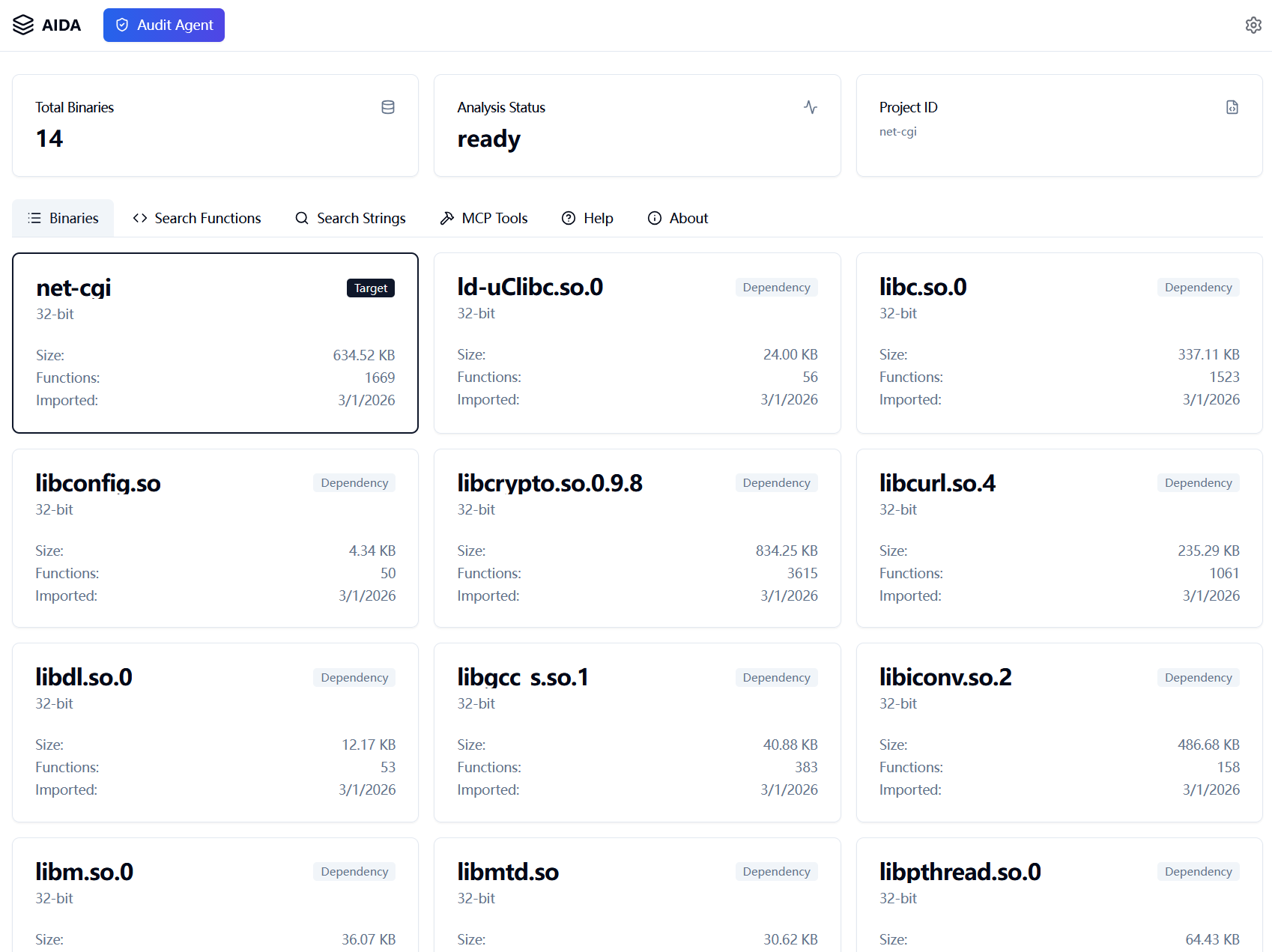
Web UI
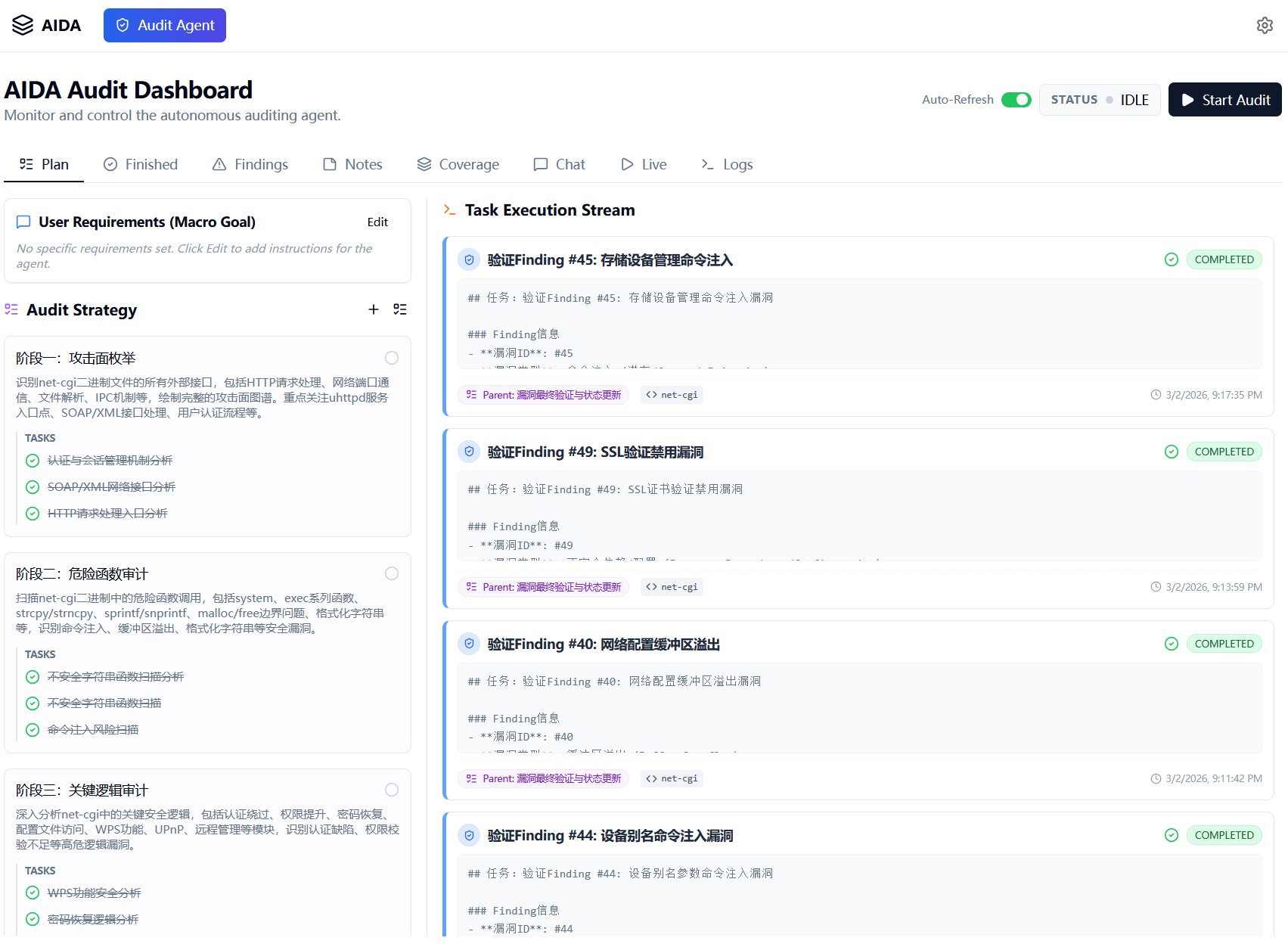
Automated Audit
Features
- Export: Automated extraction of binary metadata (functions, strings, imports, exports, pseudocode, etc.) from IDA Pro or Ghidra into portable SQLite databases. Automatically initializes the workspace with MCP client configurations.
- Web UI: A modern, interactive web interface to browse and analyze the exported data.
- CLI Query Tool: A powerful
querycommand to interrogate the exported databases directly from the terminal. It supports JSON, rich text, and Markdown outputs, making it ideal for both human users and LLM integration without starting a server. - MCP Server: A fully compliant Model Context Protocol server that allows AI assistants to query and reason about the binary structure.
- aida-audit MCP Service: The
servecommand exposes a ready-to-use MCP endpoint (/mcp) backed by exported binary databases, so tools like OpenCode, Claude, and Trae can directly call analysis and audit tools. - Automated Code Audit: An intelligent agent system powered by LLM that automatically plans, executes, and verifies security audits on binaries, with real-time feedback and detailed reporting.
- REST API: A FastAPI-backed backend for custom integrations.
Installation
Prerequisites
- Python 3.9+
- IDA Pro: Required for the
aida-audit exportcommand with IDA backend. - Ghidra: Required when exporting with the Ghidra backend.
- JDK: Required for running Ghidra (skip if your Ghidra bundle includes a JDK).
- Node.js: Required only if you plan to build the frontend from source (optional).
Install IDA Pro lib (Required)
To make the aida-audit export command work properly with the IDA backend, you need to install the IDA Pro Python library.
- Ensure IDA Pro is installed and the environment is configured.
- Navigate to the
idalib/pythonsubdirectory under your IDA Pro installation directory (e.g.,C:\Program Files\IDA Professional 9.2\). - In this directory, you should find an
idaprofolder, along withsetup.pyandpy-activate-lidalib.pyfiles. - Run the following command in this directory:
pip install . - After installation, run
python py-activate-lidalib.pyto activate the IDA Pro Python library.
Install Node.js (Optional)
If you plan to build and install aida-audit from source, you need to install Node.js.
- Download and install the latest version of Node.js.
- Verify the installation:
node -v
npm -v
Install Ghidra and JDK (Required for the Ghidra backend)
- Install a JDK (if your Ghidra bundle does not include one).
- Download and extract Ghidra.
- Set
GHIDRA_HOMEto the Ghidra root directory (it must containsupport/analyzeHeadless(.bat)). - Verify the path:
# Windows
%GHIDRA_HOME%\support\analyzeHeadless.bat
# Linux/macOS
$GHIDRA_HOME/support/analyzeHeadless
Source Build & Install
We provide scripts to automatically build the frontend, package the backend, and install the tool into your Python environment.
- Navigate to the
backenddirectory:cd backend - For Windows, run the build and install script:
For Linux/MacOS, run the build and install script:.\build_and_install.ps1./build_and_install.sh
This script will automatically:
- Build the React frontend.
- Copy the frontend assets to the backend package.
- Copy the built-in skills into the backend package.
- Build the Python wheel.
- Install
aida-auditusingpip.
PIP Installation
If you only need the backend or want to install from a pre-built wheel:
pip install aida-audit
Usage
Once installed, the aida-audit command is available in your terminal.
1. Export Analysis Data (export)
The export command runs a headless IDA Pro or Ghidra instance to analyze a binary and save the results. It automatically initializes the workspace with MCP client configurations.
aida-audit export <target_binary> -o <output_directory>
Arguments:
<target_binary>: Path to the target binary file (e.g.,.exe,.so, firmware component).-o, --out-dir: Directory where the SQLite database (.db) and other artifacts will be saved.
Advanced Options:
-s, --scan-dir <dir>: Bulk Mode. Recursively scans the specified directory for dependencies (useful for analyzing firmware file systems).-j <n>: Number of parallel workers (default: 4).--backend <ida|ghidra>: Choose the export backend (default:ida).--verbose: Enable detailed logging.--log-file <path>: Write logs to a file.- When
--backend ghidrais used, setGHIDRA_HOMEin your environment before running.
Workspace Initialization:
The export command automatically creates the following in the output directory:
opencode.json: OpenCode project config with MCP servers..mcp.json: MCP client configuration..trae/mcp.json: Trae client MCP configuration..claude/settings.local.json: Claude desktop settings..opencode/skills/: OpenCode-compatible skills (if available).
These files are generated during export and can be used directly. In most workflows, you can open the exported project in OpenCode or Claude and start using the preconfigured MCP service without manually writing configuration.
Example:
# Analyze a single binary
aida-audit export ./bin/httpd -o ./output

# Analyze a binary within a firmware root, resolving dependencies
aida-audit export ./squashfs-root/usr/sbin/httpd -o ./output --scan-dir ./squashfs-root

# Export with the Ghidra backend (using GHIDRA_HOME)
aida-audit export ./bin/httpd -o ./output --backend ghidra

# Export multiple targets via wildcard
aida-audit export ./lib/uams/uams_* -o ./output
2. Start the Server (serve)
The serve command launches the Web UI and the MCP server.
aida-audit serve [project_path]
Arguments:
[project_path]: Path to the directory containing exported.dbfiles. Defaults to the current directory (.).
Options:
--host: Host address to bind to (default:127.0.0.1).--port: Port number (default:8765).
Accessing the UI:
Once the server is running, open your browser and navigate to:
http://localhost:8765
MCP Server Address:
http://localhost:8765/mcp
3. Querying Data via CLI
You can query the exported databases directly from your terminal using the query command. This is especially useful for LLMs or quick checks without starting the web UI.
# Query project overview
aida-audit query project

# Search function by address with pseudocode and calls, output as JSON
aida-audit query function -b target.bin -a 0x401000 --pseudocode --calls -f json

# Query audit findings in Markdown format
aida-audit query audit -t finding -f markdown
Use aida-audit query --help for a full list of capabilities.
4. Use the aida-audit MCP Service in OpenCode / Claude / Trae
After running export, the project already contains ready-to-use MCP client configuration files for common AI tools:
- OpenCode:
opencode.jsonand.opencode/skills/ - Claude:
.claude/settings.local.json - Trae:
.trae/mcp.json - Generic MCP clients:
.mcp.json
After running serve, these clients can connect to:
http://localhost:8765/mcp
5. Main MCP Service Capabilities
The aida-audit MCP service provides an end-to-end binary analysis and audit workflow:
- Standard MCP Interface: JSON-RPC based tool discovery and invocation (
initialize,tools/list,tools/call), ready for direct integration with MCP-compatible clients. - Binary Analysis Tools: Query metadata, functions, symbols, disassembly, pseudocode, call graph relations, cross-references, strings, imports, and exports.
- Project-wide Search: Search strings and functions across all exported binaries to quickly locate relevant code paths in multi-binary firmware or software projects.
- Audit Workflow Tools: Create notes, report findings, verify findings, and manage macro plans and agent tasks for structured security auditing.
- Coverage and Progress Tracking: Automatically records browsing activity and provides statistics to help assess analysis coverage and audit progress.
- Multiple Transport Modes: Supports both HTTP MCP endpoint (
/mcp) and stdio MCP server mode for different client environments.
Automated Code Audit
AIDA-AUDIT includes a sophisticated intelligent agent system designed to automate the security audit process. This system leverages Large Language Models (LLMs) and the Model Context Protocol (MCP) to perform in-depth analysis of binaries.
Key Capabilities
- Intelligent Planning: The
PlanAgentanalyzes the target binary's structure and creates a comprehensive, high-level audit plan tailored to the specific characteristics of the code. - Autonomous Execution: The
AuditAgentexecutes the plan by decomposing it into specific tasks. It utilizes a rich set of tools to explore code, analyze control flow, and identify potential vulnerabilities. - Verification & Validation: A dedicated
VerificationAgentreviews the findings to minimize false positives and ensure the accuracy of the report. - Real-time Dashboard: Monitor the agent's thought process, tool usage, and findings in real-time through the "Live" tab in the Web UI.
- Loop Detection: Advanced loop detection mechanisms prevent the agent from getting stuck in repetitive analysis cycles.
- Bilingual Reporting: Supports generating reports and findings in both English and Chinese.
How it Works
- Initialization: When you start an audit session, the system initializes the agents and loads the necessary context from the exported database.
- Planning Phase: The planner agent surveys the binary's functions, strings, and imports to outline a strategy.
- Audit Loop: The audit agent picks up tasks from the plan, uses tools (like
audit_report_finding,audit_create_note) to document its work, and updates the task status. - Completion: Once all tasks are completed or the user stops the session, a final report is generated.
Development
Directory Structure
backend/: Python source code (FastAPI, IDA scripts, MCP implementation).frontend/: React/TypeScript source code for the Web UI.devdocs/: Design documentation and API specifications.
Running in Development Mode
- Backend:
cd backend && uvicorn aida-audit.server_cmd:app --reload - Frontend:
cd frontend && npm run dev
Reviews (0)
Sign in to leave a review.
Leave a reviewNo results found