my-claude-code
Health Uyari
- License — License: NOASSERTION
- Description — Repository has a description
- Active repo — Last push 0 days ago
- Low visibility — Only 8 GitHub stars
Code Basarisiz
- rm -rf — Recursive force deletion command in .github/workflows/install-smoke.yml
- rm -rf — Recursive force deletion command in .github/workflows/shell-release.yml
- rm -rf — Recursive force deletion command in desktop-shell/installer/linux/build-deb.sh
Permissions Gecti
- Permissions — No dangerous permissions requested
Bu listing icin henuz AI raporu yok.
My Claude Code (MCC) is a local multi-provider LLM proxy, model router and control plane for Claude Code, Codex, OpenCode, Gemini CLI and other AI coding agents — 57 providers, fallback routing, credential health, a native web-search tool proxy, and exhaustive analytics with cost provenance in one local dashboard.
My Claude Code
A local router for every coding agent you use. Claude Code, Codex, OpenCode, Gemini CLI, Crush, Cline, Goose, Aider, Kimi Code, Qwen Code, Command Code, Droid, Pi, Kilo, Roo Code, Antigravity and the desktop apps (Claude Desktop, Codex desktop, LM Studio, Warp, VS Code's Copilot endpoint) all point at one address and share one control panel: routing tiers with fallback chains, reasoning controls, credential rotation and health, a vision adapter, learned provider quirks, cost with provenance, and a full request log — in front of 57 model providers. Claude Code is one first-class client here, not the frame around everything else.






Install · Capabilities · Usage Guide · All docs
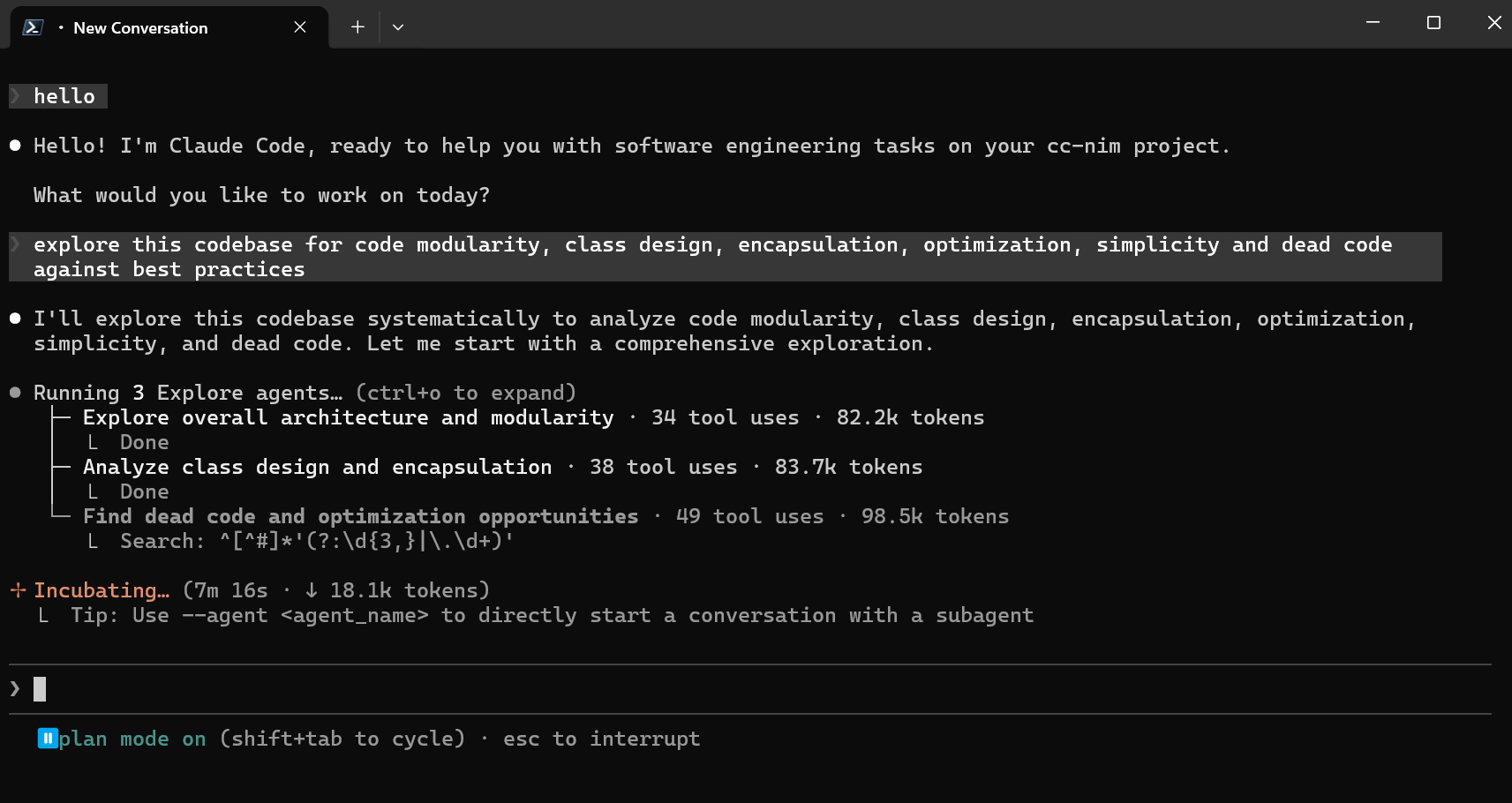
Claude Code running through the My Claude Code proxy. Every other agent below uses the same server.
Contents — Install · Capabilities · How it works · Coding agents · Model Providers · Dashboard · Configuration reference · Development · Project links · License · Project history
Install
Pick one. All four routes end at the same server, the same dashboard and the same configuration directory, and every one of them installs mcc-server plus the 16 mcc-* agent launchers on your PATH.
| Route | Command or download |
|---|---|
| Windows desktop app | MyClaudeCode-Setup-windows-x86_64.exe |
| Linux desktop app (Ubuntu 22.04+/Debian 12+) | MyClaudeCode-linux-x86_64.deb |
| Linux desktop app (Fedora/Arch/no root) | MyClaudeCode-linux-x86_64.tar.gz |
| macOS desktop app (universal) | MyClaudeCode-macos-universal.dmg |
| Windows server (Command Prompt) | curl -fsSL -o "%TEMP%\install-mcc.cmd" https://raw.githubusercontent.com/FiredMosquito831/my-claude-code/main/scripts/install.cmd && "%TEMP%\install-mcc.cmd" |
| Windows server (PowerShell) | & ([scriptblock]::Create((irm "https://raw.githubusercontent.com/FiredMosquito831/my-claude-code/main/scripts/install.ps1"))) |
| Linux / macOS / WSL server | curl -fsSL "https://raw.githubusercontent.com/FiredMosquito831/my-claude-code/main/scripts/install.sh" | sh |
| npm (any platform, server + app) | npm install -g @firedmosquito831/my-claude-code |
| npx (run without installing) | npx @firedmosquito831/my-claude-code |
npm install -g and npx … install read the machine before they install anything: they always install the server through the same digest-verified script as the one-liners, and where there is a desktop session — Windows and macOS always, Linux with DISPLAY or WAYLAND_DISPLAY — they also install the native desktop application for that platform (the setup.exe silently and per-user, the .dmg into ~/Applications, the .deb — whose one sudo dpkg -i line they print rather than run — or the tarball's per-user installer), each verified against SHA256SUMS-desktop-shell.txt from the same release before it is run. Over SSH, in CI, on a headless box or in WSL without a display they install the server alone and print the one line saying why; --server-only, --desktop-only, --no-desktop, --yes-sudo and MCC_NPM_INSTALL=server|desktop|both|none override the guess, and npx … --version still installs nothing.
Those download links always resolve to the newest release. Each desktop download's SHA-256 is in SHA256SUMS-desktop-shell.txt on the latest release page. The desktop app installs the server for you on first launch if it is not there yet; the server one-liners are the right choice on a headless box, a VPS, over SSH, or inside WSL, where there is no tray to draw into.
Then close and reopen your terminal. The installer adds ~/.local/bin to your PATH, and a shell that was already open cannot see it — this is the single most common reason mcc-server looks "not found" straight after a successful install. Check with mcc-server --version.
Your first five minutes
- Start it and open the dashboard.
mcc-server, then http://127.0.0.1:8082/admin (the desktop app does both for you). - Add a provider key. On the Providers page, find your provider, click Configure, paste the key, then Validate and Apply.
- Point the tiers at a model. On the Model Config page set
MODELand, if you want per-tier routing,MODEL_MYTHOS/MODEL_FABLE/MODEL_OPUS/MODEL_SONNET/MODEL_HAIKU, each with a fallback chain. - Launch an agent.
mcc-claude,mcc-codex,mcc-opencode,mcc-gemini… or press Configure on the Coding agents page for a desktop app such as Claude Desktop.
What the installer does, and what it cannot do
It installs uv if missing (and replaces one older than the >=0.11.0 floor in pyproject.toml); installs Python 3.14.0 through uv, so no system Python is needed and none is used; downloads the latest release wheel and verifies the SHA-256 GitHub publishes for it; installs MCC into an isolated tool environment; puts every mcc-* command on your PATH; creates the configuration home; and, with --desktop (-Desktop), the desktop app too. Add --dry-run to see it all without changing anything, or --version 6.57.0 to pin a release.
Since 7.1.0 every install restarts the server, by default. The install command stops the one server bound to the PORT of the configuration directory it is installing for, by that server's exact process ids, installs, starts mcc-server again, and waits until /health answers — and then opens the desktop app, when one is installed on this machine and is not already running. Every other My Claude Code server on the machine is listed and left running, and a port held by something that is not ours is reported rather than touched. --no-restart (-NoRestart) never stops a running server; --no-start (-NoStart, or MCC_INSTALL_NO_START=1) stops and starts nothing; --no-desktop (-NoDesktop, or MCC_INSTALL_NO_DESKTOP=1) leaves the app alone. --restart / -Restart is still accepted and now does nothing. See Updating.
Since 6.82.0 the dashboard's Update button runs that same command, so there is one update path and not two. The new version is built beside the running one, run once to prove it works, and swapped in by two directory renames — the server is down for the stop, the rename and the start, not for the download and the dependency resolve — and if it never answers /health the previous version is put back and started. install.cmd --version 6.63.0 now fetches the installer that shipped with 6.63.0 rather than today's, and MCC_INSTALL_REF points it at a branch. See One update path.
It cannot install curl on Linux/macOS/WSL — it names the exact apt-get/dnf/pacman/apk/brew line for your machine and stops. Everything else it needs is already there: Windows 10/11 with the built-in PowerShell 5.1+ (the published irm ... | iex one-liner runs under the default execution policy; only a saved .\install.ps1 needs -ExecutionPolicy Bypass, which is exactly what scripts/install.cmd passes for you — that is why the Command Prompt route leads the table and can never meet an execution-policy refusal. It needs curl.exe, which ships with Windows 10 1803+ and Windows 11, and it keeps the downloaded script in %TEMP% when a run fails), a POSIX shell elsewhere, and network access to GitHub releases and astral.sh. HTTPS_PROXY/HTTP_PROXY/NO_PROXY are honoured throughout. No Node, no Python, no git required. The desktop app's own prerequisites travel with its packages — the Windows installer bootstraps WebView2, the .deb declares webkit2gtk in its Depends, macOS needs nothing. It does not install Claude Code, Codex or any other agent: those are third-party tools you install yourself, and a launcher whose agent is missing prints that agent's own install command and exits.
Update and uninstall
- Update: the dashboard shows your version, announces releases and installs them with checksum verification — or just re-run the install command, which always fetches the newest release.
- Uninstall: one line, and it verifies every MCC command is gone before it reports success — or
mcc uninstallif you installed through npm. The desktop app is removed separately (Apps & Features,sudo apt remove my-claude-code-desktop,./install-desktop.sh --uninstall, or dragging the.appto the Trash).
curl -fsSL "https://raw.githubusercontent.com/FiredMosquito831/my-claude-code/main/scripts/uninstall.sh" | sh
& ([scriptblock]::Create((irm "https://raw.githubusercontent.com/FiredMosquito831/my-claude-code/main/scripts/uninstall.ps1")))
Four things that bite
- Windows SmartScreen flags the unsigned installer: More info → Run anyway. Machines with Smart App Control on cannot run it at all — use the PowerShell server one-liner instead.
- macOS quarantines the unsigned
.dmg. After dragging the app across, runxattr -d com.apple.quarantine "/Applications/My Claude Code.app"once. Or take the server one-liner and letmcc-desktopfetch the same binary, which is never quarantined. - WSL has no tray.
mcc-desktopsays so and refuses rather than pretending; install the server there and reach the dashboard in a Windows browser. - A pre-6.40.0 install lives in the legacy
~/.fcchome. The first start of 6.65.0 or later migrates it to~/.mccfor you — one atomic rename, nothing copied or merged — provided nothing is holding the directory open. Stop the server and quit the tray first;mcc-migrateruns the same move by hand, and it refuses while it can see a live server.
Longer versions of all of these, per platform: Usage Guide → Install.
Capabilities
Start here: add one provider key on Providers, set your tiers on Model Config, then run mcc-claude (or whichever agent you use). Everything below is optional until you want it.
Routing
| Capability | What it gives you | Where it lives | More |
|---|---|---|---|
| Model tiers | Fable, Opus, Sonnet and Haiku traffic each routed to a model you chose | Model Config page | Guide |
| Fallback chains | An ordered list of stand-ins per tier, walked when a model errors, rate-limits or refuses | Model Config page | Guide |
| Per-agent tiers | A different tier map for Claude Code than for Codex or OpenCode | Coding agents page | Guide |
| Pause a route | Take one provider/model pair out of rotation without deleting anything | Model Config page | Guide |
| Vision adapter | Image requests diverted to a model that can see, with its own chain | Model Config page | Guide |
| Describe mode | A blind tier keeps the request and gets each image described instead, cached per image | Model Config page | Guide |
| Outbound image sizing | Pictures resized to a 1568 px long edge on the router's own copy, never your client's | automatic | Guide |
| Tool-returned images | An image a tool returns reaches the model as a picture, not as base64 text | automatic | Guide |
Reasoning and budgets
| Capability | What it gives you | Where it lives | More |
|---|---|---|---|
| Reasoning control | One effort setting translated into each provider's own reasoning dialect | Model Config page | Guide |
| Learned rejections | A reasoning field a model refused is remembered and not sent again | Models page | Guide |
| Output token budgets | A ceiling per route, with a stated cost and an enforced range | Limits & Resilience page | Guide |
| Minimum output allowance | A floor that stops a long prompt squeezing the reply to nothing | Limits & Resilience page | Guide |
| Deadlines | A first-token deadline and a total deadline per route, so a silent model is a failure rather than a hang | Limits & Resilience page | Guide |
| Deadline calculator | What each model on your chains actually gets, which is rarely the number in the box | Limits & Resilience page | Guide |
Providers and credentials
| Capability | What it gives you | Where it lives | More |
|---|---|---|---|
| 57 providers | Cloud, subscription and local backends behind one address | Providers page | below |
| Custom providers | Any other OpenAI-compatible endpoint, added from the UI | Providers page | Guide |
| Multi-key rotation | Comma-separated keys per provider, four rotation policies, per-key health and usage | Providers page | Guide |
| Credential health | Keys marked unhealthy only by the provider's own auth and rate-limit signals | Limits & Resilience page | Guide |
| Chain benching | A model that 429s is benched for a while instead of being retried into the ground | Limits & Resilience page | Guide |
| Capability probes | MCC checks what a model can actually do rather than trusting the catalogue | Models page | Guide |
| Learned facts | Every negative this install taught MCC, shown with its evidence, expiring on a clock, forgettable per row | Models page | Guide |
| Hourly catalogue refresh | Every usable provider's model list refetched in the background, with last/next times | Models page | Guide |
| Model visibility | Bulk show/hide/invert per provider, with one undoable report per action | Models page | Guide |
| OAuth providers | Claude subscription (not permitted by Anthropic), ChatGPT, Kimi For Coding | Providers page | OAuth providers |
Agents
| Capability | What it gives you | Where it lives | More |
|---|---|---|---|
| 15 CLI launchers | One mcc-* command per agent that points it here and starts it |
terminal | below |
| Desktop app Configure | MCC writes its keys into the one file each app reads, carrying every other byte through | Coding agents page | Guide |
| Undo, two ways | Remove MCC's keys, or restore the exact values MCC replaced | Coding agents page | Guide |
| Backups and diffs | A .mcc-backup before the first edit, a diff preview before every write, a drift badge after a hand-edit |
Coding agents page | Guide |
| Generated catalogues | Each agent's model list carries real context windows, output ceilings, vision, tools and effort vocabulary | Coding agents page | Guide |
| Request attribution | Analytics names the coding agent behind every request | Analytics page | Guide |
| Headless control | mcc-apps list | status | configure [--preview] | undo [--restore] |
terminal | Guide |
| Other clients | Any OpenAI-, Anthropic- or Gemini-shaped client, plus VS Code and JetBrains ACP | anywhere | Clients |
Observability and cost
| Capability | What it gives you | Where it lives | More |
|---|---|---|---|
| Request log | Every completed request stored locally, searchable across prompt, reply, reasoning and tool calls | Analytics page | Guide |
| Wire capture | The message and tool structure actually sent, bounded and inspectable | Analytics page | Guide |
| Analytics | Range-aware rollups, p50/p95 latency, provider and model breakdowns, top errors, auto-refresh | Analytics page | Guide |
| Cost with provenance | Each request priced once as it is logged, with the rung of the pricing ladder that answered stored beside it | Analytics page | Guide |
| Honest totals | Reported and estimated shown side by side, never summed; an unpriceable request shows a dash, every total an "N of M priced" denominator | Analytics page | Guide |
| Exports | JSON export of anything the filters currently select | Analytics page | Guide |
| Attempt-level export | One row per model the chain tried, not per request, so the fallbacks that spent the time are in the file too | Analytics page | Guide |
| Web search analytics | Separate route and attempt analytics with full captured input/output | Web Search page | Guide |
Platform
| Capability | What it gives you | Where it lives | More |
|---|---|---|---|
| Dashboard | Everything above, local-only, at http://127.0.0.1:8082/admin |
browser | below |
| Desktop app and tray | A real window and a tray icon, three server modes (spawn/attach/off), start at login |
mcc-desktop |
Guide |
| Updates | Running version, release announcements, one-click upgrade with checksum verification | dashboard sidebar | Guide |
| Update progress | Stage timeline with timestamps, elapsed time and the installer's log tailed live in the desktop window; updates/progress.json + updates/install-<stamp>.log |
desktop app during an update | Guide |
| Atomic update | The new version is built beside the one you are running, run once to prove it works, swapped in by a rename, and kept only after /health answers — otherwise the previous one is put back. mcc-server never stops answering. |
every update | Guide |
| npm packaging | npm install -g @firedmosquito831/my-claude-code wraps the same digest-verified installer |
terminal | Guide |
| Web search | Claude Code's web_search tool fulfilled at the proxy by 14 providers, 66 advanced options, full-page text, keyless fallback |
Web Search page | Guide |
| Token optimizer | What never reached a provider: tokens saved, rule fire counts, prompt-cache effectiveness, plus the opt-in RTK binary via mcc-rtk |
Token Optimizer page | Guide |
| Messaging | Claude Code sessions over Discord or Telegram, with voice-note transcription | Messaging page | Messaging |
| Security | Token auth on the proxy; with HOST open to other machines and ANTHROPIC_AUTH_TOKEN empty, mcc-server refuses to start |
.env |
Guide |
| Config home | One .env and one directory for everything, written on the first start with a token generated for this machine, relocatable with MCC_CONFIG_DIR; a legacy ~/.fcc moves itself once |
~/.mcc |
Guide |
How it works

Your agent talks to MCC in whichever protocol it already speaks — POST /v1/messages for Claude Code, Pi, OpenCode, Crush, Kimi Code, Qwen Code, Droid and Kilo; POST /v1/responses for Codex; POST /v1/chat/completions for Cline, Goose, Aider and every OpenAI-shaped SDK; POST /v1beta/models/{model}:generateContent for Gemini CLI and Antigravity. All four doors reach the same router, which resolves the requested tier to a real model, applies your reasoning and output-budget settings, adapts images, picks a healthy credential, and walks the fallback chain when a provider fails. The reply is translated back into the protocol the agent asked in, and the whole exchange is priced and logged once on its way out. Architecture has the full picture.
Coding agents
Every agent MCC can launch is declared in one registry, and the Coding agents page shows each one's installed state, its commands and flags with a copy button, its protocol and its generated catalogue. Applications MCC does not launch get a Configure button on the same page instead, which edits the one file each of them reads.
| Agent | How to connect | Protocol |
|---|---|---|
| Claude Code | mcc-claude (mcc-claude --discover-models for the native /model picker; mcc-claude-old) |
Anthropic Messages |
| Codex CLI | mcc-codex |
OpenAI Responses |
| OpenCode / OpenCode 2 | mcc-opencode / mcc-opencode2 |
Anthropic Messages |
| Gemini CLI | mcc-gemini |
Google Gemini |
| Crush | mcc-crush |
Anthropic Messages |
| Cline | mcc-cline |
OpenAI Chat Completions |
| Goose | mcc-goose |
OpenAI Chat Completions |
| Aider | mcc-aider |
OpenAI Chat Completions |
| Kimi Code | mcc-kimi |
Anthropic Messages |
| Qwen Code | mcc-qwen |
Anthropic Messages |
| Command Code | mcc-commandcode |
Anthropic Messages |
| Droid | mcc-droid |
Anthropic Messages |
| Pi | mcc-pi |
Anthropic Messages |
| Kilo CLI | mcc-kilo |
Anthropic Messages |
| Claude Desktop | Configure button | Anthropic Messages |
| Codex desktop, Goose desktop, OpenCode desktop, Crush, Kimi desktop, Qwen desktop | Configure button | each app's own |
VS Code (Copilot custom endpoint), Roo Code, Antigravity (agy), Command Code, LM Studio, Warp |
Configure button | each app's own |
The legacy fcc-* names were retired in 7.0.0: fcc-claude, fcc-codex, fcc-server and the rest are still installed for this major version, but each one prints the mcc-* name that replaced it and exits 1. They are removed entirely in 8.0.0. Per-agent walkthroughs live in the Usage Guide; anything MCC cannot launch or configure is covered in Clients.
Model Providers
57 providers, all managed the same way: enter the listed setting on the Providers page, open Model Config, search the MODEL dropdown and select a model. MCC builds each slug as <provider-id>/<exact-provider-model-id>, and free-text entry stays available when a provider cannot list its models. Click Validate, then Apply. Any other OpenAI-compatible endpoint can be added as a custom provider from the same page. Local backends (LM Studio, llama.cpp, Ollama) need a base URL rather than a key; setup for each is in the Usage Guide.
| Provider | Admin UI setting | Example MODEL |
|---|---|---|
| Anthropic (Claude API) | ANTHROPIC_API_KEY |
anthropic/claude-sonnet-4-6 |
| Anthropic Claude subscription (OAuth, Caution — not permitted by Anthropic, see docs) | discovered / mcc-anthropic-oauth-login |
anthropic_oauth/claude-sonnet-4-6 |
| NVIDIA NIM | NVIDIA_NIM_API_KEY |
nvidia_nim/nvidia/nemotron-3-super-120b-a12b |
| OpenAI / ChatGPT | CHATGPT_OAUTH_ACCESS_TOKEN |
openai/gpt-5.5 |
| OpenRouter | OPENROUTER_API_KEY |
open_router/openrouter/free |
| Google AI Studio (Gemini) | GEMINI_API_KEY |
gemini/models/gemini-3.1-flash-lite |
| Google Vertex AI | VERTEX_PROJECT_ID + VERTEX_LOCATION |
vertex/google/gemini-3.1-flash |
| Azure OpenAI | AZURE_OPENAI_API_KEY |
azure_openai/my-gpt-5-deployment |
| DeepSeek | DEEPSEEK_API_KEY |
deepseek/deepseek-chat |
| Mistral La Plateforme | MISTRAL_API_KEY |
mistral/devstral-small-latest |
| Mistral Codestral | CODESTRAL_API_KEY |
mistral_codestral/codestral-latest |
| OpenCode Zen | OPENCODE_API_KEY |
opencode/gpt-5.3-codex |
| OpenCode Go | OPENCODE_API_KEY |
opencode_go/minimax-m2.7 |
| Vercel AI Gateway | AI_GATEWAY_API_KEY |
vercel/openai/gpt-5.5 |
| Hugging Face Inference Providers | HUGGINGFACE_API_KEY |
huggingface/Qwen/Qwen3-Coder-480B-A35B-Instruct:fastest |
| Cohere | COHERE_API_KEY |
cohere/command-a-plus-05-2026 |
| GitHub Models | GITHUB_MODELS_TOKEN |
github_models/openai/gpt-4.1 |
| Wafer | WAFER_API_KEY |
wafer/DeepSeek-V4-Pro |
| Kimi | KIMI_API_KEY |
kimi/kimi-k2.5 |
| Kimi Coding | KIMI_CODING_API_KEY |
kimi_coding/kimi-k2.5 |
| ChatGPT OAuth (experimental) | CHATGPT_OAUTH_ACCESS_TOKEN + CHATGPT_OAUTH_BASE_URL |
chatgpt_oauth/gpt-5 |
| MiniMax | MINIMAX_API_KEY |
minimax/MiniMax-M3 |
| Cerebras Inference | CEREBRAS_API_KEY |
cerebras/gpt-oss-120b |
| Groq | GROQ_API_KEY |
groq/llama-3.3-70b-versatile |
| SambaNova | SAMBANOVA_API_KEY |
sambanova/Meta-Llama-3.3-70B-Instruct |
| Fireworks AI | FIREWORKS_API_KEY |
fireworks/accounts/fireworks/models/llama-v3p3-70b-instruct |
| Novita AI | NOVITA_API_KEY |
novita/deepseek/deepseek-v3.2 |
| Nous Portal | NOUS_API_KEY |
nous_portal/deepseek/deepseek-v4-flash-0731 |
| Kilo AI Gateway | KILO_API_KEY |
kilo/kilo-auto/balanced |
| Command Code | COMMANDCODE_API_KEY |
commandcode/deepseek/deepseek-v4-flash |
| Cline | CLINE_API_KEY |
cline/anthropic/claude-sonnet-4-6 |
| Cloudflare Workers AI | CLOUDFLARE_API_TOKEN and CLOUDFLARE_ACCOUNT_ID |
cloudflare/@cf/moonshotai/kimi-k2.6 |
| Z.ai | ZAI_API_KEY |
zai/glm-5.2 |
| QwenCloud Token Plan | QWENCLOUD_API_KEY |
qwencloud/qwen3.7-plus |
| QwenCloud Coding Plan | QWENCLOUD_CODING_API_KEY |
qwencloud_coding/qwen3.7-plus |
| Agnes AI | AGNES_API_KEY |
agnes/agnes-2.0-flash |
| ZenMux | ZENMUX_API_KEY |
zenmux/deepseek/deepseek-v4-flash-free |
| W&B Inference | WANDB_API_KEY |
wandb/openai/gpt-oss-20b |
| Amazon Bedrock | AWS_BEARER_TOKEN_BEDROCK |
bedrock/openai.gpt-oss-120b |
| TokenRouter | TOKENROUTER_API_KEY |
tokenrouter/moonshotai/kimi-k3-free |
| NaraRoute | NARAROUTE_API_KEY |
nararoute/kimi-k3-free |
| HyperCharm | HYPERCHARM_API_KEY |
hypercharm/kimi-k3 |
| xAI (Grok) | XAI_API_KEY |
xai/grok-4.5 |
| Together AI | TOGETHER_API_KEY |
together/zai-org/GLM-5.2 |
| DeepInfra | DEEPINFRA_API_KEY |
deepinfra/deepseek-ai/DeepSeek-V4-Flash |
| SiliconFlow | SILICONFLOW_API_KEY |
siliconflow/Qwen/Qwen3-32B |
| Nebius Token Factory | NEBIUS_API_KEY |
nebius/Qwen/Qwen3-30B-A3B |
| Chutes | CHUTES_API_KEY |
chutes/Qwen/Qwen3-32B-TEE |
| Featherless AI | FEATHERLESS_API_KEY |
featherless/Qwen/Qwen3-32B |
| Alibaba Coding Plan — International | ALIBABA_CODING_API_KEY |
alibaba_coding/qwen3-coder-plus |
| Alibaba Coding Plan — China | ALIBABA_CODING_CN_API_KEY |
alibaba_coding_cn/qwen3-coder-plus |
| Alibaba Token Plan — International | ALIBABA_API_KEY |
alibaba/qwen3-coder-plus |
| Alibaba Token Plan — China | ALIBABA_CN_API_KEY |
alibaba_cn/qwen3-coder-plus |
| Ollama Cloud | OLLAMA_API_KEY |
ollama_cloud/qwen3-coder:480b |
| LM Studio | LM_STUDIO_BASE_URL |
lmstudio/<model-id> |
| llama.cpp | LLAMACPP_BASE_URL |
llamacpp/<model-id> |
| Ollama | OLLAMA_BASE_URL |
ollama/<model-tag> |
Notes worth knowing: Mistral Codestral uses a separate key from Mistral La Plateforme; OpenCode Zen and OpenCode Go share OPENCODE_API_KEY but use different prefixes, the rotation policy lives on the OpenCode Zen card, and both read identity headers off every request — without them the Zen free tier answers 400 MissingSessionID, so 6.69.0 sends them and identifies as the OpenCode client by default (OPENCODE_CLIENT_IDENTITY=mcc opts out — see USAGE), and since 6.74.0 MCC resolves which endpoint each Zen model is served on — two of its seven free models live on the Responses API and answered a bare HTTP 500 on Chat Completions before (USAGE); Azure OpenAI needs AZURE_OPENAI_BASE_URL in its v1 form and the model you name is your deployment name; Cloudflare needs both its token and its account ID; Ollama Cloud connects to ollama.com while local Ollama keeps the ollama/ prefix. Prefer tool-capable models for coding agents, and give local models enough context for the agent's system prompt and tool definitions.
Dashboard
The Admin UI at http://127.0.0.1:8082/admin is local-only and is where everything is configured. It opens on a Get Started checklist and gets out of the way once dismissed.

| Page | What it is for |
|---|---|
| Get Started | The first-run checklist: provider, tiers, an agent, optionally web search and analytics. |
| Providers | One searchable card per provider — keys and key pools, per-key health and usage, rotation policy, live Refresh models. |
| Configure Claude Code | Pointing Claude Code at this proxy, per session or permanently. |
| Coding agents | Every launcher's installed state and flags, and the Configure/Undo buttons for the apps MCC does not launch. |
| Model Config | MODEL, the tier map, fallback chains, the vision adapter and reasoning control. |
| Models | Every model every configured provider publishes, with bulk visibility, capability probes and learned facts. |
| Web Search | Route policy, provider cards, key health, advanced options and search analytics. |
| Limits & Resilience | Output budgets, deadlines and their calculator, chain benching, retries, credential health, diagnostics. |
| Analytics | The request log and everything computed from it, plus the REQUEST_LOG_ENABLED storage settings. |
| Token Optimizer | What never reached a provider, and the opt-in trimming and RTK controls. |
| Messaging | Discord/Telegram bot and voice settings. |
| Guide / Docs | The task-oriented guide, and these documents rendered in the app. |
Configuration reference
Every setting lives in .env.example with inline comments and cost notes, and the Usage Guide explains each one in context. The dashboard writes the same file, so the two never disagree. The ten most people ever need:
| Key | What it does |
|---|---|
ANTHROPIC_AUTH_TOKEN |
The token clients present to this proxy, generated for this machine on the first start. Required once HOST is not loopback. |
HOST / PORT |
Where the server listens. Defaults are loopback and 8082. |
MODEL |
The model used when nothing more specific matches. |
MODEL_MYTHOS |
The model Mythos-tier traffic routes to (alias mcc/cyber). |
MODEL_FABLE |
The model Fable-tier traffic routes to. |
MODEL_OPUS |
The model Opus-tier traffic routes to. |
MODEL_SONNET |
The model Sonnet-tier traffic routes to. |
MODEL_HAIKU |
The model Haiku-tier traffic routes to. |
MCC_CONFIG_DIR |
Pins the configuration directory. Environment-only — it cannot be set from the dashboard. |
REQUEST_LOG_ENABLED |
Turns the persistent request log, and therefore Analytics, on or off. |
REQUEST_LOG_MAX_ROWS |
The retention cap on that log: oldest rows are pruned periodically, so the database does not grow without bound. Once you hit it the log is a rolling window, and All time on Analytics means "all time still stored" — counts and token totals stop rising rather than the dashboard being broken. |
SERVER_LOG_RETAIN_FILES |
Caps how many server log files are kept. An early install reached 17 GB without it. |
The web search system's research notes are under research/, and the internals are in ARCHITECTURE.md.
Development
- Local CI sequence:
./scripts/ci.sh(macOS/Linux) or.\scripts\ci.ps1(Windows) — Ruff format/check,tytype checking, andpytest. - Individual commands:
uv run ruff format,uv run ruff check --fix,uv run ty check,uv run pytest -v --tb=short. - See CONTRIBUTING.md for the full workflow.
Project links
License
Dual-licensed. Use it under the GNU Affero General Public License v3 or
later — free for everyone, personal and commercial alike, including
routing your own or your employer's work through the proxy. The AGPL asks for
source in return: if you convey the software, or run a modified version as a
network service other people interact with, section 13 obliges you to offer
those users your version's complete corresponding source under the same
license. The Required Notice at the top of LICENSE must be preserved; that is
an additional term under AGPL section 7(b).
If that trade does not suit you — hosting it as a service, routing
commercially, or reusing its code or routing logic inside a product you ship
closed-source — a commercial license is available by negotiation. See
COMMERCIAL-LICENSE.md.
Project history
This repository began as a fork of
Alishahryar1/free-claude-code
and became a standalone project on 2026-09-05. Every commit, branch and tag
carried across unchanged — the Git history here is byte-for-byte the history it
always had, and every release from v4.x onward is present with its original
notes and assets.
GitHub pull requests are database records rather than Git objects, so they could
not travel with the code. They are preserved as documents instead:history/pull-requests/ holds all 284 of them
with their descriptions, conversations, reviews and commit lists, plus the raw
API payloads. Each one names the commit it merged as, and that commit is in this
repository's history.
Two consequences worth knowing. Pull request numbers written into old commit
subjects, such as (#265), refer to those archived records rather than to
anything in this repository. And release publication dates all read 2026-09-05,
because the API cannot backdate them; the tag and commit dates are the real ones.
The model-routing infrastructure inherited from the upstream project by Ali
Khokhar (Alishahryar1/free-claude-code)
stays under its original MIT license; substantial portions of it remain in this
project.
See LICENSE for the full terms, including the MIT notice.
Yorumlar (0)
Yorum birakmak icin giris yap.
Yorum birakSonuc bulunamadi