jebmcp
mcp
Basarisiz
Health Uyari
- No license — Repository has no license file
- No description — Repository has no description
- Active repo — Last push 0 days ago
- Community trust — 229 GitHub stars
Code Basarisiz
- exec() — Shell command execution in jeb-mcp/src/jeb_mcp/server.py
Permissions Gecti
- Permissions — No dangerous permissions requested
Purpose
This tool acts as an MCP server and plugin for JEB Pro (a reverse engineering platform), enabling AI assistants like Cline, Cursor, and RooCode to interact directly with JEB to analyze application files (such as APKs) and retrieve decompiled code.
Security Assessment
The overall risk is Medium. The static scan flagged shell command execution within the code. However, this is typical for development tooling, and the tool runs a local HTTP server strictly on 127.0.0.1, meaning it does not expose your machine to the wider internet. The tool does not request dangerous system permissions, and there are no hardcoded secrets. Because it interacts with a reverse engineering tool and uses AI-assisted automation, users should review the exact commands being executed to prevent unintended actions on their system or project files.
Quality Assessment
The project is highly active, with its last push occurring just today. It has garnered a solid 229 GitHub stars, which indicates a strong level of community trust and adoption for its specific niche. However, the project lacks a formal license file and a repository description. This means the legal terms of use and redistribution are undefined, which is a drawback for professional or commercial integration.
Verdict
Use with caution: the tool is active and community-validated, but the unlicensed status and local code execution require a quick manual review of the code before integrating it into your workflow.
This tool acts as an MCP server and plugin for JEB Pro (a reverse engineering platform), enabling AI assistants like Cline, Cursor, and RooCode to interact directly with JEB to analyze application files (such as APKs) and retrieve decompiled code.
Security Assessment
The overall risk is Medium. The static scan flagged shell command execution within the code. However, this is typical for development tooling, and the tool runs a local HTTP server strictly on 127.0.0.1, meaning it does not expose your machine to the wider internet. The tool does not request dangerous system permissions, and there are no hardcoded secrets. Because it interacts with a reverse engineering tool and uses AI-assisted automation, users should review the exact commands being executed to prevent unintended actions on their system or project files.
Quality Assessment
The project is highly active, with its last push occurring just today. It has garnered a solid 229 GitHub stars, which indicates a strong level of community trust and adoption for its specific niche. However, the project lacks a formal license file and a repository description. This means the legal terms of use and redistribution are undefined, which is a drawback for professional or commercial integration.
Verdict
Use with caution: the tool is active and community-validated, but the unlicensed status and local code execution require a quick manual review of the code before integrating it into your workflow.
README.md

A quick-and-dirty MCP server&Plugin for JEB Pro.
Tested on Cline & Cursor & RooCode.
Reference: https://github.com/mrexodia/ida-pro-mcp
Installation
Requirements
Python >= 3.11
uv: https://docs.astral.sh/uv/getting-started/installation/
Usage
- COPY the src/jeb_mcp/MCP.py to $JEB_INSTALLATION_DIR/scripts. Make sure the jython file is also present
- Choose and Start the script in JEB GUI (
File->Scripts->Scripts selector...), check for desired output:
[MCP] Plugin loaded
[MCP] Plugin running
[MCP] Server started at http://127.0.0.1:16161
- Add this MCP server's config in cline/cursor/etc, as in the sample
安装
要求:
安装 python3.11及以上版本
安装 uv https://docs.astral.sh/uv/getting-started/installation/
RooCode 使用方法:
- 使用 vscode 打开该工具,此时目录结构如下:
.
├── README.md
├── jeb-mcp
│   ├── pyproject.toml
│   ├── src
│   │   └── jeb_mcp
│   │       ├── MCP.py
│   │       ├── server.py
│   │       └── server_generated.py
│   └── uv.lock
└── sample_cline_mcp_settings.json
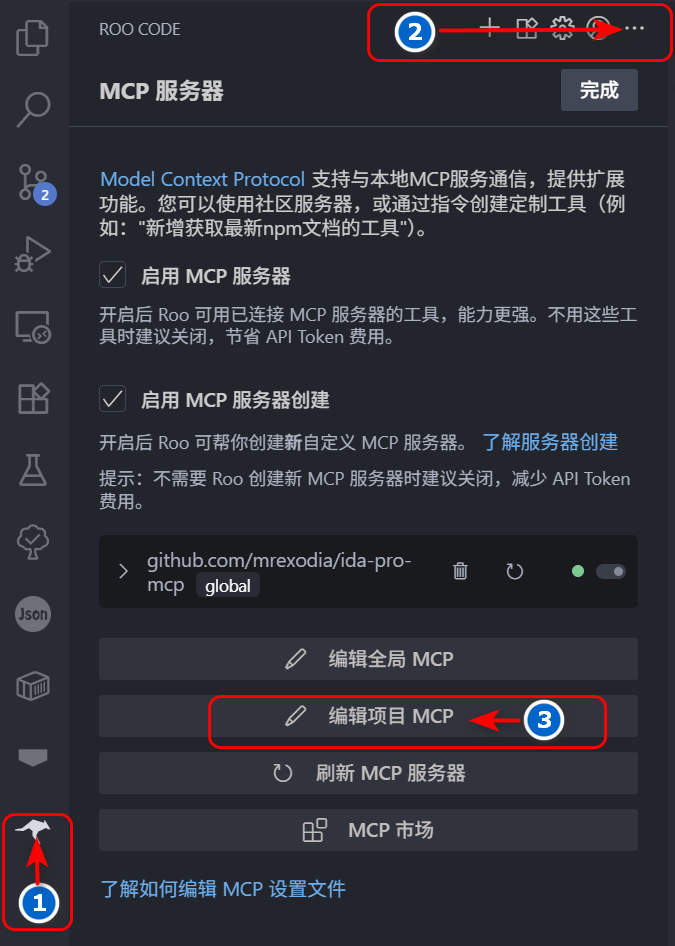
- 点击左侧活动栏 rooCode 图标,然后继续点击 RooCode 对话框右上角
...,最后点击编辑项目 MCP 按钮,
会在当前目录下产生一个.roo目录,其中包含mcp.json文件。
- 修改
mcp.json文件为下列内容:
{
  "mcpServers": {
    "jeb": {
      "command": "uv",
      "args": ["--directory", "jeb-mcp/src/jeb_mcp", "run", "server.py"],
      "timeout": 1800,
      "disabled": false,
      "autoApprove": [
        "ping",
        "check_connection",
        "get_manifest",
        "get_all_exported_activities",
        "get_exported_activities_count",
        "get_an_exported_activity_by_index",
        "get_class_decompiled_code",
        "get_method_decompiled_code",
        "get_method_overrides",
        "get_method_callers",
        "get_superclass",
        "get_interfaces",
        "get_class_methods",
        "get_class_fields",
        "rename_class_name",
        "rename_method_name",
        "rename_field_name"
      ],
      "alwaysAllow": [
        "check_connection",
        "get_class_decompiled_code",
        "get_class_fields",
        "ping",
        "get_manifest",
        "get_all_exported_activities",
        "get_exported_activities_count",
        "get_an_exported_activity_by_index",
        "get_method_decompiled_code",
        "get_method_callers",
        "get_method_overrides",
        "get_superclass",
        "get_interfaces",
        "get_class_methods",
        "rename_class_name",
        "rename_method_name",
        "rename_class_field"
      ]
    }
  }
}
此时可以发现 mcp 服务器列表中已经存在 jeb mcp 服务器了。
- 打开 jeb 菜单栏
File->Scripts->Scripts selector...选中当前目录下jeb-mcp/src/jeb_mcp/MCP.py文件,
运行脚本,此时可以在 jeb 的 logger 窗口中看到如下输出:
[MCP] Plugin loaded
[MCP] Plugin running
[MCP] Server started at http://127.0.0.1:16161
- 在 RooCode 对话框中输入下列相应的任务即可,如:
1. 连接MCP JEB
2. 分析D:\xxx.apk 应用的 Lnet/xxx/MainActivity; 类的功能
3. 根据功能重命名所有方法名小于3个字符的名称
4. 如果调用了其他类的方法,分析相应的类功能,并重命名方法名小于3个字符的名称
5. 输出分析过程
Demo
DEMO for using JEB-MCP to analyze vulnerabilities in APK
Yorumlar (0)
Yorum birakmak icin giris yap.
Yorum birakSonuc bulunamadi