FlashAgent
Health Uyari
- License — License: MIT
- Description — Repository has a description
- Active repo — Last push 0 days ago
- Low visibility — Only 6 GitHub stars
Code Gecti
- Code scan — Scanned 12 files during light audit, no dangerous patterns found
Permissions Gecti
- Permissions — No dangerous permissions requested
Bu listing icin henuz AI raporu yok.
The coding agent built for local models. One native binary for your terminal that finds the model your local server has loaded, and tells you whether that model can actually drive tools.

FlashAgent
The coding agent built for local models. One native binary for your terminal that finds the model your local server has loaded, and tells you whether that model can actually drive tools.




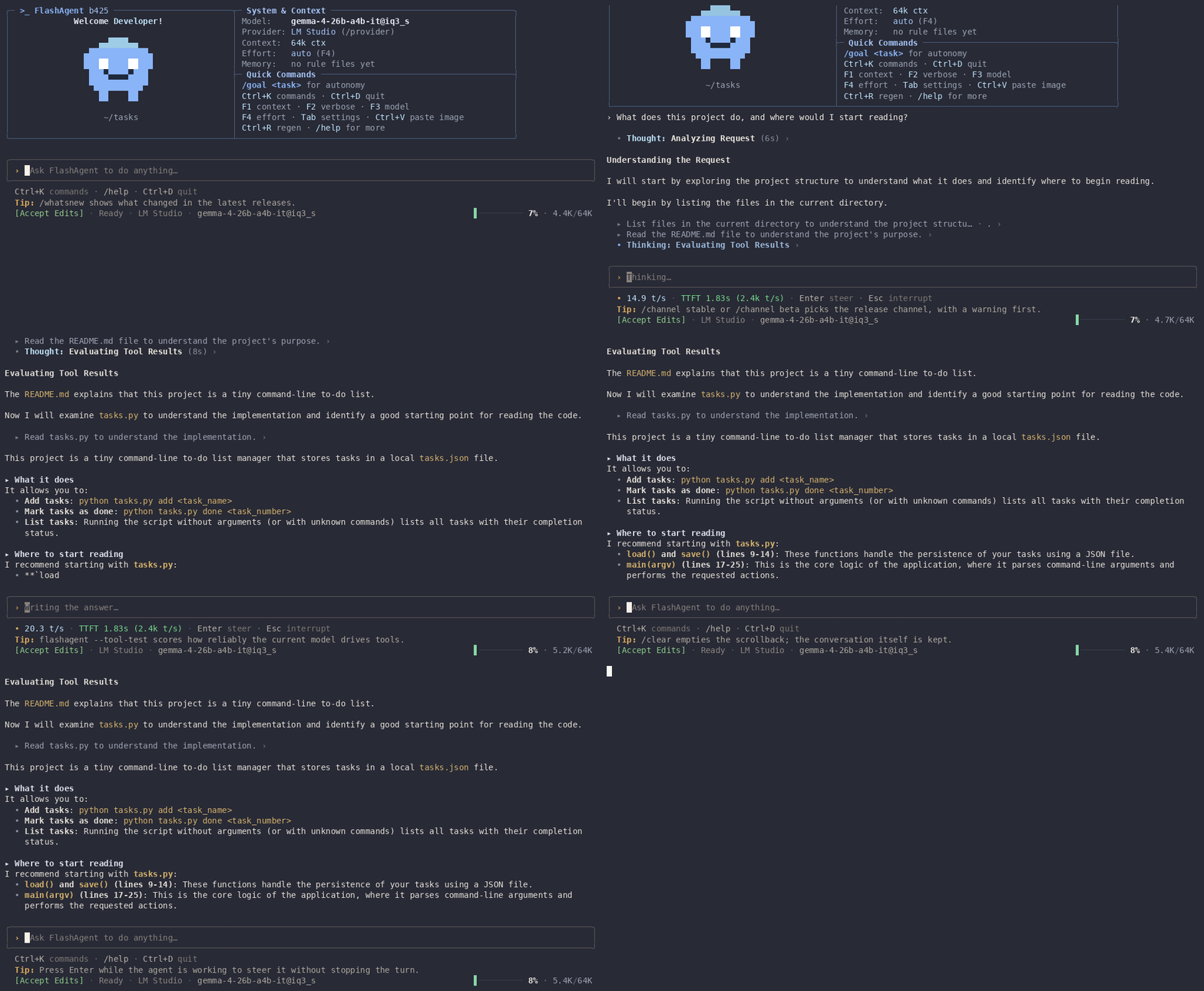
Status: Beta b573 — non-actively developed by a solo maintainer, and developed with itself: the maintainer uses FlashAgent (Ornith 1.5 35B A3B Locally in IQ3_M) to change its own code, alongside other coding agents. See the changelog and the roadmap.
Quick start
Install. Linux and macOS:
curl -fsSL https://raw.githubusercontent.com/flashback7766/FlashAgent/main/install.sh | bashWindows (PowerShell):
irm https://raw.githubusercontent.com/flashback7766/FlashAgent/main/install.ps1 | iexStart a model server: LM Studio, Ollama or llama.cpp (
llama-server --jinja), with a model that calls tools. Qwen3.6 and Gemma 4 models scored 6/8 to 8/8 in the tool-calling test. No machine for it? A cloud API works too: Anthropic, OpenAI, Gemini, OpenRouter and more.Run it in your project:
cd your-project && flashagentThe first launch opens a setup wizard: pick your server from the list and it connects and finds the models it serves. Save as many providers as you like and switch between them mid-conversation with
/provider. To check a model before you rely on it, runflashagent --tool-test.
Why FlashAgent
- Built for local models. It reads the loaded model, its context window and its reasoning presets from LM Studio, Ollama, llama.cpp or vLLM. Cloud APIs work too (Anthropic and Gemini through their own protocols, the rest through OpenAI-compatible ones), and
/providermoves the conversation between a local server and a cloud one without a restart. - Tool calls that work. Native tool calls, a recovery parser for calls written as text, JSON repair, and a test that shows which models keep up.
- Small, and you stay in control. One ~16 MB binary, ~10 MB of memory when idle (measured), four permission modes, and approval cards that show the exact command or diff.
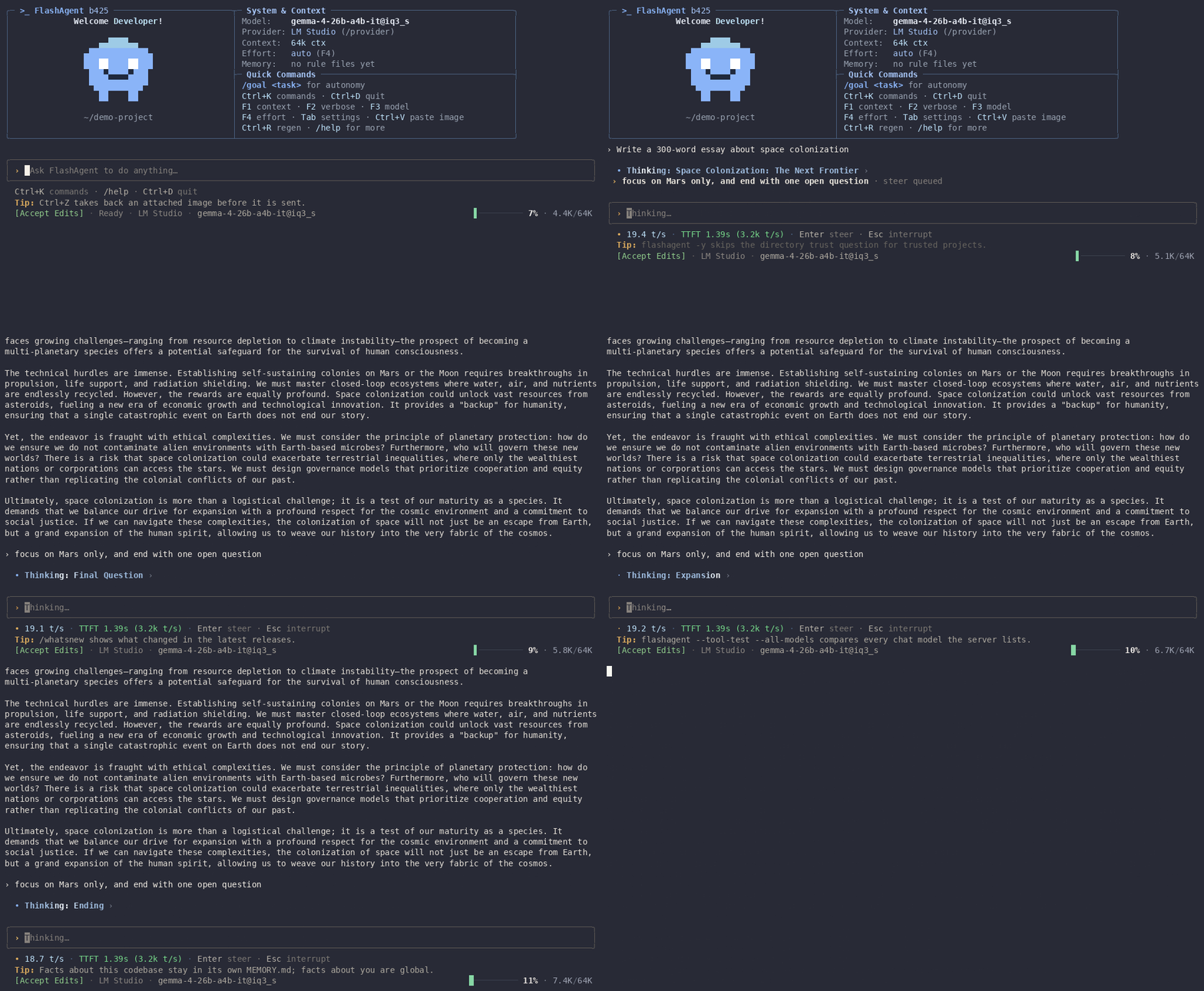 Mid-flight steering — type while the model works and press Enter: your guidance lands as soon as the tool call in progress returns, before the model's next step. A `/command` works too: `/diff` or `/verbose` runs at once, `/compact` waits for the turn's end. Esc interrupts and keeps the partial output. |
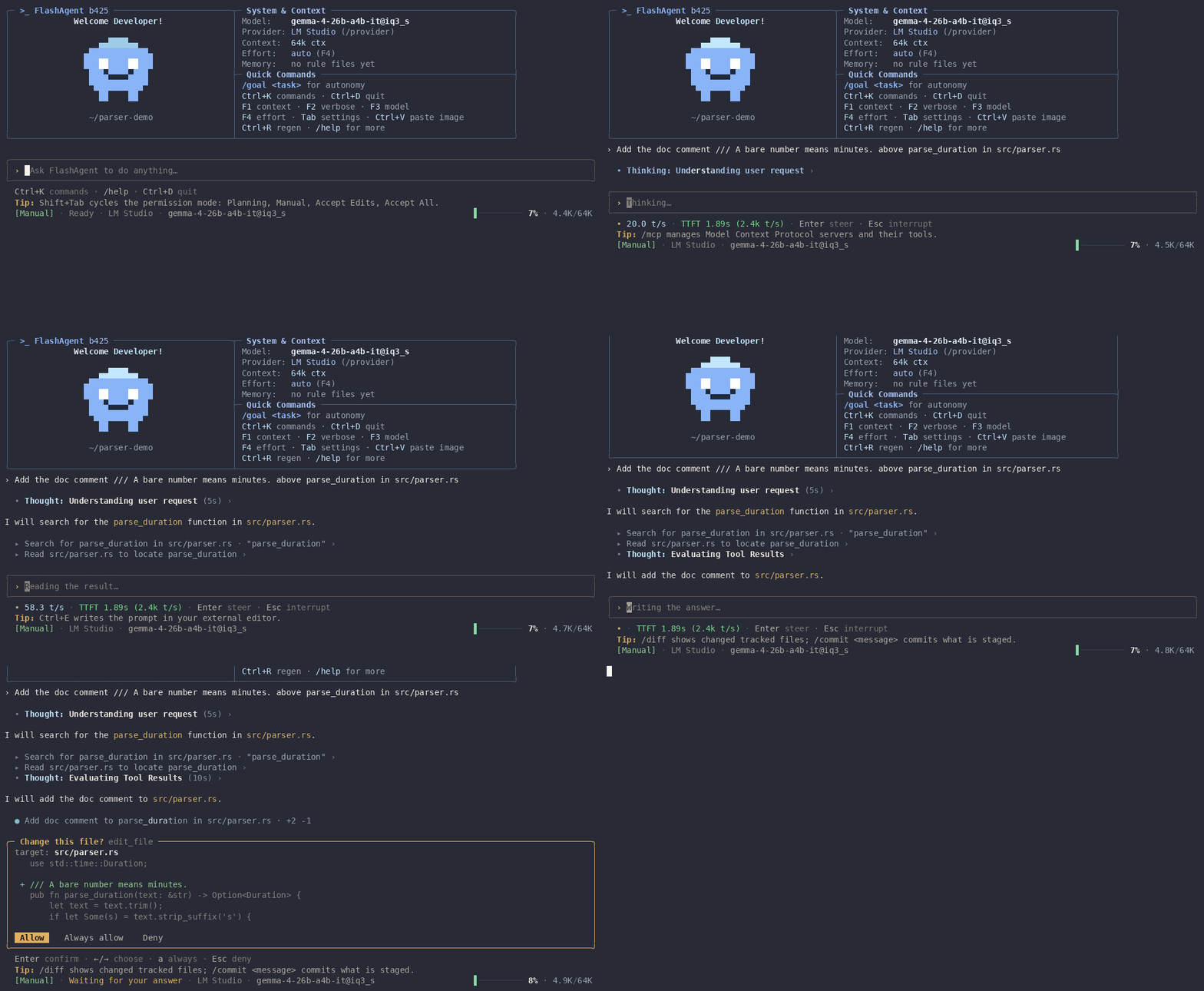 Tools & approvals — every write, patch and shell command stops at a card naming the exact target: Allow, Always allow or Deny. |
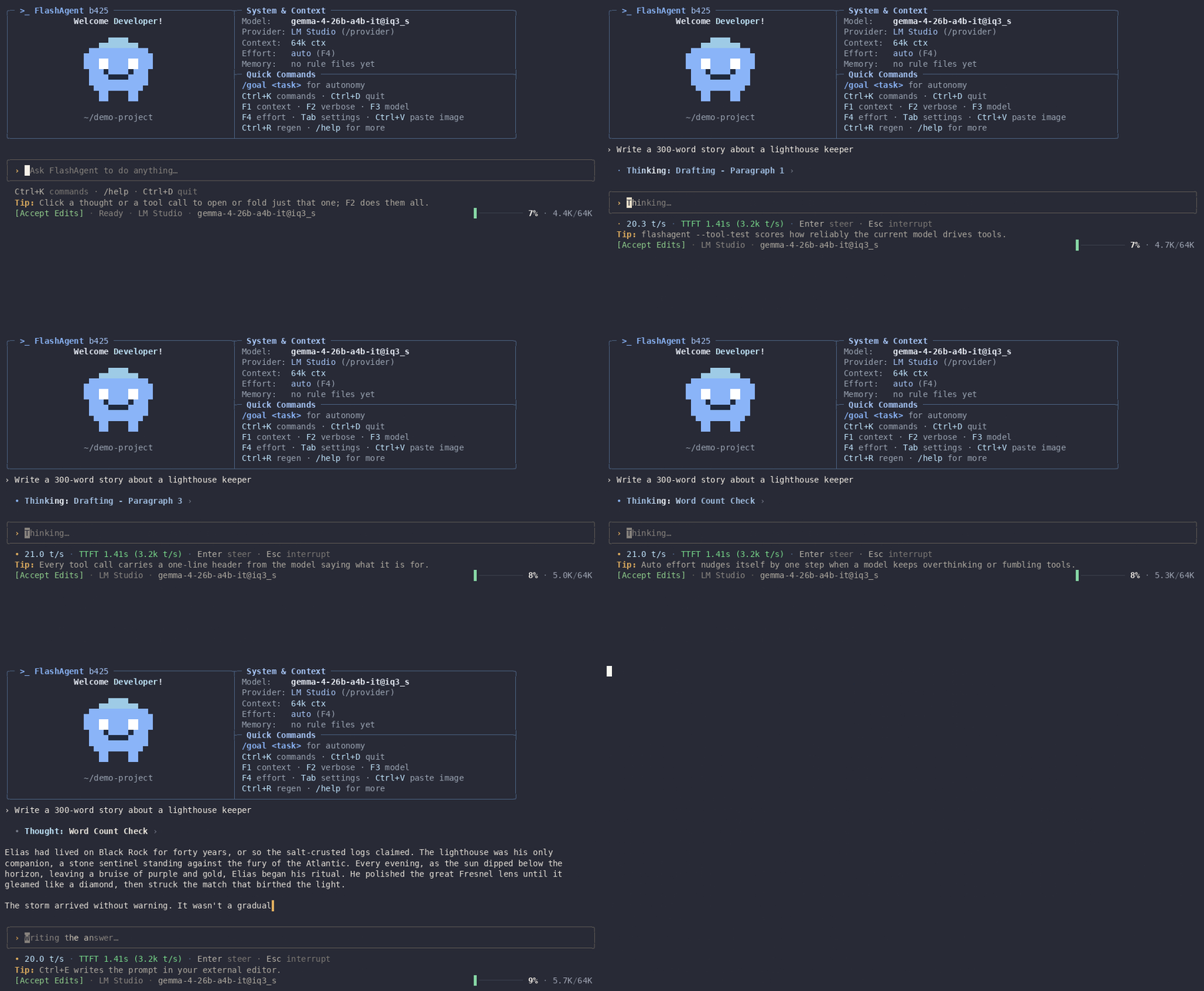 Non-blocking menus — switch model (F3) or thinking effort (F4) while tokens keep streaming. |
Every recording on this page is a real session against a small local model — Gemma 4 E2B (Q4_K_XL) in LM Studio on a laptop — so the thoughts, timings and token counts are the ones it produced. Playback is sped up; nothing else is edited.
Will your model actually drive tools?
A model that describes a tool call instead of making one gets nothing done,
and nothing says so. FlashAgent has a check for it:
flashagent --tool-test               # the model you have configured
flashagent --tool-test --all-models  # every chat model your server lists
Eight scenarios, each one something the loop does on real work. Measured here
on one machine, LM Studio, one model resident at a time:
| Model | Score | Time | Where it fell down |
|---|---|---|---|
qwen3.6-35b-a3b-mtp@iq3_xxs |
8/8 | 48s | — |
gemma-4-e4b-it@iq4_xs |
7/8 | 21s | recovering from a failed call |
gemma4-overlooked.thinker.uncensored-e2b |
7/8 | 8s | recovering from a failed call |
gemma-4-e2b-it-qat@q4_k_xl |
6/8 | 9s | recovering from a failed call; two files in one turn |
Which scenario fails tells more than the score. Three of these four, handed a
tool result that says error: no such file: src/confg.rs (did you mean src/config.rs?), explain the problem in prose instead of calling the tool
again with the corrected path. Tools fail all the time in real work, and a
model that answers each failure with a paragraph leaves the next step to you.
Small models do better since b450, which tells them how to call tools, repairs
their commonest argument mistakes and reminds them once of a step left
undone. On a CPU with Ollama, qwen3:1.7b and qwen2.5:1.5b went from 5/8 to
8/8 and gemma4:e2b from 7/8 to 8/8; 1B models are still chat models.
Method, raw results, and how to run it on your own models →
More install options
The quick start scripts install the latest stable release, or the latest beta while no stable release exists. They check the download against the release's SHA256SUMS, put flashagent in ~/.local/bin (/usr/local/bin as root) or %LOCALAPPDATA%\Programs\FlashAgent on Windows, and add that folder to your PATH. Both read these environment variables:
| Variable | Effect |
|---|---|
FLASHAGENT_CHANNEL=beta |
Install the latest beta build |
FLASHAGENT_VERSION=<tag> |
Install one stable release by its tag (vX.Y.Z+bN, as on the releases page); the script stops if there is no such release |
INSTALL_DIR=<folder> |
Install somewhere else |
curl -fsSL https://raw.githubusercontent.com/flashback7766/FlashAgent/main/install.sh | FLASHAGENT_CHANNEL=beta bash
$env:FLASHAGENT_CHANNEL = "beta"; irm https://raw.githubusercontent.com/flashback7766/FlashAgent/main/install.ps1 | iex
Packages for Arch (pacman -U), Debian/Ubuntu (dpkg -i), Void, AppImage, macOS and Windows are attached to every release, together with a SHA256SUMS file.
flashagent --uninstall (or /uninstall inside the app) removes every copy of the program, the PATH lines the installer added (keeping a backup of each file it edits), and asks part by part which data in ~/.flashagent to delete — caches and /rewind copies are ticked, settings, sessions and memory are not. An install from a package (pacman, dpkg, xbps) is removed through that package manager. If the binary is already gone or broken:
curl -fsSL https://raw.githubusercontent.com/flashback7766/FlashAgent/main/uninstall.sh | bash
irm https://raw.githubusercontent.com/flashback7766/FlashAgent/main/uninstall.ps1 | iex
Requires Rust 1.88+:
git clone https://github.com/flashback7766/FlashAgent.git
cd FlashAgent
cargo build --release
./target/release/flashagent
Or install straight from the repository: cargo install --git https://github.com/flashback7766/FlashAgent flashagent-tui.
Connecting a model
Start your server, then run flashagent in your project directory. The first launch opens a setup wizard: pick a server from the list, or type any address as Custom. flashagent --setup runs it again, and whatever you pick there is saved as another provider beside the ones you have, or updates the one for that server.
| Provider | Address | Protocol | Key |
|---|---|---|---|
| LM Studio | http://localhost:1234/v1 |
OpenAI-compatible | none; loaded model, context size and reasoning presets are read from it |
| Ollama | http://localhost:11434 |
Ollama | none; ollama pull qwen3-coder first |
| llama.cpp | http://localhost:8080/v1 |
OpenAI-compatible | none; llama-server -m model.gguf --jinja |
| vLLM | http://localhost:8000/v1 |
OpenAI-compatible | none |
| Jan | http://localhost:1337/v1 |
OpenAI-compatible | none |
| KoboldCpp | http://localhost:5001/v1 |
OpenAI-compatible | none |
| text-generation-webui | http://localhost:5000/v1 |
OpenAI-compatible | none; start it with --api |
| LocalAI | http://localhost:8080/v1 |
OpenAI-compatible | none |
| Anthropic | https://api.anthropic.com |
Anthropic | ANTHROPIC_API_KEY |
| OpenAI | https://api.openai.com/v1 |
OpenAI-compatible | OPENAI_API_KEY |
| Gemini | https://generativelanguage.googleapis.com/v1beta |
Gemini | GEMINI_API_KEY or GOOGLE_API_KEY |
| OpenRouter | https://openrouter.ai/api/v1 |
OpenAI-compatible | OPENROUTER_API_KEY |
| DeepSeek | https://api.deepseek.com/v1 |
OpenAI-compatible | DEEPSEEK_API_KEY |
| Mistral | https://api.mistral.ai/v1 |
OpenAI-compatible | MISTRAL_API_KEY |
| Groq | https://api.groq.com/openai/v1 |
OpenAI-compatible | GROQ_API_KEY |
| xAI | https://api.x.ai/v1 |
OpenAI-compatible | XAI_API_KEY |
| Together | https://api.together.xyz/v1 |
OpenAI-compatible | TOGETHER_API_KEY |
| Fireworks | https://api.fireworks.ai/inference/v1 |
OpenAI-compatible | FIREWORKS_API_KEY |
| Cerebras | https://api.cerebras.ai/v1 |
OpenAI-compatible | CEREBRAS_API_KEY |
| Custom | any address | read from the address; Tab in the wizard changes it | optional |
Providers. Each saved provider has a name, a protocol, an address, a key (optional) and the model to start with there. /provider lists them, the one in use marked, and switches to another without a restart: FlashAgent asks the new server what it runs, takes up the model you last used there (or the one it has loaded), and the conversation carries on where it was. /provider <name> switches straight to one. The same menu adds a provider (the wizard's steps, without the rest of the setup) and edits them: name, protocol, address, key and model, or deletes one. Tab → General → Provider does the same from Settings. A switch waits until the model has finished answering. Changing the model with F3 saves it for the provider in use.
Keys. A key typed in the wizard or the provider editor is saved with that provider in the config file and shown masked. A provider without a saved key uses its usual environment variable (the Key column), then FLASHAGENT_API_KEY; the wizard says when it has found one.
In config.json the providers look like this; protocol is openai, anthropic, gemini or ollama, and an empty model means the one the server has loaded, else its first. A config from an older build, with backend_url, api_key and model, is read as one provider.
{
  "providers": [
    { "name": "LM Studio", "protocol": "openai", "url": "http://localhost:1234/v1", "model": "qwen3-coder-30b" },
    { "name": "Anthropic", "protocol": "anthropic", "url": "https://api.anthropic.com", "model": "" }
  ],
  "active_provider": "LM Studio"
}
flashagent --url http://localhost:11434 --model qwen3-coder
--url talks to that server for this run only and saves nothing about it; a saved provider at the same address lends its key and model. --model switches the model and saves it for the provider in use as the one to start with next time.
Configuration
Settings live in ~/.flashagent/config.json (%USERPROFILE%\.flashagent\config.json on Windows); change them in the app with Tab on an empty prompt or /settings. flashagent --help lists every flag; -y / --yes skips the question whether you trust the folder. The app also reads:
| Variable | Effect |
|---|---|
ANTHROPIC_API_KEY, OPENAI_API_KEY, GEMINI_API_KEY, GOOGLE_API_KEY, OPENROUTER_API_KEY, ... |
Key for the provider they belong to (see Connecting a model), used when it has none saved |
FLASHAGENT_API_KEY |
Key for any provider that has none saved and none in its own variable |
FLASHAGENT_CONFIG_PATH |
Use this config file instead of ~/.flashagent/config.json |
FLASHAGENT_TRUST_DIR |
Set to anything: skip the folder trust question, like --yes |
BRAVE_API_KEY |
web_search uses Brave Search instead of DuckDuckGo |
VISUAL, EDITOR |
Editor for Ctrl+E when Settings names none (otherwise nano) |
FLASHAGENT_TOOL_TEST_JSON |
--tool-test also writes its raw results to this file |
FLASHAGENT_DEV |
1 turns self-updates off |
COLORFGBG |
Set by many terminals; a white background there picks the light color theme |
On Windows, run_shell uses Git Bash when Git for Windows is installed and cmd.exe otherwise; the model is told which, so it writes commands for that shell.
What it can do
Tools — read_file, write_file, edit_file (exact replacements, tolerant of CRLF and quote styles), patch_file (unified diffs), list_dir, glob, grep (parallel), outline_file, git_status, git_diff, run_shell (foreground with timeout or background tasks you can poll and kill; timeouts kill the whole process tree; on Windows it runs Git Bash when installed, cmd.exe otherwise), env_info, ask_user (interactive choices in the composer), memory tools, spawn_agent (subagents that inherit your permissions), view_image (offered when the model can see images), and web_fetch / web_search (on by default, run like a read; turn them off in Settings). The toolset shrinks automatically for small context windows. You can attach images yourself too: Ctrl+V pastes a screenshot from the clipboard, and dropping an image file on the prompt attaches it.
Permission modes — cycle with Shift+Tab or /mode:
| Mode | File edits | Shell | External (MCP) tools |
|---|---|---|---|
| Planning | refused | commands that only read (ls, cat, grep, git log, ...) run; the rest are refused unless allowed by a rule |
only tools you marked read_only |
| Manual | ask, with diff | ask | ask (read_only ones run) |
| Accept Edits (first run) | run | ask | ask (read_only ones run) |
| Accept All | run | run, except dangerous commands (rm -rf, sudo, git push --force, git reset --hard, ...), which ask |
run |
FlashAgent starts in the mode you left it in. Reads inside the project and web tools are always allowed. Reading or writing a file outside the project asks in Manual and Accept Edits, is allowed in Accept All (where the shell already reaches any file), and is refused in Planning and during /goal. Fetching a local address (localhost, your local network, a cloud metadata endpoint) asks in every mode and is refused in Planning and during /goal. Approval cards offer Allow, Always and Deny; "Always" on a shell command stores a narrow per-command rule for the session. There is no sandbox: commands and edits run with your user's rights, so the mode and the approval card are what stands between the model and your files.
MCP — add servers in .mcp.json (project) or ~/.flashagent/mcp.json (global), browse a small vetted marketplace with /mcp market, install with /mcp add <id>, test with /mcp test <name>. Mark a server or individual tools read_only to skip approval for them — only your config can do that; a server's own claims (tool names, readOnlyHint) never bypass an approval card.
{
  "mcpServers": {
    "sqlite": { "command": "uvx", "args": ["mcp-server-sqlite", "--db-path", "data.db"], "read_only_tools": ["read_query", "list_tables"] }
  }
}
Memory & rules — MEMORY.md, CLAUDE.md, AGENTS.md, .cursorrules, .agents/rules/*.md and ~/.flashagent/MEMORY.md are picked up automatically and injected within a token budget (whole files when they fit, outlines when they do not).
Sessions — conversations are saved on exit. flashagent --continue picks up the latest one in the current folder; flashagent --resume (or /resume inside the app) lists this folder's sessions to choose from; flashagent --resume <session_id> opens one directly. /compact summarizes older turns to free context, and it happens automatically near the limit. /rewind takes turns back: files and conversation return to before the turn you pick.
Autonomous mode (/goal <task>) — runs the task end to end in Accept All mode with maximum reasoning effort. It has no limits unless you set them in Settings → Goal (steps, time, generated tokens). Dangerous shell commands are refused outright during the run. If the model asks you something and you do not answer within two minutes, it picks the most reasonable option itself and says so in its summary. It keeps a live plan on screen, commits what it changed every ten steps inside a git repository, and ends with a factual report card — steps, generated tokens, elapsed, files created and edited, shell commands that failed, and whether a limit cut the run short — built from what the loop did, not from what the model says it did. Your previous permission mode and effort are restored afterwards, and /rewind takes the run's file changes back.
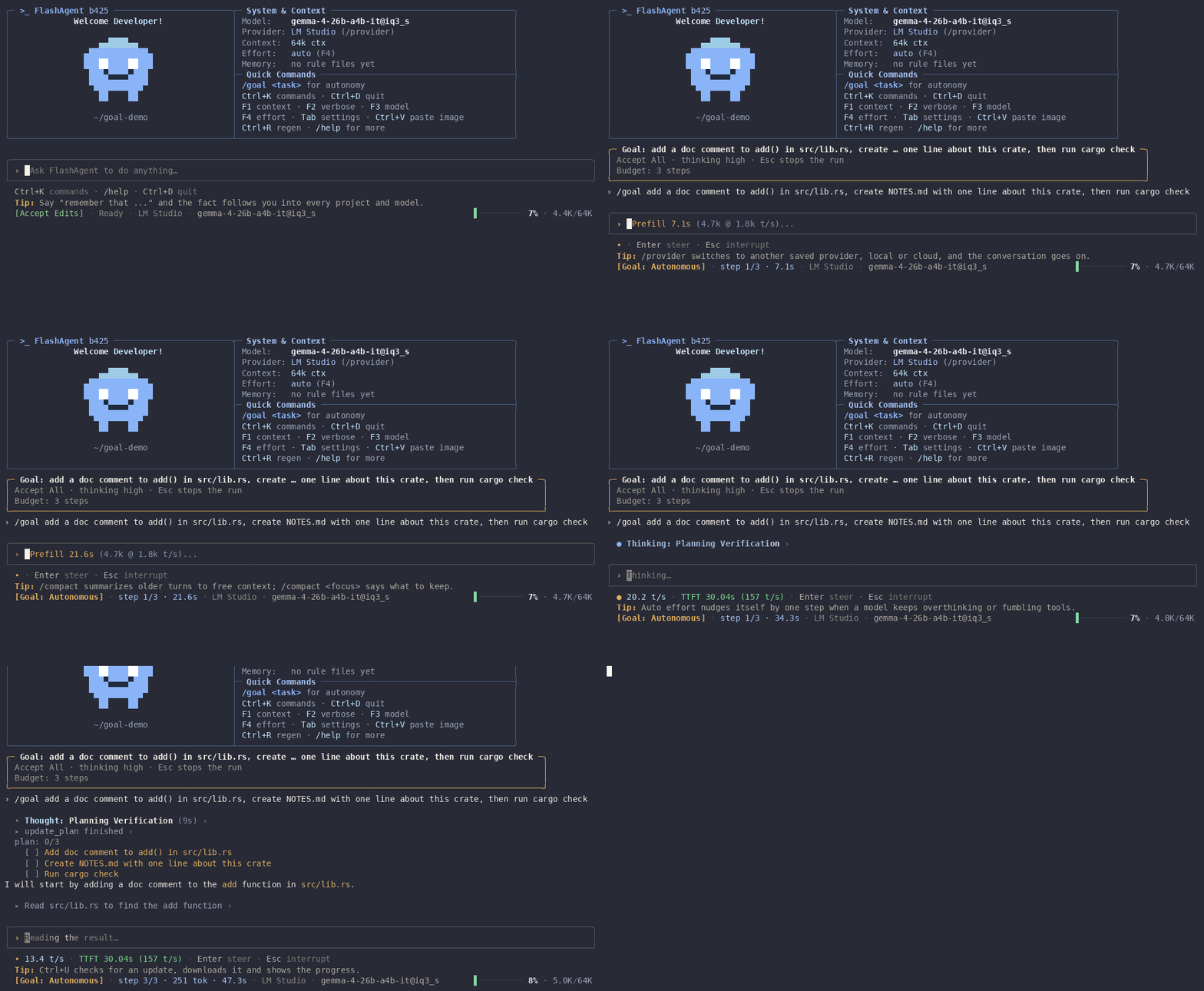
The card is built from what the loop saw, not from what the model says: here the step limit stopped the run after one edit, so neither NOTES.md nor the cargo check the task asked for appears in it.
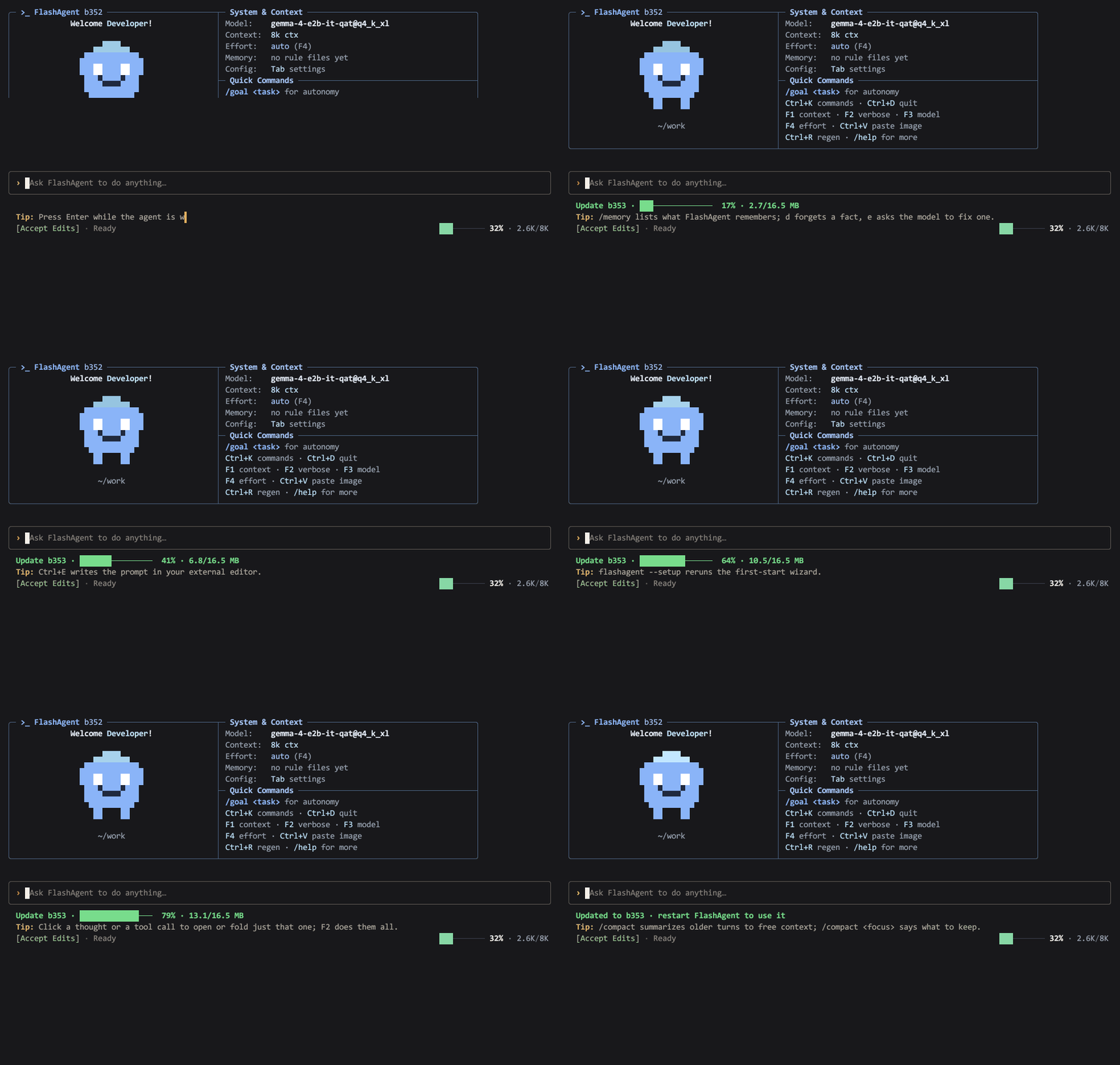
Updates — installed in the background: a new release is downloaded, verified against the release checksums and installed on its own, and the status line tells you to restart once it is in. Ctrl+U (or /update) shows the progress of a download that is already under way, or checks and installs right away when nothing is running; flashagent --update does the same from the shell. Background updates can be turned off in Settings; --channel stable|beta or /channel switches channels.
What leaves your machine — requests to the provider in use; update checks against GitHub Releases (on by default, off with Settings → Updates → Auto-update); web_fetch requests to the pages the model asks for and web_search queries to DuckDuckGo, or Brave Search with BRAVE_API_KEY (on by default, off with Settings → LLM → Web tools); and whatever the MCP servers you add do. There is no telemetry.
Keybindings
| Key | Action |
|---|---|
| Enter | Send prompt · while the model works: steer it, or run a /command |
| Alt+Enter / Ctrl+J | New line in the prompt (also Shift+Enter where the terminal reports it, or \ then Enter) |
| Esc | Close a menu or card · clear the prompt · then interrupt the running turn · never quits |
| Ctrl+D | Quit (empty prompt) |
| Ctrl+C | Interrupt the running turn · otherwise copy the prompt text, or the last answer when the prompt is empty · on an empty prompt, a second press within a second quits (the first does when there is nothing to copy) |
| Ctrl+K | Every command, searchable by name or key |
| Ctrl+F | Search earlier prompts; Ctrl+F again goes further back, Enter takes the match |
| Ctrl+V | Paste a screenshot from the clipboard as an attachment (text pastes as text) · Ctrl+Z removes the last one |
| Tab | Settings (empty prompt) · complete a /command |
| Shift+Tab | Cycle permission mode |
| F1 | Context window breakdown |
| F2 | Verbose mode: collapsed → last turn → everything |
| F3 / Alt+M | Model picker with fuzzy search |
| F4 / Ctrl+T | Thinking effort presets reported by the model |
| Click | Open or fold that one thought or tool call |
| Ctrl+O / Alt+O | Expand last / all reasoning blocks |
| Ctrl+R | Regenerate the last answer |
| Ctrl+E | Compose the prompt in your editor |
| Ctrl+U | Check for an update now and install it · or show the download already under way |
| → | Accept the suggested follow-up prompt |
| PgUp / PgDn · Shift+↑ / Shift+↓ · mouse wheel | Scroll the conversation; the prompt stays where it is · End or Esc returns to the bottom |
Type /help for every slash command: /goal, /mode, /model, /provider, /effort, /context, /compact, /rewind, /resume, /mcp, /skills, /diff, /commit, /export, /update, /channel, /exit and more.
Architecture
A Cargo workspace; the terminal client runs the whole stack in-process today.
crates/core    agent loop, steering, permissions, subagents, memory, system prompt
crates/llm     one model client, four protocols (OpenAI-compatible, Anthropic, Gemini, Ollama), reasoning-preset discovery, text tool-call parser, JSON repair
crates/tools   built-in tools, shell runner (timeouts that kill the whole process tree, background tasks), patching, MCP client/manager/marketplace
crates/tui     crossterm terminal UI (the product today)
crates/svc     self-updater
Everything runs in one process: no Node, no Python, no Electron. On Linux the binary links only the system C libraries (libc, libm, libgcc_s). See ARCHITECTURE.md for how the pieces fit, and docs/numbers.md for what it costs: a usable prompt in about 40 ms, about 10 MB of memory when idle.
cargo test --workspace
cargo clippy --workspace --all-targets -- -D warnings
Contributing
FlashAgent has one maintainer, so bug reports help a lot.
- Read PHILOSOPHY.md for the design principles.
- Read CONTRIBUTING.md for the workflow.
- Pick something from ROADMAP.md or open an issue.
Questions, and models that work well for you, go to Discussions.
Until v1.0.0 ships everything is beta, and bugs are expected. After that, flashagent --channel stable gets stable releases only.
License
Yorumlar (0)
Yorum birakmak icin giris yap.
Yorum birakSonuc bulunamadi