skillscout
Health Pass
- License — License: MIT
- Description — Repository has a description
- Active repo — Last push 0 days ago
- Community trust — 11 GitHub stars
Code Fail
- rm -rf — Recursive force deletion command in scripts/build-release.sh
- rm -rf — Recursive force deletion command in scripts/screenshot.sh
Permissions Pass
- Permissions — No dangerous permissions requested
No AI report is available for this listing yet.
Find the skills your coding agents load, see which agents can use each one, and count how often you use them
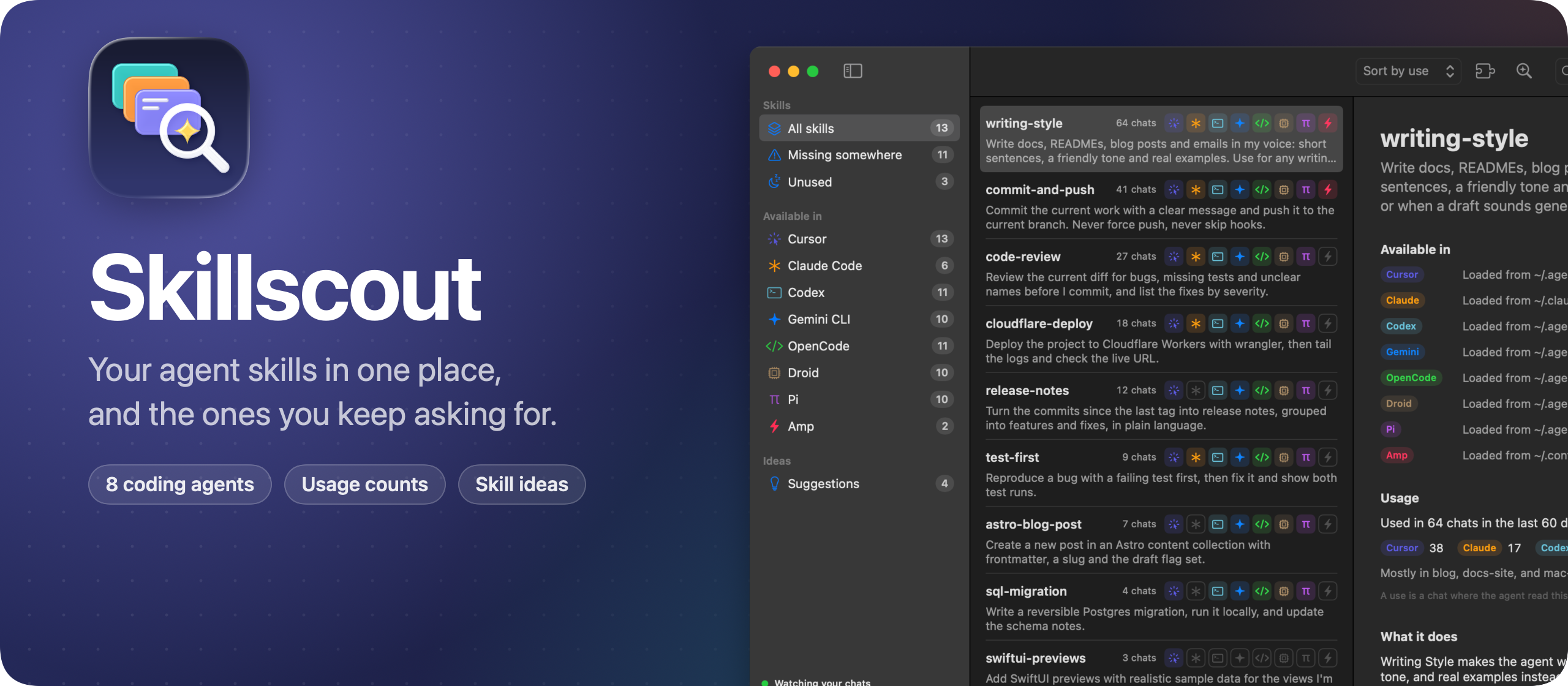
Skillscout is a Mac app for the skills your coding agents load. It finds every skill on your Mac, shows which agents can see each one, and counts how often you use them.
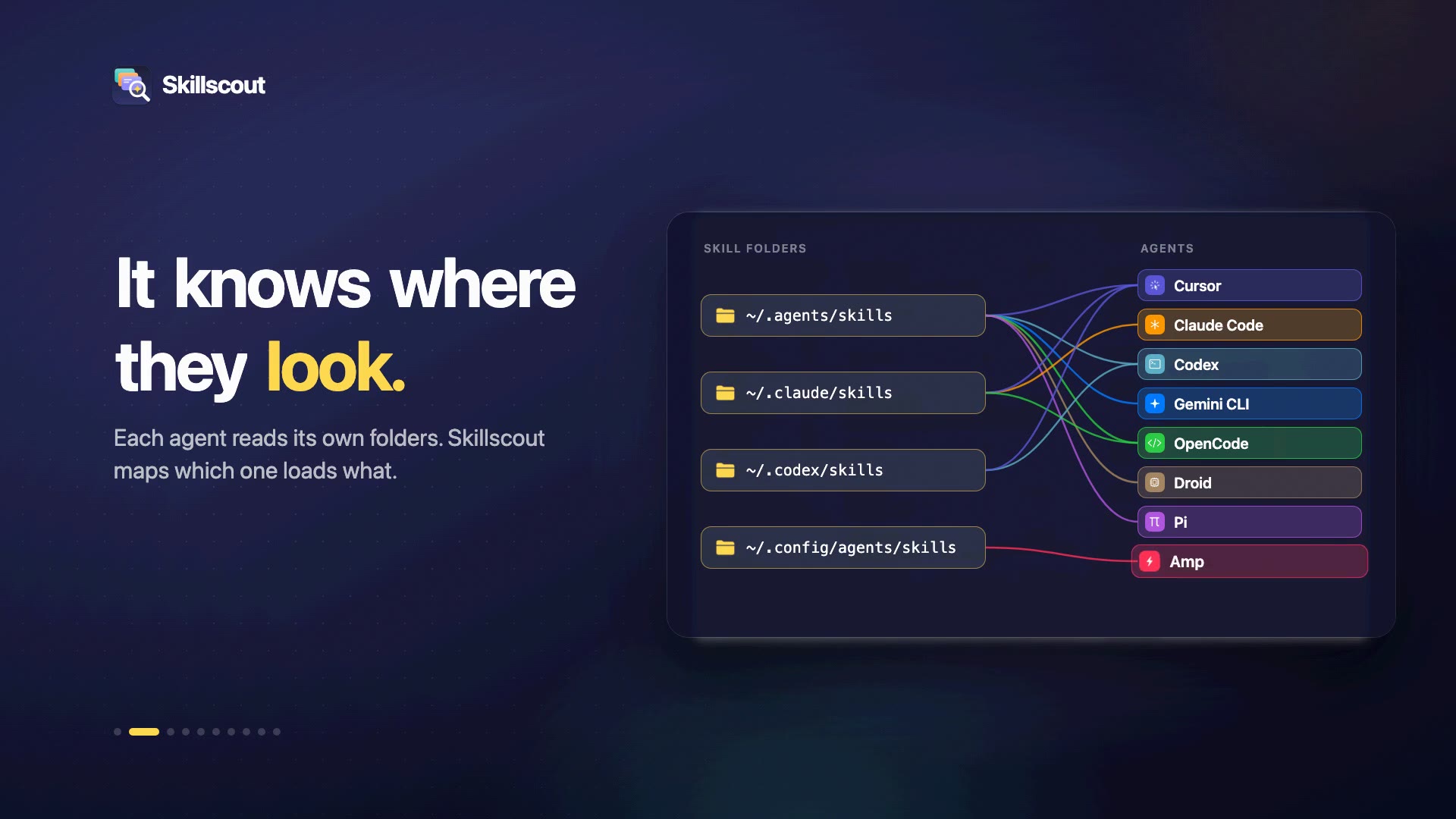
It knows 8 agents: Cursor, Claude Code, Codex, Gemini CLI, OpenCode, Droid, Pi and Amp. Each one reads skills from its own folders, and some also read the folders of the others. So a skill you wrote for Claude Code can load in Cursor but not in Codex. Skillscout maps all of it, and adds a skill to the agents that miss it with one click.
It also reads your chats. It counts a use every time an agent loads a skill, and it looks for requests you keep typing, so you can turn them into new skills.
Read the announcement and watch the 1-minute demo on my blog: I built Skillscout, a Mac app for the skills your coding agents load.
Download
Get Skillscout-1.1.0.zip from the latest release, unzip it, and drag Skillscout to your Applications folder. It runs on macOS 15 Sequoia or later, on Apple silicon and Intel Macs.
Opening it the first time
Skillscout isn't signed with an Apple Developer ID or notarized by Apple. So the first time you open it, macOS says it "could not verify Skillscout is free of malware". Click Done, then allow it in one of two ways.
In System Settings, open Privacy & Security and scroll down to the message about Skillscout. Click Open Anyway, confirm, and open the app again. The button shows up for about an hour after you try to open the app.
In Terminal, remove the quarantine flag macOS adds to downloaded files, then open the app:
xattr -dr com.apple.quarantine /Applications/Skillscout.app
The same command fixes a message saying Skillscout is damaged. You don't need to turn off Gatekeeper for either option.
On a work laptop you might not be able to install apps in /Applications. You can keep Skillscout in the Applications folder inside your home folder, and run the command on ~/Applications/Skillscout.app. If your company blocks apps that aren't notarized, ask your IT team.
Updates
Once a day, Skillscout asks GitHub whether there's a newer version. When there is, it shows what's new, and Install and Relaunch puts it in place of the old one. Skillscout → Check for Updates… checks right away. The skillscout command lives inside the app, so it updates too.
To turn off the daily check, run this in Terminal:
defaults write com.flaviocopes.skillscout AppUpdaterAutomaticChecks -bool false
Features
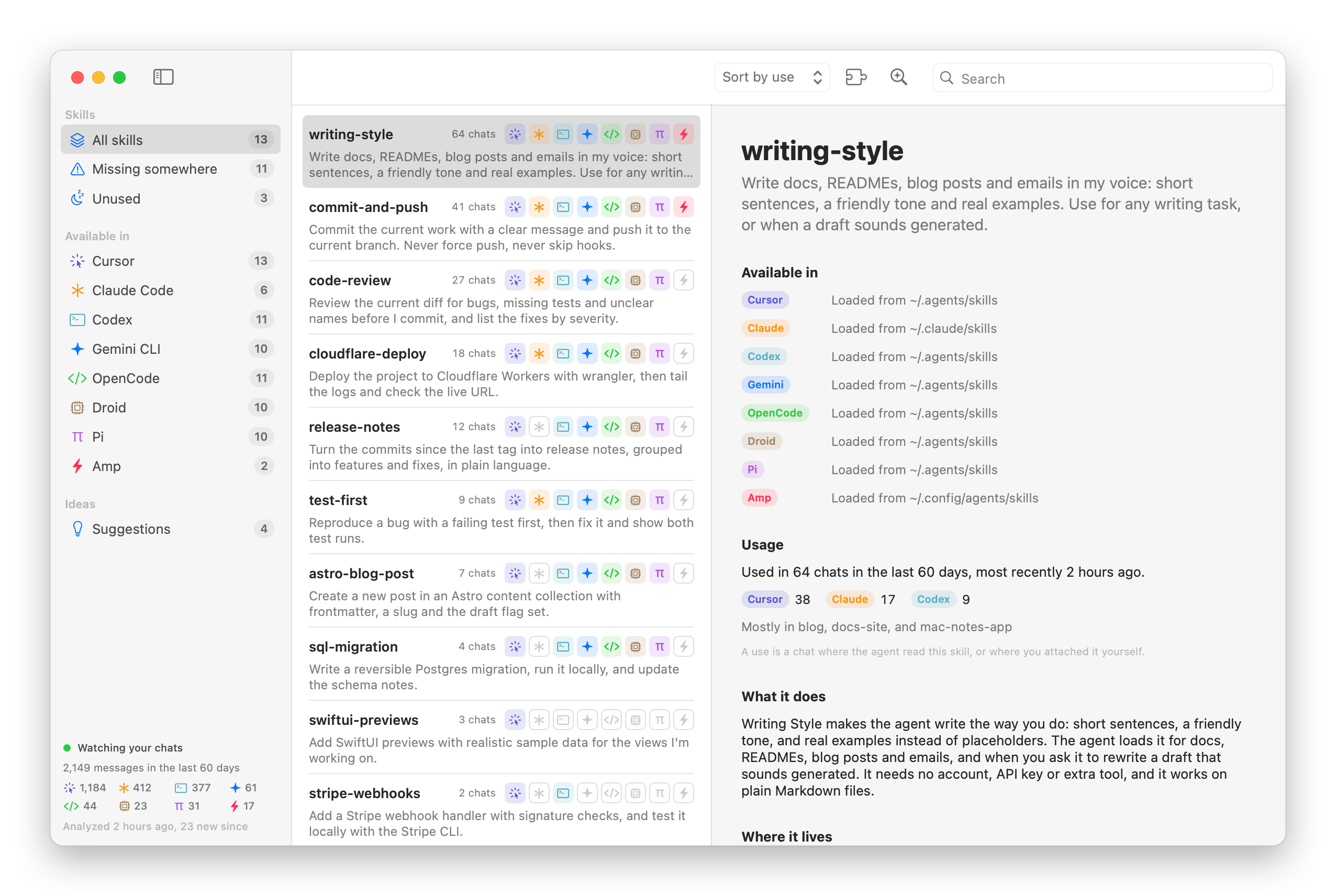
- Every skill from your agents in one list, with a row of icons showing which agents load it
- Missing somewhere lists the skills at least one of your agents can't see
- Add to links the skill folder into another agent's skills folder, so every agent loads the same file
- Uninstall moves a skill to the Trash, from all your skills folders or from one of them
- Unused lists the skills no chat touched in the last 60 days
- Usage for each skill: how many chats, from which agents, in which projects, and when you last used it
- The skills you created last come first, and you can sort by name or by use instead
- Search by name or description with
⌘F - Explain with AI asks Claude Code or Codex what a skill does, when the agent uses it, and what it needs to work
- Suggestions finds the tasks you keep asking for and drafts a
SKILL.mdfor each one - Plugin and built-in skills from Cursor, Claude Code and Codex, behind a toggle in the toolbar
- Every copy of a skill on disk, with a warning when two copies have different content
- The list and the counts update while you work, as skills and chats change on disk
- A
skillscoutcommand for your terminal that reads the same data - Updates from inside the app: it checks GitHub once a day, and Install and Relaunch puts the new version in place
- Light and dark appearance following the macOS setting
The agents it knows
Every agent has its own skills folder, and its own place for chats:
| Agent | Skills folder | Chats |
|---|---|---|
| Cursor | ~/.cursor/skills |
~/.cursor/projects/*/agent-transcripts |
| Claude Code | ~/.claude/skills |
~/.claude/projects and ~/.claude/history.jsonl |
| Codex | ~/.codex/skills |
~/.codex/sessions and ~/.codex/archived_sessions |
| Gemini CLI | ~/.gemini/skills |
~/.gemini/tmp/*/chats |
| OpenCode | ~/.config/opencode/skills |
~/.local/share/opencode/opencode.db |
| Droid | ~/.factory/skills |
~/.factory/sessions |
| Pi | ~/.pi/agent/skills |
~/.pi/agent/sessions |
| Amp | ~/.config/agents/skills |
~/.local/share/amp/threads |
Some folders are read by more than one agent. ~/.agents/skills is a shared folder that Cursor, Codex, Gemini CLI, OpenCode, Droid and Pi all load. Cursor and OpenCode also load ~/.claude/skills, and Cursor loads ~/.codex/skills too. Claude Code and Amp only read their own folders.
Skillscout knows these rules, so for every skill it tells you which agents load it and from which folder.
With the toolbar toggle on, it also shows plugin skills from ~/.cursor/plugins, ~/.claude/plugins/cache and ~/.codex/plugins/cache, plus the built-in skills of Cursor and Codex.
Skillscout turns on the agents it finds on your Mac. You can turn any of them off in Settings, and Skillscout stops showing its skills and reading its chats.
Adding a skill to more agents
Pick a skill, and the Available in section lists all 8 agents. Agents that load it show the folder it comes from. The others get an Add to button.
Adding a skill creates a symbolic link to the skill folder inside that agent's skills folder. The agents all load the same SKILL.md, so when you edit it, every one of them gets the change.
Plugin skills get copied instead of linked, because a plugin update replaces its folders.
Removing a skill
Pick a skill and click Uninstall this skill under Where it lives. You can also right-click it in the list, or select it and press Delete. Skillscout moves every copy in your skills folders to the Trash, links included, so you can put it back from there.
To take a skill away from some agents only, click Remove next to one of its folders. If other folders link to that one, the links go too, since they'd point to nothing. When you remove a link, the folder it points to stays.
Before anything moves, Skillscout tells you which agents will stop loading the skill.
Plugin and built-in skills stay where they are. Their agents manage them, so uninstall the plugin to remove its skills.
Counting uses
A use is a chat where the agent read the skill, or where you attached it yourself.
Skillscout looks for the moment an agent opens a skill's SKILL.md. That can be a skill tool call, a file read, or a shell command that prints the file. It also counts the skills you attach in Cursor and the slash commands you run in Claude Code. A chat counts once per skill, however many times the agent reads it.
It reads the last 60 days of chats. You can change that to 30, 90 or 180 days in Settings.
Skill ideas
Some requests you type again and again, like "check the links before deploying" or "bump the version and tag it". Each one could be a skill.
Click Find repeated tasks in the toolbar and Skillscout sends your 2,000 most recent messages to Claude Code or Codex. It asks for requests you keep making that a skill could handle, and skips the ones your skills already cover. Each idea shows how many times you asked, in which projects, and the messages that match.
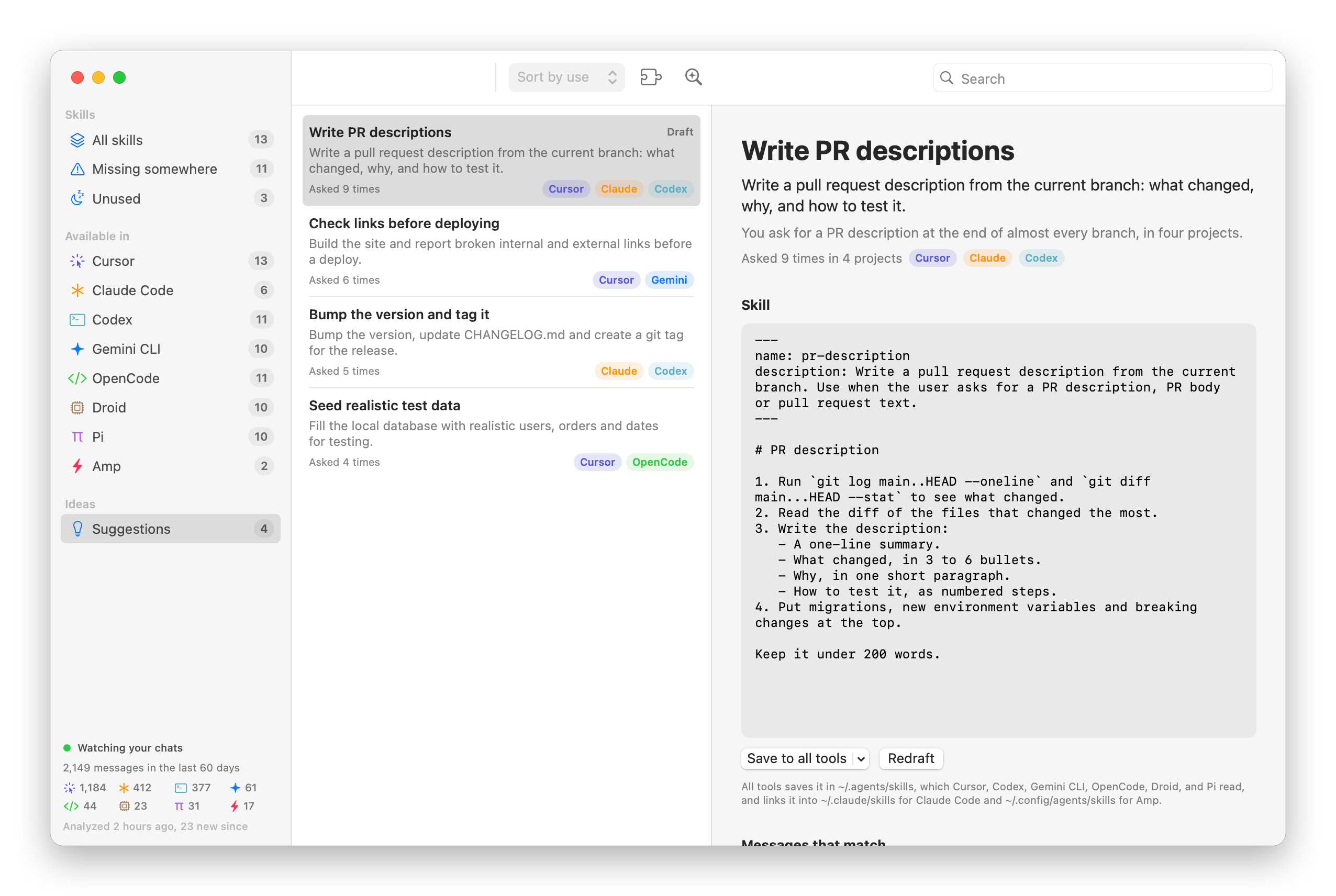
Click Draft the skill with AI to get a SKILL.md you can edit right there. Save to all tools writes it to ~/.agents/skills and links it into ~/.claude/skills and ~/.config/agents/skills, so all 8 agents load it. The menu next to it saves the skill for a single agent. Dismiss this idea hides it, and later runs won't suggest it again.
After your first run, Skillscout analyzes again on its own once you've sent 40 new messages, at most every 30 minutes. You can change the number, or turn it off, in Settings.
The command line tool
Skillscout comes with a skillscout command. To install it, open the Skillscout menu and choose Install Command Line Tool…. It links the command inside the app into /usr/local/bin, and asks for your password if that folder needs it.
The command reads the same skills and chats as the app, and follows its settings, like which agents are on and how many days of chats to read.
| Command | What it does |
|---|---|
skillscout list |
Lists your skills and the agents that load them |
skillscout show <skill> |
Where a skill lives, which agents see it, and its usage |
skillscout usage |
Ranks skills by how many chats used them |
skillscout tools |
The agents Skillscout knows, and where each one keeps its skills |
skillscout add <skill> --to <tool> |
Adds a skill to another agent |
skillscout uninstall <skill> |
Moves a skill to the Trash |
skillscout suggest |
Asks AI for skill ideas based on requests you repeat |
skillscout explain <skill> |
Asks AI what a skill does |
Run skillscout alone for a summary, and skillscout help <command> for the options of each command.
list shows a column for each agent. A dot means that agent can't see the skill:
skillscout list
SKILL              CHATS  Cu Cl Co Ge Op Dr Pi Am DESCRIPTION
astro-blog-post        7  ●  ·  ●  ●  ●  ●  ●  ·  Create a new post in an Astro content collection …
cloudflare-deploy     18  ●  ●  ●  ●  ●  ●  ●  ·  Deploy the project to Cloudflare Workers with wra…
code-review           27  ●  ●  ●  ●  ●  ●  ●  ·  Review the current diff for bugs, missing tests a…
commit-and-push       41  ●  ●  ●  ●  ●  ●  ●  ●  Commit the current work with a clear message and …
pdf-invoices           –  ●  ●  ·  ·  ●  ·  ·  ·  Generate PDF invoices from a JSON order, with the…
Add --missing to see only the skills some agent can't load, --unused for the ones no chat used, or --tool claude for the skills one agent loads. --sort use puts your most used skills first, and --sort newest the ones you created last.
show tells you what's missing and prints the command that fixes it:
skillscout show release-notes
release-notes
Turn the commits since the last tag into release notes, grouped into features and fixes, in plain
language.

Available in
  ● Cursor       ~/.agents/skills
  · Claude Code  missing  skillscout add release-notes --to claude
  ● Codex        ~/.agents/skills
  ● Gemini CLI   ~/.agents/skills
  ● OpenCode     ~/.agents/skills
  ● Droid        ~/.agents/skills
  ● Pi           ~/.agents/skills
  · Amp          missing  skillscout add release-notes --to amp
usage ranks your skills, with the chats from each agent:
skillscout usage
SKILL              CHATS  LAST USED    TOOLS
writing-style         64  2 hours ago  Cursor 38, Claude Code 17, Codex 9
commit-and-push       41  5 hours ago  Cursor 22, Claude Code 11, Codex 5, Amp 3
code-review           27  1 day ago    Cursor 9, Claude Code 14, OpenCode 4
cloudflare-deploy     18  2 days ago   Cursor 7, Codex 11
release-notes         12  4 days ago   Cursor 8, Gemini CLI 4
add works like the button in the app. Pass --to with one agent, or --all for every agent you use that's missing the skill:
skillscout add release-notes --all
uninstall moves every copy of a skill to the Trash. Pass --from with one agent to remove only the copy in that agent's skills folder, which undoes an add:
skillscout uninstall release-notes --from amp
suggest and explain take --engine codex or --engine claude, and --model to pick the model. explain returns the app's saved explanation when there is one, and --fresh asks again.
Most commands take --json, so you can use Skillscout from scripts:
skillscout list --unused --json
Privacy
Skillscout reads your skill folders and your chats on your Mac, and has no accounts or analytics. The only request it makes on its own goes to GitHub: once a day, it asks whether there's a newer version of Skillscout, and it downloads one only when you click Install and Relaunch.
Your chats leave your Mac only through the AI features. Explain with AI, Find repeated tasks and Draft the skill with AI run the Codex CLI or the Claude Code CLI you're already logged in to, so the prompt goes to OpenAI or Anthropic under your own account. To find skill ideas, that prompt includes up to 2,000 of your recent messages, each cut to 220 characters, with the agent and project it came from.
Skillscout runs Codex with --ephemeral in a read-only sandbox, and Claude Code with --no-session-persistence and no tools. These runs don't show up in your chat history.
Skillscout keeps its own data in ~/Library/Application Support/Skillscout. There's a cache of the chats it parsed, and the explanations, ideas and drafts it saved.
Build it from source
You need macOS 15 or later and Xcode 26. The app icon is an Icon Composer file, and older Xcode versions can't build it.
Open Skillscout.xcodeproj and press ⌘R. To build the release zip from the terminal, run:
scripts/build-release.sh
It builds a universal app in build/release/Release/Skillscout.app, checks its signature, and zips it into dist/. The app is ad-hoc signed. A copy you build yourself opens without a warning.
The skillscout command is its own target, SkillscoutCLI, and the app embeds it in Contents/Helpers. To build only the command:
xcodebuild -project Skillscout.xcodeproj -target SkillscoutCLI -configuration Release build
Development
The Xcode project is generated from project.yml with XcodeGen. After editing project.yml, regenerate it:
xcodegen generate
The command line tool shares the app's core files: the models, the skill scanner, the chat readers, the installer and the AI engine. Its own code lives in CLI/.
The app icon is drawn in code. Edit scripts/render-icon.swift, then write a new Skillscout/AppIcon.icon:
swift scripts/render-icon.swift
The screenshots come from the real app views, with made-up skills and chats in a demo home folder. The capture app has its own bundle ID, so your settings and skills stay as they are:
scripts/screenshot.sh
The banner uses the icon and the dark screenshot:
swift scripts/render-banner.swift
Working with an AI coding agent? Point it at AGENTS.md. It has the commands and the rules to follow.
How it works
At launch Skillscout scans every skills folder it knows. A skill is a folder with a SKILL.md file, and the name and description come from its frontmatter. When the same skill shows up in more than one folder, through a link or a copy, Skillscout groups the copies under one name and follows each agent's rules to work out which agents load it.
Then it reads the chats of every agent you turned on. Each agent stores them differently. Cursor, Claude Code, Codex, Droid and Pi write JSONL files, Gemini CLI and Amp write JSON, and OpenCode keeps a SQLite database. Skillscout keeps the messages you typed and the moments an agent loaded a skill, and caches what it parsed. On the next launch it only reads the files whose size or date changed.
An FSEvents watcher on the agents' folders refreshes the list and the counts while you work.
License
Skillscout is released under the MIT license. It's provided as is, without warranty of any kind.
Skillscout is an independent project, and it isn't affiliated with the makers of the agents it works with. Cursor, Claude Code, Codex, Gemini CLI, OpenCode, Droid, Pi and Amp are trademarks of their owners.
Reviews (0)
Sign in to leave a review.
Leave a reviewNo results found