flockr
Health Uyari
- License — License: Apache-2.0
- Description — Repository has a description
- Active repo — Last push 0 days ago
- Low visibility — Only 5 GitHub stars
Code Basarisiz
- rm -rf — Recursive force deletion command in .github/workflows/release.yml
- rm -rf — Recursive force deletion command in distribution/install.sh
Permissions Gecti
- Permissions — No dangerous permissions requested
Bu listing icin henuz AI raporu yok.
A terminal workspace for running many coding agents side by side
flockr
A terminal workspace for running many coding agents side by side. Spaces,
tabs, and split panes, with a sidebar that shows which agents are working,
waiting on you, or done.
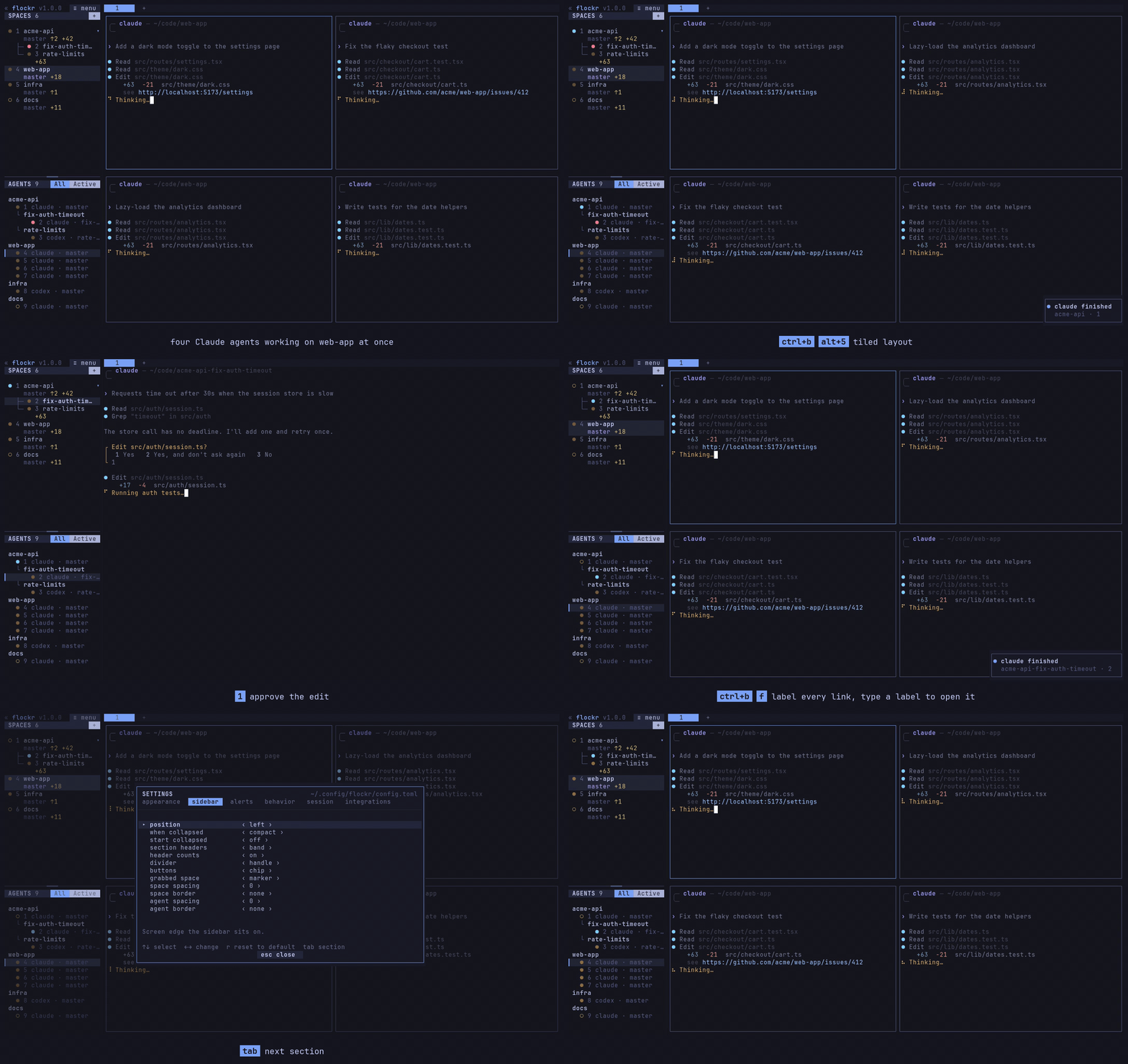
flockr is a hard fork of herdr by Can
Celik and contributors (Apache-2.0). It runs beside a stock herdr without
either one seeing the other.
Install
macOS and Linux:
curl -fsSL https://raw.githubusercontent.com/flockr-sh/flockr/master/distribution/install.sh | sh
This installs to ~/.local/bin (set FLOCKR_INSTALL_DIR to change it) and
checks the SHA-256 of the download.
Windows:
powershell -ExecutionPolicy Bypass -c "irm https://raw.githubusercontent.com/flockr-sh/flockr/master/distribution/install.ps1 | iex"
mise:
mise use -g github:flockr-sh/flockr
Binaries for each release are also on the
releases page.
Build from source
Needs Rust (via rustup) and Zig 0.16.0; with
mise, mise install in the repo sets up Zig.
mise exec -- cargo build --release --locked
ln -sf "$PWD/target/release/flockr" ~/.local/bin/flockr
Quick start
flockr                              # start, or attach to your running session
flockr integration install claude   # report agent state (also codex, pi, opencode, …)
The prefix key is ctrl+b, as in tmux.
| Keys | What it does |
|---|---|
prefix+? |
Show every key |
prefix+s |
Settings |
prefix+: |
Command palette: search every action |
prefix+a |
Jump to the next agent that needs you |
prefix+v, prefix+minus |
Split right, split down |
prefix+space |
Cycle layout presets |
prefix+f |
Open or copy a link on screen |
alt+1..9, alt+shift+1..9 |
Jump to an agent, jump to a space |
Settings live in ~/.config/flockr/config.toml. The settings screen covers
the common ones, and flockr --default-config prints every option with its
documentation.
What flockr adds to herdr
Sidebar:
- A title row with the menu. Agents sit under one header per space, and a
worktree's agents nest under their repo the way the spaces list shows them. - All and Active tabs filter the agents list.
- Agent rows can show the agent's own branch (
branch), following it into
the worktree it works in. Space rows show uncommitted changes (diff_stat),
worktree spaces included. - Agents and spaces are numbered, with keys to jump to them.
ui.sidebar_position = "right"moves the sidebar to the right edge.
Agents:
prefix+asteps through agents that are blocked or finished unseen,
oldest alert first.ui.seen_delay_msandui.seen_scope: a done agent keeps its done badge
until its pane has been on screen long enough, so stepping through agents
doesn't clear the ones you pass.prefix+umarks one done again.ui.keep_agents_in_use_first: a pane whose agent starts a fresh session
moves behind the agents in use, and a dotted ring marks fresh sessions.- Resumed agents keep the CLI options they were started with. Codex runs
without its shared daemon, so its hooks see the pane.
Keys, layout, and settings:
- A settings screen in sections; changes save to the config file and apply
at once. - The command palette, and vim jump keys in lists.
- Link hints, tmux layout presets, and tmux's split and resize keys.
ui.pane_focus_passthrough:ctrl+h/j/k/lmove between nvim windows and
flockr panes, like vim-tmux-navigator. See
nvim and pane focus.- Custom command popups are titled with their description.
Runs beside herdr:
- Its own binary, config dir (
~/.config/flockr), socket,FLOCKR_*
environment variables, and agent hooks. - Plugins and configs written for herdr work unchanged.
See CHANGELOG.md for each release.
nvim and pane focus
To move between nvim windows and flockr panes with the same keys, bind the
focus keys without the prefix and let nvim have them first:
[keys]
focus_pane_left = ["prefix+h", "ctrl+h"]
focus_pane_down = ["prefix+j", "ctrl+j"]
focus_pane_up = ["prefix+k", "ctrl+k"]
focus_pane_right = ["prefix+l", "ctrl+l"]

[ui]
pane_focus_passthrough = ["nvim"]
In nvim, move between windows and hand off to flockr at the edge:
if vim.env.FLOCKR_PANE_ID and not vim.env.TMUX then
  for key, dir in pairs({ h = "left", j = "down", k = "up", l = "right" }) do
    vim.keymap.set("n", "<c-" .. key .. ">", function()
      local win = vim.api.nvim_get_current_win()
      vim.cmd("wincmd " .. key)
      if vim.api.nvim_get_current_win() == win then
        vim.fn.jobstart({
          vim.env.FLOCKR_BIN_PATH or "flockr", "pane", "focus",
          "--pane", vim.env.FLOCKR_PANE_ID, "--direction", dir,
        }, { detach = true })
      end
    end)
  end
end
With vim-tmux-navigator, set vim.g.tmux_navigator_no_mappings = 1 so its
own mappings don't replace these.
Platforms
flockr is developed on Linux. Release binaries are built for macOS and
Windows too, but those come from herdr's code and have not been tested in
flockr yet.
Contributing
Pull requests are welcome, AI-written ones included. See
CONTRIBUTING.md.
License
Apache-2.0, same as herdr. See LICENSE. Most of the code is
herdr's; files in this repository have been modified from it.
Yorumlar (0)
Yorum birakmak icin giris yap.
Yorum birakSonuc bulunamadi