tailr
Health Warn
- License — License: MIT
- Description — Repository has a description
- Active repo — Last push 0 days ago
- Low visibility — Only 6 GitHub stars
Code Fail
- exec() — Shell command execution in frontend/scripts/check-i18n.mjs
Permissions Pass
- Permissions — No dangerous permissions requested
No AI report is available for this listing yet.
Tail any log, in your browser. Fast, simple, real-time.

tailr
Tail any log — in your browser or straight into your AI agent. Fast, simple, real-time.


Quick Start • Features • MCP • Installation • API • License
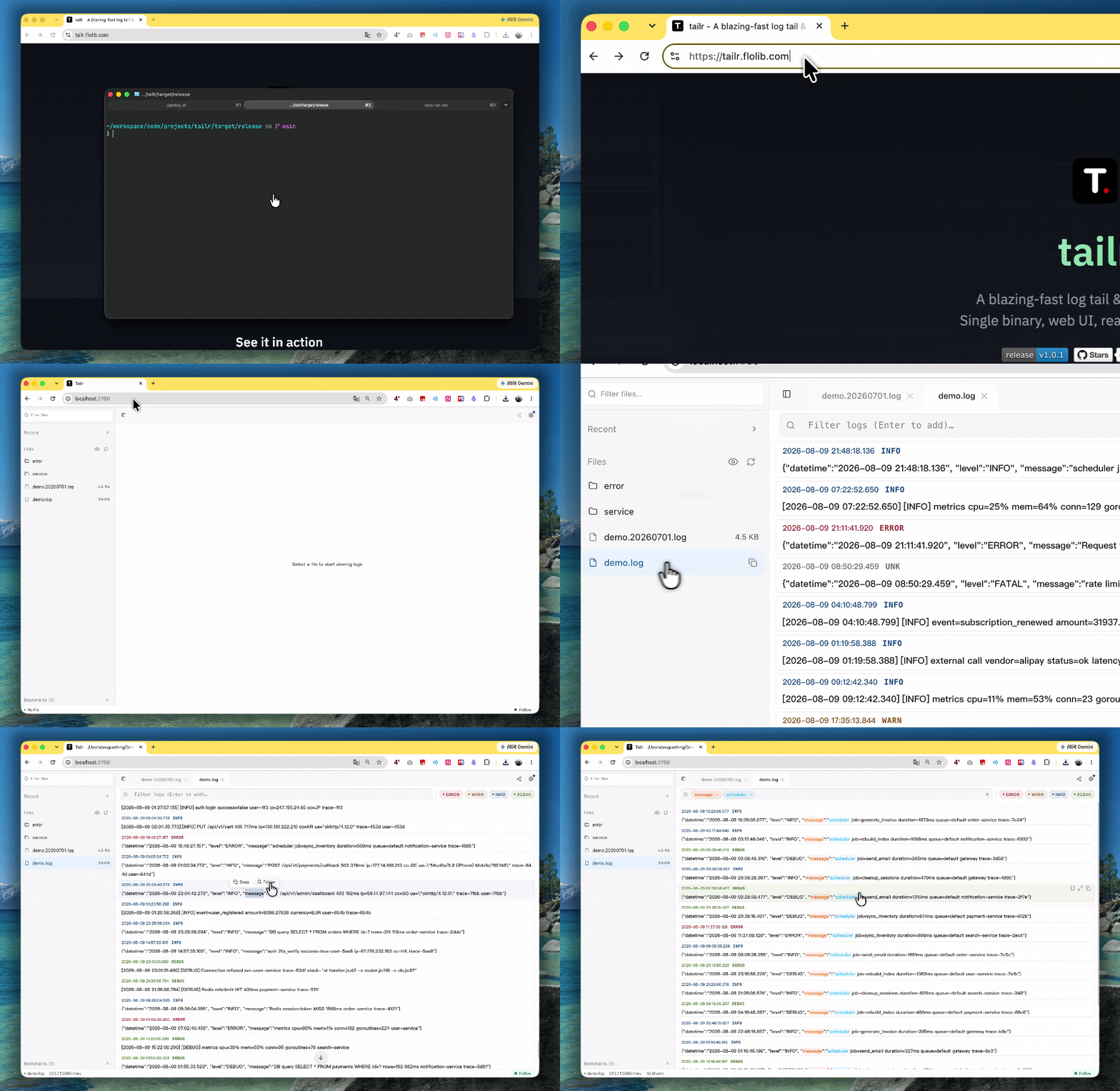
Demo
🌐 Live Demo: tailr.flolib.com
Real-time log tailing with multi-keyword filtering:
- 📡 WebSocket-based live streaming
- 🔍 Multi-keyword filter with case-insensitive substring matching
- 🎨 Configurable log levels with color coding
- 🔒 Optional token authentication
Features
- Real-time tail — WebSocket-based live log streaming
- MCP server for AI agents — Built-in
/mcpendpoint lets Claude Code / Cursor search and analyze your logs directly (2 GB scans in under a second); see docs/mcp.md - Multi-keyword filter — AND logic with case-insensitive substring matching, like
grep -i kw1 | grep -i kw2 - Memory-mapped line index — Large files (hundreds of MB) open in milliseconds via mmap
- Multi-file tabs — Open multiple log files side by side, each with independent filter state
- Bookmarks — Mark lines for quick jump-back, persisted per file
- Share links — Generate a URL encoding the current file + filters; opening it restores the exact view
- Configurable log levels — User-defined levels, keywords, and colors with 7 presets (General, Java, Python, PHP, Go, Rust, syslog)
- Single binary — No dependencies, no runtime, just run
- Web UI — Built-in Vue 3 SPA, no separate frontend deployment
- Log rotation aware — Detects inode changes, handles logrotate
- Self-upgrade — One-click update from the Web UI or
tailr upgradeCLI; auto-restarts after replacing the binary - Update notifications — Background check for new releases; badge + toast in the Web UI when an update is available
- Token authentication — Optional Bearer token for secure access
- Path validation — Prevents directory traversal attacks
- Resource limits — Configurable WebSocket connection cap and per-IP REST rate limiting for production hardening
- Optional gzip compression — Opt-in response compression for public/weak-network access (off by default; gigabit LAN is faster without it)
- Multi-language UI — English (default) and Chinese, with easy extensibility
- Cross-platform — Linux (x86_64/ARM64), macOS
Quickstart
# Run with specific log directories
tailr --log /var/log/app /var/log/nginx

# Run with a single file
tailr --log /var/log/syslog

# Custom bind address
tailr --log /var/log -b 127.0.0.1:8080

# With authentication
TAILR_TOKEN=your-secret tailr --log /var/log/app
Open http://localhost:7700 in your browser.
MCP for AI Agents
tailr ships a built-in Model Context Protocol server: Claude Code, Cursor, and any MCP-capable client can list, search, and analyze your logs directly — no SSH, no copy-pasting. Scans are cursor-based and budget-capped server-side (a full 2 GB file scans in under a second), so agents page through large results without blowing up the context window.
Connect Claude Code (add to ~/.claude.json or project .mcp.json):
{
  "mcpServers": {
    "tailr": {
      "type": "http",
      "url": "http://your-server:7700/mcp",
      "headers": { "Authorization": "Bearer YOUR_TOKEN" }
    }
  }
}
"type": "http"is required by Claude Code. Cursor uses the same shape in~/.cursor/mcp.jsonwithout thetypefield. Omit theheadersblock if tailr runs without a token.
Tools: list_log_files · get_log_stats · search_logs (AND keywords, count_only mode, resumeCursor pagination) · read_log_range · tail_log — every response carries a host field, so agents can tell multi-server results apart.
Setup snippets for Cursor / Codex / OpenCode, multi-server configs, and troubleshooting: docs/mcp.md
Installation
Download binary
Download the latest binary from GitHub Releases.
# Linux x86_64
curl -LO https://github.com/flolibio/tailr/releases/latest/download/tailr-x86_64-linux-musl.tar.gz
tar xzf tailr-x86_64-linux-musl.tar.gz
sudo mv tailr /usr/local/bin/

# Linux ARM64
curl -LO https://github.com/flolibio/tailr/releases/latest/download/tailr-aarch64-linux-musl.tar.gz
tar xzf tailr-aarch64-linux-musl.tar.gz
sudo mv tailr /usr/local/bin/
Build from source
# Clone
git clone https://github.com/flolibio/tailr.git
cd tailr

# Build frontend + Rust binary
make build

# Or just run in dev mode
make dev
Cross-compile for Linux (from macOS)
make build-linux       # x86_64
make build-linux-arm   # aarch64
make release           # both + frontend
Uses Docker with musl for static binaries (no glibc dependency).
CLI
tailr [OPTIONS]           # Start server (default)
tailr <COMMAND>           # Run a subcommand

Commands:
  init                    Initialize config file
  config                  Print config file contents
  stop                    Stop running daemon
  restart                 Restart running daemon (stops + re-execs with the same args)
  status                  Show daemon status
  systemd                 Generate systemd service file
  launchd                 Generate launchd plist file (macOS)
  upgrade                 Check for updates and upgrade tailr to the latest version

Options:
  -l, --log <LOG>...         Log directories or files to serve (can specify multiple)
  -b, --bind <BIND>          Bind address [default: 0.0.0.0:7700]
  -d, --daemon               Run as daemon in background
      --config <CONFIG>      Custom config file path
      --pid-file <PID_FILE>  Custom PID file path
      --log-file <LOG_FILE>  Custom log file path for daemon mode
  -h, --help                 Print help
  -V, --version              Print version
Priority: CLI args > Config file > TAILR_* env vars > Defaults
Config File
# Initialize config file
tailr init

# Print config file contents
tailr config

# Use custom config file
tailr --config /path/to/config.toml
The config file is located at ~/.tailr/config.toml by default. All tailr files (config, PID, logs, restart state) live in ~/.tailr/.
# Log directories or files to serve
log = ["/var/log"]

# Server bind address
bind = "0.0.0.0:7700"

# Token for authentication (empty = no auth required)
token = ""

# Resource limits (optional, all defaults shown)
# [limits]
# max_ws_connections = 50       # global WebSocket connection cap
# rate_limit_rps = 20           # per-client-IP REST requests/second (burst = ×10)
# enable_compression = false    # gzip; off by default (LAN is faster without it)
# workers = 2                   # tokio async worker threads (IO-bound; 2 is enough for most)
Available presets: general, java, python, php, go, rust, syslog
Log levels can also be configured via the Web UI under Settings → Log Levels.
Daemon Mode
Run tailr as a background daemon instead of using nohup:
# Start in daemon mode
tailr -d -l /var/log/app /var/log/nginx

# Check status
tailr status

# Stop daemon
tailr stop
PID/Log files are stored in ~/.tailr/ by default. Customize with:
tailr -d -l /var/log/app \
  --pid-file /run/tailr.pid \
  --log-file /var/log/tailr.log
System Service
systemd (Linux)
# Generate and install service file
tailr systemd -l /var/log/app | sudo tee /etc/systemd/system/tailr.service

# Enable and start
sudo systemctl enable --now tailr

# Check status
sudo systemctl status tailr
launchd (macOS)
# Generate and install plist
tailr launchd -l /var/log/app > ~/Library/LaunchAgents/com.tailr.plist

# Load and start
launchctl load ~/Library/LaunchAgents/com.tailr.plist

# Check status
launchctl list | grep tailr
Self-Upgrade
# Check for updates
tailr upgrade --check

# Upgrade to latest version
tailr upgrade

# Restart the daemon to apply an upgrade
tailr restart
From the Web UI: Settings → About → "Check for updates". If a newer version is found, click "Upgrade" — tailr downloads the new binary, replaces itself atomically, and restarts automatically. The page polls /api/health and reloads once the server is back.
Note: Automatic upgrade is supported on Linux x86_64/ARM64 only. On macOS, the Web UI shows the new version and a download link. The upgrade endpoint requires a token to be set (replacing the binary is an RCE-class operation); tailr upgrade from the CLI works without a token.
Environment Variables
| Variable | Default | Description |
|---|---|---|
TAILR_LOG_DIR |
<exe_dir>/logs |
Comma-separated log directories |
TAILR_BIND |
0.0.0.0:7700 |
Listen address |
TAILR_CONFIG |
~/.tailr/config.toml |
Config file path |
TAILR_TOKEN |
— | Authentication token (overrides config file) |
RUST_LOG |
— | Tracing filter (e.g. tailr=debug) |
API
| Route | Method | Description |
|---|---|---|
/api/files |
GET | List log files (filtered: text files only) |
/api/file/tail |
GET | Last N lines (?path=&lines=) |
/api/config/log-levels |
GET | Get current log level configuration |
/api/config/log-levels |
POST | Apply log level configuration (hot-reload only; not persisted to config.toml) |
/api/upgrade/check |
GET | Check for a newer release (?force=true bypasses cache) |
/api/upgrade |
POST | Download + replace binary + restart (requires token + CSRF header) |
/api/health |
GET | Status + uptime + version |
/api/runtime |
GET | Runtime resource snapshot (process/system CPU+memory, disk, WS connections, uptime). TTL-cached 5s |
/api/docs/openapi.json |
GET | OpenAPI 3.0 spec (machine-readable API contract) |
/ws |
WS | Real-time log streaming |
/mcp |
POST | MCP server for AI agents (streamable HTTP; same Bearer token auth; 5 log-search tools) — see docs/mcp.md |
WebSocket Protocol
// Subscribe to a file
{"type": "subscribe", "path": "/var/log/app.log"}

// Receive new entries
{"type": "append", "path": "/var/log/app.log", "seq": 42, "entries": [...]}

// Catchup on reconnect
{"type": "catchup", "path": "/var/log/app.log", "entries": [...], "lastSeq": 100}

// Server-pushed update notification (broadcast to all clients)
{"type": "updateAvailable", "latestVersion": "1.0.1", "currentVersion": "1.0.0", "releaseUrl": "..."}
Error Responses
All errors return HTTP 4xx/5xx with a consistent body shape:
{"success": false, "error": {"code": "PATH_NOT_ALLOWED", "message": "path is outside the allowed directories"}}
code— machine-readable identifier inSCREAMING_SNAKE(stable, add-only after v1.0)message— baseline English description (the frontend mapscodeto i18n keys; this is the fallback)
Success responses return HTTP 200 with {"success": true, "data": <T>}.
Development
# Terminal 1: Rust backend
cargo run

# Terminal 2: Vite dev server (with proxy)
cd frontend && npm run dev
Vite proxies /api and /ws to http://localhost:7700.
Testing
make test              # Run all checks (clippy + vue-tsc)
make test-backend      # cargo test + cargo clippy
make test-frontend     # vue-tsc --noEmit
Internationalization (i18n)
The web UI supports multiple languages:
- English (en-US) — Default
- Chinese (zh-CN) — 简体中文
Adding a new language:
- Create a new locale file in
frontend/src/locales/(e.g.,ja-JP.json) - Copy the structure from
en-US.jsonand translate all strings - Update
frontend/src/locales/index.tsto include the new locale in the type definition - Add the locale option to the language switcher in
SettingsDialog.vue - Run
cd frontend && npm run check:i18nto verify key completeness across locales
The language preference is persisted in localStorage and auto-detected from the browser on first visit.
Architecture
src/main.rs           # CLI (clap), env vars, starts axum server
crates/
  core/               # Domain core: config (figment), daemon, runtime sampling, upgrade engine
  protocol/           # Shared types: LogEntry, WSMessage, LevelDef, LogLevelConfig
  tail-engine/        # File watching (notify), LineIndex (mmap), TailSession
  search-engine/      # LevelDetector (dynamic log levels)
  server/             # Axum app: REST API, WebSocket, static files, upgrade service
frontend/             # Vue 3 + TypeScript + Vite SPA
  composables/        # useLogLevels, useLogStream, useAuth
  components/         # Settings UI, FilterBar, LogPanel
Security
- Token Authentication — Optional Bearer token via config, environment variable, or Web UI
- Path Validation — All file endpoints validated against configured directories
- CSRF Protection — Restricted CORS headers + X-Requested-With check
- Error Sanitization — Generic error messages to client, detailed logs server-side
License
Reviews (0)
Sign in to leave a review.
Leave a reviewNo results found