openbrowser
Health Gecti
- License — License: MIT
- Description — Repository has a description
- Active repo — Last push 0 days ago
- Community trust — 10 GitHub stars
Code Gecti
- Code scan — Scanned 12 files during light audit, no dangerous patterns found
Permissions Gecti
- Permissions — No dangerous permissions requested
Bu listing icin henuz AI raporu yok.
Open-source browser automation broker for AI agents: persistent Chrome profiles, proxy-aware identities, remote API, MCP tools, browser-use/OpenBrowser adapters, human auth handoff, telemetry, and audits.
OpenBrowser



Website · API docs · Browser routing
OpenBrowser is browser infrastructure for AI agents: isolated Chrome sessions, persistent profiles, proxy-aware identities, human login handoff, a remote API, and MCP tools.
It lets Claude, Codex, Cursor, browser-use, OpenBrowser-style agents, and custom workers share real Chrome browsers without fighting over one CDP port. Agents lease a browser, use a named profile when account state is needed, route selected identities through proxies, hand login challenges to a human, and leave behind telemetry plus issue reports that can be audited later.
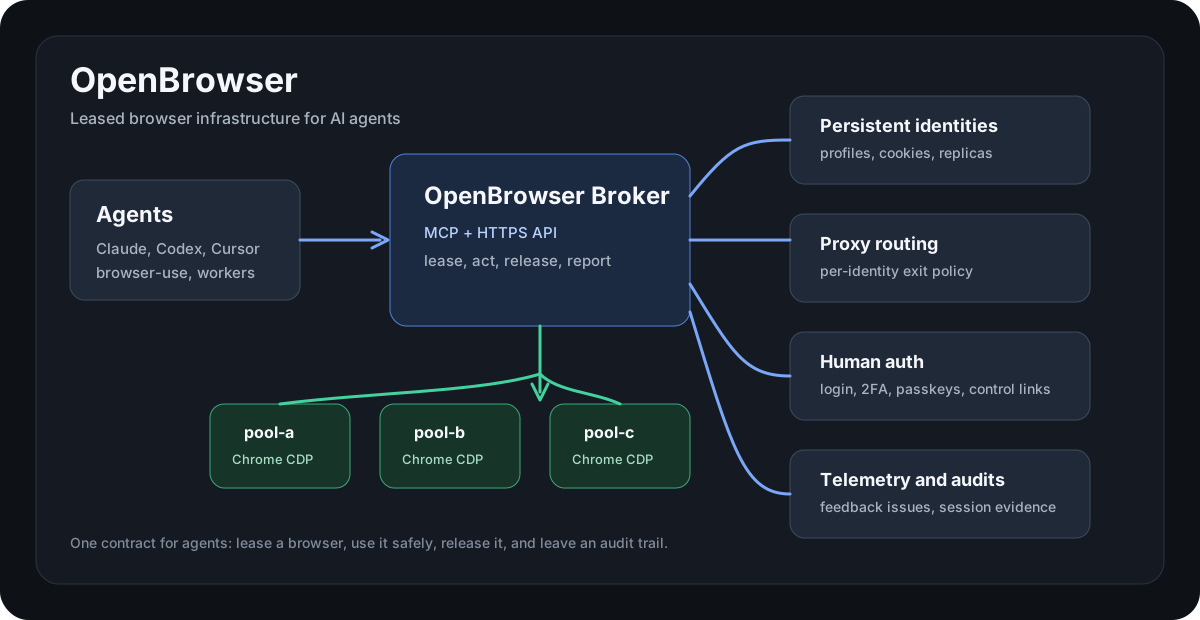
flowchart LR
  Agent["Agent\nClaude / Codex / Cursor / worker"] --> Client["MCP or API client"]
  Client --> Broker["OpenBrowser Broker"]
  Broker --> Lease["Lease manager"]
  Broker --> Profiles["Profile + identity manager"]
  Broker --> Proxy["Proxy router"]
  Broker --> Observability["Telemetry + feedback + audit"]
  Lease --> Pool["Chrome pool"]
  Profiles --> Pool
  Proxy --> Pool
  Pool --> Slots["pool-a ... pool-h\nisolated CDP sessions"]
Why
Most browser agents break in the same ways:
- several agents connect to the same Chrome instance and block each other
- logged-in sessions are tied to one fragile browser profile
- passwords and 2FA prompts become unsafe chat messages
- rich-text apps such as Slack, Discord, Notion, Linear, and X ignore DOM fill calls
- failures vanish into logs, so the next agent repeats the same mistake
OpenBrowser gives agents one operating contract: lease, act, release, report.
Features
- Browser pool: multiple isolated Chrome slots with CDP endpoints managed behind one broker.
- Persistent profiles: named identities reuse Chrome profile directories and session cookies.
- Profile replicas: selected identities can run in parallel without Chrome profile-lock conflicts.
- Fast QA routing: pair OpenBrowser with disposable browser tools for public-page checks that do not need account state.
- Proxy routing: identities can pin traffic to an HTTP/SOCKS proxy via
proxy_ref. - Remote API: bearer-token protected
/openbrowser/v1API for agents on any machine. - MCP servers: local MCP for same-host agents and remote MCP for HTTPS-backed access.
- Human auth handoff: one-time portal links for login, 2FA, passkeys, and manual challenges.
- Active lease control: short-lived manual control links for a browser tab already held by an agent.
- Rich-text keyboard tools: real keyboard events for editors that reject simple DOM value changes.
- Telemetry and issues: sanitized events, feedback issue tracking, and usage audits.
- browser-use and OpenBrowser adapters: wrappers lease a slot, run the tool, then release the slot.
Use Cases
| Use case | OpenBrowser gives you |
|---|---|
| Remote browser automation | HTTPS API and remote MCP for agents running on other machines. |
| Logged-in workflows | Named Chrome identities with persisted profile state. |
| Multi-agent work | Lease isolation so parallel agents do not steal each other's tabs. |
| Account-specific routing | Per-identity proxy refs, locale, timezone, and profile policy. |
| Human-in-the-loop auth | One-time portal links for passwords, 2FA, passkeys, and manual checks. |
| Debuggable automation | Sanitized telemetry, native feedback issues, and session-log audits. |
Architecture
sequenceDiagram
  participant A as Agent
  participant B as OpenBrowser Broker
  participant C as Chrome slot
  participant H as Human auth portal
  A->>B: lease(owner, identity_id?)
  B->>C: reserve isolated Chrome session
  B-->>A: lease_id
  A->>B: navigate / click / type / screenshot
  B->>C: browser action over CDP
  C-->>B: page state
  B-->>A: snapshot or result
  alt login or challenge required
    A->>B: auth_request or lease_control_request
    B-->>H: one-time portal URL
    H->>C: human completes login
  end
  A->>B: release(lease_id)
  B->>B: telemetry + feedback + audit trail
Quick Start
Python
git clone https://github.com/floomhq/openbrowser.git
cd openbrowser
python3 -m venv .venv
. .venv/bin/activate
pip install -e .
playwright install chromium
cp .env.example .env
cp config/identities.example.json config/identities.local.json
Start the broker:
openbrowser-broker
Docker
git clone https://github.com/floomhq/openbrowser.git
cd openbrowser
OPENBROWSER_API_KEYS="$(openssl rand -base64 48)" docker compose up --build
Lease a browser:
curl -fsS http://127.0.0.1:8767/lease \
  -H "content-type: application/json" \
  -d '{"owner":"demo","ttl_seconds":300}'
Use the returned lease_id:
curl -fsS http://127.0.0.1:8767/browser/navigate \
  -H "content-type: application/json" \
  -d '{"lease_id":"<lease_id>","url":"https://example.com"}'

curl -fsS http://127.0.0.1:8767/browser/snapshot \
  -H "content-type: application/json" \
  -d '{"lease_id":"<lease_id>"}'

curl -fsS -X POST http://127.0.0.1:8767/release/<lease_id>
Remote API
Expose the broker behind your HTTPS proxy or tunnel and configure:
OPENBROWSER_API_KEYS="your-long-random-api-key"
OPENBROWSER_PUBLIC_OPENBROWSER_BASE_URL="https://browser.example.com/openbrowser/v1"
Then call:
BASE=https://browser.example.com/openbrowser/v1
KEY=your-long-random-api-key

curl -fsS "$BASE/docs" \
  -H "authorization: Bearer $KEY" \
  -H "user-agent: openbrowser-client/1.0"
The API covers leases, navigation, snapshots, screenshots, clicks, typing, keyboard events, tabs, auth handoff, lease control, profiles, feedback issues, telemetry, and audits.
flowchart TD
  RemoteAgent["Remote agent"] -->|Bearer token| API["/openbrowser/v1"]
  API --> Lease["POST /leases"]
  API --> Browser["POST /browser/*"]
  API --> Auth["POST /auth/request"]
  API --> Issues["POST /feedback/issues"]
  API --> Audit["GET /audit"]
MCP
Local MCP, for agents running on the broker host:
{
  "mcpServers": {
    "openbrowser-broker": {
      "command": "openbrowser-mcp"
    }
  }
}
Remote MCP, for agents running anywhere:
{
  "mcpServers": {
    "openbrowser-remote": {
      "command": "openbrowser-remote-mcp",
      "env": {
        "OPENBROWSER_API_KEY": "<OPENBROWSER_API_KEY>",
        "OPENBROWSER_BASE_URL": "https://browser.example.com/openbrowser/v1"
      }
    }
  }
}
Core MCP tools:
browser_lease,browser_release,browser_heartbeatbrowser_navigate,browser_snapshot,browser_screenshotbrowser_click,browser_type,browser_keyboard_type,browser_keyboard_pressbrowser_tabs,browser_new_tab,browser_switch_tab,browser_waitauth_request,auth_status,lease_control_requestfeedback_report_issue,feedback_list_issues,feedback_update_issuetelemetry_record_event,telemetry_list_events,telemetry_summarybroker_audit,broker_docs,profile_status
Persistent Profiles
Identities are configured in config/identities.local.json:
{
  "identities": {
    "work-main": {
      "label": "Work account",
      "site": "example.com",
      "slot": "auto",
      "profile_dir": "/var/lib/openbrowser-broker/profiles/work-main",
      "proxy_ref": "residential:work-main",
      "timezone": "America/New_York",
      "lang": "en-US",
      "policy": {
        "max_parallel_sessions": 1,
        "requires_human_auth": true
      }
    }
  }
}
When an identity needs login:
curl -fsS "$BASE/auth/request" \
  -H "authorization: Bearer $KEY" \
  -H "content-type: application/json" \
  -d '{"owner":"setup","identity_id":"work-main","url":"https://example.com/login","reason":"initial_login"}'
Open the returned portal_url, complete login in the browser view, then mark the request complete. Future leases for that identity reuse the saved profile state.
For parallel work, set policy.max_parallel_sessions above 1. OpenBrowser then seeds per-slot replicas instead of starting multiple Chrome processes against one profile directory. That matters: several windows in a desktop Chrome profile are one Chrome process, but several AX41 agents are independent Chrome processes. Directly sharing the same profile_dir across those processes risks Chrome singleton-lock failures and profile database corruption.
flowchart LR
  Identity["identity_id=work-main"] --> Profile["Chrome profile dir"]
  Identity --> Policy["parallel-session policy"]
  Identity --> ProxyRef["optional proxy_ref"]
  ProxyRef --> Forwarder["local proxy forwarder"]
  Profile --> Chrome["leased Chrome slot"]
  Forwarder --> Chrome
Proxy Routing
Add proxy credentials in secrets/proxies.json:
{
  "proxies": {
    "residential:work-main": {
      "scheme": "http",
      "host": "proxy.example.net",
      "port": 12345,
      "username": "user",
      "password": "pass"
    }
  }
}
Then set "proxy_ref": "residential:work-main" on the identity. The broker starts a local proxy forwarder and launches Chrome with the matching proxy for that profile.
Safety Model
- Raw cookies, passwords, tokens, proxy credentials, and VNC passwords are never returned by tools.
- Telemetry redacts sensitive keys and secret-shaped strings.
- Browser typing telemetry stores text length, not typed text.
- Login and challenge handling use human handoff portals instead of secrets in chat.
- CAPTCHA solving and ban-circumvention automation are outside the project boundary.
What This Is Not
- Not a CAPTCHA solver.
- Not a token extractor.
- Not a shared global Chrome tab for every agent.
- Not a scraping bypass toolkit.
- Not a replacement for product APIs when a stable API exists.
Operations
openbrowser-audit --json
openbrowser-use --json open https://example.com
openbrowser-adapter status --format json
Systemd examples live in systemd/. Detailed runbooks live in docs/.
Development
python3 -m compileall ax_browser_broker tests
pytest -q
Project Status
OpenBrowser is an alpha public release of production-oriented browser infrastructure. The core lease manager, profile identities, remote API, MCP surfaces, human auth handoff, telemetry, feedback issues, audits, and adapter wrappers are covered by tests. New deployments can use the generic commands and environment variables above; legacy ax-* command wrappers remain for existing installations.
License
MIT
Yorumlar (0)
Yorum birakmak icin giris yap.
Yorum birakSonuc bulunamadi