footPrint
Health Pass
- License — License: MIT
- Description — Repository has a description
- Active repo — Last push 0 days ago
- Community trust — 21 GitHub stars
Code Pass
- Code scan — Scanned 12 files during light audit, no dangerous patterns found
Permissions Pass
- Permissions — No dangerous permissions requested
No AI report is available for this listing yet.
TypeScript workflow engine with named stages, tracked state and recorded decision evidence for execution debugging.
FootPrint
Connected runtime logs for people and AI agents.
Don't make the agent guess connections your program already knew.





Documentation · Playground · AI instructions · Provenance and limits
FootPrint is the flowchart pattern for inspectable workflows. Write your logic as named stages, tracked state, and explicit decisions. As the workflow executes, FootPrint captures connected evidence of its data activity, execution path, and evaluated decisions.
The evidence is captured during execution—not reconstructed by an LLM afterward. People and AI agents can investigate the same recorded run. No model is required to generate the record.
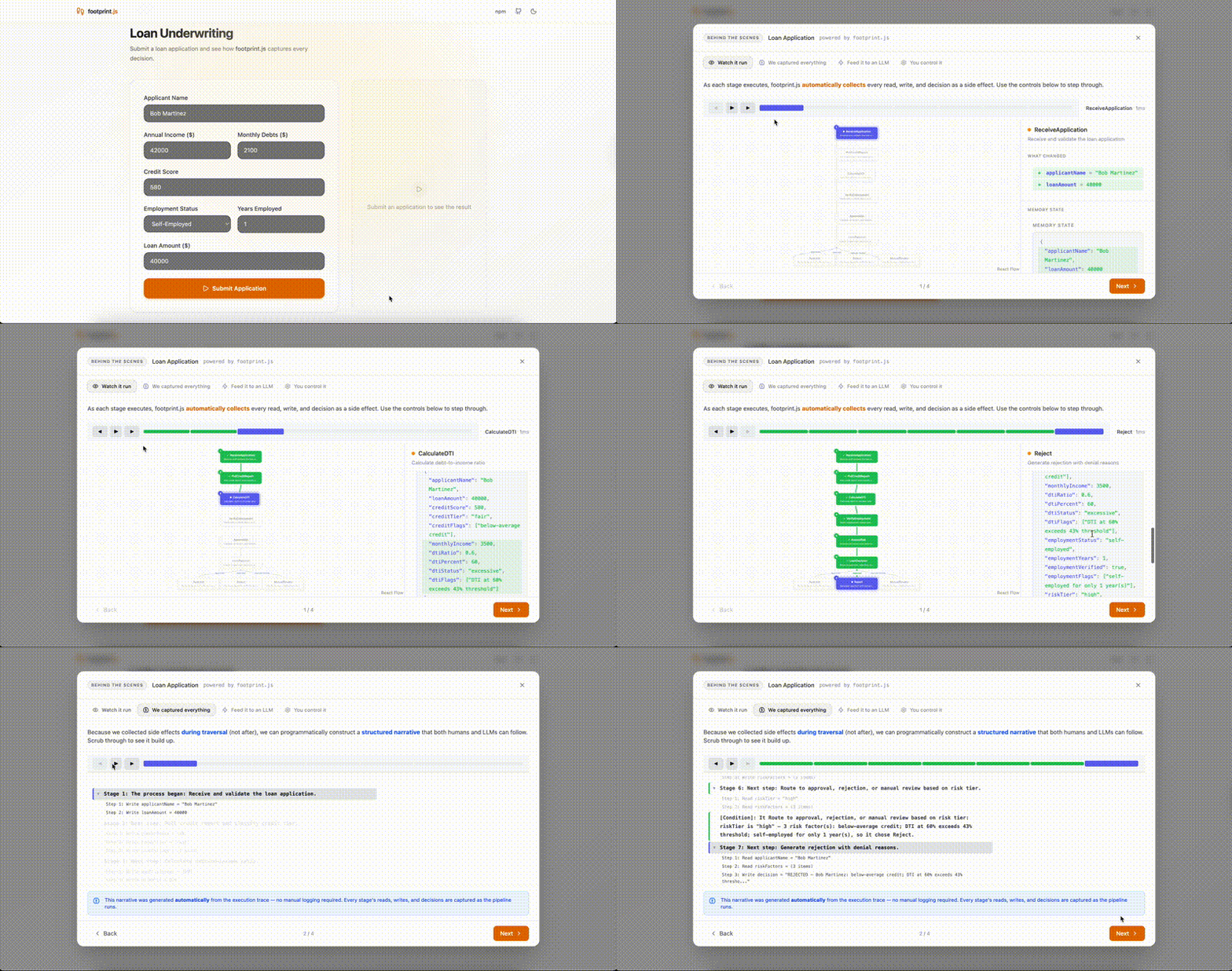
A recorded workflow in action. Open the playground to try it.
AI can read your logs. Can it follow the decision?
An image export is rejected. The application did not crash. It produced an outcome somebody needs to investigate.
Messages such as “Image loaded,” “Resolution checked,” and “Export rejected” leave questions unanswered: which width was checked, where did it come from, and which rule selected rejection?
FootPrint records tracked data activity and evaluated decision evidence as the flow executes. Its control-dependency recorder connects executed branches to their governing decisions. Later queries follow that evidence; they do not ask a model to invent the connections.
One workflow, one recorded investigation
This example uses synthetic image metadata and performs no real export. The execution output below comes from the reviewed run with footprintjs 10.0.0 and foottrace 1.0.3.
Requires Node.js 22 or newer. To use the same library versions:
npm install [email protected] [email protected]
Save the following as example.mts and run it with your TypeScript runner, for example npx tsx example.mts.
Why two import paths? Recorders belong to the execution engine (footprintjs/trace); querying the captured record belongs to foottrace.
import { flowChart, decide, FlowChartExecutor } from 'footprintjs';
import { controlDepRecorder } from 'footprintjs/trace';

type ExportState = {
  width: number;
  status: 'exported' | 'rejected';
};

const chart = flowChart<ExportState>('LoadImage', (scope) => {
  scope.width = 640; // Example data; no image service is called.
}, 'load-image')
  .addDeciderFunction('CheckResolution', (scope) => decide(scope, [
    {
      when: { width: { gte: 1280 } },
      then: 'export',
      label: 'Image is wide enough',
    },
  ], 'reject'), 'check-resolution')
    .addFunctionBranch('export', 'ExportImage', (scope) => {
      scope.status = 'exported';
    })
    .addFunctionBranch('reject', 'RejectExport', (scope) => {
      scope.status = 'rejected';
    })
    .setDefault('reject')
    .end()
  .build();

const executor = new FlowChartExecutor(chart);
const control = controlDepRecorder();

// Enable before execution: collect the narrative and governing decisions.
executor.setReadTracking('full');
executor.enableNarrative();
executor.attachCombinedRecorder(control);
await executor.run();

const snapshot = executor.getSnapshot();
console.log(snapshot.sharedState.status); // Expected: "rejected".
console.log(executor.getNarrativeEntries().map(e => e.text).join('\n'));
console.dir(control.getDecisions(), { depth: null });

import {
  causalChain,
  findLastWriter,
  formatCausalChain,
  keysReadFromExecutionTree,
} from 'foottrace';

// Continue from the completed run above.
const writer = findLastWriter(snapshot.commitLog, 'status');
if (!writer) throw new Error('No recorded writer for status.');

const reads = keysReadFromExecutionTree(snapshot.executionTree);
const chain = causalChain(
  snapshot.commitLog,
  writer.runtimeStageId,
  reads.lookup,
  { controlDeps: control.asLookup() },
);

if (!chain) throw new Error('No causal chain.');
console.log(formatCausalChain(chain));
What the run recorded
Narrative excerpt from the reviewed run:
Stage 1: The process began with LoadImage.
Step 1: Write width = 640
Stage 2: Next, it moved on to CheckResolution.
Step 1: Read width = 640
[Condition]: No rules matched, fell back to default: RejectExport.
Stage 3: Next, it moved on to RejectExport.
Step 1: Write status = "rejected"
The structured decision record also reports the evaluated condition: width, operator gte, threshold 1280, observed value 640, result false. That evidence comes from the rule evaluation—not from an LLM describing it afterward.
The dependency query prints:
RejectExport (reject#2) [wrote: status]
  CheckResolution (check-resolution#1) ← [control]
    LoadImage (load-image#0) ← via width [wrote: width]
The rejection is connected to the decision; the decision is connected to the value's producer. RejectExport writes a constant status without reading width, so data dependencies alone would miss the governing decision. The controlDeps lookup supplies that connection.
The next question might be: “Did LoadImage load a thumbnail instead of the original?” That remains a hypothesis to investigate. The record establishes the observed path, not whether 1280 is the right requirement or whether the correct source was loaded.
Two ways to work with AI
An agent building your application
FootPrint works in ordinary applications that have no LLM at runtime. Your coding agent can use the recorded run while it builds and debugs the application.
The development loop is straightforward:
- Build the workflow as named stages with tracked state and explicit decisions.
- Run the application with the required recorders enabled.
- Inspect a wrong outcome: follow its recorded producer, relevant reads, and governing decisions.
- Repair and verify with a regression test and a fresh run.
Send the relevant trace slice to the coding agent. A focused slice can reduce the log context you need to provide; actual token use and development speed depend on the model, tooling, and workflow. The record gives the agent evidence to work from, while missing evidence stays unknown.
Give your coding agent this instruction:
Build this workflow with FootPrint. Track relevant state, use explicit decision helpers, and attach the required recorders before execution. When an outcome is wrong, inspect its recorded producer, inputs, and governing decisions. Separate established evidence from hypotheses, keep missing evidence unknown, and verify each repair with a regression test and a new run.
Start with the AI instruction files and AGENTS.md.
An agent inside your application
A running agent can consume workflow results and their evidence to investigate or explain an outcome. AgentFootprint applies this approach to agent workflows, including context and tool activity. In both uses, the model reads evidence; it does not create the execution history.
An ecosystem of reusable libraries
FootPrint can be the execution foundation for a reusable library, as well as an application. Use it at meaningful workflow boundaries, not necessarily around every helper function. A library can expose a focused API while retaining the recorded steps and decisions behind its results.
| Library | What it adds |
|---|---|
| AgentFootprint | An agent runtime with context, tools, and execution evidence. |
| StoryDeck | One structured content model with article, scroll, and presentation views; optional FootPrint integration. |
| StoryReel | A filmmaking pipeline with FootPrint stages and a making-of record. |
| Blueprint | A modular platform framework with shared execution evidence and focused import paths. |
| Smallbusiness | Configurable commerce workflows built on Blueprint for different shop types. |
| Datapipeline | Collection and derivation flows with traceable execution evidence. |
| HCI Footprint | Explicit application actions and journeys for human–agent interaction. |
| VizFootprint | Analysis workflows and recorded exploration. |
These libraries have different dependencies and maturity. They do not all require AgentFootprint: StoryReel and Datapipeline use FootPrint directly, Smallbusiness builds on Blueprint, and StoryDeck makes its FootPrint integration optional. StoryReel's pipeline is a concrete example beyond agent applications.
When those workflows capture the required evidence, a person or coding agent can follow a result back through the library's recorded execution instead of working from disconnected messages. Evidence that was not captured remains unknown.
Two packages, separate responsibilities
| Package | Responsibility |
|---|---|
footprintjs |
Executes flowcharts: stages, tracked scope, decisions, and runtime recorders. |
foottrace |
Owns execution-record primitives and readers for replay, time travel, and dependency queries. |
Foottrace reads supported saved records without the original flowchart engine or an AI provider. Its foottrace/write entry also owns record-writing primitives. Import it directly when using its queries.
For offline investigation, persist the evidence each reader needs—not just the final result. This example queries one live run; storage, retention, access control, and preservation of control relationships across recording boundaries require application design.
A retry that needs reconciliation
Use addRetryLoop when an outside operation may happen even though its response is lost. It puts the attempt, reconciliation, decision and wait into ordinary chart nodes. Each logical execution keeps one operation key; another send requires an authoritative none result. An uncertain reconciliation stops by default.
See the builder rule and in-memory example and the runnable keyed-retry example. Physical call outcomes remain unchanged; separate retryLoop metadata records the workflow pass and decision.
Attempt metrics and evidence references
attempts() from footprintjs/recorders collects payload-free attempt facts during traversal. Use byTarget(),byRun(), bounded slowest() exemplars and series() to follow native calls and explicit retry decisions; optionalAttemptStore adapters support cross-run queries. Row/exemplar/I/O limits disclose omitted or pending evidence.toOTel() returns histogram/sum JSON without sending it anywhere. Durations are summed work time; orchestration
completion is not provider confirmation. See the metric guide and
the stored-trace navigation example.
What the record cannot prove
- Correctness or real-world cause. Recorded program dependencies do not prove the requirement is right, the result is correct, or a model's interpretation is sound.
- A complete or repeatable outside world. Untracked inputs, capture settings, and query limits can leave gaps. Replaying recorded state does not guarantee identical external-service or model responses.
- Integrity or compliance by itself. An in-memory record is not a tamper-evident archive or a compliance assessment. Protect retained evidence and test failed-run persistence too.
For provenance, European governance terminology, disclosure controls, OpenTelemetry, vocabulary, and recording boundaries, read Provenance, governance and limits.
Explore
API and guides · Examples · Contributing · MIT license
Capture the connections during execution. Let people and agents investigate the evidence.
Reviews (0)
Sign in to leave a review.
Leave a reviewNo results found